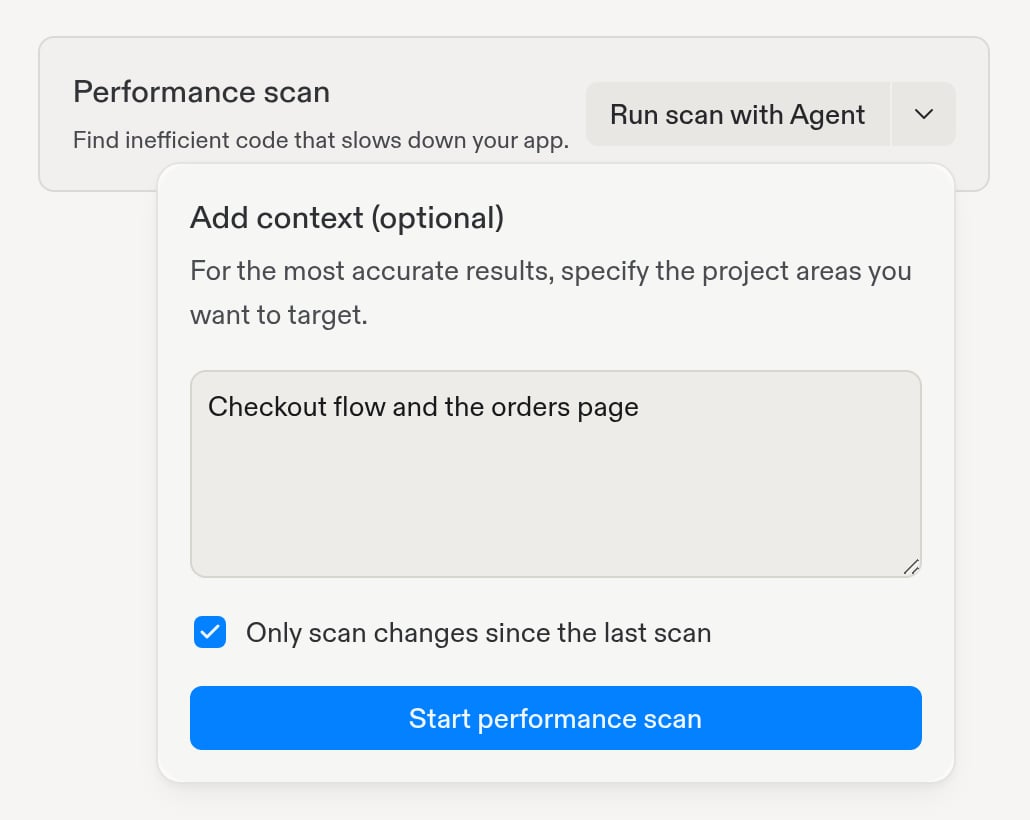
유료 플랜. Performance Agent는 유료 플랜의 빌더가 사용할 수 있습니다. 무료 플랜을 사용 중이라면 Performance scan 카드에 업그레이드 옵션이 표시됩니다.
프로젝트에 대한 편집 권한.
앱을 게시하기 전에도 스캔할 수 있습니다. 게시한 후에는 Performance Agent가 배포 로그를 사용하여 실제 방문자에게 느린 엔드포인트도 찾을 수 있습니다.스캔은 프로젝트를 읽기만 합니다. 코드, 데이터베이스, 게시된 앱을 변경하지 않습니다. 변경은 사용자가 문제 수정을 선택할 때만 이루어집니다.
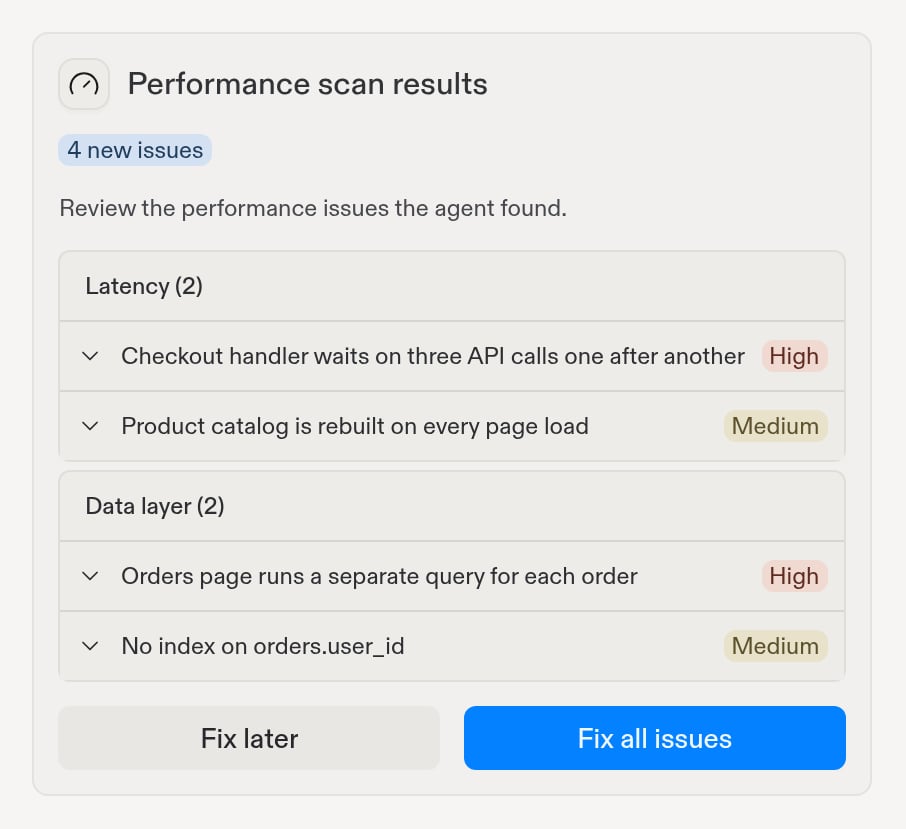
스캔이 끝나면 스캔 작업에 Performance scan results 카드가 나타납니다. 이 카드는 Performance Agent가 발견한 새로운 문제의 수를 Latency와 Data layer로 그룹화하여 보여줍니다. 문제를 펼쳐 요약을 읽거나, View issue를 선택하여 영향을 받는 파일과 권장 수정 사항을 포함한 전체 세부 정보를 확인하세요.
스캔 결과는 새로운 문제를 유형과 심각도별로 그룹화합니다
다음에 할 작업을 선택하세요:
Fix all issues: Agent가 각 그룹에 대해 수정 작업을 시작하고 Monitoring 도구를 열어 진행 상황을 추적할 수 있게 합니다.
Fix later: 아무것도 변경하지 않고 결과를 닫습니다. 문제는 Performance scan 카드에 남아 있으므로 준비되면 언제든지 수정할 수 있습니다.
스캔에서 새로운 문제가 발견되지 않으면 카드에 그렇게 표시되며 Got it을 선택할 수 있습니다.
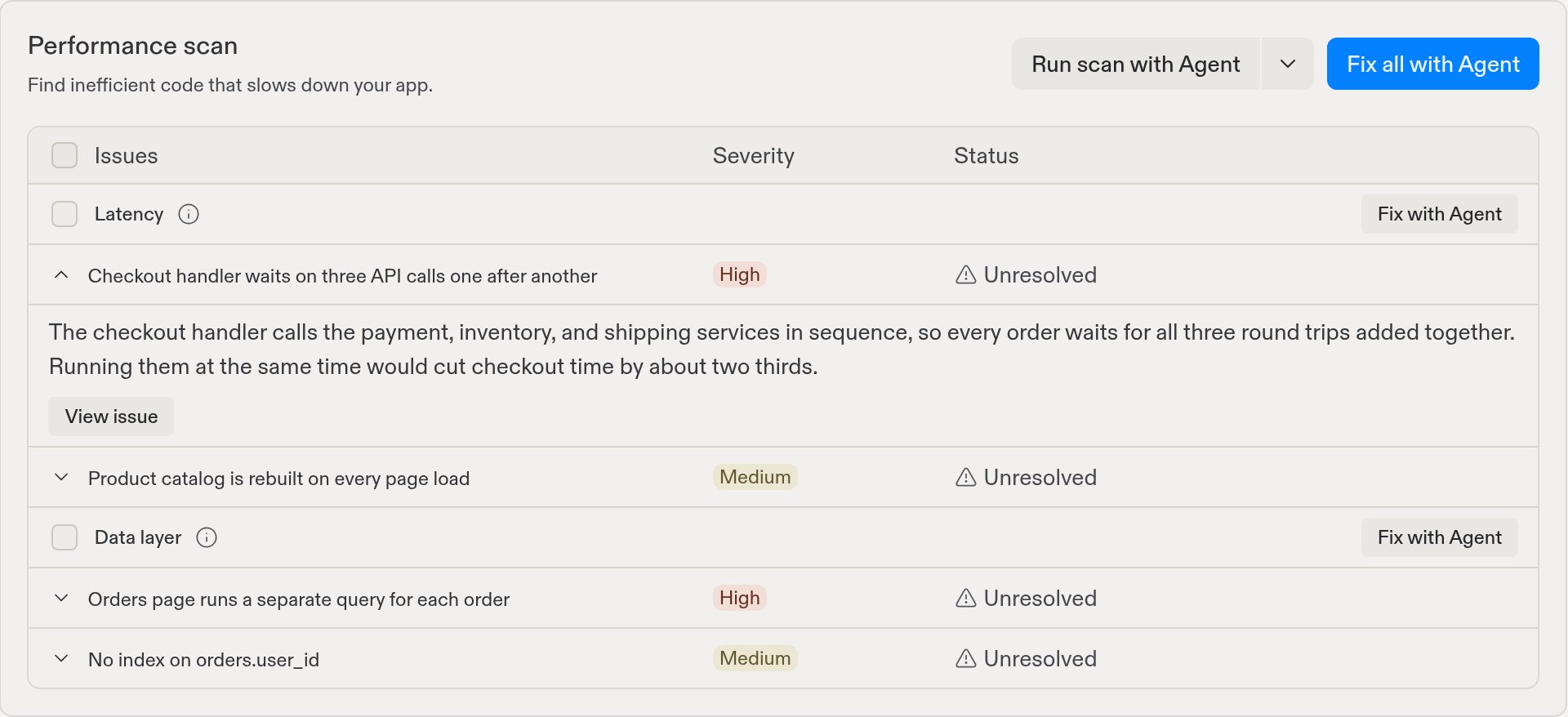
Monitoring 도구의 Performance scan 카드는 이전 스캔에서 발견된 문제를 포함하여 열려 있는 모든 문제를 추적합니다. 문제는 Latency와 Data layer로 그룹화되며, 각 문제에는 Severity와 Status가 있습니다. 문제를 펼쳐 요약을 읽거나, View issue를 선택하여 전체 세부 정보를 확인하세요.
문제를 펼쳐 요약을 읽거나, View issue를 선택하여 전체 세부 정보를 확인하세요
문제를 그룹별로 하나씩 수정하거나 한꺼번에 수정할 수 있습니다:
그룹의 Fix with Agent는 해당 그룹의 모든 문제를 하나의 작업으로 Agent에게 보냅니다.
Fix all with Agent는 열려 있는 모든 그룹을 Agent에게 보냅니다.
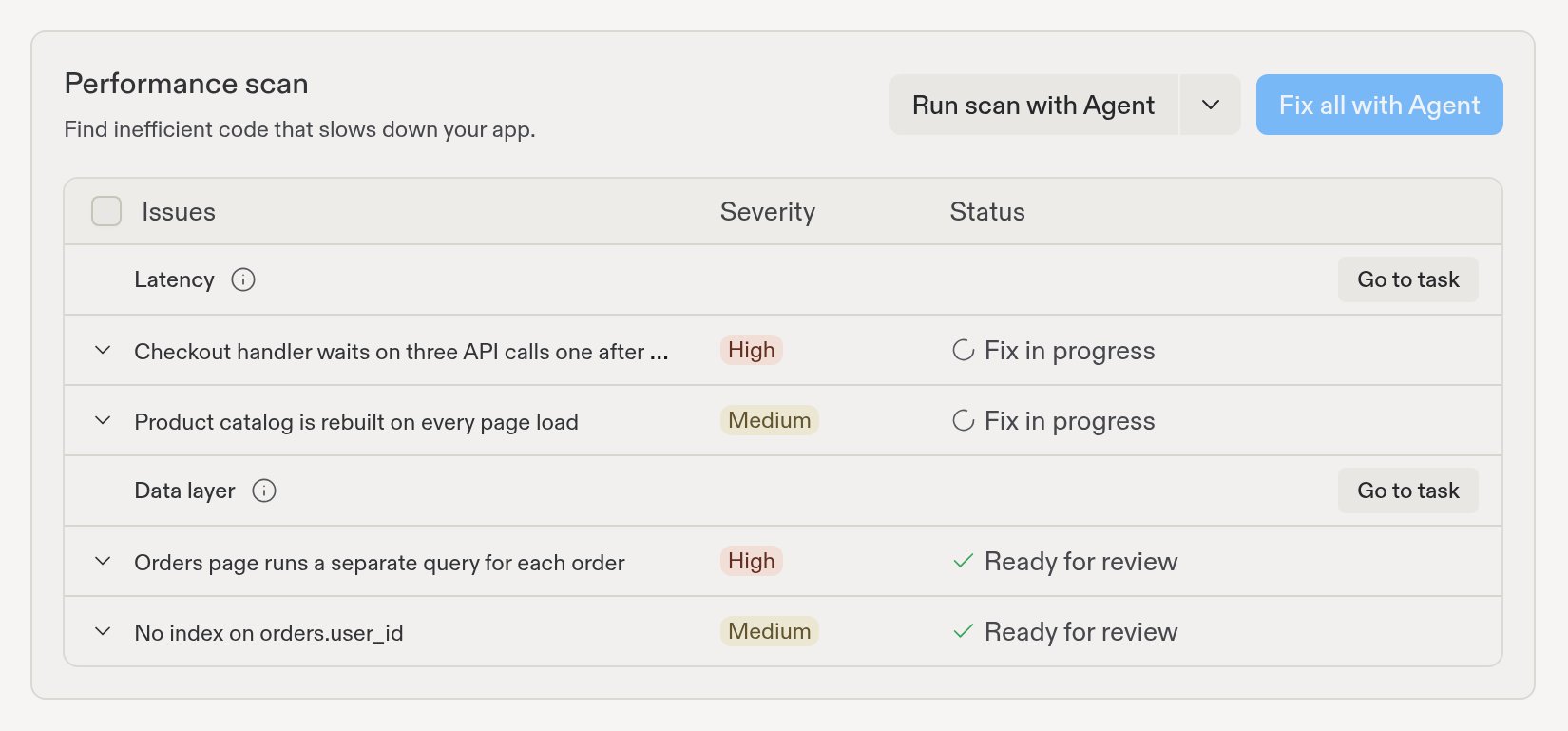
Agent는 각 수정 작업을 백그라운드에서 병렬로 처리하므로 계속 개발할 수 있습니다. 작업이 진행됨에 따라 각 문제의 상태가 업데이트됩니다:
Fix in progress: Agent가 수정 작업 중입니다. Go to task를 선택하면 진행 상황을 따라갈 수 있습니다.
Ready for review: 수정이 완료되었습니다. 작업을 열어 변경 사항을 검토한 다음 Apply changes to main version을 선택하여 앱에 추가하세요.
Applying fix: Replit이 변경 사항을 앱에 추가하고 있습니다.
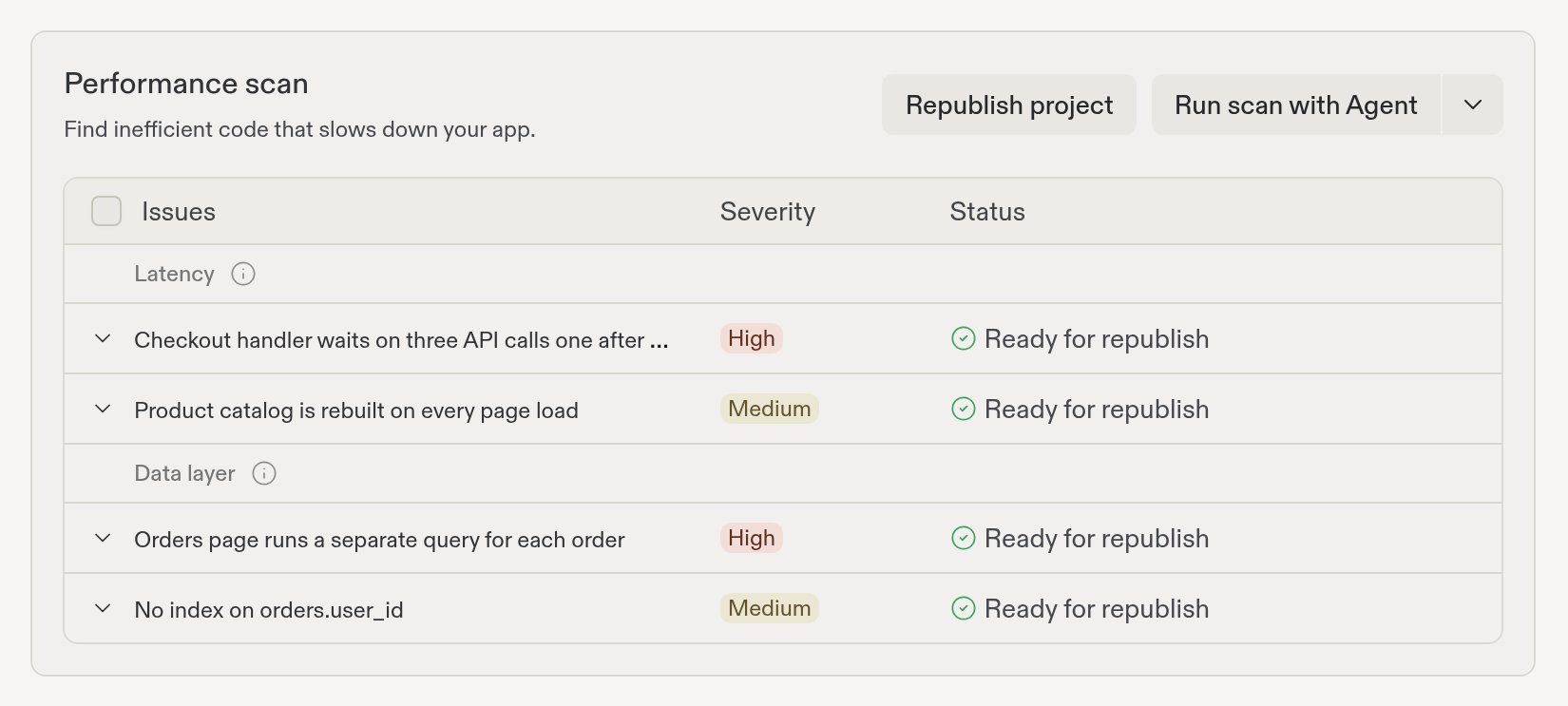
Ready for republish: 수정 사항이 앱에는 반영되었지만 아직 게시된 버전에는 반영되지 않았습니다.
수정 사항은 다시 게시한 후에야 방문자에게 반영됩니다. 하나 이상의 수정이 Ready for republish 상태가 되면 Performance scan 카드에 Republish project 버튼이 나타납니다. 이를 선택하면 수정 사항이 포함된 새 버전의 앱이 게시됩니다. 상태는 Publishing을 거쳐 Fixed로 바뀝니다.
Republish project를 선택하여 수정 사항을 라이브로 반영하세요
Publishing 도구에서도 다시 게시할 수 있습니다. 게시 후 진행 과정을 참고하세요.
다시 게시한 후에는 Only scan changes since the last scan을 선택한 상태로 스캔을
한 번 더 실행하세요. Performance Agent가 어떤 문제가 수정되었는지 확인하고 최근
변경 사항에서 새로운 문제가 있는지 점검합니다.
{"docsConfig":{"theme":"aspen","$schema":"https://mintlify.com/docs.json","name":"Replit","colors":{"primary":"#FF3C00","light":"#FF3C00","dark":"#FF3C00"},"logo":{"light":"https://mintcdn.com/replit/j4of5To8jzehz0JK/logo/light.svg?fit=max\u0026auto=format\u0026n=j4of5To8jzehz0JK\u0026q=85\u0026s=6209cb5927b56fd1781133af05428373","dark":"https://mintcdn.com/replit/j4of5To8jzehz0JK/logo/dark.svg?fit=max\u0026auto=format\u0026n=j4of5To8jzehz0JK\u0026q=85\u0026s=9cbba158300d48c49d8b888e71015495","href":"/welcome"},"favicon":"https://mintcdn.com/replit/CmOMKRnamiqG44eH/favicon.ico?fit=max\u0026auto=format\u0026n=CmOMKRnamiqG44eH\u0026q=85\u0026s=c89a6df6f537373c946c7a5f0ac65475","appearance":{"default":"light"},"background":{"color":{"light":"#F6F5F4","dark":"#1E1E1F"}},"navbar":{"links":[],"primary":{"type":"button","label":"Start Building","href":"https://replit.com?ref=docs"}},"footer":{"socials":{"x":"https://x.com/replit","linkedin":"https://www.linkedin.com/company/repl-it","youtube":"https://www.youtube.com/@replit"}},"seo":{"metatags":{"og:site_name":"Replit Docs","twitter:site":"@replit","twitter:creator":"@replit","author":"Replit"},"indexing":"all"},"fonts":{"heading":{"family":"ABC Diatype Plus","weight":400,"source":"https://cdn.replit.com/dotcom/fonts/ABCDiatypePlusVariable.woff2","format":"woff2"},"body":{"family":"ABC Diatype Plus","weight":400,"source":"https://cdn.replit.com/dotcom/fonts/ABCDiatypePlusVariable.woff2","format":"woff2"}},"integrations":{"segment":{"key":"dMePKGC4BqfBivpe0Hvl8IoPpzSHgjdX"}},"contextual":{"options":["copy","view"],"display":"header"},"thumbnails":{"appearance":"light","background":"https://mintcdn.com/replit/j4of5To8jzehz0JK/thumb.png?fit=max\u0026auto=format\u0026n=j4of5To8jzehz0JK\u0026q=85\u0026s=a7db7f0256b2fa06810fb4d378e63cc5","fonts":{"family":"ABC Diatype Plus"}},"styling":{"latex":true},"navigation":{"languages":[{"language":"en","href":"welcome"},{"language":"fr","navbar":{"links":[],"primary":{"type":"button","label":"Commencer à créer","href":"https://replit.com?ref=docs"}},"href":"fr/welcome"},{"language":"pt","hidden":false,"navbar":{"links":[],"primary":{"type":"button","label":"Comece a criar","href":"https://replit.com?ref=docs"}},"href":"pt/welcome"},{"language":"ja","hidden":false,"navbar":{"links":[],"primary":{"type":"button","label":"作成を開始","href":"https://replit.com?ref=docs"}},"href":"ja/welcome"},{"language":"ko","hidden":false,"navbar":{"links":[],"primary":{"type":"button","label":"빌드 시작하기","href":"https://replit.com?ref=docs"}},"href":"ko/welcome"}]}},"deployment":{"deploymentMetadataValue":{"subdomain":"replit","hasAudioNarration":false,"actualSubdomain":"replit","customDomains":["docs.replit.com","docs.repl.it"],"gitSource":{"type":"github","owner":"replit","repo":"replit-docs","deployBranch":"main","contentDirectory":"docs","isPrivate":true,"mountPath":"","label":""},"feedback":{"thumbs":true,"issues":true,"edits":false},"entitlements":{"AI_CHAT":{"status":"DISABLED"},"REMOVE_BRANDING":{"status":"ENABLED"},"CONTEXTUAL_FEEDBACK":{"status":"ENABLED"},"CODE_SNIPPET_FEEDBACK":{"status":"ENABLED"},"WEB_MCP":{"status":"ENABLED"},"NARRATION":{"status":"DISABLED"}},"buildId":"6af2d638fbd1ac70aabdfd9a","clientVersion":"0.0.4094","searchFilterCounts":[{"language":"en","tag":"Features","count":362},{"language":"fr","tag":"Fonctionnalités","count":362},{"language":"ja","tag":"機能","count":362},{"language":"ko","tag":"기능","count":362},{"language":"pt","tag":"Funcionalidades","count":362},{"language":"en","tag":"Changelog","count":100},{"language":"fr","tag":"Journal des modifications","count":100},{"language":"ja","tag":"変更履歴","count":100},{"language":"ko","tag":"변경 내역","count":100},{"language":"pt","tag":"Registro de alterações","count":100},{"language":"en","tag":"Apps","count":41},{"language":"fr","tag":"Apps","count":41},{"language":"ja","tag":"Apps","count":41},{"language":"ko","tag":"Apps","count":41},{"language":"pt","tag":"Apps","count":41},{"language":"en","tag":"Enterprise","count":40},{"language":"fr","tag":"Entreprise","count":40},{"language":"ja","tag":"Enterprise","count":40},{"language":"ko","tag":"Enterprise","count":40},{"language":"pt","tag":"Enterprise","count":40},{"language":"en","tag":"Use cases","count":39},{"language":"fr","tag":"Use cases","count":39},{"language":"ja","tag":"Use cases","count":39},{"language":"ko","tag":"Use cases","count":39},{"language":"pt","tag":"Use cases","count":39},{"language":"en","tag":"Chats","count":25},{"language":"en","tag":"Designs","count":25},{"language":"fr","tag":"Chats","count":25},{"language":"fr","tag":"Designs","count":25},{"language":"ja","tag":"Chats","count":25},{"language":"ja","tag":"Designs","count":25},{"language":"ko","tag":"Chats","count":25},{"language":"ko","tag":"Designs","count":25},{"language":"pt","tag":"Chats","count":25},{"language":"pt","tag":"Designs","count":25},{"language":"en","tag":"Trust \u0026 Billing","count":23},{"language":"fr","tag":"Confiance et facturation","count":23},{"language":"ja","tag":"信頼と請求","count":23},{"language":"ko","tag":"신뢰 및 결제","count":23},{"language":"pt","tag":"Confiança e faturamento","count":23},{"language":"en","tag":"Web","count":22},{"language":"fr","tag":"Web","count":22},{"language":"ja","tag":"Web","count":22},{"language":"ko","tag":"Web","count":22},{"language":"pt","tag":"Web","count":22},{"language":"en","tag":"Help","count":20},{"language":"fr","tag":"Help","count":20},{"language":"ja","tag":"Help","count":20},{"language":"ko","tag":"Help","count":20},{"language":"pt","tag":"Help","count":20}]},"assistantConfig":{"deflection":{"enabled":true,"email":"support@replit.com"}},"basePath":"","hasChatPermissions":false,"hasWebMcpPermissions":true,"toggles":[{"name":"kill-isr","enabled":true,"variant":{"name":"disabled","enabled":false,"feature_enabled":true},"impressionData":false},{"name":"custom-rbac-roles","enabled":true,"variant":{"name":"disabled","enabled":false,"feature_enabled":true},"impressionData":false},{"name":"agent-mintlify-slack","enabled":true,"variant":{"name":"disabled","enabled":false,"feature_enabled":true},"impressionData":false},{"name":"agent-integrations-settings","enabled":true,"variant":{"name":"disabled","enabled":false,"feature_enabled":true},"impressionData":false},{"name":"rbac-expansion","enabled":true,"variant":{"name":"disabled","enabled":false,"feature_enabled":true},"impressionData":false},{"name":"automations-pr-grouping","enabled":true,"variant":{"name":"disabled","enabled":false,"feature_enabled":true},"impressionData":false},{"name":"custom-prefix","enabled":true,"variant":{"name":"disabled","enabled":false,"feature_enabled":true},"impressionData":false},{"name":"analytics-v7","enabled":true,"variant":{"name":"disabled","enabled":false,"feature_enabled":true},"impressionData":false},{"name":"user-flows-analytics","enabled":true,"variant":{"name":"disabled","enabled":false,"feature_enabled":true},"impressionData":false},{"name":"no-publish-flow","enabled":true,"variant":{"name":"disabled","enabled":false,"feature_enabled":true},"impressionData":false},{"name":"workos-onboarding","enabled":true,"variant":{"name":"disabled","enabled":false,"feature_enabled":true},"impressionData":false},{"name":"llms-txt-v2","enabled":true,"variant":{"name":"disabled","enabled":false,"feature_enabled":true},"impressionData":false},{"name":"snapshot-serving-live","enabled":true,"variant":{"name":"disabled","enabled":false,"feature_enabled":true},"impressionData":false},{"name":"stripTemperatureMiddleware","enabled":true,"variant":{"name":"disabled","enabled":false,"feature_enabled":true},"impressionData":false},{"name":"support-platform-pylon-zendesk","enabled":true,"variant":{"name":"disabled","enabled":false,"feature_enabled":true},"impressionData":false},{"name":"snapshot-serving","enabled":true,"variant":{"name":"disabled","enabled":false,"feature_enabled":true},"impressionData":false},{"name":"instant-rollback","enabled":true,"variant":{"name":"disabled","enabled":false,"feature_enabled":true},"impressionData":false},{"name":"granular-notifications-server","enabled":true,"variant":{"name":"disabled","enabled":false,"feature_enabled":true},"impressionData":false},{"name":"granular-notifications","enabled":true,"variant":{"name":"disabled","enabled":false,"feature_enabled":true},"impressionData":false},{"name":"automations-fable","enabled":true,"variant":{"name":"disabled","enabled":false,"feature_enabled":true},"impressionData":false},{"name":"fixed-ai-action-pricing","enabled":true,"variant":{"name":"disabled","enabled":false,"feature_enabled":true},"impressionData":false},{"name":"automation-resolve-merge-conflict","enabled":true,"variant":{"name":"disabled","enabled":false,"feature_enabled":true},"impressionData":false},{"name":"scoped-publishing","enabled":true,"variant":{"name":"disabled","enabled":false,"feature_enabled":true},"impressionData":false},{"name":"mintql","enabled":true,"variant":{"name":"disabled","enabled":false,"feature_enabled":true},"impressionData":false},{"name":"page-level-analytics","enabled":true,"variant":{"name":"disabled","enabled":false,"feature_enabled":true},"impressionData":false},{"name":"editor-version-history-v2","enabled":true,"variant":{"name":"disabled","enabled":false,"feature_enabled":true},"impressionData":false},{"name":"billing-page-v2","enabled":true,"variant":{"name":"disabled","enabled":false,"feature_enabled":true},"impressionData":false},{"name":"full-page-search","enabled":true,"variant":{"name":"disabled","enabled":false,"feature_enabled":true},"impressionData":false},{"name":"workspace-projects","enabled":true,"variant":{"name":"disabled","enabled":false,"feature_enabled":true},"impressionData":false},{"name":"assistant-v5","enabled":true,"variant":{"name":"disabled","enabled":false,"feature_enabled":true},"impressionData":false},{"name":"fork-pr-previews","enabled":true,"variant":{"name":"disabled","enabled":false,"feature_enabled":true},"impressionData":false},{"name":"revalidation-jwt","enabled":true,"variant":{"name":"disabled","enabled":false,"feature_enabled":true},"impressionData":false},{"name":"workos-sso-scim","enabled":true,"variant":{"name":"disabled","enabled":false,"feature_enabled":true},"impressionData":false},{"name":"hobby-abuse-scan","enabled":true,"variant":{"name":"disabled","enabled":false,"feature_enabled":true},"impressionData":false},{"name":"dashboard-inbox","enabled":true,"variant":{"name":"disabled","enabled":false,"feature_enabled":true},"impressionData":false},{"name":"workos-signup","enabled":true,"variant":{"name":"disabled","enabled":false,"feature_enabled":true},"impressionData":false},{"name":"turbopuffer-dual-write","enabled":true,"variant":{"name":"disabled","enabled":false,"feature_enabled":true},"impressionData":false},{"name":"workos-enabled","enabled":true,"variant":{"name":"disabled","enabled":false,"feature_enabled":true},"impressionData":false},{"name":"approve-review-flow","enabled":true,"variant":{"name":"disabled","enabled":false,"feature_enabled":true},"impressionData":false},{"name":"editor-metadata","enabled":true,"variant":{"name":"disabled","enabled":false,"feature_enabled":true},"impressionData":false},{"name":"sso-setup-deadline-banner","enabled":true,"variant":{"name":"disabled","enabled":false,"feature_enabled":true},"impressionData":false},{"name":"turbopuffer-serve","enabled":true,"variant":{"name":"disabled","enabled":false,"feature_enabled":true},"impressionData":false},{"name":"live-agents","enabled":true,"variant":{"name":"disabled","enabled":false,"feature_enabled":true},"impressionData":false}],"googleFontsInlined":false},"customCss":[{"filePath":"styles.css","href":"/_mintlify/custom/replit/795eee5cda55dee3/styles.css"}],"page":{"pagePath":"ko/features/publishing/performance-agent","slug":"/ko/features/publishing/performance-agent","pageMetadata":{"title":"Performance Agent","sidebarTitle":"Performance Agent","description":"Performance Agent로 앱의 느린 요청과 데이터베이스 병목 현상을 스캔한 다음, Agent로 문제를 수정하고 다시 게시하세요.","icon":"gauge-high","href":"/ko/features/publishing/performance-agent"},"description":{"compiledSource":"\"use strict\";\nconst {jsx: _jsx} = arguments[0];\nconst {useMDXComponents: _provideComponents} = arguments[0];\nfunction _createMdxContent(props) {\n const _components = {\n p: \"p\",\n ..._provideComponents(),\n ...props.components\n };\n return _jsx(_components.p, {\n children: \"Performance Agent로 앱의 느린 요청과 데이터베이스 병목 현상을 스캔한 다음, Agent로 문제를 수정하고 다시 게시하세요.\"\n });\n}\nfunction MDXContent(props = {}) {\n const {wrapper: MDXLayout} = {\n ..._provideComponents(),\n ...props.components\n };\n return MDXLayout ? _jsx(MDXLayout, {\n ...props,\n children: _jsx(_createMdxContent, {\n ...props\n })\n }) : _createMdxContent(props);\n}\nreturn {\n default: MDXContent\n};\n","frontmatter":{},"scope":{}},"pageType":"default","mdx":{"mdxSource":{"compiledSource":"\"use strict\";const{Fragment:_Fragment,jsx:_jsx,jsxs:_jsxs}=arguments[0];const{useMDXComponents:_provideComponents}=arguments[0];const AiPrompt=({children})=>{const{CodeBlock}=_provideComponents()||{};if(!CodeBlock)_missingMdxReference(`CodeBlock`,true);return _jsx(CodeBlock,{className:`mint-relative mint-block mint-max-w-full mint-overflow-x-hidden mint-font-sans !mint-whitespace-pre-wrap !mint-break-words`,style:{overflowWrap:`anywhere`,wordBreak:`break-word`},children:_jsx(`div`,{className:`mint-pr-7`,style:{whiteSpace:`pre-wrap`,overflowWrap:`anywhere`,wordBreak:`break-word`},children})})};function _createMdxContent(props){const _components={a:`a`,li:`li`,p:`p`,strong:`strong`,ul:`ul`,..._provideComponents(),...props.components},{Card,CardGroup,Frame,Heading,Note,OptimizedImage,Step,Steps,Tip,_MdxComponentBoundary}=_components;if(!Card)_missingMdxReference(`Card`,true);if(!CardGroup)_missingMdxReference(`CardGroup`,true);if(!Frame)_missingMdxReference(`Frame`,true);if(!Heading)_missingMdxReference(`Heading`,true);if(!Note)_missingMdxReference(`Note`,true);if(!OptimizedImage)_missingMdxReference(`OptimizedImage`,true);if(!Step)_missingMdxReference(`Step`,true);if(!Steps)_missingMdxReference(`Steps`,true);if(!Tip)_missingMdxReference(`Tip`,true);if(!_MdxComponentBoundary)_missingMdxReference(`_MdxComponentBoundary`,true);return _jsxs(_Fragment,{children:[_jsx(_components.p,{children:`Performance Agent는 프로젝트의 소스 코드와 로그를 검토하여 앱을 느리게 만드는 구체적이고 수정 가능한 문제를 찾아냅니다. 각 결과에는 쉬운 말로 된 요약, 심각도, 그리고 Agent가 대신 적용할 수 있는 권장 수정 사항이 포함됩니다.`}),`\n`,_jsx(Heading,{level:`2`,id:`performance-agent가-찾아내는-문제`,children:`Performance Agent가 찾아내는 문제`}),`\n`,_jsx(_components.p,{children:`Performance Agent는 두 가지 유형의 문제를 찾습니다. 각 유형은 결과에서 별도의 그룹으로 표시됩니다.`}),`\n`,_jsxs(_components.ul,{children:[`\n`,_jsxs(_components.li,{children:[_jsx(_components.strong,{children:`Latency`}),`: 방문자를 기다리게 만드는 앱의 부분입니다. 예를 들어 페이지가 느린 작업을 한 번에 처리하지 않고 한 단계씩 처리하거나, 방문할 때마다 같은 작업을 반복할 수 있습니다.`]}),`\n`,_jsxs(_components.li,{children:[_jsx(_components.strong,{children:`Data layer`}),`: N+1 쿼리, 누락된 인덱스, 페이지에 필요한 것보다 많은 데이터를 불러오는 것과 같은 데이터베이스 문제입니다.`]}),`\n`]}),`\n`,_jsx(Note,{children:_jsxs(_components.p,{children:[`Performance Agent는 코드와 연결할 수 있는 문제만 보고하고 수정합니다. 머신 크기나\n다른 배포 설정은 변경하지 않습니다. 앱에 더 강력한 성능을 제공하려면 `,_jsx(_components.a,{href:`/ko/features/publishing/machine-configuration`,children:`머신\n구성`}),`을 참고하세요.`]})}),`\n`,_jsx(Heading,{level:`2`,id:`시작하기-전에`,children:`시작하기 전에`}),`\n`,_jsx(_components.p,{children:`Performance Agent를 사용하려면 다음이 필요합니다:`}),`\n`,_jsxs(_components.ul,{children:[`\n`,_jsxs(_components.li,{children:[_jsx(_components.strong,{children:`유료 플랜.`}),` Performance Agent는 유료 플랜의 빌더가 사용할 수 있습니다. 무료 플랜을 사용 중이라면 `,_jsx(_components.strong,{children:`Performance scan`}),` 카드에 업그레이드 옵션이 표시됩니다.`]}),`\n`,_jsx(_components.li,{children:_jsx(_components.strong,{children:`프로젝트에 대한 편집 권한.`})}),`\n`]}),`\n`,_jsx(_components.p,{children:`앱을 게시하기 전에도 스캔할 수 있습니다. 게시한 후에는 Performance Agent가 배포 로그를 사용하여 실제 방문자에게 느린 엔드포인트도 찾을 수 있습니다.`}),`\n`,_jsx(_components.p,{children:`스캔은 프로젝트를 읽기만 합니다. 코드, 데이터베이스, 게시된 앱을 변경하지 않습니다. 변경은 사용자가 문제 수정을 선택할 때만 이루어집니다.`}),`\n`,_jsx(Heading,{level:`2`,id:`스캔-시작하기`,children:`스캔 시작하기`}),`\n`,_jsxs(Steps,{children:[_jsx(Step,{title:`Monitoring 열기`,children:_jsxs(_components.p,{children:[`프로젝트의 `,_jsx(_components.strong,{children:`Tools`}),` 패널에서 `,_jsx(_components.strong,{children:`Replit Cloud`}),` 아래의 `,_jsx(_components.strong,{children:`Monitoring`}),`을 엽니다. `,_jsx(_components.strong,{children:`Performance scan`}),` 카드까지 스크롤합니다.`]})}),_jsxs(Step,{title:`스캔 실행하기`,children:[_jsxs(_components.p,{children:[_jsx(_components.strong,{children:`Run scan with Agent`}),`를 선택하면 기본 설정으로 프로젝트 전체를 스캔합니다.`]}),_jsxs(_components.p,{children:[`스캔 범위를 좁히려면 먼저 `,_jsx(_components.strong,{children:`Run scan with Agent`}),` 옆의 화살표를 선택하세요:`]}),_jsxs(_components.ul,{children:[`\n`,_jsxs(_components.li,{children:[_jsx(_components.strong,{children:`Add context (optional)`}),`: “결제 흐름과 주문 페이지”처럼 중요하게 생각하는 앱의 부분을 설명합니다.`]}),`\n`,_jsxs(_components.li,{children:[_jsx(_components.strong,{children:`Only scan changes since the last scan`}),`: 이 확인란을 선택하면 이전 스캔 이후 변경된 내용만 검토합니다. Performance Agent는 해당 스캔에서 발견된 문제가 아직 남아 있는지도 다시 확인합니다.`]}),`\n`]}),_jsxs(_components.p,{children:[`그런 다음 `,_jsx(_components.strong,{children:`Start performance scan`}),`을 선택합니다.`]}),_jsx(Frame,{caption:`스캔을 시작하기 전에 컨텍스트를 추가하거나 최근 변경 사항으로 범위를 제한하세요`,children:_jsx(OptimizedImage,{src:`https://mintcdn.com/replit/Ra56mnn_KIIRW4c1/images/deployments/performance-agent/01-start-scan.png?fit=max\u0026auto=format\u0026n=Ra56mnn_KIIRW4c1\u0026q=85\u0026s=f9ff4e8e319bde843e0c9a962b0be247`,alt:`스캔 옵션이 열려 있는 Performance scan 카드. 결제 흐름과 주문 페이지가 입력된 Add context 필드, 선택된 Only scan changes since the last scan 확인란, Start performance scan 버튼이 표시되어 있음`,\"data-og-width\":`1030`,width:`1030`,\"data-og-height\":`820`,height:`820`,\"data-path\":`images/deployments/performance-agent/01-start-scan.png`,\"data-optimize\":`true`,\"data-opv\":`3`,srcset:`https://mintcdn.com/replit/Ra56mnn_KIIRW4c1/images/deployments/performance-agent/01-start-scan.png?w=280\u0026fit=max\u0026auto=format\u0026n=Ra56mnn_KIIRW4c1\u0026q=85\u0026s=ea72145b2a3ddaf00b7d10e82775be2b 280w, https://mintcdn.com/replit/Ra56mnn_KIIRW4c1/images/deployments/performance-agent/01-start-scan.png?w=560\u0026fit=max\u0026auto=format\u0026n=Ra56mnn_KIIRW4c1\u0026q=85\u0026s=4e40cddab82c0280f026f9001744fb41 560w, https://mintcdn.com/replit/Ra56mnn_KIIRW4c1/images/deployments/performance-agent/01-start-scan.png?w=840\u0026fit=max\u0026auto=format\u0026n=Ra56mnn_KIIRW4c1\u0026q=85\u0026s=0e7a96fa5eef46ba9936fe7d96e1755e 840w, https://mintcdn.com/replit/Ra56mnn_KIIRW4c1/images/deployments/performance-agent/01-start-scan.png?w=1100\u0026fit=max\u0026auto=format\u0026n=Ra56mnn_KIIRW4c1\u0026q=85\u0026s=41611b452c33bdf0f3b1124698d193c9 1100w, https://mintcdn.com/replit/Ra56mnn_KIIRW4c1/images/deployments/performance-agent/01-start-scan.png?w=1650\u0026fit=max\u0026auto=format\u0026n=Ra56mnn_KIIRW4c1\u0026q=85\u0026s=721b238a67abea18e72d78ff0e98ef01 1650w, https://mintcdn.com/replit/Ra56mnn_KIIRW4c1/images/deployments/performance-agent/01-start-scan.png?w=2500\u0026fit=max\u0026auto=format\u0026n=Ra56mnn_KIIRW4c1\u0026q=85\u0026s=96e0ba62dfe571cea64f8bbcc3463e57 2500w`})})]}),_jsx(Step,{title:`결과 기다리기`,children:_jsxs(_components.p,{children:[`스캔은 별도의 작업으로 실행되므로 계속 개발할 수 있습니다. 실행되는 동안 카드에 `,_jsx(_components.strong,{children:`Scan in progress`}),`가 표시됩니다. 스캔은 보통 몇 분 정도 걸립니다. `,_jsx(_components.strong,{children:`Go to task`}),`를 선택하면 진행 상황을 따라갈 수 있습니다.`]})})]}),`\n`,_jsx(_components.p,{children:`채팅에서 Agent에게 스캔을 시작해 달라고 요청할 수도 있습니다:`}),`\n`,_jsx(_MdxComponentBoundary,{name:`AiPrompt`,children:_jsx(AiPrompt,{children:`내 앱에서 성능 스캔을 실행해 줘.`})}),`\n`,_jsx(Heading,{level:`2`,id:`결과-검토하기`,children:`결과 검토하기`}),`\n`,_jsxs(_components.p,{children:[`스캔이 끝나면 스캔 작업에 `,_jsx(_components.strong,{children:`Performance scan results`}),` 카드가 나타납니다. 이 카드는 Performance Agent가 발견한 새로운 문제의 수를 `,_jsx(_components.strong,{children:`Latency`}),`와 `,_jsx(_components.strong,{children:`Data layer`}),`로 그룹화하여 보여줍니다. 문제를 펼쳐 요약을 읽거나, `,_jsx(_components.strong,{children:`View issue`}),`를 선택하여 영향을 받는 파일과 권장 수정 사항을 포함한 전체 세부 정보를 확인하세요.`]}),`\n`,_jsx(Frame,{caption:`스캔 결과는 새로운 문제를 유형과 심각도별로 그룹화합니다`,children:_jsx(OptimizedImage,{src:`https://mintcdn.com/replit/Ra56mnn_KIIRW4c1/images/deployments/performance-agent/02-scan-results.png?fit=max\u0026auto=format\u0026n=Ra56mnn_KIIRW4c1\u0026q=85\u0026s=177c56d4b8b55cca76a02f2d0f37527d`,alt:`Latency와 Data layer 두 그룹에 걸친 4개의 새로운 문제를 보여주는 Performance scan results 카드. 각 문제에는 High 또는 Medium 심각도 레이블이 있으며, Fix later와 Fix all issues 버튼이 표시되어 있음`,\"data-og-width\":`906`,width:`906`,\"data-og-height\":`829`,height:`829`,\"data-path\":`images/deployments/performance-agent/02-scan-results.png`,\"data-optimize\":`true`,\"data-opv\":`3`,srcset:`https://mintcdn.com/replit/Ra56mnn_KIIRW4c1/images/deployments/performance-agent/02-scan-results.png?w=280\u0026fit=max\u0026auto=format\u0026n=Ra56mnn_KIIRW4c1\u0026q=85\u0026s=eb2b2e8380f8a2f873ed5d0646d26438 280w, https://mintcdn.com/replit/Ra56mnn_KIIRW4c1/images/deployments/performance-agent/02-scan-results.png?w=560\u0026fit=max\u0026auto=format\u0026n=Ra56mnn_KIIRW4c1\u0026q=85\u0026s=1d3cf91d6129b5f816f9426d65386db4 560w, https://mintcdn.com/replit/Ra56mnn_KIIRW4c1/images/deployments/performance-agent/02-scan-results.png?w=840\u0026fit=max\u0026auto=format\u0026n=Ra56mnn_KIIRW4c1\u0026q=85\u0026s=e8f7d63dd1bb964bfff70c6b29166008 840w, https://mintcdn.com/replit/Ra56mnn_KIIRW4c1/images/deployments/performance-agent/02-scan-results.png?w=1100\u0026fit=max\u0026auto=format\u0026n=Ra56mnn_KIIRW4c1\u0026q=85\u0026s=2986c9d4c3f7879d7520295fb2bf32eb 1100w, https://mintcdn.com/replit/Ra56mnn_KIIRW4c1/images/deployments/performance-agent/02-scan-results.png?w=1650\u0026fit=max\u0026auto=format\u0026n=Ra56mnn_KIIRW4c1\u0026q=85\u0026s=af85d74de9b69c0fb4b96b6862969db8 1650w, https://mintcdn.com/replit/Ra56mnn_KIIRW4c1/images/deployments/performance-agent/02-scan-results.png?w=2500\u0026fit=max\u0026auto=format\u0026n=Ra56mnn_KIIRW4c1\u0026q=85\u0026s=1470bbcc8960a86fe04a96ba7ba2b88b 2500w`})}),`\n`,_jsx(_components.p,{children:`다음에 할 작업을 선택하세요:`}),`\n`,_jsxs(_components.ul,{children:[`\n`,_jsxs(_components.li,{children:[_jsx(_components.strong,{children:`Fix all issues`}),`: Agent가 각 그룹에 대해 수정 작업을 시작하고 `,_jsx(_components.strong,{children:`Monitoring`}),` 도구를 열어 진행 상황을 추적할 수 있게 합니다.`]}),`\n`,_jsxs(_components.li,{children:[_jsx(_components.strong,{children:`Fix later`}),`: 아무것도 변경하지 않고 결과를 닫습니다. 문제는 `,_jsx(_components.strong,{children:`Performance scan`}),` 카드에 남아 있으므로 준비되면 언제든지 수정할 수 있습니다.`]}),`\n`]}),`\n`,_jsxs(_components.p,{children:[`스캔에서 새로운 문제가 발견되지 않으면 카드에 그렇게 표시되며 `,_jsx(_components.strong,{children:`Got it`}),`을 선택할 수 있습니다.`]}),`\n`,_jsx(Heading,{level:`2`,id:`monitoring에서-문제-수정하기`,children:`Monitoring에서 문제 수정하기`}),`\n`,_jsxs(_components.p,{children:[_jsx(_components.strong,{children:`Monitoring`}),` 도구의 `,_jsx(_components.strong,{children:`Performance scan`}),` 카드는 이전 스캔에서 발견된 문제를 포함하여 열려 있는 모든 문제를 추적합니다. 문제는 `,_jsx(_components.strong,{children:`Latency`}),`와 `,_jsx(_components.strong,{children:`Data layer`}),`로 그룹화되며, 각 문제에는 `,_jsx(_components.strong,{children:`Severity`}),`와 `,_jsx(_components.strong,{children:`Status`}),`가 있습니다. 문제를 펼쳐 요약을 읽거나, `,_jsx(_components.strong,{children:`View issue`}),`를 선택하여 전체 세부 정보를 확인하세요.`]}),`\n`,_jsx(Frame,{caption:`문제를 펼쳐 요약을 읽거나, View issue를 선택하여 전체 세부 정보를 확인하세요`,children:_jsx(OptimizedImage,{src:`https://mintcdn.com/replit/Ra56mnn_KIIRW4c1/images/deployments/performance-agent/03-monitoring-issues.png?fit=max\u0026auto=format\u0026n=Ra56mnn_KIIRW4c1\u0026q=85\u0026s=0a7179ccd7324d6f663537db0c13436c`,alt:`Monitoring 도구의 Performance scan 카드. Latency와 Data layer 아래에 그룹화된 문제 표, 심각도 레이블, 각 문제의 Unresolved 상태가 표시되어 있음. 첫 번째 Latency 문제가 펼쳐져 요약과 View issue 버튼이 보임. 각 그룹에는 Fix with Agent 버튼이 있고 헤더에는 Fix all with Agent 버튼이 있음`,\"data-og-width\":`1920`,width:`1920`,\"data-og-height\":`878`,height:`878`,\"data-path\":`images/deployments/performance-agent/03-monitoring-issues.png`,\"data-optimize\":`true`,\"data-opv\":`3`,srcset:`https://mintcdn.com/replit/Ra56mnn_KIIRW4c1/images/deployments/performance-agent/03-monitoring-issues.png?w=280\u0026fit=max\u0026auto=format\u0026n=Ra56mnn_KIIRW4c1\u0026q=85\u0026s=ec2aa117e1f0620978d281703501b431 280w, https://mintcdn.com/replit/Ra56mnn_KIIRW4c1/images/deployments/performance-agent/03-monitoring-issues.png?w=560\u0026fit=max\u0026auto=format\u0026n=Ra56mnn_KIIRW4c1\u0026q=85\u0026s=d69813a1d0b3dfcb7e07edf5eb508da0 560w, https://mintcdn.com/replit/Ra56mnn_KIIRW4c1/images/deployments/performance-agent/03-monitoring-issues.png?w=840\u0026fit=max\u0026auto=format\u0026n=Ra56mnn_KIIRW4c1\u0026q=85\u0026s=9ba6c361bd7cc1f5827631143f00bdd3 840w, https://mintcdn.com/replit/Ra56mnn_KIIRW4c1/images/deployments/performance-agent/03-monitoring-issues.png?w=1100\u0026fit=max\u0026auto=format\u0026n=Ra56mnn_KIIRW4c1\u0026q=85\u0026s=2cab1e5012a6f883e36ebbb315b5d8f9 1100w, https://mintcdn.com/replit/Ra56mnn_KIIRW4c1/images/deployments/performance-agent/03-monitoring-issues.png?w=1650\u0026fit=max\u0026auto=format\u0026n=Ra56mnn_KIIRW4c1\u0026q=85\u0026s=43d51dae650148cfac7e39e5d3aafff6 1650w, https://mintcdn.com/replit/Ra56mnn_KIIRW4c1/images/deployments/performance-agent/03-monitoring-issues.png?w=2500\u0026fit=max\u0026auto=format\u0026n=Ra56mnn_KIIRW4c1\u0026q=85\u0026s=8635fe35af0d4c33c0e27f69d41b34eb 2500w`})}),`\n`,_jsx(_components.p,{children:`문제를 그룹별로 하나씩 수정하거나 한꺼번에 수정할 수 있습니다:`}),`\n`,_jsxs(_components.ul,{children:[`\n`,_jsxs(_components.li,{children:[`그룹의 `,_jsx(_components.strong,{children:`Fix with Agent`}),`는 해당 그룹의 모든 문제를 하나의 작업으로 Agent에게 보냅니다.`]}),`\n`,_jsxs(_components.li,{children:[_jsx(_components.strong,{children:`Fix all with Agent`}),`는 열려 있는 모든 그룹을 Agent에게 보냅니다.`]}),`\n`]}),`\n`,_jsx(_components.p,{children:`Agent는 각 수정 작업을 백그라운드에서 병렬로 처리하므로 계속 개발할 수 있습니다. 작업이 진행됨에 따라 각 문제의 상태가 업데이트됩니다:`}),`\n`,_jsxs(_components.ul,{children:[`\n`,_jsxs(_components.li,{children:[_jsx(_components.strong,{children:`Fix in progress`}),`: Agent가 수정 작업 중입니다. `,_jsx(_components.strong,{children:`Go to task`}),`를 선택하면 진행 상황을 따라갈 수 있습니다.`]}),`\n`,_jsxs(_components.li,{children:[_jsx(_components.strong,{children:`Ready for review`}),`: 수정이 완료되었습니다. 작업을 열어 변경 사항을 검토한 다음 `,_jsx(_components.strong,{children:`Apply changes to main version`}),`을 선택하여 앱에 추가하세요.`]}),`\n`,_jsxs(_components.li,{children:[_jsx(_components.strong,{children:`Applying fix`}),`: Replit이 변경 사항을 앱에 추가하고 있습니다.`]}),`\n`,_jsxs(_components.li,{children:[_jsx(_components.strong,{children:`Ready for republish`}),`: 수정 사항이 앱에는 반영되었지만 아직 게시된 버전에는 반영되지 않았습니다.`]}),`\n`,_jsxs(_components.li,{children:[_jsx(_components.strong,{children:`Fixed`}),`: 수정 사항이 라이브 상태입니다.`]}),`\n`]}),`\n`,_jsx(Frame,{caption:`Agent가 각 수정 작업을 처리함에 따라 문제 상태가 업데이트됩니다`,children:_jsx(OptimizedImage,{src:`https://mintcdn.com/replit/Ra56mnn_KIIRW4c1/images/deployments/performance-agent/04-fixes-in-progress.png?fit=max\u0026auto=format\u0026n=Ra56mnn_KIIRW4c1\u0026q=85\u0026s=af3c795ecfb5ff06829e2d0f4ee55fa9`,alt:`Latency 문제는 Fix in progress, Data layer 문제는 Ready for review로 표시되고, 각 그룹에 Go to task 버튼이 있는 Performance scan 카드`,\"data-og-width\":`1650`,width:`1650`,\"data-og-height\":`769`,height:`769`,\"data-path\":`images/deployments/performance-agent/04-fixes-in-progress.png`,\"data-optimize\":`true`,\"data-opv\":`3`,srcset:`https://mintcdn.com/replit/Ra56mnn_KIIRW4c1/images/deployments/performance-agent/04-fixes-in-progress.png?w=280\u0026fit=max\u0026auto=format\u0026n=Ra56mnn_KIIRW4c1\u0026q=85\u0026s=1f452e8ba04eaa4db50c859765a63ea7 280w, https://mintcdn.com/replit/Ra56mnn_KIIRW4c1/images/deployments/performance-agent/04-fixes-in-progress.png?w=560\u0026fit=max\u0026auto=format\u0026n=Ra56mnn_KIIRW4c1\u0026q=85\u0026s=665e374b5165da29655df037fb9b7c59 560w, https://mintcdn.com/replit/Ra56mnn_KIIRW4c1/images/deployments/performance-agent/04-fixes-in-progress.png?w=840\u0026fit=max\u0026auto=format\u0026n=Ra56mnn_KIIRW4c1\u0026q=85\u0026s=e25d032324d321885bc5f971a15cead7 840w, https://mintcdn.com/replit/Ra56mnn_KIIRW4c1/images/deployments/performance-agent/04-fixes-in-progress.png?w=1100\u0026fit=max\u0026auto=format\u0026n=Ra56mnn_KIIRW4c1\u0026q=85\u0026s=f94edddc28ce3cbc8e95ad80ad1368bc 1100w, https://mintcdn.com/replit/Ra56mnn_KIIRW4c1/images/deployments/performance-agent/04-fixes-in-progress.png?w=1650\u0026fit=max\u0026auto=format\u0026n=Ra56mnn_KIIRW4c1\u0026q=85\u0026s=c796c4b85a018b6e049a202027659b7d 1650w, https://mintcdn.com/replit/Ra56mnn_KIIRW4c1/images/deployments/performance-agent/04-fixes-in-progress.png?w=2500\u0026fit=max\u0026auto=format\u0026n=Ra56mnn_KIIRW4c1\u0026q=85\u0026s=61dd22de999cad36fbd64395666fb9f2 2500w`})}),`\n`,_jsx(Heading,{level:`2`,id:`다시-게시하여-수정-사항-적용하기`,children:`다시 게시하여 수정 사항 적용하기`}),`\n`,_jsxs(_components.p,{children:[`수정 사항은 다시 게시한 후에야 방문자에게 반영됩니다. 하나 이상의 수정이 `,_jsx(_components.strong,{children:`Ready for republish`}),` 상태가 되면 `,_jsx(_components.strong,{children:`Performance scan`}),` 카드에 `,_jsx(_components.strong,{children:`Republish project`}),` 버튼이 나타납니다. 이를 선택하면 수정 사항이 포함된 새 버전의 앱이 게시됩니다. 상태는 `,_jsx(_components.strong,{children:`Publishing`}),`을 거쳐 `,_jsx(_components.strong,{children:`Fixed`}),`로 바뀝니다.`]}),`\n`,_jsx(Frame,{caption:`Republish project를 선택하여 수정 사항을 라이브로 반영하세요`,children:_jsx(OptimizedImage,{src:`https://mintcdn.com/replit/Ra56mnn_KIIRW4c1/images/deployments/performance-agent/05-republish.png?fit=max\u0026auto=format\u0026n=Ra56mnn_KIIRW4c1\u0026q=85\u0026s=0afaf8a0aa81222fc43646a95f6e0e15`,alt:`모든 문제가 Ready for republish로 표시되고, 헤더의 Run scan with Agent 옆에 Republish project 버튼이 있는 Performance scan 카드`,\"data-og-width\":`1650`,width:`1650`,\"data-og-height\":`743`,height:`743`,\"data-path\":`images/deployments/performance-agent/05-republish.png`,\"data-optimize\":`true`,\"data-opv\":`3`,srcset:`https://mintcdn.com/replit/Ra56mnn_KIIRW4c1/images/deployments/performance-agent/05-republish.png?w=280\u0026fit=max\u0026auto=format\u0026n=Ra56mnn_KIIRW4c1\u0026q=85\u0026s=2c136db58752dc54e5a9d63dfb71d12a 280w, https://mintcdn.com/replit/Ra56mnn_KIIRW4c1/images/deployments/performance-agent/05-republish.png?w=560\u0026fit=max\u0026auto=format\u0026n=Ra56mnn_KIIRW4c1\u0026q=85\u0026s=80d0ebca7df107488a75817bb352191d 560w, https://mintcdn.com/replit/Ra56mnn_KIIRW4c1/images/deployments/performance-agent/05-republish.png?w=840\u0026fit=max\u0026auto=format\u0026n=Ra56mnn_KIIRW4c1\u0026q=85\u0026s=04b59126b02361cbbf8f0141a8403a5f 840w, https://mintcdn.com/replit/Ra56mnn_KIIRW4c1/images/deployments/performance-agent/05-republish.png?w=1100\u0026fit=max\u0026auto=format\u0026n=Ra56mnn_KIIRW4c1\u0026q=85\u0026s=05f5dbd18a133370ef630e773de6af28 1100w, https://mintcdn.com/replit/Ra56mnn_KIIRW4c1/images/deployments/performance-agent/05-republish.png?w=1650\u0026fit=max\u0026auto=format\u0026n=Ra56mnn_KIIRW4c1\u0026q=85\u0026s=be7c5a756aa9f55d1ac749946de388b2 1650w, https://mintcdn.com/replit/Ra56mnn_KIIRW4c1/images/deployments/performance-agent/05-republish.png?w=2500\u0026fit=max\u0026auto=format\u0026n=Ra56mnn_KIIRW4c1\u0026q=85\u0026s=3fca6a66b282ef29bb393de04882363b 2500w`})}),`\n`,_jsxs(_components.p,{children:[_jsx(_components.strong,{children:`Publishing`}),` 도구에서도 다시 게시할 수 있습니다. `,_jsx(_components.a,{href:`/ko/features/publishing/after-you-publish`,children:`게시 후 진행 과정`}),`을 참고하세요.`]}),`\n`,_jsx(Tip,{children:_jsxs(_components.p,{children:[`다시 게시한 후에는 `,_jsx(_components.strong,{children:`Only scan changes since the last scan`}),`을 선택한 상태로 스캔을\n한 번 더 실행하세요. Performance Agent가 어떤 문제가 수정되었는지 확인하고 최근\n변경 사항에서 새로운 문제가 있는지 점검합니다.`]})}),`\n`,_jsx(Heading,{level:`2`,id:`performance-agent와-monitoring-agent`,children:`Performance Agent와 Monitoring Agent`}),`\n`,_jsxs(_components.p,{children:[`두 Agent 모두 `,_jsx(_components.strong,{children:`Monitoring`}),` 도구에 있지만 서로 다른 질문에 답합니다:`]}),`\n`,_jsxs(_components.ul,{children:[`\n`,_jsxs(_components.li,{children:[_jsx(_components.strong,{children:`Performance Agent`}),`는 요청할 때 코드를 검토하고, 방문자가 알아차리기 전에도 앱을 느리게 만드는 문제를 찾아냅니다.`]}),`\n`,_jsxs(_components.li,{children:[`**`,_jsx(_components.a,{href:`/ko/features/publishing/monitoring-agent`,children:`Monitoring Agent`}),`**는 게시된 앱을 24시간 감시하고, 오류 급증이나 느린 응답과 같은 프로덕션 알림을 발생하는 즉시 조사합니다.`]}),`\n`]}),`\n`,_jsx(_components.p,{children:`느린 코드를 찾아 제거하려면 Performance Agent를 사용하세요. 프로덕션 문제를 포착하려면 Monitoring Agent를 사용하세요.`}),`\n`,_jsx(Heading,{level:`2`,id:`다음-단계`,children:`다음 단계`}),`\n`,_jsxs(CardGroup,{cols:2,children:[_jsx(Card,{title:`앱 모니터링하기`,icon:`chart-line`,href:`/ko/features/publishing/monitoring-a-deployment`,children:_jsx(_components.p,{children:`게시된 앱의 가동 시간, 요청 시간, 리소스 사용량, 로그를 추적하세요.`})}),_jsx(Card,{title:`Monitoring Agent`,icon:`robot`,href:`/ko/features/publishing/monitoring-agent`,children:_jsx(_components.p,{children:`프로덕션 알림을 조사하고 자동으로 수정을 시도합니다.`})}),_jsx(Card,{title:`머신 구성`,icon:`microchip`,href:`/ko/features/publishing/machine-configuration`,children:_jsx(_components.p,{children:`더 많은 성능이 필요할 때 앱에 더 많은 CPU와 메모리를 제공하세요.`})}),_jsx(Card,{title:`SEO Agent`,icon:`magnifying-glass-chart`,href:`/ko/features/publishing/seo-agent`,children:_jsx(_components.p,{children:`기술적 SEO 감사를 실행하고 원클릭 수정을 적용하세요.`})})]})]})}function MDXContent(props={}){const{wrapper:MDXLayout}={..._provideComponents(),...props.components};return MDXLayout?_jsx(MDXLayout,{...props,children:_jsx(_createMdxContent,{...props})}):_createMdxContent(props)}return{AiPrompt,default:MDXContent};function _missingMdxReference(id,component){throw new Error(`Expected `+(component?`component`:`object`)+\" `\"+id+\"` to be defined: you likely forgot to import, pass, or provide it.\")}","frontmatter":{},"scope":{"config":{},"pageMetadata":{"title":"Performance Agent","sidebarTitle":"Performance Agent","description":"Performance Agent로 앱의 느린 요청과 데이터베이스 병목 현상을 스캔한 다음, Agent로 문제를 수정하고 다시 게시하세요.","icon":"gauge-high","href":"/ko/features/publishing/performance-agent"}}},"mdxSourceWithNoJs":null,"noJsSplices":[[144,612,")=>null;function _cr"]]},"mdxExtracts":{"tableOfContents":[{"title":"Performance Agent가 찾아내는 문제","slug":"performance-agent가-찾아내는-문제","depth":2,"children":[]},{"title":"시작하기 전에","slug":"시작하기-전에","depth":2,"children":[]},{"title":"스캔 시작하기","slug":"스캔-시작하기","depth":2,"children":[]},{"title":"결과 검토하기","slug":"결과-검토하기","depth":2,"children":[]},{"title":"Monitoring에서 문제 수정하기","slug":"monitoring에서-문제-수정하기","depth":2,"children":[]},{"title":"다시 게시하여 수정 사항 적용하기","slug":"다시-게시하여-수정-사항-적용하기","depth":2,"children":[]},{"title":"Performance Agent와 Monitoring Agent","slug":"performance-agent와-monitoring-agent","depth":2,"children":[]},{"title":"다음 단계","slug":"다음-단계","depth":2,"children":[]}],"codeExamples":{}},"jsLinks":[],"dynamicCss":".mint-relative {\n position: relative\n}\n.mint-block {\n display: block\n}\n.mint-max-w-full {\n max-width: 100%\n}\n.mint-overflow-x-hidden {\n overflow-x: hidden\n}\n.\\!mint-whitespace-pre-wrap {\n white-space: pre-wrap !important\n}\n.\\!mint-break-words {\n overflow-wrap: break-word !important\n}\n.mint-pr-7 {\n padding-right: 1.75rem\n}\n.mint-font-sans {\n font-family: ui-sans-serif, system-ui, sans-serif, \"Apple Color Emoji\", \"Segoe UI Emoji\", \"Segoe UI Symbol\", \"Noto Color Emoji\"\n}","subdomain":"replit","siteName":"Replit","title":"Performance Agent - Replit","navMaps":{"firstHrefInVersion":{},"firstHrefInLanguage":{"en":{"href":"/features/publishing/performance-agent","matchLevel":1},"fr":{"href":"/fr/features/publishing/performance-agent","matchLevel":1},"pt":{"href":"/pt/features/publishing/performance-agent","matchLevel":1},"ja":{"href":"/ja/features/publishing/performance-agent","matchLevel":1},"ko":{"href":"/ko/features/publishing/performance-agent","matchLevel":0}}},"lastModified":"2026-11-10T08:30:55.465Z","originalFileLocation":"ko/features/publishing/performance-agent.mdx","locale":"ko"},"headHtml":"\u003cscript data-mint-head>(function(){var d=document.documentElement,p=null;if(!p){try{p=localStorage.getItem(\"isDarkMode\")}catch(e){}if(p==='true')p='dark';else if(p==='false')p='light';if(p!=='light'\u0026\u0026p!=='dark'\u0026\u0026p!=='system')p=\"light\"}var r=p==='system'?(matchMedia(\"(prefers-color-scheme: dark)\").matches?'dark':'light'):p;d.classList.remove(r==='dark'?'light':'dark');d.classList.add(r);d.setAttribute(\"data-theme-preference\",p)})();\u003c/script>\u003cmeta data-mint-head name=\"description\" content=\"Performance Agent로 앱의 느린 요청과 데이터베이스 병목 현상을 스캔한 다음, Agent로 문제를 수정하고 다시 게시하세요.\">\u003cmeta data-mint-head name=\"application-name\" content=\"Replit\">\u003cmeta data-mint-head name=\"generator\" content=\"Mintlify\">\u003clink data-mint-head rel=\"icon\" type=\"image/png\" sizes=\"192x192\" href=\"/mintlify-assets/_mintlify/favicons/replit/bmCuvIiWqqoyeE2o/_generated/favicon/android-chrome-192x192.png\" media=\"(prefers-color-scheme: light)\">\u003clink data-mint-head rel=\"apple-touch-icon\" type=\"image/png\" sizes=\"180x180\" href=\"/mintlify-assets/_mintlify/favicons/replit/bmCuvIiWqqoyeE2o/_generated/favicon/apple-touch-icon.png\">\u003clink data-mint-head rel=\"icon\" type=\"image/png\" sizes=\"16x16\" href=\"/mintlify-assets/_mintlify/favicons/replit/bmCuvIiWqqoyeE2o/_generated/favicon/favicon-16x16.png\" media=\"(prefers-color-scheme: light)\">\u003clink data-mint-head rel=\"icon\" type=\"image/png\" sizes=\"32x32\" href=\"/mintlify-assets/_mintlify/favicons/replit/bmCuvIiWqqoyeE2o/_generated/favicon/favicon-32x32.png\" media=\"(prefers-color-scheme: light)\">\u003clink data-mint-head rel=\"shortcut icon\" type=\"image/x-icon\" href=\"/mintlify-assets/_mintlify/favicons/replit/bmCuvIiWqqoyeE2o/_generated/favicon/favicon.ico\" media=\"(prefers-color-scheme: light)\">\u003clink data-mint-head rel=\"icon\" type=\"image/png\" sizes=\"192x192\" href=\"/mintlify-assets/_mintlify/favicons/replit/bmCuvIiWqqoyeE2o/_generated/favicon-dark/android-chrome-192x192.png\" media=\"(prefers-color-scheme: dark)\">\u003clink data-mint-head rel=\"icon\" type=\"image/png\" sizes=\"16x16\" href=\"/mintlify-assets/_mintlify/favicons/replit/bmCuvIiWqqoyeE2o/_generated/favicon-dark/favicon-16x16.png\" media=\"(prefers-color-scheme: dark)\">\u003clink data-mint-head rel=\"icon\" type=\"image/png\" sizes=\"32x32\" href=\"/mintlify-assets/_mintlify/favicons/replit/bmCuvIiWqqoyeE2o/_generated/favicon-dark/favicon-32x32.png\" media=\"(prefers-color-scheme: dark)\">\u003clink data-mint-head rel=\"shortcut icon\" type=\"image/x-icon\" href=\"/mintlify-assets/_mintlify/favicons/replit/bmCuvIiWqqoyeE2o/_generated/favicon-dark/favicon.ico\" media=\"(prefers-color-scheme: dark)\">\u003cmeta data-mint-head property=\"og:title\" content=\"Performance Agent - Replit\">\u003cmeta data-mint-head property=\"og:description\" content=\"Performance Agent로 앱의 느린 요청과 데이터베이스 병목 현상을 스캔한 다음, Agent로 문제를 수정하고 다시 게시하세요.\">\u003cmeta data-mint-head property=\"og:site_name\" content=\"Replit Docs\">\u003cmeta data-mint-head property=\"og:url\" content=\"https://docs.replit.com/ko/features/publishing/performance-agent\">\u003cmeta data-mint-head property=\"og:type\" content=\"website\">\u003cmeta data-mint-head property=\"og:image\" content=\"https://replit.mintlify.site/_mintlify/api/og/v2?division=Monitoring\u0026amp;title=Performance+Agent\u0026amp;description=Performance+Agent%EB%A1%9C+%EC%95%B1%EC%9D%98+%EB%8A%90%EB%A6%B0+%EC%9A%94%EC%B2%AD%EA%B3%BC+%EB%8D%B0%EC%9D%B4%ED%84%B0%EB%B2%A0%EC%9D%B4%EC%8A%A4+%EB%B3%91%EB%AA%A9+%ED%98%84%EC%83%81%EC%9D%84+%EC%8A%A4%EC%BA%94%ED%95%9C+%EB%8B%A4%EC%9D%8C%2C+Agent%EB%A1%9C+%EB%AC%B8%EC%A0%9C%EB%A5%BC+%EC%88%98%EC%A0%95%ED%95%98%EA%B3%A0+%EB%8B%A4%EC%8B%9C+%EA%B2%8C%EC%8B%9C%ED%95%98%EC%84%B8%EC%9A%94.\u0026amp;theme=3d900b3257a00c38c6803774\u0026amp;signature=164b2b6252f883eacf5636f0ce62c914f51640b43341b034323446ef583910e3\">\u003cmeta data-mint-head property=\"og:image:width\" content=\"1200\">\u003cmeta data-mint-head property=\"og:image:height\" content=\"630\">\u003cmeta data-mint-head name=\"twitter:card\" content=\"summary_large_image\">\u003cmeta data-mint-head name=\"twitter:title\" content=\"Performance Agent - Replit\">\u003cmeta data-mint-head name=\"twitter:description\" content=\"Performance Agent로 앱의 느린 요청과 데이터베이스 병목 현상을 스캔한 다음, Agent로 문제를 수정하고 다시 게시하세요.\">\u003cmeta data-mint-head name=\"twitter:image\" content=\"https://replit.mintlify.site/_mintlify/api/og/v2?division=Monitoring\u0026amp;title=Performance+Agent\u0026amp;description=Performance+Agent%EB%A1%9C+%EC%95%B1%EC%9D%98+%EB%8A%90%EB%A6%B0+%EC%9A%94%EC%B2%AD%EA%B3%BC+%EB%8D%B0%EC%9D%B4%ED%84%B0%EB%B2%A0%EC%9D%B4%EC%8A%A4+%EB%B3%91%EB%AA%A9+%ED%98%84%EC%83%81%EC%9D%84+%EC%8A%A4%EC%BA%94%ED%95%9C+%EB%8B%A4%EC%9D%8C%2C+Agent%EB%A1%9C+%EB%AC%B8%EC%A0%9C%EB%A5%BC+%EC%88%98%EC%A0%95%ED%95%98%EA%B3%A0+%EB%8B%A4%EC%8B%9C+%EA%B2%8C%EC%8B%9C%ED%95%98%EC%84%B8%EC%9A%94.\u0026amp;theme=3d900b3257a00c38c6803774\u0026amp;signature=164b2b6252f883eacf5636f0ce62c914f51640b43341b034323446ef583910e3\">\u003cmeta data-mint-head name=\"twitter:image:width\" content=\"1200\">\u003cmeta data-mint-head name=\"twitter:image:height\" content=\"630\">\u003cmeta data-mint-head name=\"msapplication-config\" content=\"/mintlify-assets/_mintlify/favicons/replit/bmCuvIiWqqoyeE2o/_generated/favicon/browserconfig.xml\">\u003cmeta data-mint-head name=\"apple-mobile-web-app-title\" content=\"Replit\">\u003cmeta data-mint-head name=\"msapplication-TileColor\" content=\"#FF3C00\">\u003cmeta data-mint-head name=\"twitter:creator\" content=\"@replit\">\u003cmeta data-mint-head name=\"author\" content=\"Replit\">\u003clink data-mint-head rel=\"canonical\" href=\"https://docs.replit.com/ko/features/publishing/performance-agent\">\u003clink data-mint-head rel=\"alternate\" type=\"application/xml\" href=\"/sitemap.xml\">\u003clink data-mint-head rel=\"alternate\" type=\"text/markdown\" href=\"/ko/features/publishing/performance-agent.md\">\u003clink data-mint-head rel=\"alternate\" hreflang=\"ko\" href=\"https://docs.replit.com/ko/features/publishing/performance-agent\">\u003clink data-mint-head rel=\"alternate\" hreflang=\"en\" href=\"https://docs.replit.com/features/publishing/performance-agent\">\u003clink data-mint-head rel=\"alternate\" hreflang=\"fr\" href=\"https://docs.replit.com/fr/features/publishing/performance-agent\">\u003clink data-mint-head rel=\"alternate\" hreflang=\"pt\" href=\"https://docs.replit.com/pt/features/publishing/performance-agent\">\u003clink data-mint-head rel=\"alternate\" hreflang=\"ja\" href=\"https://docs.replit.com/ja/features/publishing/performance-agent\">\u003clink data-mint-head rel=\"alternate\" hreflang=\"x-default\" href=\"https://docs.replit.com/features/publishing/performance-agent\">\u003cscript data-mint-head type=\"application/ld+json\">{\"@context\":\"https://schema.org\",\"@graph\":[{\"@type\":\"Organization\",\"@id\":\"https://docs.replit.com/#organization\",\"name\":\"Replit\",\"url\":\"https://docs.replit.com\",\"logo\":{\"@type\":\"ImageObject\",\"url\":\"https://mintcdn.com/replit/j4of5To8jzehz0JK/logo/light.svg?fit=max\u0026auto=format\u0026n=j4of5To8jzehz0JK\u0026q=85\u0026s=6209cb5927b56fd1781133af05428373\"}},{\"@type\":\"WebSite\",\"@id\":\"https://docs.replit.com#website\",\"name\":\"Replit\",\"url\":\"https://docs.replit.com\",\"publisher\":{\"@id\":\"https://docs.replit.com/#organization\"}},{\"@type\":\"WebPage\",\"@id\":\"https://docs.replit.com/ko/features/publishing/performance-agent#webpage\",\"url\":\"https://docs.replit.com/ko/features/publishing/performance-agent\",\"name\":\"Performance Agent\",\"description\":\"Performance Agent로 앱의 느린 요청과 데이터베이스 병목 현상을 스캔한 다음, Agent로 문제를 수정하고 다시 게시하세요.\",\"dateModified\":\"2026-11-10T08:30:55.465Z\",\"isPartOf\":{\"@id\":\"https://docs.replit.com#website\"},\"breadcrumb\":{\"@id\":\"https://docs.replit.com/ko/features/publishing/performance-agent#breadcrumb\"}},{\"@type\":\"BreadcrumbList\",\"@id\":\"https://docs.replit.com/ko/features/publishing/performance-agent#breadcrumb\",\"itemListElement\":[{\"@type\":\"ListItem\",\"position\":1,\"name\":\"Monitoring\",\"item\":\"https://docs.replit.com/ko/features/publishing/monitoring-a-deployment\"},{\"@type\":\"ListItem\",\"position\":2,\"name\":\"Performance Agent\",\"item\":\"https://docs.replit.com/ko/features/publishing/performance-agent\"}]},{\"@type\":[\"Article\",\"TechArticle\"],\"@id\":\"https://docs.replit.com/ko/features/publishing/performance-agent#article\",\"headline\":\"Performance Agent\",\"name\":\"Performance Agent\",\"description\":\"Performance Agent로 앱의 느린 요청과 데이터베이스 병목 현상을 스캔한 다음, Agent로 문제를 수정하고 다시 게시하세요.\",\"url\":\"https://docs.replit.com/ko/features/publishing/performance-agent\",\"mainEntityOfPage\":{\"@id\":\"https://docs.replit.com/ko/features/publishing/performance-agent#webpage\"},\"dateModified\":\"2026-11-10T08:30:55.465Z\",\"publisher\":{\"@id\":\"https://docs.replit.com/#organization\"},\"isPartOf\":{\"@id\":\"https://docs.replit.com#website\"}}]}\u003c/script>","siteName":"Replit","nav":{"global":null,"languages":[{"language":"en","pages":[{"title":"en","href":"/features/publishing/performance-agent"}]},{"language":"fr","navbar":{"links":[],"primary":{"type":"button","label":"Commencer à créer","href":"https://replit.com?ref=docs"}},"pages":[{"title":"fr","href":"/fr/features/publishing/performance-agent"}]},{"language":"pt","navbar":{"links":[],"primary":{"type":"button","label":"Comece a criar","href":"https://replit.com?ref=docs"}},"hidden":false,"pages":[{"title":"pt","href":"/pt/features/publishing/performance-agent"}]},{"language":"ja","navbar":{"links":[],"primary":{"type":"button","label":"作成を開始","href":"https://replit.com?ref=docs"}},"hidden":false,"pages":[{"title":"ja","href":"/ja/features/publishing/performance-agent"}]},{"language":"ko","navbar":{"links":[],"primary":{"type":"button","label":"빌드 시작하기","href":"https://replit.com?ref=docs"}},"hidden":false,"tabs":[{"tab":"Home","pages":[{"title":"Home","href":"/ko/welcome"}]},{"tab":"Chats","pages":[{"title":"Chats","href":"/ko/chat/overview"}]},{"tab":"Apps","dropdowns":[{"dropdown":"Web","icon":"globe","pages":[{"group":"빠른 시작","pages":[{"title":"첫 번째 앱 빌드하기","sidebarTitle":"첫 번째 앱","icon":"rocket","href":"/ko/build/your-first-app"},{"title":"템플릿으로 빌드하고 게시하기","sidebarTitle":"템플릿으로 빌드하기","icon":"palette","href":"/ko/build/build-and-publish-from-template"},{"title":"Free Mode로 빌드하기","sidebarTitle":"Free Mode로 빌드하기","icon":"seedling","href":"/ko/build/build-with-free-mode"},{"title":"앱 게시하기","sidebarTitle":"앱 게시하기","icon":"cloud-arrow-up","href":"/ko/build/publish-your-app"}]},{"group":"Build paths","pages":[{"title":"제품 아이디어 프로토타입 만들기","sidebarTitle":"아이디어 프로토타입 만들기","icon":"lightbulb","href":"/ko/build/prototype-an-idea"},{"title":"랜딩 페이지 만들기","sidebarTitle":"랜딩 페이지 만들기","icon":"rectangle-list","href":"/ko/build/landing-page"},{"title":"Shopify 스토어프론트 빌드하기","sidebarTitle":"Shopify 스토어프론트 빌드하기","icon":"bag-shopping","href":"/ko/build/ecommerce-store"},{"title":"데이터에서 대시보드 만들기","sidebarTitle":"대시보드 만들기","icon":"chart-simple","href":"/ko/build/dashboard"},{"title":"모바일 앱 빌드하기","sidebarTitle":"모바일 앱 빌드하기","icon":"mobile-screen","href":"/ko/build/mobile-app"}]},{"group":"Grow your app","pages":[{"title":"로그인 추가","sidebarTitle":"로그인 추가","icon":"user-lock","href":"/ko/build/add-login"},{"title":"데이터베이스 추가","sidebarTitle":"데이터베이스 추가","icon":"database","href":"/ko/build/add-database"},{"title":"통합 추가","sidebarTitle":"통합 추가","icon":"plug","href":"/ko/build/add-integrations"},{"title":"커스텀 도메인 추가","sidebarTitle":"커스텀 도메인 추가","icon":"globe","href":"/ko/build/add-custom-domain"}]},{"group":"Publish and operate","pages":[{"title":"도메인 구매","sidebarTitle":"도메인 구매","icon":"cart-shopping","href":"/ko/build/domain-purchasing"},{"title":"피드백 위젯 활성화","sidebarTitle":"피드백 위젯 활성화","icon":"comment","href":"/ko/build/enable-feedback"},{"title":"앱 SEO 개선","sidebarTitle":"SEO 개선","icon":"magnifying-glass-chart","href":"/ko/build/improve-seo"},{"title":"배포 문제 해결","icon":"triangle-exclamation","href":"/ko/build/troubleshooting"}]},{"group":"Connect \u0026 integrate","pages":[{"title":"Agent Skills 사용하기","sidebarTitle":"Agent Skills 사용하기","icon":"puzzle-piece","href":"/ko/build/use-agent-skills"},{"title":"MCP로 연결하기","sidebarTitle":"MCP로 연결하기","icon":"server","href":"/ko/build/connect-via-mcp"}]},{"group":"Collaborate","pages":[{"title":"팀원 초대하기","sidebarTitle":"팀원 초대하기","icon":"user-plus","href":"/ko/build/invite-teammates"},{"title":"팀 워크스페이스 만들기","sidebarTitle":"팀 워크스페이스 만들기","icon":"users-rectangle","href":"/ko/build/create-a-team-workspace"}]},{"group":"가져오기","pages":[{"title":"제공업체에서 가져오기","sidebarTitle":"제공업체에서 가져오기","icon":"file-import","href":"/ko/build/import-from-providers"}]}]},{"dropdown":"Mobile","icon":"mobile","groups":[{"group":"빠른 시작","pages":[{"title":"첫 모바일 앱 시작하기","sidebarTitle":"모바일 앱 시작하기","icon":"wand-magic-sparkles","href":"/ko/build/mobile-first-app"},{"title":"휴대폰에서 프리뷰 및 테스트하기","sidebarTitle":"Expo Go로 테스트하기","icon":"mobile","href":"/ko/build/mobile-preview-testing"}]},{"group":"Publish for iOS","pages":[{"title":"Apple Developer 계정 설정하기","sidebarTitle":"계정 설정하기","icon":"apple","href":"/ko/build/mobile-apple-account"},{"title":"앱을 App Store Connect에 업로드하기","sidebarTitle":"앱 업로드하기","icon":"cloud-arrow-up","href":"/ko/build/mobile-upload-ios"},{"title":"TestFlight로 베타 테스트하기","sidebarTitle":"TestFlight로 테스트하기","icon":"flask","href":"/ko/build/mobile-testflight"},{"title":"App Store에 제출하기","sidebarTitle":"App Store에 제출","icon":"paper-plane","href":"/ko/build/mobile-publish-ios"}]},{"group":"Add features and grow your app","pages":[{"title":"로그인 추가하기","sidebarTitle":"로그인 추가하기","icon":"right-to-bracket","href":"/ko/build/mobile-login"},{"title":"RevenueCat으로 결제 추가하기","sidebarTitle":"결제 추가하기","icon":"credit-card","href":"/ko/build/mobile-payments"},{"title":"모바일 앱에서 이미지 저장하기","sidebarTitle":"플레이어 이미지 저장하기","icon":"image","href":"/ko/build/mobile-store-images"},{"title":"햅틱 추가하기","sidebarTitle":"햅틱 추가하기","icon":"wave-square","href":"/ko/build/mobile-haptics"},{"title":"iOS 네이티브 컴포넌트 사용하기","sidebarTitle":"네이티브 UI 사용","icon":"apple","href":"/ko/build/mobile-native-components"},{"title":"카메라 사용하기","sidebarTitle":"카메라 추가","icon":"camera","href":"/ko/build/mobile-camera"},{"title":"연락처에 접근하기","sidebarTitle":"연락처 추가","icon":"address-book","href":"/ko/build/mobile-contacts"},{"title":"푸시 알림 보내기","sidebarTitle":"알림 보내기","icon":"bell","href":"/ko/build/mobile-push-notifications"},{"title":"리뷰와 평점 수집하기","sidebarTitle":"리뷰 수집","icon":"star","href":"/ko/build/mobile-collect-reviews"}]},{"group":"디자인","pages":[{"title":"앱 디자인하기","sidebarTitle":"앱 디자인하기","icon":"palette","href":"/ko/build/mobile-design"},{"title":"앱 아이콘 생성하기","sidebarTitle":"앱 아이콘 생성","icon":"image","href":"/ko/build/mobile-app-icon"},{"title":"App Store 스크린샷 생성하기","sidebarTitle":"스토어 에셋 생성하기","icon":"images","href":"/ko/build/mobile-store-screenshots"}]},{"group":"Collaborate","pages":[{"title":"팀과 함께 PixelGames 만들기","sidebarTitle":"팀 초대하기","icon":"users","href":"/ko/build/mobile-invite-team"}]}]}]},{"tab":"Code","pages":[{"title":"Code","href":"/ko/build/code/code-with-replit"}]},{"tab":"Designs","pages":[{"title":"Designs","href":"/ko/design/what-is-replit-design"}]},{"tab":"Use cases","pages":[{"title":"Use cases","href":"/ko/use-cases"}]},{"tab":"Learn","pages":[{"title":"Learn","href":"/ko/learn/foundations/what-is-an-app"}]},{"tab":"기능","anchors":[{"anchor":"기능","icon":"book-open","groups":[{"group":"Workspace \u0026 Admin","pages":[{"title":"워크스페이스","sidebarTitle":"워크스페이스","icon":"building","href":"/ko/features/collaboration/workspaces"},{"title":"개인 \u0026 팀 워크스페이스","sidebarTitle":"개인 \u0026 팀 워크스페이스","icon":"users","href":"/ko/features/collaboration/team-workspaces"},{"title":"워크스페이스 지역","sidebarTitle":"워크스페이스 지역","icon":"globe","href":"/ko/features/collaboration/workspace-geography"},{"title":"Workspace Settings","sidebarTitle":"Workspace Settings","icon":"sliders","href":"/ko/features/collaboration/workspace-settings"},{"title":"Enterprise 모델 컨트롤","sidebarTitle":"모델 컨트롤","icon":"microchip","href":"/ko/features/collaboration/enterprise-model-controls"},{"title":"관리자 API","sidebarTitle":"관리자 API","icon":"key","href":"/ko/teams/admin-api"}]},{"group":"Chats and routines","pages":[{"title":"Chats","sidebarTitle":"Chats","icon":"comments","href":"/ko/features/chats-and-routines/chats"},{"title":"Routines","sidebarTitle":"Routines","icon":"arrows-rotate","href":"/ko/features/chats-and-routines/routines"},{"title":"Chats와 Assets 공유하기","sidebarTitle":"Chats와 Assets 공유하기","icon":"share-nodes","href":"/ko/features/chats-and-routines/sharing"}]},{"group":"Projects \u0026 artifacts","pages":[{"title":"프로젝트란 무엇인가요?","sidebarTitle":"프로젝트","icon":"diagram-project","href":"/ko/features/projects-and-artifacts/projects"},{"title":"아티팩트란 무엇인가요?","sidebarTitle":"아티팩트","icon":"layer-group","href":"/ko/features/projects-and-artifacts/artifacts"},{"title":"여러 개의 아티팩트 vs. 별도의 프로젝트","sidebarTitle":"아티팩트 vs. 프로젝트","icon":"code-compare","href":"/ko/features/projects-and-artifacts/multiple-artifacts-vs-projects"},{"title":"이전 프로젝트를 다중 아티팩트 지원으로 업데이트하기","sidebarTitle":"이전 프로젝트 업데이트","icon":"rotate","href":"/ko/features/projects-and-artifacts/updating-projects-for-multiple-artifacts"},{"title":"앱 리믹스하기","sidebarTitle":"리믹스","icon":"clone","href":"/ko/features/projects-and-artifacts/remix-an-app"}]},{"group":"Project editor","pages":[{"title":"에디터 및 도구","sidebarTitle":"도구","icon":"toolbox","href":"/ko/features/editor/editor-and-tools"},{"title":"Preview","icon":"eye","href":"/ko/features/editor/preview"},{"title":"키보드 단축키","icon":"keyboard","href":"/ko/features/editor/keyboard-shortcuts"},{"title":"User Settings","icon":"user-gear","href":"/ko/features/editor/user-settings"}]},{"group":"Agent","pages":[{"title":"Replit Agent","sidebarTitle":"Replit Agent","icon":"robot","href":"/ko/features/agent/overview"},{"title":"Plan Mode","sidebarTitle":"Plan Mode","icon":"clipboard-list","href":"/ko/features/agent/plan-mode"},{"title":"Agent 모드","sidebarTitle":"Agent 모드","icon":"bolt","href":"/ko/features/agent/agent-modes"},{"title":"Model selector","sidebarTitle":"Model selector","icon":"microchip","href":"/ko/features/agent/model-selector"},{"title":"App Testing","sidebarTitle":"App Testing","icon":"vial","href":"/ko/features/agent/app-testing"},{"title":"General Agent","sidebarTitle":"General Agent","icon":"compass","href":"/ko/features/agent/general-agent"}]},{"group":"배포","pages":[{"title":"게시","sidebarTitle":"개요","icon":"cloud-arrow-up","href":"/ko/features/publishing/overview"},{"title":"게시 후 진행 과정","sidebarTitle":"게시 후 진행 과정","icon":"rocket","href":"/ko/features/publishing/after-you-publish"},{"title":"커스텀 도메인","icon":"at","href":"/ko/features/publishing/custom-domains"},{"title":"누가 앱에 액세스할 수 있는지","sidebarTitle":"액세스","icon":"user-shield","href":"/ko/features/publishing/private-deployments"},{"title":"피드백 위젯","sidebarTitle":"피드백 위젯","icon":"comment-dots","href":"/ko/features/publishing/feedback-widget"},{"title":"배포 유형","sidebarTitle":"배포 유형","icon":"server","href":"/ko/features/publishing/deployment-types"},{"title":"머신 구성","sidebarTitle":"머신","icon":"microchip","href":"/ko/features/publishing/machine-configuration"},{"title":"프로젝트 지역","sidebarTitle":"프로젝트 지역","icon":"globe","href":"/ko/features/publishing/project-geography"}]},{"group":"Monitoring","pages":[{"title":"앱 모니터링하기","sidebarTitle":"모니터링","icon":"chart-line","href":"/ko/features/publishing/monitoring-a-deployment"},{"title":"Monitoring Agent","sidebarTitle":"Monitoring Agent","description":"Monitoring Agent로 프로덕션 알림을 조사하고, 수정을 시도하고, 자동으로 재게시하세요. 게시된 앱의 로그와 지표에 대해 Agent에게 물어볼 수 있습니다.","icon":"robot","href":"/ko/features/publishing/monitoring-agent"},{"title":"Performance Agent","sidebarTitle":"Performance Agent","icon":"gauge-high","href":"/ko/features/publishing/performance-agent"}]},{"group":"Database","pages":[{"title":"데이터베이스","sidebarTitle":"개요","description":"Replit의 완전관리형 SQL 데이터베이스를 사용해 앱에 영구 데이터 저장 기능을 추가하는 방법을 알아보세요.","icon":"table","href":"/ko/features/data-and-storage/sql-database"},{"title":"개발 및 프로덕션 데이터베이스","sidebarTitle":"개발 및 프로덕션","icon":"server","href":"/ko/features/data-and-storage/development-and-production"},{"title":"Publish가 프로덕션 데이터베이스를 업데이트하는 방법","sidebarTitle":"데이터베이스 변경 사항 게시","icon":"database","href":"/ko/features/data-and-storage/publish-database-changes"},{"title":"데이터로 작업하기","sidebarTitle":"데이터로 작업하기","icon":"table-cells","href":"/ko/features/data-and-storage/work-with-your-data"},{"title":"데이터베이스 모니터링","sidebarTitle":"모니터링","icon":"chart-line","href":"/ko/features/data-and-storage/monitor-your-database"},{"title":"연결 세부 정보","sidebarTitle":"연결 세부 정보","icon":"plug","href":"/ko/features/data-and-storage/connection-details"},{"title":"데이터 복구","sidebarTitle":"데이터 복구","icon":"clock-rotate-left","href":"/ko/features/data-and-storage/data-recovery"}]},{"group":"Users \u0026 Auth","pages":[{"title":"Users \u0026 Auth","sidebarTitle":"Overview","icon":"users","href":"/ko/features/auth-and-identity/overview"},{"title":"Replit Auth","sidebarTitle":"Replit Auth","icon":"lock","href":"/ko/features/auth-and-identity/authentication"},{"title":"Clerk Auth","sidebarTitle":"Clerk Auth","icon":"user-lock","href":"/ko/features/auth-and-identity/clerk-auth"},{"title":"앱에 SSO 추가하기 (Clerk)","sidebarTitle":"앱에 SSO 추가하기","icon":"key","href":"/ko/features/auth-and-identity/single-sign-on"},{"title":"Replit Auth에서 Clerk로 마이그레이션하기","sidebarTitle":"Clerk로 마이그레이션","icon":"right-left","href":"/ko/features/auth-and-identity/migrate-auth-to-clerk"},{"title":"로그인 제공자","sidebarTitle":"로그인 제공자","icon":"right-to-bracket","href":"/ko/features/auth-and-identity/sign-in-providers"},{"title":"커스텀 auth 마이그레이션 계획하기","sidebarTitle":"커스텀 auth 마이그레이션","icon":"right-left","href":"/ko/features/auth-and-identity/custom-auth-migration"}]},{"group":"Security Center","pages":[{"title":"Project Security Center","sidebarTitle":"Project Security Center","icon":"shield-virus","href":"/ko/features/security/project-security-center"},{"title":"보안 스캔 수준","sidebarTitle":"보안 스캔 수준","icon":"layer-group","href":"/ko/features/security/security-scan-levels"},{"title":"Agent 보안 스캔","sidebarTitle":"Agent 보안 스캔","icon":"shield-check","href":"/ko/features/security/agent-security-scans"},{"title":"블랙박스 침투 테스트","sidebarTitle":"블랙박스 침투 테스트","icon":"user-secret","href":"/ko/features/security/black-box-pen-tests"},{"title":"Workspace Security Center","sidebarTitle":"Workspace Security Center","icon":"users-rectangle","href":"/ko/features/security/workspace-security-center"},{"title":"Package Firewall","sidebarTitle":"Package Firewall","icon":"shield-check","href":"/ko/features/security/package-firewall"},{"title":"Tunnels 설정","sidebarTitle":"Tunnels","icon":"network-wired","href":"/ko/features/security/tunnels"},{"title":"보안","sidebarTitle":"보안","icon":"shield-halved","href":"/ko/features/security/overview"},{"title":"지역","sidebarTitle":"지역","icon":"globe","href":"/ko/features/security/geography"},{"title":"보안 개념","sidebarTitle":"개념","icon":"book","href":"/ko/features/security/concepts"},{"title":"Replit 공동 책임 모델","sidebarTitle":"공동 책임 모델","icon":"scale-balanced","href":"/ko/features/security/shared-responsibility-model"}]},{"group":"앱 스토리지","pages":[{"title":"App Storage","sidebarTitle":"개요","icon":"box-archive","href":"/ko/features/data-and-storage/object-storage"},{"title":"App Storage Python SDK","icon":"python","href":"/ko/features/sdks/object-storage-python-sdk"},{"title":"App Storage JavaScript SDK","icon":"js","href":"/ko/features/sdks/object-storage-javascript-sdk"}]},{"group":"Growth","pages":[{"title":"Project Analytics","sidebarTitle":"Project Analytics","icon":"chart-line-up","href":"/ko/features/publishing/project-analytics"},{"title":"SEO 등급","sidebarTitle":"SEO 등급","icon":"magnifying-glass-chart","href":"/ko/features/publishing/seo-rating"},{"title":"SEO Agent","sidebarTitle":"SEO Agent","icon":"robot","href":"/ko/features/publishing/seo-agent"}]},{"group":"통합","pages":[{"title":"Agent 통합","sidebarTitle":"커넥터","icon":"plug","href":"/ko/features/integrations/overview"},{"title":"커스텀 커넥터","sidebarTitle":"커스텀 커넥터","icon":"plug","href":"/ko/features/integrations/custom-connectors"},{"title":"Replit AI 연동","sidebarTitle":"AI","icon":"sparkles","href":"/ko/features/integrations/replit-ai-integrations"},{"title":"Plaid 연결하기","sidebarTitle":"Plaid","icon":"building-columns","href":"/ko/features/integrations/plaid-connector"},{"title":"Shopify 연결하기","sidebarTitle":"Shopify","icon":"bag-shopping","href":"/ko/features/integrations/shopify"},{"title":"Open in Replit","sidebarTitle":"Open in Replit","icon":"arrow-up-right-from-square","href":"/ko/features/integrations/open-in-replit"}]},{"group":"MCP \u0026 API","pages":[{"title":"MCP 목록","sidebarTitle":"MCP 목록","icon":"server","href":"/ko/features/mcp/overview"},{"title":"Replit MCP 서버","sidebarTitle":"Replit MCP 서버","icon":"server","href":"/ko/platforms/mcp-server"}]},{"group":"Git","pages":[{"title":"Git 창 사용하기","icon":"code-fork","href":"/ko/features/workspace-tools/git-interface"},{"title":"체크포인트 및 롤백","sidebarTitle":"체크포인트","icon":"bookmark","href":"/ko/features/version-control/checkpoints-and-rollbacks"},{"title":"파일 기록","icon":"clock-rotate-left","href":"/ko/features/version-control/file-history"},{"title":"Git 재해 복구","sidebarTitle":"재해 복구","icon":"life-ring","href":"/ko/features/version-control/disaster-recovery"}]},{"group":"Secrets","pages":[{"title":"시크릿","icon":"key","href":"/ko/core-concepts/project-editor/app-setup/secrets"}]},{"group":"Agent Skills","pages":[{"title":"Agent Skills","sidebarTitle":"Agent Skills","icon":"puzzle-piece","href":"/ko/features/agent/skills"},{"title":"Agent 커스터마이징","sidebarTitle":"Agent 커스터마이징","icon":"sliders","href":"/ko/features/agent/agent-customization"},{"title":"Skills directory","sidebarTitle":"Skills directory","icon":"grid","href":"/ko/features/agent/skills-directory"}]},{"group":"Workspace tools","pages":[{"title":"Shell","icon":"square-terminal","href":"/ko/features/workspace-tools/shell"},{"title":"Console","icon":"terminal","href":"/ko/features/workspace-tools/console"},{"title":"SSH","icon":"network-wired","href":"/ko/features/workspace-tools/ssh"},{"title":"Workflows","icon":"play","href":"/ko/features/workspace-tools/workflows"},{"title":"그래픽 명령줄 인터페이스","sidebarTitle":"CLUI","icon":"command","href":"/ko/features/workspace-tools/clui-graphical-cli"}]},{"group":"Agent capabilities","pages":[{"title":"차트","sidebarTitle":"차트","icon":"chart-line","href":"/ko/features/agent/charts"},{"title":"Image Generation","sidebarTitle":"Image Generation","icon":"image","href":"/ko/features/agent/image-generation"},{"title":"오디오 생성","sidebarTitle":"오디오 생성","icon":"music","href":"/ko/features/agent/audio-generation"},{"title":"Voice Mode","sidebarTitle":"Voice Mode","icon":"microphone","href":"/ko/features/agent/voice-mode"},{"title":"후속 메시지 조정 또는 대기열에 추가하기","sidebarTitle":"메시지 조정 및 대기열","icon":"comments","href":"/ko/features/agent/steer-and-queue-messages"},{"title":"Web Search","icon":"magnifying-glass","href":"/ko/features/agent/web-search"}]},{"group":"Tasks","pages":[{"title":"Task lifecycle","sidebarTitle":"Task lifecycle","icon":"arrows-spin","href":"/ko/features/agent/task-lifecycle"},{"title":"Task board","sidebarTitle":"Task board","icon":"table-columns","href":"/ko/features/agent/task-board"},{"title":"후속 태스크","sidebarTitle":"후속 태스크","icon":"arrow-turn-right","href":"/ko/features/agent/follow-up-tasks"}]},{"group":"Artifact types","pages":[{"title":"웹 앱","sidebarTitle":"웹 앱","icon":"globe","href":"/ko/features/artifact-types/web-apps"},{"title":"Native Mobile Apps","icon":"mobile-screen","href":"/ko/features/artifact-types/building-mobile-apps"},{"title":"Data Visualization","sidebarTitle":"Data Visualization","icon":"chart-column","href":"/ko/features/artifact-types/data-apps"},{"title":"Slide Decks","sidebarTitle":"Slide Decks","icon":"presentation-screen","href":"/ko/features/artifact-types/slide-decks"},{"title":"Animated Videos","sidebarTitle":"Animated Videos","icon":"film","href":"/ko/features/artifact-types/animated-videos"}]},{"group":"수익화","pages":[{"title":"수익화","sidebarTitle":"개요","icon":"sack-dollar","href":"/ko/features/monetization/overview"},{"title":"Whop 결제 연동","sidebarTitle":"Whop 결제","icon":"store","href":"/ko/features/monetization/whop-payments"},{"title":"Stripe 결제 연동","sidebarTitle":"Stripe 결제","icon":"credit-card","href":"/ko/features/monetization/stripe-payments"},{"title":"RevenueCat 구독","sidebarTitle":"RevenueCat","icon":"repeat","href":"/ko/features/monetization/revenuecat-subscriptions"}]},{"group":"Project setup","pages":[{"title":"Replit App 구성","sidebarTitle":"고급 구성","icon":"gear","href":"/ko/features/project-setup/configuration"},{"title":"replit.md","icon":"file-lines","href":"/ko/features/project-setup/replit-dot-md"},{"title":"종속성 관리","sidebarTitle":"종속성","icon":"boxes-packing","href":"/ko/features/project-setup/dependency-management"},{"title":"포트","icon":"plug","href":"/ko/features/project-setup/ports"},{"title":"개발자 프레임워크","icon":"cubes","href":"/ko/features/project-setup/developer-frameworks"}]},{"group":"플랫폼","pages":[{"title":"ChatGPT에서 Replit 사용하기","sidebarTitle":"ChatGPT","icon":"comments","href":"/ko/features/platforms/chatgpt"},{"title":"Claude에서 Replit 사용하기","sidebarTitle":"Claude","icon":"plug","href":"/ko/features/platforms/claude"},{"title":"Slack에서 Replit 사용하기","sidebarTitle":"Slack","icon":"slack","href":"/ko/features/platforms/slack"},{"title":"Replit 모바일 앱","sidebarTitle":"Mobile App","icon":"mobile-screen-button","href":"/ko/features/platforms/mobile-app"},{"title":"Replit 데스크톱 앱","sidebarTitle":"데스크톱 앱","icon":"desktop","href":"/ko/features/platforms/desktop-app"}]},{"group":"Troubleshooting","pages":[{"title":"모바일 앱 문제 해결","sidebarTitle":"모바일 앱","icon":"mobile-screen","href":"/ko/features/troubleshooting/mobile-app"}]},{"group":"추가 리소스","pages":[{"title":"FAQ","icon":"circle-question","href":"/ko/features/additional-resources/faq"},{"title":"Replit 치트 시트","sidebarTitle":"치트 시트","icon":"book-open","href":"/ko/features/additional-resources/cheat-sheet"},{"title":"정적 배포 구성","sidebarTitle":"고급 정적 배포","icon":"sliders","href":"/ko/features/deployment-customization/static-deployments-advanced"},{"title":"외부 액세스 토큰","sidebarTitle":"액세스 토큰","icon":"id-badge","href":"/ko/features/deployment-customization/external-access-tokens"},{"title":"공유 데이터베이스를 사용하는 게시된 앱 수정하기","sidebarTitle":"공유 데이터 마이그레이션","icon":"arrow-right-arrow-left","href":"/ko/features/data-and-storage/shared-database-migration"}]}]},{"anchor":"변경 내역","icon":"clock-rotate-left","pages":[{"title":"변경 내역","href":"/ko/updates/2026/11/06/changelog"}]},{"anchor":"Help","icon":"circle-question","pages":[{"title":"Help","href":"/ko/help/overview"}]}]},{"tab":"신뢰 및 결제","pages":[{"title":"신뢰 및 결제","href":"/ko/category/billing"}]},{"tab":"Enterprise","pages":[{"title":"Enterprise","href":"/ko/teams/welcome"}]}]}]},"basePath":"","title":"Performance Agent - Replit","buildId":"dpl_42LwxxU1kGN114H4XzwGYXa9ZDah","deploymentId":"dpl_42LwxxU1kGN114H4XzwGYXa9ZDah","dynamics":["07c022d89b","a74be98ba7"],"chunks":["Frame-5Xwp92K7.js","DynamicMarkdown-BoyYAA8K.js","zoom-image-lightbox-DkE6VzSN.js","lightbox-handle-r17bVUz3.js"]}