Agent를 사용해 기존 Replit Auth 앱을 사용자 데이터를 유지한 채로 Clerk Auth로 이전하세요.
이 가이드를 사용하여 기존 Replit Auth 앱을 Clerk Auth로 이전하세요. Agent는 해당되는 앱에 대해 마이그레이션을 처리하므로, 기존 사용자는 자신의 데이터에 계속 접근할 수 있습니다.
이 자동화된 마이그레이션은 Replit Auth를 사용하는 앱을 위한 것입니다. 앱이 다른 인증 시스템을 사용한다면 이 흐름을 사용하지 마세요.
마이그레이션 시작하기
Agent 마이그레이션은 항상 새로운 task에서 실행해야 합니다.다음 두 가지 방법 중 하나로 마이그레이션을 시작할 수 있습니다.
Agent에서 시작하기
1
새 task 만들기
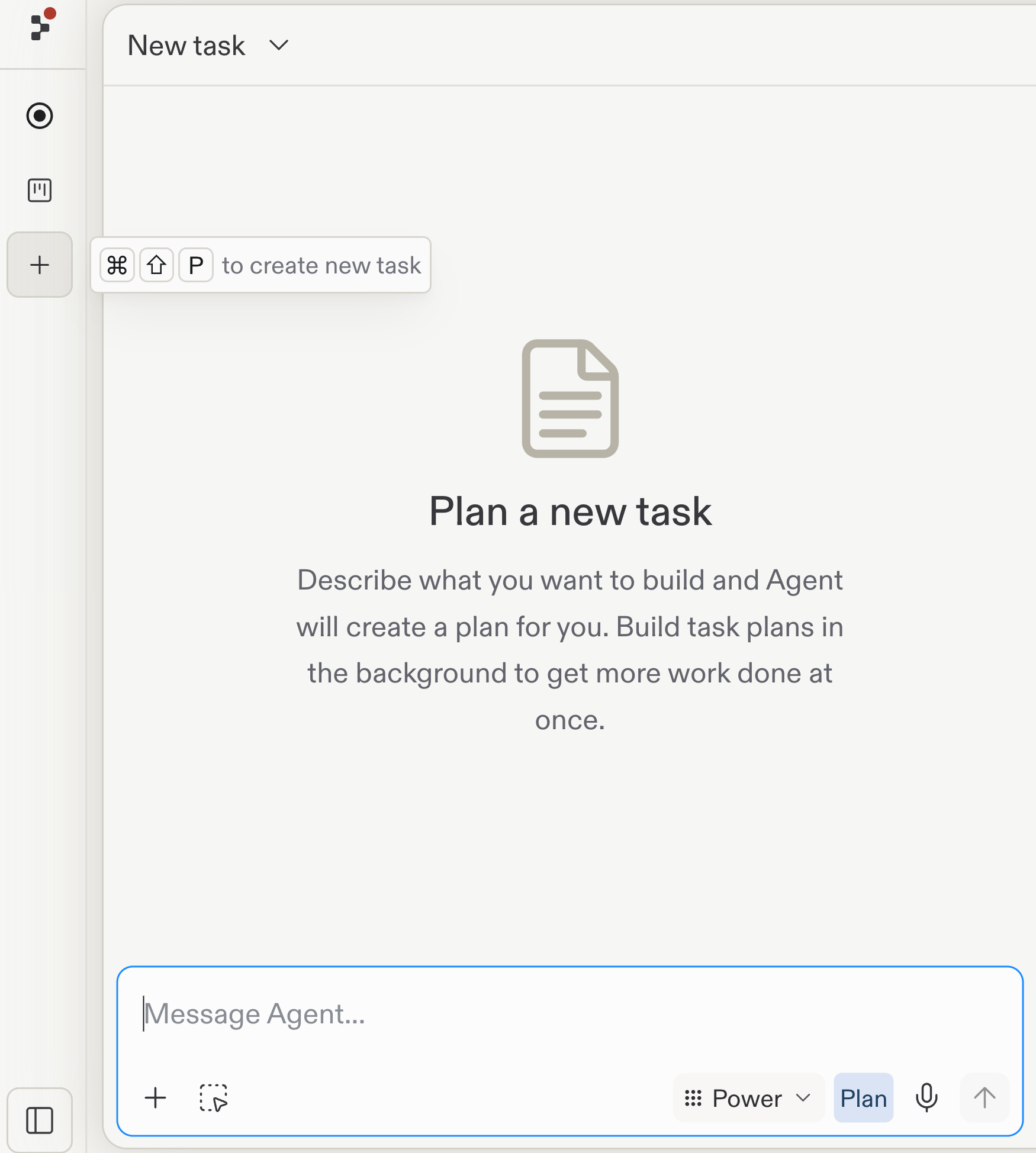
사이드바에서 **+**를 선택하거나 Cmd+Shift+P(Mac) 또는 Ctrl+Shift+P(Windows)를 눌러 새 task를 만드세요.
새 task 계획하기: 원하는 것을 설명하면 Agent가 계획을 만들어 줍니다.
2
Agent를 사용해 마이그레이션하기
새 task에서 Agent에게 앱을 Replit Auth에서 Clerk로 마이그레이션해 달라고 요청하세요.
Auth 패널에서 시작하기
1
Tools 열기
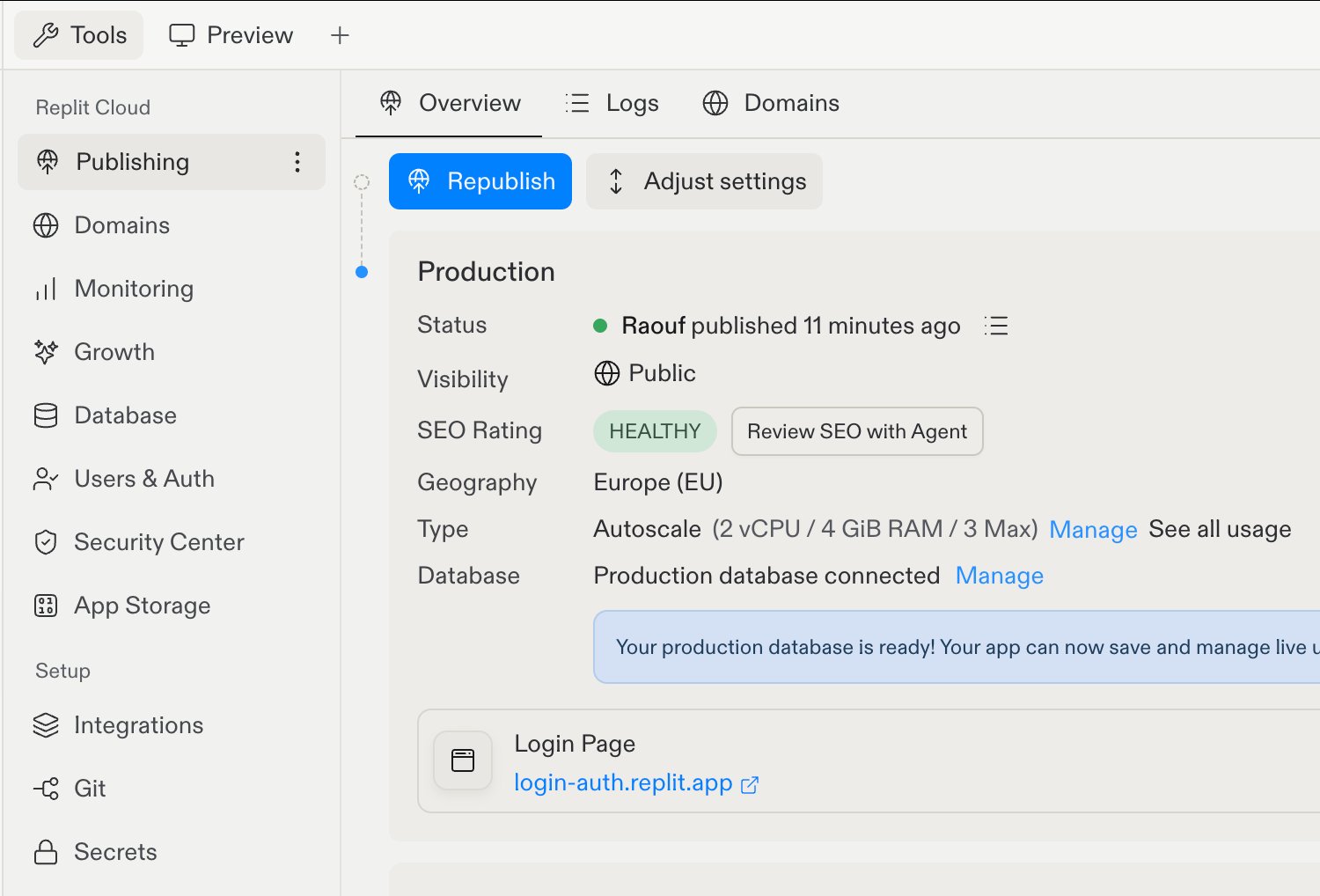
Project Editor에서 Tools를 여세요.
Tools 탭을 열면 활성 도구 옆에 도구 목록이 표시됩니다.
2
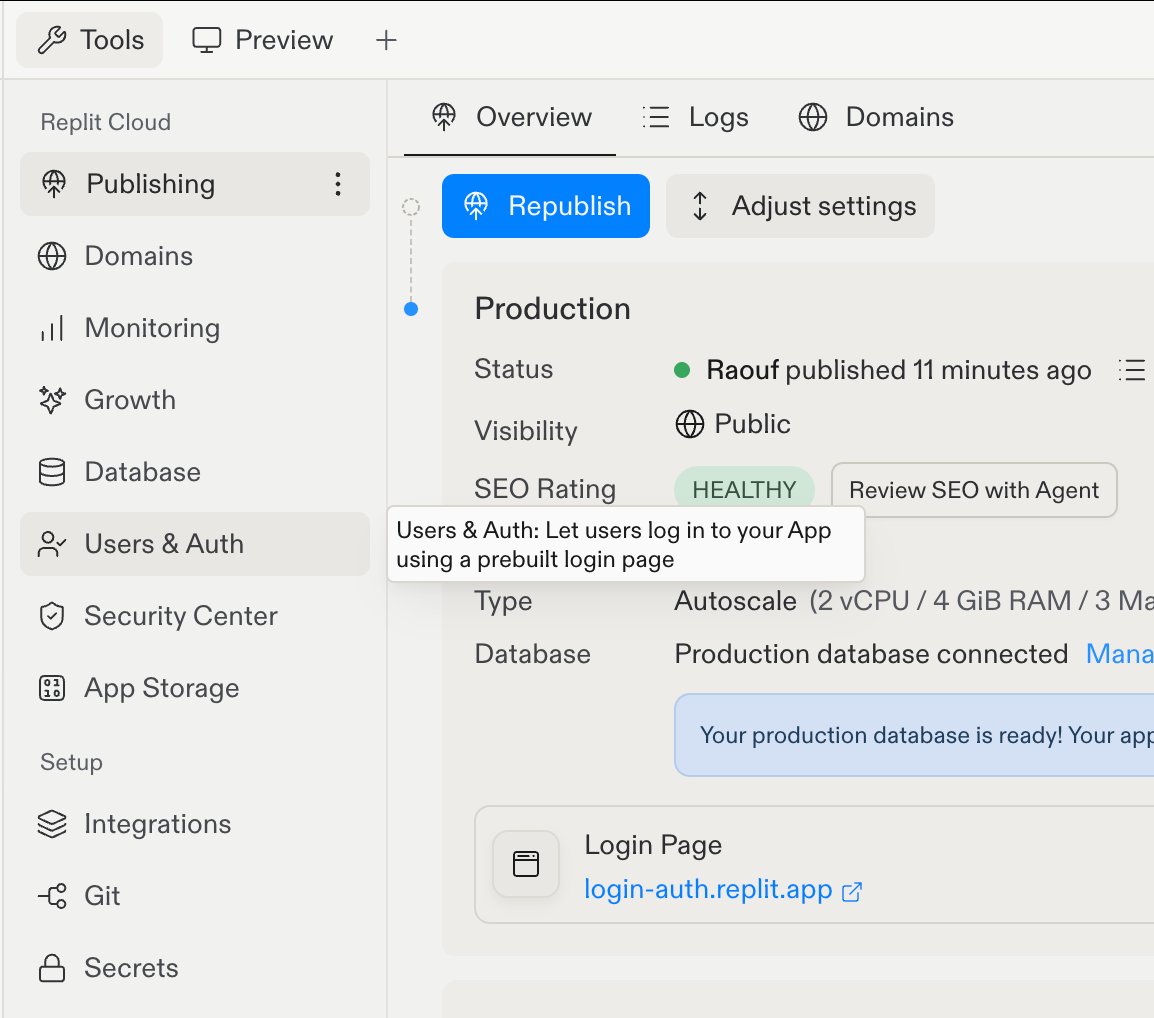
Users & Auth 선택하기
도구 목록의 Users & Auth.
3
Update now 선택하기
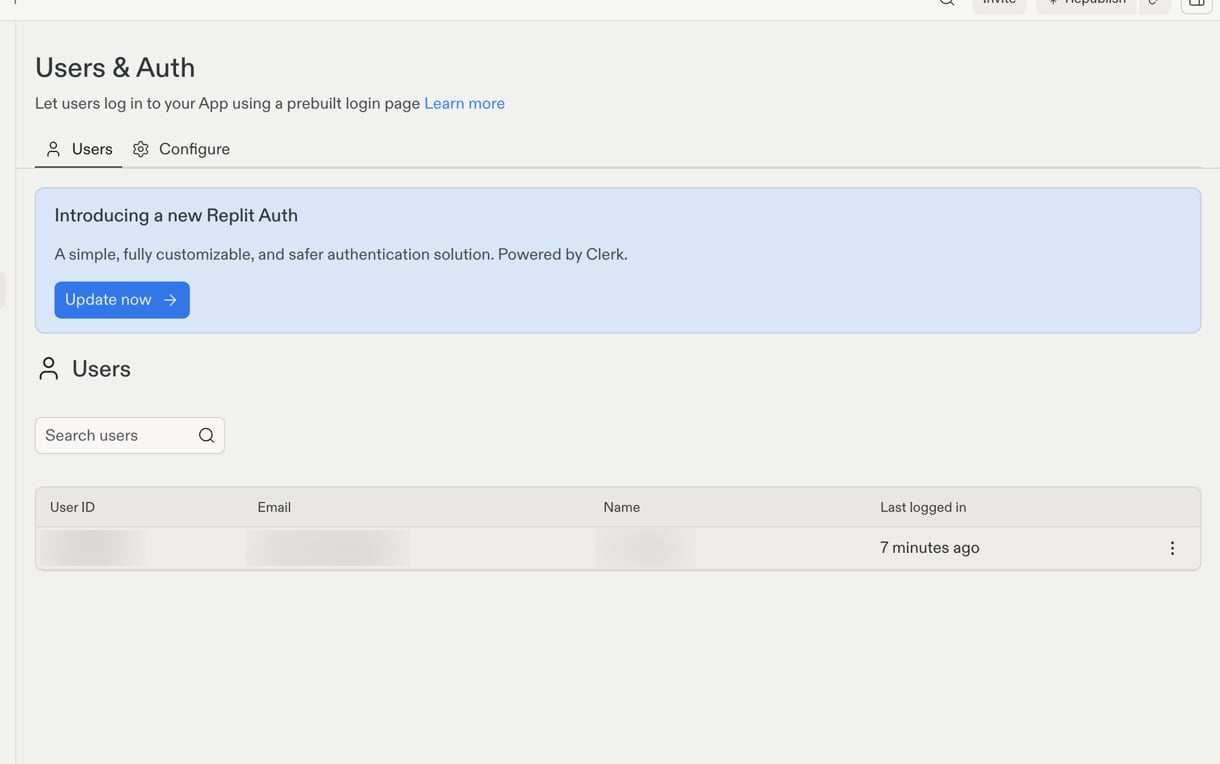
Introducing a new Replit Auth 배너에서 Update now를 선택하세요.
Users & Auth 도구에 Introducing a new Replit Auth 배너와 Update now 작업이 표시됩니다.
4
Agent에게 마이그레이션 요청하기
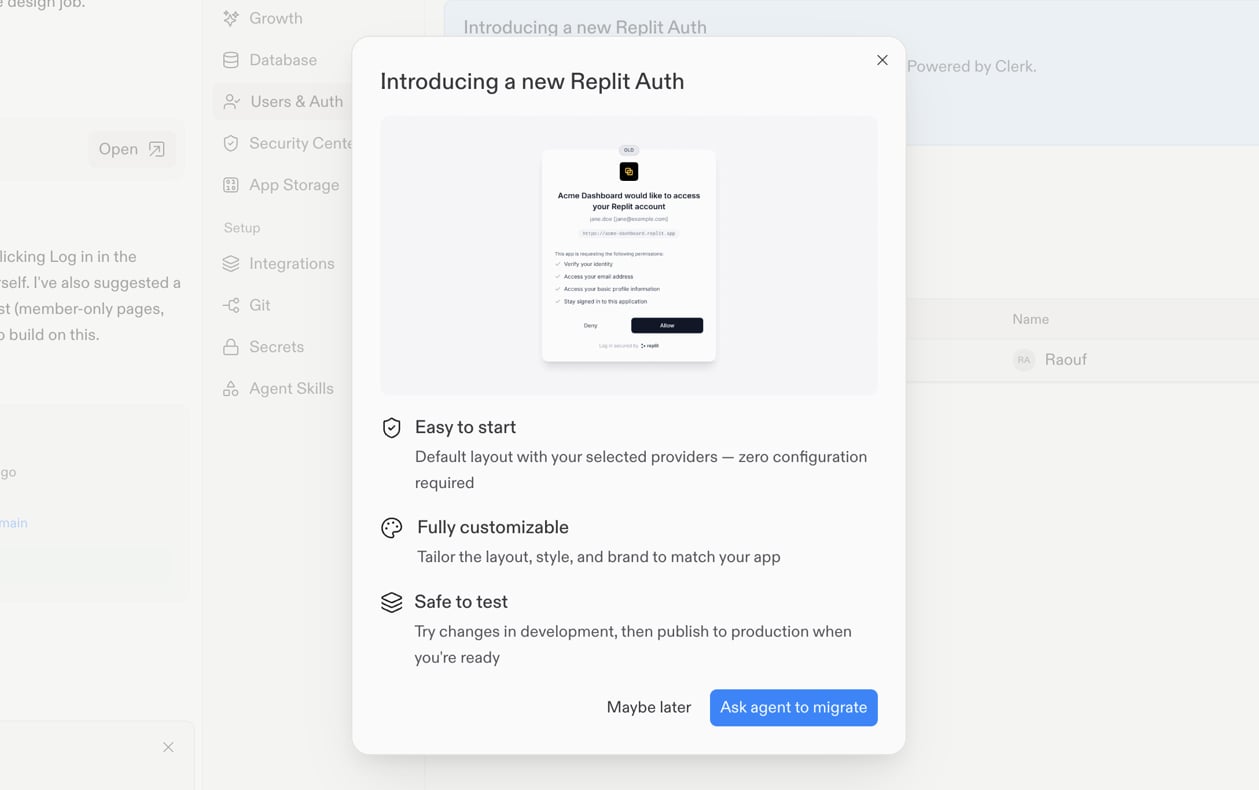
대화 상자에서 Ask agent to migrate를 선택하세요.
마이그레이션 개요 대화 상자는 Clerk Auth 업데이트를 설명하고 Ask agent to migrate를 제공합니다.
마이그레이션 계획 검토하기
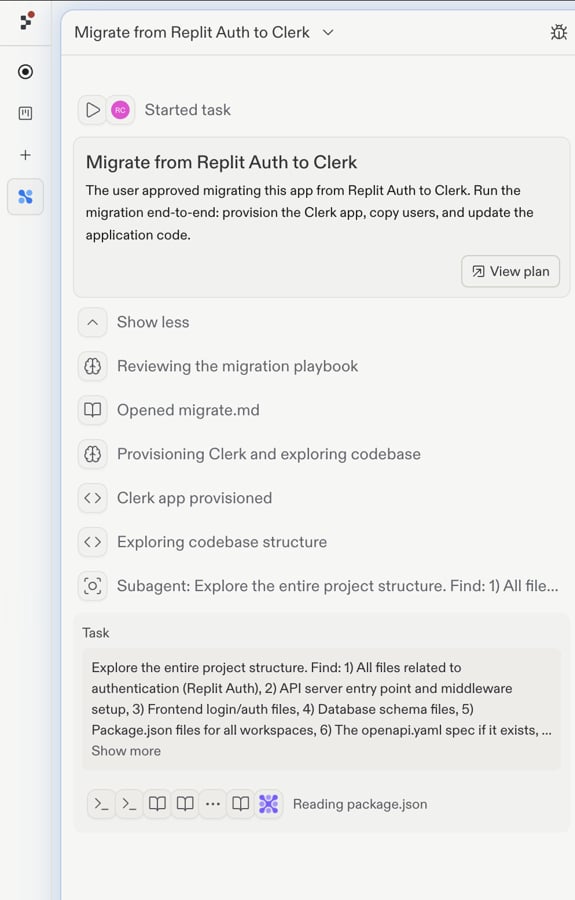
어떤 방법으로 시작하든, Agent는 Migrate from Replit Auth to Clerk task를 만들고 마이그레이션 계획을 준비합니다. task가 진행되기 전에 View plan을 선택하여 계획을 검토하세요.
Migrate from Replit Auth to Clerk task는 마이그레이션 플레이북을 검토할 수 있도록 View plan 작업으로 시작합니다.
Agent가 작업하는 동안에는 앱의 인증 코드나 Clerk 자격 증명을 변경하지 마세요.
Agent가 수행하는 작업
Agent는 다음 순서로 마이그레이션을 완료합니다.
계정 신원 정보와 지원되는 로그인 자격 증명을 포함해 Replit Auth 사용자 데이터를 Clerk로 이전합니다.
앱을 변경하기 전에 데이터 마이그레이션이 끝날 때까지 기다립니다.
앱의 로그인 및 세션 로직을 업데이트하고, 앱을 다시 시작하고, 사용 가능한 자동화된 검사를 실행합니다.
앱 데이터는 그대로 유지됩니다
Agent는 앱의 인증 코드만 변경합니다. 앱의 기존 데이터베이스 데이터나 스키마는 업데이트하지 않습니다. 테이블과 관계는 그대로 유지됩니다.기존 사용자는 프로필, 저장된 작업, 권한 등 이미 소유하고 있는 레코드와 계속 연결된 상태로 유지됩니다.
소요 시간
Agent가 작업하는 데 10분에서 1시간 정도 걸릴 것으로 예상하세요. 데이터 마이그레이션 자체는 소규모 앱의 경우 몇 분, 사용자가 많은 앱의 경우 최대 몇 시간까지 걸릴 수 있습니다. Agent는 해당 마이그레이션이 완료될 때까지 앱의 코드를 변경하기 시작하지 않습니다.
{"docsConfig":{"theme":"aspen","$schema":"https://mintlify.com/docs.json","name":"Replit","colors":{"primary":"#FF3C00","light":"#FF3C00","dark":"#FF3C00"},"logo":{"light":"https://mintcdn.com/replit/j4of5To8jzehz0JK/logo/light.svg?fit=max\u0026auto=format\u0026n=j4of5To8jzehz0JK\u0026q=85\u0026s=6209cb5927b56fd1781133af05428373","dark":"https://mintcdn.com/replit/j4of5To8jzehz0JK/logo/dark.svg?fit=max\u0026auto=format\u0026n=j4of5To8jzehz0JK\u0026q=85\u0026s=9cbba158300d48c49d8b888e71015495","href":"/welcome"},"favicon":"https://mintcdn.com/replit/CmOMKRnamiqG44eH/favicon.ico?fit=max\u0026auto=format\u0026n=CmOMKRnamiqG44eH\u0026q=85\u0026s=c89a6df6f537373c946c7a5f0ac65475","appearance":{"default":"light"},"background":{"color":{"light":"#F6F5F4","dark":"#1E1E1F"}},"navbar":{"links":[],"primary":{"type":"button","label":"Start Building","href":"https://replit.com?ref=docs"}},"footer":{"socials":{"x":"https://x.com/replit","linkedin":"https://www.linkedin.com/company/repl-it","youtube":"https://www.youtube.com/@replit"}},"seo":{"metatags":{"og:site_name":"Replit Docs","twitter:site":"@replit","twitter:creator":"@replit","author":"Replit"},"indexing":"all"},"fonts":{"heading":{"family":"ABC Diatype Plus","weight":400,"source":"https://cdn.replit.com/dotcom/fonts/ABCDiatypePlusVariable.woff2","format":"woff2"},"body":{"family":"ABC Diatype Plus","weight":400,"source":"https://cdn.replit.com/dotcom/fonts/ABCDiatypePlusVariable.woff2","format":"woff2"}},"integrations":{"segment":{"key":"dMePKGC4BqfBivpe0Hvl8IoPpzSHgjdX"}},"contextual":{"options":["copy","view"],"display":"header"},"thumbnails":{"appearance":"light","background":"https://mintcdn.com/replit/j4of5To8jzehz0JK/thumb.png?fit=max\u0026auto=format\u0026n=j4of5To8jzehz0JK\u0026q=85\u0026s=a7db7f0256b2fa06810fb4d378e63cc5","fonts":{"family":"ABC Diatype Plus"}},"styling":{"latex":true},"navigation":{"languages":[{"language":"en","href":"welcome"},{"language":"fr","navbar":{"links":[],"primary":{"type":"button","label":"Commencer à créer","href":"https://replit.com?ref=docs"}},"href":"fr/welcome"},{"language":"pt","hidden":false,"navbar":{"links":[],"primary":{"type":"button","label":"Comece a criar","href":"https://replit.com?ref=docs"}},"href":"pt/welcome"},{"language":"ja","hidden":false,"navbar":{"links":[],"primary":{"type":"button","label":"作成を開始","href":"https://replit.com?ref=docs"}},"href":"ja/welcome"},{"language":"ko","hidden":false,"navbar":{"links":[],"primary":{"type":"button","label":"빌드 시작하기","href":"https://replit.com?ref=docs"}},"href":"ko/welcome"}]}},"deployment":{"deploymentMetadataValue":{"subdomain":"replit","hasAudioNarration":false,"actualSubdomain":"replit","customDomains":["docs.replit.com","docs.repl.it"],"gitSource":{"type":"github","owner":"replit","repo":"replit-docs","deployBranch":"main","contentDirectory":"docs","isPrivate":true,"mountPath":"","label":""},"feedback":{"thumbs":true,"issues":true,"edits":false},"entitlements":{"AI_CHAT":{"status":"ENABLED"},"REMOVE_BRANDING":{"status":"ENABLED"},"CONTEXTUAL_FEEDBACK":{"status":"ENABLED"},"CODE_SNIPPET_FEEDBACK":{"status":"ENABLED"},"WEB_MCP":{"status":"ENABLED"},"NARRATION":{"status":"ENABLED"}},"buildId":"6b00a897301060a522c33c54","clientVersion":"0.0.4286","searchFilterCounts":[{"language":"en","tag":"Features","count":372},{"language":"fr","tag":"Fonctionnalités","count":371},{"language":"ja","tag":"機能","count":371},{"language":"ko","tag":"기능","count":371},{"language":"pt","tag":"Funcionalidades","count":371},{"language":"en","tag":"Changelog","count":102},{"language":"fr","tag":"Journal des modifications","count":101},{"language":"ja","tag":"変更履歴","count":101},{"language":"ko","tag":"변경 내역","count":101},{"language":"pt","tag":"Registro de alterações","count":101},{"language":"en","tag":"Enterprise","count":41},{"language":"en","tag":"Apps","count":41},{"language":"fr","tag":"Entreprise","count":41},{"language":"fr","tag":"Apps","count":41},{"language":"ja","tag":"Enterprise","count":41},{"language":"ja","tag":"Apps","count":41},{"language":"ko","tag":"Enterprise","count":41},{"language":"ko","tag":"Apps","count":41},{"language":"pt","tag":"Enterprise","count":41},{"language":"pt","tag":"Apps","count":41},{"language":"en","tag":"Use cases","count":39},{"language":"fr","tag":"Use cases","count":39},{"language":"ja","tag":"Use cases","count":39},{"language":"ko","tag":"Use cases","count":39},{"language":"pt","tag":"Use cases","count":39},{"language":"en","tag":"Chats","count":25},{"language":"en","tag":"Designs","count":25},{"language":"fr","tag":"Chats","count":25},{"language":"fr","tag":"Designs","count":25},{"language":"ja","tag":"Chats","count":25},{"language":"ja","tag":"Designs","count":25},{"language":"ko","tag":"Chats","count":25},{"language":"ko","tag":"Designs","count":25},{"language":"pt","tag":"Chats","count":25},{"language":"pt","tag":"Designs","count":25},{"language":"en","tag":"Trust \u0026 Billing","count":23},{"language":"fr","tag":"Confiance et facturation","count":23},{"language":"ja","tag":"信頼と請求","count":23},{"language":"ko","tag":"신뢰 및 결제","count":23},{"language":"pt","tag":"Confiança e faturamento","count":23},{"language":"en","tag":"Web","count":22},{"language":"fr","tag":"Web","count":22},{"language":"ja","tag":"Web","count":22},{"language":"ko","tag":"Web","count":22},{"language":"pt","tag":"Web","count":22},{"language":"en","tag":"Home","count":21},{"language":"fr","tag":"Home","count":21},{"language":"ja","tag":"Home","count":21},{"language":"ko","tag":"Home","count":21},{"language":"pt","tag":"Home","count":21}]},"assistantConfig":{"deflection":{"enabled":true,"email":"support@replit.com"}},"basePath":"","hasChatPermissions":true,"hasWebMcpPermissions":true,"toggles":[{"name":"kill-isr","enabled":true,"variant":{"name":"disabled","enabled":false,"feature_enabled":true},"impressionData":false},{"name":"custom-rbac-roles","enabled":true,"variant":{"name":"disabled","enabled":false,"feature_enabled":true},"impressionData":false},{"name":"agent-mintlify-slack","enabled":true,"variant":{"name":"disabled","enabled":false,"feature_enabled":true},"impressionData":false},{"name":"agent-integrations-settings","enabled":true,"variant":{"name":"disabled","enabled":false,"feature_enabled":true},"impressionData":false},{"name":"rbac-expansion","enabled":true,"variant":{"name":"disabled","enabled":false,"feature_enabled":true},"impressionData":false},{"name":"automations-pr-grouping","enabled":true,"variant":{"name":"disabled","enabled":false,"feature_enabled":true},"impressionData":false},{"name":"custom-prefix","enabled":true,"variant":{"name":"disabled","enabled":false,"feature_enabled":true},"impressionData":false},{"name":"analytics-v7","enabled":true,"variant":{"name":"disabled","enabled":false,"feature_enabled":true},"impressionData":false},{"name":"user-flows-analytics","enabled":true,"variant":{"name":"disabled","enabled":false,"feature_enabled":true},"impressionData":false},{"name":"no-publish-flow","enabled":true,"variant":{"name":"disabled","enabled":false,"feature_enabled":true},"impressionData":false},{"name":"workos-onboarding","enabled":true,"variant":{"name":"disabled","enabled":false,"feature_enabled":true},"impressionData":false},{"name":"snapshot-serving-live","enabled":true,"variant":{"name":"disabled","enabled":false,"feature_enabled":true},"impressionData":false},{"name":"stripTemperatureMiddleware","enabled":true,"variant":{"name":"disabled","enabled":false,"feature_enabled":true},"impressionData":false},{"name":"support-platform-pylon-zendesk","enabled":true,"variant":{"name":"disabled","enabled":false,"feature_enabled":true},"impressionData":false},{"name":"snapshot-serving","enabled":true,"variant":{"name":"disabled","enabled":false,"feature_enabled":true},"impressionData":false},{"name":"instant-rollback","enabled":true,"variant":{"name":"disabled","enabled":false,"feature_enabled":true},"impressionData":false},{"name":"granular-notifications-server","enabled":true,"variant":{"name":"disabled","enabled":false,"feature_enabled":true},"impressionData":false},{"name":"granular-notifications","enabled":true,"variant":{"name":"disabled","enabled":false,"feature_enabled":true},"impressionData":false},{"name":"automations-fable","enabled":true,"variant":{"name":"disabled","enabled":false,"feature_enabled":true},"impressionData":false},{"name":"fixed-ai-action-pricing","enabled":true,"variant":{"name":"disabled","enabled":false,"feature_enabled":true},"impressionData":false},{"name":"site-roles","enabled":true,"variant":{"name":"disabled","enabled":false,"feature_enabled":true},"impressionData":false},{"name":"automation-resolve-merge-conflict","enabled":true,"variant":{"name":"disabled","enabled":false,"feature_enabled":true},"impressionData":false},{"name":"scoped-publishing","enabled":true,"variant":{"name":"disabled","enabled":false,"feature_enabled":true},"impressionData":false},{"name":"mintql","enabled":true,"variant":{"name":"disabled","enabled":false,"feature_enabled":true},"impressionData":false},{"name":"page-level-analytics","enabled":true,"variant":{"name":"disabled","enabled":false,"feature_enabled":true},"impressionData":false},{"name":"editor-version-history-v2","enabled":true,"variant":{"name":"disabled","enabled":false,"feature_enabled":true},"impressionData":false},{"name":"billing-page-v2","enabled":true,"variant":{"name":"disabled","enabled":false,"feature_enabled":true},"impressionData":false},{"name":"full-page-search","enabled":true,"variant":{"name":"disabled","enabled":false,"feature_enabled":true},"impressionData":false},{"name":"workspace-projects","enabled":true,"variant":{"name":"disabled","enabled":false,"feature_enabled":true},"impressionData":false},{"name":"assistant-v5","enabled":true,"variant":{"name":"disabled","enabled":false,"feature_enabled":true},"impressionData":false},{"name":"fork-pr-previews","enabled":true,"variant":{"name":"disabled","enabled":false,"feature_enabled":true},"impressionData":false},{"name":"revalidation-jwt","enabled":true,"variant":{"name":"disabled","enabled":false,"feature_enabled":true},"impressionData":false},{"name":"workos-sso-scim","enabled":true,"variant":{"name":"disabled","enabled":false,"feature_enabled":true},"impressionData":false},{"name":"hobby-abuse-scan","enabled":true,"variant":{"name":"disabled","enabled":false,"feature_enabled":true},"impressionData":false},{"name":"dashboard-inbox","enabled":true,"variant":{"name":"disabled","enabled":false,"feature_enabled":true},"impressionData":false},{"name":"workos-signup","enabled":true,"variant":{"name":"disabled","enabled":false,"feature_enabled":true},"impressionData":false},{"name":"turbopuffer-dual-write","enabled":true,"variant":{"name":"disabled","enabled":false,"feature_enabled":true},"impressionData":false},{"name":"workos-enabled","enabled":true,"variant":{"name":"disabled","enabled":false,"feature_enabled":true},"impressionData":false},{"name":"approve-review-flow","enabled":true,"variant":{"name":"disabled","enabled":false,"feature_enabled":true},"impressionData":false},{"name":"editor-metadata","enabled":true,"variant":{"name":"disabled","enabled":false,"feature_enabled":true},"impressionData":false},{"name":"sso-setup-deadline-banner","enabled":true,"variant":{"name":"disabled","enabled":false,"feature_enabled":true},"impressionData":false},{"name":"turbopuffer-serve","enabled":true,"variant":{"name":"disabled","enabled":false,"feature_enabled":true},"impressionData":false},{"name":"live-agents","enabled":true,"variant":{"name":"disabled","enabled":false,"feature_enabled":true},"impressionData":false},{"name":"starter-pricing","enabled":true,"variant":{"name":"treatment","enabled":true,"payload":{"type":"string","value":"treatment"},"feature_enabled":true},"impressionData":false},{"name":"llms-txt-v2","enabled":true,"variant":{"name":"disabled","enabled":false,"feature_enabled":true},"impressionData":false},{"name":"wildcard-email-auth","enabled":true,"variant":{"name":"disabled","enabled":false,"feature_enabled":true},"impressionData":false}],"googleFontsInlined":false},"customCss":[{"filePath":"styles.css","href":"/_mintlify/custom/replit/d427c49142834eef/styles.css"}]}
{"page":{"pagePath":"ko/features/auth-and-identity/migrate-auth-to-clerk","slug":"/ko/features/auth-and-identity/migrate-auth-to-clerk","pageMetadata":{"title":"Replit Auth에서 Clerk로 마이그레이션하기","sidebarTitle":"Clerk로 마이그레이션","description":"Agent를 사용해 기존 Replit Auth 앱을 사용자 데이터를 유지한 채로 Clerk Auth로 이전하세요.","icon":"right-left","href":"/ko/features/auth-and-identity/migrate-auth-to-clerk"},"description":{"compiledSource":"\"use strict\";\nconst {jsx: _jsx} = arguments[0];\nconst {useMDXComponents: _provideComponents} = arguments[0];\nfunction _createMdxContent(props) {\n const _components = {\n p: \"p\",\n ..._provideComponents(),\n ...props.components\n };\n return _jsx(_components.p, {\n children: \"Agent를 사용해 기존 Replit Auth 앱을 사용자 데이터를 유지한 채로 Clerk Auth로 이전하세요.\"\n });\n}\nfunction MDXContent(props = {}) {\n const {wrapper: MDXLayout} = {\n ..._provideComponents(),\n ...props.components\n };\n return MDXLayout ? _jsx(MDXLayout, {\n ...props,\n children: _jsx(_createMdxContent, {\n ...props\n })\n }) : _createMdxContent(props);\n}\nreturn {\n default: MDXContent\n};\n","frontmatter":{},"scope":{}},"pageType":"default","mdx":{"mdxSource":{"compiledSource":"\"use strict\";const{Fragment:_Fragment,jsx:_jsx,jsxs:_jsxs}=arguments[0];const{useMDXComponents:_provideComponents}=arguments[0];function _createMdxContent(props){const _components={a:`a`,li:`li`,ol:`ol`,p:`p`,strong:`strong`,ul:`ul`,..._provideComponents(),...props.components},{Frame,Heading,Note,OptimizedImage,Step,Steps}=_components;if(!Frame)_missingMdxReference(`Frame`,true);if(!Heading)_missingMdxReference(`Heading`,true);if(!Note)_missingMdxReference(`Note`,true);if(!OptimizedImage)_missingMdxReference(`OptimizedImage`,true);if(!Step)_missingMdxReference(`Step`,true);if(!Steps)_missingMdxReference(`Steps`,true);return _jsxs(_Fragment,{children:[_jsxs(_components.p,{children:[`이 가이드를 사용하여 기존 `,_jsx(_components.a,{href:`/ko/features/auth-and-identity/authentication`,children:`Replit Auth`}),` 앱을 `,_jsx(_components.a,{href:`/ko/features/auth-and-identity/clerk-auth`,children:`Clerk Auth`}),`로 이전하세요. Agent는 해당되는 앱에 대해 마이그레이션을 처리하므로, 기존 사용자는 자신의 데이터에 계속 접근할 수 있습니다.`]}),`\n`,_jsx(Note,{children:_jsx(_components.p,{children:`이 자동화된 마이그레이션은 Replit Auth를 사용하는 앱을 위한 것입니다. 앱이 다른 인증 시스템을 사용한다면 이 흐름을 사용하지 마세요.`})}),`\n`,_jsx(Heading,{level:`2`,id:`마이그레이션-시작하기`,children:`마이그레이션 시작하기`}),`\n`,_jsx(_components.p,{children:`Agent 마이그레이션은 항상 새로운 task에서 실행해야 합니다.`}),`\n`,_jsx(_components.p,{children:`다음 두 가지 방법 중 하나로 마이그레이션을 시작할 수 있습니다.`}),`\n`,_jsx(Heading,{level:`3`,id:`agent에서-시작하기`,children:`Agent에서 시작하기`}),`\n`,_jsxs(Steps,{children:[_jsxs(Step,{title:`새 task 만들기`,children:[_jsxs(_components.p,{children:[`사이드바에서 **+**를 선택하거나 `,_jsx(_components.strong,{children:`Cmd+Shift+P`}),`(Mac) 또는 `,_jsx(_components.strong,{children:`Ctrl+Shift+P`}),`(Windows)를 눌러 새 task를 만드세요.`]}),_jsx(Frame,{caption:`새 task 계획하기: 원하는 것을 설명하면 Agent가 계획을 만들어 줍니다.`,children:_jsx(OptimizedImage,{src:`https://mintcdn.com/replit/HAkP_ROSRoShmzzT/images/workspace/auth/replit-auth-to-clerk-new-task.png?fit=max\u0026auto=format\u0026n=HAkP_ROSRoShmzzT\u0026q=85\u0026s=37874894a973063219f18ff14a409501`,alt:`사이드바에서 새 task 만들기 버튼이 강조 표시된 New task 화면, Cmd Shift P 단축키를 보여주는 툴팁, Message Agent 작성창 위의 Plan a new task 빈 상태`,\"data-og-width\":`1750`,width:`1750`,\"data-og-height\":`1948`,height:`1948`,\"data-path\":`images/workspace/auth/replit-auth-to-clerk-new-task.png`,\"data-optimize\":`true`,\"data-opv\":`3`,srcset:`https://mintcdn.com/replit/HAkP_ROSRoShmzzT/images/workspace/auth/replit-auth-to-clerk-new-task.png?w=280\u0026fit=max\u0026auto=format\u0026n=HAkP_ROSRoShmzzT\u0026q=85\u0026s=51fe7d351bbafd3ec9e898949c5131cc 280w, https://mintcdn.com/replit/HAkP_ROSRoShmzzT/images/workspace/auth/replit-auth-to-clerk-new-task.png?w=560\u0026fit=max\u0026auto=format\u0026n=HAkP_ROSRoShmzzT\u0026q=85\u0026s=0cf68058df0711cf49648d02d9a54d89 560w, https://mintcdn.com/replit/HAkP_ROSRoShmzzT/images/workspace/auth/replit-auth-to-clerk-new-task.png?w=840\u0026fit=max\u0026auto=format\u0026n=HAkP_ROSRoShmzzT\u0026q=85\u0026s=0e075a68a705eed3839bcd7191b426ac 840w, https://mintcdn.com/replit/HAkP_ROSRoShmzzT/images/workspace/auth/replit-auth-to-clerk-new-task.png?w=1100\u0026fit=max\u0026auto=format\u0026n=HAkP_ROSRoShmzzT\u0026q=85\u0026s=2d93ddb32895c737f2824530f2ec16fa 1100w, https://mintcdn.com/replit/HAkP_ROSRoShmzzT/images/workspace/auth/replit-auth-to-clerk-new-task.png?w=1650\u0026fit=max\u0026auto=format\u0026n=HAkP_ROSRoShmzzT\u0026q=85\u0026s=f37ad771f2e0eccd2f6ee42a79d8fb5c 1650w, https://mintcdn.com/replit/HAkP_ROSRoShmzzT/images/workspace/auth/replit-auth-to-clerk-new-task.png?w=2500\u0026fit=max\u0026auto=format\u0026n=HAkP_ROSRoShmzzT\u0026q=85\u0026s=071b6c1ceeb580ca15a8aceda26936d9 2500w`})})]}),_jsx(Step,{title:`Agent를 사용해 마이그레이션하기`,children:_jsx(_components.p,{children:`새 task에서 Agent에게 앱을 Replit Auth에서 Clerk로 마이그레이션해 달라고 요청하세요.`})})]}),`\n`,_jsx(Heading,{level:`3`,id:`auth-패널에서-시작하기`,children:`Auth 패널에서 시작하기`}),`\n`,_jsxs(Steps,{children:[_jsxs(Step,{title:`Tools 열기`,children:[_jsxs(_components.p,{children:[`Project Editor에서 `,_jsx(_components.strong,{children:`Tools`}),`를 여세요.`]}),_jsx(Frame,{caption:`Tools 탭을 열면 활성 도구 옆에 도구 목록이 표시됩니다.`,children:_jsx(OptimizedImage,{src:`https://mintcdn.com/replit/HAkP_ROSRoShmzzT/images/workspace/auth/replit-auth-to-clerk-open-tools.png?fit=max\u0026auto=format\u0026n=HAkP_ROSRoShmzzT\u0026q=85\u0026s=08fa9a797fdaef123ad8097a04c48254`,alt:`Publishing 개요 옆에 Publishing, Domains, Monitoring, Users \u0026 Auth 등을 보여주는 도구 목록이 열려 있는 Project Editor Tools 탭`,\"data-og-width\":`1500`,width:`1500`,\"data-og-height\":`1018`,height:`1018`,\"data-path\":`images/workspace/auth/replit-auth-to-clerk-open-tools.png`,\"data-optimize\":`true`,\"data-opv\":`3`,srcset:`https://mintcdn.com/replit/HAkP_ROSRoShmzzT/images/workspace/auth/replit-auth-to-clerk-open-tools.png?w=280\u0026fit=max\u0026auto=format\u0026n=HAkP_ROSRoShmzzT\u0026q=85\u0026s=84ac83ef9914fdeb01206cea1f4b199a 280w, https://mintcdn.com/replit/HAkP_ROSRoShmzzT/images/workspace/auth/replit-auth-to-clerk-open-tools.png?w=560\u0026fit=max\u0026auto=format\u0026n=HAkP_ROSRoShmzzT\u0026q=85\u0026s=2db6d18cb94429849ef6dc10226af1e0 560w, https://mintcdn.com/replit/HAkP_ROSRoShmzzT/images/workspace/auth/replit-auth-to-clerk-open-tools.png?w=840\u0026fit=max\u0026auto=format\u0026n=HAkP_ROSRoShmzzT\u0026q=85\u0026s=d54f59c9d2ea5c4ee67dd15dc065c84e 840w, https://mintcdn.com/replit/HAkP_ROSRoShmzzT/images/workspace/auth/replit-auth-to-clerk-open-tools.png?w=1100\u0026fit=max\u0026auto=format\u0026n=HAkP_ROSRoShmzzT\u0026q=85\u0026s=b3a5cd24456fa6277f1e672eaaed63ea 1100w, https://mintcdn.com/replit/HAkP_ROSRoShmzzT/images/workspace/auth/replit-auth-to-clerk-open-tools.png?w=1650\u0026fit=max\u0026auto=format\u0026n=HAkP_ROSRoShmzzT\u0026q=85\u0026s=5ca2a26bd0ba49cc637db28b23dfe55c 1650w, https://mintcdn.com/replit/HAkP_ROSRoShmzzT/images/workspace/auth/replit-auth-to-clerk-open-tools.png?w=2500\u0026fit=max\u0026auto=format\u0026n=HAkP_ROSRoShmzzT\u0026q=85\u0026s=83309fa681ea94ed0d1976065da56b30 2500w`})})]}),_jsx(Step,{title:`Users \u0026 Auth 선택하기`,children:_jsx(Frame,{caption:`도구 목록의 Users \u0026 Auth.`,children:_jsx(OptimizedImage,{src:`https://mintcdn.com/replit/HAkP_ROSRoShmzzT/images/workspace/auth/replit-auth-to-clerk-users-auth.png?fit=max\u0026auto=format\u0026n=HAkP_ROSRoShmzzT\u0026q=85\u0026s=301ed2722dba42beb848e02a47148aa3`,alt:`Users \u0026 Auth가 강조 표시되고 'Let users log in to your App using a prebuilt login page'라는 툴팁이 표시된 도구 목록`,\"data-og-width\":`1154`,width:`1154`,\"data-og-height\":`1018`,height:`1018`,\"data-path\":`images/workspace/auth/replit-auth-to-clerk-users-auth.png`,\"data-optimize\":`true`,\"data-opv\":`3`,srcset:`https://mintcdn.com/replit/HAkP_ROSRoShmzzT/images/workspace/auth/replit-auth-to-clerk-users-auth.png?w=280\u0026fit=max\u0026auto=format\u0026n=HAkP_ROSRoShmzzT\u0026q=85\u0026s=c8febbccfaec61c68d76c69a70209cff 280w, https://mintcdn.com/replit/HAkP_ROSRoShmzzT/images/workspace/auth/replit-auth-to-clerk-users-auth.png?w=560\u0026fit=max\u0026auto=format\u0026n=HAkP_ROSRoShmzzT\u0026q=85\u0026s=14a3e95bb27799cc80fb211343fd431f 560w, https://mintcdn.com/replit/HAkP_ROSRoShmzzT/images/workspace/auth/replit-auth-to-clerk-users-auth.png?w=840\u0026fit=max\u0026auto=format\u0026n=HAkP_ROSRoShmzzT\u0026q=85\u0026s=987a4571474db3fb114f778d651d8901 840w, https://mintcdn.com/replit/HAkP_ROSRoShmzzT/images/workspace/auth/replit-auth-to-clerk-users-auth.png?w=1100\u0026fit=max\u0026auto=format\u0026n=HAkP_ROSRoShmzzT\u0026q=85\u0026s=6f7669b8585b858bbf7b8509a8a8216d 1100w, https://mintcdn.com/replit/HAkP_ROSRoShmzzT/images/workspace/auth/replit-auth-to-clerk-users-auth.png?w=1650\u0026fit=max\u0026auto=format\u0026n=HAkP_ROSRoShmzzT\u0026q=85\u0026s=73c11df15ce4ec48599014900d976f49 1650w, https://mintcdn.com/replit/HAkP_ROSRoShmzzT/images/workspace/auth/replit-auth-to-clerk-users-auth.png?w=2500\u0026fit=max\u0026auto=format\u0026n=HAkP_ROSRoShmzzT\u0026q=85\u0026s=a4a39b4daa6d02fa05c97742afb561ee 2500w`})})}),_jsxs(Step,{title:`Update now 선택하기`,children:[_jsxs(_components.p,{children:[_jsx(_components.strong,{children:`Introducing a new Replit Auth`}),` 배너에서 `,_jsx(_components.strong,{children:`Update now`}),`를 선택하세요.`]}),_jsx(Frame,{caption:`Users \u0026 Auth 도구에 Introducing a new Replit Auth 배너와 Update now 작업이 표시됩니다.`,children:_jsx(OptimizedImage,{src:`https://mintcdn.com/replit/HAkP_ROSRoShmzzT/images/workspace/auth/replit-auth-to-clerk-banner.png?fit=max\u0026auto=format\u0026n=HAkP_ROSRoShmzzT\u0026q=85\u0026s=c115f201dc69c4b014a7134145c27c4a`,alt:`Users \u0026 Auth가 선택된 Project Editor와 Update now 버튼이 표시된 Introducing a new Replit Auth 배너`,\"data-og-width\":`1220`,width:`1220`,\"data-og-height\":`764`,height:`764`,\"data-path\":`images/workspace/auth/replit-auth-to-clerk-banner.png`,\"data-optimize\":`true`,\"data-opv\":`3`,srcset:`https://mintcdn.com/replit/HAkP_ROSRoShmzzT/images/workspace/auth/replit-auth-to-clerk-banner.png?w=280\u0026fit=max\u0026auto=format\u0026n=HAkP_ROSRoShmzzT\u0026q=85\u0026s=4a3a7b59eb0f040c1391d138721e4c85 280w, https://mintcdn.com/replit/HAkP_ROSRoShmzzT/images/workspace/auth/replit-auth-to-clerk-banner.png?w=560\u0026fit=max\u0026auto=format\u0026n=HAkP_ROSRoShmzzT\u0026q=85\u0026s=5f4b7a5815a95ab6974cf058bc549baa 560w, https://mintcdn.com/replit/HAkP_ROSRoShmzzT/images/workspace/auth/replit-auth-to-clerk-banner.png?w=840\u0026fit=max\u0026auto=format\u0026n=HAkP_ROSRoShmzzT\u0026q=85\u0026s=ebb7dc8ab098c4d3098c82d00d251737 840w, https://mintcdn.com/replit/HAkP_ROSRoShmzzT/images/workspace/auth/replit-auth-to-clerk-banner.png?w=1100\u0026fit=max\u0026auto=format\u0026n=HAkP_ROSRoShmzzT\u0026q=85\u0026s=5325c0cbac6091b18b85873789390439 1100w, https://mintcdn.com/replit/HAkP_ROSRoShmzzT/images/workspace/auth/replit-auth-to-clerk-banner.png?w=1650\u0026fit=max\u0026auto=format\u0026n=HAkP_ROSRoShmzzT\u0026q=85\u0026s=d02a6341d374747de3aa913dfb07ea25 1650w, https://mintcdn.com/replit/HAkP_ROSRoShmzzT/images/workspace/auth/replit-auth-to-clerk-banner.png?w=2500\u0026fit=max\u0026auto=format\u0026n=HAkP_ROSRoShmzzT\u0026q=85\u0026s=f03639eac255ad71a211728bbbb231de 2500w`})})]}),_jsxs(Step,{title:`Agent에게 마이그레이션 요청하기`,children:[_jsxs(_components.p,{children:[`대화 상자에서 `,_jsx(_components.strong,{children:`Ask agent to migrate`}),`를 선택하세요.`]}),_jsx(Frame,{caption:`마이그레이션 개요 대화 상자는 Clerk Auth 업데이트를 설명하고 Ask agent to migrate를 제공합니다.`,children:_jsx(OptimizedImage,{src:`https://mintcdn.com/replit/HAkP_ROSRoShmzzT/images/workspace/auth/replit-auth-to-clerk-dialog.png?fit=max\u0026auto=format\u0026n=HAkP_ROSRoShmzzT\u0026q=85\u0026s=83d3d51db78ea750472bb5a98c989eb8`,alt:`Ask agent to migrate 버튼이 있는 Introducing a new Replit Auth 대화 상자`,\"data-og-width\":`1259`,width:`1259`,\"data-og-height\":`790`,height:`790`,\"data-path\":`images/workspace/auth/replit-auth-to-clerk-dialog.png`,\"data-optimize\":`true`,\"data-opv\":`3`,srcset:`https://mintcdn.com/replit/HAkP_ROSRoShmzzT/images/workspace/auth/replit-auth-to-clerk-dialog.png?w=280\u0026fit=max\u0026auto=format\u0026n=HAkP_ROSRoShmzzT\u0026q=85\u0026s=60fe032d5317c203bad857060bd83982 280w, https://mintcdn.com/replit/HAkP_ROSRoShmzzT/images/workspace/auth/replit-auth-to-clerk-dialog.png?w=560\u0026fit=max\u0026auto=format\u0026n=HAkP_ROSRoShmzzT\u0026q=85\u0026s=dc7307dc96fcdf6ab4988c1e3e656739 560w, https://mintcdn.com/replit/HAkP_ROSRoShmzzT/images/workspace/auth/replit-auth-to-clerk-dialog.png?w=840\u0026fit=max\u0026auto=format\u0026n=HAkP_ROSRoShmzzT\u0026q=85\u0026s=661410a62801d3fd2b8f98f27ba255ae 840w, https://mintcdn.com/replit/HAkP_ROSRoShmzzT/images/workspace/auth/replit-auth-to-clerk-dialog.png?w=1100\u0026fit=max\u0026auto=format\u0026n=HAkP_ROSRoShmzzT\u0026q=85\u0026s=73de9e34799323c033f63c6b39b30d43 1100w, https://mintcdn.com/replit/HAkP_ROSRoShmzzT/images/workspace/auth/replit-auth-to-clerk-dialog.png?w=1650\u0026fit=max\u0026auto=format\u0026n=HAkP_ROSRoShmzzT\u0026q=85\u0026s=b31010991939ff48767ab3f806bc51e1 1650w, https://mintcdn.com/replit/HAkP_ROSRoShmzzT/images/workspace/auth/replit-auth-to-clerk-dialog.png?w=2500\u0026fit=max\u0026auto=format\u0026n=HAkP_ROSRoShmzzT\u0026q=85\u0026s=3b1b4d9ce277a9ed6de6d65d5cfc97cf 2500w`})})]})]}),`\n`,_jsx(Heading,{level:`3`,id:`마이그레이션-계획-검토하기`,children:`마이그레이션 계획 검토하기`}),`\n`,_jsxs(_components.p,{children:[`어떤 방법으로 시작하든, Agent는 `,_jsx(_components.strong,{children:`Migrate from Replit Auth to Clerk`}),` task를 만들고 마이그레이션 계획을 준비합니다. task가 진행되기 전에 `,_jsx(_components.strong,{children:`View plan`}),`을 선택하여 계획을 검토하세요.`]}),`\n`,_jsx(Frame,{caption:`Migrate from Replit Auth to Clerk task는 마이그레이션 플레이북을 검토할 수 있도록 View plan 작업으로 시작합니다.`,children:_jsx(OptimizedImage,{src:`https://mintcdn.com/replit/HAkP_ROSRoShmzzT/images/workspace/auth/replit-auth-to-clerk-task.png?fit=max\u0026auto=format\u0026n=HAkP_ROSRoShmzzT\u0026q=85\u0026s=91b6d45806c6d55e83b3579f7cdcb59a`,alt:`View plan 버튼과 마이그레이션 플레이북 검토 활동이 표시된 Migrate from Replit Auth to Clerk라는 제목의 Agent task`,\"data-og-width\":`575`,width:`575`,\"data-og-height\":`900`,height:`900`,\"data-path\":`images/workspace/auth/replit-auth-to-clerk-task.png`,\"data-optimize\":`true`,\"data-opv\":`3`,srcset:`https://mintcdn.com/replit/HAkP_ROSRoShmzzT/images/workspace/auth/replit-auth-to-clerk-task.png?w=280\u0026fit=max\u0026auto=format\u0026n=HAkP_ROSRoShmzzT\u0026q=85\u0026s=a18433001eea05ffc6fc0bf332269913 280w, https://mintcdn.com/replit/HAkP_ROSRoShmzzT/images/workspace/auth/replit-auth-to-clerk-task.png?w=560\u0026fit=max\u0026auto=format\u0026n=HAkP_ROSRoShmzzT\u0026q=85\u0026s=eafc4c3b766050d52f09683cdb359ec4 560w, https://mintcdn.com/replit/HAkP_ROSRoShmzzT/images/workspace/auth/replit-auth-to-clerk-task.png?w=840\u0026fit=max\u0026auto=format\u0026n=HAkP_ROSRoShmzzT\u0026q=85\u0026s=e378fe6d019b817f2179a0445ce96697 840w, https://mintcdn.com/replit/HAkP_ROSRoShmzzT/images/workspace/auth/replit-auth-to-clerk-task.png?w=1100\u0026fit=max\u0026auto=format\u0026n=HAkP_ROSRoShmzzT\u0026q=85\u0026s=fdb2610b28e33c92f21e7f3d1b301b1e 1100w, https://mintcdn.com/replit/HAkP_ROSRoShmzzT/images/workspace/auth/replit-auth-to-clerk-task.png?w=1650\u0026fit=max\u0026auto=format\u0026n=HAkP_ROSRoShmzzT\u0026q=85\u0026s=2f40d3106f44ee2eb82faebbab40a66f 1650w, https://mintcdn.com/replit/HAkP_ROSRoShmzzT/images/workspace/auth/replit-auth-to-clerk-task.png?w=2500\u0026fit=max\u0026auto=format\u0026n=HAkP_ROSRoShmzzT\u0026q=85\u0026s=5abf7e321fc175b3a7cf403f31c7f6d3 2500w`})}),`\n`,_jsx(_components.p,{children:`Agent가 작업하는 동안에는 앱의 인증 코드나 Clerk 자격 증명을 변경하지 마세요.`}),`\n`,_jsx(Heading,{level:`2`,id:`agent가-수행하는-작업`,children:`Agent가 수행하는 작업`}),`\n`,_jsx(_components.p,{children:`Agent는 다음 순서로 마이그레이션을 완료합니다.`}),`\n`,_jsxs(_components.ol,{children:[`\n`,_jsx(_components.li,{children:`계정 신원 정보와 지원되는 로그인 자격 증명을 포함해 Replit Auth 사용자 데이터를 Clerk로 이전합니다.`}),`\n`,_jsx(_components.li,{children:`앱을 변경하기 전에 데이터 마이그레이션이 끝날 때까지 기다립니다.`}),`\n`,_jsx(_components.li,{children:`앱의 로그인 및 세션 로직을 업데이트하고, 앱을 다시 시작하고, 사용 가능한 자동화된 검사를 실행합니다.`}),`\n`]}),`\n`,_jsx(Heading,{level:`2`,id:`앱-데이터는-그대로-유지됩니다`,children:`앱 데이터는 그대로 유지됩니다`}),`\n`,_jsx(_components.p,{children:`Agent는 앱의 인증 코드만 변경합니다. 앱의 기존 데이터베이스 데이터나 스키마는 업데이트하지 않습니다. 테이블과 관계는 그대로 유지됩니다.`}),`\n`,_jsx(_components.p,{children:`기존 사용자는 프로필, 저장된 작업, 권한 등 이미 소유하고 있는 레코드와 계속 연결된 상태로 유지됩니다.`}),`\n`,_jsx(Heading,{level:`2`,id:`소요-시간`,children:`소요 시간`}),`\n`,_jsx(_components.p,{children:`Agent가 작업하는 데 10분에서 1시간 정도 걸릴 것으로 예상하세요. 데이터 마이그레이션 자체는 소규모 앱의 경우 몇 분, 사용자가 많은 앱의 경우 최대 몇 시간까지 걸릴 수 있습니다. Agent는 해당 마이그레이션이 완료될 때까지 앱의 코드를 변경하기 시작하지 않습니다.`}),`\n`,_jsx(Heading,{level:`2`,id:`마이그레이션-이후`,children:`마이그레이션 이후`}),`\n`,_jsx(_components.p,{children:`게시하기 전에 Development 환경에서 업데이트된 앱을 테스트하세요.`}),`\n`,_jsxs(_components.ol,{children:[`\n`,_jsx(_components.li,{children:`기존 계정으로 로그인하여 저장된 데이터를 사용할 수 있는지 확인하세요.`}),`\n`,_jsx(_components.li,{children:`로그아웃한 다음 다시 로그인하세요.`}),`\n`,_jsx(_components.li,{children:`새 테스트 계정을 만들어 예상대로 앱을 사용할 수 있는지 확인하세요.`}),`\n`]}),`\n`,_jsx(Heading,{level:`2`,id:`추가-자료`,children:`추가 자료`}),`\n`,_jsxs(_components.ul,{children:[`\n`,_jsxs(_components.li,{children:[_jsx(_components.a,{href:`/ko/features/auth-and-identity/clerk-auth`,children:`Clerk Auth 개요`}),` — Replit에서 Clerk Auth가 작동하는 방식`]}),`\n`,_jsxs(_components.li,{children:[_jsx(_components.a,{href:`/ko/features/auth-and-identity/custom-auth-migration`,children:`커스텀 auth 마이그레이션 계획하기`}),` — 커스텀 인증 시스템 마이그레이션 계획하기`]}),`\n`]})]})}function MDXContent(props={}){const{wrapper:MDXLayout}={..._provideComponents(),...props.components};return MDXLayout?_jsx(MDXLayout,{...props,children:_jsx(_createMdxContent,{...props})}):_createMdxContent(props)}return{default:MDXContent};function _missingMdxReference(id,component){throw new Error(`Expected `+(component?`component`:`object`)+\" `\"+id+\"` to be defined: you likely forgot to import, pass, or provide it.\")}","frontmatter":{},"scope":{"config":{},"pageMetadata":{"title":"Replit Auth에서 Clerk로 마이그레이션하기","sidebarTitle":"Clerk로 마이그레이션","description":"Agent를 사용해 기존 Replit Auth 앱을 사용자 데이터를 유지한 채로 Clerk Auth로 이전하세요.","icon":"right-left","href":"/ko/features/auth-and-identity/migrate-auth-to-clerk"}}},"mdxSourceWithNoJs":null},"mdxExtracts":{"tableOfContents":[{"title":"마이그레이션 시작하기","slug":"마이그레이션-시작하기","depth":2,"children":[{"title":"Agent에서 시작하기","slug":"agent에서-시작하기","depth":3,"children":[]},{"title":"Auth 패널에서 시작하기","slug":"auth-패널에서-시작하기","depth":3,"children":[]},{"title":"마이그레이션 계획 검토하기","slug":"마이그레이션-계획-검토하기","depth":3,"children":[]}]},{"title":"Agent가 수행하는 작업","slug":"agent가-수행하는-작업","depth":2,"children":[]},{"title":"앱 데이터는 그대로 유지됩니다","slug":"앱-데이터는-그대로-유지됩니다","depth":2,"children":[]},{"title":"소요 시간","slug":"소요-시간","depth":2,"children":[]},{"title":"마이그레이션 이후","slug":"마이그레이션-이후","depth":2,"children":[]},{"title":"추가 자료","slug":"추가-자료","depth":2,"children":[]}],"codeExamples":{}},"jsLinks":[],"subdomain":"replit","siteName":"Replit","title":"Replit Auth에서 Clerk로 마이그레이션하기 - Replit","navMaps":{"firstHrefInVersion":{},"firstHrefInLanguage":{"en":{"href":"/features/auth-and-identity/migrate-auth-to-clerk","matchLevel":1},"fr":{"href":"/fr/features/auth-and-identity/migrate-auth-to-clerk","matchLevel":1},"pt":{"href":"/pt/features/auth-and-identity/migrate-auth-to-clerk","matchLevel":1},"ja":{"href":"/ja/features/auth-and-identity/migrate-auth-to-clerk","matchLevel":1},"ko":{"href":"/ko/features/auth-and-identity/migrate-auth-to-clerk","matchLevel":0}}},"lastModified":"2026-08-14T16:07:27.324Z","originalFileLocation":"ko/features/auth-and-identity/migrate-auth-to-clerk.mdx","locale":"ko"},"headHtml":"\u003cscript data-mint-head>(function(){var d=document.documentElement,p=null;if(!p){try{p=localStorage.getItem(\"isDarkMode\")}catch(e){}if(p==='true')p='dark';else if(p==='false')p='light';if(p!=='light'\u0026\u0026p!=='dark'\u0026\u0026p!=='system')p=\"light\"}var r=p==='system'?(matchMedia(\"(prefers-color-scheme: dark)\").matches?'dark':'light'):p;d.classList.remove(r==='dark'?'light':'dark');d.classList.add(r);d.setAttribute(\"data-theme-preference\",p)})();\u003c/script>\u003cmeta data-mint-head name=\"description\" content=\"Agent를 사용해 기존 Replit Auth 앱을 사용자 데이터를 유지한 채로 Clerk Auth로 이전하세요.\">\u003cmeta data-mint-head name=\"application-name\" content=\"Replit\">\u003cmeta data-mint-head name=\"generator\" content=\"Mintlify\">\u003clink data-mint-head rel=\"icon\" type=\"image/png\" sizes=\"192x192\" href=\"/mintlify-assets/_mintlify/favicons/replit/bmCuvIiWqqoyeE2o/_generated/favicon/android-chrome-192x192.png\" media=\"(prefers-color-scheme: light)\">\u003clink data-mint-head rel=\"apple-touch-icon\" type=\"image/png\" sizes=\"180x180\" href=\"/mintlify-assets/_mintlify/favicons/replit/bmCuvIiWqqoyeE2o/_generated/favicon/apple-touch-icon.png\">\u003clink data-mint-head rel=\"icon\" type=\"image/png\" sizes=\"16x16\" href=\"/mintlify-assets/_mintlify/favicons/replit/bmCuvIiWqqoyeE2o/_generated/favicon/favicon-16x16.png\" media=\"(prefers-color-scheme: light)\">\u003clink data-mint-head rel=\"icon\" type=\"image/png\" sizes=\"32x32\" href=\"/mintlify-assets/_mintlify/favicons/replit/bmCuvIiWqqoyeE2o/_generated/favicon/favicon-32x32.png\" media=\"(prefers-color-scheme: light)\">\u003clink data-mint-head rel=\"shortcut icon\" type=\"image/x-icon\" href=\"/mintlify-assets/_mintlify/favicons/replit/bmCuvIiWqqoyeE2o/_generated/favicon/favicon.ico\" media=\"(prefers-color-scheme: light)\">\u003clink data-mint-head rel=\"icon\" type=\"image/png\" sizes=\"192x192\" href=\"/mintlify-assets/_mintlify/favicons/replit/bmCuvIiWqqoyeE2o/_generated/favicon-dark/android-chrome-192x192.png\" media=\"(prefers-color-scheme: dark)\">\u003clink data-mint-head rel=\"icon\" type=\"image/png\" sizes=\"16x16\" href=\"/mintlify-assets/_mintlify/favicons/replit/bmCuvIiWqqoyeE2o/_generated/favicon-dark/favicon-16x16.png\" media=\"(prefers-color-scheme: dark)\">\u003clink data-mint-head rel=\"icon\" type=\"image/png\" sizes=\"32x32\" href=\"/mintlify-assets/_mintlify/favicons/replit/bmCuvIiWqqoyeE2o/_generated/favicon-dark/favicon-32x32.png\" media=\"(prefers-color-scheme: dark)\">\u003clink data-mint-head rel=\"shortcut icon\" type=\"image/x-icon\" href=\"/mintlify-assets/_mintlify/favicons/replit/bmCuvIiWqqoyeE2o/_generated/favicon-dark/favicon.ico\" media=\"(prefers-color-scheme: dark)\">\u003cmeta data-mint-head property=\"og:title\" content=\"Replit Auth에서 Clerk로 마이그레이션하기 - Replit\">\u003cmeta data-mint-head property=\"og:description\" content=\"Agent를 사용해 기존 Replit Auth 앱을 사용자 데이터를 유지한 채로 Clerk Auth로 이전하세요.\">\u003cmeta data-mint-head property=\"og:site_name\" content=\"Replit Docs\">\u003cmeta data-mint-head property=\"og:url\" content=\"https://docs.replit.com/ko/features/auth-and-identity/migrate-auth-to-clerk\">\u003cmeta data-mint-head property=\"og:type\" content=\"website\">\u003cmeta data-mint-head property=\"og:image\" content=\"https://replit.mintlify.site/_mintlify/api/og/v2?division=Users+%26+Auth\u0026amp;title=Replit+Auth%EC%97%90%EC%84%9C+Clerk%EB%A1%9C+%EB%A7%88%EC%9D%B4%EA%B7%B8%EB%A0%88%EC%9D%B4%EC%85%98%ED%95%98%EA%B8%B0\u0026amp;description=Agent%EB%A5%BC+%EC%82%AC%EC%9A%A9%ED%95%B4+%EA%B8%B0%EC%A1%B4+Replit+Auth+%EC%95%B1%EC%9D%84+%EC%82%AC%EC%9A%A9%EC%9E%90+%EB%8D%B0%EC%9D%B4%ED%84%B0%EB%A5%BC+%EC%9C%A0%EC%A7%80%ED%95%9C+%EC%B1%84%EB%A1%9C+Clerk+Auth%EB%A1%9C+%EC%9D%B4%EC%A0%84%ED%95%98%EC%84%B8%EC%9A%94.\u0026amp;theme=3d900b3257a00c38c6803774\u0026amp;signature=a6bd550bbb965103e71abe355b07869bcdddc64b62c5471e237948ff81e80d43\">\u003cmeta data-mint-head property=\"og:image:width\" content=\"1200\">\u003cmeta data-mint-head property=\"og:image:height\" content=\"630\">\u003cmeta data-mint-head name=\"twitter:card\" content=\"summary_large_image\">\u003cmeta data-mint-head name=\"twitter:title\" content=\"Replit Auth에서 Clerk로 마이그레이션하기 - Replit\">\u003cmeta data-mint-head name=\"twitter:description\" content=\"Agent를 사용해 기존 Replit Auth 앱을 사용자 데이터를 유지한 채로 Clerk Auth로 이전하세요.\">\u003cmeta data-mint-head name=\"twitter:image\" content=\"https://replit.mintlify.site/_mintlify/api/og/v2?division=Users+%26+Auth\u0026amp;title=Replit+Auth%EC%97%90%EC%84%9C+Clerk%EB%A1%9C+%EB%A7%88%EC%9D%B4%EA%B7%B8%EB%A0%88%EC%9D%B4%EC%85%98%ED%95%98%EA%B8%B0\u0026amp;description=Agent%EB%A5%BC+%EC%82%AC%EC%9A%A9%ED%95%B4+%EA%B8%B0%EC%A1%B4+Replit+Auth+%EC%95%B1%EC%9D%84+%EC%82%AC%EC%9A%A9%EC%9E%90+%EB%8D%B0%EC%9D%B4%ED%84%B0%EB%A5%BC+%EC%9C%A0%EC%A7%80%ED%95%9C+%EC%B1%84%EB%A1%9C+Clerk+Auth%EB%A1%9C+%EC%9D%B4%EC%A0%84%ED%95%98%EC%84%B8%EC%9A%94.\u0026amp;theme=3d900b3257a00c38c6803774\u0026amp;signature=a6bd550bbb965103e71abe355b07869bcdddc64b62c5471e237948ff81e80d43\">\u003cmeta data-mint-head name=\"twitter:image:width\" content=\"1200\">\u003cmeta data-mint-head name=\"twitter:image:height\" content=\"630\">\u003cmeta data-mint-head name=\"msapplication-config\" content=\"/mintlify-assets/_mintlify/favicons/replit/bmCuvIiWqqoyeE2o/_generated/favicon/browserconfig.xml\">\u003cmeta data-mint-head name=\"apple-mobile-web-app-title\" content=\"Replit\">\u003cmeta data-mint-head name=\"msapplication-TileColor\" content=\"#FF3C00\">\u003cmeta data-mint-head name=\"twitter:creator\" content=\"@replit\">\u003cmeta data-mint-head name=\"author\" content=\"Replit\">\u003clink data-mint-head rel=\"canonical\" href=\"https://docs.replit.com/ko/features/auth-and-identity/migrate-auth-to-clerk\">\u003clink data-mint-head rel=\"alternate\" type=\"application/xml\" href=\"/sitemap.xml\">\u003clink data-mint-head rel=\"alternate\" type=\"text/markdown\" href=\"/ko/features/auth-and-identity/migrate-auth-to-clerk.md\">\u003clink data-mint-head rel=\"alternate\" hreflang=\"ko\" href=\"https://docs.replit.com/ko/features/auth-and-identity/migrate-auth-to-clerk\">\u003clink data-mint-head rel=\"alternate\" hreflang=\"en\" href=\"https://docs.replit.com/features/auth-and-identity/migrate-auth-to-clerk\">\u003clink data-mint-head rel=\"alternate\" hreflang=\"fr\" href=\"https://docs.replit.com/fr/features/auth-and-identity/migrate-auth-to-clerk\">\u003clink data-mint-head rel=\"alternate\" hreflang=\"pt\" href=\"https://docs.replit.com/pt/features/auth-and-identity/migrate-auth-to-clerk\">\u003clink data-mint-head rel=\"alternate\" hreflang=\"ja\" href=\"https://docs.replit.com/ja/features/auth-and-identity/migrate-auth-to-clerk\">\u003clink data-mint-head rel=\"alternate\" hreflang=\"x-default\" href=\"https://docs.replit.com/features/auth-and-identity/migrate-auth-to-clerk\">\u003cscript data-mint-head type=\"application/ld+json\">{\"@context\":\"https://schema.org\",\"@graph\":[{\"@type\":\"Organization\",\"@id\":\"https://docs.replit.com/#organization\",\"name\":\"Replit\",\"url\":\"https://docs.replit.com\",\"logo\":{\"@type\":\"ImageObject\",\"url\":\"https://mintcdn.com/replit/j4of5To8jzehz0JK/logo/light.svg?fit=max\u0026auto=format\u0026n=j4of5To8jzehz0JK\u0026q=85\u0026s=6209cb5927b56fd1781133af05428373\"}},{\"@type\":\"WebSite\",\"@id\":\"https://docs.replit.com#website\",\"name\":\"Replit\",\"url\":\"https://docs.replit.com\",\"publisher\":{\"@id\":\"https://docs.replit.com/#organization\"}},{\"@type\":\"WebPage\",\"@id\":\"https://docs.replit.com/ko/features/auth-and-identity/migrate-auth-to-clerk#webpage\",\"url\":\"https://docs.replit.com/ko/features/auth-and-identity/migrate-auth-to-clerk\",\"name\":\"Replit Auth에서 Clerk로 마이그레이션하기\",\"description\":\"Agent를 사용해 기존 Replit Auth 앱을 사용자 데이터를 유지한 채로 Clerk Auth로 이전하세요.\",\"dateModified\":\"2026-08-14T16:07:27.324Z\",\"isPartOf\":{\"@id\":\"https://docs.replit.com#website\"},\"breadcrumb\":{\"@id\":\"https://docs.replit.com/ko/features/auth-and-identity/migrate-auth-to-clerk#breadcrumb\"}},{\"@type\":\"BreadcrumbList\",\"@id\":\"https://docs.replit.com/ko/features/auth-and-identity/migrate-auth-to-clerk#breadcrumb\",\"itemListElement\":[{\"@type\":\"ListItem\",\"position\":1,\"name\":\"Users \u0026 Auth\",\"item\":\"https://docs.replit.com/ko/features/auth-and-identity/overview\"},{\"@type\":\"ListItem\",\"position\":2,\"name\":\"Replit Auth에서 Clerk로 마이그레이션하기\",\"item\":\"https://docs.replit.com/ko/features/auth-and-identity/migrate-auth-to-clerk\"}]},{\"@type\":[\"Article\",\"TechArticle\"],\"@id\":\"https://docs.replit.com/ko/features/auth-and-identity/migrate-auth-to-clerk#article\",\"headline\":\"Replit Auth에서 Clerk로 마이그레이션하기\",\"name\":\"Replit Auth에서 Clerk로 마이그레이션하기\",\"description\":\"Agent를 사용해 기존 Replit Auth 앱을 사용자 데이터를 유지한 채로 Clerk Auth로 이전하세요.\",\"url\":\"https://docs.replit.com/ko/features/auth-and-identity/migrate-auth-to-clerk\",\"mainEntityOfPage\":{\"@id\":\"https://docs.replit.com/ko/features/auth-and-identity/migrate-auth-to-clerk#webpage\"},\"dateModified\":\"2026-08-14T16:07:27.324Z\",\"publisher\":{\"@id\":\"https://docs.replit.com/#organization\"},\"isPartOf\":{\"@id\":\"https://docs.replit.com#website\"}}]}\u003c/script>","agentPointerHref":"/ko/features/auth-and-identity/migrate-auth-to-clerk.md","siteName":"Replit","nav":{"global":null,"languages":[{"language":"en","pages":[{"title":"en","href":"/features/auth-and-identity/migrate-auth-to-clerk"}]},{"language":"fr","navbar":{"links":[],"primary":{"type":"button","label":"Commencer à créer","href":"https://replit.com?ref=docs"}},"pages":[{"title":"fr","href":"/fr/features/auth-and-identity/migrate-auth-to-clerk"}]},{"language":"pt","navbar":{"links":[],"primary":{"type":"button","label":"Comece a criar","href":"https://replit.com?ref=docs"}},"hidden":false,"pages":[{"title":"pt","href":"/pt/features/auth-and-identity/migrate-auth-to-clerk"}]},{"language":"ja","navbar":{"links":[],"primary":{"type":"button","label":"作成を開始","href":"https://replit.com?ref=docs"}},"hidden":false,"pages":[{"title":"ja","href":"/ja/features/auth-and-identity/migrate-auth-to-clerk"}]},{"language":"ko","navbar":{"links":[],"primary":{"type":"button","label":"빌드 시작하기","href":"https://replit.com?ref=docs"}},"hidden":false,"tabs":[{"tab":"Home","pages":[{"title":"Home","href":"/ko/welcome"}]},{"tab":"Chats","pages":[{"title":"Chats","href":"/ko/chat/overview"}]},{"tab":"Apps","dropdowns":[{"dropdown":"Web","icon":"globe","pages":[{"group":"빠른 시작","pages":[{"title":"첫 번째 앱 빌드하기","sidebarTitle":"첫 번째 앱","icon":"rocket","href":"/ko/build/your-first-app"},{"title":"템플릿으로 빌드하고 게시하기","sidebarTitle":"템플릿으로 빌드하기","icon":"palette","href":"/ko/build/build-and-publish-from-template"},{"title":"Free Mode로 빌드하기","sidebarTitle":"Free Mode로 빌드하기","icon":"seedling","href":"/ko/build/build-with-free-mode"},{"title":"앱 게시하기","sidebarTitle":"앱 게시하기","icon":"cloud-arrow-up","href":"/ko/build/publish-your-app"}]},{"group":"Build paths","pages":[{"title":"제품 아이디어 프로토타입 만들기","sidebarTitle":"아이디어 프로토타입 만들기","icon":"lightbulb","href":"/ko/build/prototype-an-idea"},{"title":"랜딩 페이지 만들기","sidebarTitle":"랜딩 페이지 만들기","icon":"rectangle-list","href":"/ko/build/landing-page"},{"title":"Shopify 스토어프론트 빌드하기","sidebarTitle":"Shopify 스토어프론트 빌드하기","icon":"bag-shopping","href":"/ko/build/ecommerce-store"},{"title":"데이터에서 대시보드 만들기","sidebarTitle":"대시보드 만들기","icon":"chart-simple","href":"/ko/build/dashboard"},{"title":"모바일 앱 빌드하기","sidebarTitle":"모바일 앱 빌드하기","icon":"mobile-screen","href":"/ko/build/mobile-app"}]},{"group":"Grow your app","pages":[{"title":"로그인 추가","sidebarTitle":"로그인 추가","icon":"user-lock","href":"/ko/build/add-login"},{"title":"데이터베이스 추가","sidebarTitle":"데이터베이스 추가","icon":"database","href":"/ko/build/add-database"},{"title":"통합 추가","sidebarTitle":"통합 추가","icon":"plug","href":"/ko/build/add-integrations"},{"title":"커스텀 도메인 추가","sidebarTitle":"커스텀 도메인 추가","icon":"globe","href":"/ko/build/add-custom-domain"}]},{"group":"Publish and operate","pages":[{"title":"도메인 구매","sidebarTitle":"도메인 구매","icon":"cart-shopping","href":"/ko/build/domain-purchasing"},{"title":"피드백 위젯 활성화","sidebarTitle":"피드백 위젯 활성화","icon":"comment","href":"/ko/build/enable-feedback"},{"title":"앱 SEO 개선","sidebarTitle":"SEO 개선","icon":"magnifying-glass-chart","href":"/ko/build/improve-seo"},{"title":"배포 문제 해결","icon":"triangle-exclamation","href":"/ko/build/troubleshooting"}]},{"group":"Connect \u0026 integrate","pages":[{"title":"Agent Skills 사용하기","sidebarTitle":"Agent Skills 사용하기","icon":"puzzle-piece","href":"/ko/build/use-agent-skills"},{"title":"MCP로 연결하기","sidebarTitle":"MCP로 연결하기","icon":"server","href":"/ko/build/connect-via-mcp"}]},{"group":"Collaborate","pages":[{"title":"팀원 초대하기","sidebarTitle":"팀원 초대하기","icon":"user-plus","href":"/ko/build/invite-teammates"},{"title":"팀 워크스페이스 만들기","sidebarTitle":"팀 워크스페이스 만들기","icon":"users-rectangle","href":"/ko/build/create-a-team-workspace"}]},{"group":"가져오기","pages":[{"title":"제공업체에서 가져오기","sidebarTitle":"제공업체에서 가져오기","icon":"file-import","href":"/ko/build/import-from-providers"}]}]},{"dropdown":"Mobile","icon":"mobile","groups":[{"group":"빠른 시작","pages":[{"title":"첫 모바일 앱 시작하기","sidebarTitle":"모바일 앱 시작하기","icon":"wand-magic-sparkles","href":"/ko/build/mobile-first-app"},{"title":"휴대폰에서 프리뷰 및 테스트하기","sidebarTitle":"Expo Go로 테스트하기","icon":"mobile","href":"/ko/build/mobile-preview-testing"}]},{"group":"Publish for iOS","pages":[{"title":"Apple Developer 계정 설정하기","sidebarTitle":"계정 설정하기","icon":"apple","href":"/ko/build/mobile-apple-account"},{"title":"앱을 App Store Connect에 업로드하기","sidebarTitle":"앱 업로드하기","icon":"cloud-arrow-up","href":"/ko/build/mobile-upload-ios"},{"title":"TestFlight로 베타 테스트하기","sidebarTitle":"TestFlight로 테스트하기","icon":"flask","href":"/ko/build/mobile-testflight"},{"title":"App Store에 제출하기","sidebarTitle":"App Store에 제출","icon":"paper-plane","href":"/ko/build/mobile-publish-ios"}]},{"group":"Add features and grow your app","pages":[{"title":"로그인 추가하기","sidebarTitle":"로그인 추가하기","icon":"right-to-bracket","href":"/ko/build/mobile-login"},{"title":"RevenueCat으로 결제 추가하기","sidebarTitle":"결제 추가하기","icon":"credit-card","href":"/ko/build/mobile-payments"},{"title":"모바일 앱에서 이미지 저장하기","sidebarTitle":"플레이어 이미지 저장하기","icon":"image","href":"/ko/build/mobile-store-images"},{"title":"햅틱 추가하기","sidebarTitle":"햅틱 추가하기","icon":"wave-square","href":"/ko/build/mobile-haptics"},{"title":"iOS 네이티브 컴포넌트 사용하기","sidebarTitle":"네이티브 UI 사용","icon":"apple","href":"/ko/build/mobile-native-components"},{"title":"카메라 사용하기","sidebarTitle":"카메라 추가","icon":"camera","href":"/ko/build/mobile-camera"},{"title":"연락처에 접근하기","sidebarTitle":"연락처 추가","icon":"address-book","href":"/ko/build/mobile-contacts"},{"title":"푸시 알림 보내기","sidebarTitle":"알림 보내기","icon":"bell","href":"/ko/build/mobile-push-notifications"},{"title":"리뷰와 평점 수집하기","sidebarTitle":"리뷰 수집","icon":"star","href":"/ko/build/mobile-collect-reviews"}]},{"group":"디자인","pages":[{"title":"앱 디자인하기","sidebarTitle":"앱 디자인하기","icon":"palette","href":"/ko/build/mobile-design"},{"title":"앱 아이콘 생성하기","sidebarTitle":"앱 아이콘 생성","icon":"image","href":"/ko/build/mobile-app-icon"},{"title":"App Store 스크린샷 생성하기","sidebarTitle":"스토어 에셋 생성하기","icon":"images","href":"/ko/build/mobile-store-screenshots"}]},{"group":"Collaborate","pages":[{"title":"팀과 함께 PixelGames 만들기","sidebarTitle":"팀 초대하기","icon":"users","href":"/ko/build/mobile-invite-team"}]}]}]},{"tab":"Code","pages":[{"title":"Code","href":"/ko/build/code/code-with-replit"}]},{"tab":"Designs","pages":[{"title":"Designs","href":"/ko/design/what-is-replit-design"}]},{"tab":"Use cases","pages":[{"title":"Use cases","href":"/ko/use-cases"}]},{"tab":"Learn","pages":[{"title":"Learn","href":"/ko/learn/foundations/what-is-an-app"}]},{"tab":"기능","anchors":[{"anchor":"기능","icon":"book-open","groups":[{"group":"Workspace \u0026 Admin","pages":[{"title":"워크스페이스","sidebarTitle":"워크스페이스","icon":"building","href":"/ko/features/collaboration/workspaces"},{"title":"개인 \u0026 팀 워크스페이스","sidebarTitle":"개인 \u0026 팀 워크스페이스","icon":"users","href":"/ko/features/collaboration/team-workspaces"},{"title":"워크스페이스 지역","sidebarTitle":"워크스페이스 지역","icon":"globe","href":"/ko/features/collaboration/workspace-geography"},{"title":"Workspace Settings","sidebarTitle":"Workspace Settings","icon":"sliders","href":"/ko/features/collaboration/workspace-settings"},{"title":"Enterprise 모델 컨트롤","sidebarTitle":"모델 컨트롤","icon":"microchip","href":"/ko/features/collaboration/enterprise-model-controls"},{"title":"관리자 API","sidebarTitle":"관리자 API","icon":"key","href":"/ko/teams/admin-api"}]},{"group":"Chats and routines","pages":[{"title":"Chats","sidebarTitle":"Chats","icon":"comments","href":"/ko/features/chats-and-routines/chats"},{"title":"Missions","sidebarTitle":"Missions","icon":"bullseye","href":"/ko/features/chats-and-routines/missions"},{"title":"Routines","sidebarTitle":"Routines","icon":"arrows-rotate","href":"/ko/features/chats-and-routines/routines"},{"title":"Missions, Routines, Tasks","sidebarTitle":"Missions vs. Routines vs. Tasks","icon":"arrows-split-up-and-left","href":"/ko/features/chats-and-routines/missions-routines-and-tasks"},{"title":"Chats와 Assets 공유하기","sidebarTitle":"Chats와 Assets 공유하기","icon":"share-nodes","href":"/ko/features/chats-and-routines/sharing"}]},{"group":"Projects \u0026 artifacts","pages":[{"title":"프로젝트란 무엇인가요?","sidebarTitle":"프로젝트","icon":"diagram-project","href":"/ko/features/projects-and-artifacts/projects"},{"title":"아티팩트란 무엇인가요?","sidebarTitle":"아티팩트","icon":"layer-group","href":"/ko/features/projects-and-artifacts/artifacts"},{"title":"여러 개의 아티팩트 vs. 별도의 프로젝트","sidebarTitle":"아티팩트 vs. 프로젝트","icon":"code-compare","href":"/ko/features/projects-and-artifacts/multiple-artifacts-vs-projects"},{"title":"이전 프로젝트를 다중 아티팩트 지원으로 업데이트하기","sidebarTitle":"이전 프로젝트 업데이트","icon":"rotate","href":"/ko/features/projects-and-artifacts/updating-projects-for-multiple-artifacts"},{"title":"앱 리믹스하기","sidebarTitle":"리믹스","icon":"clone","href":"/ko/features/projects-and-artifacts/remix-an-app"}]},{"group":"Project editor","pages":[{"title":"에디터 및 도구","sidebarTitle":"도구","icon":"toolbox","href":"/ko/features/editor/editor-and-tools"},{"title":"Preview","icon":"eye","href":"/ko/features/editor/preview"},{"title":"키보드 단축키","icon":"keyboard","href":"/ko/features/editor/keyboard-shortcuts"},{"title":"User Settings","icon":"user-gear","href":"/ko/features/editor/user-settings"}]},{"group":"Agent","pages":[{"title":"Replit","sidebarTitle":"Replit","icon":"robot","href":"/ko/features/agent/overview"},{"title":"Replit으로 계획하기","sidebarTitle":"계획","icon":"clipboard-list","href":"/ko/features/agent/plan-mode"},{"title":"Agent 모드","sidebarTitle":"Agent 모드","icon":"bolt","href":"/ko/features/agent/agent-modes"},{"title":"Model selector","sidebarTitle":"Model selector","icon":"microchip","href":"/ko/features/agent/model-selector"},{"title":"App Testing","sidebarTitle":"App Testing","icon":"vial","href":"/ko/features/agent/app-testing"},{"title":"General Agent","sidebarTitle":"General Agent","icon":"compass","href":"/ko/features/agent/general-agent"}]},{"group":"배포","pages":[{"title":"게시","sidebarTitle":"개요","icon":"cloud-arrow-up","href":"/ko/features/publishing/overview"},{"title":"게시 후 진행 과정","sidebarTitle":"게시 후 진행 과정","icon":"rocket","href":"/ko/features/publishing/after-you-publish"},{"title":"커스텀 도메인","icon":"at","href":"/ko/features/publishing/custom-domains"},{"title":"누가 앱에 액세스할 수 있는지","sidebarTitle":"액세스","icon":"user-shield","href":"/ko/features/publishing/private-deployments"},{"title":"피드백 위젯","sidebarTitle":"피드백 위젯","icon":"comment-dots","href":"/ko/features/publishing/feedback-widget"},{"title":"배포 유형","sidebarTitle":"배포 유형","icon":"server","href":"/ko/features/publishing/deployment-types"},{"title":"머신 구성","sidebarTitle":"머신","icon":"microchip","href":"/ko/features/publishing/machine-configuration"},{"title":"프로젝트 지역","sidebarTitle":"프로젝트 지역","icon":"globe","href":"/ko/features/publishing/project-geography"}]},{"group":"Monitoring","pages":[{"title":"앱 모니터링하기","sidebarTitle":"모니터링","icon":"chart-line","href":"/ko/features/publishing/monitoring-a-deployment"},{"title":"Monitoring Agent","sidebarTitle":"Monitoring Agent","icon":"robot","href":"/ko/features/publishing/monitoring-agent"},{"title":"Performance Agent","sidebarTitle":"Performance Agent","icon":"gauge-high","href":"/ko/features/publishing/performance-agent"}]},{"group":"Database","pages":[{"title":"데이터베이스","sidebarTitle":"개요","icon":"table","href":"/ko/features/data-and-storage/sql-database"},{"title":"개발 및 프로덕션 데이터베이스","sidebarTitle":"개발 및 프로덕션","icon":"server","href":"/ko/features/data-and-storage/development-and-production"},{"title":"Publish가 프로덕션 데이터베이스를 업데이트하는 방법","sidebarTitle":"데이터베이스 변경 사항 게시","icon":"database","href":"/ko/features/data-and-storage/publish-database-changes"},{"title":"데이터로 작업하기","sidebarTitle":"데이터로 작업하기","icon":"table-cells","href":"/ko/features/data-and-storage/work-with-your-data"},{"title":"데이터베이스 모니터링","sidebarTitle":"모니터링","icon":"chart-line","href":"/ko/features/data-and-storage/monitor-your-database"},{"title":"연결 세부 정보","sidebarTitle":"연결 세부 정보","icon":"plug","href":"/ko/features/data-and-storage/connection-details"},{"title":"데이터 복구","sidebarTitle":"데이터 복구","icon":"clock-rotate-left","href":"/ko/features/data-and-storage/data-recovery"}]},{"group":"Users \u0026 Auth","pages":[{"title":"Users \u0026 Auth","sidebarTitle":"Overview","icon":"users","href":"/ko/features/auth-and-identity/overview"},{"title":"Replit Auth","sidebarTitle":"Replit Auth","icon":"lock","href":"/ko/features/auth-and-identity/authentication"},{"title":"Clerk Auth","sidebarTitle":"Clerk Auth","icon":"user-lock","href":"/ko/features/auth-and-identity/clerk-auth"},{"title":"앱에 SSO 추가하기 (Clerk)","sidebarTitle":"앱에 SSO 추가하기","description":"Okta 또는 Microsoft Entra ID와 같은 회사의 아이덴티티 제공자로 앱 사용자가 Clerk 대시보드를 통해 로그인하도록 하고, 다중 요소 인증과 세션 제어도 함께 설정하세요.","icon":"key","href":"/ko/features/auth-and-identity/single-sign-on"},{"title":"Replit Auth에서 Clerk로 마이그레이션하기","sidebarTitle":"Clerk로 마이그레이션","icon":"right-left","href":"/ko/features/auth-and-identity/migrate-auth-to-clerk"},{"title":"로그인 제공자","sidebarTitle":"로그인 제공자","description":"Clerk Auth를 사용하는 앱에서 Google, GitHub, Apple, X 로그인을 위한 커스텀 OAuth 자격 증명을 설정하는 방법을 알아보세요.","icon":"right-to-bracket","href":"/ko/features/auth-and-identity/sign-in-providers"},{"title":"커스텀 auth 마이그레이션 계획하기","sidebarTitle":"커스텀 auth 마이그레이션","icon":"right-left","href":"/ko/features/auth-and-identity/custom-auth-migration"}]},{"group":"Security Center","pages":[{"title":"Project Security Center","sidebarTitle":"Project Security Center","icon":"shield-virus","href":"/ko/features/security/project-security-center"},{"title":"보안 스캔 수준","sidebarTitle":"보안 스캔 수준","icon":"layer-group","href":"/ko/features/security/security-scan-levels"},{"title":"Agent 보안 스캔","sidebarTitle":"Agent 보안 스캔","icon":"shield-check","href":"/ko/features/security/agent-security-scans"},{"title":"블랙박스 침투 테스트","sidebarTitle":"블랙박스 침투 테스트","icon":"user-secret","href":"/ko/features/security/black-box-pen-tests"},{"title":"Workspace Security Center","sidebarTitle":"Workspace Security Center","icon":"users-rectangle","href":"/ko/features/security/workspace-security-center"},{"title":"Package Firewall","sidebarTitle":"Package Firewall","icon":"shield-check","href":"/ko/features/security/package-firewall"},{"title":"Tunnels 설정","sidebarTitle":"Tunnels","icon":"network-wired","href":"/ko/features/security/tunnels"},{"title":"보안","sidebarTitle":"보안","icon":"shield-halved","href":"/ko/features/security/overview"},{"title":"지역","sidebarTitle":"지역","icon":"globe","href":"/ko/features/security/geography"},{"title":"보안 개념","sidebarTitle":"개념","icon":"book","href":"/ko/features/security/concepts"},{"title":"Replit 공동 책임 모델","sidebarTitle":"공동 책임 모델","icon":"scale-balanced","href":"/ko/features/security/shared-responsibility-model"}]},{"group":"앱 스토리지","pages":[{"title":"App Storage","sidebarTitle":"개요","icon":"box-archive","href":"/ko/features/data-and-storage/object-storage"},{"title":"App Storage Python SDK","icon":"python","href":"/ko/features/sdks/object-storage-python-sdk"},{"title":"App Storage JavaScript SDK","icon":"js","href":"/ko/features/sdks/object-storage-javascript-sdk"}]},{"group":"Growth","pages":[{"title":"Project Analytics","sidebarTitle":"Project Analytics","icon":"chart-line-up","href":"/ko/features/publishing/project-analytics"},{"title":"SEO 등급","sidebarTitle":"SEO 등급","icon":"magnifying-glass-chart","href":"/ko/features/publishing/seo-rating"},{"title":"SEO Agent","sidebarTitle":"SEO Agent","icon":"robot","href":"/ko/features/publishing/seo-agent"}]},{"group":"통합","pages":[{"title":"Agent 통합","sidebarTitle":"커넥터","icon":"plug","href":"/ko/features/integrations/overview"},{"title":"커스텀 커넥터","sidebarTitle":"커스텀 커넥터","icon":"plug","href":"/ko/features/integrations/custom-connectors"},{"title":"Replit AI 연동","sidebarTitle":"AI","icon":"sparkles","href":"/ko/features/integrations/replit-ai-integrations"},{"title":"Plaid 연결하기","sidebarTitle":"Plaid","icon":"building-columns","href":"/ko/features/integrations/plaid-connector"},{"title":"Shopify 연결하기","sidebarTitle":"Shopify","icon":"bag-shopping","href":"/ko/features/integrations/shopify"},{"title":"Open in Replit","sidebarTitle":"Open in Replit","icon":"arrow-up-right-from-square","href":"/ko/features/integrations/open-in-replit"}]},{"group":"MCP \u0026 API","pages":[{"title":"MCP 목록","sidebarTitle":"MCP 목록","icon":"server","href":"/ko/features/mcp/overview"},{"title":"Replit MCP 서버","sidebarTitle":"Replit MCP 서버","icon":"server","href":"/ko/platforms/mcp-server"}]},{"group":"Git","pages":[{"title":"Git 창 사용하기","icon":"code-fork","href":"/ko/features/workspace-tools/git-interface"},{"title":"체크포인트 및 롤백","sidebarTitle":"체크포인트","icon":"bookmark","href":"/ko/features/version-control/checkpoints-and-rollbacks"},{"title":"파일 기록","icon":"clock-rotate-left","href":"/ko/features/version-control/file-history"},{"title":"Git 재해 복구","sidebarTitle":"재해 복구","icon":"life-ring","href":"/ko/features/version-control/disaster-recovery"}]},{"group":"Secrets","pages":[{"title":"시크릿","icon":"key","href":"/ko/core-concepts/project-editor/app-setup/secrets"}]},{"group":"Agent Skills","pages":[{"title":"Agent Skills","sidebarTitle":"Agent Skills","icon":"puzzle-piece","href":"/ko/features/agent/skills"},{"title":"Agent 커스터마이징","sidebarTitle":"Agent 커스터마이징","icon":"sliders","href":"/ko/features/agent/agent-customization"},{"title":"Skills directory","sidebarTitle":"Skills directory","icon":"grid","href":"/ko/features/agent/skills-directory"}]},{"group":"Workspace tools","pages":[{"title":"Shell","icon":"square-terminal","href":"/ko/features/workspace-tools/shell"},{"title":"Console","icon":"terminal","href":"/ko/features/workspace-tools/console"},{"title":"SSH","icon":"network-wired","href":"/ko/features/workspace-tools/ssh"},{"title":"Workflows","icon":"play","href":"/ko/features/workspace-tools/workflows"},{"title":"그래픽 명령줄 인터페이스","sidebarTitle":"CLUI","icon":"command","href":"/ko/features/workspace-tools/clui-graphical-cli"}]},{"group":"Agent capabilities","pages":[{"title":"차트","sidebarTitle":"차트","icon":"chart-line","href":"/ko/features/agent/charts"},{"title":"Image Generation","sidebarTitle":"Image Generation","icon":"image","href":"/ko/features/agent/image-generation"},{"title":"오디오 생성","sidebarTitle":"오디오 생성","icon":"music","href":"/ko/features/agent/audio-generation"},{"title":"Voice Mode","sidebarTitle":"Voice Mode","icon":"microphone","href":"/ko/features/agent/voice-mode"},{"title":"후속 메시지 조정 또는 대기열에 추가하기","sidebarTitle":"메시지 조정 및 대기열","icon":"comments","href":"/ko/features/agent/steer-and-queue-messages"},{"title":"Web Search","icon":"magnifying-glass","href":"/ko/features/agent/web-search"},{"title":"Replit으로 비즈니스에 필요한 물품 구매하기","sidebarTitle":"에이전틱 커머스","icon":"bag-shopping","href":"/ko/features/agent/agentic-commerce"},{"title":"Google Ads로 고객에게 다가가기","sidebarTitle":"에이전틱 광고","icon":"bullhorn","href":"/ko/features/agent/agentic-ads"}]},{"group":"Tasks","pages":[{"title":"Task lifecycle","sidebarTitle":"Task lifecycle","icon":"arrows-spin","href":"/ko/features/agent/task-lifecycle"},{"title":"Task board","sidebarTitle":"Task board","icon":"table-columns","href":"/ko/features/agent/task-board"},{"title":"후속 태스크","sidebarTitle":"후속 태스크","icon":"arrow-turn-right","href":"/ko/features/agent/follow-up-tasks"}]},{"group":"Artifact types","pages":[{"title":"웹 앱","sidebarTitle":"웹 앱","icon":"globe","href":"/ko/features/artifact-types/web-apps"},{"title":"Native Mobile Apps","icon":"mobile-screen","href":"/ko/features/artifact-types/building-mobile-apps"},{"title":"Data Visualization","sidebarTitle":"Data Visualization","icon":"chart-column","href":"/ko/features/artifact-types/data-apps"},{"title":"Slide Decks","sidebarTitle":"Slide Decks","icon":"presentation-screen","href":"/ko/features/artifact-types/slide-decks"},{"title":"Animated Videos","sidebarTitle":"Animated Videos","icon":"film","href":"/ko/features/artifact-types/animated-videos"}]},{"group":"수익화","pages":[{"title":"수익화","sidebarTitle":"개요","icon":"sack-dollar","href":"/ko/features/monetization/overview"},{"title":"Whop 결제 연동","sidebarTitle":"Whop 결제","icon":"store","href":"/ko/features/monetization/whop-payments"},{"title":"Stripe 결제 연동","sidebarTitle":"Stripe 결제","icon":"credit-card","href":"/ko/features/monetization/stripe-payments"},{"title":"RevenueCat 구독","sidebarTitle":"RevenueCat","icon":"repeat","href":"/ko/features/monetization/revenuecat-subscriptions"}]},{"group":"Project setup","pages":[{"title":"Replit App 구성","sidebarTitle":"고급 구성","icon":"gear","href":"/ko/features/project-setup/configuration"},{"title":"replit.md","icon":"file-lines","href":"/ko/features/project-setup/replit-dot-md"},{"title":"종속성 관리","sidebarTitle":"종속성","icon":"boxes-packing","href":"/ko/features/project-setup/dependency-management"},{"title":"포트","icon":"plug","href":"/ko/features/project-setup/ports"},{"title":"개발자 프레임워크","icon":"cubes","href":"/ko/features/project-setup/developer-frameworks"}]},{"group":"플랫폼","pages":[{"title":"ChatGPT에서 Replit 사용하기","sidebarTitle":"ChatGPT","icon":"comments","href":"/ko/features/platforms/chatgpt"},{"title":"Claude에서 Replit 사용하기","sidebarTitle":"Claude","icon":"plug","href":"/ko/features/platforms/claude"},{"title":"Slack에서 Replit 사용하기","sidebarTitle":"Slack","icon":"slack","href":"/ko/features/platforms/slack"},{"title":"Replit 모바일 앱","sidebarTitle":"Mobile App","icon":"mobile-screen-button","href":"/ko/features/platforms/mobile-app"},{"title":"Replit 데스크톱 앱","sidebarTitle":"데스크톱 앱","icon":"desktop","href":"/ko/features/platforms/desktop-app"}]},{"group":"Troubleshooting","pages":[{"title":"모바일 앱 문제 해결","sidebarTitle":"모바일 앱","icon":"mobile-screen","href":"/ko/features/troubleshooting/mobile-app"}]},{"group":"추가 리소스","pages":[{"title":"FAQ","icon":"circle-question","href":"/ko/features/additional-resources/faq"},{"title":"Replit 치트 시트","sidebarTitle":"치트 시트","icon":"book-open","href":"/ko/features/additional-resources/cheat-sheet"},{"title":"정적 배포 구성","sidebarTitle":"고급 정적 배포","icon":"sliders","href":"/ko/features/deployment-customization/static-deployments-advanced"},{"title":"외부 액세스 토큰","sidebarTitle":"액세스 토큰","icon":"id-badge","href":"/ko/features/deployment-customization/external-access-tokens"},{"title":"공유 데이터베이스를 사용하는 게시된 앱 수정하기","sidebarTitle":"공유 데이터 마이그레이션","icon":"arrow-right-arrow-left","href":"/ko/features/data-and-storage/shared-database-migration"}]}]},{"anchor":"변경 내역","icon":"clock-rotate-left","pages":[{"title":"변경 내역","href":"/ko/updates/2026/11/13/changelog"}]},{"anchor":"Help","icon":"circle-question","pages":[{"title":"Help","href":"/ko/help/overview"}]}]},{"tab":"신뢰 및 결제","pages":[{"title":"신뢰 및 결제","href":"/ko/category/billing"}]},{"tab":"Enterprise","pages":[{"title":"Enterprise","href":"/ko/teams/welcome"}]}]}]},"basePath":"","title":"Replit Auth에서 Clerk로 마이그레이션하기 - Replit","deploymentId":"dpl_G6E2ur2Zjq51xGTVZPSFXsWoTxCu","buildId":"dpl_G6E2ur2Zjq51xGTVZPSFXsWoTxCu","dynamics":["07c022d89b","a74be98ba7","a9bb46feb3"],"chunks":["Frame-2hRFysAg.js","DynamicMarkdown-Bg54PExR.js","zoom-image-lightbox-D1ofL3wq.js","lightbox-handle-r17bVUz3.js","Markdown-CYkmN8yk.js","AssistantPageLink-BZUrxqjy.js","dist-C-58LlaB.js","lib-DMeTj1gb.js","lib-B8HbPgcC.js","katex-Dbtb6Wk7.js","html-void-elements-mCSPHezU.js","marked.esm-CZWythHk.js"]}