

What is SEO and why it matters
Search engine optimization (SEO) is the practice of building your site so that search engines like Google can find, understand, and rank it. Strong SEO means your app shows up when people search for what you offer — without paying for ads. A handful of things drive most of your SEO outcomes: clear page titles and descriptions, semantic HTML, fast load times, mobile-friendly layouts, descriptive alt text on images, and a crawlable site structure. Search engines reward sites that are easy to read for both humans and machines. If you are launching a landing page, a marketing site, a blog, a directory, or anything else where discoverability matters, SEO is one of the highest-leverage things you can invest in early.How Replit improves your SEO out of the box
Replit handles a lot of the SEO foundations for you so you can focus on your content and product:- Fast, globally distributed hosting: Replit Deployments serve your app from infrastructure tuned for speed, and you can choose where your app runs with Project geography.
- HTTPS by default: Every published app gets a TLS certificate managed by Replit, which is a baseline ranking signal for search engines.
- Custom domains: Connect your own domain to build trust and brand authority. See Custom Domains.
- Static Deployments for content sites: For marketing pages, blogs, and documentation, Static Deployments deliver pre-rendered HTML that search engines crawl easily.
- Agent writes SEO-aware code: When Agent builds your pages, it produces semantic HTML, accessible markup, and meta tags by default — the same things SEO tools check for.
- The SEO rating: An automatic post-publish audit so you always know where you stand, paired with a one-click handoff to Agent to fix what it finds.
The SEO rating
After every successful publish, Replit runs a Lighthouse audit against the URLs in your deployment and stores the results. The Publishing tool then displays an overall SEO rating for your app.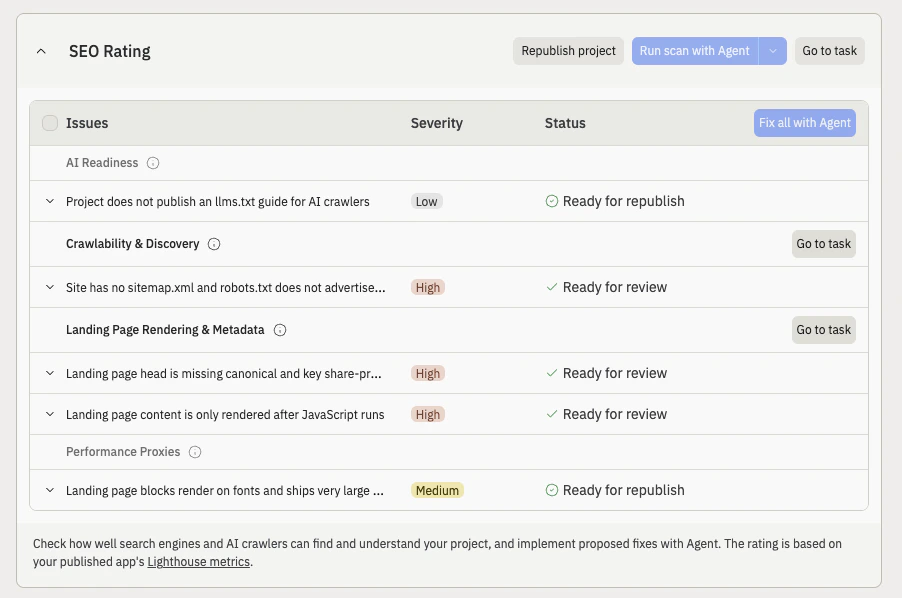
The SEO Rating card, listing issues by category with severity and status
Where to find it
Open the Publishing tool on a published app. The SEO rating appears on the deployment overview alongside your other build details. Hover the rating to see the specific action items Lighthouse flagged for each page.If you don’t see an SEO rating, your app is likely private or hasn’t been
published recently. The rating only appears for public web-facing apps that
have been published.
How to read your rating
Replit shows one of three ratings based on the Lighthouse audit:
If your app has multiple pages, the badge shows the lowest rating across every URL Replit crawled, so the worst page surfaces first instead of being averaged away.
When the rating is calculated
The audit runs automatically after every successful publish. The rating usually appears within a minute or two of a deployment going live, and the Publishing tool refreshes the badge as soon as results land.Supported deployment types
The SEO rating is calculated for public web-facing deployments where search engines can crawl URLs: Scheduled deployments and private deployments won’t produce an SEO rating because they do not serve public web traffic.Optimize SEO with Agent
An Optimize SEO with Agent button appears next to your rating. Selecting it opens SEO Agent in the Growth pane, where you can run a technical SEO audit, review the issues it finds, and apply one-click fixes. After Agent finishes its changes, republish your app. The SEO rating recalculates against the new build and the badge updates automatically. Common fixes Agent will apply:- Add or rewrite missing or generic
<title>tags so each page has a unique, descriptive title - Add a meta description to every page
- Add descriptive
alttext to images - Set the
langattribute on the<html>element - Make sure links have discernible text (no “click here” or empty anchors)
- Add a
robots.txtand asitemap.xml - Add a viewport meta tag for mobile rendering
- Improve color contrast on text that fails accessibility checks
- Add Open Graph and Twitter card meta tags so links to your app preview well on social platforms
Best practices for an SEO-optimized site on Replit
Whether you ask Agent to handle these for you or write them yourself, these are the highest-impact things to get right on a Replit-built app:- Give every page a unique title and meta description. Aim for titles under 60 characters and descriptions around 150–160 characters.
- Use semantic HTML. Wrap your layout in
<main>,<header>,<nav>, and<footer>. Use<h1>once per page and step heading levels in order. - Add alt text to every image. Describe what the image shows, not just what it is.
- Generate a
sitemap.xmlandrobots.txt. Ask Agent to create both so search engines know what to crawl. - Add Open Graph and Twitter card tags. Control how your app looks when shared on social media.
- Use a custom domain. A branded domain builds trust with both visitors and search engines. See Custom Domains.
- Pick the right deployment type. For content-heavy sites, Static Deployments deliver pre-rendered HTML that search engines parse instantly.
- Add structured data. JSON-LD markup helps search engines show rich results for products, articles, FAQs, and events.
- Keep your app fast. Optimize images, avoid render-blocking scripts, and lean on Replit’s hosting to keep response times low.
Next steps
- SEO Agent — run a technical SEO audit and apply one-click fixes from the Growth pane.
- Custom Domains — connect your own domain to your published app.
- Static Deployments — the best deployment type for content-heavy, SEO-critical sites.
- Project geography — choose where your app runs to keep response times low for your audience.
- Agent — learn more about working with Agent on your app.