

Project geography and Workspace
geography can differ. Workspace
geography controls where development resources for new Projects in a Workspace
are hosted.
What Project geography controls
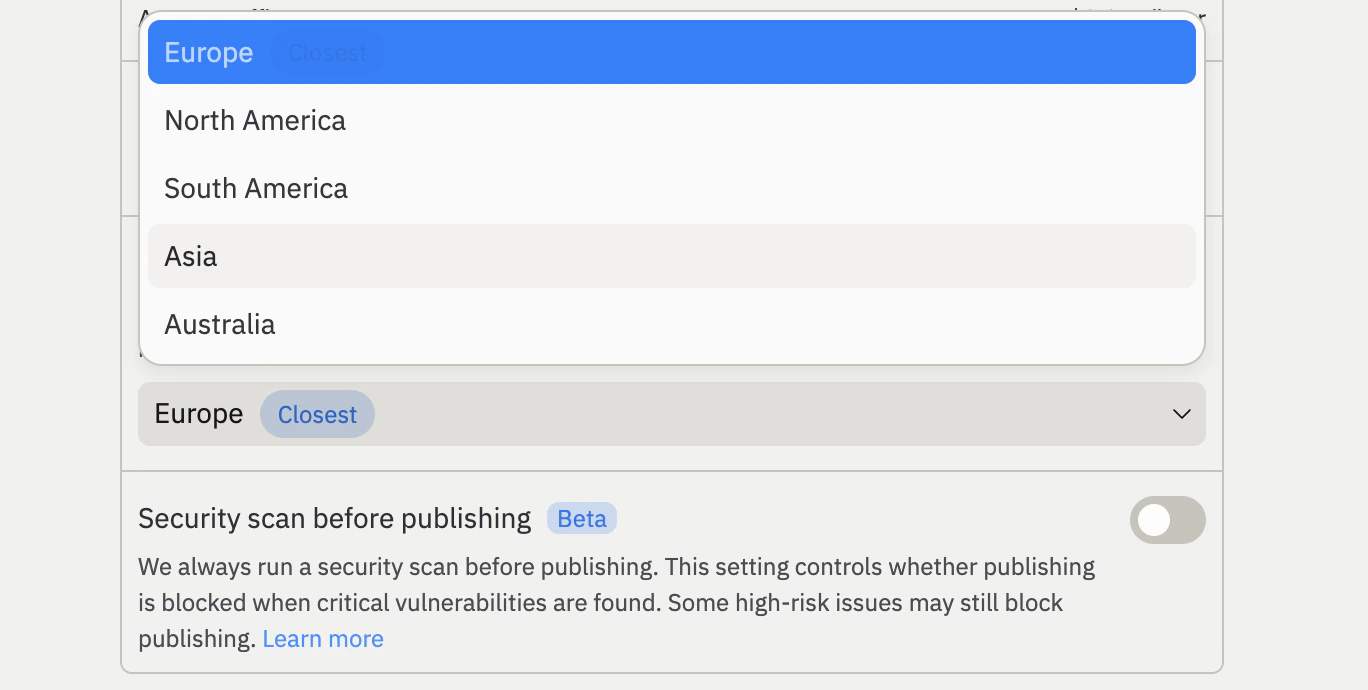
By default, Replit recommends the geography closest to you. This helps reduce latency for your app’s visitors and meet data residency requirements. When you select a geography, all published artifacts for your Project, such as compute, database, and Object Storage, are automatically colocated in the same region. A geography-specific proxy also helps reduce latency for your app’s visitors.Select a Project geography
To choose a geography other than the recommended one:1
Open the Publishing tool in your Replit Project.
2
Expand the Advanced settings.
3
Select your preferred geography from the Geography dropdown.
4
Select Publish to publish your Project to the selected geography.
Enforce a geography on published Projects
Enterprise admins can enforce a publishing geography for all Projects across their organization. When a policy is set, builders in the organization publish to the configured geography. This policy applies only to Projects that have not yet been published. Projects already published to a different geography are not affected.Enforcing a publishing geography is an Enterprise feature. To learn more about
Enterprise plans, see Pricing.
1
Navigate to your Account settings.
2
Select Advanced.
3
Choose the geography that all Projects published for the first time must
use.
Availability and limits
Project geography selection is available to Core, Pro, and Enterprise
customers. Free customers publish to North America by default.
- Geography cannot be changed after publishing. Once you publish your Project to a geography, that selection is permanent. You cannot migrate a published Project to a different geography.
- Development and published locations can differ. Resources such as Object Storage can be created before you publish and may not match your Project geography.
Next steps
- Publishing: Learn how to publish and manage a Replit App.
- Autoscale Deployments: Learn how autoscaling adjusts capacity based on traffic.
- Reserved VM Deployments: Publish your Project to a dedicated virtual machine.
- Published App Monitoring: View logs and monitor your published Project.