

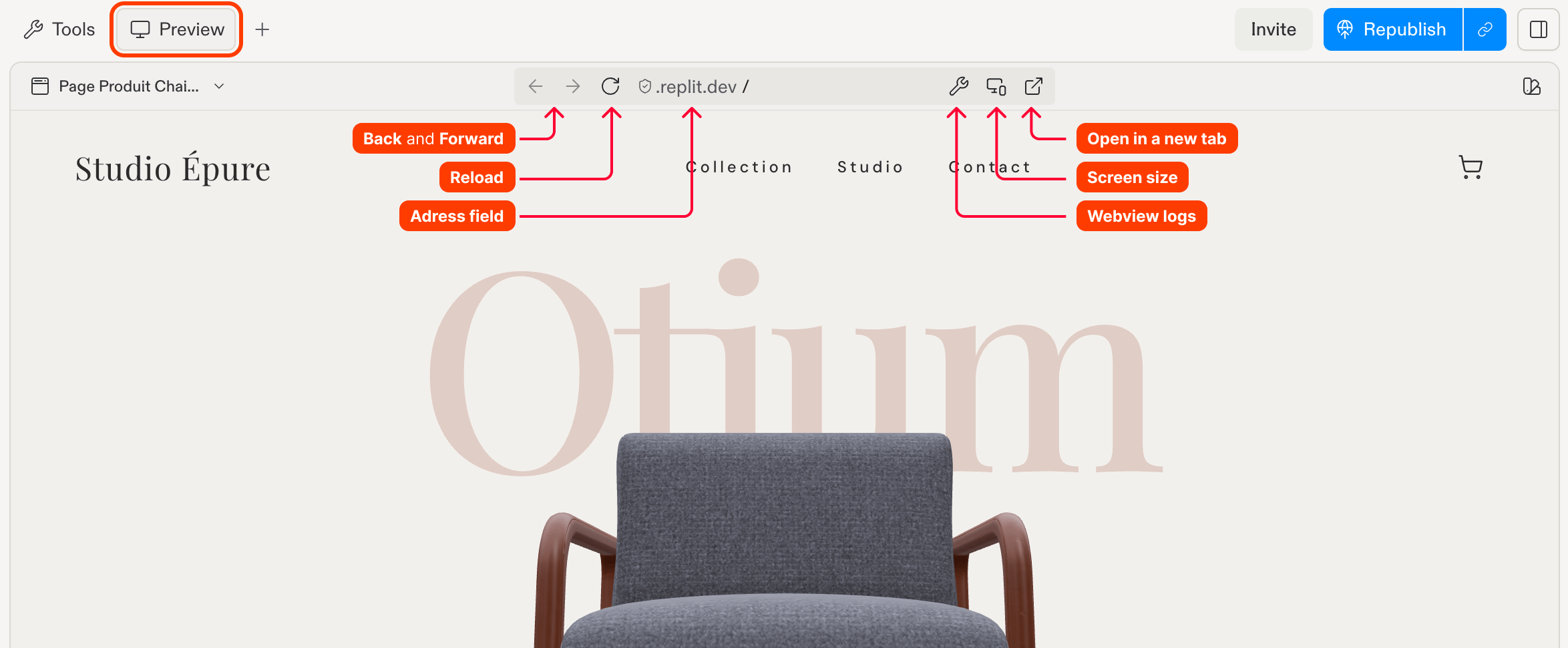
Features
Preview includes the following functionality to help you test and debug your web apps:- Live web view: See your app and interact with it without leaving your browser tab.
- Logs: Review browser and workflow output.
- Responsive testing: View your app in different screen sizes.
Usage
Preview automatically opens when you run a web app. You can toggle this behavior in User Settings, under App Preview, using Automatic Preview.How to access Preview
How to access Preview
In the Project Editor tab bar, select Preview, beside Tools.
Location bar
Once your web app is running, the location bar at the top of Preview provides navigation controls:- Back and Forward: Navigate through the app’s browsing history.
- Refresh: Reload the app.
- Address field: View the current URL path or enter a new path.
Browser tools
The location bar also provides:- Screen size: Select a screen-size preset to test responsive designs.
- Webview logs: Toggle the logs panel.
- Open in a new tab: Open your app in a separate browser tab.
Building a mobile app? Preview also supports mobile previews. See Native Mobile Apps for simulator and emulator details.