

Publish your app
The main pane walks you through everything your app needs to go live. Review each section, then select Publish.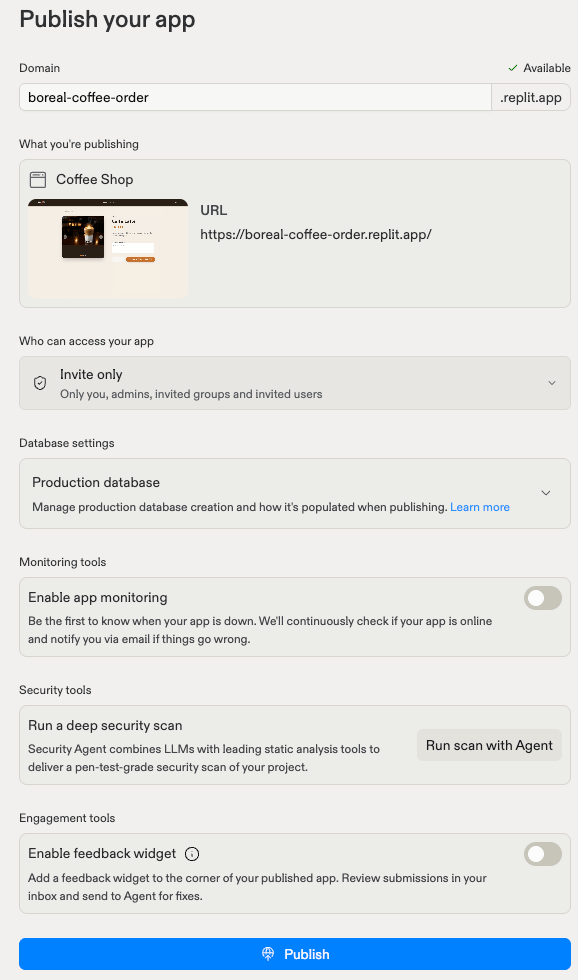
- Domain: The web address for your app. Replit suggests a
.replit.appname and checks that it’s available. You can change it, or connect a custom domain after publishing. - What you’re publishing: A preview of the app that will go live, with the URL it will use.
- Who can access your app: Choose Public, Password protected, Workspace only, or Invite only. The private options limit your app to your workspace or the people and groups you invite. Learn more about app access.
- Database settings: Manage how your app’s production database is created and filled with data when you publish. Learn more about production databases.
- Monitoring tools: Turn on app monitoring to be the first to know when your app is down. Replit continuously checks that your app is online and emails you if something goes wrong. Learn more about monitoring your app.
- Security tools: Run a deep security scan before you publish. Security Agent combines AI with leading static analysis tools to check your project for vulnerabilities. Learn more in the Project Security Center.
- Engagement tools: Turn on the feedback widget to add a feedback button to the corner of your published app. Review submissions in your inbox and send them to Agent for fixes.
Adjust settings
Select Adjust settings to manually configure how your app is hosted. Most builders never need to change these settings. Replit picks sensible defaults.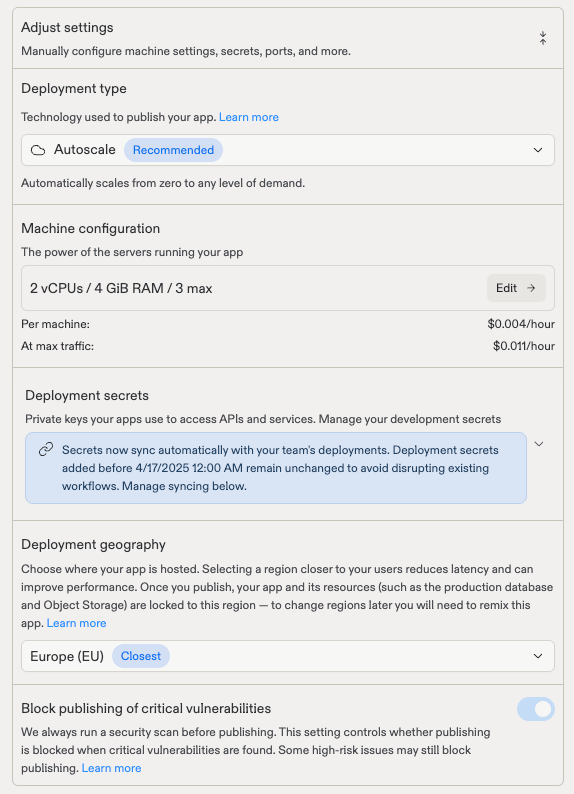
- Deployment type: The technology used to publish your app. Autoscale is recommended for most apps because it scales from zero to any level of demand. Compare deployment types.
- Machine configuration: The power of the servers running your app. Select Edit to change the CPU, memory, and the maximum number of machines. The pane shows the cost per machine and the cost at maximum traffic. Learn more about machine configuration.
- Deployment secrets: Private keys your app uses to access APIs and services (a secure, hidden storage area for sensitive values like API keys). Secrets sync automatically from your development environment to your published app when you publish or republish. Learn more about Secrets.
- Deployment geography: Where your app is hosted. Choosing a region closer to your users reduces latency. Once you publish, your app and its resources are locked to this region. To change regions later, remix the app. Learn more about Project geography.
- Block publishing of critical vulnerabilities: Replit always runs a security scan before publishing. This setting controls whether publishing is blocked when critical vulnerabilities are found. Learn more in the Project Security Center.
Next steps
Publish walkthrough
A step-by-step guide from Publish button to live URL.
Custom domains
Buy a domain or connect one you already own.
Monitor your app
Logs, analytics, and uptime monitoring for your published app.
When to use Autoscale, Static, Reserved VM, or Scheduled.