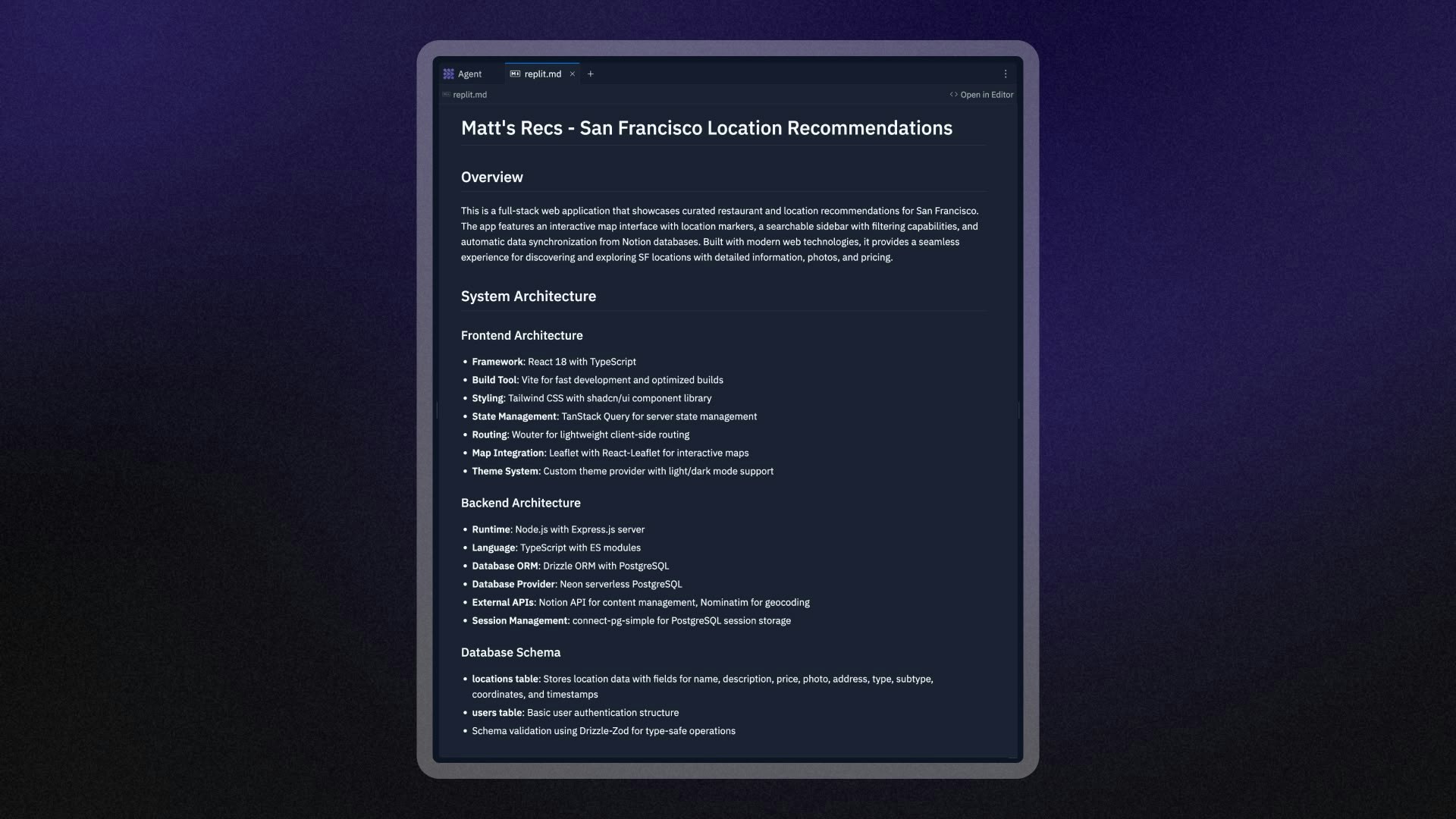
Agent는 검증된 모범 사례를 사용하여 프로젝트 루트 디렉토리에 이 파일을 자동으로 생성합니다. Agent는 파일 내용을 컨텍스트에 포함하여 사용자의 환경 설정, 프로젝트 구조, 코딩 스타일을 이해하는 데 활용합니다.
replit.md의 작동 방식
Agent는 먼저 검증된 모범 사례를 사용하여 프로젝트 루트 디렉토리에 replit.md 파일을 생성합니다. 이 파일에는 다음이 포함됩니다:
- 기본 프로젝트 정보
- 권장 코딩 패턴
- 프로젝트 유형에 맞는 일반적인 환경 설정
Agent가 요청을 처리할 때 replit.md 파일을 자동으로 읽고 그 내용을 다음과 같은 목적으로 활용합니다:
- 프로젝트의 아키텍처 및 규칙 이해
- 선호하는 코딩 패턴 및 스타일 따르기
- 지정된 패키지 관리자 및 의존성 사용
Agent는 프로젝트에 대해 더 많이 파악하고 애플리케이션을 변경하면서 replit.md 파일을 업데이트할 수도 있습니다.
replit.md 파일을 편집하여 Agent의 동작을 맞춤 설정할 수 있습니다.
replit.md 설정
자동 생성
Agent로 새 프로젝트를 만들면 검증된 모범 사례를 사용하여 replit.md 파일이 자동으로 생성됩니다. 이 파일은 프로젝트 루트 디렉토리에 나타나며 다음을 포함합니다:
- 기본 프로젝트 정보
- 권장 코딩 패턴
- 프로젝트 유형에 맞는 일반적인 환경 설정
수동 생성
프로젝트 루트 디렉토리에 replit.md라는 새 파일을 추가하여 직접 만들 수 있습니다. Agent는 향후 대화에서 이 파일을 자동으로 감지하고 사용합니다.
replit.md는 올바르게 작동하려면 프로젝트 루트 디렉토리에 위치해야 합니다.
replit.md 재생성
replit.md 파일이 손상되었거나 새로 시작하고 싶을 때:
- 프로젝트 루트에서 기존
replit.md 파일을 삭제합니다
- Agent와 새 대화를 시작합니다
- Agent가 현재 프로젝트를 기반으로 새
replit.md 파일을 자동으로 생성합니다
모범 사례
구체적이고 명확하게 작성하기
Agent가 원하는 바를 정확히 이해할 수 있도록 명확하고 구체적인 지침을 작성하세요:
## Coding Style

- Use TypeScript for all new JavaScript files
- Prefer functional components with hooks over class components
- Use Tailwind CSS for styling, avoid inline styles
- Always include TypeScript types for function parameters and return values
예시 사용하기
예시는 추상적인 설명보다 Agent가 선호도를 더 잘 이해하는 데 도움이 됩니다:
## API Error Handling

When creating API endpoints, always use this error handling pattern:

```javascript
app.get('/api/users', async (req, res) => {
  try {
    const users = await getUsersFromDatabase();
    res.json({ success: true, data: users });
  } catch (error) {
    console.error('Error fetching users:', error);
    res.status(500).json({
      success: false,
      error: 'Failed to fetch users'
    });
  }
});
커뮤니케이션 선호도 정의하기
Agent가 정보와 업데이트를 제공하는 방식을 설정하세요:
## Communication Style

- Before implementing changes, explain what you're going to do and why
- Break down complex tasks into clear steps
- Ask for clarification if requirements are unclear
- Provide brief explanations for technical decisions
프로젝트 컨텍스트 지정하기
Agent가 프로젝트의 목적과 제약을 이해할 수 있도록 도와주세요:
## Project Context

This is a social media app for book lovers where users can:
- Create reading lists and share book recommendations
- Follow other readers and see their updates
- Rate and review books they've read

Target audience: Casual readers aged 25-45
Tech stack: React frontend, Node.js backend, PostgreSQL database
replit.md 구성 예시
웹 애플리케이션 프로젝트
# MyApp Project Guidelines

## Project Overview
A task management web application built with React and Express.js.

## Technology Preferences
- Frontend: React with TypeScript, Tailwind CSS
- Backend: Express.js with TypeScript
- Database: Neon PostgreSQL with Drizzle ORM
- Package Manager: npm (not yarn or pnpm)

## Coding Standards
- Use functional components with hooks
- Implement proper error boundaries
- Follow REST API conventions for endpoints
- Use descriptive variable and function names

## Communication Style
- Explain your approach before making changes
- Provide code comments for complex logic
- Ask questions if requirements are ambiguous
데이터 분석 프로젝트
# Data Analysis Project Guidelines

## Project Context
Analyzing customer behavior data to identify trends and insights.

## Technology Preferences
- Python with Streamlit for interactive web applications
- pandas, numpy, and matplotlib for data analysis

## Analysis Standards
- Include clear documentation for all analysis steps
- Create interactive visualizations with Streamlit components
- Validate data quality before analysis
- Export results to CSV format and display in Streamlit tables

## Communication Style
- Explain statistical methods and assumptions
- Provide context for findings and recommendations
- Use clear, non-technical language for business insights
- Create interactive dashboards for stakeholder presentations
API 개발 프로젝트
# API Development Guidelines

## Project Overview
Building a RESTful API for a mobile app backend.

## Technology Stack
- Node.js with Express.js
- MongoDB with Mongoose
- JWT for authentication
- Package manager: npm

## API Standards
- Use semantic HTTP status codes
- Implement proper input validation
- Include rate limiting on public endpoints
- Follow OpenAPI specification for documentation

## Security Requirements
- Validate all user inputs
- Use environment variables for sensitive data
- Implement proper CORS policies
- Include request logging for debugging

## Testing Approach
- Write unit tests for all endpoints
- Include integration tests for critical flows
- Use Jest as the testing framework
고급 활용
동적 프로젝트 안내
프로젝트가 발전함에 따라 현재 컨텍스트를 제공하기 위해 replit.md 파일을 업데이트하세요:
## Current Development Phase
The team is currently focused on implementing user authentication.
Priority features:
1. User registration and login
2. Password reset functionality
3. Email verification

## Recent Decisions
- Switched from local authentication to OAuth with Google
- Added Redux for state management
- Decided to use Material-UI for consistent styling
외부 도구와의 통합
replit.md에서 외부 문서 및 도구를 참조하세요:
## External Resources
- Design system: Follow the Figma design system at [link]
- API documentation: Reference our internal API docs
- Coding standards: Follow the team style guide in our wiki

## Deployment Process
- Test changes in development environment first
- Use the CI/CD pipeline for staging published apps
- Require code review before production releases
웹 검색과 replit.md 결합하기
Agent는 웹 검색을 수행하여 최신 정보, 라이브러리, 솔루션을 찾을 수 있습니다. replit.md 파일과 결합하면 최신 지식과 프로젝트별 지침을 함께 활용할 수 있습니다.
웹 검색 통합을 위한 모범 사례
Agent가 조사할 내용을 구체적으로 명시하세요:
## Research Preferences
- Always check for the latest versions of dependencies before suggesting updates
- Research current best practices for security implementations
- Look up recent performance optimization techniques for our tech stack
## External Research Guidelines
- When suggesting new libraries, ensure compatibility with our existing stack
- Adapt external examples to match our coding standards and project structure
- Verify that suggested solutions work with our publishing environment
replit.md에 정의된 컴포넌트 패턴에 따라 구현해 주세요”
이 접근 방식은 최신 정보와 특정 프로젝트 요구사항에 맞는 솔루션을 동시에 제공합니다.
제한 사항
파일 크기 및 콘텐츠 제한
replit.md에 엄격한 문자 제한은 없지만 매우 큰 파일은 완전히 처리되지 않을 수 있습니다. 최상의 결과를 위해 replit.md를 집중적이고 간결하게 유지하세요.
루트 디렉토리 요구 사항
replit.md는 프로젝트 루트 디렉토리에 존재해야 합니다. Agent는 하위 디렉토리의 파일을 자동으로 감지하지 않습니다.
컨텍스트 범위
replit.md는 Agent 대화에 컨텍스트를 제공하지만 다른 AI 도구에 자동으로 적용되지는 않습니다.
다음 단계
프로젝트에 맞게 Agent를 맞춤 설정할 준비가 되셨나요?
- 간단하게 시작하기: 주요 환경 설정이 담긴 기본
replit.md 만들기
- 반복적으로 개선하기: Agent와 작업하면서
replit.md 업데이트하기
- 패턴 공유하기: 성공적인
replit.md 구성을 유사한 프로젝트에 활용하기
- 효과 모니터링하기: Agent가 지침을 얼마나 잘 따르는지 살펴보고 필요에 따라 조정하기
Agent 작업하기 또는 다른 AI 도구 탐색에 대해 더 자세히 알아보세요.
Enterprise: 사용자 정의 템플릿에 replit.md를 미리 구성하여 조직의 모든 빌더에게 일관된 시작 컨텍스트를 제공하세요. 디자인 관련 지침은 디자인 시스템 설정을 참조하세요.