Choose release settings, publish your app, verify the live version, and monitor it after launch.
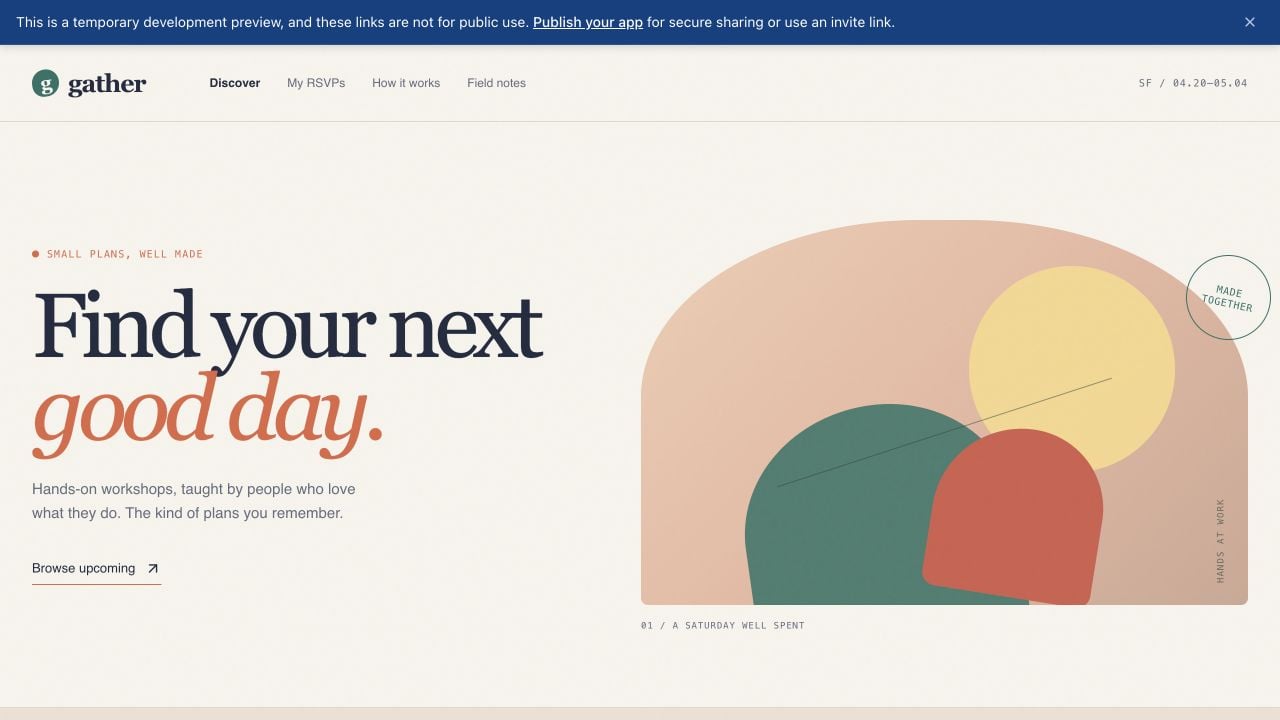
You have probably built and tested your app in Preview, and now you want other people to use it. The preview URL is private by default, temporary, and intended for development—it is not the link to distribute publicly. Sharing a private preview URL does not grant access to your app. When you open it, a banner points you to publishing for secure sharing.
Publishing creates a production deployment: a stable, shareable version of your app that runs at its own URL. The development preview is where you build and test; the production deployment is the version your visitors use. Because they are separate, you can continue working without changing the live app until you publish again.Publishing is more than making the preview public. Replit packages the app, provisions the resources it needs, checks the release, and routes a domain to the resulting deployment.
Before opening Publishing, use Preview to test the main user journey, check the layout at the screen sizes you support, and fix any errors reported by Agent. Publishing makes the current version available to other people, so avoid including secrets or private test data in the app.
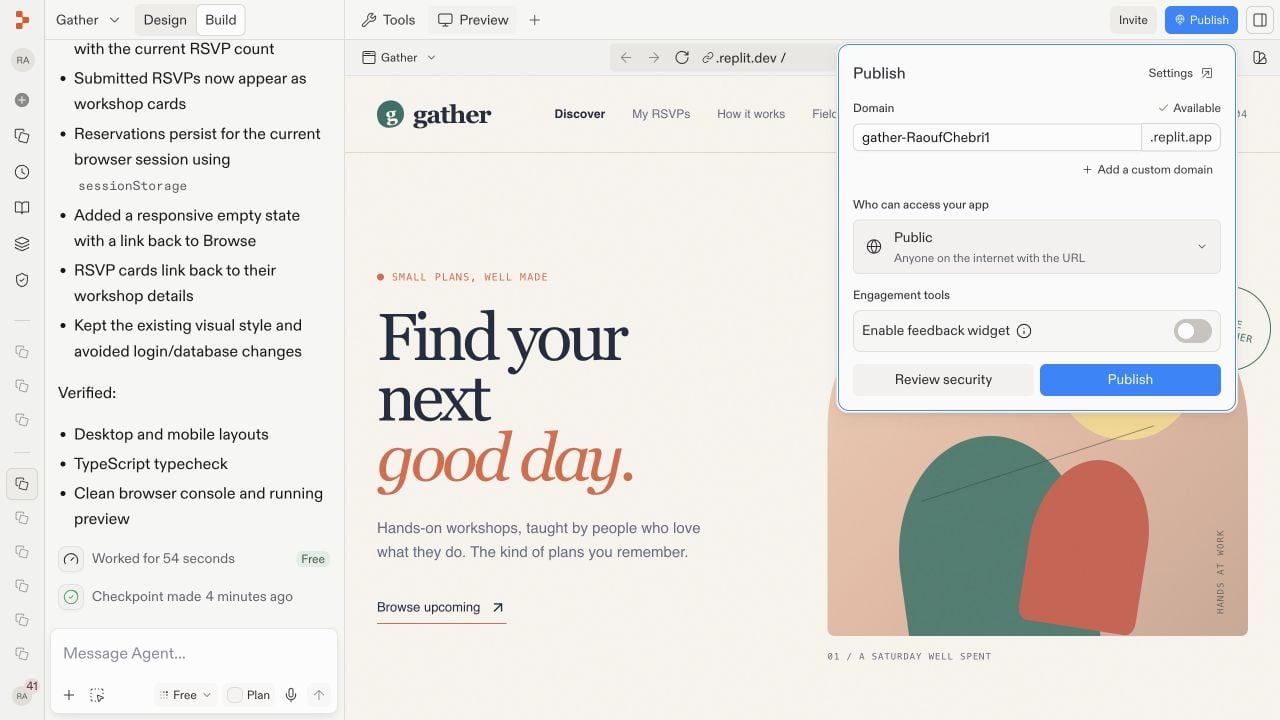
While working in Build, select Publish in the upper-right corner of the Project Editor to open the quick-publish dialog.
Open Publish from Build to review the domain and access settings.
For the detailed publishing settings, select Tools in the pane header, then Publishing under Replit Cloud.
The remaining steps use this pane, including the Sharing and Suggested add-ons screenshot below.
You can also ask Agent in the prompt box: Publish this app. Agent can prepare the release or direct you to the required confirmation.
2
Choose the domain and access settings
A domain is the address visitors use to reach your deployment. Review the generated .replit.app domain and change its available name if needed. Then choose an access level, which determines who is allowed to open the app:
Public makes the app available to anyone with the link.
Password protected requires visitors to enter a shared password.
Workspace only limits access to members of your workspace.
Invite only limits access to the people or groups you select.
For details on each option, see App access.Choose the access level in the Sharing section of the Publishing pane.
3
Review security and publish
Under Suggested add-ons, select Run scan beside Deep security scan if you want to review security before publishing. Review Block publishing of critical vulnerabilities and the optional monitoring, analytics, and feedback-widget settings.
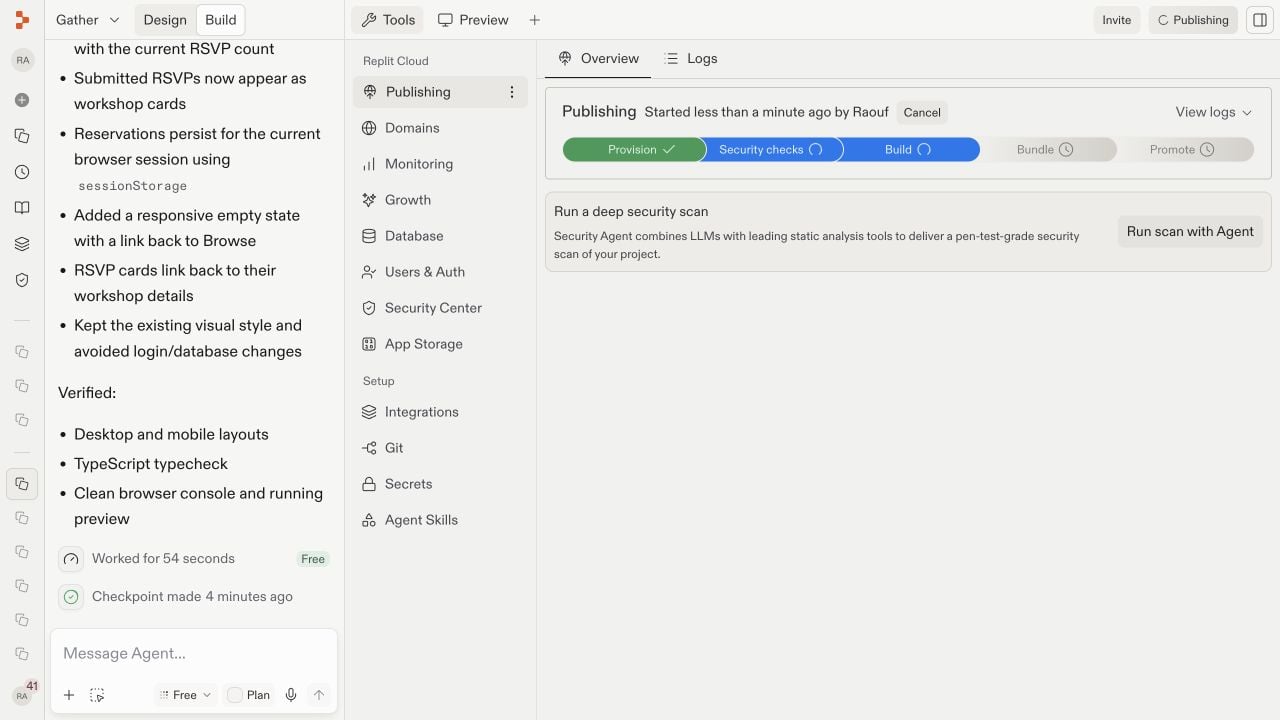
When the domain, access, and security settings are ready, select Publish in the Publishing pane.Replit provisions the deployment, runs security checks, builds and bundles the app, and promotes the release. Provisioning prepares its cloud resources; building and bundling turn the project into a production-ready package; promoting makes that package the live version. Keep the project open while the stages complete.
4
Open and verify the live app
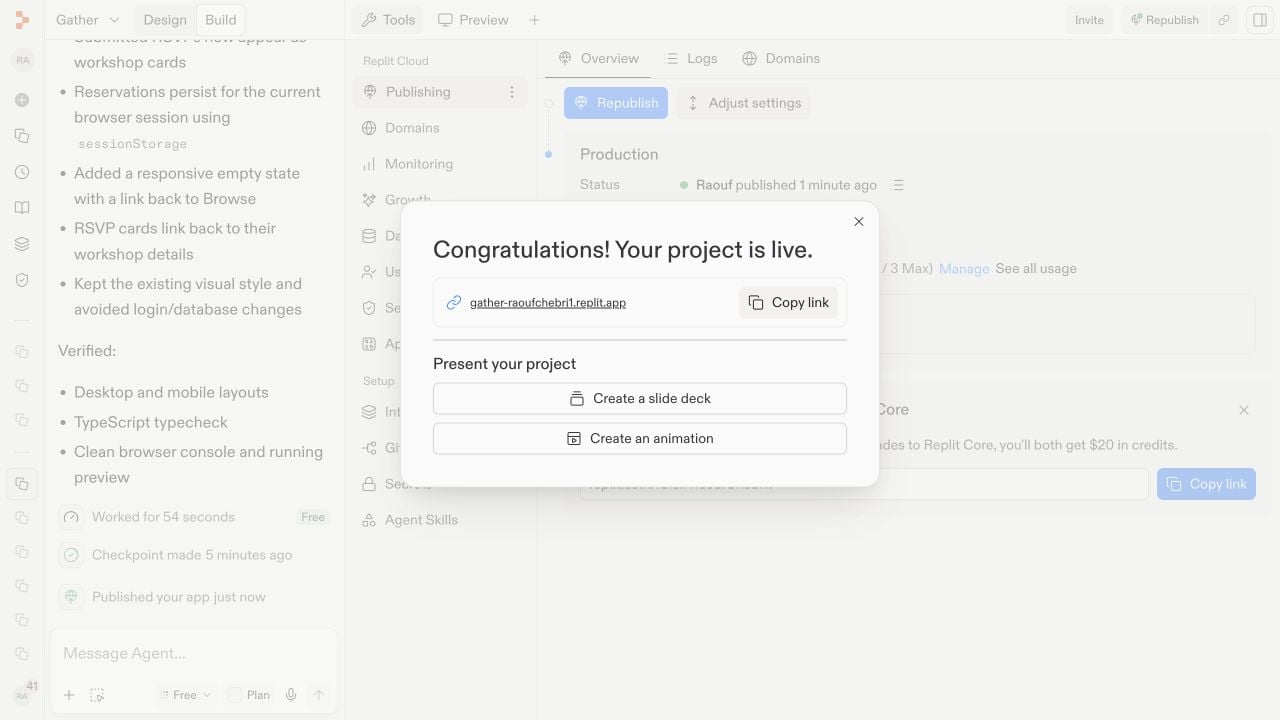
When publishing finishes, Replit shows the deployment status and public URL. Open the URL and test the live app — not only the development preview — to confirm that its pages and most important actions work as expected.
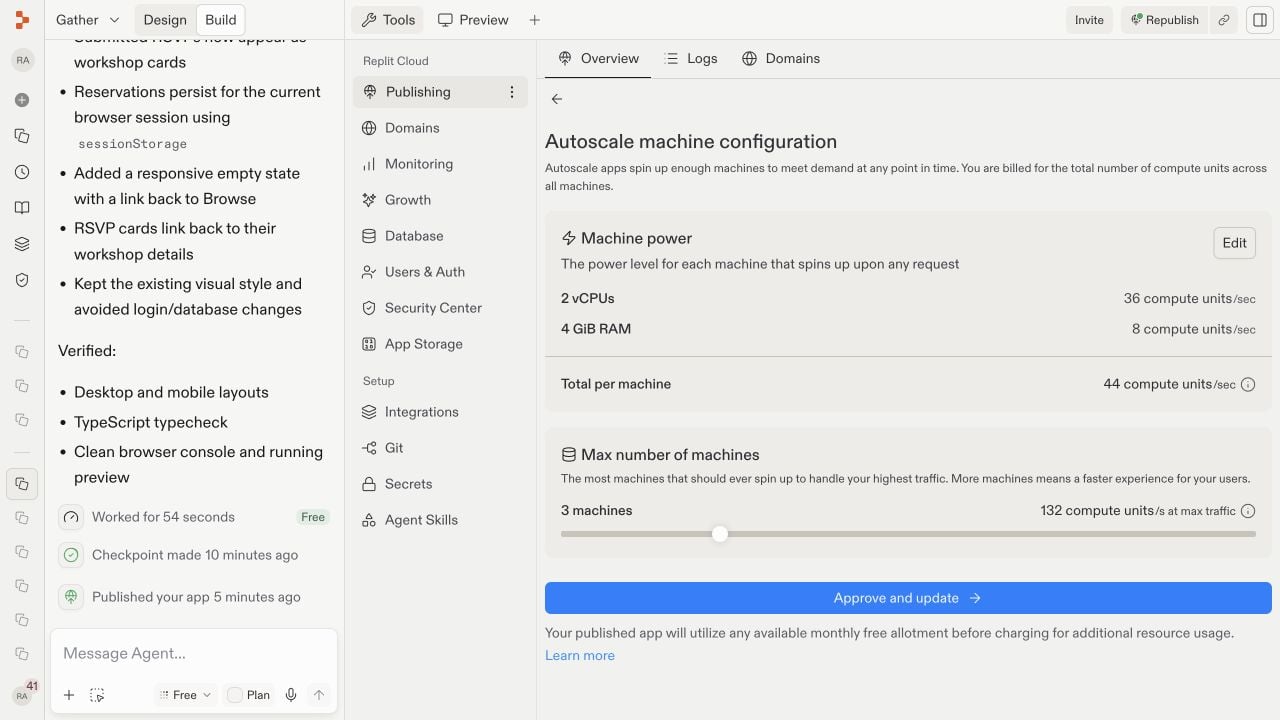
After publishing, the project has two related parts: the editable project where you continue building and the production deployment currently serving visitors. Open Tools to inspect and manage that production environment.The Publishing pane is the deployment overview. It shows whether the latest release succeeded, who can access it, where it runs, how it is hosted, which resources it can use, and which domains point to it.The deployment type describes how Replit runs the app. Autoscale starts more machines as traffic changes. Reserved VM keeps a machine continuously available. Static serves files that need no running backend, while Scheduled runs a program on a timetable. See Deployment types to compare them.Machine power is the CPU and memory available to each instance. The maximum machine count limits how far Autoscale can expand. See Machine configuration. More resources can improve capacity and increase usage costs.Deployment geography controls the region where the app runs. A region closer to most visitors can reduce latency. See Project geography.Depending on your app and plan, Adjust settings or Manage exposes these controls along with production secrets and related deployment options.These are optional production controls. You do not need to change them to share a typical app, and some changes can affect availability or usage costs.
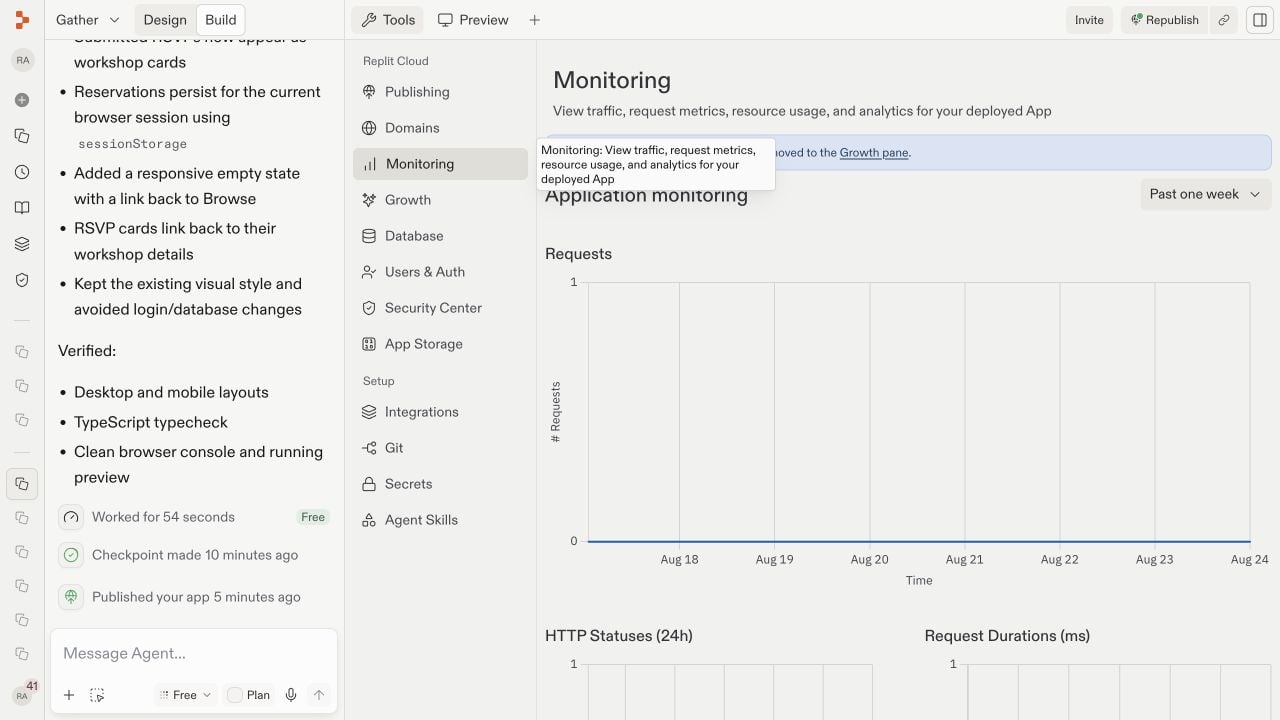
Monitoring answers a production question: Is the app healthy and responding well? Open Monitoring under Replit Cloud in the Tools pane. It shows requests, HTTP statuses, response durations, CPU utilization, and memory utilization. Status codes reveal failed requests, while durations reveal slow responses. CPU and memory charts help identify resource limits. New releases may show little data until the live app receives traffic. For the full tour, see Monitoring your app.
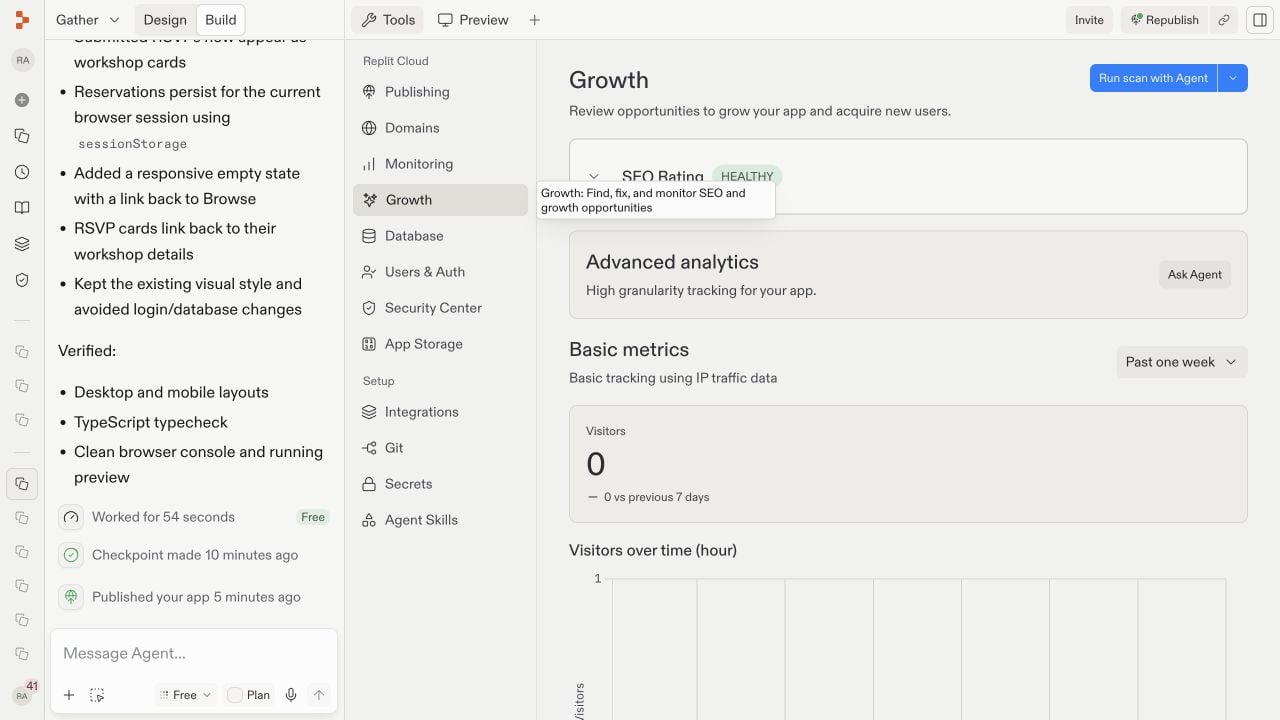
Growth answers a different question: Are people finding and using the app? Open Growth under Replit Cloud in the Tools pane. Basic metrics include visitors, top pages, referrers, countries, browsers, and devices. These show where an audience comes from and what attracts attention. The SEO rating measures how well published pages are prepared for search engines. Builders on a paid plan can use SEO Agent to scan for improvements. Analytics populate after the published app receives traffic.
Changes in the Project Editor do not automatically replace the live release. This separation lets you prepare and test a change without disrupting visitors. Test your changes in Preview, then select Republish when you are ready. Republishing creates a new production release at the same URL, so you do not need to send visitors a new link.After republishing, open the public URL again and verify the changed behavior. If a release fails, use the publishing status and logs to identify the failing stage before trying again.
{"docsConfig":{"theme":"aspen","$schema":"https://mintlify.com/docs.json","name":"Replit","colors":{"primary":"#FF3C00","light":"#FF3C00","dark":"#FF3C00"},"logo":{"light":"https://mintcdn.com/replit/j4of5To8jzehz0JK/logo/light.svg?fit=max\u0026auto=format\u0026n=j4of5To8jzehz0JK\u0026q=85\u0026s=6209cb5927b56fd1781133af05428373","dark":"https://mintcdn.com/replit/j4of5To8jzehz0JK/logo/dark.svg?fit=max\u0026auto=format\u0026n=j4of5To8jzehz0JK\u0026q=85\u0026s=9cbba158300d48c49d8b888e71015495","href":"/welcome"},"favicon":"https://mintcdn.com/replit/CmOMKRnamiqG44eH/favicon.ico?fit=max\u0026auto=format\u0026n=CmOMKRnamiqG44eH\u0026q=85\u0026s=c89a6df6f537373c946c7a5f0ac65475","appearance":{"default":"light"},"background":{"color":{"light":"#F6F5F4","dark":"#1E1E1F"}},"navbar":{"links":[],"primary":{"type":"button","label":"Start Building","href":"https://replit.com?ref=docs"}},"footer":{"socials":{"x":"https://x.com/replit","linkedin":"https://www.linkedin.com/company/repl-it","youtube":"https://www.youtube.com/@replit"}},"seo":{"metatags":{"og:site_name":"Replit Docs","twitter:site":"@replit","twitter:creator":"@replit","author":"Replit"},"indexing":"all"},"fonts":{"heading":{"family":"ABC Diatype Plus","weight":400,"source":"https://cdn.replit.com/dotcom/fonts/ABCDiatypePlusVariable.woff2","format":"woff2"},"body":{"family":"ABC Diatype Plus","weight":400,"source":"https://cdn.replit.com/dotcom/fonts/ABCDiatypePlusVariable.woff2","format":"woff2"}},"integrations":{"segment":{"key":"dMePKGC4BqfBivpe0Hvl8IoPpzSHgjdX"}},"contextual":{"options":["copy","view"],"display":"header"},"thumbnails":{"appearance":"light","background":"https://mintcdn.com/replit/j4of5To8jzehz0JK/thumb.png?fit=max\u0026auto=format\u0026n=j4of5To8jzehz0JK\u0026q=85\u0026s=a7db7f0256b2fa06810fb4d378e63cc5","fonts":{"family":"ABC Diatype Plus"}},"styling":{"latex":true},"navigation":{"languages":[{"language":"en","href":"welcome"},{"language":"fr","navbar":{"links":[],"primary":{"type":"button","label":"Commencer à créer","href":"https://replit.com?ref=docs"}},"href":"fr/welcome"},{"language":"pt","hidden":false,"navbar":{"links":[],"primary":{"type":"button","label":"Comece a criar","href":"https://replit.com?ref=docs"}},"href":"pt/welcome"},{"language":"ja","hidden":false,"navbar":{"links":[],"primary":{"type":"button","label":"作成を開始","href":"https://replit.com?ref=docs"}},"href":"ja/welcome"},{"language":"ko","hidden":false,"navbar":{"links":[],"primary":{"type":"button","label":"빌드 시작하기","href":"https://replit.com?ref=docs"}},"href":"ko/welcome"}]}},"deployment":{"deploymentMetadataValue":{"subdomain":"replit","hasAudioNarration":false,"actualSubdomain":"replit","customDomains":["docs.replit.com","docs.repl.it"],"gitSource":{"type":"github","owner":"replit","repo":"replit-docs","deployBranch":"main","contentDirectory":"docs","isPrivate":true,"mountPath":"","label":""},"feedback":{"thumbs":true,"issues":true,"edits":false},"entitlements":{"AI_CHAT":{"status":"DISABLED"},"REMOVE_BRANDING":{"status":"ENABLED"},"CONTEXTUAL_FEEDBACK":{"status":"ENABLED"},"CODE_SNIPPET_FEEDBACK":{"status":"ENABLED"},"WEB_MCP":{"status":"ENABLED"},"NARRATION":{"status":"DISABLED"}},"buildId":"6aee55254219cf14872521f4","clientVersion":"0.0.4087","searchFilterCounts":[{"language":"en","tag":"Features","count":360},{"language":"fr","tag":"Fonctionnalités","count":359},{"language":"ja","tag":"機能","count":359},{"language":"ko","tag":"기능","count":359},{"language":"pt","tag":"Funcionalidades","count":359},{"language":"en","tag":"Changelog","count":100},{"language":"fr","tag":"Journal des modifications","count":99},{"language":"ja","tag":"変更履歴","count":99},{"language":"ko","tag":"변경 내역","count":99},{"language":"pt","tag":"Registro de alterações","count":99},{"language":"en","tag":"Apps","count":41},{"language":"fr","tag":"Apps","count":41},{"language":"ja","tag":"Apps","count":41},{"language":"ko","tag":"Apps","count":41},{"language":"pt","tag":"Apps","count":41},{"language":"en","tag":"Enterprise","count":40},{"language":"fr","tag":"Entreprise","count":40},{"language":"ja","tag":"Enterprise","count":40},{"language":"ko","tag":"Enterprise","count":40},{"language":"pt","tag":"Enterprise","count":40},{"language":"en","tag":"Use cases","count":39},{"language":"fr","tag":"Use cases","count":39},{"language":"ja","tag":"Use cases","count":39},{"language":"ko","tag":"Use cases","count":39},{"language":"pt","tag":"Use cases","count":39},{"language":"en","tag":"Chats","count":25},{"language":"en","tag":"Designs","count":25},{"language":"fr","tag":"Chats","count":25},{"language":"fr","tag":"Designs","count":25},{"language":"ja","tag":"Chats","count":25},{"language":"ja","tag":"Designs","count":25},{"language":"ko","tag":"Chats","count":25},{"language":"ko","tag":"Designs","count":25},{"language":"pt","tag":"Chats","count":25},{"language":"pt","tag":"Designs","count":25},{"language":"en","tag":"Trust \u0026 Billing","count":23},{"language":"fr","tag":"Confiance et facturation","count":23},{"language":"ja","tag":"信頼と請求","count":23},{"language":"ko","tag":"신뢰 및 결제","count":23},{"language":"pt","tag":"Confiança e faturamento","count":23},{"language":"en","tag":"Web","count":22},{"language":"fr","tag":"Web","count":22},{"language":"ja","tag":"Web","count":22},{"language":"ko","tag":"Web","count":22},{"language":"pt","tag":"Web","count":22},{"language":"en","tag":"Help","count":20},{"language":"fr","tag":"Help","count":20},{"language":"ja","tag":"Help","count":20},{"language":"ko","tag":"Help","count":20},{"language":"pt","tag":"Help","count":20}]},"assistantConfig":{"deflection":{"enabled":true,"email":"support@replit.com"}},"basePath":"","hasChatPermissions":false,"hasWebMcpPermissions":true,"toggles":[{"name":"kill-isr","enabled":true,"variant":{"name":"disabled","enabled":false,"feature_enabled":true},"impressionData":false},{"name":"agent-mintlify-slack","enabled":true,"variant":{"name":"disabled","enabled":false,"feature_enabled":true},"impressionData":false},{"name":"agent-integrations-settings","enabled":true,"variant":{"name":"disabled","enabled":false,"feature_enabled":true},"impressionData":false},{"name":"rbac-expansion","enabled":true,"variant":{"name":"disabled","enabled":false,"feature_enabled":true},"impressionData":false},{"name":"automations-pr-grouping","enabled":true,"variant":{"name":"disabled","enabled":false,"feature_enabled":true},"impressionData":false},{"name":"custom-prefix","enabled":true,"variant":{"name":"disabled","enabled":false,"feature_enabled":true},"impressionData":false},{"name":"analytics-v7","enabled":true,"variant":{"name":"disabled","enabled":false,"feature_enabled":true},"impressionData":false},{"name":"user-flows-analytics","enabled":true,"variant":{"name":"disabled","enabled":false,"feature_enabled":true},"impressionData":false},{"name":"no-publish-flow","enabled":true,"variant":{"name":"disabled","enabled":false,"feature_enabled":true},"impressionData":false},{"name":"workos-onboarding","enabled":true,"variant":{"name":"disabled","enabled":false,"feature_enabled":true},"impressionData":false},{"name":"llms-txt-v2","enabled":true,"variant":{"name":"disabled","enabled":false,"feature_enabled":true},"impressionData":false},{"name":"snapshot-serving-live","enabled":true,"variant":{"name":"disabled","enabled":false,"feature_enabled":true},"impressionData":false},{"name":"stripTemperatureMiddleware","enabled":true,"variant":{"name":"disabled","enabled":false,"feature_enabled":true},"impressionData":false},{"name":"support-platform-pylon-zendesk","enabled":true,"variant":{"name":"disabled","enabled":false,"feature_enabled":true},"impressionData":false},{"name":"snapshot-serving","enabled":true,"variant":{"name":"disabled","enabled":false,"feature_enabled":true},"impressionData":false},{"name":"instant-rollback","enabled":true,"variant":{"name":"disabled","enabled":false,"feature_enabled":true},"impressionData":false},{"name":"granular-notifications-server","enabled":true,"variant":{"name":"disabled","enabled":false,"feature_enabled":true},"impressionData":false},{"name":"granular-notifications","enabled":true,"variant":{"name":"disabled","enabled":false,"feature_enabled":true},"impressionData":false},{"name":"automations-fable","enabled":true,"variant":{"name":"disabled","enabled":false,"feature_enabled":true},"impressionData":false},{"name":"fixed-ai-action-pricing","enabled":true,"variant":{"name":"disabled","enabled":false,"feature_enabled":true},"impressionData":false},{"name":"automation-resolve-merge-conflict","enabled":true,"variant":{"name":"disabled","enabled":false,"feature_enabled":true},"impressionData":false},{"name":"scoped-publishing","enabled":true,"variant":{"name":"disabled","enabled":false,"feature_enabled":true},"impressionData":false},{"name":"mintql","enabled":true,"variant":{"name":"disabled","enabled":false,"feature_enabled":true},"impressionData":false},{"name":"page-level-analytics","enabled":true,"variant":{"name":"disabled","enabled":false,"feature_enabled":true},"impressionData":false},{"name":"editor-version-history-v2","enabled":true,"variant":{"name":"disabled","enabled":false,"feature_enabled":true},"impressionData":false},{"name":"billing-page-v2","enabled":true,"variant":{"name":"disabled","enabled":false,"feature_enabled":true},"impressionData":false},{"name":"full-page-search","enabled":true,"variant":{"name":"disabled","enabled":false,"feature_enabled":true},"impressionData":false},{"name":"workspace-projects","enabled":true,"variant":{"name":"disabled","enabled":false,"feature_enabled":true},"impressionData":false},{"name":"assistant-v5","enabled":true,"variant":{"name":"disabled","enabled":false,"feature_enabled":true},"impressionData":false},{"name":"fork-pr-previews","enabled":true,"variant":{"name":"disabled","enabled":false,"feature_enabled":true},"impressionData":false},{"name":"revalidation-jwt","enabled":true,"variant":{"name":"disabled","enabled":false,"feature_enabled":true},"impressionData":false},{"name":"workos-sso-scim","enabled":true,"variant":{"name":"disabled","enabled":false,"feature_enabled":true},"impressionData":false},{"name":"hobby-abuse-scan","enabled":true,"variant":{"name":"disabled","enabled":false,"feature_enabled":true},"impressionData":false},{"name":"dashboard-inbox","enabled":true,"variant":{"name":"disabled","enabled":false,"feature_enabled":true},"impressionData":false},{"name":"workos-signup","enabled":true,"variant":{"name":"disabled","enabled":false,"feature_enabled":true},"impressionData":false},{"name":"turbopuffer-dual-write","enabled":true,"variant":{"name":"disabled","enabled":false,"feature_enabled":true},"impressionData":false},{"name":"workos-enabled","enabled":true,"variant":{"name":"disabled","enabled":false,"feature_enabled":true},"impressionData":false},{"name":"approve-review-flow","enabled":true,"variant":{"name":"disabled","enabled":false,"feature_enabled":true},"impressionData":false},{"name":"editor-metadata","enabled":true,"variant":{"name":"disabled","enabled":false,"feature_enabled":true},"impressionData":false},{"name":"sso-setup-deadline-banner","enabled":true,"variant":{"name":"disabled","enabled":false,"feature_enabled":true},"impressionData":false},{"name":"turbopuffer-serve","enabled":true,"variant":{"name":"disabled","enabled":false,"feature_enabled":true},"impressionData":false},{"name":"live-agents","enabled":true,"variant":{"name":"disabled","enabled":false,"feature_enabled":true},"impressionData":false},{"name":"comment-mode","enabled":true,"variant":{"name":"disabled","enabled":false,"feature_enabled":true},"impressionData":false}],"googleFontsInlined":false},"customCss":[{"filePath":"styles.css","href":"/_mintlify/custom/replit/795eee5cda55dee3/styles.css"}],"page":{"pagePath":"build/publish-your-app","slug":"/build/publish-your-app","pageMetadata":{"title":"Publish your app","sidebarTitle":"Publish your app","description":"Choose release settings, publish your app, verify the live version, and monitor it after launch.","icon":"cloud-arrow-up","href":"/build/publish-your-app"},"description":{"compiledSource":"\"use strict\";\nconst {jsx: _jsx} = arguments[0];\nconst {useMDXComponents: _provideComponents} = arguments[0];\nfunction _createMdxContent(props) {\n const _components = {\n p: \"p\",\n ..._provideComponents(),\n ...props.components\n };\n return _jsx(_components.p, {\n children: \"Choose release settings, publish your app, verify the live version, and monitor it after launch.\"\n });\n}\nfunction MDXContent(props = {}) {\n const {wrapper: MDXLayout} = {\n ..._provideComponents(),\n ...props.components\n };\n return MDXLayout ? _jsx(MDXLayout, {\n ...props,\n children: _jsx(_createMdxContent, {\n ...props\n })\n }) : _createMdxContent(props);\n}\nreturn {\n default: MDXContent\n};\n","frontmatter":{},"scope":{}},"pageType":"default","mdx":{"mdxSource":{"compiledSource":"\"use strict\";const{Fragment:_Fragment,jsx:_jsx,jsxs:_jsxs}=arguments[0];const{useMDXComponents:_provideComponents}=arguments[0];const __snippet_FreeDeployments_y3twig=`1`;const PublishingPlanAvailability=()=>{const{Note}=_provideComponents()||{};if(!Note)_missingMdxReference(`Note`,true);return _jsxs(Note,{children:[`Publishing is available on every plan. Starter includes `,__snippet_FreeDeployments_y3twig,`published app, which expires after 30 days and can be republished. Core and Pro include additional publishing options. See [Deployment pricing](/billing/deployment-pricing) and [Starter plan](/billing/plans/starter-plan) for current limits.`]})};const YouTubeEmbed=({videoId,title=`YouTube video`,startAt})=>{const{Frame}=_provideComponents()||{};if(!Frame)_missingMdxReference(`Frame`,true);if(!videoId){return null}let url=`https://www.youtube.com/embed/`+videoId;if(startAt){url=url+`?start=`+startAt}return _jsx(Frame,{children:_jsx(`iframe`,{src:url,title,allow:`accelerometer; autoplay; clipboard-write; encrypted-media; gyroscope; picture-in-picture; web-share`,allowFullScreen:true})})};function _createMdxContent(props){const _components={a:`a`,code:`code`,em:`em`,li:`li`,p:`p`,strong:`strong`,ul:`ul`,..._provideComponents(),...props.components},{Frame,Heading,Icon,OptimizedImage,Step,Steps,Tip,_MdxComponentBoundary}=_components;if(!Frame)_missingMdxReference(`Frame`,true);if(!Heading)_missingMdxReference(`Heading`,true);if(!Icon)_missingMdxReference(`Icon`,true);if(!OptimizedImage)_missingMdxReference(`OptimizedImage`,true);if(!Step)_missingMdxReference(`Step`,true);if(!Steps)_missingMdxReference(`Steps`,true);if(!Tip)_missingMdxReference(`Tip`,true);if(!_MdxComponentBoundary)_missingMdxReference(`_MdxComponentBoundary`,true);return _jsxs(_Fragment,{children:[_jsxs(_components.p,{children:[`You have probably built and tested your app in `,_jsx(_components.strong,{children:`Preview`}),`, and now you want other people to use it. The preview URL is private by default, temporary, and intended for development—it is not the link to distribute publicly. Sharing a private preview URL does not grant access to your app. When you open it, a banner points you to publishing for secure sharing.`]}),`\n`,_jsx(Frame,{children:_jsx(OptimizedImage,{src:`https://mintcdn.com/replit/82Q9hMxIoxepT4ct/images/publish-gather/00-development-preview-banner.jpg?fit=max\u0026auto=format\u0026n=82Q9hMxIoxepT4ct\u0026q=85\u0026s=f0f282033a3c4c9175d995d4c29db553`,alt:`The Gather development preview with a banner explaining that the URL is temporary and linking to Publish your app for secure sharing`,\"data-og-width\":`1280`,width:`1280`,\"data-og-height\":`720`,height:`720`,\"data-path\":`images/publish-gather/00-development-preview-banner.jpg`,\"data-optimize\":`true`,\"data-opv\":`3`,srcset:`https://mintcdn.com/replit/82Q9hMxIoxepT4ct/images/publish-gather/00-development-preview-banner.jpg?w=280\u0026fit=max\u0026auto=format\u0026n=82Q9hMxIoxepT4ct\u0026q=85\u0026s=1f28c80bc4458ec50c5ff9df11ecb645 280w, https://mintcdn.com/replit/82Q9hMxIoxepT4ct/images/publish-gather/00-development-preview-banner.jpg?w=560\u0026fit=max\u0026auto=format\u0026n=82Q9hMxIoxepT4ct\u0026q=85\u0026s=a73e329ee496685435994730ed5ffeac 560w, https://mintcdn.com/replit/82Q9hMxIoxepT4ct/images/publish-gather/00-development-preview-banner.jpg?w=840\u0026fit=max\u0026auto=format\u0026n=82Q9hMxIoxepT4ct\u0026q=85\u0026s=1349dc922e9161bad9e9cf9bcefb65ac 840w, https://mintcdn.com/replit/82Q9hMxIoxepT4ct/images/publish-gather/00-development-preview-banner.jpg?w=1100\u0026fit=max\u0026auto=format\u0026n=82Q9hMxIoxepT4ct\u0026q=85\u0026s=916c27769bb4e65d5fbac928cace5c23 1100w, https://mintcdn.com/replit/82Q9hMxIoxepT4ct/images/publish-gather/00-development-preview-banner.jpg?w=1650\u0026fit=max\u0026auto=format\u0026n=82Q9hMxIoxepT4ct\u0026q=85\u0026s=22448204aa9ef02483c48d49dd9fa613 1650w, https://mintcdn.com/replit/82Q9hMxIoxepT4ct/images/publish-gather/00-development-preview-banner.jpg?w=2500\u0026fit=max\u0026auto=format\u0026n=82Q9hMxIoxepT4ct\u0026q=85\u0026s=3e22f04ad17059b1fa100f4d39d36961 2500w`})}),`\n`,_jsxs(_components.p,{children:[`Publishing creates a `,_jsx(_components.strong,{children:`production deployment`}),`: a stable, shareable version of your app that runs at its own URL. The development preview is where you build and test; the production deployment is the version your visitors use. Because they are separate, you can continue working without changing the live app until you publish again.`]}),`\n`,_jsx(_components.p,{children:`Publishing is more than making the preview public. Replit packages the app, provisions the resources it needs, checks the release, and routes a domain to the resulting deployment.`}),`\n`,_jsx(_MdxComponentBoundary,{name:`YouTubeEmbed`,children:_jsx(YouTubeEmbed,{videoId:`ski8_MUYO4M`,title:`Publish your app on Replit`})}),`\n`,_jsx(Heading,{level:`2`,id:`before-you-publish`,children:`Before you publish`}),`\n`,_jsxs(_components.p,{children:[`Before opening `,_jsx(_components.strong,{children:`Publishing`}),`, use Preview to test the main user journey, check the layout at the screen sizes you support, and fix any errors reported by Agent. Publishing makes the current version available to other people, so avoid including secrets or private test data in the app.`]}),`\n`,_jsx(Heading,{level:`2`,id:`publish-your-app`,children:`Publish your app`}),`\n`,_jsxs(Steps,{children:[_jsxs(Step,{title:`Open Publishing`,children:[_jsxs(_components.p,{children:[`While working in `,_jsx(_components.strong,{children:`Build`}),`, select `,_jsx(_components.strong,{children:`Publish`}),` in the upper-right corner of the Project Editor to open the quick-publish dialog.`]}),_jsx(Frame,{caption:`Open Publish from Build to review the domain and access settings.`,children:_jsx(OptimizedImage,{src:`https://mintcdn.com/replit/82Q9hMxIoxepT4ct/images/publish-gather/01-publish-settings.jpg?fit=max\u0026auto=format\u0026n=82Q9hMxIoxepT4ct\u0026q=85\u0026s=a755466f940ad3e4cdc46507acd72499`,alt:`The Gather app in Build with the upper-right Publish button and quick-publish dialog open`,\"data-og-width\":`1280`,width:`1280`,\"data-og-height\":`720`,height:`720`,\"data-path\":`images/publish-gather/01-publish-settings.jpg`,\"data-optimize\":`true`,\"data-opv\":`3`,srcset:`https://mintcdn.com/replit/82Q9hMxIoxepT4ct/images/publish-gather/01-publish-settings.jpg?w=280\u0026fit=max\u0026auto=format\u0026n=82Q9hMxIoxepT4ct\u0026q=85\u0026s=a32818c73b5e28e658d8a07da042ddd6 280w, https://mintcdn.com/replit/82Q9hMxIoxepT4ct/images/publish-gather/01-publish-settings.jpg?w=560\u0026fit=max\u0026auto=format\u0026n=82Q9hMxIoxepT4ct\u0026q=85\u0026s=aba4f55668c32745641833de036a49d5 560w, https://mintcdn.com/replit/82Q9hMxIoxepT4ct/images/publish-gather/01-publish-settings.jpg?w=840\u0026fit=max\u0026auto=format\u0026n=82Q9hMxIoxepT4ct\u0026q=85\u0026s=595b76c218c9743b4d5c5cb3f8464962 840w, https://mintcdn.com/replit/82Q9hMxIoxepT4ct/images/publish-gather/01-publish-settings.jpg?w=1100\u0026fit=max\u0026auto=format\u0026n=82Q9hMxIoxepT4ct\u0026q=85\u0026s=2eb12bff99093297e6ee5493a72f2d53 1100w, https://mintcdn.com/replit/82Q9hMxIoxepT4ct/images/publish-gather/01-publish-settings.jpg?w=1650\u0026fit=max\u0026auto=format\u0026n=82Q9hMxIoxepT4ct\u0026q=85\u0026s=23b972b7383c9f862a5c421d743fda7e 1650w, https://mintcdn.com/replit/82Q9hMxIoxepT4ct/images/publish-gather/01-publish-settings.jpg?w=2500\u0026fit=max\u0026auto=format\u0026n=82Q9hMxIoxepT4ct\u0026q=85\u0026s=ef22051d98905b8860436b9582ae3e9b 2500w`})}),_jsxs(_components.p,{children:[`For the detailed publishing settings, select `,_jsx(_components.strong,{children:`Tools`}),` in the pane header, then `,_jsx(_components.strong,{children:`Publishing`}),` under `,_jsx(_components.strong,{children:`Replit Cloud`}),`.\nThe remaining steps use this pane, including the Sharing and Suggested add-ons screenshot below.`]}),_jsx(Tip,{children:_jsxs(_components.p,{children:[`You can also ask Agent in the prompt box: `,_jsx(_components.code,{children:`Publish this app.`}),` Agent can prepare the release or direct you to the required confirmation.`]})})]}),_jsxs(Step,{title:`Choose the domain and access settings`,children:[_jsxs(_components.p,{children:[`A `,_jsx(_components.strong,{children:`domain`}),` is the address visitors use to reach your deployment. Review the generated `,_jsx(_components.code,{children:`.replit.app`}),` domain and change its available name if needed. Then choose an `,_jsx(_components.strong,{children:`access level`}),`, which determines who is allowed to open the app:`]}),_jsxs(_components.ul,{children:[`\n`,_jsxs(_components.li,{children:[_jsx(_components.strong,{children:`Public`}),` makes the app available to anyone with the link.`]}),`\n`,_jsxs(_components.li,{children:[_jsx(_components.strong,{children:`Password protected`}),` requires visitors to enter a shared password.`]}),`\n`,_jsxs(_components.li,{children:[_jsx(_components.strong,{children:`Workspace only`}),` limits access to members of your workspace.`]}),`\n`,_jsxs(_components.li,{children:[_jsx(_components.strong,{children:`Invite only`}),` limits access to the people or groups you select.`]}),`\n`]}),_jsxs(_components.p,{children:[`For details on each option, see `,_jsx(_components.a,{href:`/features/publishing/private-deployments`,children:`App access`}),`.`]}),_jsxs(_components.p,{children:[`Choose the access level in the `,_jsx(_components.strong,{children:`Sharing`}),` section of the Publishing pane.`]}),_jsx(_MdxComponentBoundary,{name:`PublishingPlanAvailability`,children:_jsx(PublishingPlanAvailability,{})})]}),_jsxs(Step,{title:`Review security and publish`,children:[_jsxs(_components.p,{children:[`Under `,_jsx(_components.strong,{children:`Suggested add-ons`}),`, select `,_jsx(_components.strong,{children:`Run scan`}),` beside `,_jsx(_components.strong,{children:`Deep security scan`}),` if you want to review security before publishing. Review `,_jsx(_components.strong,{children:`Block publishing of critical vulnerabilities`}),` and the optional monitoring, analytics, and feedback-widget settings.`]}),_jsx(Frame,{children:_jsx(OptimizedImage,{src:`https://mintcdn.com/replit/b6aT51aW75-SUxta/images/publishing/publish-sharing-addons.png?fit=max\u0026auto=format\u0026n=b6aT51aW75-SUxta\u0026q=85\u0026s=8edf694d86ede91e3ce282086fc40608`,alt:`Publishing settings with the Sharing selector and Suggested add-ons for security scans, active monitoring, analytics, and the feedback widget`,\"data-og-width\":`1752`,width:`1752`,\"data-og-height\":`1172`,height:`1172`,\"data-path\":`images/publishing/publish-sharing-addons.png`,\"data-optimize\":`true`,\"data-opv\":`3`,srcset:`https://mintcdn.com/replit/b6aT51aW75-SUxta/images/publishing/publish-sharing-addons.png?w=280\u0026fit=max\u0026auto=format\u0026n=b6aT51aW75-SUxta\u0026q=85\u0026s=194b20ada17bbc3ad4a7909ca84edee5 280w, https://mintcdn.com/replit/b6aT51aW75-SUxta/images/publishing/publish-sharing-addons.png?w=560\u0026fit=max\u0026auto=format\u0026n=b6aT51aW75-SUxta\u0026q=85\u0026s=ccb643b5dd5fc2612feb65c31ee03204 560w, https://mintcdn.com/replit/b6aT51aW75-SUxta/images/publishing/publish-sharing-addons.png?w=840\u0026fit=max\u0026auto=format\u0026n=b6aT51aW75-SUxta\u0026q=85\u0026s=f376cfd6db1f2f878c298e823102fd7e 840w, https://mintcdn.com/replit/b6aT51aW75-SUxta/images/publishing/publish-sharing-addons.png?w=1100\u0026fit=max\u0026auto=format\u0026n=b6aT51aW75-SUxta\u0026q=85\u0026s=9e33de5a9da63b37d29d2fc7270ef527 1100w, https://mintcdn.com/replit/b6aT51aW75-SUxta/images/publishing/publish-sharing-addons.png?w=1650\u0026fit=max\u0026auto=format\u0026n=b6aT51aW75-SUxta\u0026q=85\u0026s=b03e74d4226e2af7b88dc3738f148299 1650w, https://mintcdn.com/replit/b6aT51aW75-SUxta/images/publishing/publish-sharing-addons.png?w=2500\u0026fit=max\u0026auto=format\u0026n=b6aT51aW75-SUxta\u0026q=85\u0026s=17b4787c0e4d794775f5138a922408be 2500w`})}),_jsxs(_components.p,{children:[`When the domain, access, and security settings are ready, select `,_jsx(_components.strong,{children:`Publish`}),` in the Publishing pane.`]}),_jsx(_components.p,{children:`Replit provisions the deployment, runs security checks, builds and bundles the app, and promotes the release. Provisioning prepares its cloud resources; building and bundling turn the project into a production-ready package; promoting makes that package the live version. Keep the project open while the stages complete.`}),_jsx(Frame,{children:_jsx(OptimizedImage,{src:`https://mintcdn.com/replit/82Q9hMxIoxepT4ct/images/publish-gather/02-publishing-progress.jpg?fit=max\u0026auto=format\u0026n=82Q9hMxIoxepT4ct\u0026q=85\u0026s=f7033afaf58fc5c5e1c9a0c0086d8d61`,alt:`The Gather project showing publishing in progress after the release was started`,\"data-og-width\":`1280`,width:`1280`,\"data-og-height\":`720`,height:`720`,\"data-path\":`images/publish-gather/02-publishing-progress.jpg`,\"data-optimize\":`true`,\"data-opv\":`3`,srcset:`https://mintcdn.com/replit/82Q9hMxIoxepT4ct/images/publish-gather/02-publishing-progress.jpg?w=280\u0026fit=max\u0026auto=format\u0026n=82Q9hMxIoxepT4ct\u0026q=85\u0026s=a1a433ae5699da047d07d8a7d04fbb58 280w, https://mintcdn.com/replit/82Q9hMxIoxepT4ct/images/publish-gather/02-publishing-progress.jpg?w=560\u0026fit=max\u0026auto=format\u0026n=82Q9hMxIoxepT4ct\u0026q=85\u0026s=29b64b6421420408bf043836afe74b14 560w, https://mintcdn.com/replit/82Q9hMxIoxepT4ct/images/publish-gather/02-publishing-progress.jpg?w=840\u0026fit=max\u0026auto=format\u0026n=82Q9hMxIoxepT4ct\u0026q=85\u0026s=c9293839cbccf811473852311eb7a9b1 840w, https://mintcdn.com/replit/82Q9hMxIoxepT4ct/images/publish-gather/02-publishing-progress.jpg?w=1100\u0026fit=max\u0026auto=format\u0026n=82Q9hMxIoxepT4ct\u0026q=85\u0026s=150016b8ee44f26d8d05054347731809 1100w, https://mintcdn.com/replit/82Q9hMxIoxepT4ct/images/publish-gather/02-publishing-progress.jpg?w=1650\u0026fit=max\u0026auto=format\u0026n=82Q9hMxIoxepT4ct\u0026q=85\u0026s=a12c15a6a78829012c9752197d59f51c 1650w, https://mintcdn.com/replit/82Q9hMxIoxepT4ct/images/publish-gather/02-publishing-progress.jpg?w=2500\u0026fit=max\u0026auto=format\u0026n=82Q9hMxIoxepT4ct\u0026q=85\u0026s=97e2c9465fc90bcee77ceb6725c96080 2500w`})})]}),_jsxs(Step,{title:`Open and verify the live app`,children:[_jsx(_components.p,{children:`When publishing finishes, Replit shows the deployment status and public URL. Open the URL and test the live app — not only the development preview — to confirm that its pages and most important actions work as expected.`}),_jsx(Frame,{children:_jsx(OptimizedImage,{src:`https://mintcdn.com/replit/82Q9hMxIoxepT4ct/images/publish-gather/03-published-project.jpg?fit=max\u0026auto=format\u0026n=82Q9hMxIoxepT4ct\u0026q=85\u0026s=7020bc214dcafbcfc67ec35f1bbf36c0`,alt:`The Gather project after publishing, showing the successful production status and live URL`,\"data-og-width\":`1280`,width:`1280`,\"data-og-height\":`720`,height:`720`,\"data-path\":`images/publish-gather/03-published-project.jpg`,\"data-optimize\":`true`,\"data-opv\":`3`,srcset:`https://mintcdn.com/replit/82Q9hMxIoxepT4ct/images/publish-gather/03-published-project.jpg?w=280\u0026fit=max\u0026auto=format\u0026n=82Q9hMxIoxepT4ct\u0026q=85\u0026s=a26008645d53e439d9b9a74a6ecce272 280w, https://mintcdn.com/replit/82Q9hMxIoxepT4ct/images/publish-gather/03-published-project.jpg?w=560\u0026fit=max\u0026auto=format\u0026n=82Q9hMxIoxepT4ct\u0026q=85\u0026s=a4d6e0633a755e7364a76f8099c24b60 560w, https://mintcdn.com/replit/82Q9hMxIoxepT4ct/images/publish-gather/03-published-project.jpg?w=840\u0026fit=max\u0026auto=format\u0026n=82Q9hMxIoxepT4ct\u0026q=85\u0026s=dfc93b6d3ed532ab2686282ec3e88e2e 840w, https://mintcdn.com/replit/82Q9hMxIoxepT4ct/images/publish-gather/03-published-project.jpg?w=1100\u0026fit=max\u0026auto=format\u0026n=82Q9hMxIoxepT4ct\u0026q=85\u0026s=b0c05d97cf341ffcbfc8c078c5f9a75e 1100w, https://mintcdn.com/replit/82Q9hMxIoxepT4ct/images/publish-gather/03-published-project.jpg?w=1650\u0026fit=max\u0026auto=format\u0026n=82Q9hMxIoxepT4ct\u0026q=85\u0026s=a55a8203a51c7d369c8b168a1b32ffb9 1650w, https://mintcdn.com/replit/82Q9hMxIoxepT4ct/images/publish-gather/03-published-project.jpg?w=2500\u0026fit=max\u0026auto=format\u0026n=82Q9hMxIoxepT4ct\u0026q=85\u0026s=9bc7f68633c85093fe0dfeff900bd57b 2500w`})}),_jsx(Frame,{children:_jsx(OptimizedImage,{src:`https://mintcdn.com/replit/82Q9hMxIoxepT4ct/images/publish-gather/04-live-site.jpg?fit=max\u0026auto=format\u0026n=82Q9hMxIoxepT4ct\u0026q=85\u0026s=389ee3320b672823997c4687ec7b9180`,alt:`The published Gather workshop-discovery app open at its public replit.app URL`,\"data-og-width\":`1280`,width:`1280`,\"data-og-height\":`720`,height:`720`,\"data-path\":`images/publish-gather/04-live-site.jpg`,\"data-optimize\":`true`,\"data-opv\":`3`,srcset:`https://mintcdn.com/replit/82Q9hMxIoxepT4ct/images/publish-gather/04-live-site.jpg?w=280\u0026fit=max\u0026auto=format\u0026n=82Q9hMxIoxepT4ct\u0026q=85\u0026s=c4046902fc66a3310a563e735221dd53 280w, https://mintcdn.com/replit/82Q9hMxIoxepT4ct/images/publish-gather/04-live-site.jpg?w=560\u0026fit=max\u0026auto=format\u0026n=82Q9hMxIoxepT4ct\u0026q=85\u0026s=bf804ac688793f9d79bad887e696ec42 560w, https://mintcdn.com/replit/82Q9hMxIoxepT4ct/images/publish-gather/04-live-site.jpg?w=840\u0026fit=max\u0026auto=format\u0026n=82Q9hMxIoxepT4ct\u0026q=85\u0026s=e626be295938f2d7a7a079b11d5f6774 840w, https://mintcdn.com/replit/82Q9hMxIoxepT4ct/images/publish-gather/04-live-site.jpg?w=1100\u0026fit=max\u0026auto=format\u0026n=82Q9hMxIoxepT4ct\u0026q=85\u0026s=ef3cc918e7cd72a5ea128ad18cb21bc8 1100w, https://mintcdn.com/replit/82Q9hMxIoxepT4ct/images/publish-gather/04-live-site.jpg?w=1650\u0026fit=max\u0026auto=format\u0026n=82Q9hMxIoxepT4ct\u0026q=85\u0026s=3ac9be0939004a670aa842fa6997f4ac 1650w, https://mintcdn.com/replit/82Q9hMxIoxepT4ct/images/publish-gather/04-live-site.jpg?w=2500\u0026fit=max\u0026auto=format\u0026n=82Q9hMxIoxepT4ct\u0026q=85\u0026s=c55692ddbb9888b667cec825e25eb8e2 2500w`})})]})]}),`\n`,_jsx(Heading,{level:`2`,id:`understand-the-published-project`,children:`Understand the published project`}),`\n`,_jsxs(_components.p,{children:[`After publishing, the project has two related parts: the editable project where you continue building and the production deployment currently serving visitors. Open `,_jsx(_components.strong,{children:`Tools`}),` to inspect and manage that production environment.`]}),`\n`,_jsxs(_components.p,{children:[`The `,_jsx(_components.strong,{children:`Publishing`}),` pane is the deployment overview. It shows whether the latest release succeeded, who can access it, where it runs, how it is hosted, which resources it can use, and which domains point to it.`]}),`\n`,_jsxs(_components.p,{children:[`The `,_jsx(_components.strong,{children:`deployment type`}),` describes how Replit runs the app. `,_jsx(_components.strong,{children:`Autoscale`}),` starts more machines as traffic changes. `,_jsx(_components.strong,{children:`Reserved VM`}),` keeps a machine continuously available. `,_jsx(_components.strong,{children:`Static`}),` serves files that need no running backend, while `,_jsx(_components.strong,{children:`Scheduled`}),` runs a program on a timetable. See `,_jsx(_components.a,{href:`/features/publishing/deployment-types`,children:`Deployment types`}),` to compare them.`]}),`\n`,_jsxs(_components.p,{children:[_jsx(_components.strong,{children:`Machine power`}),` is the CPU and memory available to each instance. The maximum machine count limits how far Autoscale can expand. See `,_jsx(_components.a,{href:`/features/publishing/machine-configuration`,children:`Machine configuration`}),`. More resources can improve capacity and increase usage costs.`]}),`\n`,_jsxs(_components.p,{children:[_jsx(_components.strong,{children:`Deployment geography`}),` controls the region where the app runs. A region closer to most visitors can reduce latency. See `,_jsx(_components.a,{href:`/features/publishing/project-geography`,children:`Project geography`}),`.`]}),`\n`,_jsxs(_components.p,{children:[`Depending on your app and plan, `,_jsx(_components.strong,{children:`Adjust settings`}),` or `,_jsx(_components.strong,{children:`Manage`}),` exposes these controls along with production secrets and related deployment options.`]}),`\n`,_jsx(_components.p,{children:`These are optional production controls. You do not need to change them to share a typical app, and some changes can affect availability or usage costs.`}),`\n`,_jsx(Frame,{children:_jsx(OptimizedImage,{src:`https://mintcdn.com/replit/82Q9hMxIoxepT4ct/images/publish-gather/07-resource-settings.jpg?fit=max\u0026auto=format\u0026n=82Q9hMxIoxepT4ct\u0026q=85\u0026s=92b0a530db80585b1bb88f1015b10bb8`,alt:`The Gather Autoscale machine configuration showing machine power, CPU and RAM, the maximum number of machines, and estimated compute usage`,\"data-og-width\":`1280`,width:`1280`,\"data-og-height\":`720`,height:`720`,\"data-path\":`images/publish-gather/07-resource-settings.jpg`,\"data-optimize\":`true`,\"data-opv\":`3`,srcset:`https://mintcdn.com/replit/82Q9hMxIoxepT4ct/images/publish-gather/07-resource-settings.jpg?w=280\u0026fit=max\u0026auto=format\u0026n=82Q9hMxIoxepT4ct\u0026q=85\u0026s=0c9172d9dd5a36e6b6a6e3834a148466 280w, https://mintcdn.com/replit/82Q9hMxIoxepT4ct/images/publish-gather/07-resource-settings.jpg?w=560\u0026fit=max\u0026auto=format\u0026n=82Q9hMxIoxepT4ct\u0026q=85\u0026s=5512871a381ccba6fa93169daa48faf9 560w, https://mintcdn.com/replit/82Q9hMxIoxepT4ct/images/publish-gather/07-resource-settings.jpg?w=840\u0026fit=max\u0026auto=format\u0026n=82Q9hMxIoxepT4ct\u0026q=85\u0026s=493d869641244b973c6c42c668d2dc57 840w, https://mintcdn.com/replit/82Q9hMxIoxepT4ct/images/publish-gather/07-resource-settings.jpg?w=1100\u0026fit=max\u0026auto=format\u0026n=82Q9hMxIoxepT4ct\u0026q=85\u0026s=6d428816ede0dd93010969cf1c7be1b1 1100w, https://mintcdn.com/replit/82Q9hMxIoxepT4ct/images/publish-gather/07-resource-settings.jpg?w=1650\u0026fit=max\u0026auto=format\u0026n=82Q9hMxIoxepT4ct\u0026q=85\u0026s=950978f53b4cba933a5b5ddd73e3a016 1650w, https://mintcdn.com/replit/82Q9hMxIoxepT4ct/images/publish-gather/07-resource-settings.jpg?w=2500\u0026fit=max\u0026auto=format\u0026n=82Q9hMxIoxepT4ct\u0026q=85\u0026s=ff7b45536eaba4cb1fe2ac267ac9aa20 2500w`})}),`\n`,_jsx(Heading,{level:`3`,id:`monitor-the-release`,children:`Monitor the release`}),`\n`,_jsxs(_components.p,{children:[_jsx(_components.strong,{children:`Monitoring`}),` answers a production question: `,_jsx(_components.em,{children:`Is the app healthy and responding well?`}),` Open `,_jsx(_components.strong,{children:`Monitoring`}),` under `,_jsx(_components.strong,{children:`Replit Cloud`}),` in the `,_jsx(_components.strong,{children:`Tools`}),` pane. It shows requests, HTTP statuses, response durations, CPU utilization, and memory utilization. Status codes reveal failed requests, while durations reveal slow responses. CPU and memory charts help identify resource limits. New releases may show little data until the live app receives traffic. For the full tour, see `,_jsx(_components.a,{href:`/features/publishing/monitoring-a-deployment`,children:`Monitoring your app`}),`.`]}),`\n`,_jsx(Frame,{children:_jsx(OptimizedImage,{src:`https://mintcdn.com/replit/82Q9hMxIoxepT4ct/images/publish-gather/05-monitoring.jpg?fit=max\u0026auto=format\u0026n=82Q9hMxIoxepT4ct\u0026q=85\u0026s=3a95750bf68df7ac1f91c6fd7b94323f`,alt:`The Gather Monitoring pane showing application request metrics and infrastructure CPU and memory charts`,\"data-og-width\":`1280`,width:`1280`,\"data-og-height\":`720`,height:`720`,\"data-path\":`images/publish-gather/05-monitoring.jpg`,\"data-optimize\":`true`,\"data-opv\":`3`,srcset:`https://mintcdn.com/replit/82Q9hMxIoxepT4ct/images/publish-gather/05-monitoring.jpg?w=280\u0026fit=max\u0026auto=format\u0026n=82Q9hMxIoxepT4ct\u0026q=85\u0026s=7c9127c12a1a12d034444abfde749fb3 280w, https://mintcdn.com/replit/82Q9hMxIoxepT4ct/images/publish-gather/05-monitoring.jpg?w=560\u0026fit=max\u0026auto=format\u0026n=82Q9hMxIoxepT4ct\u0026q=85\u0026s=fb7224dc7fa739a90b20e37ccbb5e116 560w, https://mintcdn.com/replit/82Q9hMxIoxepT4ct/images/publish-gather/05-monitoring.jpg?w=840\u0026fit=max\u0026auto=format\u0026n=82Q9hMxIoxepT4ct\u0026q=85\u0026s=ad6f4da8a0d1fbdd77ed533344123c47 840w, https://mintcdn.com/replit/82Q9hMxIoxepT4ct/images/publish-gather/05-monitoring.jpg?w=1100\u0026fit=max\u0026auto=format\u0026n=82Q9hMxIoxepT4ct\u0026q=85\u0026s=72a3d20c14c15d255c8658baec720f35 1100w, https://mintcdn.com/replit/82Q9hMxIoxepT4ct/images/publish-gather/05-monitoring.jpg?w=1650\u0026fit=max\u0026auto=format\u0026n=82Q9hMxIoxepT4ct\u0026q=85\u0026s=1538d8d4ec7c9243423ab14a978abb4e 1650w, https://mintcdn.com/replit/82Q9hMxIoxepT4ct/images/publish-gather/05-monitoring.jpg?w=2500\u0026fit=max\u0026auto=format\u0026n=82Q9hMxIoxepT4ct\u0026q=85\u0026s=c7d30be0a5d065b21e811d5f514deb8c 2500w`})}),`\n`,_jsx(Heading,{level:`3`,id:`review-traffic-and-growth`,children:`Review traffic and growth`}),`\n`,_jsxs(_components.p,{children:[_jsx(_components.strong,{children:`Growth`}),` answers a different question: `,_jsx(_components.em,{children:`Are people finding and using the app?`}),` Open `,_jsx(_components.strong,{children:`Growth`}),` under `,_jsx(_components.strong,{children:`Replit Cloud`}),` in the `,_jsx(_components.strong,{children:`Tools`}),` pane. Basic metrics include visitors, top pages, referrers, countries, browsers, and devices. These show where an audience comes from and what attracts attention. The `,_jsx(_components.a,{href:`/features/publishing/seo-rating`,children:`SEO rating`}),` measures how well published pages are prepared for search engines. Builders on a paid plan can use `,_jsx(_components.a,{href:`/features/publishing/seo-agent`,children:`SEO Agent`}),` to scan for improvements. Analytics populate after the published app receives traffic.`]}),`\n`,_jsx(Frame,{children:_jsx(OptimizedImage,{src:`https://mintcdn.com/replit/82Q9hMxIoxepT4ct/images/publish-gather/06-growth-analytics.jpg?fit=max\u0026auto=format\u0026n=82Q9hMxIoxepT4ct\u0026q=85\u0026s=f44ef95cad5f739392f14c251b24d221`,alt:`The Gather Growth pane showing SEO status and basic visitor analytics for the published app`,\"data-og-width\":`1280`,width:`1280`,\"data-og-height\":`720`,height:`720`,\"data-path\":`images/publish-gather/06-growth-analytics.jpg`,\"data-optimize\":`true`,\"data-opv\":`3`,srcset:`https://mintcdn.com/replit/82Q9hMxIoxepT4ct/images/publish-gather/06-growth-analytics.jpg?w=280\u0026fit=max\u0026auto=format\u0026n=82Q9hMxIoxepT4ct\u0026q=85\u0026s=0e8b0802ed2c01b8ab0239561d5ef20c 280w, https://mintcdn.com/replit/82Q9hMxIoxepT4ct/images/publish-gather/06-growth-analytics.jpg?w=560\u0026fit=max\u0026auto=format\u0026n=82Q9hMxIoxepT4ct\u0026q=85\u0026s=656ee6bab94e73e89a67c5bfc392934d 560w, https://mintcdn.com/replit/82Q9hMxIoxepT4ct/images/publish-gather/06-growth-analytics.jpg?w=840\u0026fit=max\u0026auto=format\u0026n=82Q9hMxIoxepT4ct\u0026q=85\u0026s=d202deb17466311849df55214983bec0 840w, https://mintcdn.com/replit/82Q9hMxIoxepT4ct/images/publish-gather/06-growth-analytics.jpg?w=1100\u0026fit=max\u0026auto=format\u0026n=82Q9hMxIoxepT4ct\u0026q=85\u0026s=b524671ec68f4270a63eb9a5aecf2798 1100w, https://mintcdn.com/replit/82Q9hMxIoxepT4ct/images/publish-gather/06-growth-analytics.jpg?w=1650\u0026fit=max\u0026auto=format\u0026n=82Q9hMxIoxepT4ct\u0026q=85\u0026s=20a7dab8eff61f422ddebb9688462d54 1650w, https://mintcdn.com/replit/82Q9hMxIoxepT4ct/images/publish-gather/06-growth-analytics.jpg?w=2500\u0026fit=max\u0026auto=format\u0026n=82Q9hMxIoxepT4ct\u0026q=85\u0026s=db6671b4811d18871f8522640e6b5e10 2500w`})}),`\n`,_jsx(Heading,{level:`2`,id:`update-your-published-app`,children:`Update your published app`}),`\n`,_jsxs(_components.p,{children:[`Changes in the Project Editor do not automatically replace the live release. This separation lets you prepare and test a change without disrupting visitors. Test your changes in `,_jsx(_components.strong,{children:`Preview`}),`, then select `,_jsx(_components.strong,{children:`Republish`}),` when you are ready. Republishing creates a new production release at the same URL, so you do not need to send visitors a new link.`]}),`\n`,_jsx(_components.p,{children:`After republishing, open the public URL again and verify the changed behavior. If a release fails, use the publishing status and logs to identify the failing stage before trying again.`}),`\n`,_jsx(Heading,{level:`2`,id:`next-steps`,children:`Next steps`}),`\n`,_jsxs(`section`,{className:`chat-mkt chat-workflow-grid has-visuals catalog-three-up`,children:[_jsxs(_components.a,{className:`chat-example has-visual`,href:`/build/add-custom-domain`,children:[_jsx(`div`,{className:`chat-use-case-visual palette-blush`,children:_jsxs(`div`,{className:`chat-use-case-window`,children:[_jsx(`b`,{}),_jsx(`b`,{}),_jsx(`b`,{})]})}),_jsx(`span`,{children:_jsx(Icon,{icon:`globe`,size:19})}),_jsx(`div`,{className:`chat-card-title`,children:`Add a custom domain`}),_jsxs(`p`,{children:[`Use your own domain instead of `,_jsx(_components.code,{children:`.replit.app`}),`.`]}),_jsx(`div`,{className:`chat-card-link`,children:`Continue →`})]}),_jsxs(_components.a,{className:`chat-example has-visual`,href:`/learn/projects-and-artifacts/replit-deployments`,children:[_jsx(`div`,{className:`chat-use-case-visual palette-stone`,children:_jsxs(`div`,{className:`chat-use-case-window`,children:[_jsx(`b`,{}),_jsx(`b`,{}),_jsx(`b`,{})]})}),_jsx(`span`,{children:_jsx(Icon,{icon:`server`,size:19})}),_jsx(`div`,{className:`chat-card-title`,children:`Deployment types`}),_jsx(`p`,{children:`Compare Autoscale, Reserved VM, Static, and Scheduled deployments.`}),_jsx(`div`,{className:`chat-card-link`,children:`Compare deployments →`})]}),_jsxs(_components.a,{className:`chat-example has-visual`,href:`/build/troubleshooting`,children:[_jsx(`div`,{className:`chat-use-case-visual palette-ink`,children:_jsxs(`div`,{className:`chat-use-case-window`,children:[_jsx(`b`,{}),_jsx(`b`,{}),_jsx(`b`,{})]})}),_jsx(`span`,{children:_jsx(Icon,{icon:`triangle-exclamation`,size:19})}),_jsx(`div`,{className:`chat-card-title`,children:`Troubleshoot publishing`}),_jsx(`p`,{children:`Find common publishing problems and how to fix them.`}),_jsx(`div`,{className:`chat-card-link`,children:`Troubleshoot →`})]})]})]})}function MDXContent(props={}){const{wrapper:MDXLayout}={..._provideComponents(),...props.components};return MDXLayout?_jsx(MDXLayout,{...props,children:_jsx(_createMdxContent,{...props})}):_createMdxContent(props)}return{__snippet_FreeDeployments_y3twig,PublishingPlanAvailability,YouTubeEmbed,default:MDXContent};function _missingMdxReference(id,component){throw new Error(`Expected `+(component?`component`:`object`)+\" `\"+id+\"` to be defined: you likely forgot to import, pass, or provide it.\")}","frontmatter":{},"scope":{"config":{},"pageMetadata":{"title":"Publish your app","sidebarTitle":"Publish your app","description":"Choose release settings, publish your app, verify the live version, and monitor it after launch.","icon":"cloud-arrow-up","href":"/build/publish-your-app"}}},"mdxSourceWithNoJs":null,"noJsSplices":[[167,1106,"undefined;const PublishingPlanAvailability=()=>null;const YouTubeEmbed=()=>null;"]]},"mdxExtracts":{"tableOfContents":[{"title":"Before you publish","slug":"before-you-publish","depth":2,"children":[]},{"title":"Publish your app","slug":"publish-your-app","depth":2,"children":[]},{"title":"Understand the published project","slug":"understand-the-published-project","depth":2,"children":[{"title":"Monitor the release","slug":"monitor-the-release","depth":3,"children":[]},{"title":"Review traffic and growth","slug":"review-traffic-and-growth","depth":3,"children":[]}]},{"title":"Update your published app","slug":"update-your-published-app","depth":2,"children":[]},{"title":"Next steps","slug":"next-steps","depth":2,"children":[]}],"codeExamples":{}},"jsLinks":[],"subdomain":"replit","siteName":"Replit","title":"Publish your app - Replit","navMaps":{"firstHrefInVersion":{},"firstHrefInLanguage":{"en":{"href":"/build/publish-your-app","matchLevel":0},"fr":{"href":"/fr/build/publish-your-app","matchLevel":1},"pt":{"href":"/pt/build/publish-your-app","matchLevel":1},"ja":{"href":"/ja/build/publish-your-app","matchLevel":1},"ko":{"href":"/ko/build/publish-your-app","matchLevel":1}}},"lastModified":"2026-10-21T16:39:48.392Z","originalFileLocation":"build/publish-your-app.mdx","locale":"en"},"headHtml":"\u003cscript data-mint-head>(function(){var d=document.documentElement,p=null;if(!p){try{p=localStorage.getItem(\"isDarkMode\")}catch(e){}if(p==='true')p='dark';else if(p==='false')p='light';if(p!=='light'\u0026\u0026p!=='dark'\u0026\u0026p!=='system')p=\"light\"}var r=p==='system'?(matchMedia(\"(prefers-color-scheme: dark)\").matches?'dark':'light'):p;d.classList.remove(r==='dark'?'light':'dark');d.classList.add(r);d.setAttribute(\"data-theme-preference\",p)})();\u003c/script>\u003cmeta data-mint-head name=\"description\" content=\"Choose release settings, publish your app, verify the live version, and monitor it after launch.\">\u003cmeta data-mint-head name=\"application-name\" content=\"Replit\">\u003cmeta data-mint-head name=\"generator\" content=\"Mintlify\">\u003clink data-mint-head rel=\"icon\" type=\"image/png\" sizes=\"192x192\" href=\"/mintlify-assets/_mintlify/favicons/replit/bmCuvIiWqqoyeE2o/_generated/favicon/android-chrome-192x192.png\" media=\"(prefers-color-scheme: light)\">\u003clink data-mint-head rel=\"apple-touch-icon\" type=\"image/png\" sizes=\"180x180\" href=\"/mintlify-assets/_mintlify/favicons/replit/bmCuvIiWqqoyeE2o/_generated/favicon/apple-touch-icon.png\">\u003clink data-mint-head rel=\"icon\" type=\"image/png\" sizes=\"16x16\" href=\"/mintlify-assets/_mintlify/favicons/replit/bmCuvIiWqqoyeE2o/_generated/favicon/favicon-16x16.png\" media=\"(prefers-color-scheme: light)\">\u003clink data-mint-head rel=\"icon\" type=\"image/png\" sizes=\"32x32\" href=\"/mintlify-assets/_mintlify/favicons/replit/bmCuvIiWqqoyeE2o/_generated/favicon/favicon-32x32.png\" media=\"(prefers-color-scheme: light)\">\u003clink data-mint-head rel=\"shortcut icon\" type=\"image/x-icon\" href=\"/mintlify-assets/_mintlify/favicons/replit/bmCuvIiWqqoyeE2o/_generated/favicon/favicon.ico\" media=\"(prefers-color-scheme: light)\">\u003clink data-mint-head rel=\"icon\" type=\"image/png\" sizes=\"192x192\" href=\"/mintlify-assets/_mintlify/favicons/replit/bmCuvIiWqqoyeE2o/_generated/favicon-dark/android-chrome-192x192.png\" media=\"(prefers-color-scheme: dark)\">\u003clink data-mint-head rel=\"icon\" type=\"image/png\" sizes=\"16x16\" href=\"/mintlify-assets/_mintlify/favicons/replit/bmCuvIiWqqoyeE2o/_generated/favicon-dark/favicon-16x16.png\" media=\"(prefers-color-scheme: dark)\">\u003clink data-mint-head rel=\"icon\" type=\"image/png\" sizes=\"32x32\" href=\"/mintlify-assets/_mintlify/favicons/replit/bmCuvIiWqqoyeE2o/_generated/favicon-dark/favicon-32x32.png\" media=\"(prefers-color-scheme: dark)\">\u003clink data-mint-head rel=\"shortcut icon\" type=\"image/x-icon\" href=\"/mintlify-assets/_mintlify/favicons/replit/bmCuvIiWqqoyeE2o/_generated/favicon-dark/favicon.ico\" media=\"(prefers-color-scheme: dark)\">\u003cmeta data-mint-head property=\"og:title\" content=\"Publish your app - Replit\">\u003cmeta data-mint-head property=\"og:description\" content=\"Choose release settings, publish your app, verify the live version, and monitor it after launch.\">\u003cmeta data-mint-head property=\"og:site_name\" content=\"Replit Docs\">\u003cmeta data-mint-head property=\"og:url\" content=\"https://docs.replit.com/build/publish-your-app\">\u003cmeta data-mint-head property=\"og:type\" content=\"website\">\u003cmeta data-mint-head property=\"og:image\" content=\"https://replit.mintlify.site/_mintlify/api/og/v2?division=Quickstarts\u0026amp;title=Publish+your+app\u0026amp;description=Choose+release+settings%2C+publish+your+app%2C+verify+the+live+version%2C+and+monitor+it+after+launch.\u0026amp;theme=c1942b8f9ebd95f98c5c7c23\u0026amp;signature=ce1b4341b7c94cfddf8de0229fcd095831a212c1f0104b03892bbf5398c10047\">\u003cmeta data-mint-head property=\"og:image:width\" content=\"1200\">\u003cmeta data-mint-head property=\"og:image:height\" content=\"630\">\u003cmeta data-mint-head name=\"twitter:card\" content=\"summary_large_image\">\u003cmeta data-mint-head name=\"twitter:title\" content=\"Publish your app - Replit\">\u003cmeta data-mint-head name=\"twitter:description\" content=\"Choose release settings, publish your app, verify the live version, and monitor it after launch.\">\u003cmeta data-mint-head name=\"twitter:image\" content=\"https://replit.mintlify.site/_mintlify/api/og/v2?division=Quickstarts\u0026amp;title=Publish+your+app\u0026amp;description=Choose+release+settings%2C+publish+your+app%2C+verify+the+live+version%2C+and+monitor+it+after+launch.\u0026amp;theme=c1942b8f9ebd95f98c5c7c23\u0026amp;signature=ce1b4341b7c94cfddf8de0229fcd095831a212c1f0104b03892bbf5398c10047\">\u003cmeta data-mint-head name=\"twitter:image:width\" content=\"1200\">\u003cmeta data-mint-head name=\"twitter:image:height\" content=\"630\">\u003cmeta data-mint-head name=\"msapplication-config\" content=\"/mintlify-assets/_mintlify/favicons/replit/bmCuvIiWqqoyeE2o/_generated/favicon/browserconfig.xml\">\u003cmeta data-mint-head name=\"apple-mobile-web-app-title\" content=\"Replit\">\u003cmeta data-mint-head name=\"msapplication-TileColor\" content=\"#FF3C00\">\u003cmeta data-mint-head name=\"twitter:creator\" content=\"@replit\">\u003cmeta data-mint-head name=\"author\" content=\"Replit\">\u003clink data-mint-head rel=\"canonical\" href=\"https://docs.replit.com/build/publish-your-app\">\u003clink data-mint-head rel=\"alternate\" type=\"application/xml\" href=\"/sitemap.xml\">\u003clink data-mint-head rel=\"alternate\" type=\"text/markdown\" href=\"/build/publish-your-app.md\">\u003clink data-mint-head rel=\"alternate\" hreflang=\"en\" href=\"https://docs.replit.com/build/publish-your-app\">\u003clink data-mint-head rel=\"alternate\" hreflang=\"fr\" href=\"https://docs.replit.com/fr/build/publish-your-app\">\u003clink data-mint-head rel=\"alternate\" hreflang=\"pt\" href=\"https://docs.replit.com/pt/build/publish-your-app\">\u003clink data-mint-head rel=\"alternate\" hreflang=\"ja\" href=\"https://docs.replit.com/ja/build/publish-your-app\">\u003clink data-mint-head rel=\"alternate\" hreflang=\"ko\" href=\"https://docs.replit.com/ko/build/publish-your-app\">\u003clink data-mint-head rel=\"alternate\" hreflang=\"x-default\" href=\"https://docs.replit.com/build/publish-your-app\">\u003cscript data-mint-head type=\"application/ld+json\">{\"@context\":\"https://schema.org\",\"@graph\":[{\"@type\":\"Organization\",\"@id\":\"https://docs.replit.com/#organization\",\"name\":\"Replit\",\"url\":\"https://docs.replit.com\",\"logo\":{\"@type\":\"ImageObject\",\"url\":\"https://mintcdn.com/replit/j4of5To8jzehz0JK/logo/light.svg?fit=max\u0026auto=format\u0026n=j4of5To8jzehz0JK\u0026q=85\u0026s=6209cb5927b56fd1781133af05428373\"}},{\"@type\":\"WebSite\",\"@id\":\"https://docs.replit.com#website\",\"name\":\"Replit\",\"url\":\"https://docs.replit.com\",\"publisher\":{\"@id\":\"https://docs.replit.com/#organization\"}},{\"@type\":\"WebPage\",\"@id\":\"https://docs.replit.com/build/publish-your-app#webpage\",\"url\":\"https://docs.replit.com/build/publish-your-app\",\"name\":\"Publish your app\",\"description\":\"Choose release settings, publish your app, verify the live version, and monitor it after launch.\",\"dateModified\":\"2026-10-21T16:39:48.392Z\",\"isPartOf\":{\"@id\":\"https://docs.replit.com#website\"},\"breadcrumb\":{\"@id\":\"https://docs.replit.com/build/publish-your-app#breadcrumb\"}},{\"@type\":\"BreadcrumbList\",\"@id\":\"https://docs.replit.com/build/publish-your-app#breadcrumb\",\"itemListElement\":[{\"@type\":\"ListItem\",\"position\":1,\"name\":\"Quickstarts\",\"item\":\"https://docs.replit.com/build/your-first-app\"},{\"@type\":\"ListItem\",\"position\":2,\"name\":\"Publish your app\",\"item\":\"https://docs.replit.com/build/publish-your-app\"}]},{\"@type\":[\"Article\",\"TechArticle\"],\"@id\":\"https://docs.replit.com/build/publish-your-app#article\",\"headline\":\"Publish your app\",\"name\":\"Publish your app\",\"description\":\"Choose release settings, publish your app, verify the live version, and monitor it after launch.\",\"url\":\"https://docs.replit.com/build/publish-your-app\",\"mainEntityOfPage\":{\"@id\":\"https://docs.replit.com/build/publish-your-app#webpage\"},\"dateModified\":\"2026-10-21T16:39:48.392Z\",\"publisher\":{\"@id\":\"https://docs.replit.com/#organization\"},\"isPartOf\":{\"@id\":\"https://docs.replit.com#website\"}}]}\u003c/script>","siteName":"Replit","nav":{"global":null,"languages":[{"language":"en","tabs":[{"tab":"Home","pages":[{"title":"Home","href":"/welcome"}]},{"tab":"Chats","pages":[{"title":"Chats","href":"/chat/overview"}]},{"tab":"Apps","dropdowns":[{"dropdown":"Web","icon":"globe","pages":[{"group":"Quickstarts","pages":[{"title":"Build your first app","sidebarTitle":"Build your first app","icon":"rocket","href":"/build/your-first-app"},{"title":"Build and publish from a template","sidebarTitle":"Build from a template","icon":"palette","href":"/build/build-and-publish-from-template"},{"title":"Build with Free Mode","sidebarTitle":"Build with Free Mode","description":"Use your included Free Mode allowance to turn an idea into a working app, one focused step at a time.","icon":"seedling","href":"/build/build-with-free-mode"},{"title":"Publish your app","sidebarTitle":"Publish your app","icon":"cloud-arrow-up","href":"/build/publish-your-app"}]},{"group":"Build paths","pages":[{"title":"Prototype a product idea","sidebarTitle":"Prototype an idea","description":"Turn a product idea into a focused prototype, collaborate with others, and use feedback to decide what to build next.","icon":"lightbulb","href":"/build/prototype-an-idea"},{"title":"Launch a landing page","sidebarTitle":"Launch a landing page","icon":"rectangle-list","href":"/build/landing-page"},{"title":"Build a Shopify storefront","sidebarTitle":"Build a Shopify storefront","icon":"bag-shopping","href":"/build/ecommerce-store"},{"title":"Create a dashboard from data","sidebarTitle":"Create a dashboard","icon":"chart-simple","href":"/build/dashboard"},{"title":"Build a mobile app","sidebarTitle":"Build a mobile app","icon":"mobile-screen","href":"/build/mobile-app"}]},{"group":"Grow your app","pages":[{"title":"Add login","sidebarTitle":"Add login","icon":"user-lock","href":"/build/add-login"},{"title":"Add a database","sidebarTitle":"Add a database","icon":"database","href":"/build/add-database"},{"title":"Add integrations","sidebarTitle":"Add integrations","icon":"plug","href":"/build/add-integrations"},{"title":"Add a custom domain","sidebarTitle":"Add a custom domain","icon":"globe","href":"/build/add-custom-domain"}]},{"group":"Publish and operate","pages":[{"title":"Purchase a domain","sidebarTitle":"Purchase a domain","icon":"cart-shopping","href":"/build/domain-purchasing"},{"title":"Enable Feedback Widget","sidebarTitle":"Enable Feedback Widget","icon":"comment","href":"/build/enable-feedback"},{"title":"Improve your app's SEO","sidebarTitle":"Improve SEO","icon":"magnifying-glass-chart","href":"/build/improve-seo"},{"title":"Troubleshoot publishing","icon":"triangle-exclamation","href":"/build/troubleshooting"}]},{"group":"Connect \u0026 integrate","pages":[{"title":"Use Agent Skills","sidebarTitle":"Use Agent Skills","icon":"puzzle-piece","href":"/build/use-agent-skills"},{"title":"Connect via MCP","sidebarTitle":"Connect via MCP","icon":"server","href":"/build/connect-via-mcp"}]},{"group":"Collaborate","pages":[{"title":"Invite teammates","sidebarTitle":"Invite teammates","icon":"user-plus","href":"/build/invite-teammates"},{"title":"Create a team workspace","sidebarTitle":"Create a team workspace","icon":"users-rectangle","href":"/build/create-a-team-workspace"}]},{"group":"Import","pages":[{"title":"Import from a provider","sidebarTitle":"Import from a provider","icon":"file-import","href":"/build/import-from-providers"}]}]},{"dropdown":"Mobile","icon":"mobile","groups":[{"group":"Quickstarts","pages":[{"title":"Start your first mobile app","sidebarTitle":"Start your mobile app","icon":"wand-magic-sparkles","href":"/build/mobile-first-app"},{"title":"Preview and test on your phone","sidebarTitle":"Test with Expo Go","icon":"mobile","href":"/build/mobile-preview-testing"}]},{"group":"Publish for iOS","pages":[{"title":"Set up your Apple Developer account","sidebarTitle":"Set up your account","icon":"apple","href":"/build/mobile-apple-account"},{"title":"Upload your app to App Store Connect","sidebarTitle":"Upload your app","icon":"cloud-arrow-up","href":"/build/mobile-upload-ios"},{"title":"Beta test with TestFlight","sidebarTitle":"Test on TestFlight","icon":"flask","href":"/build/mobile-testflight"},{"title":"Submit to the App Store","sidebarTitle":"Submit for App Store","icon":"paper-plane","href":"/build/mobile-publish-ios"}]},{"group":"Add features and grow your app","pages":[{"title":"Add login","sidebarTitle":"Add login","icon":"right-to-bracket","href":"/build/mobile-login"},{"title":"Add payments with RevenueCat","sidebarTitle":"Add payments","icon":"credit-card","href":"/build/mobile-payments"},{"title":"Store images in your mobile app","sidebarTitle":"Save player images","icon":"image","href":"/build/mobile-store-images"},{"title":"Add haptics","sidebarTitle":"Add haptics","icon":"wave-square","href":"/build/mobile-haptics"},{"title":"Use iOS native components","sidebarTitle":"Use native UI","icon":"apple","href":"/build/mobile-native-components"},{"title":"Use the camera","sidebarTitle":"Add camera","icon":"camera","href":"/build/mobile-camera"},{"title":"Access contacts","sidebarTitle":"Add contacts","icon":"address-book","href":"/build/mobile-contacts"},{"title":"Send push notifications","sidebarTitle":"Send notifications","icon":"bell","href":"/build/mobile-push-notifications"},{"title":"Collect reviews and ratings","sidebarTitle":"Collect reviews","icon":"star","href":"/build/mobile-collect-reviews"}]},{"group":"Design","pages":[{"title":"Design your app","sidebarTitle":"Design your app","icon":"palette","href":"/build/mobile-design"},{"title":"Generate an app icon","sidebarTitle":"Generate app icon","icon":"image","href":"/build/mobile-app-icon"},{"title":"Generate App Store screenshots","sidebarTitle":"Generate store assets","icon":"images","href":"/build/mobile-store-screenshots"}]},{"group":"Collaborate","pages":[{"title":"Build PixelGames with a team","sidebarTitle":"Invite your team","icon":"users","href":"/build/mobile-invite-team"}]}]}]},{"tab":"Code","pages":[{"title":"Code","href":"/build/code/code-with-replit"}]},{"tab":"Designs","pages":[{"title":"Designs","href":"/design/what-is-replit-design"}]},{"tab":"Use cases","pages":[{"title":"Use cases","href":"/use-cases"}]},{"tab":"Learn","pages":[{"title":"Learn","href":"/learn/foundations/what-is-an-app"}]},{"tab":"Features","pages":[{"title":"Features","href":"/features/collaboration/workspaces"}]},{"tab":"Trust \u0026 Billing","pages":[{"title":"Trust \u0026 Billing","href":"/category/billing"}]},{"tab":"Enterprise","pages":[{"title":"Enterprise","href":"/teams/welcome"}]}]},{"language":"fr","navbar":{"links":[],"primary":{"type":"button","label":"Commencer à créer","href":"https://replit.com?ref=docs"}},"pages":[{"title":"fr","href":"/fr/build/publish-your-app"}]},{"language":"pt","navbar":{"links":[],"primary":{"type":"button","label":"Comece a criar","href":"https://replit.com?ref=docs"}},"hidden":false,"pages":[{"title":"pt","href":"/pt/build/publish-your-app"}]},{"language":"ja","navbar":{"links":[],"primary":{"type":"button","label":"作成を開始","href":"https://replit.com?ref=docs"}},"hidden":false,"pages":[{"title":"ja","href":"/ja/build/publish-your-app"}]},{"language":"ko","navbar":{"links":[],"primary":{"type":"button","label":"빌드 시작하기","href":"https://replit.com?ref=docs"}},"hidden":false,"pages":[{"title":"ko","href":"/ko/build/publish-your-app"}]}]},"basePath":"","title":"Publish your app - Replit","buildId":"dpl_FWZhTb2vab28gFGFH4ojka6qEznQ","deploymentId":"dpl_FWZhTb2vab28gFGFH4ojka6qEznQ","dynamics":["07c022d89b","a74be98ba7"],"chunks":["Frame-CXMGc493.js","DynamicMarkdown-D-2HDKEp.js","zoom-image-lightbox-CE4cYsJE.js","lightbox-handle-r17bVUz3.js"]}