

velocityrentals.com instead of velocity.replit.app.
You’ve added sign-in, a database, payments, and a calendar integration to Velocity. Now give it a URL that looks like a real rental brand. This guide moves Velocity to velocityrentals.com — swap in whatever domain you own.
Confirm Velocity works on the Replit URL first
Don’t change anything until the publicvelocity.replit.app URL is solid. Open it in a new browser tab and check:
- The fleet page loads.
- A customer can sign in, reserve a car, and see the reservation after refresh.
- Stripe deposit checkout opens and the test card confirms the reservation.
- The Google Calendar event lands on the booking customer’s calendar.
Connect velocityrentals.com in Replit
Open Velocity’s Publishing settings and addvelocityrentals.com as a custom domain. Replit will show you two DNS records — copy them exactly as shown.
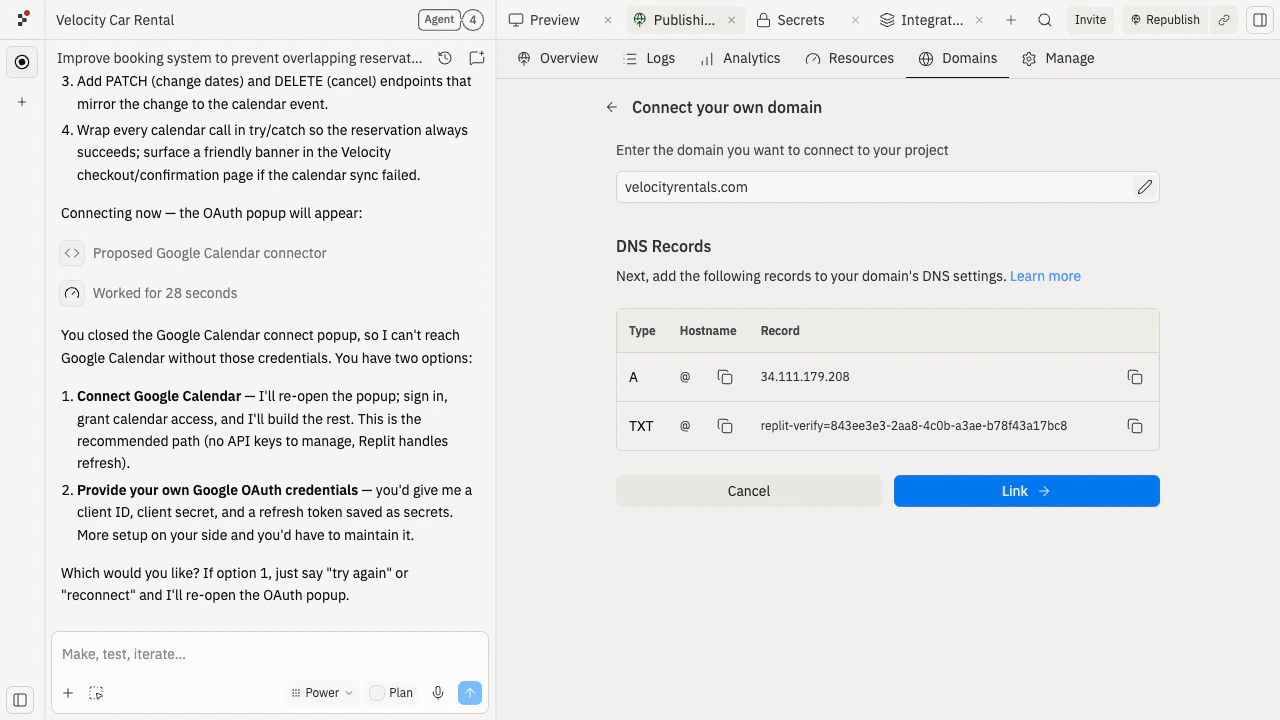
velocityrentals.com once it sees the records.
Test Velocity on velocityrentals.com
Once Replit shows the domain as verified:- Open
https://velocityrentals.comin a new browser tab. The green padlock should appear — HTTPS is automatic. - Sign in as a customer. Sign-in should still work (Replit Auth handles the new domain automatically).
- Reserve a car, refresh, and confirm the booking persists.
- Open Stripe deposit checkout. The page should now show
velocityrentals.comas the merchant URL. - Confirm the booking and check that the Google Calendar event still lands on the customer’s calendar.
velocityrentals.com, tell Agent the exact symptom:
Velocity now lives at a real rental-brand URL. Share velocityrentals.com with customers — they won’t see “replit.app” anywhere.
Improve it next
Troubleshoot publishing
Fix issues when the public URL doesn’t work.
Domain purchasing
Buy velocityrentals.com through Replit if you haven’t already.
Need further help?
velocityrentals.comdoesn’t load right away: DNS changes can take a few hours. Wait and check again before changing more settings.- The Replit URL works but the custom domain doesn’t: double-check the DNS records match what Replit shows exactly — common mistakes are a trailing dot, an extra subdomain, or a stale record.
- Stripe checkout still says
velocity.replit.app: ask Agent to update the Stripe redirect URLs to usevelocityrentals.com. - You don’t own a domain yet: buy one through Replit — see Domain purchasing.