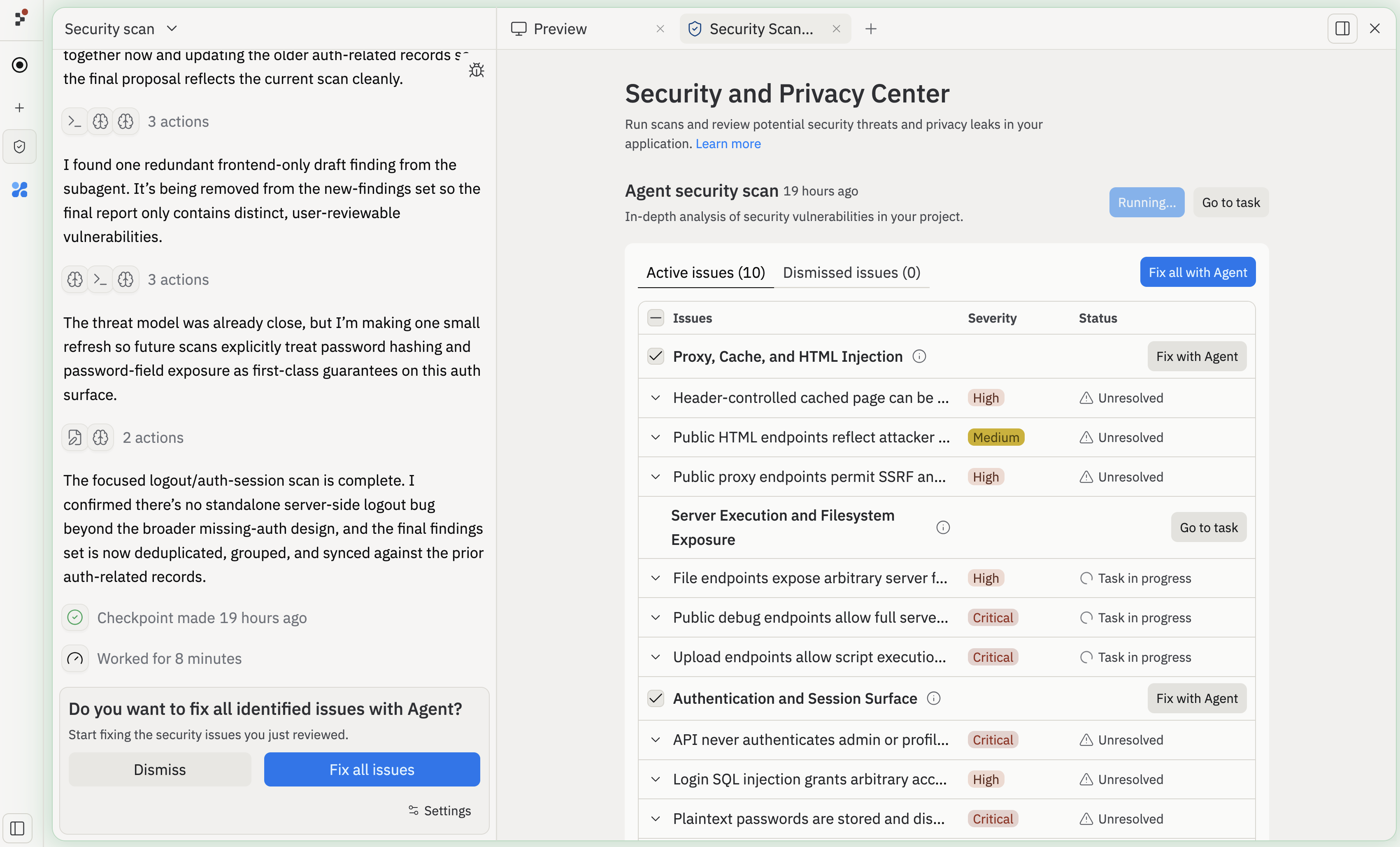
Security and Privacy Scanner interface showing vulnerability scan results
The scanner is currently in beta. It is powerful, but it may occasionally report false positives or miss some issues. Review results carefully, and use your own judgment before changing code or updating dependencies.

What is Security and Privacy Scanner?

Security and Privacy Scanner helps you find and fix high-impact risks in your Replit App before you ship it. It focuses on issues that are most likely to affect the safety of your application or your data:
  • Dependency vulnerabilities: Known issues in the packages your Replit App depends on
  • Static analysis issues (SAST): Dangerous patterns in your source code
  • Malicious or unsafe files: Files that match known-bad or risky signatures
  • Privacy issues: Potential leaks of sensitive or personal data in your code
Scans run on Replit infrastructure and are powered by partners like Semgrep Community Edition and HoundDog.ai. Your code and data are not sent to these partners or any other third parties.

Types of vulnerabilities

Dependency vulnerabilities

These come from a dependency audit of your project’s packages:
  • Supports many popular ecosystems (including Node.js/npm, Python, Go, Rust, PHP, and Ruby)
  • Captures whether the dependency is direct or transitive
  • Includes metadata about the vulnerable package and any available fixes
Examples include:
"express": "4.18.2" // version with a known vulnerability
Some dependency issues can be updated automatically, while others may require manual changes or may not have a fix available.

Static analysis (SAST) issues

Static analysis scans your source files for insecure patterns, like:
const query = `SELECT * FROM users WHERE username = '${userInput}'`;
SAST findings include:
  • File path and exact location (line and column)
  • Rule or check name
  • A message describing the issue
These are the issues you’ll typically fix directly in your code.

Malicious or unsafe files

Malicious file detection looks for files that match known-bad or high-risk signatures, such as:
# malicious setup script from a known supply-chain attack
setup_bun.js
For these findings, the scanner shows:
  • Why the file is risky
  • The paths where it appears
  • Suggested mitigation text
You should either remove or carefully inspect these files before continuing.

Privacy issues

In addition to security issues, the scanner also surfaces potential privacy issues powered by HoundDog.ai, especially when sensitive data flows into risky sinks like logs, files, or third-party SDKs and APIs:
  • Locations where sensitive data may be exposed
  • Rules that describe the privacy concern
  • Suggested remediation strategies (for example, deletion vs. sanitization)
For example, the scanner might flag code that logs an entire user profile (including contact details) to an application log:
logger.info("New signup", {
  email: user.email,
  phoneNumber: user.phoneNumber,
  address: user.address,
});
These findings are powered by HoundDog.ai and are labeled as privacy or HoundDog vulnerabilities in the pane.

Getting started

You can open Security and Privacy Scanner in a few ways:
1
Open the Security Scanner pane.
2
Use the workspace search/tool palette and search for “Security Scanner”.
Once open, the pane will automatically run an initial scan if no previous results exist. Scans usually complete in minutes, but may take longer for large codebases or dependency graphs.

Understanding scan results

The results are organized into two tabs:
  • Active issues: Issues that are currently considered in scope
  • Hidden issues: Issues you have explicitly hidden
Within Active issues, you may see:
  • Automatic dependency vulnerabilities: Dependency issues that can be fixed by updating packages.
  • Static analysis issues: Code-level vulnerabilities with file and line references.
  • Malicious file issues: Known-bad or risky files in your project.
  • Privacy issues: Locations where sensitive or personal data might be at risk.

Severity

Each issue has a severity:
  • Critical
  • High
  • (Lower severity level like moderate/low/info may be present in underlying data but are not prioritized in this pane.)
The scanner focuses on high and critical issues so you can address the most impactful problems first.

Hiding and re-activating issues

You can:
  • Hide a non-critical issue you understand and are willing to accept.
  • Move to active to bring a previously hidden issue back into the Active issues tab.

Fixing issues

The scanner integrates with both dependency tooling and Replit AI Agent to help you fix problems quickly.

Automatic dependency updates (Node.js)

For supported Node.js projects, you’ll see an Update automatically button for certain dependency vulnerabilities. If your project or ecosystem is not supported, you may still see dependency vulnerabilities, but the automatic update button might be disabled for your Replit App.

Fix with Agent

Most vulnerability cards include a Fix with Agent button:
  • Opens or attaches to a Replit Agent session.
  • Sends the vulnerability details to Agent.
  • Agent proposes and applies fixes in your Replit App, while you stay in control.
After fixes are applied, run the scanner again to confirm the issues are resolved.

Viewing existing Agent sessions

If you already started fixing vulnerabilities with Agent, you may see a View Agent Session button on an issue:
  • Select it to jump back into the associated Agent chat.
  • Continue iterating on the fix or ask follow-up questions about the vulnerability.

Privacy and data handling

Security and privacy scanning are powered by Semgrep and HoundDog.ai, but:
  • All scanning runs locally on Replit infrastructure.
  • Your code and data are not sent to Semgrep, HoundDog.ai, or other third parties.
  • Scan configuration and results stay attached to your Replit App.

Limitations and best practices

Keep in mind:
  • Beta: The scanner may occasionally report false positives or miss issues.
  • Language support:
    • Dependency scanning supports many popular ecosystems (including Node.js/npm, Python, Go, Rust, PHP, and Ruby).
    • Automatic dependency fixing is currently focused on Node.js/npm.
  • Not a full security review: Use it alongside code review, tests, and live app checks.
  • Re-run after changes: Re-run the scanner after:
    • Adding or updating dependencies
    • Making major code changes
    • Before publishing a new version
For best results, treat the scanner as part of your normal development workflow, not a one-time check.

Next steps

  • Learn more about Publishing and how to publish your Replit App once scans are clean.
  • Explore Replit AI Agent to fix security and privacy issues directly from the workspace.
  • Check out Workspace Features for more tools to improve code quality, performance, and reliability.