ユーザーがGoogleアカウントを使ってあなたのウェブサイトにログインできるようにすると、以下のメリットがあります:
  1. 独自の認証スキームを実装する必要がない。
  2. ユーザーの名前や連絡先情報を簡単に取得できる。
  3. 同じ認証情報を使って、SheetsやDriveなどのユーザーのGoogleリソースにアクセスできる。
このガイドでは、ReplitでPythonとFlaskを使ってそれを行う方法を説明します。 まず、基本的なOAuth認証のセットアップ方法を説明し、次に取得した認証情報を使ってユーザーのGoogleリソースにアクセスする方法を説明します。

OAuthの概要

Google認証はOAuth標準に基づいています。OAuthの仕組みは以下の通りです:
  1. ウェブサイトのどこかで、ユーザーをログインページに誘導します。
  2. ユーザーがログインページにアクセスすると、ウェブサイト上でログインフォームを実装するのではなく、Googleのログインサービスにリダイレクトしてユーザーをログインさせます。
  3. Googleのログインサービスがユーザーのログインに成功すると、ユーザーとログインセッションに関する情報を送信しながら、あなたが定義したURL(例:https://YOUR_DOMAIN/oauth2callback)にウェブサイトへリダイレクトします。
  4. ユーザーのログイン情報を使って、アクセストークンを取得します。これはユーザーのプロフィール情報、スプレッドシート、ドキュメントなどのリソースにアクセスするための通行証です。

OAuth:コードを見せてください

私のように、まず動作するコードが欲しいという方へ。以下のコードがそれです。ただし、すべてが正しく機能するためには、Google Cloud Consoleでいくつかの設定が必要です。それは次のセクションで説明します。Flaskテンプレートを使って新しいReplit Appを作成し、以下をmain.pyに入力してください。コード内のコメントが各部分の説明をしています:
from flask import Flask, redirect, session, url_for, request
import google_auth_oauthlib.flow
import json
import os
import requests

app = Flask('app')
# `FLASK_SECRET_KEY` is used by sessions. You should create a random string
# and store it as secret.
app.secret_key = os.environ.get('FLASK_SECRET_KEY') or os.urandom(24)

# `GOOGLE_APIS_OAUTH_SECRET` contains the contents of a JSON file to be downloaded
# from the Google Cloud Credentials panel. See next section.
oauth_config = json.loads(os.environ['GOOGLE_OAUTH_SECRETS'])

# This sets up a configuration for the OAuth flow
oauth_flow = google_auth_oauthlib.flow.Flow.from_client_config(
    oauth_config,
    # scopes define what APIs you want to access on behave of the user once authenticated
    scopes=[
        "https://www.googleapis.com/auth/userinfo.email",
        "openid",
        "https://www.googleapis.com/auth/userinfo.profile",
    ]
)

# This is entrypoint of the login page. It will redirect to the Google login service located at the
# `authorization_url`. The `redirect_uri` is actually the URI which the Google login service will use to
# redirect back to this app.
@app.route('/signin')
def signin():
    # We rewrite the URL from http to https because inside the Replit App http is used,
    # but externally it's accessed via https, and the redirect_uri has to match that
    oauth_flow.redirect_uri = url_for('oauth2callback', _external=True).replace('http://', 'https://')
    authorization_url, state = oauth_flow.authorization_url()
    session['state'] = state
    return redirect(authorization_url)

# This is the endpoint that Google login service redirects back to. It must be added to the "Authorized redirect URIs"
# in the API credentials panel within Google Cloud. It will call a Google endpoint to request
# an access token and store it in the user session. After this, the access token can be used to access
# APIs on behalf of the user.
@app.route('/oauth2callback')
def oauth2callback():
    if not session['state'] == request.args['state']:
        return 'Invalid state parameter', 400
    oauth_flow.fetch_token(authorization_response=request.url.replace('http:', 'https:'))
    session['access_token'] = oauth_flow.credentials.token
    return redirect("/")

# This is the home page of the app. It directs the user to log in if they are not already.
# It shows the user info's information if they already are.
@app.route('/')
def welcome():
    if "access_token" in session:
        user_info = get_user_info(session["access_token"])
        if user_info:
            return f"""
                Hello {user_info["given_name"]}!<br>
                Your email address is {user_info["email"]}<br>
                <a href="/logout">Log out</a>
            """
    return """
        <h1>Hello!</h1>
        <a href="/signin">Sign In via Google</a><br>
    """

# Call the userinfo API to get the user's information with a valid access token.
# This is the first example of using the access token to access an API on the user's behalf.
def get_user_info(access_token):
    response = requests.get("https://www.googleapis.com/oauth2/v3/userinfo", headers={
       "Authorization": f"Bearer {access_token}"
   })
    if response.status_code == 200:
        user_info = response.json()
        return user_info
    else:
        print(f"Failed to fetch user info: {response.status_code} {response.text}")
        return None

@app.route('/logout')
def logout():
    session.clear()
    return redirect('/')

if __name__ == '__main__':
    app.run(host='0.0.0.0', port=5000)

OAuthアプリ/クライアントのセットアップ

上記のコードを動作させるには、Google Cloudで以下の設定が必要です。
  1. Google Cloudプロジェクトを作成する(まだない場合)。
  2. OAuth同意画面を設定する。
  3. アプリのOAuthクライアントIDを作成する。

Google Cloudプロジェクトの作成

この演習に使いたいGoogle Cloudプロジェクトが既にある場合は、このステップをスキップできます。
  1. Google Cloud Consoleに移動します。
  2. Google Cloudロゴのそばにあるプロジェクトセレクターのドロップボックスをクリックします:
Googleプロジェクトドロップダウン
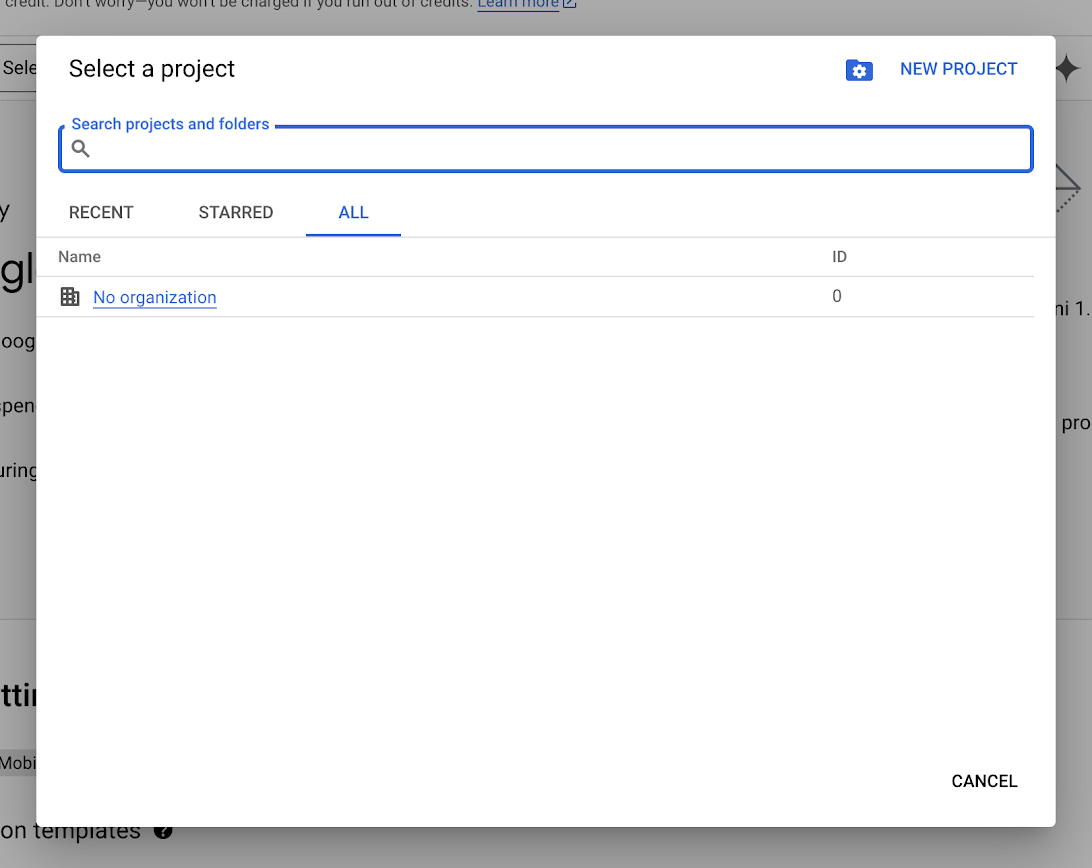
  1. 既存のプロジェクトを選択するか、「新しいプロジェクト」をクリックして新しいプロジェクトを作成します。
プロジェクトの選択
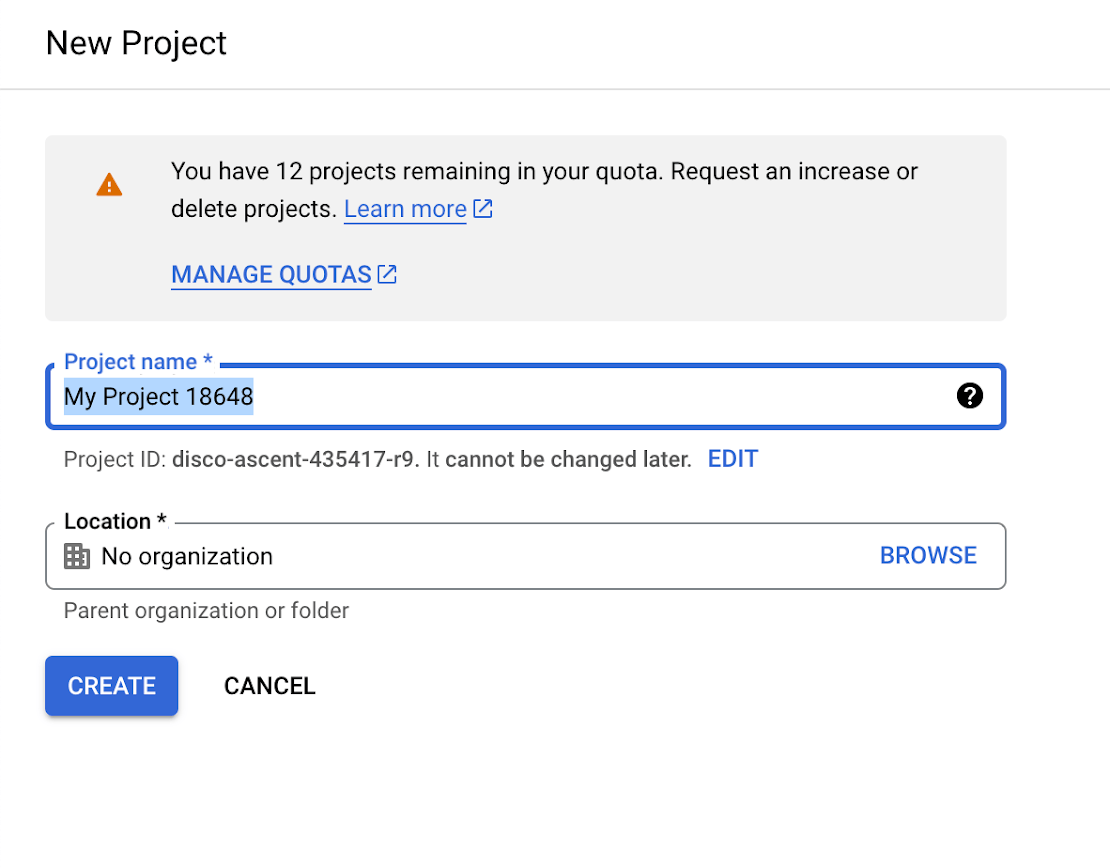
  1. 新しいプロジェクトを作成する場合は、プロジェクト名を入力して「作成」をクリックします。
新しいプロジェクト
ポップアップに新しいプロジェクトが表示されたら、「プロジェクトを選択」をクリックしてアクティブプロジェクトに設定します。

OAuth同意画面の設定

プロジェクトができたら、OAuth同意画面を設定します:
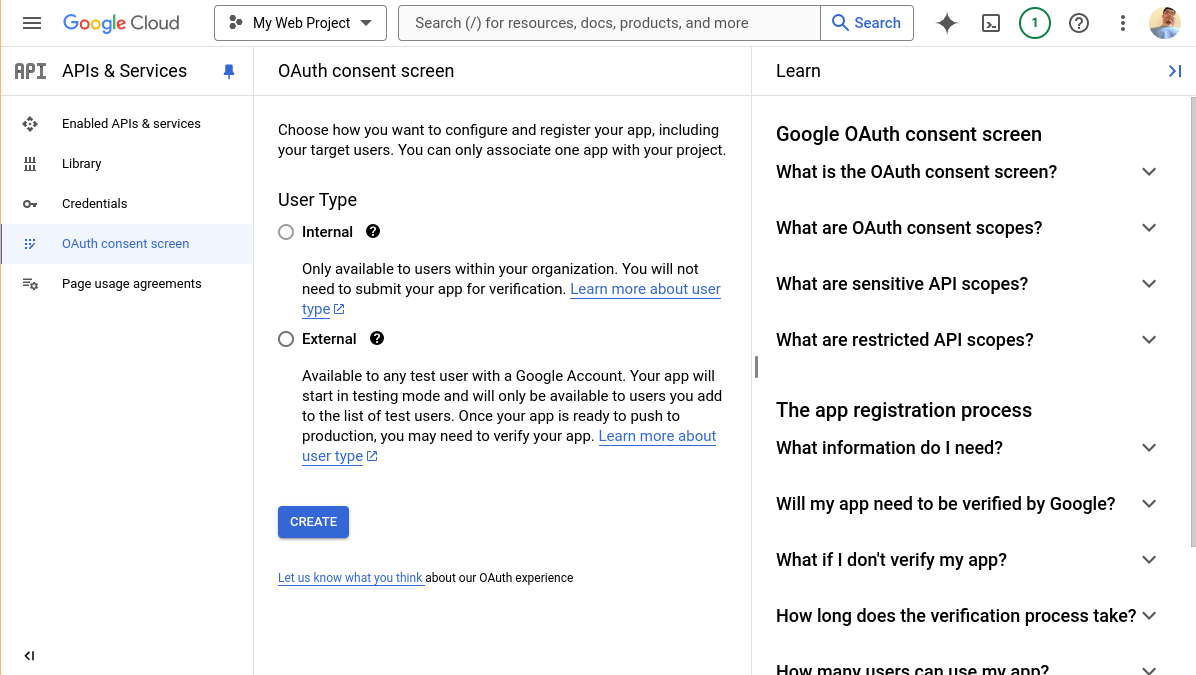
  1. OAuth同意画面に移動します。
OAuth同意画面
  1. プロジェクトのドロップダウンで、使用したいプロジェクトが選択されていることを確認します。
  2. 任意のGoogleアカウントを持つユーザーがアプリにログインできるよう「外部」を選択します。「内部」は組織内のユーザーのみに制限されます。
  3. 「作成」をクリックします。
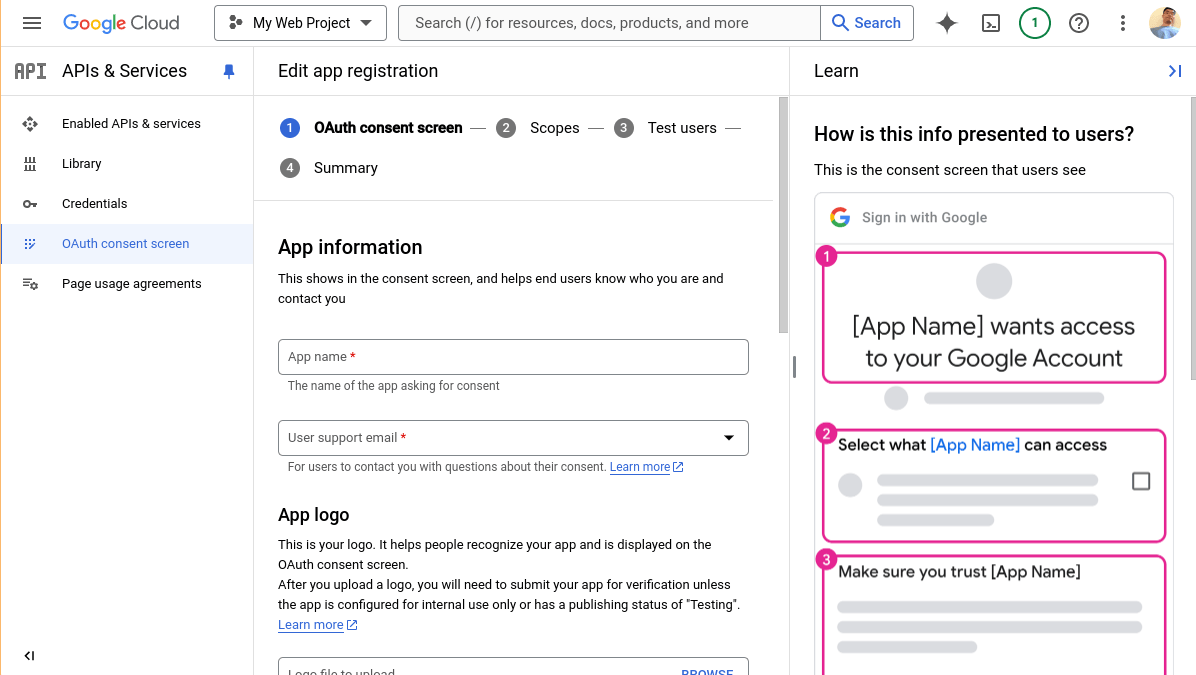
  4. アプリ名とこのアプリをサポートする担当者のメールアドレスを入力します(あなた自身?)
OAuth同意画面
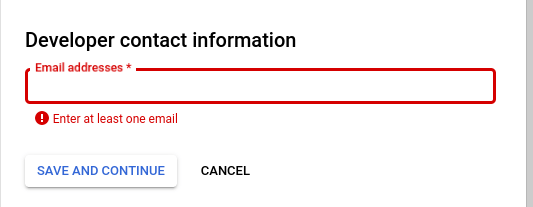
  1. 「デベロッパーの連絡先情報」にメールアドレスを入力します。
デベロッパーの連絡先情報
  1. 「保存して続行」をクリックします。
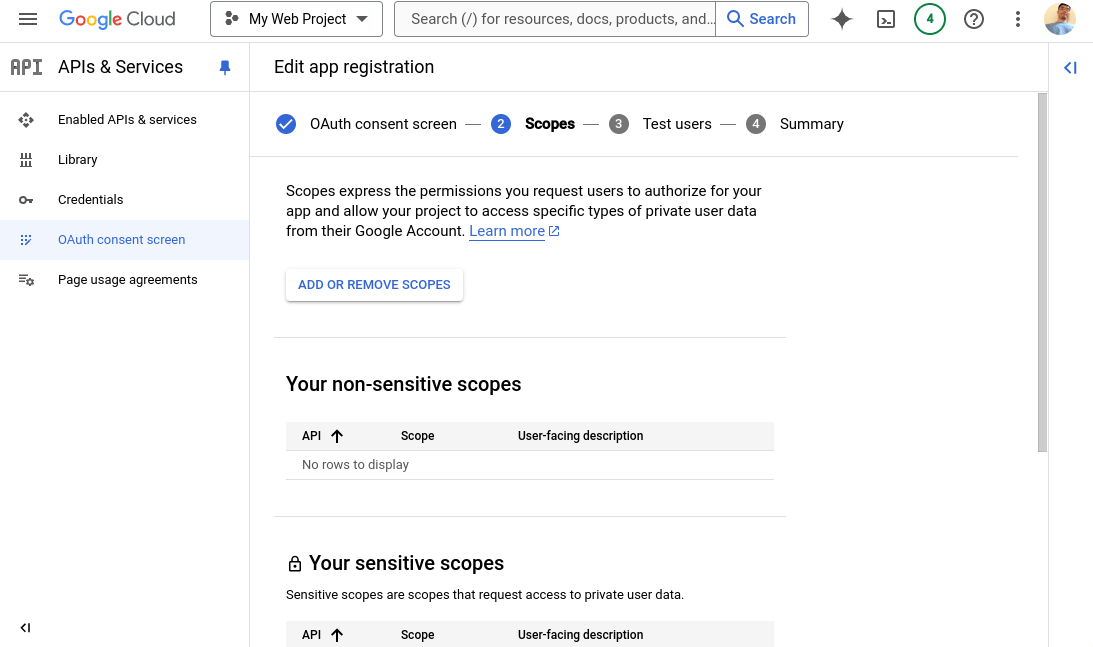
  2. スコープ画面では、アプリがアクセスしたいAPIを追加できます。基本的なユーザー情報取得のAPIには既にアクセスできます。
OAuthスコープ
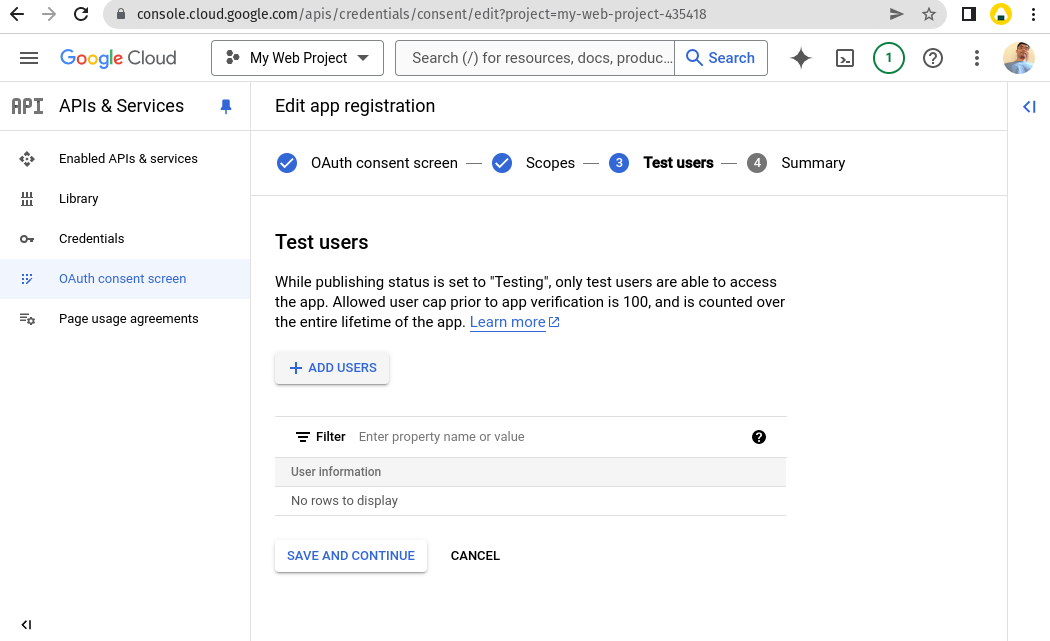
今はこのままにして「保存して続行」をクリックします。 9. テストユーザーでは、テスト段階でアプリをテストするユーザーのメールアドレスを追加する必要があります。
テストユーザー
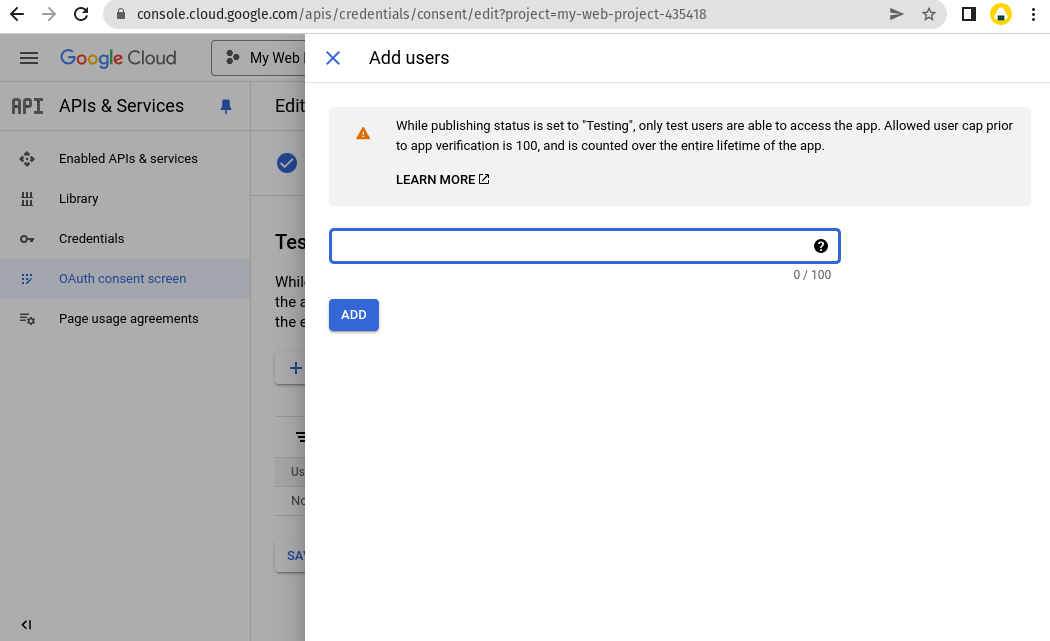
「ユーザーを追加」をクリックします。 10. 1つ以上のGoogleメールアドレスを追加して「追加」をクリックします。
テストユーザー
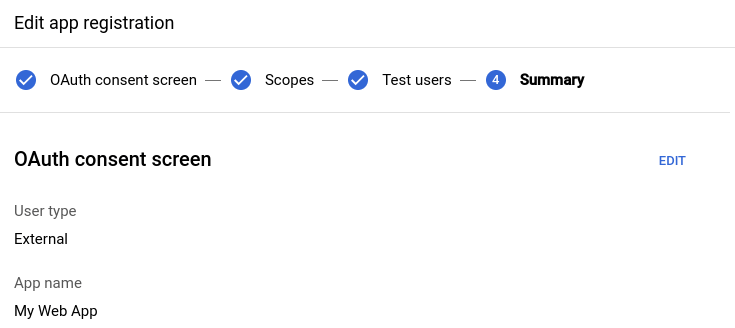
次に「保存して続行」をクリックします。 11. サマリー画面を確認します。いつでも戻って各ステップを編集できます。
テストユーザー

アプリのOAuthクライアントIDの作成

これが最後の部分です。OAuthを機能させるには、アプリのOAuthクライアントIDを作成する必要があります。
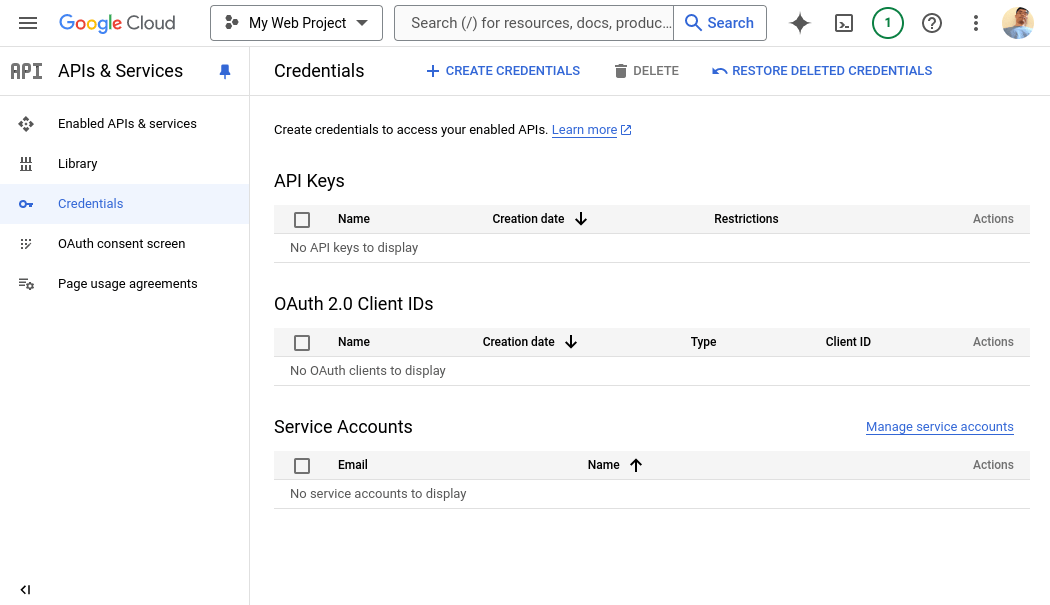
  1. 認証情報に移動します。
テストユーザー
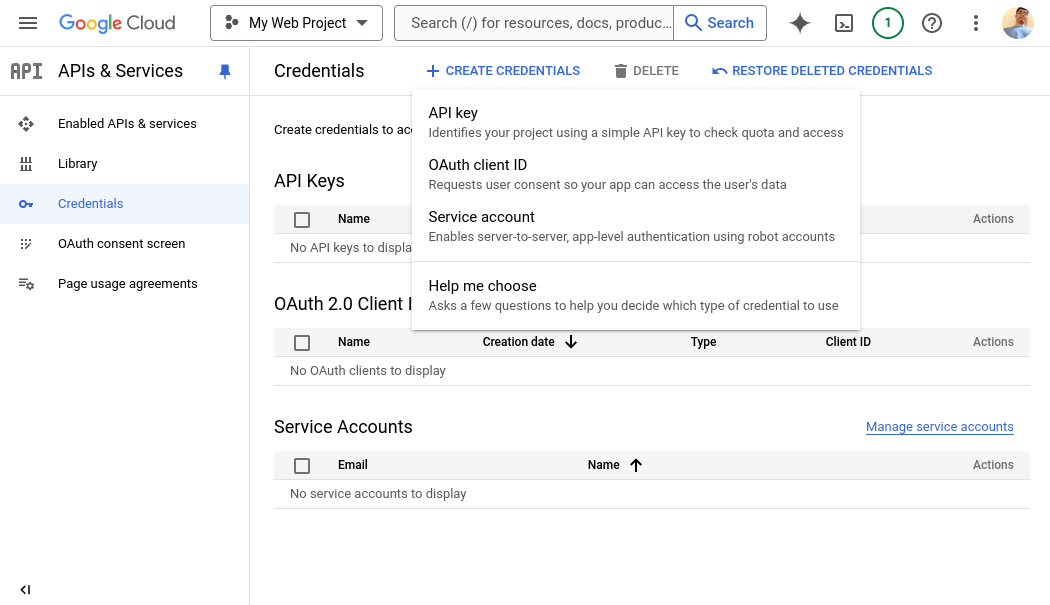
  1. 「認証情報を作成」をクリックします。
テストユーザー
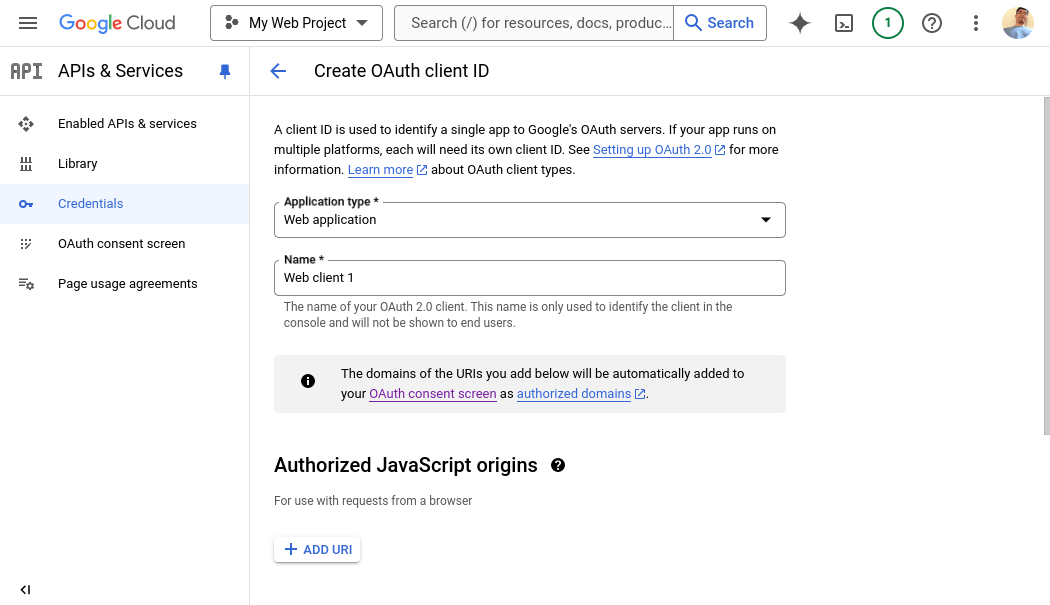
「OAuthクライアントID」を選択します。 3. アプリケーションの種類として「ウェブアプリケーション」を選択します。このクライアントIDの名前を入力します。
テストユーザー
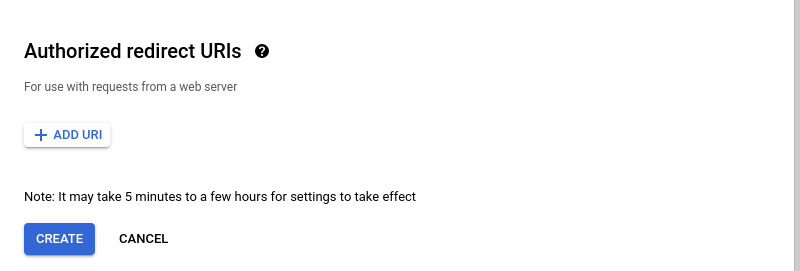
  1. Flask Replit Appに移動します。シェルを開いて次のコマンドを入力します:echo https://$REPLIT_DEV_DOMAIN/oauth2callback。結果は https://81309e9b-c4df-48e0-a2c2-0a8d3c0e3162-00-35ppsa0tcuv6v.infra-staging.replit.dev/oauth2callback のようになります。このテキストをコピーして、フォーム下部の「承認済みのリダイレクトURI」の1つとして入力します。
テストユーザー
後でアプリを公開する際は、ここに戻って別のエントリ https://YOUR_APP_DOMAIN/oauth2callback を追加してください。
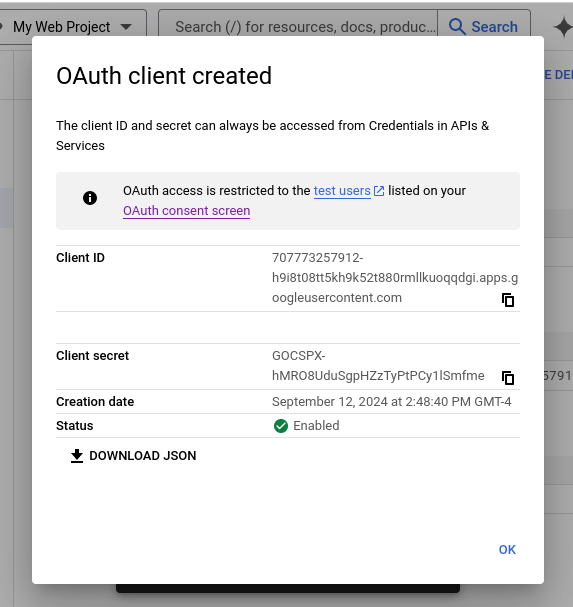
  1. 「作成」をクリックします。
  2. 「JSONをダウンロード」をクリックします:
テストユーザー
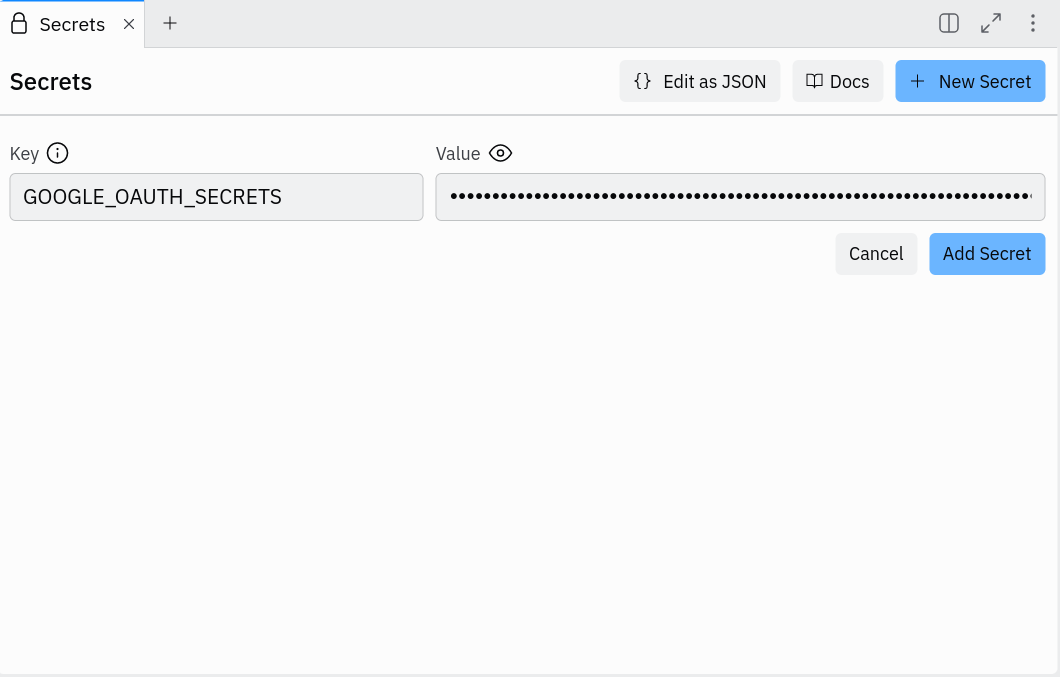
  1. Replit Appに戻り、Secretsペインを開きます。GOOGLE_OAUTH_SECRETS という名前のシークレットを作成し、ダウンロードしたファイルの内容をシークレットの値として貼り付けます。
テストユーザー
お疲れ様でした!ここまで辿り着いた方はおめでとうございます!これでFlaskアプリを実行し、テストユーザーのGoogleアカウントを使ってログインできるようになりました。アプリを任意のGoogleユーザーが利用できるようにするには、同意ページに戻って「アプリを公開」をクリックする必要があります。SheetsやDriveなどの追加のGoogle APIが必要な場合は、確認プロセスが必要になることがあります。 次は、Sheetsなどのような Google APIとの統合方法を説明します。さらに進めたい方は引き続きご覧ください。

Google Sheets APIのセットアップ

Google SheetsのようなGoogle API統合を追加するには、まずアプリのAPIを有効にする必要があります。利用可能なAPIを参照できます。例としてGoogle Sheetsを使用します。
  1. Google Sheets APIのリストページに移動します。
  2. 「有効にする」をクリックします。
以上です!この部分のGoogle Cloudセットアップはこれだけです。

Google Sheets統合:コードを見せてください

まず、元のコードのOAuthフローセクションで、"https://www.googleapis.com/auth/spreadsheets.readonly" をスコープのリストに追加する以外はすべて同じままにします:
# This sets up a configuration for the OAuth flow
oauth_flow = google_auth_oauthlib.flow.Flow.from_client_config(
    oauth_config,
    # scopes define what APIs you want to access on behave of the user once authenticated
    scopes=[
        "https://www.googleapis.com/auth/userinfo.email",
        "openid",
        "https://www.googleapis.com/auth/userinfo.profile",
        "https://www.googleapis.com/auth/spreadsheets.readonly"
    ]
)
googleapiclient.discovery ライブラリでGoogle APIにアクセスする方法は、まずアクセストークンを使用して Credentials オブジェクトを作成し、次に build 関数を使用して呼び出し可能なAPIオブジェクトを作成します。Sheets APIの場合は以下のようになります:
credentials = google.oauth2.credentials.Credentials(token=session['access_token'])
service = build("sheets", "v4", credentials=credentials)
sheets_api = service.spreadsheets()
Sheets APIの実際の使用方法について、いくつかのヘルパー関数を作成しました:
# fetch all sheets within a Google spreadsheet
def get_sheets(sheets_api, spreadsheet_id) -> list[str]:
    result = sheets_api.get(spreadsheetId=spreadsheet_id).execute()
    return [sheet["properties"]["title"] for sheet in result["sheets"]]

# fetch the data for a given sheet within a Google spreadsheet
def get_sheet_data(sheets_api, spreadsheet_id, sheet_title) -> list[list[str]]:
    result = (
        sheets_api.values()
        .get(spreadsheetId=spreadsheet_id, range=sheet_title)
        .execute()
    )
    return result["values"]
上記のヘルパーを使って、Googleスプレッドシートをインポートするためのハンドラーエンドポイントを以下のように作成できます:
@app.route("/import_spreadsheet", methods = ['POST'])
def import_spreadsheet():
    if 'access_token' not in session:
        return redirect('/signin')
    spreadsheet_id = request.form["spreadsheet_id"]
    credentials = google.oauth2.credentials.Credentials(token=session['access_token'])
    service = build("sheets", "v4", credentials=credentials)
    sheets_api = service.spreadsheets()
    try:
        sheets = get_sheets(sheets_api, spreadsheet_id)
        data_by_sheets = {}
        for sheet in sheets:
            data = get_sheet_data(sheets_api, spreadsheet_id, sheet)
            data_by_sheets[sheet] = data
    except googleapiclient.errors.HttpError as e:
        return f"upload failure"
    dirpath = os.path.join("static", "uploads", spreadsheet_id)
    filepath = os.path.join(dirpath, "data.json")
    os.makedirs(dirpath, exist_ok=True)
    with open(filepath, "w") as file:
        json.dump(data_by_sheets, file)
    return "upload success!"
完全な動作コードはこちらです:
from flask import Flask, redirect, session, url_for, request
import google_auth_oauthlib.flow
import json
import os
import requests
from googleapiclient.discovery import build
import googleapiclient.errors
import google.oauth2.credentials

app = Flask('app')
# `FLASK_SECRET_KEY` is used by sessions. You should create a random string
# and store it as secret.
app.secret_key = os.environ.get('FLASK_SECRET_KEY') or os.urandom(24)

# `GOOGLE_APIS_OAUTH_SECRET` contains the contents of a JSON file to be downloaded
# from the Google Cloud Credentials panel. See next section.
oauth_config = json.loads(os.environ['GOOGLE_OAUTH_SECRETS'])

# This sets up a configuration for the OAuth flow
oauth_flow = google_auth_oauthlib.flow.Flow.from_client_config(
    oauth_config,
    # scopes define what APIs you want to access on behave of the user once authenticated
    scopes=[
        "https://www.googleapis.com/auth/userinfo.email",
        "openid",
        "https://www.googleapis.com/auth/userinfo.profile",
        "https://www.googleapis.com/auth/spreadsheets.readonly"
    ]
)

# This is entrypoint of the login page. It will redirect to the Google login service located at the
# `authorization_url`. The `redirect_uri` is actually the URI which the Google login service will use to
# redirect back to this app.
@app.route('/signin')
def signin():
    # We rewrite the URL from http to https because inside the Replit App http is used,
    # but externally it's accessed via https, and the redirect_uri has to match that
    oauth_flow.redirect_uri = url_for('oauth2callback', _external=True).replace('http://', 'https://')
    authorization_url, state = oauth_flow.authorization_url()
    session['state'] = state
    return redirect(authorization_url)

# This is the endpoint that Google login service redirects back to. It must be added to the "Authorized redirect URIs"
# in the API credentials panel within Google Cloud. It will call a Google endpoint to request
# an access token and store it in the user session. After this, the access token can be used to access
# APIs on behalf of the user.
@app.route('/oauth2callback')
def oauth2callback():
    if not session['state'] == request.args['state']:
        return 'Invalid state parameter', 400
    oauth_flow.fetch_token(authorization_response=request.url.replace('http:', 'https:'))
    session['access_token'] = oauth_flow.credentials.token
    return redirect("/")

# Call the userinfo API to get the user's information with a valid access token.
# This is the first example of using the access token to access an API on the user's behalf.
def get_user_info(access_token):
    response = requests.get("https://www.googleapis.com/oauth2/v3/userinfo", headers={
       "Authorization": f"Bearer {access_token}"
   })
    if response.status_code == 200:
        user_info = response.json()
        return user_info
    else:
        print(f"Failed to fetch user info: {response.status_code} {response.text}")
        return None

@app.route('/logout')
def logout():
    session.clear()
    return redirect('/')

# fetch all sheets within a Google spreadsheet
def get_sheets(sheets_api, spreadsheet_id) -> list[str]:
    result = sheets_api.get(spreadsheetId=spreadsheet_id).execute()
    return [sheet["properties"]["title"] for sheet in result["sheets"]]

# fetch the data for a given sheet within a Google spreadsheet
def get_sheet_data(sheets_api, spreadsheet_id, sheet_title) -> list[list[str]]:
    result = (
        sheets_api.values()
        .get(spreadsheetId=spreadsheet_id, range=sheet_title)
        .execute()
    )
    return result["values"]

# Render a form to allow importing a spreadsheet
@app.route("/import_spreadsheet_form")
def import_spreadsheet_form():
    return """
    <h3>Import Spreadsheet</h3>
    <form action="/import_spreadsheet" method="POST">
        <label>Spreadsheet ID</label>
        <input type="text" name="spreadsheet_id">

        <button type="submit">Import</button>
    </form>
    """

@app.route("/import_spreadsheet", methods = ['POST'])
def import_spreadsheet():
    if 'access_token' not in session:
        return redirect('/signin')
    spreadsheet_id = request.form["spreadsheet_id"]
    credentials = google.oauth2.credentials.Credentials(token=session['access_token'])
    service = build("sheets", "v4", credentials=credentials)
    sheets_api = service.spreadsheets()
    try:
        sheets = get_sheets(sheets_api, spreadsheet_id)
        data_by_sheets = {}
        for sheet in sheets:
            data = get_sheet_data(sheets_api, spreadsheet_id, sheet)
            data_by_sheets[sheet] = data
    except googleapiclient.errors.HttpError as e:
        return f"upload failure"
    dirpath = os.path.join("static", "uploads", spreadsheet_id)
    filepath = os.path.join(dirpath, "data.json")
    os.makedirs(dirpath, exist_ok=True)
    with open(filepath, "w") as file:
        json.dump(data_by_sheets, file)
    return "upload success! Really!"

@app.route('/')
def welcome():
    if "access_token" in session:
        user_info = get_user_info(session["access_token"])
        if user_info:
            return f"""
            Hello {user_info["given_name"]}!<br>
            Your email address is {user_info["email"]}<br>
            <a href="/signin">Sign In to Google</a><br>
            <a href="/import_spreadsheet_form">Import a Sheet</a>
            """
    return """
    <h1>Welcome to Google Sheet Importer</h1>
    <a href="/signin">Sign In to Google</a><br>
    <a href="/import_spreadsheet_form">Import a Sheet</a>
    """

if __name__ == '__main__':
    app.run(host='0.0.0.0', port=5000)
アプリを公開する際は、必ず以下を確認してください:
  1. 本番環境の /oauth2callback URIを「承認済みのリダイレクトURI」に追加する。
  2. 同意ページに移動して「アプリを公開」をクリックする。
良い体験ができたことを願っています。さらなる冒険をお楽しみください。