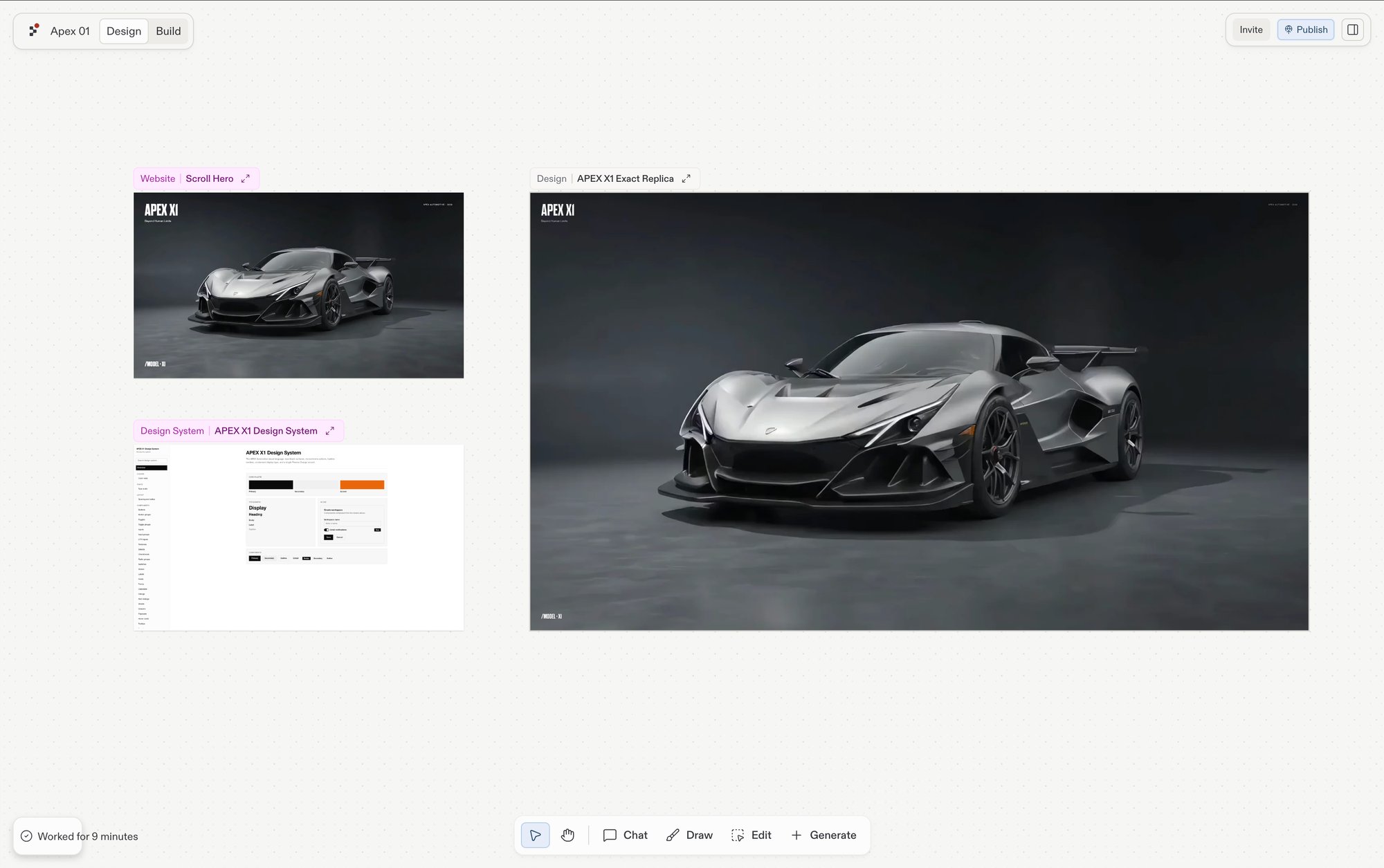
Design 프레임이 정적 이미지처럼 동작하는지, 대화형 프로토타입처럼 동작하는지는 Interactive frames 기능에 따라 달라집니다. 이 기능이 활성화되어 있으면 Design 프레임은 실제 페이지처럼 클릭과 폼 입력에 반응합니다. 그렇지 않으면 반복 작업은 가능하지만 클릭해서 넘어갈 수는 없는 스냅샷으로 렌더링됩니다.
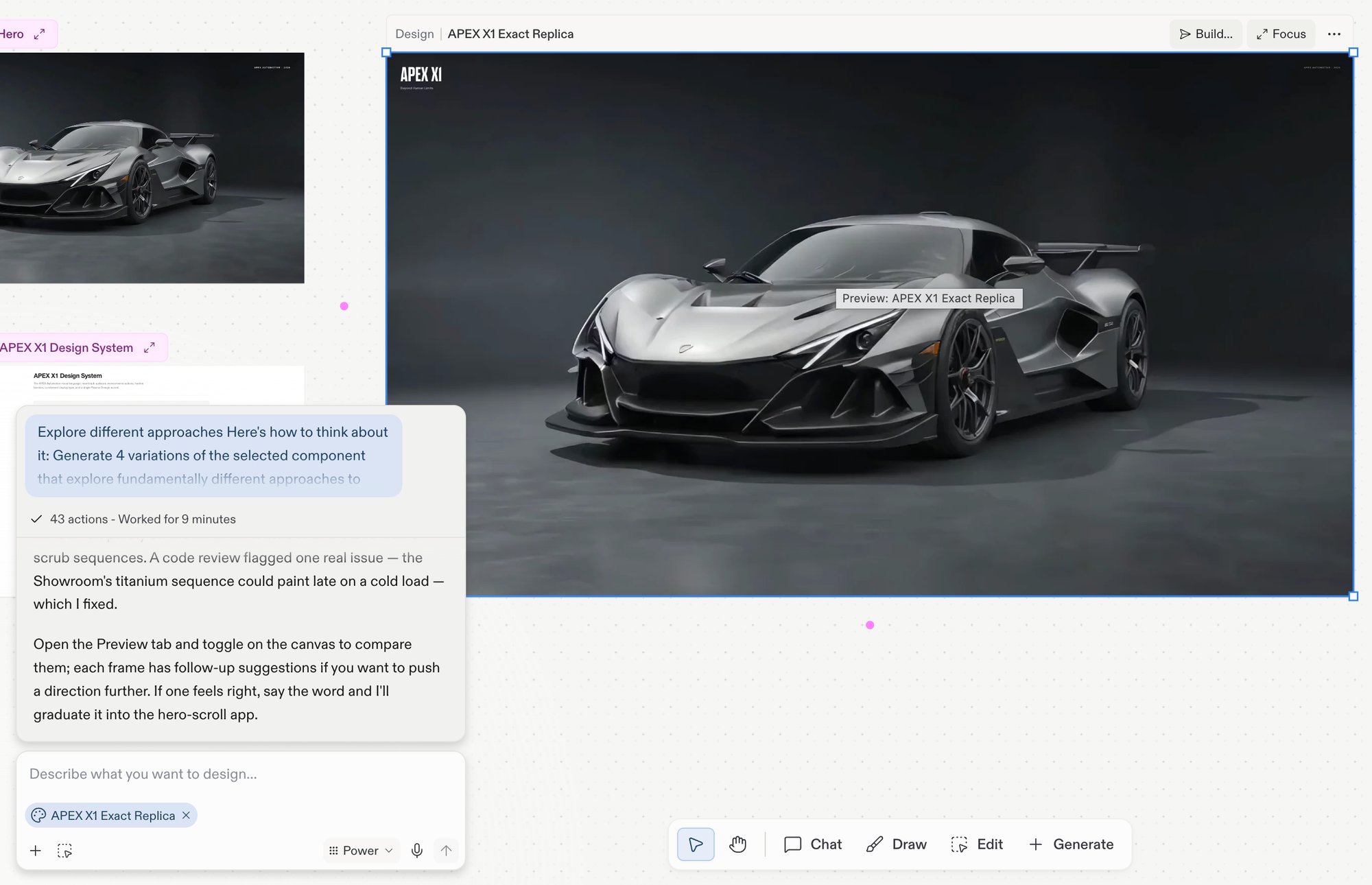
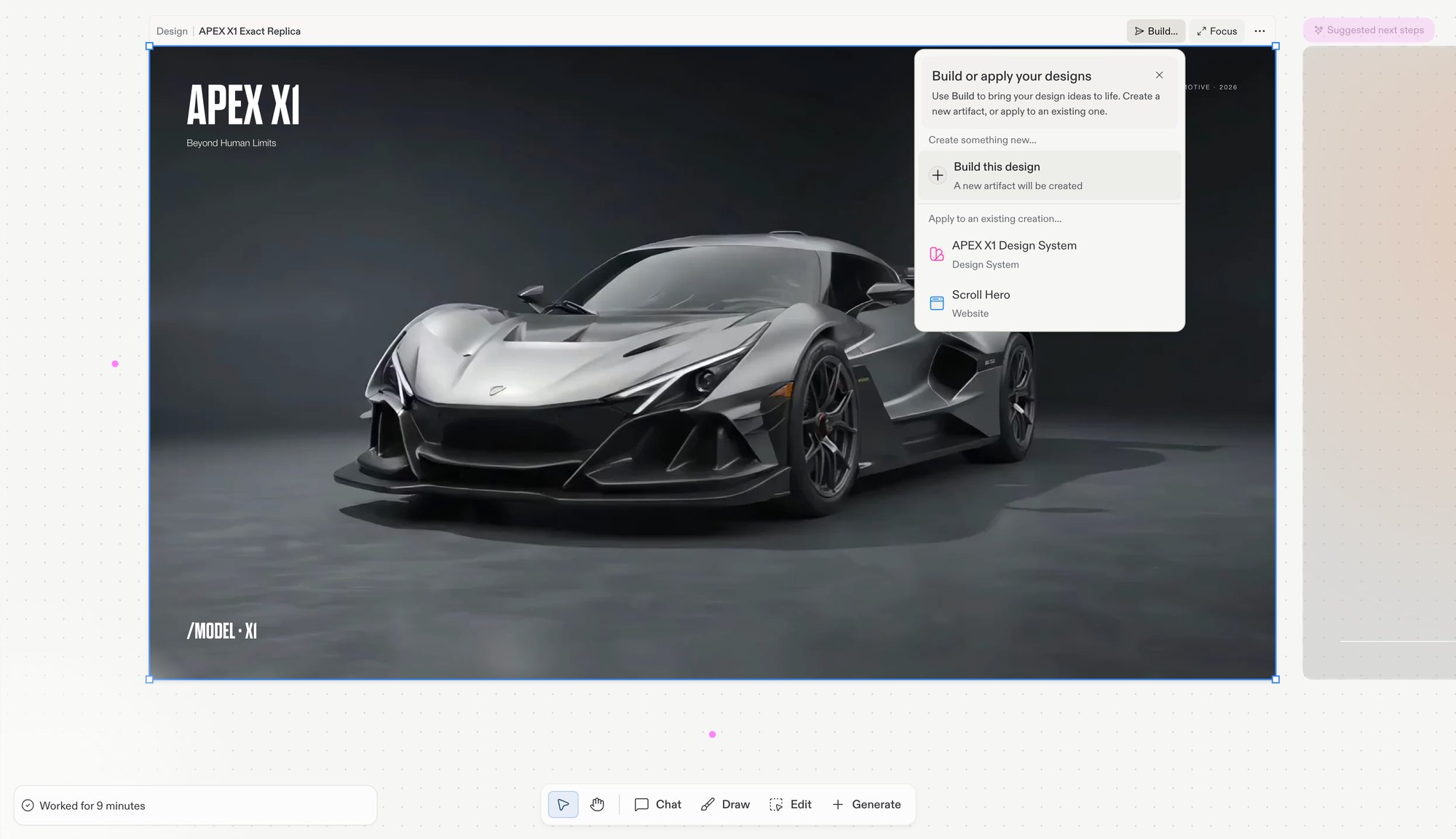
프로젝트 내 모든 Artifact를 나열하는 메뉴를 엽니다 — 디자인을 적용할 하나를 선택하거나, Build this design을 선택해 새 Artifact를 만드세요. Design 프레임에만 해당됩니다. Build를 참고하세요.
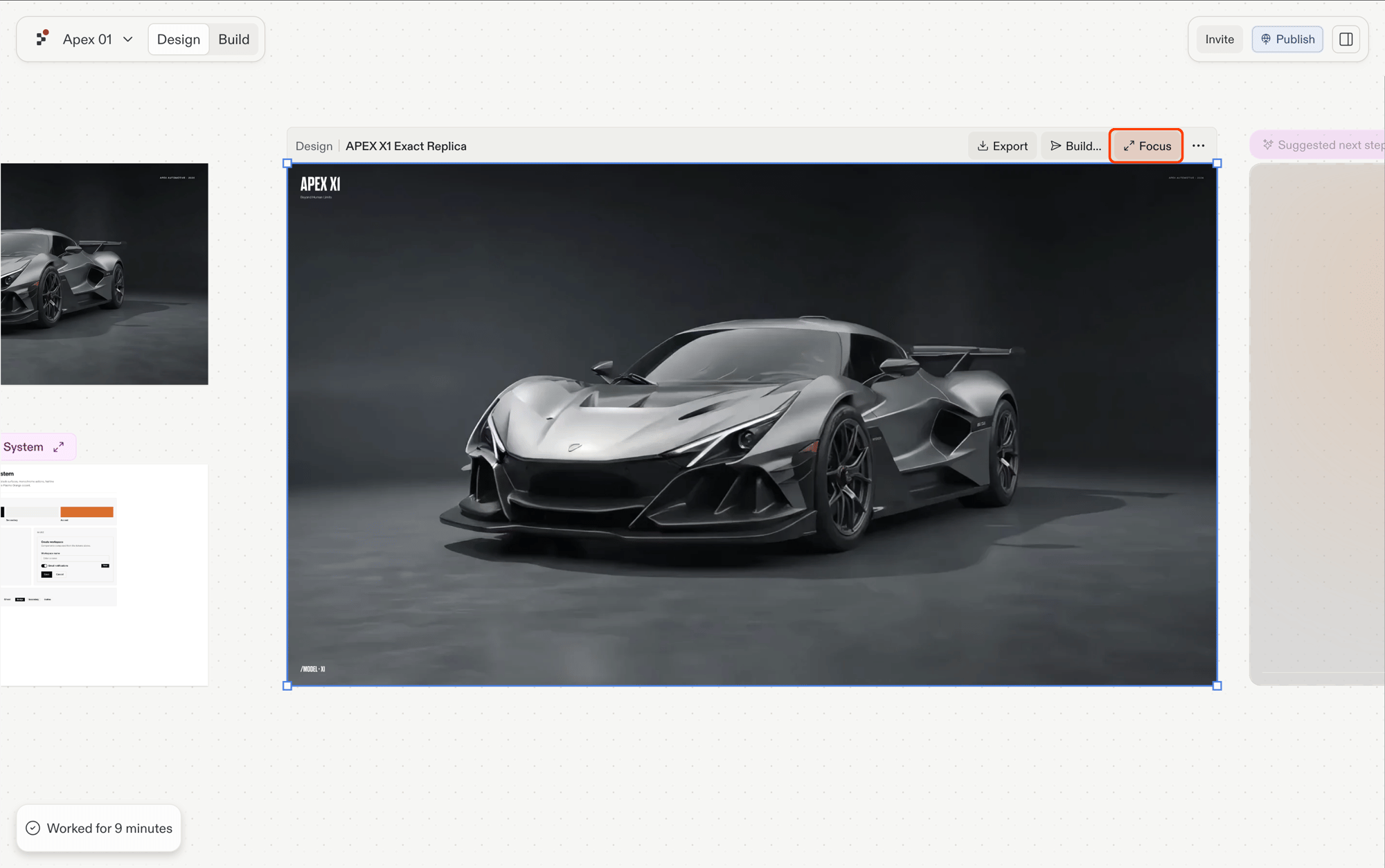
Focus
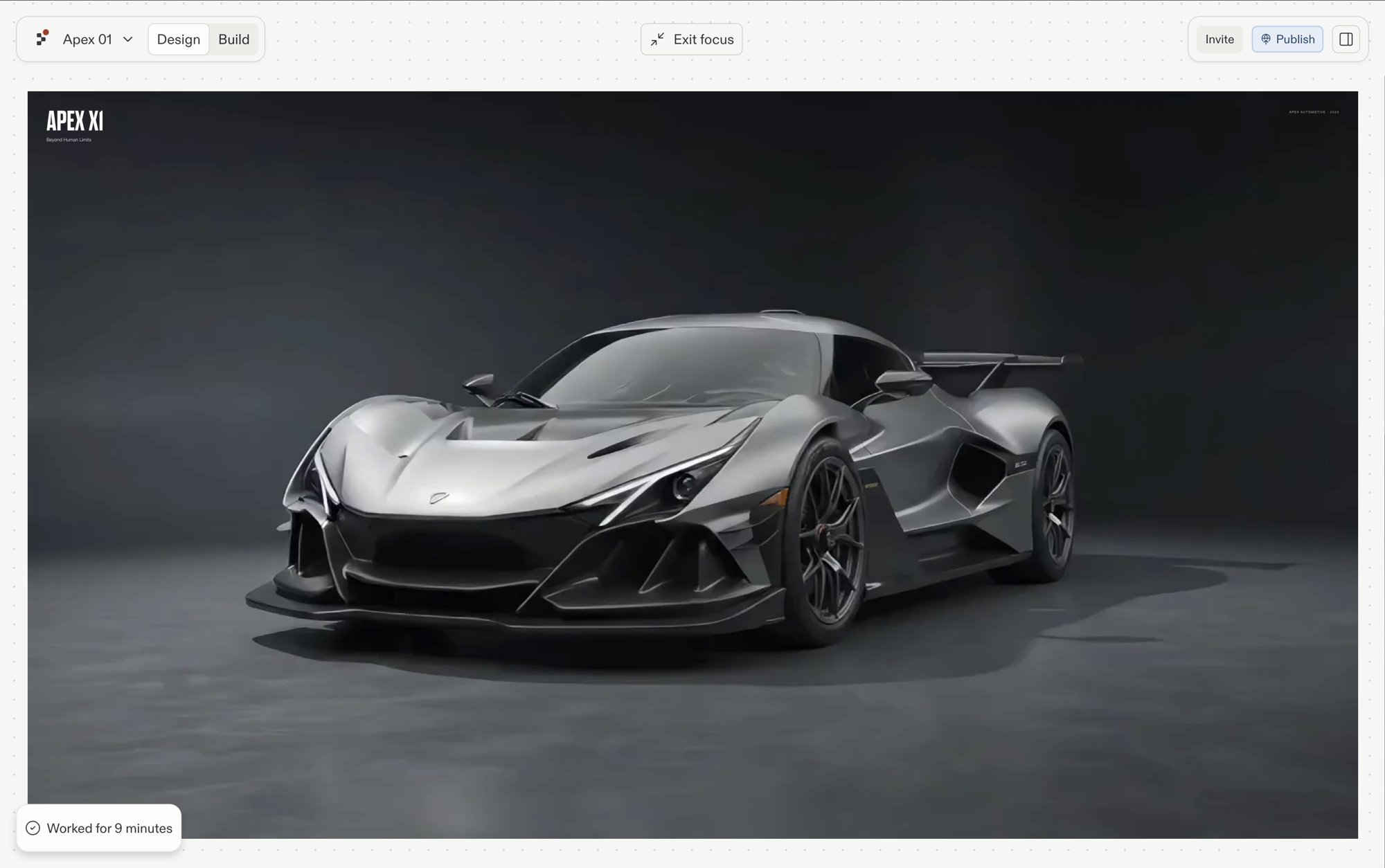
프레임을 메인 화면으로 확장하는 포커스 모드로 진입합니다.
More (…)
추가 프레임 액션입니다. 복사, 복제, 순서 변경, 내보내기는 보드의 우클릭 메뉴에서도 사용할 수 있습니다.
앱 프레임(Website, Slides, Mobile app)은 Focus와 추가 옵션을 보여주고, Design 프레임은 그 앞에 Build…를 추가로 보여줍니다. 선택한 프레임에서 새로운 방향으로 뻗어나가려면 해당 프레임의 제안을 따라가세요.프레임을 선택하면 다음 Agent 채팅 메시지에도 스냅샷으로 첨부됩니다 — Canvas에 있는 것들을 참고하세요.
액션 바는 읽기 전용 모드를 따릅니다. Canvas가 백그라운드 작업 컨텍스트 안에서 잠겨 있으면 반복 작업 관련 액션은 숨겨지고 Focus만 남습니다.
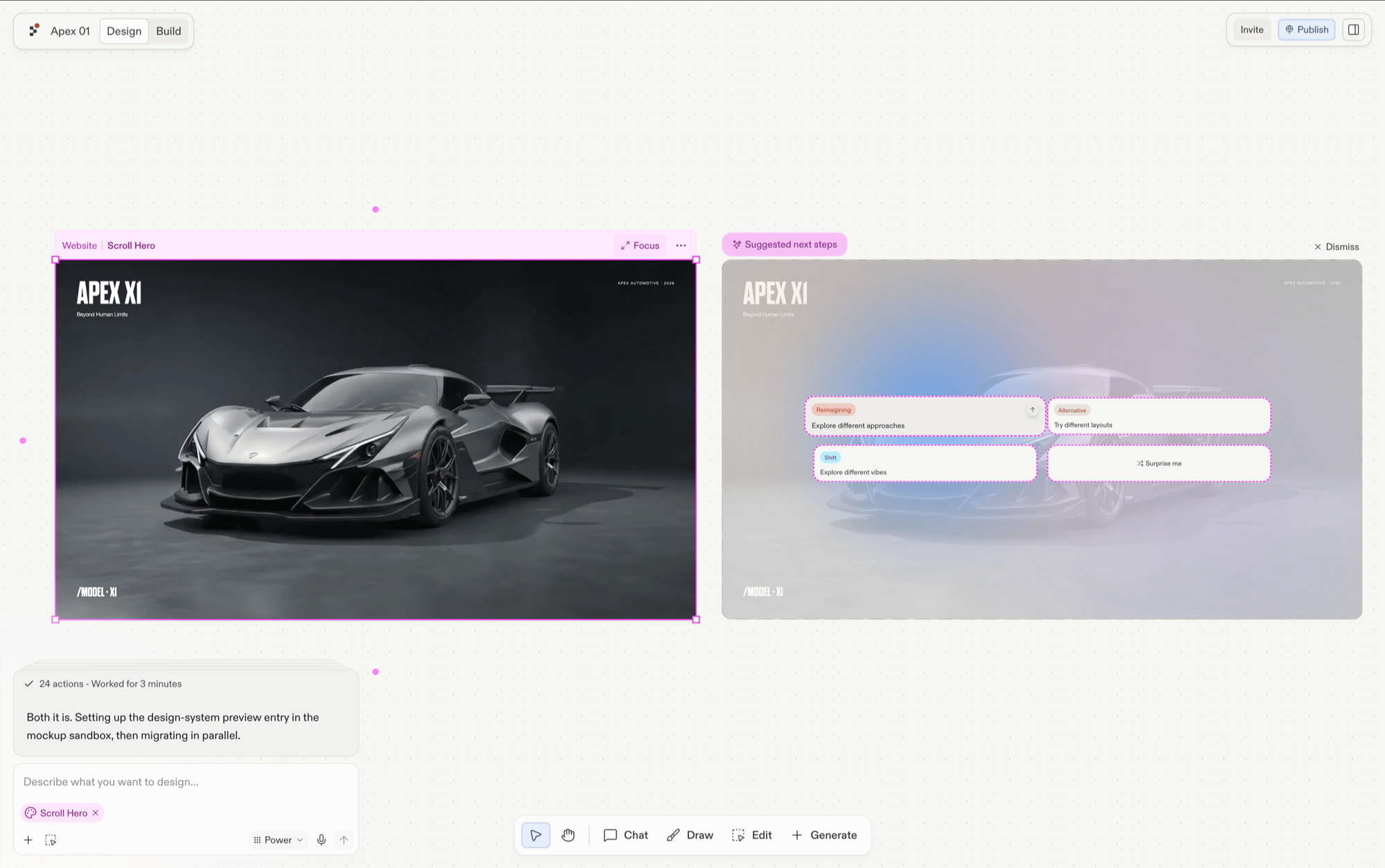
프레임을 선택하면 옆에 제안이 나타납니다: 지금 보고 있는 것을 바탕으로 한 원클릭 방향 제시로, 다른 레이아웃, 새로운 분위기, 또는 디자인이 암시하는 페이지 등이 있습니다. 각 제안은 원본 옆에 새로운 프레임으로 생성되므로, 원본은 그대로 유지된 채 비교할 수 있습니다.
Build… 메뉴에는 프로젝트 내 모든 Artifact가 나열됩니다. 하나를 선택하면 선택한 Design의 변경 사항이 해당 Artifact에 적용됩니다 — Agent가 디자인에 맞춰 Artifact의 코드를 다시 작성하며, Design 프레임은 참고용으로 Canvas에 남아 있습니다.
{"docsConfig":{"theme":"aspen","$schema":"https://mintlify.com/docs.json","name":"Replit","colors":{"primary":"#FF3C00","light":"#FF3C00","dark":"#FF3C00"},"logo":{"light":"https://mintcdn.com/replit/j4of5To8jzehz0JK/logo/light.svg?fit=max\u0026auto=format\u0026n=j4of5To8jzehz0JK\u0026q=85\u0026s=6209cb5927b56fd1781133af05428373","dark":"https://mintcdn.com/replit/j4of5To8jzehz0JK/logo/dark.svg?fit=max\u0026auto=format\u0026n=j4of5To8jzehz0JK\u0026q=85\u0026s=9cbba158300d48c49d8b888e71015495","href":"/welcome"},"favicon":"https://mintcdn.com/replit/CmOMKRnamiqG44eH/favicon.ico?fit=max\u0026auto=format\u0026n=CmOMKRnamiqG44eH\u0026q=85\u0026s=c89a6df6f537373c946c7a5f0ac65475","appearance":{"default":"light"},"background":{"color":{"light":"#F6F5F4","dark":"#1E1E1F"}},"navbar":{"links":[],"primary":{"type":"button","label":"Start Building","href":"https://replit.com?ref=docs"}},"footer":{"socials":{"x":"https://x.com/replit","linkedin":"https://www.linkedin.com/company/repl-it","youtube":"https://www.youtube.com/@replit"}},"seo":{"metatags":{"og:site_name":"Replit Docs","twitter:site":"@replit","twitter:creator":"@replit","author":"Replit"},"indexing":"all"},"fonts":{"heading":{"family":"ABC Diatype Plus","weight":400,"source":"https://cdn.replit.com/dotcom/fonts/ABCDiatypePlusVariable.woff2","format":"woff2"},"body":{"family":"ABC Diatype Plus","weight":400,"source":"https://cdn.replit.com/dotcom/fonts/ABCDiatypePlusVariable.woff2","format":"woff2"}},"integrations":{"segment":{"key":"dMePKGC4BqfBivpe0Hvl8IoPpzSHgjdX"}},"contextual":{"options":["copy","view"],"display":"header"},"thumbnails":{"appearance":"light","background":"https://mintcdn.com/replit/j4of5To8jzehz0JK/thumb.png?fit=max\u0026auto=format\u0026n=j4of5To8jzehz0JK\u0026q=85\u0026s=a7db7f0256b2fa06810fb4d378e63cc5","fonts":{"family":"ABC Diatype Plus"}},"styling":{"latex":true},"navigation":{"languages":[{"language":"en","href":"welcome"},{"language":"fr","navbar":{"links":[],"primary":{"type":"button","label":"Commencer à créer","href":"https://replit.com?ref=docs"}},"href":"fr/welcome"},{"language":"pt","hidden":false,"navbar":{"links":[],"primary":{"type":"button","label":"Comece a criar","href":"https://replit.com?ref=docs"}},"href":"pt/welcome"},{"language":"ja","hidden":false,"navbar":{"links":[],"primary":{"type":"button","label":"作成を開始","href":"https://replit.com?ref=docs"}},"href":"ja/welcome"},{"language":"ko","hidden":false,"navbar":{"links":[],"primary":{"type":"button","label":"빌드 시작하기","href":"https://replit.com?ref=docs"}},"href":"ko/welcome"}]}},"deployment":{"deploymentMetadataValue":{"subdomain":"replit","hasAudioNarration":false,"actualSubdomain":"replit","customDomains":["docs.replit.com","docs.repl.it"],"gitSource":{"type":"github","owner":"replit","repo":"replit-docs","deployBranch":"main","contentDirectory":"docs","isPrivate":true,"mountPath":"","label":""},"feedback":{"thumbs":true,"issues":true,"edits":false},"entitlements":{"AI_CHAT":{"status":"DISABLED"},"REMOVE_BRANDING":{"status":"ENABLED"},"CONTEXTUAL_FEEDBACK":{"status":"ENABLED"},"CODE_SNIPPET_FEEDBACK":{"status":"ENABLED"},"WEB_MCP":{"status":"ENABLED"},"NARRATION":{"status":"DISABLED"}},"buildId":"6af05876198d4fbfea6de5df","clientVersion":"0.0.4087","searchFilterCounts":[{"language":"en","tag":"Features","count":360},{"language":"fr","tag":"Fonctionnalités","count":360},{"language":"ja","tag":"機能","count":360},{"language":"ko","tag":"기능","count":360},{"language":"pt","tag":"Funcionalidades","count":360},{"language":"en","tag":"Changelog","count":100},{"language":"fr","tag":"Journal des modifications","count":100},{"language":"ja","tag":"変更履歴","count":100},{"language":"ko","tag":"변경 내역","count":100},{"language":"pt","tag":"Registro de alterações","count":100},{"language":"en","tag":"Apps","count":41},{"language":"fr","tag":"Apps","count":41},{"language":"ja","tag":"Apps","count":41},{"language":"ko","tag":"Apps","count":41},{"language":"pt","tag":"Apps","count":41},{"language":"en","tag":"Enterprise","count":40},{"language":"fr","tag":"Entreprise","count":40},{"language":"ja","tag":"Enterprise","count":40},{"language":"ko","tag":"Enterprise","count":40},{"language":"pt","tag":"Enterprise","count":40},{"language":"en","tag":"Use cases","count":39},{"language":"fr","tag":"Use cases","count":39},{"language":"ja","tag":"Use cases","count":39},{"language":"ko","tag":"Use cases","count":39},{"language":"pt","tag":"Use cases","count":39},{"language":"en","tag":"Chats","count":25},{"language":"en","tag":"Designs","count":25},{"language":"fr","tag":"Chats","count":25},{"language":"fr","tag":"Designs","count":25},{"language":"ja","tag":"Chats","count":25},{"language":"ja","tag":"Designs","count":25},{"language":"ko","tag":"Chats","count":25},{"language":"ko","tag":"Designs","count":25},{"language":"pt","tag":"Chats","count":25},{"language":"pt","tag":"Designs","count":25},{"language":"en","tag":"Trust \u0026 Billing","count":23},{"language":"fr","tag":"Confiance et facturation","count":23},{"language":"ja","tag":"信頼と請求","count":23},{"language":"ko","tag":"신뢰 및 결제","count":23},{"language":"pt","tag":"Confiança e faturamento","count":23},{"language":"en","tag":"Web","count":22},{"language":"fr","tag":"Web","count":22},{"language":"ja","tag":"Web","count":22},{"language":"ko","tag":"Web","count":22},{"language":"pt","tag":"Web","count":22},{"language":"en","tag":"Help","count":20},{"language":"fr","tag":"Help","count":20},{"language":"ja","tag":"Help","count":20},{"language":"ko","tag":"Help","count":20},{"language":"pt","tag":"Help","count":20}]},"assistantConfig":{"deflection":{"enabled":true,"email":"support@replit.com"}},"basePath":"","hasChatPermissions":false,"hasWebMcpPermissions":true,"toggles":[{"name":"kill-isr","enabled":true,"variant":{"name":"disabled","enabled":false,"feature_enabled":true},"impressionData":false},{"name":"agent-mintlify-slack","enabled":true,"variant":{"name":"disabled","enabled":false,"feature_enabled":true},"impressionData":false},{"name":"agent-integrations-settings","enabled":true,"variant":{"name":"disabled","enabled":false,"feature_enabled":true},"impressionData":false},{"name":"rbac-expansion","enabled":true,"variant":{"name":"disabled","enabled":false,"feature_enabled":true},"impressionData":false},{"name":"automations-pr-grouping","enabled":true,"variant":{"name":"disabled","enabled":false,"feature_enabled":true},"impressionData":false},{"name":"custom-prefix","enabled":true,"variant":{"name":"disabled","enabled":false,"feature_enabled":true},"impressionData":false},{"name":"analytics-v7","enabled":true,"variant":{"name":"disabled","enabled":false,"feature_enabled":true},"impressionData":false},{"name":"user-flows-analytics","enabled":true,"variant":{"name":"disabled","enabled":false,"feature_enabled":true},"impressionData":false},{"name":"no-publish-flow","enabled":true,"variant":{"name":"disabled","enabled":false,"feature_enabled":true},"impressionData":false},{"name":"workos-onboarding","enabled":true,"variant":{"name":"disabled","enabled":false,"feature_enabled":true},"impressionData":false},{"name":"llms-txt-v2","enabled":true,"variant":{"name":"disabled","enabled":false,"feature_enabled":true},"impressionData":false},{"name":"snapshot-serving-live","enabled":true,"variant":{"name":"disabled","enabled":false,"feature_enabled":true},"impressionData":false},{"name":"stripTemperatureMiddleware","enabled":true,"variant":{"name":"disabled","enabled":false,"feature_enabled":true},"impressionData":false},{"name":"support-platform-pylon-zendesk","enabled":true,"variant":{"name":"disabled","enabled":false,"feature_enabled":true},"impressionData":false},{"name":"snapshot-serving","enabled":true,"variant":{"name":"disabled","enabled":false,"feature_enabled":true},"impressionData":false},{"name":"instant-rollback","enabled":true,"variant":{"name":"disabled","enabled":false,"feature_enabled":true},"impressionData":false},{"name":"granular-notifications-server","enabled":true,"variant":{"name":"disabled","enabled":false,"feature_enabled":true},"impressionData":false},{"name":"granular-notifications","enabled":true,"variant":{"name":"disabled","enabled":false,"feature_enabled":true},"impressionData":false},{"name":"automations-fable","enabled":true,"variant":{"name":"disabled","enabled":false,"feature_enabled":true},"impressionData":false},{"name":"fixed-ai-action-pricing","enabled":true,"variant":{"name":"disabled","enabled":false,"feature_enabled":true},"impressionData":false},{"name":"automation-resolve-merge-conflict","enabled":true,"variant":{"name":"disabled","enabled":false,"feature_enabled":true},"impressionData":false},{"name":"scoped-publishing","enabled":true,"variant":{"name":"disabled","enabled":false,"feature_enabled":true},"impressionData":false},{"name":"mintql","enabled":true,"variant":{"name":"disabled","enabled":false,"feature_enabled":true},"impressionData":false},{"name":"page-level-analytics","enabled":true,"variant":{"name":"disabled","enabled":false,"feature_enabled":true},"impressionData":false},{"name":"editor-version-history-v2","enabled":true,"variant":{"name":"disabled","enabled":false,"feature_enabled":true},"impressionData":false},{"name":"billing-page-v2","enabled":true,"variant":{"name":"disabled","enabled":false,"feature_enabled":true},"impressionData":false},{"name":"full-page-search","enabled":true,"variant":{"name":"disabled","enabled":false,"feature_enabled":true},"impressionData":false},{"name":"workspace-projects","enabled":true,"variant":{"name":"disabled","enabled":false,"feature_enabled":true},"impressionData":false},{"name":"assistant-v5","enabled":true,"variant":{"name":"disabled","enabled":false,"feature_enabled":true},"impressionData":false},{"name":"fork-pr-previews","enabled":true,"variant":{"name":"disabled","enabled":false,"feature_enabled":true},"impressionData":false},{"name":"revalidation-jwt","enabled":true,"variant":{"name":"disabled","enabled":false,"feature_enabled":true},"impressionData":false},{"name":"workos-sso-scim","enabled":true,"variant":{"name":"disabled","enabled":false,"feature_enabled":true},"impressionData":false},{"name":"hobby-abuse-scan","enabled":true,"variant":{"name":"disabled","enabled":false,"feature_enabled":true},"impressionData":false},{"name":"dashboard-inbox","enabled":true,"variant":{"name":"disabled","enabled":false,"feature_enabled":true},"impressionData":false},{"name":"workos-signup","enabled":true,"variant":{"name":"disabled","enabled":false,"feature_enabled":true},"impressionData":false},{"name":"turbopuffer-dual-write","enabled":true,"variant":{"name":"disabled","enabled":false,"feature_enabled":true},"impressionData":false},{"name":"workos-enabled","enabled":true,"variant":{"name":"disabled","enabled":false,"feature_enabled":true},"impressionData":false},{"name":"approve-review-flow","enabled":true,"variant":{"name":"disabled","enabled":false,"feature_enabled":true},"impressionData":false},{"name":"editor-metadata","enabled":true,"variant":{"name":"disabled","enabled":false,"feature_enabled":true},"impressionData":false},{"name":"sso-setup-deadline-banner","enabled":true,"variant":{"name":"disabled","enabled":false,"feature_enabled":true},"impressionData":false},{"name":"turbopuffer-serve","enabled":true,"variant":{"name":"disabled","enabled":false,"feature_enabled":true},"impressionData":false},{"name":"live-agents","enabled":true,"variant":{"name":"disabled","enabled":false,"feature_enabled":true},"impressionData":false},{"name":"comment-mode","enabled":true,"variant":{"name":"disabled","enabled":false,"feature_enabled":true},"impressionData":false}],"googleFontsInlined":false},"customCss":[{"filePath":"styles.css","href":"/_mintlify/custom/replit/795eee5cda55dee3/styles.css"}],"page":{"pagePath":"ko/design/frames","slug":"/ko/design/frames","pageMetadata":{"title":"Frames","sidebarTitle":"Frames","description":"프레임 종류, 프레임별 액션 바, Canvas의 Build 및 Focus 액션.","icon":"square-dashed","href":"/ko/design/frames"},"description":{"compiledSource":"\"use strict\";\nconst {jsx: _jsx} = arguments[0];\nconst {useMDXComponents: _provideComponents} = arguments[0];\nfunction _createMdxContent(props) {\n const _components = {\n p: \"p\",\n ..._provideComponents(),\n ...props.components\n };\n return _jsx(_components.p, {\n children: \"프레임 종류, 프레임별 액션 바, Canvas의 Build 및 Focus 액션.\"\n });\n}\nfunction MDXContent(props = {}) {\n const {wrapper: MDXLayout} = {\n ..._provideComponents(),\n ...props.components\n };\n return MDXLayout ? _jsx(MDXLayout, {\n ...props,\n children: _jsx(_createMdxContent, {\n ...props\n })\n }) : _createMdxContent(props);\n}\nreturn {\n default: MDXContent\n};\n","frontmatter":{},"scope":{}},"pageType":"default","mdx":{"mdxSource":{"compiledSource":"\"use strict\";const{Fragment:_Fragment,jsx:_jsx,jsxs:_jsxs}=arguments[0];const{useMDXComponents:_provideComponents}=arguments[0];function _createMdxContent(props){const _components={a:`a`,li:`li`,p:`p`,strong:`strong`,tbody:`tbody`,td:`td`,th:`th`,thead:`thead`,tr:`tr`,ul:`ul`,..._provideComponents(),...props.components},{Frame,Heading,Note,OptimizedImage,Step,Steps,Table}=_components;if(!Frame)_missingMdxReference(`Frame`,true);if(!Heading)_missingMdxReference(`Heading`,true);if(!Note)_missingMdxReference(`Note`,true);if(!OptimizedImage)_missingMdxReference(`OptimizedImage`,true);if(!Step)_missingMdxReference(`Step`,true);if(!Steps)_missingMdxReference(`Steps`,true);if(!Table)_missingMdxReference(`Table`,true);return _jsxs(_Fragment,{children:[_jsx(_components.p,{children:`Canvas의 모든 타일은 **프레임(frame)**입니다. 프레임은 여러분이 선택하고 드래그하고 작업하는 대상입니다. 이 페이지에서는 프레임 종류, 선택 시 나타나는 프레임별 액션 바, 그리고 여기서 실행할 수 있는 기능인 Build와 Focus를 다룹니다.`}),`\n`,_jsx(Frame,{children:_jsx(OptimizedImage,{src:`https://mintcdn.com/replit/OIImiKPshhawqFXK/images/replitai/canvas-overview.png?fit=max\u0026auto=format\u0026n=OIImiKPshhawqFXK\u0026q=85\u0026s=5cd2330c89bbdedfb249151ee582f070`,alt:`보드에 배치된 세 개의 프레임이 있는 Canvas: Website(Scroll Hero), APEX X1 Design System, 그리고 APEX X1 슈퍼카의 Design 목업이 있으며, 하단에는 플로팅 툴바(Chat, Draw, Edit, Generate)가 있음`,\"data-og-width\":`2000`,width:`2000`,\"data-og-height\":`1255`,height:`1255`,\"data-path\":`images/replitai/canvas-overview.png`,\"data-optimize\":`true`,\"data-opv\":`3`,srcset:`https://mintcdn.com/replit/OIImiKPshhawqFXK/images/replitai/canvas-overview.png?w=280\u0026fit=max\u0026auto=format\u0026n=OIImiKPshhawqFXK\u0026q=85\u0026s=d06d2d847a1e7825d9ed02721cb45ef4 280w, https://mintcdn.com/replit/OIImiKPshhawqFXK/images/replitai/canvas-overview.png?w=560\u0026fit=max\u0026auto=format\u0026n=OIImiKPshhawqFXK\u0026q=85\u0026s=d36061ea203905e997c06543df7f5e90 560w, https://mintcdn.com/replit/OIImiKPshhawqFXK/images/replitai/canvas-overview.png?w=840\u0026fit=max\u0026auto=format\u0026n=OIImiKPshhawqFXK\u0026q=85\u0026s=4b12d30a5272d12ddee82e069b8cf956 840w, https://mintcdn.com/replit/OIImiKPshhawqFXK/images/replitai/canvas-overview.png?w=1100\u0026fit=max\u0026auto=format\u0026n=OIImiKPshhawqFXK\u0026q=85\u0026s=35ec06ddafe8185d048022c5ddb9b1c1 1100w, https://mintcdn.com/replit/OIImiKPshhawqFXK/images/replitai/canvas-overview.png?w=1650\u0026fit=max\u0026auto=format\u0026n=OIImiKPshhawqFXK\u0026q=85\u0026s=9603f817be4e8e6939f5fd602e758380 1650w, https://mintcdn.com/replit/OIImiKPshhawqFXK/images/replitai/canvas-overview.png?w=2500\u0026fit=max\u0026auto=format\u0026n=OIImiKPshhawqFXK\u0026q=85\u0026s=665321e78f3e12f9707654cde1969bcb 2500w`})}),`\n`,_jsx(Heading,{level:`2`,id:`프레임-종류`,children:`프레임 종류`}),`\n`,_jsxs(_components.p,{children:[`주요 두 종류는 `,_jsx(_components.strong,{children:`Artifacts`}),`(실행 중인, 앱에 연결된 화면)와 `,_jsx(_components.strong,{children:`Designs`}),`(목업)입니다. 프레임 좌측 상단 헤더에서 어느 종류인지 확인할 수 있습니다.`]}),`\n`,_jsxs(Table,{children:[_jsx(_components.thead,{children:_jsxs(_components.tr,{children:[_jsx(_components.th,{children:`종류`}),_jsx(_components.th,{children:`헤더 레이블`}),_jsx(_components.th,{children:`기반`}),_jsx(_components.th,{children:`실행 중인 앱처럼 상호작용 가능?`}),_jsx(_components.th,{children:`실제 앱으로 전환 가능?`})]})}),_jsxs(_components.tbody,{children:[_jsxs(_components.tr,{children:[_jsx(_components.td,{children:`Artifact`}),_jsxs(_components.td,{children:[_jsx(_components.strong,{children:`Website`}),`, `,_jsx(_components.strong,{children:`Slides`}),` 등`]}),_jsx(_components.td,{children:`실행 중인 아티팩트`}),_jsx(_components.td,{children:`예`}),_jsx(_components.td,{children:`이미 앱임.`})]}),_jsxs(_components.tr,{children:[_jsx(_components.td,{children:`Mobile artifact`}),_jsx(_components.td,{children:_jsx(_components.strong,{children:`Mobile app`})}),_jsx(_components.td,{children:`실행 중인 아티팩트`}),_jsx(_components.td,{children:`예(시뮬레이터에서)`}),_jsx(_components.td,{children:`이미 앱임.`})]}),_jsxs(_components.tr,{children:[_jsx(_components.td,{children:`Design`}),_jsx(_components.td,{children:_jsx(_components.strong,{children:`Design`})}),_jsx(_components.td,{children:`정적/대화형 목업`}),_jsx(_components.td,{children:`대화형 프레임만`}),_jsxs(_components.td,{children:[`예 — 프레임별 `,_jsx(_components.strong,{children:`Build…`}),` 메뉴를 통해. `,_jsx(_components.a,{href:`#build`,children:`Build`}),`를 참고하세요.`]})]}),_jsxs(_components.tr,{children:[_jsx(_components.td,{children:`Image`}),_jsx(_components.td,{children:_jsx(_components.strong,{children:`Image`})}),_jsx(_components.td,{children:`생성된 PNG/JPG`}),_jsx(_components.td,{children:`아니요`}),_jsx(_components.td,{children:`아니요 — 참고 자료로 사용.`})]}),_jsxs(_components.tr,{children:[_jsx(_components.td,{children:`Video`}),_jsx(_components.td,{children:_jsx(_components.strong,{children:`Video`})}),_jsx(_components.td,{children:`생성된 영상`}),_jsx(_components.td,{children:`아니요`}),_jsx(_components.td,{children:`아니요.`})]}),_jsxs(_components.tr,{children:[_jsx(_components.td,{children:`Vector graphic`}),_jsx(_components.td,{children:_jsx(_components.strong,{children:`Graphic`})}),_jsx(_components.td,{children:`생성된 SVG`}),_jsx(_components.td,{children:`아니요`}),_jsx(_components.td,{children:`아니요 — 실제 앱에 임베드.`})]})]})]}),`\n`,_jsx(Note,{children:_jsxs(_components.p,{children:[`Design 프레임이 정적 이미지처럼 동작하는지, 대화형 프로토타입처럼 동작하는지는 `,_jsx(_components.strong,{children:`Interactive frames`}),` 기능에 따라 달라집니다. 이 기능이 활성화되어 있으면 Design 프레임은 실제 페이지처럼 클릭과 폼 입력에 반응합니다. 그렇지 않으면 반복 작업은 가능하지만 클릭해서 넘어갈 수는 없는 스냅샷으로 렌더링됩니다.`]})}),`\n`,_jsx(Heading,{level:`2`,id:`다양한-기기에서-미리보기`,children:`다양한 기기에서 미리보기`}),`\n`,_jsx(_components.p,{children:`디자인이 다양한 화면 크기에서 어떻게 보이는지 확인하세요. Agent에게 모바일, 태블릿, 또는 데스크톱 버전을 보여달라고 요청하세요. 예를 들어 “이 페이지의 모바일 버전을 보여줘”라고 하면 Agent가 해당 크기로 프레임을 렌더링합니다.`}),`\n`,_jsxs(_components.ul,{children:[`\n`,_jsxs(_components.li,{children:[_jsx(_components.strong,{children:`모바일`}),`: 390 × 844`]}),`\n`,_jsxs(_components.li,{children:[_jsx(_components.strong,{children:`태블릿`}),`: 768 × 1024`]}),`\n`,_jsxs(_components.li,{children:[_jsx(_components.strong,{children:`데스크톱`}),`: 1280 × 720`]}),`\n`]}),`\n`,_jsx(Heading,{level:`2`,id:`프레임별-액션-바`,children:`프레임별 액션 바`}),`\n`,_jsx(_components.p,{children:`프레임을 선택하면 액션 바가 표시됩니다. 액션은 프레임의 종류에 따라 달라집니다.`}),`\n`,_jsx(Heading,{level:`3`,id:`artifact-및-design-프레임`,children:`Artifact 및 Design 프레임`}),`\n`,_jsx(_components.p,{children:`Artifact(Website, Slides 등) 및 Design 프레임의 경우, 액션 바가 프레임 상단을 가로질러 표시됩니다.`}),`\n`,_jsx(Frame,{caption:`Design 프레임의 액션 바: Build…, Focus, 그리고 추가 옵션.`,children:_jsx(OptimizedImage,{src:`https://mintcdn.com/replit/OIImiKPshhawqFXK/images/replitai/canvas-frame-action-bar.png?fit=max\u0026auto=format\u0026n=OIImiKPshhawqFXK\u0026q=85\u0026s=c767372a08966097abccb48bf11591c7`,alt:`APEX X1 Design 프레임이 선택된 Canvas. 상단에 종류 레이블과 Build, Focus, 추가 옵션 액션이 있는 프레임별 액션 바가 표시되고, 채팅 프롬프트 입력란에 해당 프레임이 칩으로 첨부되어 있음`,\"data-og-width\":`2000`,width:`2000`,\"data-og-height\":`1290`,height:`1290`,\"data-path\":`images/replitai/canvas-frame-action-bar.png`,\"data-optimize\":`true`,\"data-opv\":`3`,srcset:`https://mintcdn.com/replit/OIImiKPshhawqFXK/images/replitai/canvas-frame-action-bar.png?w=280\u0026fit=max\u0026auto=format\u0026n=OIImiKPshhawqFXK\u0026q=85\u0026s=f78ad071f18fd801f51a093f1f8585c7 280w, https://mintcdn.com/replit/OIImiKPshhawqFXK/images/replitai/canvas-frame-action-bar.png?w=560\u0026fit=max\u0026auto=format\u0026n=OIImiKPshhawqFXK\u0026q=85\u0026s=06ce7dfd524174f04bb975741ea8f56d 560w, https://mintcdn.com/replit/OIImiKPshhawqFXK/images/replitai/canvas-frame-action-bar.png?w=840\u0026fit=max\u0026auto=format\u0026n=OIImiKPshhawqFXK\u0026q=85\u0026s=74891f932f9b9d52ea243e4fe13b16a5 840w, https://mintcdn.com/replit/OIImiKPshhawqFXK/images/replitai/canvas-frame-action-bar.png?w=1100\u0026fit=max\u0026auto=format\u0026n=OIImiKPshhawqFXK\u0026q=85\u0026s=408eeae9da878b22cee56a9970447ab0 1100w, https://mintcdn.com/replit/OIImiKPshhawqFXK/images/replitai/canvas-frame-action-bar.png?w=1650\u0026fit=max\u0026auto=format\u0026n=OIImiKPshhawqFXK\u0026q=85\u0026s=ffec2489043c763cb85bab90804828a8 1650w, https://mintcdn.com/replit/OIImiKPshhawqFXK/images/replitai/canvas-frame-action-bar.png?w=2500\u0026fit=max\u0026auto=format\u0026n=OIImiKPshhawqFXK\u0026q=85\u0026s=bf51528515e672cea2365f3de7517218 2500w`})}),`\n`,_jsx(_components.p,{children:`액션 클러스터는 좁은 너비에서는 아이콘으로 압축되고, 프레임이 넓어지면 레이블이 나타납니다. 좌측부터 순서대로 전체 목록은 다음과 같습니다.`}),`\n`,_jsxs(Table,{children:[_jsx(_components.thead,{children:_jsxs(_components.tr,{children:[_jsx(_components.th,{children:`액션`}),_jsx(_components.th,{children:`기능`})]})}),_jsxs(_components.tbody,{children:[_jsxs(_components.tr,{children:[_jsx(_components.td,{children:`Export`}),_jsxs(_components.td,{children:[`프레임을 PNG로 다운로드합니다. `,_jsx(_components.a,{href:`/ko/design/canvas#export-a-frame-as-png`,children:`프레임을 PNG로 내보내기`}),`를 참고하세요.`]})]}),_jsxs(_components.tr,{children:[_jsx(_components.td,{children:`Build…`}),_jsxs(_components.td,{children:[`프로젝트 내 모든 Artifact를 나열하는 메뉴를 엽니다 — 디자인을 적용할 하나를 선택하거나, `,_jsx(_components.strong,{children:`Build this design`}),`을 선택해 새 Artifact를 만드세요. Design 프레임에만 해당됩니다. `,_jsx(_components.a,{href:`#build`,children:`Build`}),`를 참고하세요.`]})]}),_jsxs(_components.tr,{children:[_jsx(_components.td,{children:`Focus`}),_jsx(_components.td,{children:`프레임을 메인 화면으로 확장하는 포커스 모드로 진입합니다.`})]}),_jsxs(_components.tr,{children:[_jsx(_components.td,{children:`More (…)`}),_jsxs(_components.td,{children:[`추가 프레임 액션입니다. 복사, 복제, 순서 변경, 내보내기는 보드의 `,_jsx(_components.a,{href:`/ko/design/canvas#right-click-menu`,children:`우클릭 메뉴`}),`에서도 사용할 수 있습니다.`]})]})]})]}),`\n`,_jsxs(_components.p,{children:[`앱 프레임(Website, Slides, Mobile app)은 Focus와 추가 옵션을 보여주고, Design 프레임은 그 앞에 Build…를 추가로 보여줍니다. 선택한 프레임에서 새로운 방향으로 뻗어나가려면 해당 프레임의 `,_jsx(_components.a,{href:`/ko/design/explore-suggestions`,children:`제안`}),`을 따라가세요.`]}),`\n`,_jsxs(_components.p,{children:[`프레임을 선택하면 다음 Agent 채팅 메시지에도 스냅샷으로 첨부됩니다 — `,_jsx(_components.a,{href:`/ko/design/canvas#what-lives-on-the-canvas`,children:`Canvas에 있는 것들`}),`을 참고하세요.`]}),`\n`,_jsx(Note,{children:_jsxs(_components.p,{children:[`액션 바는 `,_jsx(_components.strong,{children:`읽기 전용 모드`}),`를 따릅니다. Canvas가 백그라운드 작업 컨텍스트 안에서 잠겨 있으면 반복 작업 관련 액션은 숨겨지고 Focus만 남습니다.`]})}),`\n`,_jsx(Heading,{level:`3`,id:`미디어-프레임`,children:`미디어 프레임`}),`\n`,_jsx(_components.p,{children:`Image, Video, Vector graphic 프레임은 프레임 위에 작은 플로팅 액션 바를 표시합니다. 세 종류 모두 다음을 공통으로 제공합니다.`}),`\n`,_jsxs(_components.ul,{children:[`\n`,_jsxs(_components.li,{children:[_jsx(_components.strong,{children:`미디어 교체`}),`: Canvas에서의 위치와 크기를 유지한 채 프레임에 새 파일을 업로드해 교체합니다.`]}),`\n`,_jsxs(_components.li,{children:[_jsx(_components.strong,{children:`다운로드`}),`: 미디어 파일을 컴퓨터에 저장합니다.`]}),`\n`,_jsxs(_components.li,{children:[_jsx(_components.strong,{children:`대체 텍스트`}),`: 접근성을 위해, 그리고 프레임이 참조될 때 Agent가 더 많은 컨텍스트를 갖도록 대체 텍스트를 추가합니다.`]}),`\n`]}),`\n`,_jsx(Frame,{caption:`영상 프레임의 액션 바: Replace media, Download, Alt text.`,children:_jsx(OptimizedImage,{src:`https://mintcdn.com/replit/OIImiKPshhawqFXK/images/replitai/canvas-frame-video-actions.png?fit=max\u0026auto=format\u0026n=OIImiKPshhawqFXK\u0026q=85\u0026s=dde933bc1e78e6cc413a9dd15f73fc2e`,alt:`Canvas에서 선택된 파란색 슈퍼카 영상 프레임 위에 플로팅 액션 바가 표시되어 있으며, Replace media, Download('Download original' 툴팁 포함), Alt text 컨트롤을 보여줌`,\"data-og-width\":`2000`,width:`2000`,\"data-og-height\":`1252`,height:`1252`,\"data-path\":`images/replitai/canvas-frame-video-actions.png`,\"data-optimize\":`true`,\"data-opv\":`3`,srcset:`https://mintcdn.com/replit/OIImiKPshhawqFXK/images/replitai/canvas-frame-video-actions.png?w=280\u0026fit=max\u0026auto=format\u0026n=OIImiKPshhawqFXK\u0026q=85\u0026s=a6934949e42b5753b11ca6dbc6821140 280w, https://mintcdn.com/replit/OIImiKPshhawqFXK/images/replitai/canvas-frame-video-actions.png?w=560\u0026fit=max\u0026auto=format\u0026n=OIImiKPshhawqFXK\u0026q=85\u0026s=7cce73da51e2bdda044990dff00ed309 560w, https://mintcdn.com/replit/OIImiKPshhawqFXK/images/replitai/canvas-frame-video-actions.png?w=840\u0026fit=max\u0026auto=format\u0026n=OIImiKPshhawqFXK\u0026q=85\u0026s=6a4e93f1c3e962846a7d47e569befd10 840w, https://mintcdn.com/replit/OIImiKPshhawqFXK/images/replitai/canvas-frame-video-actions.png?w=1100\u0026fit=max\u0026auto=format\u0026n=OIImiKPshhawqFXK\u0026q=85\u0026s=f2ad4b15c0c550070f6cf40f0172ad1e 1100w, https://mintcdn.com/replit/OIImiKPshhawqFXK/images/replitai/canvas-frame-video-actions.png?w=1650\u0026fit=max\u0026auto=format\u0026n=OIImiKPshhawqFXK\u0026q=85\u0026s=1182bb4b2b46f74c7596a1b914c61acb 1650w, https://mintcdn.com/replit/OIImiKPshhawqFXK/images/replitai/canvas-frame-video-actions.png?w=2500\u0026fit=max\u0026auto=format\u0026n=OIImiKPshhawqFXK\u0026q=85\u0026s=b6cf3ec11c245b5780a5fa9054ad7c9b 2500w`})}),`\n`,_jsx(_components.p,{children:`Image 프레임에는 두 가지 컨트롤이 더 있습니다.`}),`\n`,_jsxs(_components.ul,{children:[`\n`,_jsxs(_components.li,{children:[_jsx(_components.strong,{children:`자르기(Crop)`}),`: Canvas에서 바로 이미지를 자릅니다.`]}),`\n`,_jsxs(_components.li,{children:[_jsx(_components.strong,{children:`영상 생성(Generate video)`}),`: 이미지로부터 짧은 영상 클립을 생성합니다.`]}),`\n`]}),`\n`,_jsx(Frame,{caption:`이미지 프레임의 액션 바에는 Crop과 Generate video가 추가됨.`,children:_jsx(OptimizedImage,{src:`https://mintcdn.com/replit/OIImiKPshhawqFXK/images/replitai/canvas-frame-image-actions.png?fit=max\u0026auto=format\u0026n=OIImiKPshhawqFXK\u0026q=85\u0026s=95c35379724d57a518efa0578fe0183c`,alt:`Canvas에서 선택된 노란색 슈퍼카 이미지 프레임 위에 플로팅 액션 바가 표시되어 있으며, Replace media, Crop, Download, Alt text, Generate video 컨트롤을 보여줌`,\"data-og-width\":`1600`,width:`1600`,\"data-og-height\":`1002`,height:`1002`,\"data-path\":`images/replitai/canvas-frame-image-actions.png`,\"data-optimize\":`true`,\"data-opv\":`3`,srcset:`https://mintcdn.com/replit/OIImiKPshhawqFXK/images/replitai/canvas-frame-image-actions.png?w=280\u0026fit=max\u0026auto=format\u0026n=OIImiKPshhawqFXK\u0026q=85\u0026s=f5e91c28486e80fb1f1929cf08927229 280w, https://mintcdn.com/replit/OIImiKPshhawqFXK/images/replitai/canvas-frame-image-actions.png?w=560\u0026fit=max\u0026auto=format\u0026n=OIImiKPshhawqFXK\u0026q=85\u0026s=e581a32796ebeb696c61750fa6da3929 560w, https://mintcdn.com/replit/OIImiKPshhawqFXK/images/replitai/canvas-frame-image-actions.png?w=840\u0026fit=max\u0026auto=format\u0026n=OIImiKPshhawqFXK\u0026q=85\u0026s=66b533a1308bcf02380f3fd60420ba42 840w, https://mintcdn.com/replit/OIImiKPshhawqFXK/images/replitai/canvas-frame-image-actions.png?w=1100\u0026fit=max\u0026auto=format\u0026n=OIImiKPshhawqFXK\u0026q=85\u0026s=8210cb95c7591acc604a2da833ef30c0 1100w, https://mintcdn.com/replit/OIImiKPshhawqFXK/images/replitai/canvas-frame-image-actions.png?w=1650\u0026fit=max\u0026auto=format\u0026n=OIImiKPshhawqFXK\u0026q=85\u0026s=c2e9a84035ae29f2676ba7b8a3a0bf51 1650w, https://mintcdn.com/replit/OIImiKPshhawqFXK/images/replitai/canvas-frame-image-actions.png?w=2500\u0026fit=max\u0026auto=format\u0026n=OIImiKPshhawqFXK\u0026q=85\u0026s=7cc351ad3a04a5c19bce8e4aeca3c6be 2500w`})}),`\n`,_jsx(Heading,{level:`2`,id:`새로운-방향-탐색하기`,children:`새로운 방향 탐색하기`}),`\n`,_jsxs(_components.p,{children:[`프레임을 선택하면 옆에 `,_jsx(_components.a,{href:`/ko/design/explore-suggestions`,children:`제안`}),`이 나타납니다: 지금 보고 있는 것을 바탕으로 한 원클릭 방향 제시로, 다른 레이아웃, 새로운 분위기, 또는 디자인이 암시하는 페이지 등이 있습니다. 각 제안은 원본 옆에 새로운 프레임으로 생성되므로, 원본은 그대로 유지된 채 비교할 수 있습니다.`]}),`\n`,_jsx(Frame,{children:_jsx(OptimizedImage,{src:`https://mintcdn.com/replit/9Q_lVrxG2Dh35jz1/images/design/replit-design/ambient-iq.png?fit=max\u0026auto=format\u0026n=9Q_lVrxG2Dh35jz1\u0026q=85\u0026s=7f39fec76cde3f60e3a20e6c5a13d8db`,alt:`APEX X1 슈퍼카 히어로를 보여주는 선택된 Website 프레임 옆에 Suggested next steps 패널이 있고, Explore different approaches, Try different layouts, Explore different vibes, Surprise me 같은 제안 칩이 표시되어 있음`,\"data-og-width\":`2000`,width:`2000`,\"data-og-height\":`1254`,height:`1254`,\"data-path\":`images/design/replit-design/ambient-iq.png`,\"data-optimize\":`true`,\"data-opv\":`3`,srcset:`https://mintcdn.com/replit/9Q_lVrxG2Dh35jz1/images/design/replit-design/ambient-iq.png?w=280\u0026fit=max\u0026auto=format\u0026n=9Q_lVrxG2Dh35jz1\u0026q=85\u0026s=6424e030ddfc68ec83dba132241c8312 280w, https://mintcdn.com/replit/9Q_lVrxG2Dh35jz1/images/design/replit-design/ambient-iq.png?w=560\u0026fit=max\u0026auto=format\u0026n=9Q_lVrxG2Dh35jz1\u0026q=85\u0026s=3f696ff05b245116f4ca530e745a105a 560w, https://mintcdn.com/replit/9Q_lVrxG2Dh35jz1/images/design/replit-design/ambient-iq.png?w=840\u0026fit=max\u0026auto=format\u0026n=9Q_lVrxG2Dh35jz1\u0026q=85\u0026s=64cdc56d1cad7bcc856fdf9ecb0c0cc4 840w, https://mintcdn.com/replit/9Q_lVrxG2Dh35jz1/images/design/replit-design/ambient-iq.png?w=1100\u0026fit=max\u0026auto=format\u0026n=9Q_lVrxG2Dh35jz1\u0026q=85\u0026s=9d63a1c84bb235bc946fdd14677d43a9 1100w, https://mintcdn.com/replit/9Q_lVrxG2Dh35jz1/images/design/replit-design/ambient-iq.png?w=1650\u0026fit=max\u0026auto=format\u0026n=9Q_lVrxG2Dh35jz1\u0026q=85\u0026s=89094c99cd81d120f2a96c01cc4ab7db 1650w, https://mintcdn.com/replit/9Q_lVrxG2Dh35jz1/images/design/replit-design/ambient-iq.png?w=2500\u0026fit=max\u0026auto=format\u0026n=9Q_lVrxG2Dh35jz1\u0026q=85\u0026s=d016498f7219df192c44c01e5657c6fa 2500w`})}),`\n`,_jsx(Heading,{level:`2`,id:`build`,children:`Build`}),`\n`,_jsxs(_components.p,{children:[`선택한 Design 프레임의 `,_jsx(_components.strong,{children:`Build…`}),` 메뉴는 디자인을 실제 작동하는 앱으로 승격시킵니다. 동일한 메뉴로 이미 존재하는 Artifact에 디자인을 적용하는 것도 가능합니다.`]}),`\n`,_jsx(Frame,{children:_jsx(OptimizedImage,{src:`https://mintcdn.com/replit/OIImiKPshhawqFXK/images/replitai/canvas-build-menu.png?fit=max\u0026auto=format\u0026n=OIImiKPshhawqFXK\u0026q=85\u0026s=494228a2a81e9f943376d78e77b96417`,alt:`선택된 Design 프레임(APEX X1 Exact Replica)에서 열린 Build 메뉴. 헤더는 'Build or apply your designs'이며, 새 아티팩트를 만드는 'Build this design'과, 프로젝트의 APEX X1 Design System 및 Scroll Hero 웹사이트를 나열하는 'Apply to an existing creation'을 보여줌`,\"data-og-width\":`2000`,width:`2000`,\"data-og-height\":`1153`,height:`1153`,\"data-path\":`images/replitai/canvas-build-menu.png`,\"data-optimize\":`true`,\"data-opv\":`3`,srcset:`https://mintcdn.com/replit/OIImiKPshhawqFXK/images/replitai/canvas-build-menu.png?w=280\u0026fit=max\u0026auto=format\u0026n=OIImiKPshhawqFXK\u0026q=85\u0026s=74596a4d587e510ab4e141d76d03475e 280w, https://mintcdn.com/replit/OIImiKPshhawqFXK/images/replitai/canvas-build-menu.png?w=560\u0026fit=max\u0026auto=format\u0026n=OIImiKPshhawqFXK\u0026q=85\u0026s=01c35e7f4a22a89a6b1964f3023bb05e 560w, https://mintcdn.com/replit/OIImiKPshhawqFXK/images/replitai/canvas-build-menu.png?w=840\u0026fit=max\u0026auto=format\u0026n=OIImiKPshhawqFXK\u0026q=85\u0026s=63813a879efefe9d8c44261c5e4c2e1f 840w, https://mintcdn.com/replit/OIImiKPshhawqFXK/images/replitai/canvas-build-menu.png?w=1100\u0026fit=max\u0026auto=format\u0026n=OIImiKPshhawqFXK\u0026q=85\u0026s=b55dc31764f9b6b19e6363090da177e7 1100w, https://mintcdn.com/replit/OIImiKPshhawqFXK/images/replitai/canvas-build-menu.png?w=1650\u0026fit=max\u0026auto=format\u0026n=OIImiKPshhawqFXK\u0026q=85\u0026s=7d63b7d96ff58ff190aa47763a45a8b3 1650w, https://mintcdn.com/replit/OIImiKPshhawqFXK/images/replitai/canvas-build-menu.png?w=2500\u0026fit=max\u0026auto=format\u0026n=OIImiKPshhawqFXK\u0026q=85\u0026s=18d713163ef69eee37d34f4c04380bac 2500w`})}),`\n`,_jsx(Heading,{level:`3`,id:`build-this-design`,children:`Build this design`}),`\n`,_jsxs(_components.p,{children:[`메뉴에서 `,_jsx(_components.strong,{children:`Build this design`}),`을 선택하면 선택한 Design 프레임으로부터 새 Artifact가 시작됩니다. 새 Artifact는 프로젝트의 아티팩트 목록에 추가되어 실제 작동하는 앱이 됩니다. Build에는 Core 또는 Pro가 필요합니다.`]}),`\n`,_jsx(Heading,{level:`3`,id:`기존-artifact에-적용하기`,children:`기존 Artifact에 적용하기`}),`\n`,_jsx(_components.p,{children:`Build… 메뉴에는 프로젝트 내 모든 Artifact가 나열됩니다. 하나를 선택하면 선택한 Design의 변경 사항이 해당 Artifact에 적용됩니다 — Agent가 디자인에 맞춰 Artifact의 코드를 다시 작성하며, Design 프레임은 참고용으로 Canvas에 남아 있습니다.`}),`\n`,_jsx(Heading,{level:`2`,id:`포커스-모드`,children:`포커스 모드`}),`\n`,_jsx(_components.p,{children:`포커스 모드를 사용하면 Design에 머무른 채 선택한 프레임을 전체 크기로 작업할 수 있습니다.`}),`\n`,_jsxs(Steps,{children:[_jsxs(Step,{title:`프레임에서 Focus 선택하기`,children:[_jsxs(_components.p,{children:[`프레임을 선택한 다음 액션 바에서 `,_jsx(_components.strong,{children:`Focus`}),`를 선택하세요.`]}),_jsx(Frame,{caption:`선택된 프레임의 액션 바에 있는 Focus 액션.`,children:_jsx(OptimizedImage,{src:`https://mintcdn.com/replit/0WSH0CZtbcWq7rzd/images/design/replit-design/focus-before.png?fit=max\u0026auto=format\u0026n=0WSH0CZtbcWq7rzd\u0026q=85\u0026s=90cf0b08e2ca6d5db6a561daff8bde3a`,alt:`Canvas에서 선택된 Design 프레임의 프레임 액션 바에 Focus 액션이 강조 표시된 모습.`,\"data-og-width\":`2000`,width:`2000`,\"data-og-height\":`1254`,height:`1254`,\"data-path\":`images/design/replit-design/focus-before.png`,\"data-optimize\":`true`,\"data-opv\":`3`,srcset:`https://mintcdn.com/replit/0WSH0CZtbcWq7rzd/images/design/replit-design/focus-before.png?w=280\u0026fit=max\u0026auto=format\u0026n=0WSH0CZtbcWq7rzd\u0026q=85\u0026s=744ee5edb7767dd6f4d3e82bce88b6e3 280w, https://mintcdn.com/replit/0WSH0CZtbcWq7rzd/images/design/replit-design/focus-before.png?w=560\u0026fit=max\u0026auto=format\u0026n=0WSH0CZtbcWq7rzd\u0026q=85\u0026s=2f4ea7116edffec46313521f58e89756 560w, https://mintcdn.com/replit/0WSH0CZtbcWq7rzd/images/design/replit-design/focus-before.png?w=840\u0026fit=max\u0026auto=format\u0026n=0WSH0CZtbcWq7rzd\u0026q=85\u0026s=0873c0df8d3261f518083916791e38f0 840w, https://mintcdn.com/replit/0WSH0CZtbcWq7rzd/images/design/replit-design/focus-before.png?w=1100\u0026fit=max\u0026auto=format\u0026n=0WSH0CZtbcWq7rzd\u0026q=85\u0026s=683449798e0a358e5a198322fbd9fac6 1100w, https://mintcdn.com/replit/0WSH0CZtbcWq7rzd/images/design/replit-design/focus-before.png?w=1650\u0026fit=max\u0026auto=format\u0026n=0WSH0CZtbcWq7rzd\u0026q=85\u0026s=7a86b1c67db34e8ac8e189323c988815 1650w, https://mintcdn.com/replit/0WSH0CZtbcWq7rzd/images/design/replit-design/focus-before.png?w=2500\u0026fit=max\u0026auto=format\u0026n=0WSH0CZtbcWq7rzd\u0026q=85\u0026s=4e7847885c5ee15017acb615c9fefb45 2500w`})})]}),_jsxs(Step,{title:`전체 크기로 작업하기`,children:[_jsx(_components.p,{children:`프레임이 화면을 가득 채워 나머지 보드 없이 가까이서 작업할 수 있습니다.`}),_jsx(Frame,{caption:`포커스 모드`,children:_jsx(OptimizedImage,{src:`https://mintcdn.com/replit/0WSH0CZtbcWq7rzd/images/design/replit-design/focus-mode.png?fit=max\u0026auto=format\u0026n=0WSH0CZtbcWq7rzd\u0026q=85\u0026s=045be2bf21cc136b73d93ff1c2d32513`,alt:`Design 프레임이 화면을 가득 채우고 보드 상단에 Exit focus 버튼이 있는 포커스 모드.`,\"data-og-width\":`2000`,width:`2000`,\"data-og-height\":`1254`,height:`1254`,\"data-path\":`images/design/replit-design/focus-mode.png`,\"data-optimize\":`true`,\"data-opv\":`3`,srcset:`https://mintcdn.com/replit/0WSH0CZtbcWq7rzd/images/design/replit-design/focus-mode.png?w=280\u0026fit=max\u0026auto=format\u0026n=0WSH0CZtbcWq7rzd\u0026q=85\u0026s=0480ae7bd972ea1896f8287a96d0bf62 280w, https://mintcdn.com/replit/0WSH0CZtbcWq7rzd/images/design/replit-design/focus-mode.png?w=560\u0026fit=max\u0026auto=format\u0026n=0WSH0CZtbcWq7rzd\u0026q=85\u0026s=c555b4cfe369895a0740cf097c216322 560w, https://mintcdn.com/replit/0WSH0CZtbcWq7rzd/images/design/replit-design/focus-mode.png?w=840\u0026fit=max\u0026auto=format\u0026n=0WSH0CZtbcWq7rzd\u0026q=85\u0026s=8e136f5fa7b6442d1039164536a1a2ee 840w, https://mintcdn.com/replit/0WSH0CZtbcWq7rzd/images/design/replit-design/focus-mode.png?w=1100\u0026fit=max\u0026auto=format\u0026n=0WSH0CZtbcWq7rzd\u0026q=85\u0026s=4649aaae9e191990d6da9a74cdec9651 1100w, https://mintcdn.com/replit/0WSH0CZtbcWq7rzd/images/design/replit-design/focus-mode.png?w=1650\u0026fit=max\u0026auto=format\u0026n=0WSH0CZtbcWq7rzd\u0026q=85\u0026s=6940b6f32d958c7a6442723180afe028 1650w, https://mintcdn.com/replit/0WSH0CZtbcWq7rzd/images/design/replit-design/focus-mode.png?w=2500\u0026fit=max\u0026auto=format\u0026n=0WSH0CZtbcWq7rzd\u0026q=85\u0026s=ae717f5e13cf10258c15531c1f448cf2 2500w`})})]}),_jsx(Step,{title:`Canvas로 돌아가기`,children:_jsxs(_components.p,{children:[`보드 상단의 `,_jsx(_components.strong,{children:`Exit focus`}),`를 선택해 Canvas로 돌아가세요.`]})})]}),`\n`,_jsx(Heading,{level:`2`,id:`관련-페이지`,children:`관련 페이지`}),`\n`,_jsxs(_components.ul,{children:[`\n`,_jsxs(_components.li,{children:[_jsx(_components.a,{href:`/ko/design/canvas`,children:`Canvas`}),` — 개요 및 구조.`]}),`\n`,_jsxs(_components.li,{children:[_jsx(_components.a,{href:`/ko/design/toolbar`,children:`Toolbar`}),` — 플로팅 툴바; Generate로 새 프레임을 만듭니다.`]}),`\n`,_jsxs(_components.li,{children:[_jsx(_components.a,{href:`/ko/design/elements`,children:`Elements`}),` — 프레임 내부의 개별 조각.`]}),`\n`,_jsxs(_components.li,{children:[_jsx(_components.a,{href:`/ko/design/visual-editor`,children:`Visual Editor`}),` — 포커스된 프레임 내부의 요소 단위 편집.`]}),`\n`]})]})}function MDXContent(props={}){const{wrapper:MDXLayout}={..._provideComponents(),...props.components};return MDXLayout?_jsx(MDXLayout,{...props,children:_jsx(_createMdxContent,{...props})}):_createMdxContent(props)}return{default:MDXContent};function _missingMdxReference(id,component){throw new Error(`Expected `+(component?`component`:`object`)+\" `\"+id+\"` to be defined: you likely forgot to import, pass, or provide it.\")}","frontmatter":{},"scope":{"config":{},"pageMetadata":{"title":"Frames","sidebarTitle":"Frames","description":"프레임 종류, 프레임별 액션 바, Canvas의 Build 및 Focus 액션.","icon":"square-dashed","href":"/ko/design/frames"}}},"mdxSourceWithNoJs":null},"mdxExtracts":{"tableOfContents":[{"title":"프레임 종류","slug":"프레임-종류","depth":2,"children":[]},{"title":"다양한 기기에서 미리보기","slug":"다양한-기기에서-미리보기","depth":2,"children":[]},{"title":"프레임별 액션 바","slug":"프레임별-액션-바","depth":2,"children":[{"title":"Artifact 및 Design 프레임","slug":"artifact-및-design-프레임","depth":3,"children":[]},{"title":"미디어 프레임","slug":"미디어-프레임","depth":3,"children":[]}]},{"title":"새로운 방향 탐색하기","slug":"새로운-방향-탐색하기","depth":2,"children":[]},{"title":"Build","slug":"build","depth":2,"children":[{"title":"Build this design","slug":"build-this-design","depth":3,"children":[]},{"title":"기존 Artifact에 적용하기","slug":"기존-artifact에-적용하기","depth":3,"children":[]}]},{"title":"포커스 모드","slug":"포커스-모드","depth":2,"children":[]},{"title":"관련 페이지","slug":"관련-페이지","depth":2,"children":[]}],"codeExamples":{}},"jsLinks":[],"subdomain":"replit","siteName":"Replit","title":"Frames - Replit","navMaps":{"firstHrefInVersion":{},"firstHrefInLanguage":{"en":{"href":"/design/frames","matchLevel":1},"fr":{"href":"/fr/design/frames","matchLevel":1},"pt":{"href":"/pt/design/frames","matchLevel":1},"ja":{"href":"/ja/design/frames","matchLevel":1},"ko":{"href":"/ko/design/frames","matchLevel":0}}},"lastModified":"2026-07-31T13:06:43.677Z","originalFileLocation":"ko/design/frames.mdx","locale":"ko"},"headHtml":"\u003cscript data-mint-head>(function(){var d=document.documentElement,p=null;if(!p){try{p=localStorage.getItem(\"isDarkMode\")}catch(e){}if(p==='true')p='dark';else if(p==='false')p='light';if(p!=='light'\u0026\u0026p!=='dark'\u0026\u0026p!=='system')p=\"light\"}var r=p==='system'?(matchMedia(\"(prefers-color-scheme: dark)\").matches?'dark':'light'):p;d.classList.remove(r==='dark'?'light':'dark');d.classList.add(r);d.setAttribute(\"data-theme-preference\",p)})();\u003c/script>\u003cmeta data-mint-head name=\"description\" content=\"프레임 종류, 프레임별 액션 바, Canvas의 Build 및 Focus 액션.\">\u003cmeta data-mint-head name=\"application-name\" content=\"Replit\">\u003cmeta data-mint-head name=\"generator\" content=\"Mintlify\">\u003clink data-mint-head rel=\"icon\" type=\"image/png\" sizes=\"192x192\" href=\"/mintlify-assets/_mintlify/favicons/replit/bmCuvIiWqqoyeE2o/_generated/favicon/android-chrome-192x192.png\" media=\"(prefers-color-scheme: light)\">\u003clink data-mint-head rel=\"apple-touch-icon\" type=\"image/png\" sizes=\"180x180\" href=\"/mintlify-assets/_mintlify/favicons/replit/bmCuvIiWqqoyeE2o/_generated/favicon/apple-touch-icon.png\">\u003clink data-mint-head rel=\"icon\" type=\"image/png\" sizes=\"16x16\" href=\"/mintlify-assets/_mintlify/favicons/replit/bmCuvIiWqqoyeE2o/_generated/favicon/favicon-16x16.png\" media=\"(prefers-color-scheme: light)\">\u003clink data-mint-head rel=\"icon\" type=\"image/png\" sizes=\"32x32\" href=\"/mintlify-assets/_mintlify/favicons/replit/bmCuvIiWqqoyeE2o/_generated/favicon/favicon-32x32.png\" media=\"(prefers-color-scheme: light)\">\u003clink data-mint-head rel=\"shortcut icon\" type=\"image/x-icon\" href=\"/mintlify-assets/_mintlify/favicons/replit/bmCuvIiWqqoyeE2o/_generated/favicon/favicon.ico\" media=\"(prefers-color-scheme: light)\">\u003clink data-mint-head rel=\"icon\" type=\"image/png\" sizes=\"192x192\" href=\"/mintlify-assets/_mintlify/favicons/replit/bmCuvIiWqqoyeE2o/_generated/favicon-dark/android-chrome-192x192.png\" media=\"(prefers-color-scheme: dark)\">\u003clink data-mint-head rel=\"icon\" type=\"image/png\" sizes=\"16x16\" href=\"/mintlify-assets/_mintlify/favicons/replit/bmCuvIiWqqoyeE2o/_generated/favicon-dark/favicon-16x16.png\" media=\"(prefers-color-scheme: dark)\">\u003clink data-mint-head rel=\"icon\" type=\"image/png\" sizes=\"32x32\" href=\"/mintlify-assets/_mintlify/favicons/replit/bmCuvIiWqqoyeE2o/_generated/favicon-dark/favicon-32x32.png\" media=\"(prefers-color-scheme: dark)\">\u003clink data-mint-head rel=\"shortcut icon\" type=\"image/x-icon\" href=\"/mintlify-assets/_mintlify/favicons/replit/bmCuvIiWqqoyeE2o/_generated/favicon-dark/favicon.ico\" media=\"(prefers-color-scheme: dark)\">\u003cmeta data-mint-head property=\"og:title\" content=\"Frames - Replit\">\u003cmeta data-mint-head property=\"og:description\" content=\"프레임 종류, 프레임별 액션 바, Canvas의 Build 및 Focus 액션.\">\u003cmeta data-mint-head property=\"og:site_name\" content=\"Replit Docs\">\u003cmeta data-mint-head property=\"og:url\" content=\"https://docs.replit.com/ko/design/frames\">\u003cmeta data-mint-head property=\"og:type\" content=\"website\">\u003cmeta data-mint-head property=\"og:image\" content=\"https://replit.mintlify.site/_mintlify/api/og/v2?division=Core+components\u0026amp;title=Frames\u0026amp;description=%ED%94%84%EB%A0%88%EC%9E%84+%EC%A2%85%EB%A5%98%2C+%ED%94%84%EB%A0%88%EC%9E%84%EB%B3%84+%EC%95%A1%EC%85%98+%EB%B0%94%2C+Canvas%EC%9D%98+Build+%EB%B0%8F+Focus+%EC%95%A1%EC%85%98.\u0026amp;theme=c1942b8f9ebd95f98c5c7c23\u0026amp;signature=4af150684157335d363edc8eb40acd8dc7a38637256a06f8d6fe633dbbac2cfd\">\u003cmeta data-mint-head property=\"og:image:width\" content=\"1200\">\u003cmeta data-mint-head property=\"og:image:height\" content=\"630\">\u003cmeta data-mint-head name=\"twitter:card\" content=\"summary_large_image\">\u003cmeta data-mint-head name=\"twitter:title\" content=\"Frames - Replit\">\u003cmeta data-mint-head name=\"twitter:description\" content=\"프레임 종류, 프레임별 액션 바, Canvas의 Build 및 Focus 액션.\">\u003cmeta data-mint-head name=\"twitter:image\" content=\"https://replit.mintlify.site/_mintlify/api/og/v2?division=Core+components\u0026amp;title=Frames\u0026amp;description=%ED%94%84%EB%A0%88%EC%9E%84+%EC%A2%85%EB%A5%98%2C+%ED%94%84%EB%A0%88%EC%9E%84%EB%B3%84+%EC%95%A1%EC%85%98+%EB%B0%94%2C+Canvas%EC%9D%98+Build+%EB%B0%8F+Focus+%EC%95%A1%EC%85%98.\u0026amp;theme=c1942b8f9ebd95f98c5c7c23\u0026amp;signature=4af150684157335d363edc8eb40acd8dc7a38637256a06f8d6fe633dbbac2cfd\">\u003cmeta data-mint-head name=\"twitter:image:width\" content=\"1200\">\u003cmeta data-mint-head name=\"twitter:image:height\" content=\"630\">\u003cmeta data-mint-head name=\"msapplication-config\" content=\"/mintlify-assets/_mintlify/favicons/replit/bmCuvIiWqqoyeE2o/_generated/favicon/browserconfig.xml\">\u003cmeta data-mint-head name=\"apple-mobile-web-app-title\" content=\"Replit\">\u003cmeta data-mint-head name=\"msapplication-TileColor\" content=\"#FF3C00\">\u003cmeta data-mint-head name=\"twitter:creator\" content=\"@replit\">\u003cmeta data-mint-head name=\"author\" content=\"Replit\">\u003clink data-mint-head rel=\"canonical\" href=\"https://docs.replit.com/ko/design/frames\">\u003clink data-mint-head rel=\"alternate\" type=\"application/xml\" href=\"/sitemap.xml\">\u003clink data-mint-head rel=\"alternate\" type=\"text/markdown\" href=\"/ko/design/frames.md\">\u003clink data-mint-head rel=\"alternate\" hreflang=\"ko\" href=\"https://docs.replit.com/ko/design/frames\">\u003clink data-mint-head rel=\"alternate\" hreflang=\"en\" href=\"https://docs.replit.com/design/frames\">\u003clink data-mint-head rel=\"alternate\" hreflang=\"fr\" href=\"https://docs.replit.com/fr/design/frames\">\u003clink data-mint-head rel=\"alternate\" hreflang=\"pt\" href=\"https://docs.replit.com/pt/design/frames\">\u003clink data-mint-head rel=\"alternate\" hreflang=\"ja\" href=\"https://docs.replit.com/ja/design/frames\">\u003clink data-mint-head rel=\"alternate\" hreflang=\"x-default\" href=\"https://docs.replit.com/design/frames\">\u003cscript data-mint-head type=\"application/ld+json\">{\"@context\":\"https://schema.org\",\"@graph\":[{\"@type\":\"Organization\",\"@id\":\"https://docs.replit.com/#organization\",\"name\":\"Replit\",\"url\":\"https://docs.replit.com\",\"logo\":{\"@type\":\"ImageObject\",\"url\":\"https://mintcdn.com/replit/j4of5To8jzehz0JK/logo/light.svg?fit=max\u0026auto=format\u0026n=j4of5To8jzehz0JK\u0026q=85\u0026s=6209cb5927b56fd1781133af05428373\"}},{\"@type\":\"WebSite\",\"@id\":\"https://docs.replit.com#website\",\"name\":\"Replit\",\"url\":\"https://docs.replit.com\",\"publisher\":{\"@id\":\"https://docs.replit.com/#organization\"}},{\"@type\":\"WebPage\",\"@id\":\"https://docs.replit.com/ko/design/frames#webpage\",\"url\":\"https://docs.replit.com/ko/design/frames\",\"name\":\"Frames\",\"description\":\"프레임 종류, 프레임별 액션 바, Canvas의 Build 및 Focus 액션.\",\"dateModified\":\"2026-07-31T13:06:43.677Z\",\"isPartOf\":{\"@id\":\"https://docs.replit.com#website\"},\"breadcrumb\":{\"@id\":\"https://docs.replit.com/ko/design/frames#breadcrumb\"}},{\"@type\":\"BreadcrumbList\",\"@id\":\"https://docs.replit.com/ko/design/frames#breadcrumb\",\"itemListElement\":[{\"@type\":\"ListItem\",\"position\":1,\"name\":\"Core components\",\"item\":\"https://docs.replit.com/ko/design/core-components\"},{\"@type\":\"ListItem\",\"position\":2,\"name\":\"Frames\",\"item\":\"https://docs.replit.com/ko/design/frames\"}]},{\"@type\":[\"Article\",\"TechArticle\"],\"@id\":\"https://docs.replit.com/ko/design/frames#article\",\"headline\":\"Frames\",\"name\":\"Frames\",\"description\":\"프레임 종류, 프레임별 액션 바, Canvas의 Build 및 Focus 액션.\",\"url\":\"https://docs.replit.com/ko/design/frames\",\"mainEntityOfPage\":{\"@id\":\"https://docs.replit.com/ko/design/frames#webpage\"},\"dateModified\":\"2026-07-31T13:06:43.677Z\",\"publisher\":{\"@id\":\"https://docs.replit.com/#organization\"},\"isPartOf\":{\"@id\":\"https://docs.replit.com#website\"}}]}\u003c/script>","siteName":"Replit","nav":{"global":null,"languages":[{"language":"en","pages":[{"title":"en","href":"/design/frames"}]},{"language":"fr","navbar":{"links":[],"primary":{"type":"button","label":"Commencer à créer","href":"https://replit.com?ref=docs"}},"pages":[{"title":"fr","href":"/fr/design/frames"}]},{"language":"pt","navbar":{"links":[],"primary":{"type":"button","label":"Comece a criar","href":"https://replit.com?ref=docs"}},"hidden":false,"pages":[{"title":"pt","href":"/pt/design/frames"}]},{"language":"ja","navbar":{"links":[],"primary":{"type":"button","label":"作成を開始","href":"https://replit.com?ref=docs"}},"hidden":false,"pages":[{"title":"ja","href":"/ja/design/frames"}]},{"language":"ko","navbar":{"links":[],"primary":{"type":"button","label":"빌드 시작하기","href":"https://replit.com?ref=docs"}},"hidden":false,"tabs":[{"tab":"Home","pages":[{"title":"Home","href":"/ko/welcome"}]},{"tab":"Chats","pages":[{"title":"Chats","href":"/ko/chat/overview"}]},{"tab":"Apps","dropdowns":[{"dropdown":"Web","icon":"globe","pages":[{"group":"빠른 시작","pages":[{"title":"첫 번째 앱 빌드하기","sidebarTitle":"첫 번째 앱","icon":"rocket","href":"/ko/build/your-first-app"},{"title":"템플릿으로 빌드하고 게시하기","sidebarTitle":"템플릿으로 빌드하기","icon":"palette","href":"/ko/build/build-and-publish-from-template"},{"title":"Free Mode로 빌드하기","sidebarTitle":"Free Mode로 빌드하기","icon":"seedling","href":"/ko/build/build-with-free-mode"},{"title":"앱 게시하기","sidebarTitle":"앱 게시하기","icon":"cloud-arrow-up","href":"/ko/build/publish-your-app"}]},{"group":"Build paths","pages":[{"title":"제품 아이디어 프로토타입 만들기","sidebarTitle":"아이디어 프로토타입 만들기","icon":"lightbulb","href":"/ko/build/prototype-an-idea"},{"title":"랜딩 페이지 만들기","sidebarTitle":"랜딩 페이지 만들기","icon":"rectangle-list","href":"/ko/build/landing-page"},{"title":"Shopify 스토어프론트 빌드하기","sidebarTitle":"Shopify 스토어프론트 빌드하기","icon":"bag-shopping","href":"/ko/build/ecommerce-store"},{"title":"데이터에서 대시보드 만들기","sidebarTitle":"대시보드 만들기","icon":"chart-simple","href":"/ko/build/dashboard"},{"title":"모바일 앱 빌드하기","sidebarTitle":"모바일 앱 빌드하기","icon":"mobile-screen","href":"/ko/build/mobile-app"}]},{"group":"Grow your app","pages":[{"title":"로그인 추가","sidebarTitle":"로그인 추가","icon":"user-lock","href":"/ko/build/add-login"},{"title":"데이터베이스 추가","sidebarTitle":"데이터베이스 추가","icon":"database","href":"/ko/build/add-database"},{"title":"통합 추가","sidebarTitle":"통합 추가","icon":"plug","href":"/ko/build/add-integrations"},{"title":"커스텀 도메인 추가","sidebarTitle":"커스텀 도메인 추가","icon":"globe","href":"/ko/build/add-custom-domain"}]},{"group":"Publish and operate","pages":[{"title":"도메인 구매","sidebarTitle":"도메인 구매","icon":"cart-shopping","href":"/ko/build/domain-purchasing"},{"title":"피드백 위젯 활성화","sidebarTitle":"피드백 위젯 활성화","icon":"comment","href":"/ko/build/enable-feedback"},{"title":"앱 SEO 개선","sidebarTitle":"SEO 개선","icon":"magnifying-glass-chart","href":"/ko/build/improve-seo"},{"title":"배포 문제 해결","icon":"triangle-exclamation","href":"/ko/build/troubleshooting"}]},{"group":"Connect \u0026 integrate","pages":[{"title":"Agent Skills 사용하기","sidebarTitle":"Agent Skills 사용하기","icon":"puzzle-piece","href":"/ko/build/use-agent-skills"},{"title":"MCP로 연결하기","sidebarTitle":"MCP로 연결하기","icon":"server","href":"/ko/build/connect-via-mcp"}]},{"group":"Collaborate","pages":[{"title":"팀원 초대하기","sidebarTitle":"팀원 초대하기","icon":"user-plus","href":"/ko/build/invite-teammates"},{"title":"팀 워크스페이스 만들기","sidebarTitle":"팀 워크스페이스 만들기","icon":"users-rectangle","href":"/ko/build/create-a-team-workspace"}]},{"group":"가져오기","pages":[{"title":"제공업체에서 가져오기","sidebarTitle":"제공업체에서 가져오기","icon":"file-import","href":"/ko/build/import-from-providers"}]}]},{"dropdown":"Mobile","icon":"mobile","groups":[{"group":"빠른 시작","pages":[{"title":"첫 모바일 앱 시작하기","sidebarTitle":"모바일 앱 시작하기","icon":"wand-magic-sparkles","href":"/ko/build/mobile-first-app"},{"title":"휴대폰에서 프리뷰 및 테스트하기","sidebarTitle":"Expo Go로 테스트하기","icon":"mobile","href":"/ko/build/mobile-preview-testing"}]},{"group":"Publish for iOS","pages":[{"title":"Apple Developer 계정 설정하기","sidebarTitle":"계정 설정하기","icon":"apple","href":"/ko/build/mobile-apple-account"},{"title":"앱을 App Store Connect에 업로드하기","sidebarTitle":"앱 업로드하기","icon":"cloud-arrow-up","href":"/ko/build/mobile-upload-ios"},{"title":"TestFlight로 베타 테스트하기","sidebarTitle":"TestFlight로 테스트하기","icon":"flask","href":"/ko/build/mobile-testflight"},{"title":"App Store에 제출하기","sidebarTitle":"App Store에 제출","icon":"paper-plane","href":"/ko/build/mobile-publish-ios"}]},{"group":"Add features and grow your app","pages":[{"title":"로그인 추가하기","sidebarTitle":"로그인 추가하기","icon":"right-to-bracket","href":"/ko/build/mobile-login"},{"title":"RevenueCat으로 결제 추가하기","sidebarTitle":"결제 추가하기","icon":"credit-card","href":"/ko/build/mobile-payments"},{"title":"모바일 앱에서 이미지 저장하기","sidebarTitle":"플레이어 이미지 저장하기","icon":"image","href":"/ko/build/mobile-store-images"},{"title":"햅틱 추가하기","sidebarTitle":"햅틱 추가하기","icon":"wave-square","href":"/ko/build/mobile-haptics"},{"title":"iOS 네이티브 컴포넌트 사용하기","sidebarTitle":"네이티브 UI 사용","icon":"apple","href":"/ko/build/mobile-native-components"},{"title":"카메라 사용하기","sidebarTitle":"카메라 추가","icon":"camera","href":"/ko/build/mobile-camera"},{"title":"연락처에 접근하기","sidebarTitle":"연락처 추가","icon":"address-book","href":"/ko/build/mobile-contacts"},{"title":"푸시 알림 보내기","sidebarTitle":"알림 보내기","icon":"bell","href":"/ko/build/mobile-push-notifications"},{"title":"리뷰와 평점 수집하기","sidebarTitle":"리뷰 수집","icon":"star","href":"/ko/build/mobile-collect-reviews"}]},{"group":"디자인","pages":[{"title":"앱 디자인하기","sidebarTitle":"앱 디자인하기","icon":"palette","href":"/ko/build/mobile-design"},{"title":"앱 아이콘 생성하기","sidebarTitle":"앱 아이콘 생성","icon":"image","href":"/ko/build/mobile-app-icon"},{"title":"App Store 스크린샷 생성하기","sidebarTitle":"스토어 에셋 생성하기","icon":"images","href":"/ko/build/mobile-store-screenshots"}]},{"group":"Collaborate","pages":[{"title":"팀과 함께 PixelGames 만들기","sidebarTitle":"팀 초대하기","icon":"users","href":"/ko/build/mobile-invite-team"}]}]}]},{"tab":"Code","pages":[{"title":"Code","href":"/ko/build/code/code-with-replit"}]},{"tab":"Designs","groups":[{"group":"Replit Design","pages":[{"title":"Replit Design이란","sidebarTitle":"Replit Design이란","icon":"palette","href":"/ko/design/what-is-replit-design"},{"title":"Design vs. Build","sidebarTitle":"Design vs. Build","icon":"code-compare","href":"/ko/design/design-vs-build"}]},{"group":"Quickstart","pages":[{"title":"첫 화면 디자인하기","icon":"rocket","href":"/ko/design/design-your-first-screen"},{"title":"템플릿으로 시작하기","icon":"layer-group","href":"/ko/design/start-from-a-template"},{"title":"Replit Design으로 Figma 디자인 가져오기","sidebarTitle":"Figma에서 가져오기","icon":"pen-ruler","href":"/ko/design/import-figma-designs-into-replit-design"},{"title":"Replit Design으로 Claude 디자인 가져오기","sidebarTitle":"Claude에서 가져오기","icon":"file-import","href":"/ko/design/import-claude-designs-into-replit-design"},{"title":"Replit Design으로 웹사이트 가져오기","sidebarTitle":"URL로 가져오기","icon":"link","href":"/ko/design/import-a-website-into-replit-design"}]},{"group":"Core components","pages":[{"title":"Replit Design 구성 요소","sidebarTitle":"개요","icon":"layer-group","href":"/ko/design/core-components"},{"title":"Canvas","sidebarTitle":"Canvas","description":"Replit Design이 프레임을 표시하는 무한한 표면인 Canvas를 열고, 탐색하고, 콘텐츠를 추가하세요.","icon":"object-group","href":"/ko/design/canvas"},{"title":"Frames","sidebarTitle":"Frames","icon":"square-dashed","href":"/ko/design/frames"},{"title":"요소 편집하기","sidebarTitle":"Elements","description":"Canvas의 프레임 내부에 있는 개별 조각을 선택하고 편집하세요.","icon":"object-ungroup","href":"/ko/design/elements"},{"title":"Toolbar","sidebarTitle":"Toolbar","icon":"toolbox","href":"/ko/design/toolbar"},{"title":"라이브러리 패널","icon":"images","href":"/ko/design/library-panel"}]},{"group":"Explore","pages":[{"title":"탐색하기","sidebarTitle":"개요","icon":"compass","href":"/ko/design/explore"},{"title":"제안 살펴보기","icon":"lightbulb","href":"/ko/design/explore-suggestions"},{"title":"다양한 모델로 살펴보기","sidebarTitle":"모델로 살펴보기","icon":"microchip","href":"/ko/design/explore-with-different-models"},{"title":"디자인에 템플릿과 영감 추가하기","sidebarTitle":"템플릿 \u0026 영감","icon":"shapes","href":"/ko/design/add-templates-and-inspiration"}]},{"group":"Refine","pages":[{"title":"다듬기","sidebarTitle":"개요","icon":"sliders","href":"/ko/design/refine"},{"title":"디자인에 대해 채팅하기","sidebarTitle":"채팅","icon":"comments","href":"/ko/design/chat-about-your-design"},{"title":"Visual Editor","sidebarTitle":"Visual Editor","icon":"pen-to-square","href":"/ko/design/visual-editor"}]},{"group":"Build","pages":[{"title":"디자인 빌드하기","sidebarTitle":"디자인 빌드하기","icon":"rocket","href":"/ko/design/build-your-design"}]},{"group":"Design systems","pages":[{"title":"디자인 시스템 이해하기","icon":"swatchbook","href":"/ko/design/design-systems-explained"},{"title":"디자인 시스템 만들기","icon":"droplet","href":"/ko/design/create-a-design-system"},{"title":"디자인 시스템 구성과 DESIGN.md","icon":"file-lines","href":"/ko/design/design-md"},{"title":"기존 앱에 디자인 시스템 적용하기","icon":"paint-roller","href":"/ko/design/apply-design-system"}]}]},{"tab":"Use cases","pages":[{"title":"Use cases","href":"/ko/use-cases"}]},{"tab":"Learn","pages":[{"title":"Learn","href":"/ko/learn/foundations/what-is-an-app"}]},{"tab":"기능","pages":[{"title":"기능","href":"/ko/features/collaboration/workspaces"}]},{"tab":"신뢰 및 결제","pages":[{"title":"신뢰 및 결제","href":"/ko/category/billing"}]},{"tab":"Enterprise","pages":[{"title":"Enterprise","href":"/ko/teams/welcome"}]}]}]},"basePath":"","title":"Frames - Replit","buildId":"dpl_FWZhTb2vab28gFGFH4ojka6qEznQ","deploymentId":"dpl_FWZhTb2vab28gFGFH4ojka6qEznQ","dynamics":["07c022d89b","a74be98ba7"],"chunks":["Frame-CXMGc493.js","DynamicMarkdown-D-2HDKEp.js","zoom-image-lightbox-CE4cYsJE.js","lightbox-handle-r17bVUz3.js"]}