

Why AI models need MCP
Without access to external tools and data, AI models can’t:- Access up-to-date information
- Interact with external systems
- Perform actions in the real world
- Work with your private data
- Access specialized tools and APIs
- Read from private data sources
- Take actions in the real world
- Connect to other systems seamlessly
How MCP works
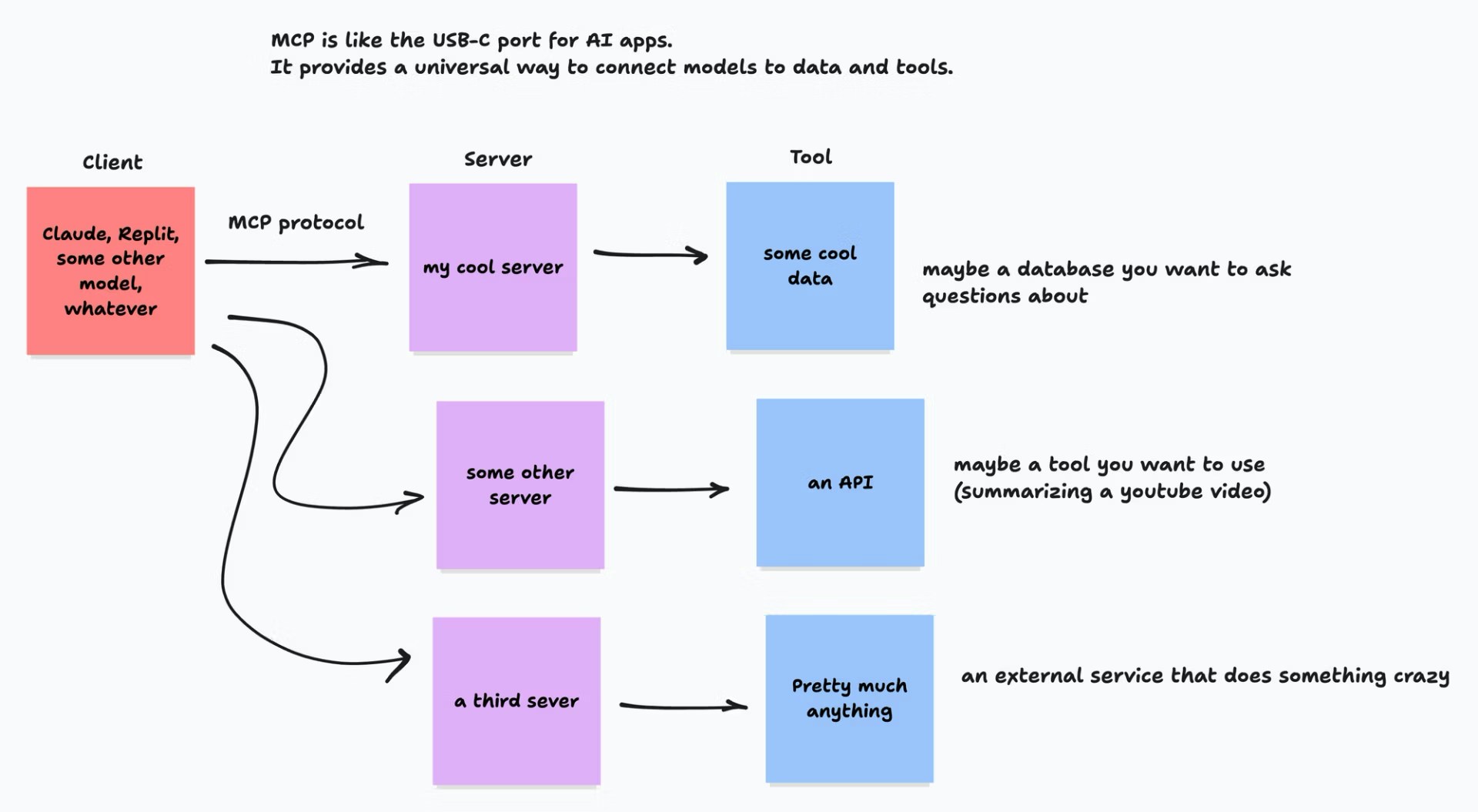
The MCP architecture has three main components:- The client side — AI models like Claude or applications that need to access external tools.
- The communication layer — the protocol itself that standardizes how requests and responses are formatted.
- The server side — programs that provide access to tools, data sources, and specialized capabilities.
What's an MCP client?
What's an MCP client?
An MCP client is something like Claude, Replit Agent, or a command-line interface that connects to a large language model. It’s the “device” that plugs into external tools or data sources.Examples of MCP clients:
- Claude in the browser
- Replit Agent
- Command-line interfaces for AI
- Custom applications built with AI SDKs
What's an MCP server?
What's an MCP server?
An MCP server provides tools and capabilities to AI models. Think of it like giving AI a set of specialized tools to solve problems.Examples of what MCP servers enable:
- Accessing specific data sources to answer questions
- Connecting AI to APIs so it can take actions online
- Reading or writing files
- Making calculations or running code
- Pulling content from services like Notion, Linear, or Stripe
What MCP unlocks
MCP defines several primitives that make it powerful for AI applications:- Resources — share data and content with AI models
- Tools — let AI models perform actions through your services
- Prompts — reusable templates for consistent AI interactions
- Sampling — allow your services to request information from AI models
- Transports — connect clients and servers efficiently
Skills vs. MCP servers
Skills and MCP servers are the two main ways to extend AI agents — and they serve different purposes.
See Agent skills for the matching mindset on skills.
Real-world applications
MCP enables a wide range of AI applications:- Customer service systems that access company databases to answer specific questions
- Research assistants that search and summarize content from multiple sources
- Productivity tools that interact with your files and applications
- Content creation tools that access media libraries and publishing platforms
Benefits
MCP offers three key benefits:- Ready-to-use integrations your AI can connect to immediately
- The ability to switch between AI providers without rewriting your connections
- Security features that keep your sensitive data protected
MCP is an emerging standard with growing support across the AI ecosystem. New tools and integrations are added regularly.
Next steps
Connect via MCP
Hands-on: connect a pre-listed MCP server or add a custom one in Replit.
MCP Servers reference
Catalog of pre-listed servers, security model, and authentication options.
Agent skills
The other way to extend Agent — when and how to use skills.
MCP protocol documentation
Read the open standard’s official documentation.