Answers to common Stripe questions: choosing a connection method, naming your secret key, sandbox errors, business verification, and the live payments app.
Should I connect Stripe through Replit or use my own keys?
You can connect Stripe in two ways:
Replit Stripe connector: Agent sets up a Stripe sandbox, and you install the Stripe app to go live. The connector is available on paid plans.
Your own keys, with a webhook or the Stripe SDK: a manual setup that you manage in Secrets.
Use only one method in each environment. Combining them in the same environment causes connection conflicts, even if Agent suggests adding a webhook. You can use different methods in development and production, such as the connector while you build and your own keys after you publish.See Choose one method per environment.
What should I name the secret for a manual Stripe setup?
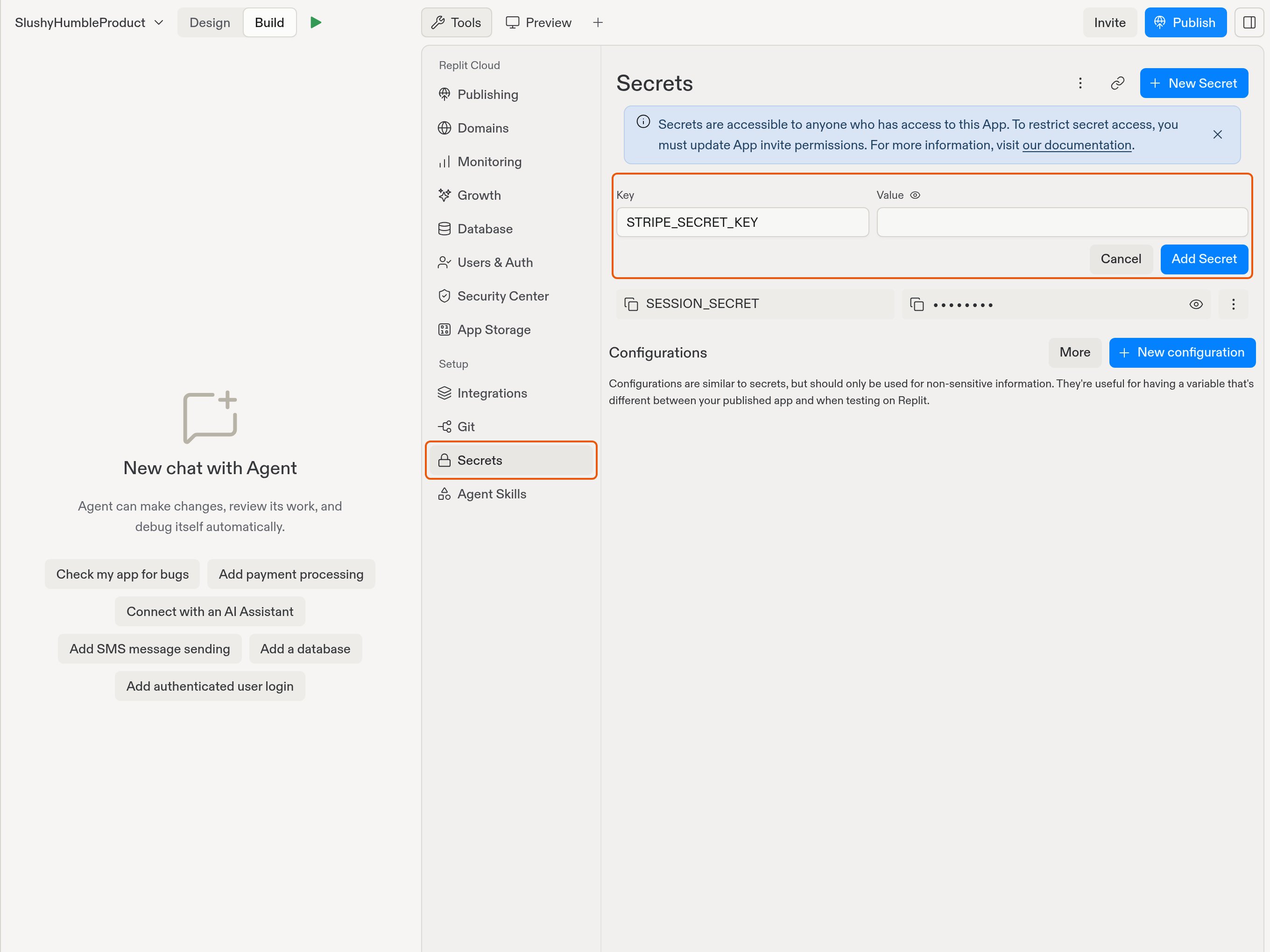
Name your Stripe secret key STRIPE_SECRET_KEY in Secrets. This applies to both webhook and Stripe SDK setups. Use your own key as the value, and keep it out of your application code.Open Tools, select Secrets under Setup, then select New Secret.
Enter STRIPE_SECRET_KEY in Key and your Stripe key in Value.
The example shows the required name before entering a value.
Make sure your published app’s secrets include STRIPE_SECRET_KEY too, and publish again after you change it. If development uses the Replit Stripe connector’s sandbox and production uses your own keys, the published value must be a live key that starts with sk_live_ or rk_live_. Otherwise publishing stops with Connect a live Stripe account before publishing.See Publish with your own live keys.
Stripe blocks my sandbox claim or says I have too many sandboxes. What should I do?
Match the action to the error:
The sandbox is already in use: create a new sandbox instead of claiming that one.
You reached the sandbox limit: consolidate the sandboxes you already have in Stripe, then try again.
{"docsConfig":{"theme":"aspen","$schema":"https://mintlify.com/docs.json","name":"Replit","colors":{"primary":"#FF3C00","light":"#FF3C00","dark":"#FF3C00"},"logo":{"light":"https://mintcdn.com/replit/j4of5To8jzehz0JK/logo/light.svg?fit=max\u0026auto=format\u0026n=j4of5To8jzehz0JK\u0026q=85\u0026s=6209cb5927b56fd1781133af05428373","dark":"https://mintcdn.com/replit/j4of5To8jzehz0JK/logo/dark.svg?fit=max\u0026auto=format\u0026n=j4of5To8jzehz0JK\u0026q=85\u0026s=9cbba158300d48c49d8b888e71015495","href":"/welcome"},"favicon":"https://mintcdn.com/replit/CmOMKRnamiqG44eH/favicon.ico?fit=max\u0026auto=format\u0026n=CmOMKRnamiqG44eH\u0026q=85\u0026s=c89a6df6f537373c946c7a5f0ac65475","appearance":{"default":"light"},"background":{"color":{"light":"#F6F5F4","dark":"#1E1E1F"}},"navbar":{"links":[],"primary":{"type":"button","label":"Start Building","href":"https://replit.com?ref=docs"}},"footer":{"socials":{"x":"https://x.com/replit","linkedin":"https://www.linkedin.com/company/repl-it","youtube":"https://www.youtube.com/@replit"}},"seo":{"metatags":{"og:site_name":"Replit Docs","twitter:site":"@replit","twitter:creator":"@replit","author":"Replit"},"indexing":"all"},"fonts":{"heading":{"family":"ABC Diatype Plus","weight":400,"source":"https://cdn.replit.com/dotcom/fonts/ABCDiatypePlusVariable.woff2","format":"woff2"},"body":{"family":"ABC Diatype Plus","weight":400,"source":"https://cdn.replit.com/dotcom/fonts/ABCDiatypePlusVariable.woff2","format":"woff2"}},"integrations":{"segment":{"key":"dMePKGC4BqfBivpe0Hvl8IoPpzSHgjdX"}},"contextual":{"options":["copy","view"],"display":"header"},"thumbnails":{"appearance":"light","background":"https://mintcdn.com/replit/j4of5To8jzehz0JK/thumb.png?fit=max\u0026auto=format\u0026n=j4of5To8jzehz0JK\u0026q=85\u0026s=a7db7f0256b2fa06810fb4d378e63cc5","fonts":{"family":"ABC Diatype Plus"}},"styling":{"latex":true},"navigation":{"languages":[{"language":"en","href":"welcome"},{"language":"fr","navbar":{"links":[],"primary":{"type":"button","label":"Commencer à créer","href":"https://replit.com?ref=docs"}},"href":"fr/welcome"},{"language":"pt","hidden":false,"navbar":{"links":[],"primary":{"type":"button","label":"Comece a criar","href":"https://replit.com?ref=docs"}},"href":"pt/welcome"},{"language":"ja","hidden":false,"navbar":{"links":[],"primary":{"type":"button","label":"作成を開始","href":"https://replit.com?ref=docs"}},"href":"ja/welcome"},{"language":"ko","hidden":false,"navbar":{"links":[],"primary":{"type":"button","label":"빌드 시작하기","href":"https://replit.com?ref=docs"}},"href":"ko/welcome"}]}},"deployment":{"deploymentMetadataValue":{"subdomain":"replit","hasAudioNarration":false,"actualSubdomain":"replit","customDomains":["docs.replit.com","docs.repl.it"],"gitSource":{"type":"github","owner":"replit","repo":"replit-docs","deployBranch":"main","contentDirectory":"docs","isPrivate":true,"mountPath":"","label":""},"chroma":{"liveDeploymentHistoryId":"6ae8ba4ea0f23322a3d8e491","collectionId":"ae3be722-8649-4d66-a0da-e46ee9576060","schemaVersion":"v3","latestBuiltDeploymentHistoryId":"6ae8ba4ea0f23322a3d8e491"},"feedback":{"thumbs":true,"issues":true,"edits":false},"entitlements":{"AI_CHAT":{"status":"ENABLED"},"REMOVE_BRANDING":{"status":"ENABLED"},"CONTEXTUAL_FEEDBACK":{"status":"ENABLED"},"CODE_SNIPPET_FEEDBACK":{"status":"ENABLED"},"WEB_MCP":{"status":"ENABLED"},"NARRATION":{"status":"ENABLED"}},"buildId":"6ae8ba4ea0f23322a3d8e491","clientVersion":"0.0.4045","searchFilterCounts":[{"language":"en","tag":"Features","count":357},{"language":"fr","tag":"Fonctionnalités","count":357},{"language":"ja","tag":"機能","count":357},{"language":"ko","tag":"기능","count":357},{"language":"pt","tag":"Funcionalidades","count":357},{"language":"en","tag":"Changelog","count":99},{"language":"fr","tag":"Journal des modifications","count":99},{"language":"ja","tag":"変更履歴","count":99},{"language":"ko","tag":"변경 내역","count":99},{"language":"pt","tag":"Registro de alterações","count":99},{"language":"en","tag":"Apps","count":41},{"language":"fr","tag":"Apps","count":41},{"language":"ja","tag":"Apps","count":41},{"language":"ko","tag":"Apps","count":41},{"language":"pt","tag":"Apps","count":41},{"language":"en","tag":"Enterprise","count":40},{"language":"fr","tag":"Entreprise","count":40},{"language":"ja","tag":"Enterprise","count":40},{"language":"ko","tag":"Enterprise","count":40},{"language":"pt","tag":"Enterprise","count":40},{"language":"en","tag":"Use cases","count":39},{"language":"fr","tag":"Use cases","count":39},{"language":"ja","tag":"Use cases","count":39},{"language":"ko","tag":"Use cases","count":39},{"language":"pt","tag":"Use cases","count":39},{"language":"en","tag":"Chats","count":25},{"language":"en","tag":"Designs","count":25},{"language":"fr","tag":"Chats","count":25},{"language":"fr","tag":"Designs","count":25},{"language":"ja","tag":"Chats","count":25},{"language":"ja","tag":"Designs","count":25},{"language":"ko","tag":"Chats","count":25},{"language":"ko","tag":"Designs","count":25},{"language":"pt","tag":"Chats","count":25},{"language":"pt","tag":"Designs","count":25},{"language":"en","tag":"Trust \u0026 Billing","count":23},{"language":"fr","tag":"Confiance et facturation","count":23},{"language":"ja","tag":"信頼と請求","count":23},{"language":"ko","tag":"신뢰 및 결제","count":23},{"language":"pt","tag":"Confiança e faturamento","count":23},{"language":"en","tag":"Web","count":22},{"language":"fr","tag":"Web","count":22},{"language":"ja","tag":"Web","count":22},{"language":"ko","tag":"Web","count":22},{"language":"pt","tag":"Web","count":22},{"language":"en","tag":"Help","count":20},{"language":"fr","tag":"Help","count":20},{"language":"ja","tag":"Help","count":20},{"language":"ko","tag":"Help","count":20},{"language":"pt","tag":"Help","count":20}]},"assistantConfig":{"deflection":{"enabled":true,"email":"support@replit.com"}},"basePath":"","hasChatPermissions":true,"hasWebMcpPermissions":true,"toggles":[{"name":"kill-isr","enabled":true,"variant":{"name":"disabled","enabled":false,"feature_enabled":true},"impressionData":false},{"name":"agent-mintlify-slack","enabled":true,"variant":{"name":"disabled","enabled":false,"feature_enabled":true},"impressionData":false},{"name":"agent-integrations-settings","enabled":true,"variant":{"name":"disabled","enabled":false,"feature_enabled":true},"impressionData":false},{"name":"automations-pr-grouping","enabled":true,"variant":{"name":"disabled","enabled":false,"feature_enabled":true},"impressionData":false},{"name":"custom-prefix","enabled":true,"variant":{"name":"disabled","enabled":false,"feature_enabled":true},"impressionData":false},{"name":"analytics-v7","enabled":true,"variant":{"name":"disabled","enabled":false,"feature_enabled":true},"impressionData":false},{"name":"user-flows-analytics","enabled":true,"variant":{"name":"disabled","enabled":false,"feature_enabled":true},"impressionData":false},{"name":"no-publish-flow","enabled":true,"variant":{"name":"disabled","enabled":false,"feature_enabled":true},"impressionData":false},{"name":"workos-onboarding","enabled":true,"variant":{"name":"disabled","enabled":false,"feature_enabled":true},"impressionData":false},{"name":"llms-txt-v2","enabled":true,"variant":{"name":"disabled","enabled":false,"feature_enabled":true},"impressionData":false},{"name":"snapshot-serving-live","enabled":true,"variant":{"name":"disabled","enabled":false,"feature_enabled":true},"impressionData":false},{"name":"stripTemperatureMiddleware","enabled":true,"variant":{"name":"disabled","enabled":false,"feature_enabled":true},"impressionData":false},{"name":"support-platform-pylon-zendesk","enabled":true,"variant":{"name":"disabled","enabled":false,"feature_enabled":true},"impressionData":false},{"name":"snapshot-serving","enabled":true,"variant":{"name":"disabled","enabled":false,"feature_enabled":true},"impressionData":false},{"name":"instant-rollback","enabled":true,"variant":{"name":"disabled","enabled":false,"feature_enabled":true},"impressionData":false},{"name":"granular-notifications-server","enabled":true,"variant":{"name":"disabled","enabled":false,"feature_enabled":true},"impressionData":false},{"name":"granular-notifications","enabled":true,"variant":{"name":"disabled","enabled":false,"feature_enabled":true},"impressionData":false},{"name":"automations-fable","enabled":true,"variant":{"name":"disabled","enabled":false,"feature_enabled":true},"impressionData":false},{"name":"fixed-ai-action-pricing","enabled":true,"variant":{"name":"disabled","enabled":false,"feature_enabled":true},"impressionData":false},{"name":"automation-resolve-merge-conflict","enabled":true,"variant":{"name":"disabled","enabled":false,"feature_enabled":true},"impressionData":false},{"name":"scoped-publishing","enabled":true,"variant":{"name":"disabled","enabled":false,"feature_enabled":true},"impressionData":false},{"name":"mintql","enabled":true,"variant":{"name":"disabled","enabled":false,"feature_enabled":true},"impressionData":false},{"name":"page-level-analytics","enabled":true,"variant":{"name":"disabled","enabled":false,"feature_enabled":true},"impressionData":false},{"name":"editor-version-history-v2","enabled":true,"variant":{"name":"disabled","enabled":false,"feature_enabled":true},"impressionData":false},{"name":"billing-page-v2","enabled":true,"variant":{"name":"disabled","enabled":false,"feature_enabled":true},"impressionData":false},{"name":"full-page-search","enabled":true,"variant":{"name":"disabled","enabled":false,"feature_enabled":true},"impressionData":false},{"name":"workspace-projects","enabled":true,"variant":{"name":"disabled","enabled":false,"feature_enabled":true},"impressionData":false},{"name":"assistant-v5","enabled":true,"variant":{"name":"disabled","enabled":false,"feature_enabled":true},"impressionData":false},{"name":"byok-sep-25","enabled":true,"variant":{"name":"disabled","enabled":false,"feature_enabled":true},"impressionData":false},{"name":"fork-pr-previews","enabled":true,"variant":{"name":"disabled","enabled":false,"feature_enabled":true},"impressionData":false},{"name":"revalidation-jwt","enabled":true,"variant":{"name":"disabled","enabled":false,"feature_enabled":true},"impressionData":false},{"name":"vite-origin","enabled":true,"variant":{"name":"disabled","enabled":false,"feature_enabled":true},"impressionData":false},{"name":"billing-updated-9-15","enabled":true,"variant":{"name":"disabled","enabled":false,"feature_enabled":true},"impressionData":false},{"name":"workos-sso-scim","enabled":true,"variant":{"name":"disabled","enabled":false,"feature_enabled":true},"impressionData":false},{"name":"hobby-abuse-scan","enabled":true,"variant":{"name":"disabled","enabled":false,"feature_enabled":true},"impressionData":false},{"name":"dashboard-inbox","enabled":true,"variant":{"name":"disabled","enabled":false,"feature_enabled":true},"impressionData":false},{"name":"workos-signup","enabled":true,"variant":{"name":"disabled","enabled":false,"feature_enabled":true},"impressionData":false},{"name":"turbopuffer-dual-write","enabled":true,"variant":{"name":"disabled","enabled":false,"feature_enabled":true},"impressionData":false},{"name":"workos-enabled","enabled":true,"variant":{"name":"disabled","enabled":false,"feature_enabled":true},"impressionData":false},{"name":"approve-review-flow","enabled":true,"variant":{"name":"disabled","enabled":false,"feature_enabled":true},"impressionData":false},{"name":"sso-setup-deadline-banner","enabled":true,"variant":{"name":"disabled","enabled":false,"feature_enabled":true},"impressionData":false}],"googleFontsInlined":false},"customCss":[{"filePath":"styles.css","href":"/_mintlify/custom/replit/6239de1eb4bb33f5/styles.css"}],"page":{"pagePath":"help/payments-and-stripe","slug":"/help/payments-and-stripe","pageMetadata":{"title":"Payments and Stripe","sidebarTitle":"Payments and Stripe","description":"Answers to common Stripe questions: choosing a connection method, naming your secret key, sandbox errors, business verification, and the live payments app.","icon":"credit-card","href":"/help/payments-and-stripe"},"description":{"compiledSource":"\"use strict\";\nconst {jsx: _jsx} = arguments[0];\nconst {useMDXComponents: _provideComponents} = arguments[0];\nfunction _createMdxContent(props) {\n const _components = {\n p: \"p\",\n ..._provideComponents(),\n ...props.components\n };\n return _jsx(_components.p, {\n children: \"Answers to common Stripe questions: choosing a connection method, naming your secret key, sandbox errors, business verification, and the live payments app.\"\n });\n}\nfunction MDXContent(props = {}) {\n const {wrapper: MDXLayout} = {\n ..._provideComponents(),\n ...props.components\n };\n return MDXLayout ? _jsx(MDXLayout, {\n ...props,\n children: _jsx(_createMdxContent, {\n ...props\n })\n }) : _createMdxContent(props);\n}\nreturn {\n default: MDXContent\n};\n","frontmatter":{},"scope":{}},"pageType":"default","mdx":{"mdxSource":{"compiledSource":"\"use strict\";const{Fragment:_Fragment,jsx:_jsx,jsxs:_jsxs}=arguments[0];const{useMDXComponents:_provideComponents}=arguments[0];function _createMdxContent(props){const _components={a:`a`,code:`code`,li:`li`,ol:`ol`,p:`p`,strong:`strong`,ul:`ul`,..._provideComponents(),...props.components},{Accordion,AccordionGroup,Frame,Heading,OptimizedImage}=_components;if(!Accordion)_missingMdxReference(`Accordion`,true);if(!AccordionGroup)_missingMdxReference(`AccordionGroup`,true);if(!Frame)_missingMdxReference(`Frame`,true);if(!Heading)_missingMdxReference(`Heading`,true);if(!OptimizedImage)_missingMdxReference(`OptimizedImage`,true);return _jsxs(_Fragment,{children:[_jsxs(_components.p,{children:[`These answers cover connecting Stripe to your app. For both setup methods, see `,_jsx(_components.a,{href:`/use-cases/accept-payments-with-stripe`,children:`Accept payments with Stripe`}),`. For connector details, see `,_jsx(_components.a,{href:`/features/monetization/stripe-payments`,children:`Stripe Payments`}),`.`]}),`\n`,_jsxs(AccordionGroup,{children:[_jsxs(Accordion,{title:`Should I connect Stripe through Replit or use my own keys?`,id:`should-i-connect-stripe-through-replit-or-use-my-own-keys`,children:[_jsx(_components.p,{children:`You can connect Stripe in two ways:`}),_jsxs(_components.ul,{children:[`\n`,_jsxs(_components.li,{children:[_jsx(_components.strong,{children:`Replit Stripe connector:`}),` Agent sets up a Stripe sandbox, and you install the Stripe app to go live. The connector is available on paid plans.`]}),`\n`,_jsxs(_components.li,{children:[_jsx(_components.strong,{children:`Your own keys, with a webhook or the Stripe SDK:`}),` a manual setup that you manage in `,_jsx(_components.strong,{children:`Secrets`}),`.`]}),`\n`]}),_jsx(_components.p,{children:`Use only one method in each environment. Combining them in the same environment causes connection conflicts, even if Agent suggests adding a webhook. You can use different methods in development and production, such as the connector while you build and your own keys after you publish.`}),_jsxs(_components.p,{children:[`See `,_jsx(_components.a,{href:`/use-cases/accept-payments-with-stripe#choose-one-method-per-environment`,children:`Choose one method per environment`}),`.`]})]}),_jsxs(Accordion,{title:`What should I name the secret for a manual Stripe setup?`,id:`what-should-i-name-the-secret-for-a-manual-stripe-setup`,children:[_jsxs(_components.p,{children:[`Name your Stripe secret key `,_jsx(_components.code,{children:`STRIPE_SECRET_KEY`}),` in `,_jsx(_components.strong,{children:`Secrets`}),`. This applies to both webhook and Stripe SDK setups. Use your own key as the value, and keep it out of your application code.`]}),_jsxs(_components.p,{children:[`Open `,_jsx(_components.strong,{children:`Tools`}),`, select `,_jsx(_components.strong,{children:`Secrets`}),` under `,_jsx(_components.strong,{children:`Setup`}),`, then select `,_jsx(_components.strong,{children:`New Secret`}),`.\nEnter `,_jsx(_components.code,{children:`STRIPE_SECRET_KEY`}),` in `,_jsx(_components.strong,{children:`Key`}),` and your Stripe key in `,_jsx(_components.strong,{children:`Value`}),`.`]}),_jsx(Frame,{caption:`The example shows the required name before entering a value.`,children:_jsx(OptimizedImage,{src:`https://mintcdn.com/replit/2n-A_ptJoYn-gb3a/images/stripe/secret-name-context.png?fit=max\u0026auto=format\u0026n=2n-A_ptJoYn-gb3a\u0026q=85\u0026s=1133c28885534c63747df325de6ba576`,alt:`Secrets navigation and the new-secret form with STRIPE_SECRET_KEY entered in Key`,\"data-og-width\":`2720`,width:`2720`,\"data-og-height\":`2040`,height:`2040`,\"data-path\":`images/stripe/secret-name-context.png`,\"data-optimize\":`true`,\"data-opv\":`3`,srcset:`https://mintcdn.com/replit/2n-A_ptJoYn-gb3a/images/stripe/secret-name-context.png?w=280\u0026fit=max\u0026auto=format\u0026n=2n-A_ptJoYn-gb3a\u0026q=85\u0026s=742ebe609f5f8ab1b266ceb8ddeece49 280w, https://mintcdn.com/replit/2n-A_ptJoYn-gb3a/images/stripe/secret-name-context.png?w=560\u0026fit=max\u0026auto=format\u0026n=2n-A_ptJoYn-gb3a\u0026q=85\u0026s=fd0a4b5d2a8ce3adb64af1ca9e0fa714 560w, https://mintcdn.com/replit/2n-A_ptJoYn-gb3a/images/stripe/secret-name-context.png?w=840\u0026fit=max\u0026auto=format\u0026n=2n-A_ptJoYn-gb3a\u0026q=85\u0026s=b34e381141acfc1146eb89e86eca7e70 840w, https://mintcdn.com/replit/2n-A_ptJoYn-gb3a/images/stripe/secret-name-context.png?w=1100\u0026fit=max\u0026auto=format\u0026n=2n-A_ptJoYn-gb3a\u0026q=85\u0026s=ff84e86a99afea78a0367857e75ea2a4 1100w, https://mintcdn.com/replit/2n-A_ptJoYn-gb3a/images/stripe/secret-name-context.png?w=1650\u0026fit=max\u0026auto=format\u0026n=2n-A_ptJoYn-gb3a\u0026q=85\u0026s=4dbeee4576c0965b0bd476da51d65b85 1650w, https://mintcdn.com/replit/2n-A_ptJoYn-gb3a/images/stripe/secret-name-context.png?w=2500\u0026fit=max\u0026auto=format\u0026n=2n-A_ptJoYn-gb3a\u0026q=85\u0026s=716a067749a3c4b82904423b085a107a 2500w`})}),_jsxs(_components.p,{children:[`Make sure your published app’s secrets include `,_jsx(_components.code,{children:`STRIPE_SECRET_KEY`}),` too, and publish again after you change it. If development uses the Replit Stripe connector’s sandbox and production uses your own keys, the published value must be a live key that starts with `,_jsx(_components.code,{children:`sk_live_`}),` or `,_jsx(_components.code,{children:`rk_live_`}),`. Otherwise publishing stops with `,_jsx(_components.strong,{children:`Connect a live Stripe account before publishing.`})]}),_jsxs(_components.p,{children:[`See `,_jsx(_components.a,{href:`/use-cases/accept-payments-with-stripe#publish-with-your-own-live-keys`,children:`Publish with your own live keys`}),`.`]})]}),_jsxs(Accordion,{title:`Stripe blocks my sandbox claim or says I have too many sandboxes. What should I do?`,id:`stripe-blocks-my-sandbox-claim-or-says-i-have-too-many-sandboxes-what-should-i-do`,children:[_jsx(_components.p,{children:`Match the action to the error:`}),_jsxs(_components.ul,{children:[`\n`,_jsxs(_components.li,{children:[_jsx(_components.strong,{children:`The sandbox is already in use:`}),` create a new sandbox instead of claiming that one.`]}),`\n`,_jsxs(_components.li,{children:[_jsx(_components.strong,{children:`You reached the sandbox limit:`}),` consolidate the sandboxes you already have in Stripe, then try again.`]}),`\n`]}),_jsxs(_components.p,{children:[`If you see an invalid or expired claim token error, `,_jsx(_components.a,{href:`https://replit.com/support`,children:`contact Replit Support`}),`.`]})]}),_jsxs(Accordion,{title:`Why does Replit still show business verification as unfinished after I complete it in Stripe?`,id:`why-does-replit-still-show-business-verification-as-unfinished-after-i-complete-it-in-stripe`,children:[_jsx(_components.p,{children:`Business verification happens in Stripe’s portal. Replit keeps the step open until you confirm it:`}),_jsxs(_components.ol,{children:[`\n`,_jsx(_components.li,{children:`Finish business verification in Stripe.`}),`\n`,_jsxs(_components.li,{children:[`Return to Replit and select `,_jsx(_components.strong,{children:`Got It`}),` to continue setup.`]}),`\n`]}),_jsx(_components.p,{children:`Completing verification in Stripe alone doesn’t move you past the step.`})]}),_jsxs(Accordion,{title:`Stripe selected the sandbox payments app during live setup. How do I choose the live one?`,id:`stripe-selected-the-sandbox-payments-app-during-live-setup-how-do-i-choose-the-live-one`,children:[_jsx(_components.p,{children:`The installation flow can select the sandbox version of the payments app automatically, which causes an error. To fix it:`}),_jsxs(_components.ol,{children:[`\n`,_jsxs(_components.li,{children:[`In the Stripe installation flow, manually choose the `,_jsx(_components.strong,{children:`Live Mode`}),` version of the app.`]}),`\n`,_jsx(_components.li,{children:`Install it with your live Stripe account, not a sandbox or test account.`}),`\n`,_jsx(_components.li,{children:`Keep the Stripe window open until the installation finishes.`}),`\n`]}),_jsxs(_components.p,{children:[`See `,_jsx(_components.a,{href:`/features/monetization/stripe-payments#go-live`,children:`Go live`}),`.`]})]})]}),`\n`,_jsx(Heading,{level:`2`,id:`still-need-help`,children:`Still need help?`}),`\n`,_jsxs(_components.p,{children:[`If your Stripe question isn’t answered here, `,_jsx(_components.a,{href:`https://replit.com/support`,children:`contact Replit Support`}),`.`]})]})}function MDXContent(props={}){const{wrapper:MDXLayout}={..._provideComponents(),...props.components};return MDXLayout?_jsx(MDXLayout,{...props,children:_jsx(_createMdxContent,{...props})}):_createMdxContent(props)}return{default:MDXContent};function _missingMdxReference(id,component){throw new Error(`Expected `+(component?`component`:`object`)+\" `\"+id+\"` to be defined: you likely forgot to import, pass, or provide it.\")}","frontmatter":{},"scope":{"config":{},"pageMetadata":{"title":"Payments and Stripe","sidebarTitle":"Payments and Stripe","description":"Answers to common Stripe questions: choosing a connection method, naming your secret key, sandbox errors, business verification, and the live payments app.","icon":"credit-card","href":"/help/payments-and-stripe"}}},"mdxSourceWithNoJs":null},"mdxExtracts":{"tableOfContents":[{"title":"Still need help?","slug":"still-need-help","depth":2,"children":[]}],"codeExamples":{}},"jsLinks":[],"subdomain":"replit","siteName":"Replit","title":"Payments and Stripe - Replit","navMaps":{"firstHrefInVersion":{},"firstHrefInLanguage":{"en":{"href":"/help/payments-and-stripe","matchLevel":0},"fr":{"href":"/fr/help/payments-and-stripe","matchLevel":1},"pt":{"href":"/pt/help/payments-and-stripe","matchLevel":1},"ja":{"href":"/ja/help/payments-and-stripe","matchLevel":1},"ko":{"href":"/ko/help/payments-and-stripe","matchLevel":1}}},"lastModified":"2026-10-13T12:37:26.122Z","originalFileLocation":"help/payments-and-stripe.mdx","locale":"en"},"headHtml":"\u003cscript data-mint-head>(function(){var d=document.documentElement,p=null;if(!p){try{p=localStorage.getItem(\"isDarkMode\")}catch(e){}if(p==='true')p='dark';else if(p==='false')p='light';if(p!=='light'\u0026\u0026p!=='dark'\u0026\u0026p!=='system')p=\"light\"}var r=p==='system'?(matchMedia(\"(prefers-color-scheme: dark)\").matches?'dark':'light'):p;d.classList.remove(r==='dark'?'light':'dark');d.classList.add(r);d.setAttribute(\"data-theme-preference\",p)})();\u003c/script>\u003cmeta data-mint-head name=\"description\" content=\"Answers to common Stripe questions: choosing a connection method, naming your secret key, sandbox errors, business verification, and the live payments app.\">\u003cmeta data-mint-head name=\"application-name\" content=\"Replit\">\u003cmeta data-mint-head name=\"generator\" content=\"Mintlify\">\u003clink data-mint-head rel=\"icon\" type=\"image/png\" sizes=\"192x192\" href=\"/mintlify-assets/_mintlify/favicons/replit/bmCuvIiWqqoyeE2o/_generated/favicon/android-chrome-192x192.png\" media=\"(prefers-color-scheme: light)\">\u003clink data-mint-head rel=\"apple-touch-icon\" type=\"image/png\" sizes=\"180x180\" href=\"/mintlify-assets/_mintlify/favicons/replit/bmCuvIiWqqoyeE2o/_generated/favicon/apple-touch-icon.png\">\u003clink data-mint-head rel=\"icon\" type=\"image/png\" sizes=\"16x16\" href=\"/mintlify-assets/_mintlify/favicons/replit/bmCuvIiWqqoyeE2o/_generated/favicon/favicon-16x16.png\" media=\"(prefers-color-scheme: light)\">\u003clink data-mint-head rel=\"icon\" type=\"image/png\" sizes=\"32x32\" href=\"/mintlify-assets/_mintlify/favicons/replit/bmCuvIiWqqoyeE2o/_generated/favicon/favicon-32x32.png\" media=\"(prefers-color-scheme: light)\">\u003clink data-mint-head rel=\"shortcut icon\" type=\"image/x-icon\" href=\"/mintlify-assets/_mintlify/favicons/replit/bmCuvIiWqqoyeE2o/_generated/favicon/favicon.ico\" media=\"(prefers-color-scheme: light)\">\u003clink data-mint-head rel=\"icon\" type=\"image/png\" sizes=\"192x192\" href=\"/mintlify-assets/_mintlify/favicons/replit/bmCuvIiWqqoyeE2o/_generated/favicon-dark/android-chrome-192x192.png\" media=\"(prefers-color-scheme: dark)\">\u003clink data-mint-head rel=\"icon\" type=\"image/png\" sizes=\"16x16\" href=\"/mintlify-assets/_mintlify/favicons/replit/bmCuvIiWqqoyeE2o/_generated/favicon-dark/favicon-16x16.png\" media=\"(prefers-color-scheme: dark)\">\u003clink data-mint-head rel=\"icon\" type=\"image/png\" sizes=\"32x32\" href=\"/mintlify-assets/_mintlify/favicons/replit/bmCuvIiWqqoyeE2o/_generated/favicon-dark/favicon-32x32.png\" media=\"(prefers-color-scheme: dark)\">\u003clink data-mint-head rel=\"shortcut icon\" type=\"image/x-icon\" href=\"/mintlify-assets/_mintlify/favicons/replit/bmCuvIiWqqoyeE2o/_generated/favicon-dark/favicon.ico\" media=\"(prefers-color-scheme: dark)\">\u003cmeta data-mint-head property=\"og:title\" content=\"Payments and Stripe - Replit\">\u003cmeta data-mint-head property=\"og:description\" content=\"Answers to common Stripe questions: choosing a connection method, naming your secret key, sandbox errors, business verification, and the live payments app.\">\u003cmeta data-mint-head property=\"og:site_name\" content=\"Replit Docs\">\u003cmeta data-mint-head property=\"og:url\" content=\"https://docs.replit.com/help/payments-and-stripe\">\u003cmeta data-mint-head property=\"og:type\" content=\"website\">\u003cmeta data-mint-head property=\"og:image\" content=\"https://replit.mintlify.app/_mintlify/api/og/v2?division=Help+center\u0026amp;title=Payments+and+Stripe\u0026amp;description=Answers+to+common+Stripe+questions%3A+choosing+a+connection+method%2C+naming+your+secret+key%2C+sandbox+errors%2C+business+verification%2C+and+the+live+payments+app.\u0026amp;theme=c1942b8f9ebd95f98c5c7c23\u0026amp;signature=e02c8a0bad507e9ad67377e3822b1f01652733cc37281ea0dd5d25df0380f03a\">\u003cmeta data-mint-head property=\"og:image:width\" content=\"1200\">\u003cmeta data-mint-head property=\"og:image:height\" content=\"630\">\u003cmeta data-mint-head name=\"twitter:card\" content=\"summary_large_image\">\u003cmeta data-mint-head name=\"twitter:title\" content=\"Payments and Stripe - Replit\">\u003cmeta data-mint-head name=\"twitter:description\" content=\"Answers to common Stripe questions: choosing a connection method, naming your secret key, sandbox errors, business verification, and the live payments app.\">\u003cmeta data-mint-head name=\"twitter:image\" content=\"https://replit.mintlify.app/_mintlify/api/og/v2?division=Help+center\u0026amp;title=Payments+and+Stripe\u0026amp;description=Answers+to+common+Stripe+questions%3A+choosing+a+connection+method%2C+naming+your+secret+key%2C+sandbox+errors%2C+business+verification%2C+and+the+live+payments+app.\u0026amp;theme=c1942b8f9ebd95f98c5c7c23\u0026amp;signature=e02c8a0bad507e9ad67377e3822b1f01652733cc37281ea0dd5d25df0380f03a\">\u003cmeta data-mint-head name=\"twitter:image:width\" content=\"1200\">\u003cmeta data-mint-head name=\"twitter:image:height\" content=\"630\">\u003cmeta data-mint-head name=\"msapplication-config\" content=\"/mintlify-assets/_mintlify/favicons/replit/bmCuvIiWqqoyeE2o/_generated/favicon/browserconfig.xml\">\u003cmeta data-mint-head name=\"apple-mobile-web-app-title\" content=\"Replit\">\u003cmeta data-mint-head name=\"msapplication-TileColor\" content=\"#FF3C00\">\u003cmeta data-mint-head name=\"twitter:creator\" content=\"@replit\">\u003cmeta data-mint-head name=\"author\" content=\"Replit\">\u003clink data-mint-head rel=\"canonical\" href=\"https://docs.replit.com/help/payments-and-stripe\">\u003clink data-mint-head rel=\"alternate\" type=\"application/xml\" href=\"/sitemap.xml\">\u003clink data-mint-head rel=\"alternate\" type=\"text/markdown\" href=\"/help/payments-and-stripe.md\">\u003clink data-mint-head rel=\"alternate\" hreflang=\"en\" href=\"https://docs.replit.com/help/payments-and-stripe\">\u003clink data-mint-head rel=\"alternate\" hreflang=\"fr\" href=\"https://docs.replit.com/fr/help/payments-and-stripe\">\u003clink data-mint-head rel=\"alternate\" hreflang=\"pt\" href=\"https://docs.replit.com/pt/help/payments-and-stripe\">\u003clink data-mint-head rel=\"alternate\" hreflang=\"ja\" href=\"https://docs.replit.com/ja/help/payments-and-stripe\">\u003clink data-mint-head rel=\"alternate\" hreflang=\"ko\" href=\"https://docs.replit.com/ko/help/payments-and-stripe\">\u003clink data-mint-head rel=\"alternate\" hreflang=\"x-default\" href=\"https://docs.replit.com/help/payments-and-stripe\">\u003cscript data-mint-head type=\"application/ld+json\">{\"@context\":\"https://schema.org\",\"@graph\":[{\"@type\":\"Organization\",\"@id\":\"https://docs.replit.com/#organization\",\"name\":\"Replit\",\"url\":\"https://docs.replit.com\",\"logo\":{\"@type\":\"ImageObject\",\"url\":\"https://mintcdn.com/replit/j4of5To8jzehz0JK/logo/light.svg?fit=max\u0026auto=format\u0026n=j4of5To8jzehz0JK\u0026q=85\u0026s=6209cb5927b56fd1781133af05428373\"}},{\"@type\":\"WebSite\",\"@id\":\"https://docs.replit.com#website\",\"name\":\"Replit\",\"url\":\"https://docs.replit.com\",\"publisher\":{\"@id\":\"https://docs.replit.com/#organization\"}},{\"@type\":\"WebPage\",\"@id\":\"https://docs.replit.com/help/payments-and-stripe#webpage\",\"url\":\"https://docs.replit.com/help/payments-and-stripe\",\"name\":\"Payments and Stripe\",\"description\":\"Answers to common Stripe questions: choosing a connection method, naming your secret key, sandbox errors, business verification, and the live payments app.\",\"dateModified\":\"2026-10-13T12:37:26.122Z\",\"isPartOf\":{\"@id\":\"https://docs.replit.com#website\"},\"breadcrumb\":{\"@id\":\"https://docs.replit.com/help/payments-and-stripe#breadcrumb\"}},{\"@type\":\"BreadcrumbList\",\"@id\":\"https://docs.replit.com/help/payments-and-stripe#breadcrumb\",\"itemListElement\":[{\"@type\":\"ListItem\",\"position\":1,\"name\":\"Help center\",\"item\":\"https://docs.replit.com/help/overview\"},{\"@type\":\"ListItem\",\"position\":2,\"name\":\"Payments and Stripe\",\"item\":\"https://docs.replit.com/help/payments-and-stripe\"}]},{\"@type\":[\"Article\",\"TechArticle\"],\"@id\":\"https://docs.replit.com/help/payments-and-stripe#article\",\"headline\":\"Payments and Stripe\",\"name\":\"Payments and Stripe\",\"description\":\"Answers to common Stripe questions: choosing a connection method, naming your secret key, sandbox errors, business verification, and the live payments app.\",\"url\":\"https://docs.replit.com/help/payments-and-stripe\",\"mainEntityOfPage\":{\"@id\":\"https://docs.replit.com/help/payments-and-stripe#webpage\"},\"dateModified\":\"2026-10-13T12:37:26.122Z\",\"publisher\":{\"@id\":\"https://docs.replit.com/#organization\"},\"isPartOf\":{\"@id\":\"https://docs.replit.com#website\"}}]}\u003c/script>","siteName":"Replit","nav":{"global":null,"languages":[{"language":"en","tabs":[{"tab":"Home","pages":[{"title":"Home","href":"/welcome"}]},{"tab":"Chats","pages":[{"title":"Chats","href":"/chat/overview"}]},{"tab":"Apps","dropdowns":[{"dropdown":"Web","icon":"globe","pages":[{"group":"Quickstarts","pages":[{"title":"Build your first app","sidebarTitle":"Build your first app","icon":"rocket","href":"/build/your-first-app"},{"title":"Build and publish from a template","sidebarTitle":"Build from a template","icon":"palette","href":"/build/build-and-publish-from-template"},{"title":"Build with Free Mode","sidebarTitle":"Build with Free Mode","icon":"seedling","href":"/build/build-with-free-mode"},{"title":"Publish your app","sidebarTitle":"Publish your app","icon":"cloud-arrow-up","href":"/build/publish-your-app"}]},{"group":"Build paths","pages":[{"title":"Prototype a product idea","sidebarTitle":"Prototype an idea","icon":"lightbulb","href":"/build/prototype-an-idea"},{"title":"Launch a landing page","sidebarTitle":"Launch a landing page","icon":"rectangle-list","href":"/build/landing-page"},{"title":"Build a Shopify storefront","sidebarTitle":"Build a Shopify storefront","icon":"bag-shopping","href":"/build/ecommerce-store"},{"title":"Create a dashboard from data","sidebarTitle":"Create a dashboard","icon":"chart-simple","href":"/build/dashboard"},{"title":"Build a mobile app","sidebarTitle":"Build a mobile app","icon":"mobile-screen","href":"/build/mobile-app"}]},{"group":"Grow your app","pages":[{"title":"Add login","sidebarTitle":"Add login","icon":"user-lock","href":"/build/add-login"},{"title":"Add a database","sidebarTitle":"Add a database","icon":"database","href":"/build/add-database"},{"title":"Add integrations","sidebarTitle":"Add integrations","icon":"plug","href":"/build/add-integrations"},{"title":"Add a custom domain","sidebarTitle":"Add a custom domain","icon":"globe","href":"/build/add-custom-domain"}]},{"group":"Publish and operate","pages":[{"title":"Purchase a domain","sidebarTitle":"Purchase a domain","icon":"cart-shopping","href":"/build/domain-purchasing"},{"title":"Enable Feedback Widget","sidebarTitle":"Enable Feedback Widget","icon":"comment","href":"/build/enable-feedback"},{"title":"Improve your app's SEO","sidebarTitle":"Improve SEO","icon":"magnifying-glass-chart","href":"/build/improve-seo"},{"title":"Troubleshoot publishing","icon":"triangle-exclamation","href":"/build/troubleshooting"}]},{"group":"Connect \u0026 integrate","pages":[{"title":"Use Agent Skills","sidebarTitle":"Use Agent Skills","icon":"puzzle-piece","href":"/build/use-agent-skills"},{"title":"Connect via MCP","sidebarTitle":"Connect via MCP","icon":"server","href":"/build/connect-via-mcp"}]},{"group":"Collaborate","pages":[{"title":"Invite teammates","sidebarTitle":"Invite teammates","icon":"user-plus","href":"/build/invite-teammates"},{"title":"Create a team workspace","sidebarTitle":"Create a team workspace","icon":"users-rectangle","href":"/build/create-a-team-workspace"}]},{"group":"Import","pages":[{"title":"Import from a provider","sidebarTitle":"Import from a provider","icon":"file-import","href":"/build/import-from-providers"}]}]},{"dropdown":"Mobile","icon":"mobile","groups":[{"group":"Quickstarts","pages":[{"title":"Start your first mobile app","sidebarTitle":"Start your mobile app","icon":"wand-magic-sparkles","href":"/build/mobile-first-app"},{"title":"Preview and test on your phone","sidebarTitle":"Test with Expo Go","icon":"mobile","href":"/build/mobile-preview-testing"}]},{"group":"Publish for iOS","pages":[{"title":"Set up your Apple Developer account","sidebarTitle":"Set up your account","icon":"apple","href":"/build/mobile-apple-account"},{"title":"Upload your app to App Store Connect","sidebarTitle":"Upload your app","icon":"cloud-arrow-up","href":"/build/mobile-upload-ios"},{"title":"Beta test with TestFlight","sidebarTitle":"Test on TestFlight","icon":"flask","href":"/build/mobile-testflight"},{"title":"Submit to the App Store","sidebarTitle":"Submit for App Store","icon":"paper-plane","href":"/build/mobile-publish-ios"}]},{"group":"Add features and grow your app","pages":[{"title":"Add login","sidebarTitle":"Add login","icon":"right-to-bracket","href":"/build/mobile-login"},{"title":"Add payments with RevenueCat","sidebarTitle":"Add payments","icon":"credit-card","href":"/build/mobile-payments"},{"title":"Store images in your mobile app","sidebarTitle":"Save player images","icon":"image","href":"/build/mobile-store-images"},{"title":"Add haptics","sidebarTitle":"Add haptics","icon":"wave-square","href":"/build/mobile-haptics"},{"title":"Use iOS native components","sidebarTitle":"Use native UI","icon":"apple","href":"/build/mobile-native-components"},{"title":"Use the camera","sidebarTitle":"Add camera","icon":"camera","href":"/build/mobile-camera"},{"title":"Access contacts","sidebarTitle":"Add contacts","icon":"address-book","href":"/build/mobile-contacts"},{"title":"Send push notifications","sidebarTitle":"Send notifications","icon":"bell","href":"/build/mobile-push-notifications"},{"title":"Collect reviews and ratings","sidebarTitle":"Collect reviews","icon":"star","href":"/build/mobile-collect-reviews"}]},{"group":"Design","pages":[{"title":"Design your app","sidebarTitle":"Design your app","icon":"palette","href":"/build/mobile-design"},{"title":"Generate an app icon","sidebarTitle":"Generate app icon","icon":"image","href":"/build/mobile-app-icon"},{"title":"Generate App Store screenshots","sidebarTitle":"Generate store assets","icon":"images","href":"/build/mobile-store-screenshots"}]},{"group":"Collaborate","pages":[{"title":"Build PixelGames with a team","sidebarTitle":"Invite your team","icon":"users","href":"/build/mobile-invite-team"}]}]}]},{"tab":"Code","pages":[{"title":"Code","href":"/build/code/code-with-replit"}]},{"tab":"Designs","pages":[{"title":"Designs","href":"/design/what-is-replit-design"}]},{"tab":"Use cases","pages":[{"title":"Use cases","href":"/use-cases"}]},{"tab":"Learn","pages":[{"title":"Learn","href":"/learn/foundations/what-is-an-app"}]},{"tab":"Features","anchors":[{"anchor":"Features","icon":"book-open","pages":[{"title":"Features","href":"/features/collaboration/workspaces"}]},{"anchor":"Changelog","icon":"clock-rotate-left","pages":[{"title":"Changelog","href":"/updates/2026/10/30/changelog"}]},{"anchor":"Help","icon":"circle-question","groups":[{"group":"Help center","pages":[{"title":"Help center","sidebarTitle":"Overview","icon":"circle-question","href":"/help/overview"},{"title":"Billing and refunds","sidebarTitle":"Billing and refunds","icon":"receipt","href":"/help/billing-and-refunds"},{"title":"Pricing and plans","sidebarTitle":"Pricing and plans","icon":"tags","href":"/help/pricing-and-plans"},{"title":"Subscriptions","sidebarTitle":"Subscriptions","icon":"rotate","href":"/help/subscriptions"},{"title":"Agent and AI","sidebarTitle":"Agent and AI","icon":"robot","href":"/help/agent-and-ai"},{"title":"Free Agent Mode","sidebarTitle":"Free Agent Mode","icon":"message-bot","href":"/help/free-agent-mode"},{"title":"Deployment and publishing","sidebarTitle":"Deployment and publishing","description":"Answers to common publishing questions—debugging failed publishes, reading logs, fixing runtime errors, redeploying, and changing regions.","icon":"rocket","href":"/help/deployment-and-publishing"},{"title":"Payments and Stripe","sidebarTitle":"Payments and Stripe","icon":"credit-card","href":"/help/payments-and-stripe"},{"title":"Database","sidebarTitle":"Database","description":"Answers to common database questions—fixing disabled endpoints, restoring tables, migrating to production, and connection errors.","icon":"database","href":"/help/database"},{"title":"Custom domains and DNS","sidebarTitle":"Custom domains and DNS","icon":"globe","href":"/help/custom-domains-and-dns"},{"title":"Networking and app errors","sidebarTitle":"Networking and app errors","icon":"triangle-exclamation","href":"/help/networking-and-app-errors"},{"title":"Resolving \"This app is blocked\" for Google Connectors","sidebarTitle":"Google Suite Errors","icon":"bug","href":"/features/troubleshooting/debugging-google-connectors"},{"title":"Fixing Salesforce Connection Expired Errors","sidebarTitle":"Salesforce Errors","icon":"bug","href":"/features/troubleshooting/debugging-salesforce-connectors"},{"title":"Account and access","sidebarTitle":"Account and access","icon":"user","href":"/help/account-and-access"},{"title":"Projects and files","sidebarTitle":"Projects and files","icon":"folder","href":"/help/projects-and-files"},{"group":"Troubleshooting guides","pages":[{"title":"Troubleshooting guides","sidebarTitle":"Troubleshooting overview","href":"/help/troubleshooting/overview"},{"title":"Troubleshoot deployments","sidebarTitle":"Deployments","href":"/help/troubleshooting/deployments"},{"title":"Troubleshoot app authentication","sidebarTitle":"App authentication","href":"/help/troubleshooting/auth"},{"title":"Troubleshoot databases","sidebarTitle":"Databases","href":"/help/troubleshooting/databases"},{"title":"Troubleshoot domains","sidebarTitle":"Domains","href":"/help/troubleshooting/domains"}]}]}]}]},{"tab":"Trust \u0026 Billing","pages":[{"title":"Trust \u0026 Billing","href":"/category/billing"}]},{"tab":"Enterprise","pages":[{"title":"Enterprise","href":"/teams/welcome"}]}]},{"language":"fr","navbar":{"links":[],"primary":{"type":"button","label":"Commencer à créer","href":"https://replit.com?ref=docs"}},"pages":[{"title":"fr","href":"/fr/help/payments-and-stripe"}]},{"language":"pt","navbar":{"links":[],"primary":{"type":"button","label":"Comece a criar","href":"https://replit.com?ref=docs"}},"hidden":false,"pages":[{"title":"pt","href":"/pt/help/payments-and-stripe"}]},{"language":"ja","navbar":{"links":[],"primary":{"type":"button","label":"作成を開始","href":"https://replit.com?ref=docs"}},"hidden":false,"pages":[{"title":"ja","href":"/ja/help/payments-and-stripe"}]},{"language":"ko","navbar":{"links":[],"primary":{"type":"button","label":"빌드 시작하기","href":"https://replit.com?ref=docs"}},"hidden":false,"pages":[{"title":"ko","href":"/ko/help/payments-and-stripe"}]}]},"basePath":"","title":"Payments and Stripe - Replit","buildId":"dpl_36EDyZCDfRuoUD9af5CH4M1bqY2h","deploymentId":"dpl_36EDyZCDfRuoUD9af5CH4M1bqY2h","dynamics":["07c022d89b","a74be98ba7"],"chunks":["Frame-DW6UFrUy.js","DynamicMarkdown-B62XqCSI.js","zoom-image-lightbox-eHyQ0tlO.js","lightbox-handle-r17bVUz3.js"]}