> ## Documentation Index
> Fetch the complete documentation index at: https://docs.replit.com/llms.txt
> Use this file to discover all available pages before exploring further.

# Conversations

> Use Conversations to ask questions, explore information, run Routines, and describe useful outcomes.

export function ConversationsCover() {
  return <ChatConversationsCover />;
}

<ConversationsCover />

A Conversation is a single thread for asking questions, exploring information, running Routines, and describing an outcome. Every task in Replit starts with a conversation.

<Note>
  Conversations are private. Only you can access them in your Workspace. For
  collaboration, ask Replit to create a Project.
</Note>

## Start a new conversation

<Steps>
  <Step title="Select New">
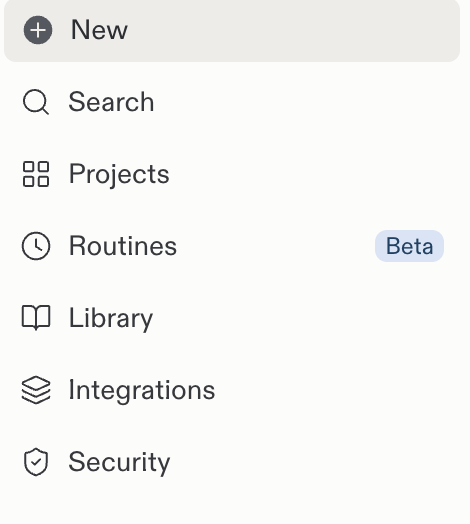
    Select **New** in the Replit sidebar.

    <Frame>
      <img src="https://mintcdn.com/replit/teDUL4A-lNO7dv1O/images/chat/start-new-conversation-sidebar.png?fit=max&auto=format&n=teDUL4A-lNO7dv1O&q=85&s=52b729bd549daddbde87f995c8f0b4b1" alt="Replit sidebar with the New button above Search, Projects, Routines, and other navigation entries" width="470" height="524" data-path="images/chat/start-new-conversation-sidebar.png" />
    </Frame>
  </Step>

  <Step title="Write your request">
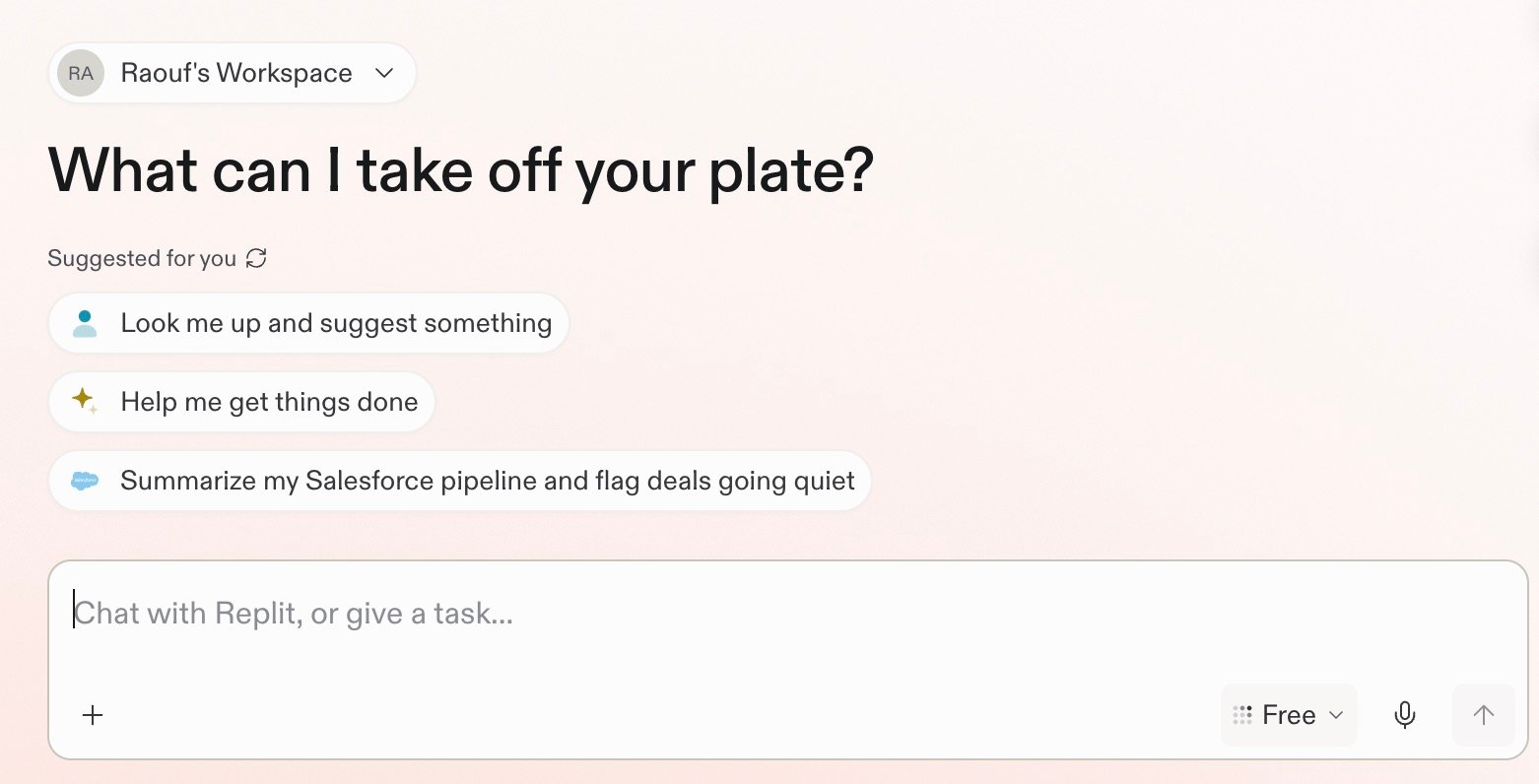
    Use the prompt box to write your request. For example, ask Replit:
    "Summarize our Slack activity from this week and flag messages that need my
    reply."

    <Frame>
      <img src="https://mintcdn.com/replit/teDUL4A-lNO7dv1O/images/chat/replit-conversation-home.jpg?fit=max&auto=format&n=teDUL4A-lNO7dv1O&q=85&s=ab82b3d581eb83c0d5f90c3e6fcd918e" alt="Replit conversation home screen with suggested prompts and a message box for chatting with Replit or giving it a task" width="1562" height="796" data-path="images/chat/replit-conversation-home.jpg" />
    </Frame>
  </Step>
</Steps>

## Start with what you want to do

### Ask a question

Replit can research and analyze information from the web, connected tools, and uploaded files. Ask a focused question or provide the context Replit should use.

For example, ask Replit to summarize your Slack activity from this week and flag
messages that need your reply.

<section className="chat-mkt chat-workflow-grid has-visuals">
  <a className="chat-example has-visual" href="/use-cases/prepare-for-a-customer-call">
    <div className="chat-use-case-visual">
      <div className="customer-call-marks customer-call-marks-card" aria-hidden="true">
        <div className="customer-call-mark">
          <Icon icon="salesforce" iconType="brands" size={44} color="#ffffff" />
        </div>

        <div className="customer-call-mark">
          <Icon icon="slack" iconType="brands" size={44} color="#ffffff" />
        </div>

        <div className="customer-call-mark">
          <Icon icon="google-drive" iconType="brands" size={44} color="#ffffff" />
        </div>
      </div>
    </div>

    <div className="chat-example-tag">Research and analyze</div>

    <div className="chat-card-title" style={{ marginTop: 16, fontSize: 20 }}>
      Prepare for a customer call
    </div>

    <p>Bring together connected sources and prepare a focused call brief.</p>
    <div className="chat-card-link">Explore →</div>
  </a>

  <a className="chat-example has-visual" href="/chat/upload-and-use-files">
    <div className="chat-use-case-visual">
      <div className="chat-use-case-window">
        <i />

        <i />

        <i />

        <b />

        <b />

        <b />
      </div>

      <em>
        <Icon icon="file-arrow-up" size={24} />
      </em>
    </div>

    <div className="chat-card-title" style={{ marginTop: 16, fontSize: 20 }}>
      Work with files
    </div>

    <p>
      Upload documents, spreadsheets, and images to understand, compare, or
      analyze them.
    </p>

    <div className="chat-card-link">Explore →</div>
  </a>
</section>

### Run a routine

A Routine schedules recurring work inside a Conversation. Replit returns each result to the same Conversation, where you can review and continue the work. Learn more about [Routines](/chat/routines).

For example, ask Replit to review Slack every morning and return your priorities.

<section className="chat-mkt chat-workflow-grid has-visuals">
  <a className="chat-example has-visual" href="/chat/routines">
    <div className="chat-use-case-visual palette-ink">
      <div className="chat-use-case-window">
        <i />

        <i />

        <i />

        <b />

        <b />

        <b />
      </div>

      <em>
        <Icon icon="arrows-rotate" size={24} />
      </em>
    </div>

    <div className="chat-card-title" style={{ marginTop: 16, fontSize: 20 }}>
      Schedule a routine
    </div>

    <p>
      Schedule recurring work and review each result in the same Conversation.
    </p>

    <div className="chat-card-link">Explore →</div>
  </a>

  <a className="chat-example has-visual" href="/chat/conversations-and-projects">
    <div className="chat-use-case-visual palette-stone">
      <div className="chat-use-case-window">
        <i />

        <i />

        <i />

        <b />

        <b />

        <b />
      </div>

      <em>
        <Icon icon="lightbulb" size={24} />
      </em>
    </div>

    <div className="chat-card-title" style={{ marginTop: 16, fontSize: 20 }}>
      Act on insight
    </div>

    <p>Turn what you learn into a brief, plan, decision, or next step.</p>
    <div className="chat-card-link">Explore →</div>
  </a>
</section>

### Describe an outcome

A Conversation can turn an idea, research, or an insight into a concrete result, such as an app, presentation, or design.

For example, ask Replit to create a simple project tracker for your team.

<section className="chat-mkt chat-workflow-grid has-visuals">
  <a className="chat-example has-visual" href="/build/your-first-app">
    <div className="chat-use-case-visual">
      <div className="chat-use-case-window">
        <i />

        <i />

        <i />

        <b />

        <b />

        <b />
      </div>

      <em>
        <Icon icon="code" size={24} />
      </em>
    </div>

    <div className="chat-card-title" style={{ marginTop: 16, fontSize: 20 }}>
      Build on insight
    </div>

    <p>Create a dashboard, app, or tool around the information that matters.</p>
    <div className="chat-card-link">Explore →</div>
  </a>

  <a className="chat-example has-visual" href="/design/design-your-first-screen">
    <div className="chat-use-case-visual palette-blush">
      <div className="chat-use-case-window">
        <i />

        <i />

        <i />

        <b />

        <b />

        <b />
      </div>

      <em>
        <Icon icon="object-group" size={24} />
      </em>
    </div>

    <div className="chat-card-title" style={{ marginTop: 16, fontSize: 20 }}>
      Explore designs
    </div>

    <p>Gather references and turn an idea into a visual direction.</p>
    <div className="chat-card-link">Explore →</div>
  </a>
</section>

## Conversations vs. Projects

A Conversation is a single thread for questions, exploration, and Routines. A [Project](/features/projects-and-artifacts/projects) is a deeper workspace for substantial build and design work, including multiple artifacts.

Start in a Conversation. When the work grows into a substantial build or design, the Conversation can become a Project.

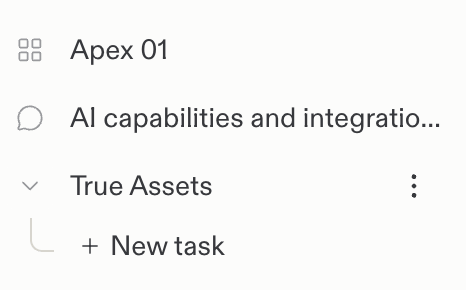
The sidebar uses a chat bubble icon for Conversations and a four-square grid icon for Projects.

<Frame>
  <img src="https://mintcdn.com/replit/teDUL4A-lNO7dv1O/images/chat/conversation-and-project-icons.png?fit=max&auto=format&n=teDUL4A-lNO7dv1O&q=85&s=dd0308cf6783c2345507028dbcf27533" alt="Replit sidebar showing a Project with a four-square grid icon and a Conversation with a chat bubble icon" width="466" height="290" data-path="images/chat/conversation-and-project-icons.png" />
</Frame>

| Area             | Conversations                        | Projects                                                                              |
| ---------------- | ------------------------------------ | ------------------------------------------------------------------------------------- |
| Best for         | Questions, exploration, and Routines | Deeper build and design work such as apps, slides, dashboards, and multiple artifacts |
| Background tasks | **Not available**                    | **Can run in parallel**                                                               |
| Routines         | **Available**                        | **Not available**                                                                     |
| Integrations     | Available                            | Available                                                                             |
| Structure        | A single thread                      | A project workspace with multiple artifacts                                           |