> ## Documentation Index
> Fetch the complete documentation index at: https://docs.replit.com/llms.txt
> Use this file to discover all available pages before exploring further.

# Welcome to Replit

> Replit turns ideas and everyday work into outcomes with Conversations, Build, Design, and Connect.

export const PublishSiteCover = () => <div className="chat-mkt" role="img" aria-label="A frosted publishing panel with a public link for a finished site" style={{
  margin: "28px 0 42px",
  borderTop: 0,
  paddingTop: 0
}}>
    <div className="chat-use-case-visual" style={{
  aspectRatio: "auto",
  minHeight: "clamp(220px, 34vw, 320px)",
  overflow: "hidden",
  background: "radial-gradient(circle at 50% -18%, rgba(255,255,255,.82), transparent 42%), radial-gradient(circle at 4% 96%, rgba(255,184,146,.48), transparent 38%), linear-gradient(140deg, #ff764d, #ff3c00 60%, #c92d00)"
}}>
      <div aria-hidden="true" style={{
  position: "absolute",
  inset: 0,
  background: "linear-gradient(180deg, rgba(255,255,255,.14), rgba(255,255,255,0) 48%, rgba(111,24,0,.2))"
}} />
      <div aria-hidden="true" style={{
  position: "relative",
  zIndex: 1,
  display: "grid",
  width: "min(620px, 80%)",
  minHeight: "inherit",
  placeItems: "center",
  margin: "auto"
}}>
        <div style={{
  display: "grid",
  width: "100%",
  gap: "clamp(14px, 2.4vw, 22px)",
  padding: "clamp(18px, 3vw, 28px)",
  border: "1px solid rgba(255,255,255,.62)",
  borderRadius: 24,
  background: "linear-gradient(180deg, rgba(255,255,255,.38), rgba(255,255,255,.13))",
  boxShadow: "0 20px 40px rgba(55,27,18,.22)",
  backdropFilter: "blur(7px)"
}}>
          <div style={{
  display: "flex",
  justifyContent: "space-between",
  gap: 10
}}>
            <span style={{
  width: "36%",
  height: 9,
  borderRadius: 99,
  background: "rgba(255,255,255,.78)"
}} />
            <span style={{
  width: 18,
  height: 18,
  border: "1px solid rgba(255,255,255,.72)",
  borderRadius: 999
}} />
          </div>
          <div style={{
  display: "flex",
  alignItems: "center",
  gap: 10,
  padding: "clamp(11px, 1.8vw, 15px)",
  border: "1px solid rgba(255,255,255,.58)",
  borderRadius: 14,
  background: "rgba(255,255,255,.16)"
}}>
            <span style={{
  width: 18,
  height: 18,
  border: "2px solid rgba(255,255,255,.88)",
  borderRadius: 6,
  transform: "rotate(-45deg)"
}} />
            <span style={{
  width: "60%",
  height: 7,
  borderRadius: 99,
  background: "rgba(255,255,255,.74)"
}} />
            <span style={{
  width: 48,
  height: 22,
  marginLeft: "auto",
  borderRadius: 7,
  background: "rgba(255,255,255,.88)"
}} />
          </div>
          <div style={{
  display: "grid",
  gridTemplateColumns: "repeat(4, minmax(0, 1fr))",
  gap: 7
}}>
            {[0, 1, 2, 3].map(stage => <span key={stage} style={{
  height: 8,
  borderRadius: 99,
  background: stage < 3 ? "rgba(255,255,255,.82)" : "rgba(255,255,255,.36)"
}} />)}
          </div>
        </div>
      </div>
    </div>
  </div>;

export const OpeningSiteDesignCover = () => <div className="chat-mkt" role="img" aria-label="A frosted design canvas with a website layout and image asset" style={{
  margin: "28px 0 42px",
  borderTop: 0,
  paddingTop: 0
}}>
    <div className="chat-use-case-visual" style={{
  aspectRatio: "auto",
  minHeight: "clamp(220px, 34vw, 320px)",
  overflow: "hidden",
  background: "radial-gradient(circle at 50% -18%, rgba(255,255,255,.82), transparent 42%), radial-gradient(circle at 4% 96%, rgba(255,184,146,.48), transparent 38%), linear-gradient(140deg, #ff764d, #ff3c00 60%, #c92d00)"
}}>
      <div aria-hidden="true" style={{
  position: "absolute",
  inset: 0,
  background: "linear-gradient(180deg, rgba(255,255,255,.14), rgba(255,255,255,0) 48%, rgba(111,24,0,.2))"
}} />
      <div aria-hidden="true" style={{
  position: "relative",
  zIndex: 1,
  display: "grid",
  gridTemplateColumns: "minmax(0, 1.15fr) minmax(0, .85fr)",
  gap: "clamp(12px, 2.4vw, 22px)",
  width: "min(720px, 84%)",
  minHeight: "inherit",
  alignItems: "center",
  margin: "auto"
}}>
        <div style={{
  display: "grid",
  gap: 12,
  minHeight: "clamp(148px, 23vw, 198px)",
  padding: "clamp(12px, 2vw, 18px)",
  border: "1px solid rgba(255,255,255,.6)",
  borderRadius: 20,
  background: "linear-gradient(180deg, rgba(255,255,255,.36), rgba(255,255,255,.12))",
  boxShadow: "0 18px 36px rgba(55,27,18,.2)",
  backdropFilter: "blur(6px)"
}}>
          <div style={{
  display: "flex",
  gap: 6
}}>
            {[".92", ".52", ".32"].map(opacity => <span key={opacity} style={{
  width: 7,
  height: 7,
  borderRadius: 999,
  background: `rgba(255,255,255,${opacity})`
}} />)}
          </div>
          <div style={{
  display: "grid",
  gridTemplateColumns: "minmax(0, 1fr) minmax(0, .8fr)",
  gap: 10
}}>
            <div style={{
  display: "grid",
  alignContent: "center",
  gap: 9
}}>
              <span style={{
  width: "76%",
  height: 12,
  borderRadius: 99,
  background: "rgba(255,255,255,.86)"
}} />
              <span style={{
  width: "94%",
  height: 7,
  borderRadius: 99,
  background: "rgba(255,255,255,.46)"
}} />
              <span style={{
  width: "72%",
  height: 7,
  borderRadius: 99,
  background: "rgba(255,255,255,.34)"
}} />
              <span style={{
  width: 48,
  height: 18,
  marginTop: 4,
  borderRadius: 99,
  background: "rgba(255,255,255,.74)"
}} />
            </div>
            <div style={{
  minHeight: 92,
  border: "1px solid rgba(255,255,255,.42)",
  borderRadius: 12,
  background: "linear-gradient(135deg, rgba(255,255,255,.72), rgba(255,255,255,.18))"
}} />
          </div>
        </div>
        <div style={{
  display: "grid",
  gap: 10
}}>
          {["68%", "86%", "54%"].map((width, index) => <div key={width} style={{
  display: "grid",
  gridTemplateColumns: "18px minmax(0, 1fr)",
  alignItems: "center",
  gap: 9,
  padding: "clamp(9px, 1.5vw, 13px)",
  border: "1px solid rgba(255,255,255,.46)",
  borderRadius: 14,
  background: index === 0 ? "rgba(255,255,255,.29)" : "rgba(255,255,255,.12)",
  backdropFilter: "blur(5px)"
}}>
              <span style={{
  width: 18,
  height: 18,
  borderRadius: index === 1 ? 4 : 999,
  background: index === 0 ? "rgba(255,255,255,.9)" : "rgba(255,255,255,.42)"
}} />
              <span style={{
  width,
  height: 7,
  borderRadius: 99,
  background: "rgba(255,255,255,.7)"
}} />
            </div>)}
        </div>
      </div>
    </div>
  </div>;

export const ConversationsProjectsCover = ({handoff = false}) => <div className="chat-mkt" role="img" aria-label={handoff ? "A Replit Conversation flowing into a structured Project window" : "A frosted Replit Conversation window linked to a structured Project window"} style={{
  margin: "28px 0 42px",
  borderTop: 0,
  paddingTop: 0
}}>
    <div className="chat-use-case-visual" style={{
  aspectRatio: "auto",
  minHeight: "clamp(220px, 34vw, 320px)",
  overflow: "hidden",
  background: "radial-gradient(circle at 50% -18%, rgba(255,255,255,.82), transparent 42%), radial-gradient(circle at 4% 96%, rgba(255,184,146,.48), transparent 38%), linear-gradient(140deg, #ff764d, #ff3c00 60%, #c92d00)"
}}>
      <div aria-hidden="true" style={{
  position: "absolute",
  inset: 0,
  background: "linear-gradient(180deg, rgba(255,255,255,.14), rgba(255,255,255,0) 48%, rgba(111,24,0,.2))"
}} />
      <div aria-hidden="true" style={{
  position: "relative",
  zIndex: 1,
  display: "flex",
  width: "100%",
  boxSizing: "border-box",
  minHeight: "inherit",
  alignItems: "center",
  justifyContent: "center",
  gap: handoff ? "clamp(5px, 1vw, 13px)" : "clamp(3px, .8vw, 10px)",
  padding: "clamp(10px, 1.6vw, 18px)"
}}>
        <div style={{
  position: "relative",
  flex: handoff ? "0 1 38%" : "0 1 45%",
  width: handoff ? "38%" : "45%",
  minWidth: 0,
  maxWidth: "none"
}}>
          <div aria-hidden="true" style={{
  position: "absolute",
  width: "84%",
  height: "82%",
  left: "10%",
  top: "9%",
  transform: "rotate(3deg)",
  border: "1px solid rgba(255,255,255,.28)",
  borderRadius: 20,
  opacity: 0.52
}} />
          <div aria-hidden="true" style={{
  position: "relative",
  display: "flex",
  width: "100%",
  boxSizing: "border-box",
  minHeight: "clamp(138px, 20vw, 190px)",
  gap: "clamp(7px, 1.5vw, 14px)",
  padding: "clamp(10px, 2vw, 18px)",
  border: "1px solid rgba(255,255,255,.54)",
  borderRadius: 20,
  background: "linear-gradient(180deg, rgba(255,255,255,.27), rgba(255,255,255,.1))",
  boxShadow: "0 18px 36px rgba(55,27,18,.2)",
  backdropFilter: "blur(5px)"
}}>
            <div style={{
  display: "grid",
  width: "clamp(20px, 4vw, 36px)",
  minWidth: "clamp(20px, 4vw, 36px)",
  alignContent: "start",
  gap: 8,
  paddingRight: "clamp(6px, 1vw, 11px)",
  borderRight: "1px solid rgba(255,255,255,.3)"
}}>
              <span style={{
  width: 10,
  height: 10,
  borderRadius: 4,
  background: "rgba(255,255,255,.9)"
}} />
              <span style={{
  width: 10,
  height: 10,
  borderRadius: 4,
  border: "1px solid rgba(255,255,255,.66)",
  background: "rgba(255,255,255,.12)"
}} />
              <span style={{
  width: 10,
  height: 10,
  borderRadius: 999,
  border: "1px solid rgba(255,255,255,.48)"
}} />
            </div>
            <div style={{
  display: "grid",
  minWidth: 0,
  flex: "1 1 auto",
  alignContent: "space-between",
  gap: 8
}}>
              <div style={{
  display: "grid",
  gap: 7
}}>
                <span style={{
  width: "66%",
  height: 17,
  border: "1px solid rgba(255,255,255,.44)",
  borderRadius: "10px 10px 10px 3px",
  background: "rgba(255,255,255,.17)"
}} />
                <span style={{
  justifySelf: "end",
  width: "56%",
  height: 17,
  borderRadius: "10px 10px 3px 10px",
  background: "rgba(255,255,255,.76)"
}} />
                <span style={{
  width: "76%",
  height: 21,
  border: "1px solid rgba(255,255,255,.4)",
  borderRadius: "10px 10px 10px 3px",
  background: "rgba(255,255,255,.14)"
}} />
              </div>
              <div style={{
  display: "flex",
  alignItems: "center",
  justifyContent: "space-between",
  gap: 6,
  padding: "7px 8px",
  border: "1px solid rgba(255,255,255,.52)",
  borderRadius: 10,
  background: "rgba(255,255,255,.14)"
}}>
                <span style={{
  width: "65%",
  height: 5,
  borderRadius: 999,
  background: "rgba(255,255,255,.7)"
}} />
                <span style={{
  width: 14,
  height: 14,
  borderRadius: 5,
  background: "rgba(255,255,255,.88)"
}} />
              </div>
            </div>
          </div>
        </div>

        <div aria-hidden="true" style={{
  position: "relative",
  width: handoff ? "clamp(30px, 9vw, 92px)" : "clamp(24px, 7vw, 76px)",
  minWidth: handoff ? "clamp(30px, 9vw, 92px)" : "clamp(24px, 7vw, 76px)",
  height: "clamp(38px, 6vw, 56px)"
}}>
          <span style={{
  position: "absolute",
  left: 0,
  right: 0,
  top: "50%",
  width: "100%",
  height: 2,
  borderRadius: 999,
  background: "linear-gradient(90deg, rgba(255,255,255,.18), rgba(255,255,255,.86), rgba(255,255,255,.18))",
  boxShadow: "0 0 12px rgba(255,255,255,.36)"
}} />
          <span style={{
  position: "absolute",
  left: handoff ? "7%" : "13%",
  top: "calc(50% - 5px)",
  width: handoff ? 7 : 10,
  height: handoff ? 7 : 10,
  border: "1px solid rgba(255,255,255,.72)",
  borderRadius: 999,
  background: "rgba(255,255,255,.18)",
  boxShadow: "0 0 10px rgba(255,255,255,.24)"
}} />
          <span style={{
  position: "absolute",
  left: handoff ? "39%" : "46%",
  top: handoff ? "calc(50% - 6px)" : "calc(50% - 8px)",
  width: handoff ? 12 : 16,
  height: handoff ? 12 : 16,
  border: "1px solid rgba(255,255,255,.86)",
  borderRadius: 999,
  background: "rgba(255,255,255,.28)",
  boxShadow: "0 0 14px rgba(255,255,255,.34)"
}} />
          <span style={{
  position: "absolute",
  right: handoff ? "3%" : "8%",
  top: handoff ? "calc(50% - 9px)" : "calc(50% - 5px)",
  width: handoff ? 18 : 10,
  height: handoff ? 18 : 10,
  border: "1px solid rgba(255,255,255,.72)",
  borderRadius: 999,
  background: handoff ? "rgba(255,255,255,.42)" : "rgba(255,255,255,.18)",
  boxShadow: handoff ? "0 0 18px rgba(255,255,255,.46)" : "0 0 10px rgba(255,255,255,.24)"
}} />
        </div>

        <div style={{
  position: "relative",
  flex: handoff ? "0 1 52%" : "0 1 45%",
  width: handoff ? "52%" : "45%",
  minWidth: 0,
  maxWidth: "none",
  transform: handoff ? "translateX(1%)" : undefined
}}>
          <div aria-hidden="true" style={{
  position: "absolute",
  width: "84%",
  height: "82%",
  right: "10%",
  top: "9%",
  transform: "rotate(-3deg)",
  border: "1px solid rgba(255,255,255,.28)",
  borderRadius: 20,
  opacity: 0.52
}} />
          <div aria-hidden="true" style={{
  position: "relative",
  display: "grid",
  width: "100%",
  boxSizing: "border-box",
  minHeight: "clamp(138px, 20vw, 190px)",
  gridTemplateRows: "auto 1fr",
  gap: "clamp(9px, 1.8vw, 15px)",
  padding: "clamp(10px, 2vw, 18px)",
  border: "1px solid rgba(255,255,255,.54)",
  borderRadius: 20,
  background: "linear-gradient(180deg, rgba(255,255,255,.27), rgba(255,255,255,.1))",
  boxShadow: "0 18px 36px rgba(55,27,18,.2)",
  backdropFilter: "blur(5px)"
}}>
            <div style={{
  display: "flex",
  alignItems: "center",
  gap: 6
}}>
              <span style={{
  width: 8,
  height: 8,
  borderRadius: 999,
  background: "rgba(255,255,255,.92)"
}} />
              <span style={{
  width: 8,
  height: 8,
  borderRadius: 999,
  background: "rgba(255,255,255,.52)"
}} />
              <span style={{
  width: 8,
  height: 8,
  borderRadius: 999,
  background: "rgba(255,255,255,.32)"
}} />
              <span style={{
  width: "34%",
  height: 6,
  marginLeft: 6,
  borderRadius: 999,
  background: "rgba(255,255,255,.62)"
}} />
            </div>
            <div style={{
  display: "grid",
  gridTemplateColumns: "minmax(18px, .45fr) minmax(0, 1fr)",
  gap: "clamp(7px, 1.5vw, 14px)",
  minWidth: 0
}}>
              <div style={{
  display: "grid",
  alignContent: "start",
  gap: 7,
  paddingRight: "clamp(5px, 1vw, 10px)",
  borderRight: "1px solid rgba(255,255,255,.3)"
}}>
                <span style={{
  width: "80%",
  height: 7,
  borderRadius: 999,
  background: "rgba(255,255,255,.8)"
}} />
                <span style={{
  width: "64%",
  height: 7,
  borderRadius: 999,
  background: "rgba(255,255,255,.42)"
}} />
                <span style={{
  width: "74%",
  height: 7,
  borderRadius: 999,
  background: "rgba(255,255,255,.26)"
}} />
              </div>
              <div style={{
  display: "grid",
  gridTemplateColumns: "repeat(2, minmax(0, 1fr))",
  gridTemplateRows: "repeat(2, minmax(0, 1fr))",
  gap: 7,
  minWidth: 0
}}>
                <span style={{
  border: "1px solid rgba(255,255,255,.48)",
  borderRadius: 9,
  background: "rgba(255,255,255,.2)"
}} />
                <span style={{
  border: "1px solid rgba(255,255,255,.32)",
  borderRadius: 9,
  background: "rgba(255,255,255,.1)"
}} />
                <span style={{
  gridColumn: "span 2",
  border: "1px solid rgba(255,255,255,.4)",
  borderRadius: 9,
  background: "rgba(255,255,255,.16)"
}} />
              </div>
            </div>
          </div>
        </div>
      </div>
    </div>
  </div>;

export const RoutineWatchCover = () => <div className="chat-mkt" role="img" aria-label="A frosted recurring market watch with a schedule and research updates" style={{
  margin: "28px 0 42px",
  borderTop: 0,
  paddingTop: 0
}}>
    <div className="chat-use-case-visual" style={{
  aspectRatio: "auto",
  minHeight: "clamp(220px, 34vw, 320px)",
  overflow: "hidden",
  background: "radial-gradient(circle at 50% -18%, rgba(255,255,255,.82), transparent 42%), radial-gradient(circle at 4% 96%, rgba(255,184,146,.48), transparent 38%), linear-gradient(140deg, #ff764d, #ff3c00 60%, #c92d00)"
}}>
      <div aria-hidden="true" style={{
  position: "absolute",
  inset: 0,
  background: "linear-gradient(180deg, rgba(255,255,255,.14), rgba(255,255,255,0) 48%, rgba(111,24,0,.2))"
}} />
      <div aria-hidden="true" style={{
  position: "relative",
  zIndex: 1,
  display: "grid",
  gridTemplateColumns: "minmax(0, .9fr) minmax(0, 1.25fr)",
  gap: "clamp(12px, 2.5vw, 24px)",
  width: "min(720px, 84%)",
  minHeight: "inherit",
  alignItems: "center",
  margin: "auto"
}}>
        <div style={{
  display: "grid",
  placeItems: "center",
  aspectRatio: "1",
  border: "1px solid rgba(255,255,255,.6)",
  borderRadius: 24,
  background: "linear-gradient(180deg, rgba(255,255,255,.34), rgba(255,255,255,.12))",
  boxShadow: "0 18px 36px rgba(55,27,18,.2)",
  backdropFilter: "blur(6px)"
}}>
          <div style={{
  position: "relative",
  width: "44%",
  aspectRatio: "1",
  border: "2px solid rgba(255,255,255,.86)",
  borderRadius: 999
}}>
            <span style={{
  position: "absolute",
  width: "2px",
  height: "34%",
  left: "50%",
  top: "18%",
  transformOrigin: "bottom",
  transform: "translateX(-50%) rotate(22deg)",
  borderRadius: 99,
  background: "rgba(255,255,255,.9)"
}} />
            <span style={{
  position: "absolute",
  width: "2px",
  height: "26%",
  left: "50%",
  top: "25%",
  transformOrigin: "bottom",
  transform: "translateX(-50%) rotate(-72deg)",
  borderRadius: 99,
  background: "rgba(255,255,255,.9)"
}} />
          </div>
        </div>
        <div style={{
  display: "grid",
  gap: "clamp(9px, 1.6vw, 14px)"
}}>
          {["82%", "64%", "74%"].map((width, index) => <div key={width} style={{
  display: "grid",
  gridTemplateColumns: "18px minmax(0, 1fr)",
  alignItems: "center",
  gap: 10,
  padding: "clamp(10px, 1.6vw, 14px)",
  border: "1px solid rgba(255,255,255,.48)",
  borderRadius: 15,
  background: index === 0 ? "rgba(255,255,255,.3)" : "rgba(255,255,255,.13)",
  backdropFilter: "blur(5px)"
}}>
              <span style={{
  width: 18,
  height: 18,
  borderRadius: 6,
  background: index === 0 ? "rgba(255,255,255,.9)" : "rgba(255,255,255,.42)"
}} />
              <span style={{
  width,
  height: 7,
  borderRadius: 99,
  background: "rgba(255,255,255,.74)"
}} />
            </div>)}
        </div>
      </div>
    </div>
  </div>;

export const IntegrationsOverviewCover = () => <div className="chat-mkt" role="img" aria-label="A frosted integrations catalog with connected service cards" style={{
  margin: "28px 0 42px",
  borderTop: 0,
  paddingTop: 0
}}>
    <div className="chat-use-case-visual" style={{
  aspectRatio: "auto",
  minHeight: "clamp(220px, 34vw, 320px)",
  overflow: "hidden",
  background: "radial-gradient(circle at 50% -18%, rgba(255,255,255,.82), transparent 42%), radial-gradient(circle at 4% 96%, rgba(255,184,146,.48), transparent 38%), linear-gradient(140deg, #ff764d, #ff3c00 60%, #c92d00)"
}}>
      <div aria-hidden="true" style={{
  position: "absolute",
  inset: 0,
  background: "linear-gradient(180deg, rgba(255,255,255,.14), rgba(255,255,255,0) 48%, rgba(111,24,0,.2))"
}} />
      <div aria-hidden="true" style={{
  position: "relative",
  zIndex: 1,
  display: "grid",
  gridTemplateColumns: "repeat(3, minmax(0, 1fr))",
  gap: "clamp(10px, 2vw, 18px)",
  width: "min(720px, 82%)",
  minHeight: "inherit",
  alignItems: "center",
  margin: "auto"
}}>
        {["48%", "74%", "58%"].map((lineWidth, index) => <div key={lineWidth} style={{
  display: "grid",
  gap: 10,
  minHeight: "clamp(122px, 20vw, 164px)",
  padding: "clamp(12px, 2vw, 18px)",
  border: "1px solid rgba(255,255,255,.56)",
  borderRadius: 18,
  background: index === 1 ? "linear-gradient(180deg, rgba(255,255,255,.38), rgba(255,255,255,.16))" : "rgba(255,255,255,.16)",
  boxShadow: "0 16px 30px rgba(55,27,18,.16)",
  backdropFilter: "blur(6px)"
}}>
            <span style={{
  width: 26,
  height: 26,
  borderRadius: 8,
  background: index === 1 ? "rgba(255,255,255,.9)" : "rgba(255,255,255,.42)"
}} />
            <span style={{
  width: "88%",
  height: 8,
  borderRadius: 999,
  background: "rgba(255,255,255,.74)"
}} />
            <span style={{
  width: lineWidth,
  height: 7,
  borderRadius: 999,
  background: "rgba(255,255,255,.38)"
}} />
          </div>)}
      </div>
    </div>
  </div>;

export const IntegrateYourToolsCover = () => <div className="chat-mkt" role="img" aria-label="Supported service context connecting into a central Replit workspace" style={{
  margin: "28px 0 42px",
  borderTop: 0,
  paddingTop: 0
}}>
    <div className="chat-use-case-visual" style={{
  aspectRatio: "auto",
  minHeight: "clamp(220px, 34vw, 320px)",
  overflow: "hidden",
  background: "radial-gradient(circle at 50% -16%, rgba(255,255,255,.82), transparent 42%), radial-gradient(circle at 4% 96%, rgba(255,184,146,.47), transparent 38%), linear-gradient(140deg, #ff764d, #ff3c00 60%, #c92d00)"
}}>
      <div aria-hidden="true" style={{
  position: "absolute",
  inset: 0,
  background: "linear-gradient(180deg, rgba(255,255,255,.13), rgba(255,255,255,0) 50%, rgba(111,24,0,.2))"
}} />
      <div aria-hidden="true" style={{
  position: "relative",
  zIndex: 1,
  display: "grid",
  width: "100%",
  minHeight: "inherit",
  placeItems: "center",
  padding: "clamp(14px, 3vw, 28px)",
  boxSizing: "border-box"
}}>
        <div style={{
  position: "absolute",
  left: "clamp(13px, 8%, 82px)",
  top: "26%",
  display: "grid",
  width: "clamp(42px, 8vw, 64px)",
  height: "clamp(42px, 8vw, 64px)",
  placeItems: "center",
  border: "1px solid rgba(255,255,255,.58)",
  borderRadius: 16,
  background: "linear-gradient(180deg, rgba(255,255,255,.31), rgba(255,255,255,.12))",
  boxShadow: "0 12px 24px rgba(55,27,18,.16)",
  backdropFilter: "blur(5px)"
}}>
          <svg viewBox="0 0 24 24" width="56%" fill="rgba(255,255,255,.88)">
            <path d="M5.042 15.165a2.528 2.528 0 0 1-2.52 2.523A2.528 2.528 0 0 1 0 15.165a2.527 2.527 0 0 1 2.522-2.52h2.52v2.52zM6.313 15.165a2.527 2.527 0 0 1 2.521-2.52 2.527 2.527 0 0 1 2.521 2.52v6.313A2.528 2.528 0 0 1 8.834 24a2.528 2.528 0 0 1-2.521-2.522v-6.313zM8.834 5.042a2.528 2.528 0 0 1-2.521-2.52A2.528 2.528 0 0 1 8.834 0a2.528 2.528 0 0 1 2.521 2.522v2.52H8.834zM8.834 6.313a2.528 2.528 0 0 1 2.521 2.521 2.528 2.528 0 0 1-2.521 2.521H2.522A2.528 2.528 0 0 1 0 8.834a2.527 2.527 0 0 1 2.522-2.521h6.312zM18.956 8.834a2.528 2.528 0 0 1 2.522-2.521A2.528 2.528 0 0 1 24 8.834a2.528 2.528 0 0 1-2.522 2.521h-2.522V8.834zM17.688 8.834a2.528 2.528 0 0 1-2.523 2.521 2.527 2.527 0 0 1-2.52-2.521V2.522A2.527 2.527 0 0 1 15.165 0a2.528 2.528 0 0 1 2.523 2.522v6.312zM15.165 18.956a2.528 2.528 0 0 1 2.523 2.522A2.528 2.528 0 0 1 15.165 24a2.527 2.527 0 0 1-2.52-2.522v-2.522h2.52zM15.165 17.688a2.527 2.527 0 0 1-2.52-2.523 2.526 2.526 0 0 1 2.52-2.52h6.313A2.527 2.527 0 0 1 24 15.165a2.528 2.528 0 0 1-2.522 2.523h-6.313z" />
          </svg>
        </div>
        <div style={{
  position: "absolute",
  left: "clamp(22px, 12%, 112px)",
  bottom: "clamp(18px, 9%, 44px)",
  display: "grid",
  width: "clamp(38px, 7vw, 58px)",
  height: "clamp(38px, 7vw, 58px)",
  placeItems: "center",
  border: "1px solid rgba(255,255,255,.52)",
  borderRadius: 15,
  background: "rgba(255,255,255,.16)",
  boxShadow: "0 12px 24px rgba(55,27,18,.14)",
  backdropFilter: "blur(5px)"
}}>
          <div style={{
  display: "grid",
  gap: 3,
  width: "48%"
}}>
            {[0, 1, 2].map(line => <span key={line} style={{
  display: "block",
  height: 4,
  borderRadius: 999,
  background: line === 0 ? "rgba(255,255,255,.84)" : "rgba(255,255,255,.44)"
}} />)}
          </div>
        </div>
        <div style={{
  position: "absolute",
  right: "clamp(13px, 8%, 82px)",
  top: "26%",
  display: "grid",
  width: "clamp(42px, 8vw, 64px)",
  height: "clamp(42px, 8vw, 64px)",
  placeItems: "center",
  border: "1px solid rgba(255,255,255,.58)",
  borderRadius: 16,
  background: "linear-gradient(180deg, rgba(255,255,255,.31), rgba(255,255,255,.12))",
  boxShadow: "0 12px 24px rgba(55,27,18,.16)",
  backdropFilter: "blur(5px)"
}}>
          <div style={{
  width: "46%",
  height: "40%",
  border: "1px solid rgba(255,255,255,.86)",
  borderRadius: 4,
  boxSizing: "border-box"
}} />
        </div>
        <div style={{
  position: "absolute",
  right: "clamp(22px, 12%, 112px)",
  bottom: "clamp(18px, 9%, 44px)",
  display: "grid",
  width: "clamp(38px, 7vw, 58px)",
  height: "clamp(38px, 7vw, 58px)",
  placeItems: "center",
  border: "1px solid rgba(255,255,255,.52)",
  borderRadius: 15,
  background: "rgba(255,255,255,.16)",
  boxShadow: "0 12px 24px rgba(55,27,18,.14)",
  backdropFilter: "blur(5px)"
}}>
          <div style={{
  display: "grid",
  gridTemplateColumns: "repeat(2, 1fr)",
  gap: 3,
  width: "48%",
  height: "48%"
}}>
            {[0, 1, 2, 3].map(cell => <span key={cell} style={{
  borderRadius: 3,
  background: cell === 0 ? "rgba(255,255,255,.84)" : "rgba(255,255,255,.38)"
}} />)}
          </div>
        </div>
        <div style={{
  position: "relative",
  display: "grid",
  width: "clamp(124px, 24vw, 194px)",
  height: "clamp(124px, 24vw, 194px)",
  placeItems: "center",
  border: "1px solid rgba(255,255,255,.68)",
  borderRadius: 28,
  background: "linear-gradient(145deg, rgba(255,255,255,.4), rgba(255,255,255,.12))",
  boxShadow: "0 24px 44px rgba(67,21,7,.24)",
  backdropFilter: "blur(8px)"
}}>
          <div style={{
  display: "grid",
  gridTemplateColumns: "repeat(2, 16px)",
  gap: 7
}}>
            {[0, 1, 2, 3].map(tile => <span key={tile} style={{
  width: 16,
  height: 16,
  borderRadius: 5,
  background: tile === 0 ? "rgba(255,255,255,.9)" : "rgba(255,255,255,.46)",
  boxShadow: tile === 0 ? "0 0 14px rgba(255,255,255,.42)" : "none"
}} />)}
          </div>
          <div style={{
  position: "absolute",
  bottom: "16%",
  display: "flex",
  gap: 5
}}>
            {[0, 1, 2].map(node => <span key={node} style={{
  width: 5,
  height: 5,
  borderRadius: 999,
  background: "rgba(255,255,255,.52)"
}} />)}
          </div>
        </div>
      </div>
    </div>
  </div>;

export const PromptingCover = () => <div className="chat-mkt" role="img" aria-label="Prompt box with context cues and a generated result, representing prompting in Replit" style={{
  margin: "28px 0 42px",
  borderTop: 0,
  paddingTop: 0
}}>
    <div className="chat-use-case-visual" style={{
  aspectRatio: "auto",
  minHeight: "clamp(220px, 34vw, 320px)",
  overflow: "hidden",
  background: "radial-gradient(circle at 50% -18%, rgba(255,255,255,.82), transparent 42%), radial-gradient(circle at 4% 96%, rgba(255,184,146,.48), transparent 38%), linear-gradient(140deg, #ff764d, #ff3c00 60%, #c92d00)"
}}>
      <div aria-hidden="true" style={{
  position: "absolute",
  inset: 0,
  background: "linear-gradient(180deg, rgba(255,255,255,.14), rgba(255,255,255,0) 48%, rgba(111,24,0,.2))"
}} />
      <div aria-hidden="true" style={{
  position: "absolute",
  width: "min(76%, 560px)",
  height: "64%",
  left: "50%",
  top: "18%",
  transform: "translateX(-50%) rotate(-4deg)",
  opacity: 0.42,
  border: "1px solid rgba(255,255,255,.34)",
  borderRadius: 26
}} />
      <div aria-hidden="true" style={{
  position: "relative",
  zIndex: 1,
  display: "flex",
  width: "100%",
  minHeight: "inherit",
  alignItems: "center",
  justifyContent: "center",
  padding: "clamp(14px, 3vw, 28px)"
}}>
        <div style={{
  width: "clamp(260px, 66%, 680px)",
  maxWidth: "calc(100% - 20px)",
  boxSizing: "border-box"
}}>
          <div style={{
  display: "flex",
  justifyContent: "center",
  gap: 10,
  marginBottom: 12
}}>
            <span style={{
  width: 18,
  height: 18,
  border: "1px solid rgba(255,255,255,.54)",
  borderRadius: 6,
  background: "rgba(255,255,255,.18)"
}} />
            <span style={{
  width: 18,
  height: 18,
  border: "1px solid rgba(255,255,255,.54)",
  borderRadius: 999,
  background: "rgba(255,255,255,.14)"
}} />
            <span style={{
  width: 18,
  height: 18,
  border: "1px solid rgba(255,255,255,.54)",
  borderRadius: 5,
  background: "rgba(255,255,255,.12)"
}} />
          </div>
          <div style={{
  padding: "clamp(18px, 4vw, 30px)",
  border: "1px solid rgba(255,255,255,.58)",
  borderRadius: 24,
  background: "linear-gradient(180deg, rgba(255,255,255,.28), rgba(255,255,255,.1))",
  boxShadow: "0 18px 36px rgba(55,27,18,.2)",
  backdropFilter: "blur(5px)"
}}>
            <div style={{
  display: "grid",
  gap: 9
}}>
              <span style={{
  width: "55%",
  height: 9,
  borderRadius: 999,
  background: "rgba(255,255,255,.84)"
}} />
              <span style={{
  width: "88%",
  height: 9,
  borderRadius: 999,
  background: "rgba(255,255,255,.42)"
}} />
            </div>
            <div style={{
  display: "flex",
  alignItems: "center",
  justifyContent: "space-between",
  gap: 12,
  marginTop: "clamp(22px, 4vw, 32px)",
  padding: "13px 14px",
  border: "1px solid rgba(255,255,255,.64)",
  borderRadius: 16,
  background: "rgba(255,255,255,.18)"
}}>
              <span style={{
  width: "68%",
  height: 8,
  borderRadius: 999,
  background: "rgba(255,255,255,.78)"
}} />
              <span style={{
  display: "grid",
  width: 27,
  height: 27,
  placeItems: "center",
  flex: "0 0 auto",
  borderRadius: 9,
  background: "rgba(255,255,255,.9)",
  color: "#4b5563",
  fontSize: 16,
  fontWeight: 700
}}>
                ↑
              </span>
            </div>
          </div>
          <div style={{
  display: "flex",
  alignItems: "center",
  gap: 10,
  width: "74%",
  margin: "14px auto 0",
  padding: "10px 12px",
  border: "1px solid rgba(255,255,255,.46)",
  borderRadius: 14,
  background: "rgba(255,255,255,.14)"
}}>
            <span style={{
  display: "grid",
  width: 20,
  height: 20,
  placeItems: "center",
  flex: "0 0 auto",
  borderRadius: 999,
  background: "rgba(255,255,255,.86)",
  color: "#4b5563",
  fontSize: 13,
  fontWeight: 700
}}>
              ✓
            </span>
            <span style={{
  width: "68%",
  height: 7,
  borderRadius: 999,
  background: "rgba(255,255,255,.68)"
}} />
          </div>
        </div>
      </div>
    </div>
  </div>;

export const ChatConversationsCover = () => <div className="chat-mkt" role="img" aria-label="Replit Conversation window with a message thread and prompt box" style={{
  margin: "28px 0 42px",
  borderTop: 0,
  paddingTop: 0
}}>
    <div className="chat-use-case-visual" style={{
  aspectRatio: "auto",
  minHeight: "clamp(220px, 34vw, 320px)",
  overflow: "hidden",
  background: "radial-gradient(circle at 50% -18%, rgba(255,255,255,.82), transparent 42%), radial-gradient(circle at 4% 96%, rgba(255,184,146,.48), transparent 38%), linear-gradient(140deg, #ff764d, #ff3c00 60%, #c92d00)"
}}>
      <div aria-hidden="true" style={{
  position: "absolute",
  inset: 0,
  background: "linear-gradient(180deg, rgba(255,255,255,.14), rgba(255,255,255,0) 48%, rgba(111,24,0,.2))"
}} />
      <div aria-hidden="true" style={{
  position: "absolute",
  width: "clamp(280px, 72%, 780px)",
  maxWidth: "calc(100% - 12px)",
  height: "68%",
  left: "50%",
  top: "15%",
  transform: "translateX(-50%) rotate(3deg)",
  opacity: 0.46,
  border: "1px solid rgba(255,255,255,.34)",
  borderRadius: 28,
  background: "transparent"
}} />
      <div aria-hidden="true" style={{
  position: "relative",
  zIndex: 1,
  display: "flex",
  width: "100%",
  minHeight: "inherit",
  alignItems: "center",
  justifyContent: "center",
  padding: "clamp(10px, 2vw, 20px)"
}}>
        <div style={{
  width: "clamp(260px, 70%, 760px)",
  maxWidth: "calc(100% - 20px)",
  minWidth: 0,
  boxSizing: "border-box",
  padding: "clamp(16px, 3vw, 26px)",
  border: "1px solid rgba(255,255,255,.54)",
  borderRadius: 24,
  background: "linear-gradient(180deg, rgba(255,255,255,.27), rgba(255,255,255,.1))",
  boxShadow: "0 18px 36px rgba(55,27,18,.2)",
  backdropFilter: "blur(5px)"
}}>
          <div style={{
  display: "flex",
  alignItems: "center",
  gap: 7
}}>
            <span style={{
  width: 8,
  height: 8,
  borderRadius: 999,
  background: "rgba(255,255,255,.92)"
}} />
            <span style={{
  width: 8,
  height: 8,
  borderRadius: 999,
  background: "rgba(255,255,255,.52)"
}} />
            <span style={{
  width: 8,
  height: 8,
  borderRadius: 999,
  background: "rgba(255,255,255,.32)"
}} />
          </div>
          <div style={{
  display: "flex",
  gap: "clamp(12px, 3vw, 20px)",
  marginTop: "clamp(14px, 3vw, 22px)"
}}>
            <div style={{
  display: "grid",
  width: "clamp(34px, 7vw, 52px)",
  minWidth: "clamp(34px, 7vw, 52px)",
  alignContent: "start",
  gap: 10,
  padding: "8px 8px 8px 0",
  borderRight: "1px solid rgba(255,255,255,.32)"
}}>
              <span style={{
  width: 12,
  height: 12,
  borderRadius: 4,
  background: "rgba(255,255,255,.9)"
}} />
              <span style={{
  width: 12,
  height: 12,
  border: "1px solid rgba(255,255,255,.66)",
  borderRadius: 4,
  background: "rgba(255,255,255,.12)"
}} />
              <span style={{
  width: 12,
  height: 12,
  border: "1px solid rgba(255,255,255,.48)",
  borderRadius: 999
}} />
            </div>
            <div style={{
  display: "grid",
  minWidth: 0,
  flex: "1 1 auto",
  gap: 9,
  alignContent: "start"
}}>
              <span style={{
  width: "68%",
  height: 24,
  border: "1px solid rgba(255,255,255,.46)",
  borderRadius: "14px 14px 14px 4px",
  background: "rgba(255,255,255,.18)"
}} />
              <span style={{
  justifySelf: "end",
  width: "58%",
  height: 24,
  borderRadius: "14px 14px 4px 14px",
  background: "rgba(255,255,255,.78)"
}} />
              <span style={{
  width: "76%",
  height: 32,
  border: "1px solid rgba(255,255,255,.4)",
  borderRadius: "14px 14px 14px 4px",
  background: "rgba(255,255,255,.14)"
}} />
            </div>
          </div>
          <div style={{
  display: "flex",
  alignItems: "center",
  justifyContent: "space-between",
  gap: 10,
  marginTop: "clamp(14px, 3vw, 20px)",
  padding: "10px 11px 10px 13px",
  border: "1px solid rgba(255,255,255,.58)",
  borderRadius: 15,
  background: "rgba(255,255,255,.16)"
}}>
            <span style={{
  width: "64%",
  height: 7,
  borderRadius: 999,
  background: "rgba(255,255,255,.7)"
}} />
            <span style={{
  display: "grid",
  width: 24,
  height: 24,
  placeItems: "center",
  flex: "0 0 auto",
  borderRadius: 8,
  background: "rgba(255,255,255,.9)",
  color: "#4b5563",
  fontSize: 15,
  fontWeight: 700
}}>
              ↑
            </span>
          </div>
        </div>
      </div>
    </div>
  </div>;

export const WorkspaceCover = () => <div className="chat-mkt" role="img" aria-label="A frosted Replit Workspace canvas bringing together a conversation, files, and a routine" style={{
  margin: "28px 0 42px",
  borderTop: 0,
  paddingTop: 0
}}>
    <div className="chat-use-case-visual" style={{
  aspectRatio: "auto",
  minHeight: "clamp(220px, 34vw, 320px)",
  overflow: "hidden",
  background: "radial-gradient(circle at 50% -18%, rgba(255,255,255,.82), transparent 42%), radial-gradient(circle at 4% 96%, rgba(255,184,146,.48), transparent 38%), linear-gradient(140deg, #ff764d, #ff3c00 60%, #c92d00)"
}}>
      <div aria-hidden="true" style={{
  position: "absolute",
  inset: 0,
  background: "linear-gradient(180deg, rgba(255,255,255,.14), rgba(255,255,255,0) 48%, rgba(111,24,0,.2))"
}} />
      <div aria-hidden="true" style={{
  position: "relative",
  zIndex: 1,
  display: "flex",
  width: "100%",
  minHeight: "inherit",
  boxSizing: "border-box",
  alignItems: "center",
  justifyContent: "center",
  padding: "clamp(12px, 2.6vw, 26px)"
}}>
        <div style={{
  display: "grid",
  gridTemplateColumns: "clamp(38px, 7vw, 66px) minmax(0, 1fr)",
  width: "min(720px, 90%)",
  minHeight: "clamp(168px, 27vw, 220px)",
  overflow: "hidden",
  border: "1px solid rgba(255,255,255,.62)",
  borderRadius: 24,
  background: "linear-gradient(145deg, rgba(255,255,255,.4), rgba(255,255,255,.12))",
  boxShadow: "0 20px 40px rgba(55,27,18,.22)",
  backdropFilter: "blur(7px)"
}}>
          <div style={{
  display: "grid",
  alignContent: "space-between",
  justifyItems: "center",
  padding: "clamp(12px, 2vw, 18px) 0",
  borderRight: "1px solid rgba(255,255,255,.28)"
}}>
            <span style={{
  width: 13,
  height: 13,
  borderRadius: 4,
  background: "rgba(255,255,255,.92)"
}} />
            <div style={{
  display: "grid",
  gap: 10
}}>
              {[0, 1, 2].map(item => <span key={item} style={{
  width: 12,
  height: 12,
  border: item === 0 ? "1px solid rgba(255,255,255,.84)" : "1px solid rgba(255,255,255,.48)",
  borderRadius: item === 2 ? 999 : 4,
  background: item === 0 ? "rgba(255,255,255,.3)" : "transparent"
}} />)}
            </div>
            <span style={{
  width: 13,
  height: 13,
  border: "1px solid rgba(255,255,255,.56)",
  borderRadius: 999
}} />
          </div>
          <div style={{
  minWidth: 0,
  padding: "clamp(13px, 2.4vw, 22px)"
}}>
            <div style={{
  display: "flex",
  alignItems: "center",
  gap: 7
}}>
              {[0, 1, 2].map(dot => <span key={dot} style={{
  width: 7,
  height: 7,
  borderRadius: 999,
  background: dot === 0 ? "rgba(255,255,255,.92)" : "rgba(255,255,255,.38)"
}} />)}
              <span style={{
  width: "30%",
  height: 6,
  marginLeft: 5,
  borderRadius: 999,
  background: "rgba(255,255,255,.62)"
}} />
            </div>
            <div style={{
  display: "grid",
  gridTemplateColumns: "minmax(0, 1.25fr) minmax(0, .75fr)",
  gap: "clamp(9px, 1.8vw, 16px)",
  marginTop: "clamp(13px, 2.4vw, 20px)"
}}>
              <div style={{
  display: "grid",
  alignContent: "space-between",
  minHeight: "clamp(102px, 16vw, 138px)",
  padding: "clamp(10px, 1.7vw, 14px)",
  border: "1px solid rgba(255,255,255,.42)",
  borderRadius: 14,
  background: "rgba(255,255,255,.13)"
}}>
                <div style={{
  display: "grid",
  gap: 8
}}>
                  <span style={{
  width: "56%",
  height: 16,
  border: "1px solid rgba(255,255,255,.46)",
  borderRadius: "10px 10px 10px 3px",
  background: "rgba(255,255,255,.18)"
}} />
                  <span style={{
  justifySelf: "end",
  width: "48%",
  height: 16,
  borderRadius: "10px 10px 3px 10px",
  background: "rgba(255,255,255,.74)"
}} />
                </div>
                <span style={{
  height: 8,
  border: "1px solid rgba(255,255,255,.48)",
  borderRadius: 7,
  background: "rgba(255,255,255,.13)"
}} />
              </div>
              <div style={{
  display: "grid",
  gap: "clamp(9px, 1.5vw, 14px)"
}}>
                {["76%", "54%"].map((width, index) => <div key={width} style={{
  display: "grid",
  alignContent: "center",
  gap: 7,
  padding: "clamp(8px, 1.5vw, 12px)",
  border: "1px solid rgba(255,255,255,.4)",
  borderRadius: 13,
  background: index === 0 ? "rgba(255,255,255,.2)" : "rgba(255,255,255,.11)"
}}>
                    <span style={{
  width,
  height: 6,
  borderRadius: 999,
  background: "rgba(255,255,255,.78)"
}} />
                    <span style={{
  width: "48%",
  height: 4,
  borderRadius: 999,
  background: "rgba(255,255,255,.42)"
}} />
                  </div>)}
              </div>
            </div>
          </div>
        </div>
      </div>
    </div>
  </div>;

export const GetStartedCover = () => <div className="chat-mkt" role="img" aria-label="A Replit journey from research and ideas to a plan and a finished result" style={{
  margin: "28px 0 42px",
  borderTop: 0,
  paddingTop: 0
}}>
    <div className="chat-use-case-visual" style={{
  aspectRatio: "auto",
  minHeight: "clamp(220px, 34vw, 320px)",
  overflow: "hidden",
  background: "radial-gradient(circle at 50% -18%, rgba(255,255,255,.82), transparent 42%), radial-gradient(circle at 4% 96%, rgba(255,184,146,.48), transparent 38%), linear-gradient(140deg, #ff764d, #ff3c00 60%, #c92d00)"
}}>
      <div aria-hidden="true" style={{
  position: "absolute",
  inset: 0,
  background: "linear-gradient(180deg, rgba(255,255,255,.14), rgba(255,255,255,0) 48%, rgba(111,24,0,.2))"
}} />
      <div aria-hidden="true" style={{
  position: "relative",
  zIndex: 1,
  display: "flex",
  width: "100%",
  minHeight: "inherit",
  boxSizing: "border-box",
  alignItems: "center",
  justifyContent: "center",
  padding: "clamp(10px, 2vw, 20px)"
}}>
        <div style={{
  width: "clamp(270px, 72%, 760px)",
  maxWidth: "calc(100% - 20px)",
  boxSizing: "border-box",
  padding: "clamp(14px, 2.4vw, 24px)",
  border: "1px solid rgba(255,255,255,.54)",
  borderRadius: 24,
  background: "linear-gradient(180deg, rgba(255,255,255,.27), rgba(255,255,255,.1))",
  boxShadow: "0 18px 36px rgba(55,27,18,.2)",
  backdropFilter: "blur(5px)"
}}>
          <div style={{
  display: "flex",
  gap: 7
}}>
            {[".92", ".52", ".32"].map(opacity => <span key={opacity} style={{
  width: 8,
  height: 8,
  borderRadius: 999,
  background: `rgba(255,255,255,${opacity})`
}} />)}
          </div>
          <div style={{
  display: "grid",
  gridTemplateColumns: "repeat(3, minmax(0, 1fr))",
  gap: "clamp(8px, 1.8vw, 16px)",
  marginTop: "clamp(16px, 3vw, 24px)"
}}>
            {["48%", "68%", "88%"].map((height, index) => <div key={height} style={{
  display: "grid",
  alignContent: "end",
  minHeight: "clamp(88px, 14vw, 128px)",
  padding: "clamp(8px, 1.4vw, 13px)",
  border: "1px solid rgba(255,255,255,.38)",
  borderRadius: 14,
  background: "rgba(255,255,255,.1)"
}}>
                <span style={{
  display: "block",
  width: index === 2 ? "100%" : "78%",
  height,
  borderRadius: 9,
  background: index === 2 ? "rgba(255,255,255,.82)" : "rgba(255,255,255,.34)"
}} />
              </div>)}
          </div>
          <div style={{
  display: "flex",
  alignItems: "center",
  justifyContent: "space-between",
  gap: 8,
  marginTop: "clamp(12px, 2vw, 18px)",
  padding: "9px 10px",
  border: "1px solid rgba(255,255,255,.52)",
  borderRadius: 11,
  background: "rgba(255,255,255,.14)"
}}>
            <span style={{
  width: "62%",
  height: 6,
  borderRadius: 99,
  background: "rgba(255,255,255,.72)"
}} />
            <span style={{
  width: 16,
  height: 16,
  borderRadius: 6,
  background: "rgba(255,255,255,.9)"
}} />
          </div>
        </div>
      </div>
    </div>
  </div>;

export const chatIcon = (name, size = 19) => {
  const paths = {
    MessageCircle: <path d="M7.9 20A9 9 0 1 0 4 16.1L2 22Z" />,
    ChartNoAxesCombined: <>
        <path d="M12 16v5" />
        <path d="M16 14v7" />
        <path d="M20 10v11" />
        <path d="m22 3-8.646 8.646a.5.5 0 0 1-.708 0L9.354 8.354a.5.5 0 0 0-.708 0L2 15" />
        <path d="M4 18v3" />
        <path d="M8 14v7" />
      </>,
    Workflow: <>
        <rect width="8" height="8" x="3" y="3" rx="2" />
        <path d="M7 11v4a2 2 0 0 0 2 2h4" />
        <rect width="8" height="8" x="13" y="13" rx="2" />
      </>,
    Lightbulb: <>
        <path d="M15 14c.2-1 .7-1.7 1.5-2.5 1-.9 1.5-2.2 1.5-3.5A6 6 0 0 0 6 8c0 1 .2 2.2 1.5 3.5.7.7 1.3 1.5 1.5 2.5" />
        <path d="M9 18h6" />
        <path d="M10 22h4" />
      </>,
    Code2: <>
        <path d="m18 16 4-4-4-4" />
        <path d="m6 8-4 4 4 4" />
        <path d="m14.5 4-5 16" />
      </>,
    Presentation: <>
        <path d="M2 3h20" />
        <path d="M21 3v11a2 2 0 0 1-2 2H5a2 2 0 0 1-2-2V3" />
        <path d="m7 21 5-5 5 5" />
      </>,
    PanelsTopLeft: <>
        <rect width="18" height="18" x="3" y="3" rx="2" />
        <path d="M3 9h18" />
        <path d="M9 21V9" />
      </>,
    Keyboard: <>
        <rect width="20" height="14" x="2" y="5" rx="2" />
        <path d="M6 9h.01M10 9h.01M14 9h.01M18 9h.01M6 13h.01M10 13h.01M14 13h.01M18 13h.01M8 17h8" />
      </>,
    Layers3: <>
        <path d="m12 2 9 5-9 5-9-5 9-5Z" />
        <path d="m3 12 9 5 9-5M3 17l9 5 9-5" />
      </>,
    CalendarClock: <>
        <path d="M16 2v4M8 2v4M3 10h18" />
        <rect width="18" height="19" x="3" y="4" rx="2" />
        <path d="M12 14v3l2 1" />
      </>,
    ConversationProject: <>
        <path d="M3 4h8v6H6l-3 2V4Z" />
        <rect width="9" height="9" x="12" y="11" rx="1.5" />
        <path d="M12 14h9M15 11v9" />
      </>,
    CursorDesign: <>
        <path d="m5 3 13 7-6 2-2 6L5 3Z" />
        <path d="M15 16h6M18 13v6" />
      </>,
    AppWindow: <>
        <rect width="20" height="18" x="2" y="3" rx="2" />
        <path d="M2 8h20M6 5.5h.01M9 5.5h.01" />
      </>,
    CloudUpload: <>
        <path d="M12 13v8M8 17l4-4 4 4" />
        <path d="M20 16.5A5 5 0 0 0 18 7h-1.3A7 7 0 0 0 3.3 9.4 4.5 4.5 0 0 0 5 18h2" />
      </>,
    Image: <>
        <rect width="18" height="18" x="3" y="3" rx="2" ry="2" />
        <circle cx="9" cy="9" r="2" />
        <path d="m21 15-3.086-3.086a2 2 0 0 0-2.828 0L6 21" />
      </>,
    FileUp: <>
        <path d="M15 2H6a2 2 0 0 0-2 2v16a2 2 0 0 0 2 2h12a2 2 0 0 0 2-2V7Z" />
        <path d="M14 2v4a2 2 0 0 0 2 2h4" />
        <path d="M12 12v6" />
        <path d="m15 15-3-3-3 3" />
      </>,
    Search: <>
        <circle cx="11" cy="11" r="8" />
        <path d="m21 21-4.3-4.3" />
      </>,
    Sparkles: <path d="M9.937 15.5A2 2 0 0 0 8.5 14.063l-6.135-1.582a.5.5 0 0 1 0-.962L8.5 9.936A2 2 0 0 0 9.937 8.5l1.582-6.135a.5.5 0 0 1 .963 0L14.063 8.5A2 2 0 0 0 15.5 9.937l6.135 1.581a.5.5 0 0 1 0 .964L15.5 14.063a2 2 0 0 0-1.437 1.437l-1.582 6.135a.5.5 0 0 1-.963 0z" />,
    Briefcase: <>
        <path d="M16 20V4a2 2 0 0 0-2-2h-4a2 2 0 0 0-2 2v16" />
        <rect width="20" height="14" x="2" y="6" rx="2" />
      </>,
    WandSparkles: <>
        <path d="m21.64 3.64-1.28-1.28a1.21 1.21 0 0 0-1.72 0L2.36 18.64a1.21 1.21 0 0 0 0 1.72l1.28 1.28a1.2 1.2 0 0 0 1.72 0L21.64 5.36a1.2 1.2 0 0 0 0-1.72" />
        <path d="m14 7 3 3" />
        <path d="M5 6v4" />
        <path d="M19 14v4" />
        <path d="M10 2v2" />
        <path d="M7 8H3" />
        <path d="M21 16h-4" />
        <path d="M11 3H9" />
      </>
  };
  return <svg width={size} height={size} viewBox="0 0 24 24" fill="none" stroke="currentColor" strokeWidth="1.8" strokeLinecap="round" strokeLinejoin="round" aria-hidden="true">
      {paths[name] ?? paths.Sparkles}
    </svg>;
};

export const injectWelcomeLandingStyles = () => {
  if (typeof document === "undefined") return;
  const existingStyle = document.getElementById("welcome-landing-styles");
  const style = existingStyle || document.createElement("style");
  style.id = "welcome-landing-styles";
  style.textContent = `
    #content-area:has(.welcome-landing-hero) > #header {
      display: none;
    }
    .welcome-journey-intro {
      max-width: 760px;
      margin: 0 0 56px;
    }
    .welcome-journey-stage {
      margin: 0 0 72px;
      border-top: 1px solid var(--cm-border);
      padding-top: 28px;
    }
    .welcome-journey-stage h3 {
      margin-top: 0;
      font-size: clamp(28px, 4vw, 40px);
      letter-spacing: -0.035em;
      line-height: 1.05;
    }
    .welcome-journey-stage > p {
      max-width: 760px;
    }
    .welcome-journey-number {
      display: inline-flex;
      align-items: center;
      justify-content: center;
      min-width: 32px;
      min-height: 32px;
      margin-bottom: 14px;
      border-radius: 999px;
      background: var(--cm-accent-soft);
      color: var(--cm-accent-text);
      font: 700 12px var(--cm-mono);
    }
    .welcome-journey-card-cover > .chat-mkt {
      position: absolute;
      top: 50%;
      left: 50%;
      width: 135.15%;
      margin: 0 !important;
      border: 0 !important;
      padding: 0 !important;
      transform: translate(-50%, -50%) scale(.74);
      transform-origin: center;
    }
    .welcome-journey-card-cover {
      position: relative;
      align-self: stretch;
      width: 100%;
      aspect-ratio: 1.42;
      overflow: hidden;
      border-radius: 14px;
    }
    .welcome-journey-card-cover .chat-use-case-visual {
      min-height: 0 !important;
      aspect-ratio: 1.42 !important;
      border-radius: 14px !important;
    }
    .welcome-journey-card-cover .chat-mkt[role="img"] {
      overflow: hidden;
      border-radius: 14px;
    }
    .welcome-journey-card.palette-blush .chat-use-case-visual {
      background: linear-gradient(140deg, #ffd2c2, #ff9a78 56%, #ff5b25) !important;
    }
    .welcome-journey-card.palette-stone .chat-use-case-visual {
      background: linear-gradient(140deg, #e3dcd6, #c6bbb2 58%, #8b8077) !important;
    }
    .welcome-journey-card.palette-ink .chat-use-case-visual {
      background: linear-gradient(140deg, #5a4038, #191818 60%, #3d2119) !important;
    }
    .welcome-access-visual {
      isolation: isolate;
    }
    .welcome-access-web {
      background: linear-gradient(140deg, #ff8f68, #ef4d22 57%, #9f2714) !important;
    }
    .welcome-access-desktop {
      background: linear-gradient(140deg, #4b403f, #211f20 58%, #100f10) !important;
    }
    .welcome-access-mobile {
      aspect-ratio: 1.42 !important;
      min-height: 0 !important;
      background: linear-gradient(140deg, #e6e1dd, #b8afaa 57%, #7b716e) !important;
    }
    .welcome-access-desktop-copy .chat-use-case-visual {
      background: radial-gradient(circle at 50% -18%, rgba(255,255,255,.22), transparent 42%), radial-gradient(circle at 4% 96%, rgba(138,112,103,.3), transparent 38%), linear-gradient(140deg, #4b403f, #211f20 60%, #100f10) !important;
    }
    .welcome-access-visual::after {
      content: "";
      position: absolute;
      z-index: 1;
      inset: auto 11% 10%;
      height: 18%;
      border-radius: 999px;
      background: rgba(255,255,255,.14);
      filter: blur(16px);
    }
    .welcome-access-frame {
      position: relative;
      z-index: 2;
      display: grid;
      overflow: hidden;
      width: min(76%, 242px);
      border: 1px solid rgba(255,255,255,.58);
      border-radius: 16px;
      background: linear-gradient(145deg, rgba(255,255,255,.42), rgba(255,255,255,.14));
      box-shadow: 0 18px 36px rgba(59,27,16,.22), inset 0 1px rgba(255,255,255,.35);
      backdrop-filter: blur(7px);
    }
    .welcome-access-web-frame {
      grid-template-rows: 27px 1fr;
      min-height: 112px;
    }
    .welcome-access-web-frame > b:first-child,
    .welcome-access-desktop-frame > b:first-child {
      display: flex;
      gap: 6px;
      align-items: center;
      padding: 0 12px;
      border-bottom: 1px solid rgba(255,255,255,.28);
    }
    .welcome-access-web-frame > b:first-child::before,
    .welcome-access-desktop-frame > b:first-child::before {
      content: "";
      width: 7px;
      height: 7px;
      border-radius: 99px;
      background: rgba(255,255,255,.92);
      box-shadow: 12px 0 rgba(255,255,255,.55), 24px 0 rgba(255,255,255,.32);
    }
    .welcome-access-web-frame > b:first-child::after {
      content: "";
      width: 43%;
      height: 8px;
      margin-left: auto;
      border-radius: 999px;
      background: rgba(255,255,255,.39);
    }
    .welcome-access-web-frame > b:last-child {
      position: relative;
      margin: 12px 13px 13px;
      border-radius: 10px;
      background: linear-gradient(140deg, rgba(255,255,255,.9), rgba(255,225,211,.47));
      box-shadow: inset 0 0 0 1px rgba(255,255,255,.38);
    }
    .welcome-access-web-frame > b:last-child::before,
    .welcome-access-web-frame > b:last-child::after {
      content: "";
      position: absolute;
      left: 12%;
      border-radius: 99px;
    }
    .welcome-access-web-frame > b:last-child::before {
      top: 21%;
      width: 49%;
      height: 12%;
      background: rgba(72,36,21,.52);
    }
    .welcome-access-web-frame > b:last-child::after {
      top: 48%;
      width: 63%;
      height: 7%;
      background: rgba(72,36,21,.26);
      box-shadow: 0 13px rgba(72,36,21,.2), 84px 2px 0 -1px rgba(255,139,99,.78);
    }
    .welcome-access-desktop-frame {
      grid-template-columns: 25% 1fr;
      grid-template-rows: 27px 1fr;
      min-height: 112px;
      border-color: rgba(255, 255, 255, 0.35);
      background: linear-gradient(145deg, rgba(255, 255, 255, 0.25), rgba(255, 255, 255, 0.07));
    }
    .welcome-access-desktop-frame > b:first-child { grid-column: 1 / -1; }
    .welcome-access-desktop-frame > b:nth-child(2) {
      display: grid;
      gap: 9px;
      align-content: center;
      padding: 12px 10px;
      border-right: 1px solid rgba(255,255,255,.25);
      background: rgba(255,255,255,.1);
    }
    .welcome-access-desktop-frame > b:nth-child(2)::before,
    .welcome-access-desktop-frame > b:nth-child(2)::after {
      content: "";
      height: 7px;
      border-radius: 99px;
      background: rgba(255,255,255,.48);
      box-shadow: 0 15px rgba(255,255,255,.32);
    }
    .welcome-access-desktop-frame > b:last-child {
      position: relative;
      margin: 12px 13px 13px;
      border-radius: 10px;
      background: linear-gradient(145deg, rgba(255,255,255,.92), rgba(255,229,216,.66));
    }
    .welcome-access-desktop-frame > b:last-child::before {
      content: "";
      position: absolute;
      top: 14%;
      left: 12%;
      width: 38%;
      height: 9%;
      border-radius: 99px;
      background: rgba(83,40,25,.42);
    }
    .welcome-access-desktop-frame > b:last-child::after {
      content: "";
      position: absolute;
      top: 33%;
      right: 12%;
      bottom: 14%;
      left: 12%;
      border-radius: 7px;
      background: linear-gradient(135deg, rgba(255,138,96,.94), rgba(255,232,219,.72));
      box-shadow: 0 16px 0 -10px rgba(83,40,25,.38), 0 29px 0 -10px rgba(83,40,25,.2);
    }
    .welcome-access-desktop-frame > b:nth-child(2)::before,
    .welcome-access-desktop-frame > b:nth-child(2)::after {
      background: rgba(255, 255, 255, 0.62);
      box-shadow: 0 15px rgba(255, 255, 255, 0.38);
    }
    .welcome-access-mobile-frame {
      display: grid;
      place-items: center;
      width: min(25%, 76px);
      min-height: 142px;
      padding: 5px;
      border: 2px solid rgba(255,255,255,.72);
      border-radius: 21px;
      background: linear-gradient(155deg, rgba(255,255,255,.96), rgba(214,208,204,.88));
      box-shadow: 0 18px 36px rgba(59,27,16,.24), inset 0 0 0 1px rgba(65,31,20,.12);
    }
    .welcome-access-mobile-frame > b {
      position: relative;
      display: grid;
      grid-template-rows: 1.25fr .6fr .6fr;
      gap: 5px;
      width: 100%;
      height: 132px;
      box-sizing: border-box;
      padding: 21px 7px 7px;
      border-radius: 15px;
      background: linear-gradient(160deg, rgba(255,255,255,.99), rgba(211,205,201,.94));
    }
    .welcome-access-mobile-frame > b::before {
      content: "";
      position: absolute;
      top: 7px;
      left: 50%;
      width: 33%;
      height: 5px;
      border-radius: 99px;
      background: rgba(62,37,31,.45);
      transform: translateX(-50%);
    }
    .welcome-access-mobile-frame > b i {
      display: block;
      border-radius: 7px;
      background: rgba(255,255,255,.82);
    }
    .welcome-access-mobile-frame > b i:first-child {
      position: relative;
      overflow: hidden;
      background: linear-gradient(135deg, rgba(255,255,255,.96), rgba(224,220,216,.82));
    }
    .welcome-access-mobile-frame > b i:first-child::after {
      content: "";
      position: absolute;
      bottom: 11px;
      left: 10px;
      width: 54%;
      height: 5px;
      border-radius: 99px;
      background: rgba(58,54,51,.46);
      box-shadow: 0 -11px rgba(58,54,51,.2);
    }
    .welcome-access-mobile-frame > b i:nth-child(2),
    .welcome-access-mobile-frame > b i:nth-child(3) {
      position: relative;
    }
    .welcome-access-mobile-frame > b i:nth-child(2)::after,
    .welcome-access-mobile-frame > b i:nth-child(3)::after {
      content: "";
      position: absolute;
      top: 50%;
      left: 9px;
      width: 54%;
      height: 4px;
      border-radius: 99px;
      background: rgba(58,54,51,.28);
      transform: translateY(-50%);
    }
  `;
  if (!existingStyle) document.head.appendChild(style);
};

{injectWelcomeLandingStyles()}

<section className="chat-mkt welcome-landing-hero" aria-labelledby="welcome-hero-heading" style={{ margin: "28px 0 72px", borderTop: 0, paddingTop: 0 }}>
  <div
    style={{
  display: "grid",
  gridTemplateColumns: "repeat(auto-fit, minmax(min(100%, 360px), 1fr))",
  gap: "clamp(32px, 5vw, 64px)",
  alignItems: "center",
}}
  >
    <div
      style={{
    display: "flex",
    flexDirection: "column",
    alignItems: "flex-start",
  }}
    >
      <h2
        id="welcome-hero-heading"
        className="cm-heading"
        style={{
      margin: 0,
      maxWidth: "700px",
      fontSize: "clamp(42px, 5vw, 68px)",
      lineHeight: 0.98,
      letterSpacing: "-0.055em",
    }}
      >
        Welcome to Replit
      </h2>

      <p className="cm-intro" style={{ marginTop: "24px", maxWidth: "560px", fontSize: "17px" }}>
        Turn ideas, everyday work, and intelligence into useful outcomes.
      </p>

      <div
        style={{
      display: "flex",
      flexWrap: "wrap",
      gap: "12px",
      marginTop: "28px",
    }}
      >
        <a
          href="/home/get-started"
          aria-label="Get started"
          style={{
        display: "inline-flex",
        alignItems: "center",
        justifyContent: "center",
        minHeight: "44px",
        borderRadius: "10px",
        background: "var(--cm-accent)",
        padding: "10px 18px",
        color: "#fff",
        fontWeight: 700,
        textDecoration: "none",
      }}
        >
          Get Started
        </a>

        <a
          href="/use-cases"
          aria-label="Explore use cases: Research and analyze"
          style={{
        display: "inline-flex",
        alignItems: "center",
        justifyContent: "center",
        minHeight: "44px",
        border: "1px solid var(--cm-border)",
        borderRadius: "10px",
        background: "var(--cm-surface)",
        padding: "10px 18px",
        color: "var(--cm-text)",
        fontWeight: 700,
        textDecoration: "none",
      }}
        >
          Explore use cases
        </a>
      </div>
    </div>

    <div style={{ minWidth: 0 }}>
      <div
        className="chat-use-case-visual"
        style={{
      aspectRatio: "auto",
      minHeight: 0,
      padding: "clamp(18px, 3vw, 30px)",
    }}
      >
        <div style={{ position: "relative", zIndex: 1, width: "100%" }}>
          <Frame>
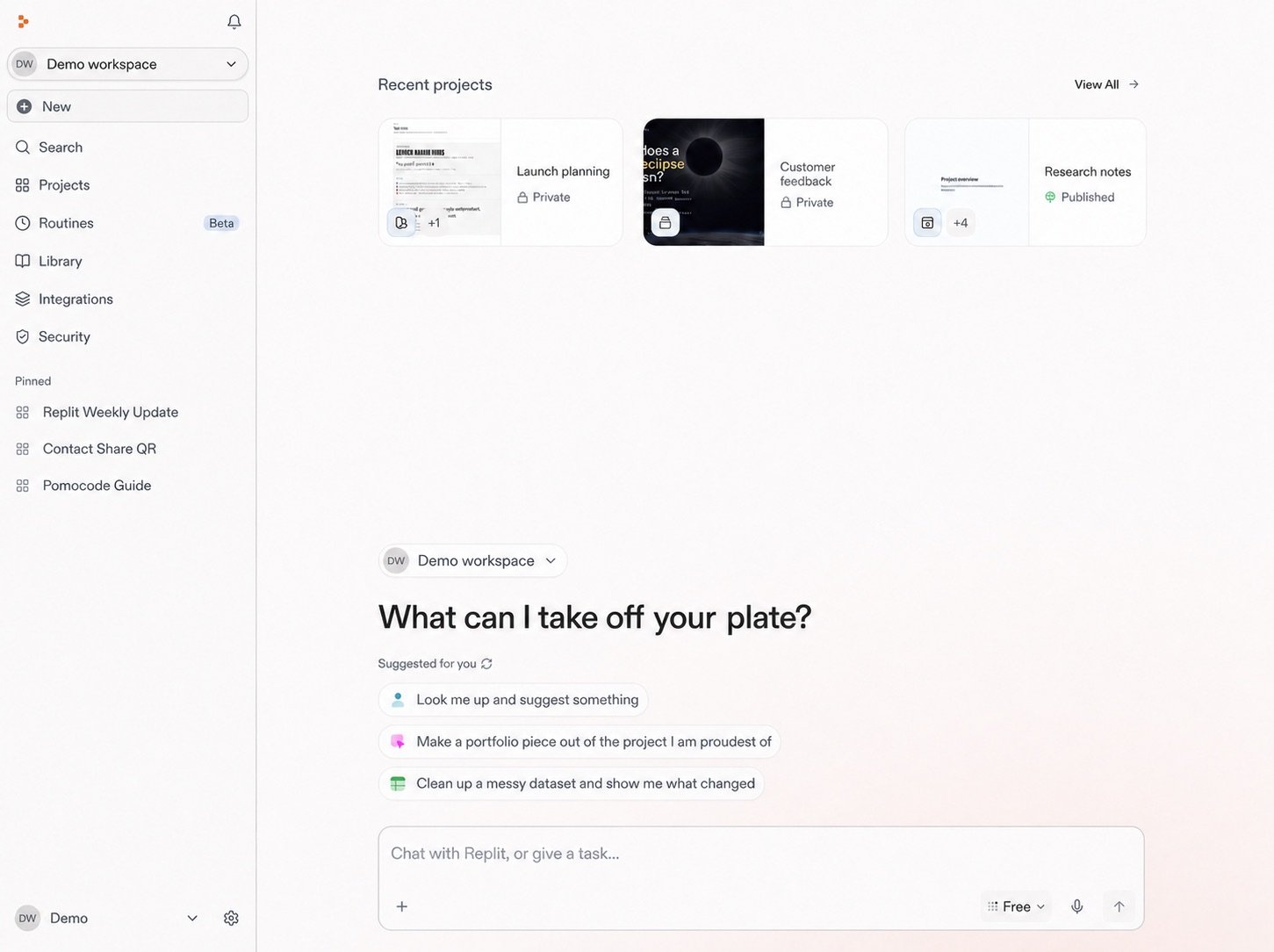
            <img src="https://mintcdn.com/replit/teDUL4A-lNO7dv1O/images/chat/start-new-conversation-home-sanitized-neutral.jpg?fit=max&auto=format&n=teDUL4A-lNO7dv1O&q=85&s=cf93f549696aff0eab748dd953aea0b6" alt="Replit home screen for Demo workspace with suggested prompts and message box" width="1451" height="1084" data-path="images/chat/start-new-conversation-home-sanitized-neutral.jpg" />
          </Frame>
        </div>
      </div>
    </div>
  </div>
</section>

## Get Replit

Choose where you want to use Replit, then sign in or create an account. You can
start on the web, in the Desktop App, or in the Mobile App.

<section className="chat-mkt chat-workflow-grid has-visuals catalog-three-up">
  <a className="chat-example has-visual" href="https://replit.com" target="_blank" rel="noreferrer">
    <div className="welcome-journey-card-cover">
      <WorkspaceCover />
    </div>

    <div className="chat-example-tag">Web</div>
    <div className="chat-card-title">Web</div>
    <p>Open Replit in your browser. No download needed.</p>
    <div className="chat-card-link">Go to Replit →</div>
  </a>

  <a className="chat-example has-visual" href="https://replit.com/desktop" target="_blank" rel="noreferrer">
    <div className="welcome-journey-card-cover welcome-access-desktop-copy">
      <WorkspaceCover />
    </div>

    <div className="chat-example-tag">Desktop</div>
    <div className="chat-card-title">Desktop</div>
    <p>Download Replit for your Mac or Windows computer.</p>
    <div className="chat-card-link">Download →</div>
  </a>

  <a className="chat-example has-visual" href="https://replit.com/mobile" target="_blank" rel="noreferrer">
    <div className="chat-use-case-visual welcome-access-visual welcome-access-mobile">
      <div className="welcome-access-frame welcome-access-mobile-frame">
        <b>
          <i />

          <i />

          <i />
        </b>
      </div>
    </div>

    <div className="chat-example-tag">Mobile</div>
    <div className="chat-card-title">Mobile</div>
    <p>Download Replit for your iOS or Android device.</p>
    <div className="chat-card-link">Download →</div>
  </a>
</section>

## Your journey

<div className="welcome-journey-intro">
  Follow the same path shown in Home: start with an idea, give it context, keep
  the plan current, then turn the work into something people can discover.
</div>

<section className="welcome-journey-stage" aria-labelledby="journey-start">
  <div className="welcome-journey-number" aria-hidden="true">
    1
  </div>

  <h3 id="journey-start">Start with an idea</h3>

  <p>
    Get oriented in your Workspace, begin a conversation, then describe the
    outcome you want to create.
  </p>

  <section className="chat-mkt chat-workflow-grid has-visuals catalog-three-up">
    <a className="chat-example has-visual welcome-journey-card" href="/home/get-started">
      <div className="welcome-journey-card-cover">
        <GetStartedCover />
      </div>

      <div className="chat-example-tag">Get started</div>
      <div className="chat-card-title">Open a coffee shop</div>

      <p>
        Use a concrete project to learn how research, planning, and building fit
        together.
      </p>

      <div className="chat-card-link">Explore →</div>
    </a>

    <a className="chat-example has-visual welcome-journey-card palette-stone" href="/home/understand-your-workspace">
      <div className="welcome-journey-card-cover">
        <WorkspaceCover />
      </div>

      <div className="chat-example-tag">Workspace</div>
      <div className="chat-card-title">Understand your workspace</div>
      <p>See where conversations, resources, routines, and projects live.</p>
      <div className="chat-card-link">Explore →</div>
    </a>

    <a className="chat-example has-visual welcome-journey-card palette-blush" href="/home/start-a-conversation">
      <div className="welcome-journey-card-cover">
        <ChatConversationsCover />
      </div>

      <div className="chat-example-tag">Conversation</div>
      <div className="chat-card-title">Start a conversation</div>
      <p>Open a conversation to start moving your idea forward.</p>
      <div className="chat-card-link">Explore →</div>
    </a>
  </section>
</section>

<section className="welcome-journey-stage" aria-labelledby="journey-motion">
  <div className="welcome-journey-number" aria-hidden="true">
    2
  </div>

  <h3 id="journey-motion">Build a useful plan</h3>

  <p>
    Refine your idea, connect the tools that hold your context, and bring the
    useful materials together in one plan.
  </p>

  <section className="chat-mkt chat-workflow-grid has-visuals catalog-three-up">
    <a className="chat-example has-visual welcome-journey-card" href="/home/describe-your-idea">
      <div className="welcome-journey-card-cover">
        <PromptingCover />
      </div>

      <div className="chat-example-tag">Idea</div>
      <div className="chat-card-title">Describe your idea</div>

      <p>
        Begin with a clear outcome, share context, and use follow-up questions
        to refine your direction.
      </p>

      <div className="chat-card-link">Explore →</div>
    </a>

    <a className="chat-example has-visual welcome-journey-card palette-ink" href="/home/integrations">
      <div className="welcome-journey-card-cover">
        <IntegrationsOverviewCover />
      </div>

      <div className="chat-example-tag">Integrations</div>
      <div className="chat-card-title">Integrations</div>

      <p>
        Learn how connected services bring in relevant context or let Replit
        take action in your tools.
      </p>

      <div className="chat-card-link">Explore →</div>
    </a>

    <a className="chat-example has-visual welcome-journey-card palette-stone" href="/home/integrate-tools">
      <div className="welcome-journey-card-cover">
        <IntegrateYourToolsCover />
      </div>

      <div className="chat-example-tag">Context</div>
      <div className="chat-card-title">Integrate tools</div>

      <p>
        Apply integrations to bring files and decisions into a plan you can use.
      </p>

      <div className="chat-card-link">Explore →</div>
    </a>
  </section>
</section>

<section className="welcome-journey-stage" aria-labelledby="journey-create">
  <div className="welcome-journey-number" aria-hidden="true">
    3
  </div>

  <h3 id="journey-create">Keep building and share it</h3>

  <p>
    Keep an eye on what changes, then turn your plan into a project, a site, and
    a link you can share.
  </p>

  <section className="chat-mkt chat-workflow-grid has-visuals catalog-three-up">
    <a className="chat-example has-visual welcome-journey-card palette-blush" href="/home/watch-the-competition">
      <div className="welcome-journey-card-cover">
        <RoutineWatchCover />
      </div>

      <div className="chat-example-tag">Routine</div>
      <div className="chat-card-title">Watch the competition</div>
      <p>Schedule recurring research so your plan stays current.</p>
      <div className="chat-card-link">Explore →</div>
    </a>

    <a className="chat-example has-visual welcome-journey-card palette-ink" href="/home/conversations-and-projects">
      <div className="welcome-journey-card-cover">
        <ConversationsProjectsCover handoff />
      </div>

      <div className="chat-example-tag">Project</div>
      <div className="chat-card-title">Conversations and projects</div>
      <p>Understand when to keep exploring and when to move into a project.</p>
      <div className="chat-card-link">Explore →</div>
    </a>

    <a className="chat-example has-visual welcome-journey-card" href="/home/design-an-opening-site">
      <div className="welcome-journey-card-cover">
        <OpeningSiteDesignCover />
      </div>

      <div className="chat-example-tag">Design</div>
      <div className="chat-card-title">Design an opening site</div>

      <p>
        Use your plan and direction to create a site for people to discover.
      </p>

      <div className="chat-card-link">Explore →</div>
    </a>

    <a className="chat-example has-visual welcome-journey-card palette-stone" href="/home/publish-the-site">
      <div className="welcome-journey-card-cover">
        <PublishSiteCover />
      </div>

      <div className="chat-example-tag">Publish</div>
      <div className="chat-card-title">Publish the site</div>
      <p>Make the finished site public and share it with your community.</p>
      <div className="chat-card-link">Explore →</div>
    </a>
  </section>
</section>

## Go deeper

Explore [Chat](/chat/conversations) for Conversations, [Build](/build/your-first-app) for software, [Design](/design/what-is-replit-design) for visual exploration, [Features](/features/agent/overview) for the complete product catalog, or [Use cases](/use-cases) for outcome-focused examples.