> ## Documentation Index
> Fetch the complete documentation index at: https://docs.replit.com/llms.txt
> Use this file to discover all available pages before exploring further.

# 適切なAgentモードを選ぶ

> やりたい作業、必要な能力、利用可能な利用枠やクレジットに基づいて、フリーモード、パワーモード、マックスモードから選択します。

export const FreeModePlanAvailability = `Free Mode is available on the Starter, Core, and Pro plans. Your Free Mode limits depend on your plan, and Core and Pro include an allowance that refreshes every ${FreeModeAllowanceRefreshPeriod}.`;

<div className="chat-mkt" role="img" aria-label="Agentモードを表す9つのドットのモードセレクター" style={{ margin: "28px 0 42px", borderTop: 0, paddingTop: 0 }}>
  <div className="chat-use-case-visual" style={{ aspectRatio: "auto", minHeight: "clamp(220px, 34vw, 320px)" }}>
    <div
      aria-hidden="true"
      style={{
    position: "relative",
    zIndex: 1,
    display: "flex",
    alignItems: "center",
    justifyContent: "center",
    gap: "clamp(18px, 4vw, 28px)",
    color: "#fff",
    filter: "drop-shadow(0 8px 18px rgba(73,18,0,.42))",
  }}
    >
      <svg
        width="96"
        height="96"
        viewBox="0 0 18 18"
        fill="none"
        dangerouslySetInnerHTML={{
      __html:
        '<circle cx="3.724" cy="3.724" r="1.75" fill="currentColor" opacity="0.55"></circle><circle cx="9.004" cy="3.724" r="1.75" fill="currentColor" opacity="1"></circle><circle cx="14.285" cy="3.724" r="1.75" fill="currentColor" opacity="1"></circle><circle cx="3.724" cy="9.004" r="1.75" fill="currentColor" opacity="0.2"></circle><circle cx="9.004" cy="9.004" r="1.75" fill="currentColor" opacity="0.55"></circle><circle cx="14.285" cy="9.004" r="1.75" fill="currentColor" opacity="1"></circle><circle cx="3.724" cy="14.285" r="1.75" fill="currentColor" opacity="0.2"></circle><circle cx="9.004" cy="14.285" r="1.75" fill="currentColor" opacity="0.2"></circle><circle cx="14.285" cy="14.285" r="1.75" fill="currentColor" opacity="0.55"></circle>',
    }}
      />

      <span
        style={{
      fontSize: "clamp(34px, 7vw, 58px)",
      fontWeight: 600,
      letterSpacing: "-0.03em",
      lineHeight: 1,
    }}
      >
        Agentモード
      </span>
    </div>
  </div>
</div>

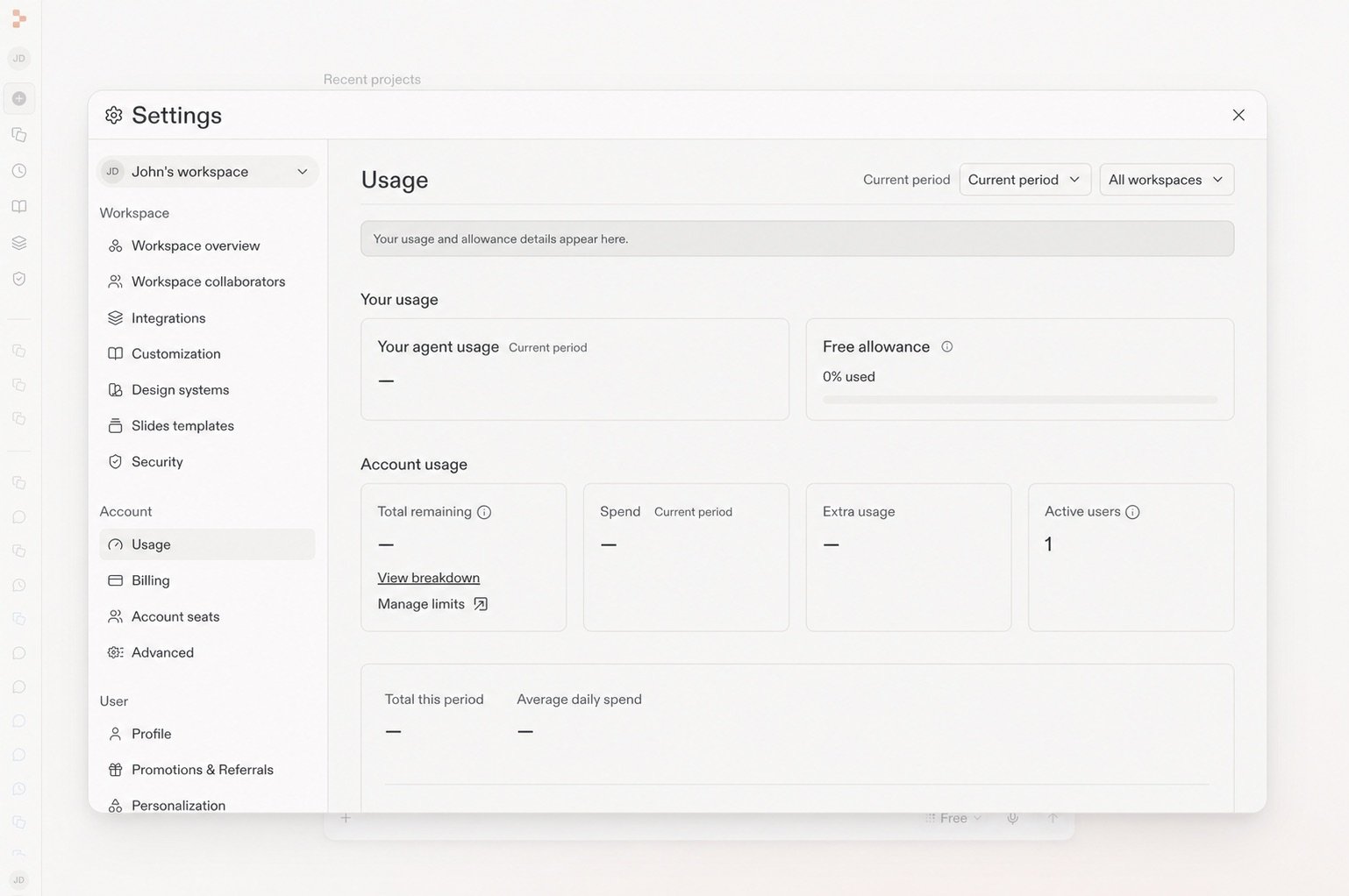
Agentモードでは、リクエストを送信する前に、含まれる利用枠、クレジット、能力のバランスを選べます。プロンプトボックスのAgent設定のドロップダウンを開き、作業に合ったモードを選択してください。

<Note>
  エコノミーモードは提供終了しました。パワーモードが同じ価格で後継となります。
</Note>

<Frame caption="モードセレクターからフリーモードを選択します。">
  <img src="https://mintcdn.com/replit/teDUL4A-lNO7dv1O/images/chat/agent-modes-selector.png?fit=max&auto=format&n=teDUL4A-lNO7dv1O&q=85&s=01b29cf86c7ba82e431790bc6746cc72" alt="Freeが選択されたモードセレクター" width="1266" height="964" data-path="images/chat/agent-modes-selector.png" />
</Frame>

## モードを選ぶ

* **フリーモード:** アイデアを探求し、質問し、構築を始め、日々の作業を止めずに進めます。フリーモードはAutoを使ってモデルを選択します。 {FreeModePlanAvailability}
* **パワーモード:** ほとんどの作業に適した、速度と能力のバランスが良いモードです。フリーモードの利用枠を超える能力が必要なとき、または既存プロジェクトでより強力なデフォルトを使いたいときに利用します。
* **マックスモード:** 複雑で野心的な作業、大規模なコードベース、難しい問題に最も適したオプションです。

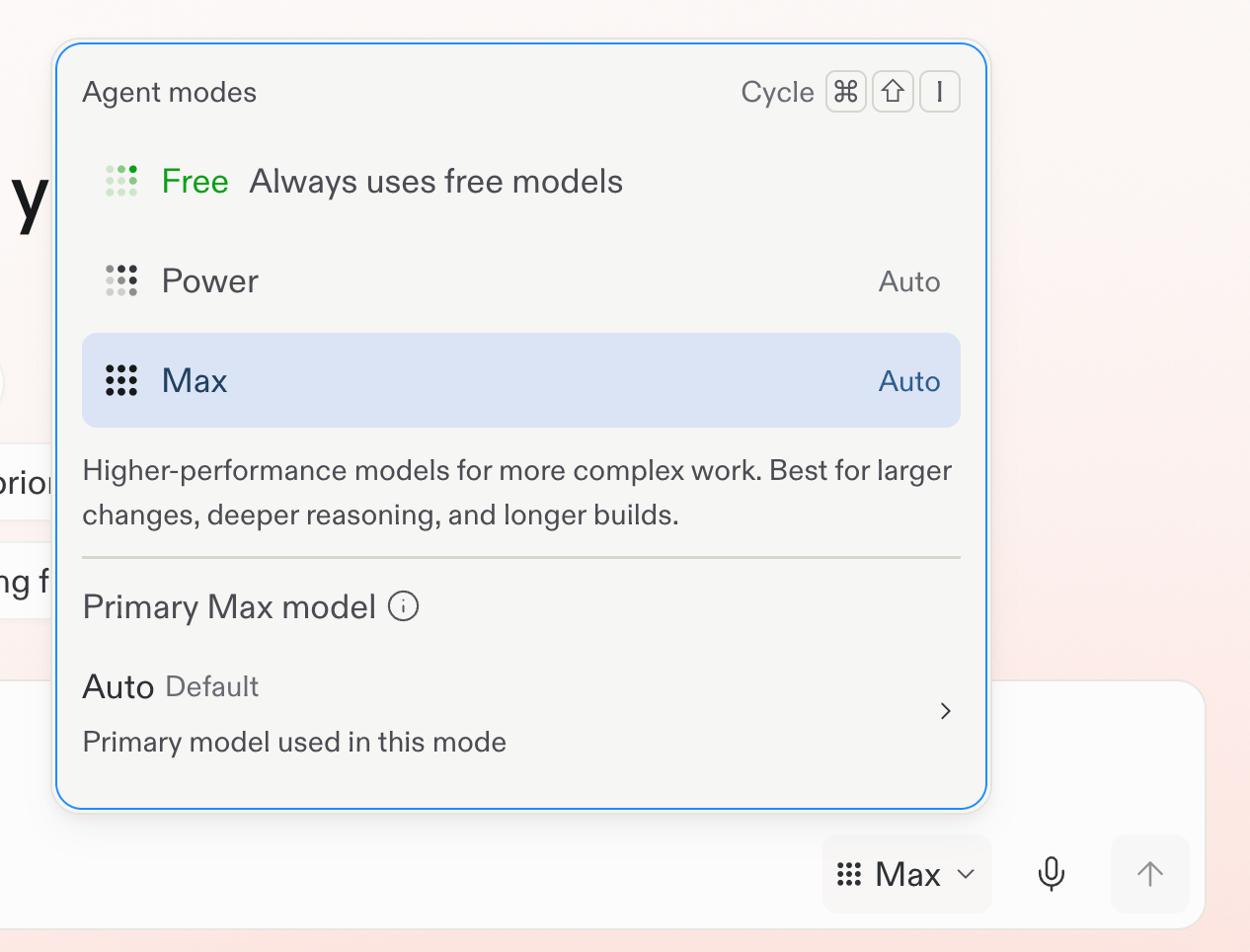
パワーモードとマックスモードは月間クレジットを使用します。リクエストがフリーモードから利用コストが発生するモードに切り替わる前に、Replitが通知します。残りのフリーモードの利用枠は **設定** → **使用状況** で確認できます。実践的なヒントは [フリーモードを最大限に活用する](/ja/chat/free-mode) を参照してください。

ルーティンはパワーモードまたはマックスモードで実行され、実行ごとの予算が必要です。フリーモードでは実行できません。詳しくは[ルーティン](/chat/routines)を参照してください。

## さらに詳しく

<section className="chat-mkt chat-workflow-grid has-visuals">
  <a className="chat-example has-visual" href="/ja/features/agent/agent-modes">
    <div className="chat-use-case-visual palette-ink">
      <div className="chat-use-case-window">
        <i />

        <i />

        <i />

        <b />

        <b />

        <b />
      </div>

      <em>
        <Icon icon="bolt" size={24} />
      </em>
    </div>

    <span>
      <Icon icon="bolt" size={19} />
    </span>

    <div className="chat-card-title">Agentモードのリファレンス</div>
    <p>フリーモード、パワーモード、マックスモードを詳しく比較します。</p>
    <div className="chat-card-link">リファレンスを開く →</div>
  </a>

  <a className="chat-example has-visual" href="/ja/chat/free-mode">
    <div className="chat-use-case-visual">
      <div
        aria-hidden="true"
        style={{
      position: "relative",
      zIndex: 1,
      display: "flex",
      alignItems: "center",
      justifyContent: "center",
      gap: "clamp(12px, 3vw, 18px)",
      color: "#fff",
      filter: "drop-shadow(0 8px 18px rgba(73,18,0,.42))",
    }}
      >
        <svg
          width="48"
          height="48"
          viewBox="0 0 18 18"
          fill="none"
          dangerouslySetInnerHTML={{
        __html:
          '<circle cx="3.724" cy="3.724" r="1.75" fill="currentColor" opacity="0.55"></circle><circle cx="9.004" cy="3.724" r="1.75" fill="currentColor" opacity="1"></circle><circle cx="14.285" cy="3.724" r="1.75" fill="currentColor" opacity="1"></circle><circle cx="3.724" cy="9.004" r="1.75" fill="currentColor" opacity="0.2"></circle><circle cx="9.004" cy="9.004" r="1.75" fill="currentColor" opacity="0.55"></circle><circle cx="14.285" cy="9.004" r="1.75" fill="currentColor" opacity="1"></circle><circle cx="3.724" cy="14.285" r="1.75" fill="currentColor" opacity="0.2"></circle><circle cx="9.004" cy="14.285" r="1.75" fill="currentColor" opacity="0.2"></circle><circle cx="14.285" cy="14.285" r="1.75" fill="currentColor" opacity="0.55"></circle>',
      }}
        />

        <span
          style={{
        fontSize: "clamp(22px, 3vw, 30px)",
        fontWeight: 600,
        letterSpacing: "-0.03em",
        lineHeight: 1,
      }}
        >
          フリーモード
        </span>
      </div>
    </div>

    <span>
      <Icon icon="seedling" size={19} />
    </span>

    <div className="chat-card-title">フリーモードを最大限に活用する</div>

    <p>
      日々のチャット、作成、構築に付属の利用枠を活用しましょう。
    </p>

    <div className="chat-card-link">続きを見る →</div>
  </a>
</section>

## 利用枠を確認する

**設定** → **使用状況** を開くと、フリーモードの利用枠の残りと更新タイミングを確認できます。実践的なヒントは [フリーモードを最大限に活用する](/ja/chat/free-mode) を参照してください。

<Frame caption="使用状況ページには残りのフリー利用枠が表示されます。">
  <img src="https://mintcdn.com/replit/teDUL4A-lNO7dv1O/images/chat/free-mode-usage-sanitized.jpg?fit=max&auto=format&n=teDUL4A-lNO7dv1O&q=85&s=d0538032632b4201a99f555f47999333" alt="フリー利用枠パネルが表示された設定の使用状況ページ" width="1538" height="1022" data-path="images/chat/free-mode-usage-sanitized.jpg" />
</Frame>