> ## Documentation Index
> Fetch the complete documentation index at: https://docs.replit.com/llms.txt
> Use this file to discover all available pages before exploring further.

# Travailler avec Figma

> Utilisez une frame Figma comme contexte visuel, puis suivez le flux d'import de Replit Design lorsque vous voulez explorer, affiner ou construire à partir de celle-ci.

export const WorkWithFigmaCover = () => <div className="chat-mkt" role="img" aria-label="A Figma frame becoming a Replit Design artifact" style={{
  margin: "28px 0 42px",
  borderTop: 0,
  paddingTop: 0
}}>
    <div className="chat-use-case-visual" style={{
  aspectRatio: "auto",
  minHeight: "clamp(220px, 34vw, 320px)",
  overflow: "hidden",
  background: "radial-gradient(circle at 18% 0%, rgba(255,255,255,.82), transparent 40%), radial-gradient(circle at 92% 96%, rgba(255,186,148,.48), transparent 37%), linear-gradient(140deg, #ff764d, #ff3c00 60%, #c92d00)"
}}>
      <div aria-hidden="true" style={{
  position: "absolute",
  inset: 0,
  background: "linear-gradient(180deg, rgba(255,255,255,.13), rgba(255,255,255,0) 51%, rgba(105,24,2,.18))"
}} />
      <div aria-hidden="true" style={{
  position: "relative",
  zIndex: 1,
  display: "flex",
  alignItems: "center",
  justifyContent: "center",
  width: "100%",
  minHeight: "inherit",
  padding: "clamp(14px, 3vw, 28px)",
  boxSizing: "border-box"
}}>
        <div style={{
  display: "grid",
  gridTemplateColumns: "minmax(0, 1fr) clamp(34px, 7vw, 76px) minmax(0, 1fr)",
  alignItems: "center",
  width: "min(88%, 720px)",
  minWidth: "min(92%, 520px)",
  gap: "clamp(7px, 1.6vw, 16px)"
}}>
          <div style={{
  position: "relative",
  minHeight: "clamp(152px, 25vw, 210px)",
  padding: "clamp(12px, 2vw, 18px)",
  border: "1px solid rgba(255,255,255,.62)",
  borderRadius: 20,
  background: "linear-gradient(145deg, rgba(255,255,255,.36), rgba(255,255,255,.11))",
  boxShadow: "0 20px 38px rgba(71,21,7,.2)",
  backdropFilter: "blur(7px)",
  boxSizing: "border-box"
}}>
            <div style={{
  display: "flex",
  alignItems: "center",
  gap: 7
}}>
              <span style={{
  display: "grid",
  width: 25,
  height: 25,
  placeItems: "center",
  border: "1px solid rgba(255,255,255,.56)",
  borderRadius: 8,
  background: "rgba(255,255,255,.12)"
}}>
                <svg viewBox="0 0 24 24" width="15" fill="rgba(255,255,255,.9)">
                  <path d="M12 12a4 4 0 1 1 8 0 4 4 0 0 1-8 0zM4 20a4 4 0 0 1 4-4h4v4a4 4 0 1 1-8 0zM12 0v8h4a4 4 0 1 0 0-8h-4zM4 4a4 4 0 0 0 4 4h4V0H8a4 4 0 0 0-4 4zM4 12a4 4 0 0 0 4 4h4V8H8a4 4 0 0 0-4 4z" />
                </svg>
              </span>
              <span style={{
  width: "44%",
  height: 7,
  borderRadius: 999,
  background: "rgba(255,255,255,.6)"
}} />
            </div>
            <div style={{
  position: "absolute",
  inset: "clamp(48px, 8vw, 64px) clamp(12px, 2vw, 18px) clamp(12px, 2vw, 18px)",
  overflow: "hidden",
  border: "1px solid rgba(255,255,255,.46)",
  borderRadius: 12,
  background: "linear-gradient(135deg, rgba(255,255,255,.2), rgba(255,255,255,.06))"
}}>
              <span style={{
  position: "absolute",
  left: "10%",
  top: "14%",
  width: "34%",
  height: "70%",
  border: "1px solid rgba(255,255,255,.54)",
  borderRadius: 7,
  background: "rgba(255,255,255,.1)"
}} />
              <span style={{
  position: "absolute",
  right: "10%",
  top: "14%",
  width: "36%",
  height: "27%",
  border: "1px solid rgba(255,255,255,.54)",
  borderRadius: 7,
  background: "rgba(255,255,255,.18)"
}} />
              <span style={{
  position: "absolute",
  right: "10%",
  bottom: "14%",
  width: "36%",
  height: "35%",
  border: "1px solid rgba(255,255,255,.4)",
  borderRadius: 7,
  background: "rgba(255,255,255,.09)"
}} />
            </div>
          </div>
          <div style={{
  display: "flex",
  alignItems: "center",
  justifyContent: "center",
  gap: "clamp(3px, .8vw, 7px)"
}}>
            {[0, 1, 2].map(node => <span key={node} style={{
  width: node === 1 ? 9 : 6,
  height: node === 1 ? 9 : 6,
  border: "1px solid rgba(255,255,255,.66)",
  borderRadius: 999,
  background: node === 1 ? "rgba(255,255,255,.82)" : "rgba(255,255,255,.28)",
  boxShadow: node === 1 ? "0 0 14px rgba(255,255,255,.46)" : "none"
}} />)}
          </div>
          <div style={{
  position: "relative",
  minHeight: "clamp(152px, 25vw, 210px)",
  padding: "clamp(12px, 2vw, 18px)",
  border: "1px solid rgba(255,255,255,.62)",
  borderRadius: 20,
  background: "linear-gradient(145deg, rgba(255,255,255,.42), rgba(255,255,255,.12))",
  boxShadow: "0 20px 38px rgba(71,21,7,.22)",
  backdropFilter: "blur(7px)",
  boxSizing: "border-box"
}}>
            <div style={{
  display: "flex",
  alignItems: "center",
  gap: 6
}}>
              {[0, 1, 2].map(dot => <span key={dot} style={{
  width: 7,
  height: 7,
  borderRadius: 999,
  background: dot === 0 ? "rgba(255,255,255,.9)" : "rgba(255,255,255,.38)"
}} />)}
              <span style={{
  width: "44%",
  height: 7,
  marginLeft: 4,
  borderRadius: 999,
  background: "rgba(255,255,255,.58)"
}} />
            </div>
            <div style={{
  display: "grid",
  gridTemplateColumns: "1.15fr .85fr",
  gap: 8,
  marginTop: "clamp(17px, 3vw, 26px)"
}}>
              <span style={{
  height: "clamp(72px, 12vw, 102px)",
  border: "1px solid rgba(255,255,255,.5)",
  borderRadius: 10,
  background: "linear-gradient(145deg, rgba(255,255,255,.25), rgba(255,255,255,.07))"
}} />
              <span style={{
  display: "grid",
  gap: 8
}}>
                <i style={{
  display: "block",
  border: "1px solid rgba(255,255,255,.44)",
  borderRadius: 9,
  background: "rgba(255,255,255,.15)"
}} />
                <i style={{
  display: "block",
  border: "1px solid rgba(255,255,255,.34)",
  borderRadius: 9,
  background: "rgba(255,255,255,.08)"
}} />
              </span>
            </div>
          </div>
        </div>
      </div>
    </div>
  </div>;

<WorkWithFigmaCover />

Replit prend en charge l'import de frames Figma.

Importez une frame Figma lorsque vous avez déjà une direction visuelle et que vous voulez que Replit s'appuie sur ce travail ou le transforme en design.

## Quand Figma est utile

* **Explorer une autre direction :** conservez la hiérarchie principale tout en essayant un style ou une mise en page différents.
* **Poursuivre un flux produit :** utilisez un écran existant comme contexte pour l'écran ou l'état suivant.
* **Faire avancer un travail de design vers une application :** partez d'une direction visuelle approuvée, puis affinez et construisez à partir de celle-ci.

## Importer une frame Figma

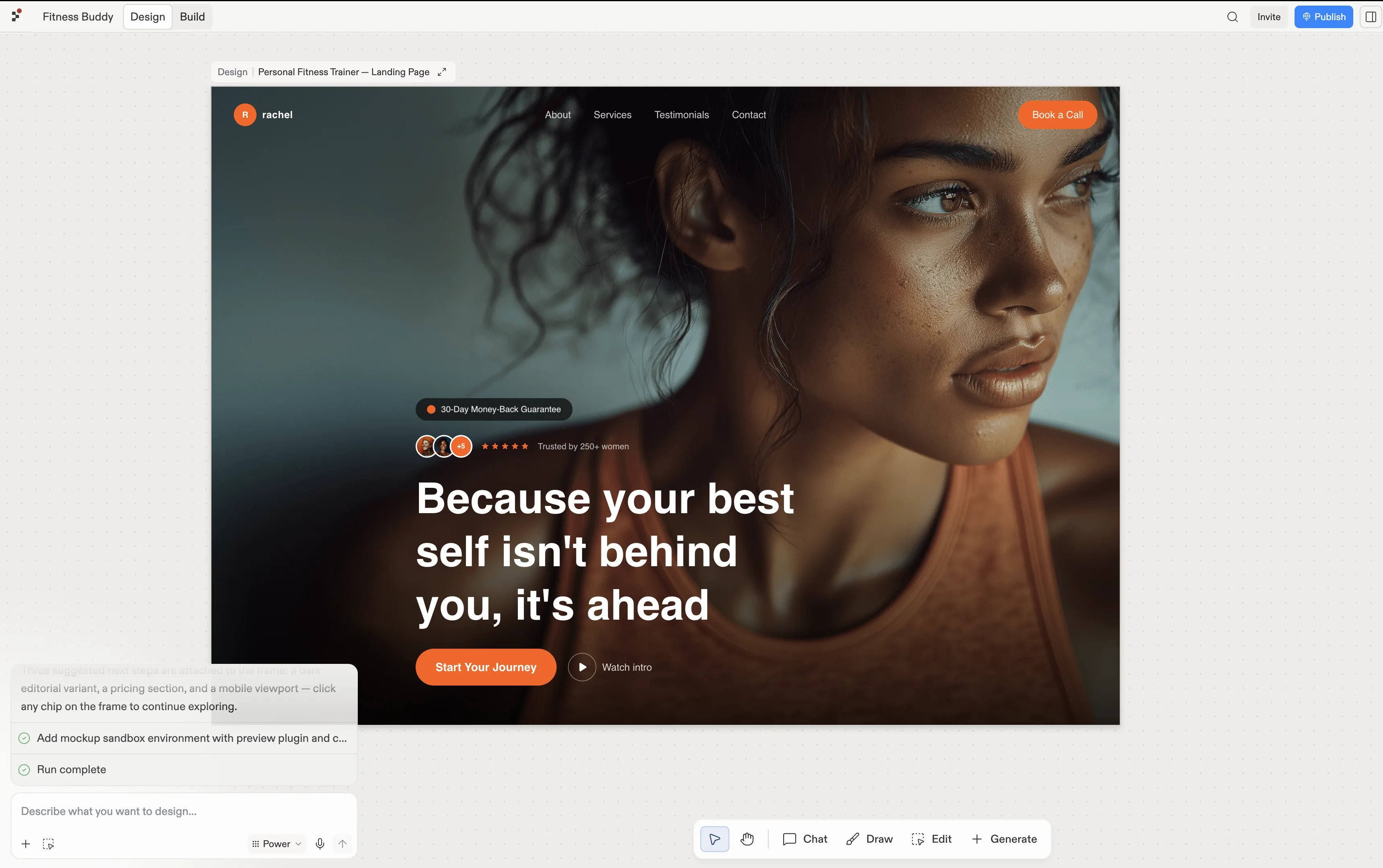
Choisissez la frame qui représente le travail que vous voulez poursuivre. Replit Design transforme la frame importée en frame de design, où vous pouvez explorer des changements, comparer des suggestions et décider quoi construire ensuite.

<Frame caption="Une frame Figma importée comme frame de design dans Replit Design.">
  <img src="https://mintcdn.com/replit/9Q_lVrxG2Dh35jz1/images/fitstart/turn-mockup-into-app/figma-import-result.webp?fit=max&auto=format&n=9Q_lVrxG2Dh35jz1&q=85&s=5def987784c7ec7b20e07c1c5bc422d0" alt="Page d'atterrissage Personal Fitness Trainer importée comme frame de design dans Replit Design" width="3440" height="2160" data-path="images/fitstart/turn-mockup-into-app/figma-import-result.webp" />
</Frame>

## Poursuivre dans Design

Le guide Design couvre le flux complet d'import, d'affinement et de construction.
<section className="chat-mkt chat-workflow-grid has-visuals">
  <a className="chat-example has-visual" href="/fr/design/import-figma-designs-into-replit-design">
    <div className="chat-use-case-visual palette-blush">
      <div className="chat-use-case-window">
        <i />

        <i />

        <i />

        <b />

        <b />

        <b />
      </div>

      <em>
        <Icon icon="figma" size={24} />
      </em>
    </div>

    <span>
      <Icon icon="figma" size={19} />
    </span>

    <div className="chat-card-title">Importer depuis Figma</div>
    <p>Suivez le flux complet pour importer et affiner une frame Figma.</p>
    <div className="chat-card-link">Ouvrir le guide Design →</div>
  </a>
</section>
