> ## Documentation Index
> Fetch the complete documentation index at: https://docs.replit.com/llms.txt
> Use this file to discover all available pages before exploring further.

# Intégrer vos outils

> Connectez des services pris en charge, identifiez les informations ou l'action dont une Conversation a besoin, et suivez la documentation de référence des intégrations pour la configuration.

export const IntegrateYourToolsCover = () => <div className="chat-mkt" role="img" aria-label="Supported service context connecting into a central Replit workspace" style={{
  margin: "28px 0 42px",
  borderTop: 0,
  paddingTop: 0
}}>
    <div className="chat-use-case-visual" style={{
  aspectRatio: "auto",
  minHeight: "clamp(220px, 34vw, 320px)",
  overflow: "hidden",
  background: "radial-gradient(circle at 50% -16%, rgba(255,255,255,.82), transparent 42%), radial-gradient(circle at 4% 96%, rgba(255,184,146,.47), transparent 38%), linear-gradient(140deg, #ff764d, #ff3c00 60%, #c92d00)"
}}>
      <div aria-hidden="true" style={{
  position: "absolute",
  inset: 0,
  background: "linear-gradient(180deg, rgba(255,255,255,.13), rgba(255,255,255,0) 50%, rgba(111,24,0,.2))"
}} />
      <div aria-hidden="true" style={{
  position: "relative",
  zIndex: 1,
  display: "grid",
  width: "100%",
  minHeight: "inherit",
  placeItems: "center",
  padding: "clamp(14px, 3vw, 28px)",
  boxSizing: "border-box"
}}>
        <div style={{
  position: "absolute",
  left: "clamp(13px, 8%, 82px)",
  top: "26%",
  display: "grid",
  width: "clamp(42px, 8vw, 64px)",
  height: "clamp(42px, 8vw, 64px)",
  placeItems: "center",
  border: "1px solid rgba(255,255,255,.58)",
  borderRadius: 16,
  background: "linear-gradient(180deg, rgba(255,255,255,.31), rgba(255,255,255,.12))",
  boxShadow: "0 12px 24px rgba(55,27,18,.16)",
  backdropFilter: "blur(5px)"
}}>
          <svg viewBox="0 0 24 24" width="56%" fill="rgba(255,255,255,.88)">
            <path d="M5.042 15.165a2.528 2.528 0 0 1-2.52 2.523A2.528 2.528 0 0 1 0 15.165a2.527 2.527 0 0 1 2.522-2.52h2.52v2.52zM6.313 15.165a2.527 2.527 0 0 1 2.521-2.52 2.527 2.527 0 0 1 2.521 2.52v6.313A2.528 2.528 0 0 1 8.834 24a2.528 2.528 0 0 1-2.521-2.522v-6.313zM8.834 5.042a2.528 2.528 0 0 1-2.521-2.52A2.528 2.528 0 0 1 8.834 0a2.528 2.528 0 0 1 2.521 2.522v2.52H8.834zM8.834 6.313a2.528 2.528 0 0 1 2.521 2.521 2.528 2.528 0 0 1-2.521 2.521H2.522A2.528 2.528 0 0 1 0 8.834a2.527 2.527 0 0 1 2.522-2.521h6.312zM18.956 8.834a2.528 2.528 0 0 1 2.522-2.521A2.528 2.528 0 0 1 24 8.834a2.528 2.528 0 0 1-2.522 2.521h-2.522V8.834zM17.688 8.834a2.528 2.528 0 0 1-2.523 2.521 2.527 2.527 0 0 1-2.52-2.521V2.522A2.527 2.527 0 0 1 15.165 0a2.528 2.528 0 0 1 2.523 2.522v6.312zM15.165 18.956a2.528 2.528 0 0 1 2.523 2.522A2.528 2.528 0 0 1 15.165 24a2.527 2.527 0 0 1-2.52-2.522v-2.522h2.52zM15.165 17.688a2.527 2.527 0 0 1-2.52-2.523 2.526 2.526 0 0 1 2.52-2.52h6.313A2.527 2.527 0 0 1 24 15.165a2.528 2.528 0 0 1-2.522 2.523h-6.313z" />
          </svg>
        </div>
        <div style={{
  position: "absolute",
  left: "clamp(22px, 12%, 112px)",
  bottom: "clamp(18px, 9%, 44px)",
  display: "grid",
  width: "clamp(38px, 7vw, 58px)",
  height: "clamp(38px, 7vw, 58px)",
  placeItems: "center",
  border: "1px solid rgba(255,255,255,.52)",
  borderRadius: 15,
  background: "rgba(255,255,255,.16)",
  boxShadow: "0 12px 24px rgba(55,27,18,.14)",
  backdropFilter: "blur(5px)"
}}>
          <div style={{
  display: "grid",
  gap: 3,
  width: "48%"
}}>
            {[0, 1, 2].map(line => <span key={line} style={{
  display: "block",
  height: 4,
  borderRadius: 999,
  background: line === 0 ? "rgba(255,255,255,.84)" : "rgba(255,255,255,.44)"
}} />)}
          </div>
        </div>
        <div style={{
  position: "absolute",
  right: "clamp(13px, 8%, 82px)",
  top: "26%",
  display: "grid",
  width: "clamp(42px, 8vw, 64px)",
  height: "clamp(42px, 8vw, 64px)",
  placeItems: "center",
  border: "1px solid rgba(255,255,255,.58)",
  borderRadius: 16,
  background: "linear-gradient(180deg, rgba(255,255,255,.31), rgba(255,255,255,.12))",
  boxShadow: "0 12px 24px rgba(55,27,18,.16)",
  backdropFilter: "blur(5px)"
}}>
          <div style={{
  width: "46%",
  height: "40%",
  border: "1px solid rgba(255,255,255,.86)",
  borderRadius: 4,
  boxSizing: "border-box"
}} />
        </div>
        <div style={{
  position: "absolute",
  right: "clamp(22px, 12%, 112px)",
  bottom: "clamp(18px, 9%, 44px)",
  display: "grid",
  width: "clamp(38px, 7vw, 58px)",
  height: "clamp(38px, 7vw, 58px)",
  placeItems: "center",
  border: "1px solid rgba(255,255,255,.52)",
  borderRadius: 15,
  background: "rgba(255,255,255,.16)",
  boxShadow: "0 12px 24px rgba(55,27,18,.14)",
  backdropFilter: "blur(5px)"
}}>
          <div style={{
  display: "grid",
  gridTemplateColumns: "repeat(2, 1fr)",
  gap: 3,
  width: "48%",
  height: "48%"
}}>
            {[0, 1, 2, 3].map(cell => <span key={cell} style={{
  borderRadius: 3,
  background: cell === 0 ? "rgba(255,255,255,.84)" : "rgba(255,255,255,.38)"
}} />)}
          </div>
        </div>
        <div style={{
  position: "relative",
  display: "grid",
  width: "clamp(124px, 24vw, 194px)",
  height: "clamp(124px, 24vw, 194px)",
  placeItems: "center",
  border: "1px solid rgba(255,255,255,.68)",
  borderRadius: 28,
  background: "linear-gradient(145deg, rgba(255,255,255,.4), rgba(255,255,255,.12))",
  boxShadow: "0 24px 44px rgba(67,21,7,.24)",
  backdropFilter: "blur(8px)"
}}>
          <div style={{
  display: "grid",
  gridTemplateColumns: "repeat(2, 16px)",
  gap: 7
}}>
            {[0, 1, 2, 3].map(tile => <span key={tile} style={{
  width: 16,
  height: 16,
  borderRadius: 5,
  background: tile === 0 ? "rgba(255,255,255,.9)" : "rgba(255,255,255,.46)",
  boxShadow: tile === 0 ? "0 0 14px rgba(255,255,255,.42)" : "none"
}} />)}
          </div>
          <div style={{
  position: "absolute",
  bottom: "16%",
  display: "flex",
  gap: 5
}}>
            {[0, 1, 2].map(node => <span key={node} style={{
  width: 5,
  height: 5,
  borderRadius: 999,
  background: "rgba(255,255,255,.52)"
}} />)}
          </div>
        </div>
      </div>
    </div>
  </div>;

<IntegrateYourToolsCover />

Les intégrations ajoutent du contexte et des capacités provenant de services pris en charge à Replit.

* **Slack** permet à Replit de lire les messages et les fils Slack.
* **Google Drive** donne à Replit accès aux fichiers et dossiers, tandis que Google Slides prend en charge les présentations.
* **Salesforce** donne à Replit accès aux données CRM et aux opérations prises en charge.

Le catalogue de connecteurs affiche les services disponibles sur votre plan.

## Connecter une intégration

<Steps>
  <Step title="Ouvrir Intégrations">
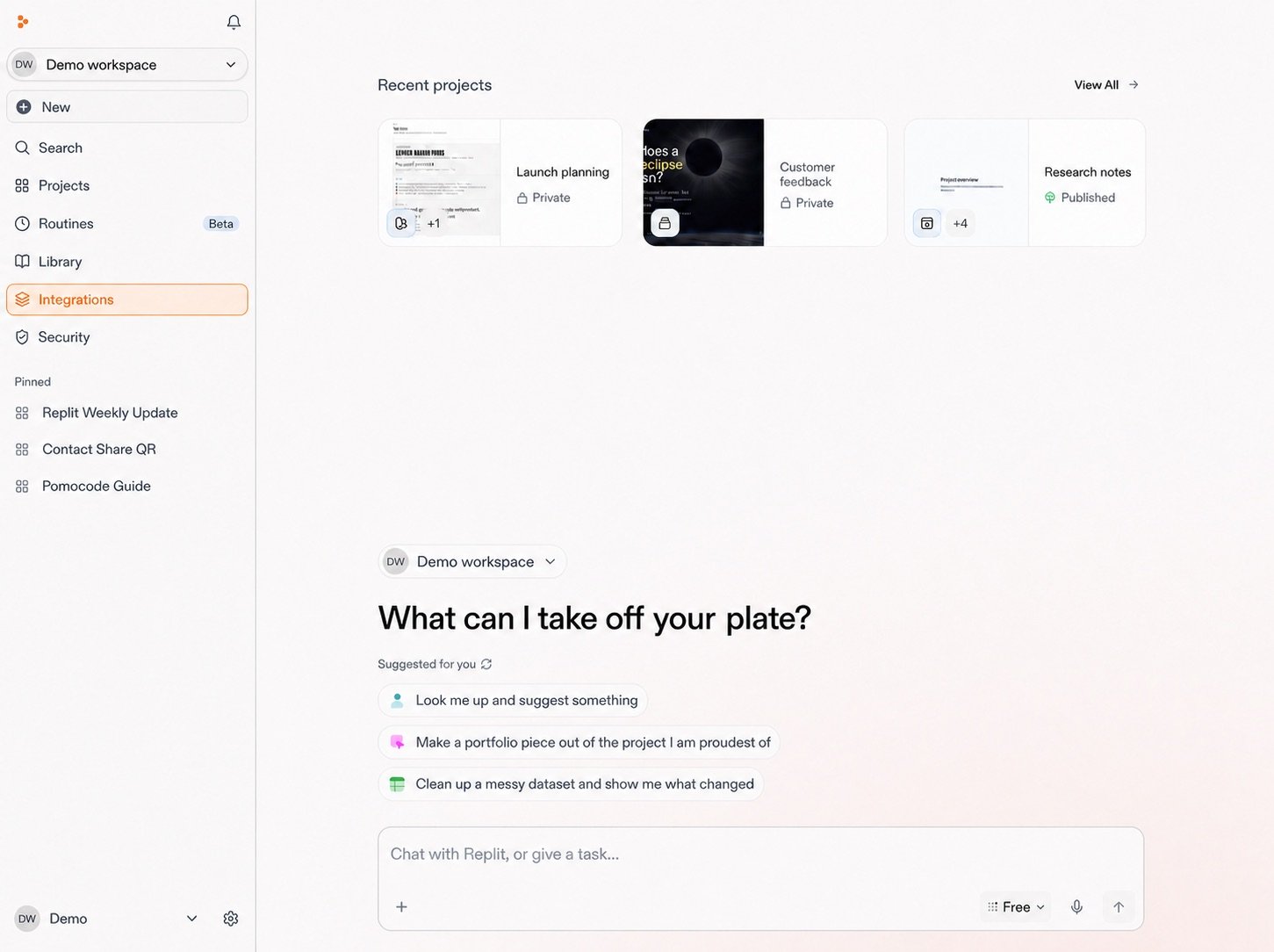
    Depuis votre Espace de travail, sélectionnez **Intégrations** dans la barre latérale.

    <Frame>
      <img src="https://mintcdn.com/replit/teDUL4A-lNO7dv1O/images/chat/integrations-open-from-workspace.jpg?fit=max&auto=format&n=teDUL4A-lNO7dv1O&q=85&s=c0febc56b64d0ae9223249a2f8bb7cf9" alt="Accueil de l'Espace de travail Replit anonymisé avec Intégrations mis en évidence dans la barre latérale gauche" width="1451" height="1084" data-path="images/chat/integrations-open-from-workspace.jpg" />
    </Frame>
  </Step>

  <Step title="Sélectionner une intégration">
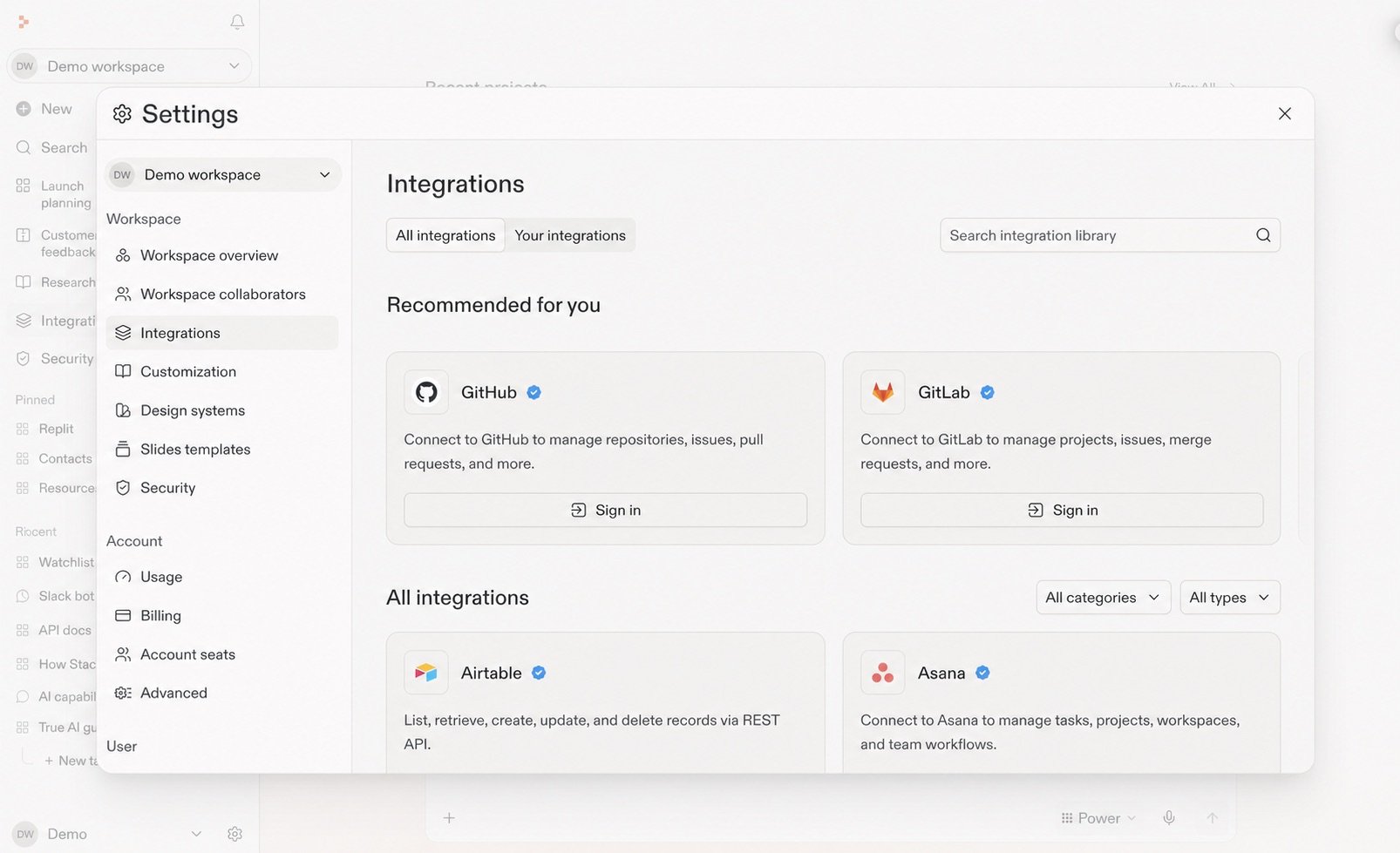
    Parcourez ou recherchez dans la bibliothèque d'intégrations, puis sélectionnez le service dont vous avez besoin.

    <Frame>
      <img src="https://mintcdn.com/replit/teDUL4A-lNO7dv1O/images/chat/integrations-library-sanitized.jpg?fit=max&auto=format&n=teDUL4A-lNO7dv1O&q=85&s=c7c02cdd6628fda3018d08ee7a05ab8f" alt="Bibliothèque d'intégrations Replit anonymisée affichant les intégrations recommandées et disponibles" width="1606" height="979" data-path="images/chat/integrations-library-sanitized.jpg" />
    </Frame>
  </Step>

  <Step title="Connectez-la">
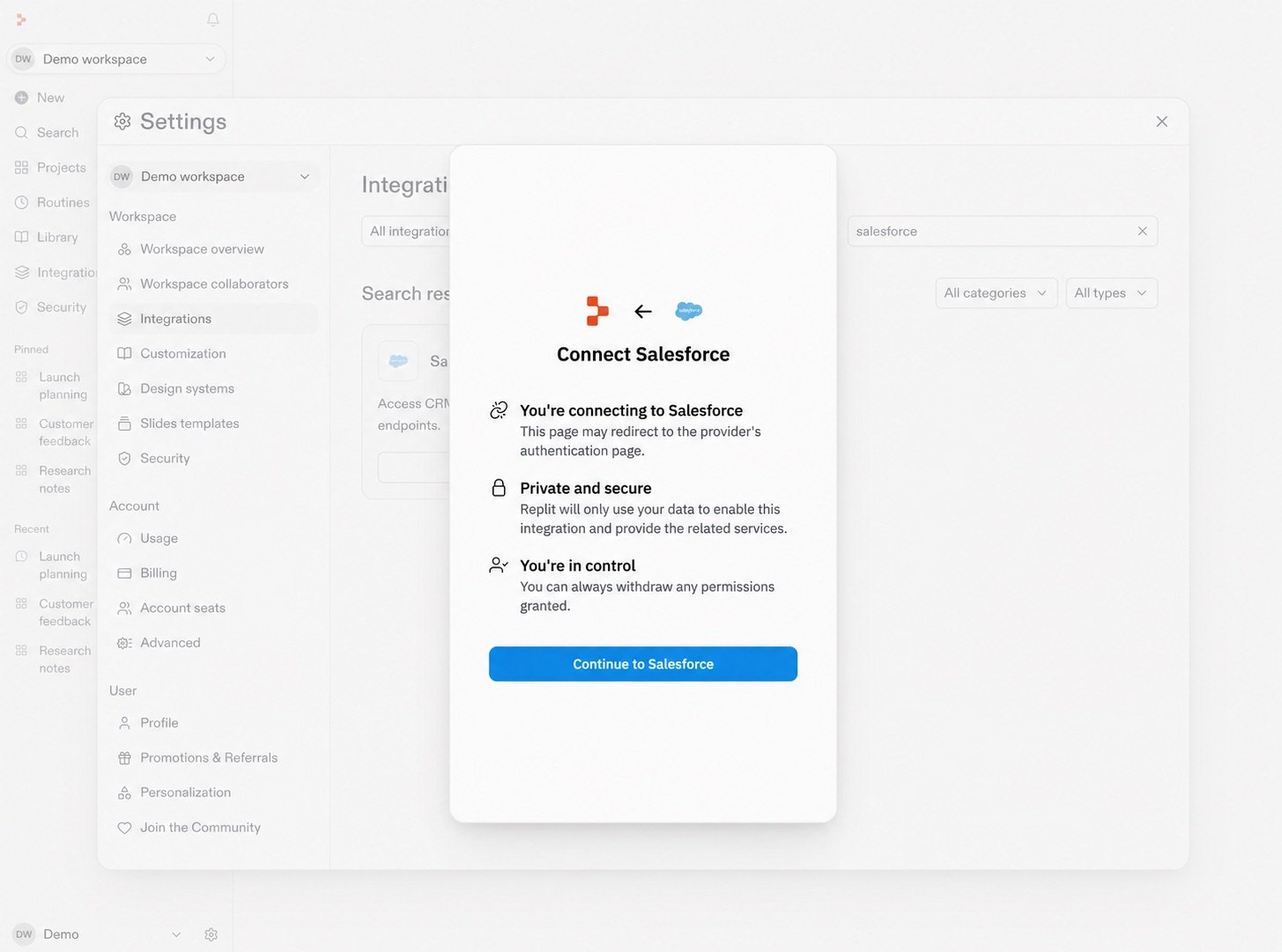
    Passez en revue ce à quoi l'intégration peut accéder, puis poursuivez le flux de connexion et d'autorisations du fournisseur. Salesforce est illustré ici. D'autres intégrations peuvent différer.

    <Frame>
      <img src="https://mintcdn.com/replit/teDUL4A-lNO7dv1O/images/chat/salesforce-connect-permissions-sanitized.jpg?fit=max&auto=format&n=teDUL4A-lNO7dv1O&q=85&s=428570b45b627f40db0ba56dc4579254" alt="Boîte de dialogue de connexion Salesforce anonymisée décrivant l'authentification, la confidentialité, les permissions et le bouton Continue to Salesforce" width="1455" height="1081" data-path="images/chat/salesforce-connect-permissions-sanitized.jpg" />
    </Frame>
  </Step>
</Steps>

Vous pouvez également sélectionner le menu **plus** dans la zone d'invite, puis **Ajouter une intégration**.

## Commencez par un outil familier

<section className="chat-mkt chat-workflow-grid has-visuals catalog-three-up">
  <a className="chat-example has-visual" href="/fr/features/integrations/overview#connectors">
    <div className="chat-use-case-visual palette-ink">
      <div className="chat-use-case-window">
        <b />

        <b />

        <b />
      </div>

      <div className="chat-use-case-icon">
        <img src="https://mintcdn.com/replit/ULLdJVk-FThFx3Hf/images/icons/slack.svg?fit=max&auto=format&n=ULLdJVk-FThFx3Hf&q=85&s=8d842525c111e3534251b55944402629" alt="" style={{ filter: "brightness(0) invert(1)" }} width="24" height="24" data-path="images/icons/slack.svg" />
      </div>
    </div>

    <span>
      <Icon icon="plug" size={19} />
    </span>

    <div className="chat-card-title">Slack</div>
    <p>Recherchez des conversations et des fils, puis utilisez ce contexte dans votre travail.</p>
    <div className="chat-card-link">Explorer les connecteurs →</div>
  </a>

  <a className="chat-example has-visual" href="/fr/features/integrations/overview#connectors">
    <div className="chat-use-case-visual palette-blush">
      <div className="chat-use-case-window">
        <b />

        <b />

        <b />
      </div>

      <div className="chat-use-case-icon">
        <Icon icon="folder-open" size={24} />
      </div>
    </div>

    <span>
      <Icon icon="folder-open" size={19} />
    </span>

    <div className="chat-card-title">Google Drive</div>
    <p>Apportez les fichiers et dossiers pertinents dans le contexte d'une Conversation.</p>
    <div className="chat-card-link">Explorer les connecteurs →</div>
  </a>

  <a className="chat-example has-visual" href="/fr/features/integrations/overview#connectors">
    <div className="chat-use-case-visual palette-stone">
      <div className="chat-use-case-window">
        <b />

        <b />

        <b />
      </div>

      <div className="chat-use-case-icon">
        <Icon icon="building" size={24} />
      </div>
    </div>

    <span>
      <Icon icon="building" size={19} />
    </span>

    <div className="chat-card-title">Salesforce</div>
    <p>Utilisez les informations client et compte pertinentes dans une Conversation.</p>
    <div className="chat-card-link">Explorer les connecteurs →</div>
  </a>
</section>

## Voir un flux de travail connecté

<section className="chat-mkt chat-workflow-grid has-visuals">
  <a className="chat-example has-visual" href="/fr/use-cases/prepare-for-a-customer-call">
    <div className="chat-use-case-visual palette-blush">
      <div className="chat-use-case-window">
        <i />

        <i />

        <i />

        <b />

        <b />

        <b />
      </div>

      <em>
        <Icon icon="chart-line" size={24} />
      </em>
    </div>

    <div className="chat-example-tag">Rechercher et analyser</div>

    <div className="chat-card-title" style={{ marginTop: 11, fontSize: 20 }}>
      Se préparer pour un appel client
    </div>

    <p>Réunissez le contexte de Salesforce, Slack et Google Drive.</p>
    <div className="chat-card-link">Explorer le cas d'usage →</div>
  </a>
</section>

## Intégrations personnalisées avec MCP

Les intégrations natives sont des connexions à des services pris en charge dans le catalogue de connecteurs de Replit. Si un service n'est pas pris en charge, vous pouvez créer un MCP personnalisé et l'ajouter comme intégration à Replit.

[Découvrez comment vous connecter via MCP.](/fr/chat/connect-through-mcp)

Suivez le [guide de référence des intégrations](/fr/features/integrations/overview) pour connaître les types de connecteurs, la disponibilité, la configuration, les services pris en charge et les permissions.

Lorsque la Conversation dispose d'un contexte suffisant pour un travail conséquent, découvrez comment [la transformer en Projet](/fr/chat/continue-or-create-a-project).
