> ## Documentation Index
> Fetch the complete documentation index at: https://docs.replit.com/llms.txt
> Use this file to discover all available pages before exploring further.

# Work with Figma

> Use a Figma frame as visual context, then follow the Replit Design import flow when you want to explore, refine, or build from it.

export const WorkWithFigmaCover = () => <div className="chat-mkt" role="img" aria-label="A Figma frame becoming a Replit Design artifact" style={{
  margin: "28px 0 42px",
  borderTop: 0,
  paddingTop: 0
}}>
    <div className="chat-use-case-visual" style={{
  aspectRatio: "auto",
  minHeight: "clamp(220px, 34vw, 320px)",
  overflow: "hidden",
  background: "radial-gradient(circle at 18% 0%, rgba(255,255,255,.82), transparent 40%), radial-gradient(circle at 92% 96%, rgba(255,186,148,.48), transparent 37%), linear-gradient(140deg, #ff764d, #ff3c00 60%, #c92d00)"
}}>
      <div aria-hidden="true" style={{
  position: "absolute",
  inset: 0,
  background: "linear-gradient(180deg, rgba(255,255,255,.13), rgba(255,255,255,0) 51%, rgba(105,24,2,.18))"
}} />
      <div aria-hidden="true" style={{
  position: "relative",
  zIndex: 1,
  display: "flex",
  alignItems: "center",
  justifyContent: "center",
  width: "100%",
  minHeight: "inherit",
  padding: "clamp(14px, 3vw, 28px)",
  boxSizing: "border-box"
}}>
        <div style={{
  display: "grid",
  gridTemplateColumns: "minmax(0, 1fr) clamp(34px, 7vw, 76px) minmax(0, 1fr)",
  alignItems: "center",
  width: "min(88%, 720px)",
  minWidth: "min(92%, 520px)",
  gap: "clamp(7px, 1.6vw, 16px)"
}}>
          <div style={{
  position: "relative",
  minHeight: "clamp(152px, 25vw, 210px)",
  padding: "clamp(12px, 2vw, 18px)",
  border: "1px solid rgba(255,255,255,.62)",
  borderRadius: 20,
  background: "linear-gradient(145deg, rgba(255,255,255,.36), rgba(255,255,255,.11))",
  boxShadow: "0 20px 38px rgba(71,21,7,.2)",
  backdropFilter: "blur(7px)",
  boxSizing: "border-box"
}}>
            <div style={{
  display: "flex",
  alignItems: "center",
  gap: 7
}}>
              <span style={{
  display: "grid",
  width: 25,
  height: 25,
  placeItems: "center",
  border: "1px solid rgba(255,255,255,.56)",
  borderRadius: 8,
  background: "rgba(255,255,255,.12)"
}}>
                <svg viewBox="0 0 24 24" width="15" fill="rgba(255,255,255,.9)">
                  <path d="M12 12a4 4 0 1 1 8 0 4 4 0 0 1-8 0zM4 20a4 4 0 0 1 4-4h4v4a4 4 0 1 1-8 0zM12 0v8h4a4 4 0 1 0 0-8h-4zM4 4a4 4 0 0 0 4 4h4V0H8a4 4 0 0 0-4 4zM4 12a4 4 0 0 0 4 4h4V8H8a4 4 0 0 0-4 4z" />
                </svg>
              </span>
              <span style={{
  width: "44%",
  height: 7,
  borderRadius: 999,
  background: "rgba(255,255,255,.6)"
}} />
            </div>
            <div style={{
  position: "absolute",
  inset: "clamp(48px, 8vw, 64px) clamp(12px, 2vw, 18px) clamp(12px, 2vw, 18px)",
  overflow: "hidden",
  border: "1px solid rgba(255,255,255,.46)",
  borderRadius: 12,
  background: "linear-gradient(135deg, rgba(255,255,255,.2), rgba(255,255,255,.06))"
}}>
              <span style={{
  position: "absolute",
  left: "10%",
  top: "14%",
  width: "34%",
  height: "70%",
  border: "1px solid rgba(255,255,255,.54)",
  borderRadius: 7,
  background: "rgba(255,255,255,.1)"
}} />
              <span style={{
  position: "absolute",
  right: "10%",
  top: "14%",
  width: "36%",
  height: "27%",
  border: "1px solid rgba(255,255,255,.54)",
  borderRadius: 7,
  background: "rgba(255,255,255,.18)"
}} />
              <span style={{
  position: "absolute",
  right: "10%",
  bottom: "14%",
  width: "36%",
  height: "35%",
  border: "1px solid rgba(255,255,255,.4)",
  borderRadius: 7,
  background: "rgba(255,255,255,.09)"
}} />
            </div>
          </div>
          <div style={{
  display: "flex",
  alignItems: "center",
  justifyContent: "center",
  gap: "clamp(3px, .8vw, 7px)"
}}>
            {[0, 1, 2].map(node => <span key={node} style={{
  width: node === 1 ? 9 : 6,
  height: node === 1 ? 9 : 6,
  border: "1px solid rgba(255,255,255,.66)",
  borderRadius: 999,
  background: node === 1 ? "rgba(255,255,255,.82)" : "rgba(255,255,255,.28)",
  boxShadow: node === 1 ? "0 0 14px rgba(255,255,255,.46)" : "none"
}} />)}
          </div>
          <div style={{
  position: "relative",
  minHeight: "clamp(152px, 25vw, 210px)",
  padding: "clamp(12px, 2vw, 18px)",
  border: "1px solid rgba(255,255,255,.62)",
  borderRadius: 20,
  background: "linear-gradient(145deg, rgba(255,255,255,.42), rgba(255,255,255,.12))",
  boxShadow: "0 20px 38px rgba(71,21,7,.22)",
  backdropFilter: "blur(7px)",
  boxSizing: "border-box"
}}>
            <div style={{
  display: "flex",
  alignItems: "center",
  gap: 6
}}>
              {[0, 1, 2].map(dot => <span key={dot} style={{
  width: 7,
  height: 7,
  borderRadius: 999,
  background: dot === 0 ? "rgba(255,255,255,.9)" : "rgba(255,255,255,.38)"
}} />)}
              <span style={{
  width: "44%",
  height: 7,
  marginLeft: 4,
  borderRadius: 999,
  background: "rgba(255,255,255,.58)"
}} />
            </div>
            <div style={{
  display: "grid",
  gridTemplateColumns: "1.15fr .85fr",
  gap: 8,
  marginTop: "clamp(17px, 3vw, 26px)"
}}>
              <span style={{
  height: "clamp(72px, 12vw, 102px)",
  border: "1px solid rgba(255,255,255,.5)",
  borderRadius: 10,
  background: "linear-gradient(145deg, rgba(255,255,255,.25), rgba(255,255,255,.07))"
}} />
              <span style={{
  display: "grid",
  gap: 8
}}>
                <i style={{
  display: "block",
  border: "1px solid rgba(255,255,255,.44)",
  borderRadius: 9,
  background: "rgba(255,255,255,.15)"
}} />
                <i style={{
  display: "block",
  border: "1px solid rgba(255,255,255,.34)",
  borderRadius: 9,
  background: "rgba(255,255,255,.08)"
}} />
              </span>
            </div>
          </div>
        </div>
      </div>
    </div>
  </div>;

<WorkWithFigmaCover />

Replit supports importing Figma frames.

Import a Figma frame when you already have a visual direction and want Replit to begin from that work or turn it into a design.

## When Figma helps

* **Explore another direction:** Keep the core hierarchy while trying a different style or layout.
* **Continue a product flow:** Use an existing screen as context for the next screen or state.
* **Move design work toward an app:** Start from an approved visual direction, then refine and build from it.

## Import a Figma frame

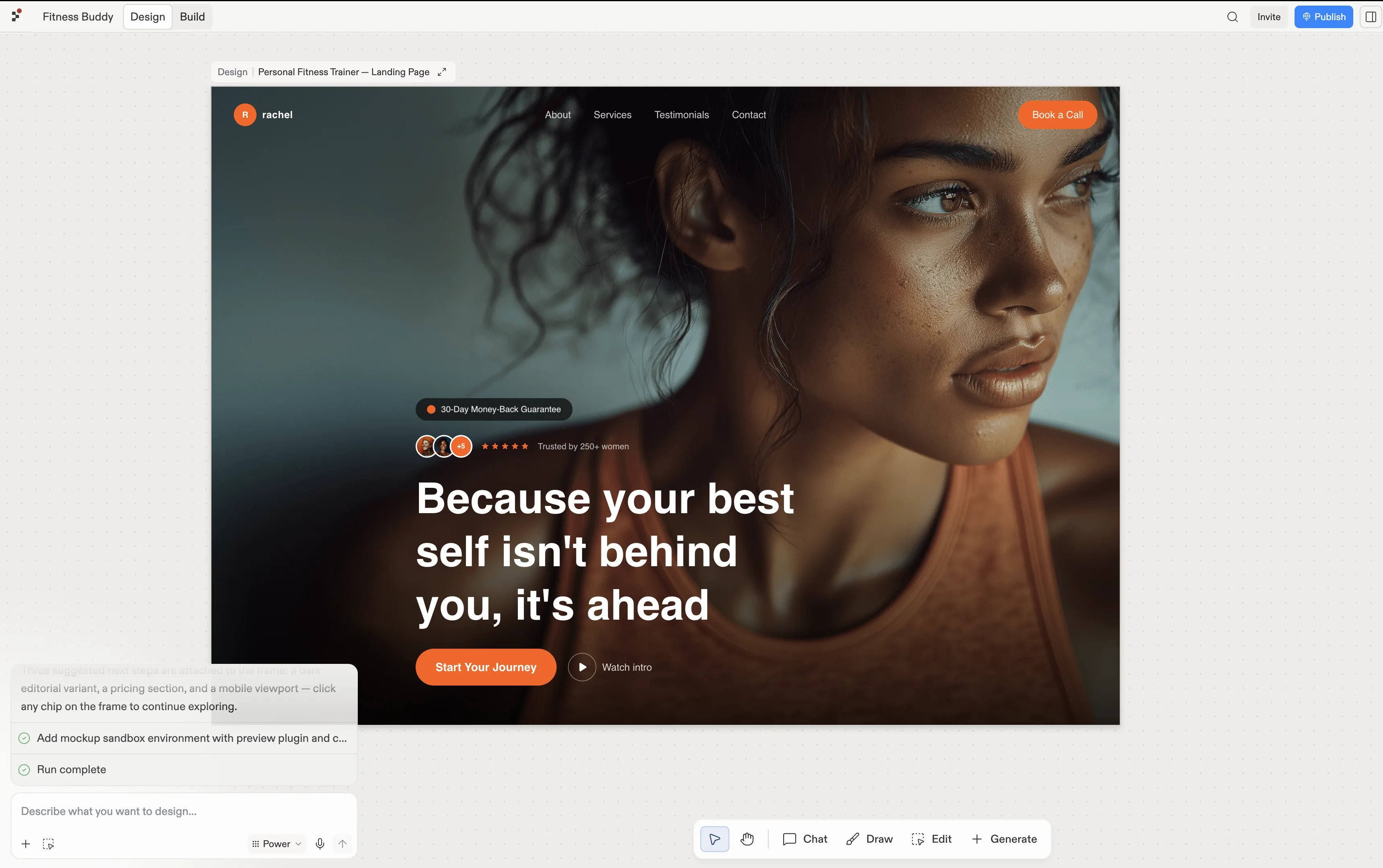
Choose the frame that represents the work you want to continue. Replit Design turns the imported frame into a design frame, where you can explore changes, compare suggestions, and decide what to build next.

<Frame caption="A Figma frame imported as a design frame in Replit Design.">
  <img src="https://mintcdn.com/replit/9Q_lVrxG2Dh35jz1/images/fitstart/turn-mockup-into-app/figma-import-result.webp?fit=max&auto=format&n=9Q_lVrxG2Dh35jz1&q=85&s=5def987784c7ec7b20e07c1c5bc422d0" alt="Imported Personal Fitness Trainer landing page as a design frame in Replit Design" width="3440" height="2160" data-path="images/fitstart/turn-mockup-into-app/figma-import-result.webp" />
</Frame>

## Continue in Design

The Design guide covers the complete import, refinement, and build workflow.
<section className="chat-mkt chat-workflow-grid has-visuals">
  <a className="chat-example has-visual" href="/design/import-figma-designs-into-replit-design">
    <div className="chat-use-case-visual palette-blush">
      <div className="chat-use-case-window">
        <i />

        <i />

        <i />

        <b />

        <b />

        <b />
      </div>

      <em>
        <Icon icon="figma" size={24} />
      </em>
    </div>

    <span>
      <Icon icon="figma" size={19} />
    </span>

    <div className="chat-card-title">Import from Figma</div>
    <p>Follow the complete flow for importing and refining a Figma frame.</p>
    <div className="chat-card-link">Open the Design guide →</div>
  </a>
</section>
