> ## Documentation Index
> Fetch the complete documentation index at: https://docs.replit.com/llms.txt
> Use this file to discover all available pages before exploring further.

# Use a design system

> Use a saved design system as context for colors, typography, spacing, and components when you want Replit to create consistent visual work.

export const DesignSystemCover = () => <div className="chat-mkt" role="img" aria-label="Design tokens and components shaping a consistent interface" style={{
  margin: "28px 0 42px",
  borderTop: 0,
  paddingTop: 0
}}>
    <div className="chat-use-case-visual" style={{
  aspectRatio: "auto",
  minHeight: "clamp(220px, 34vw, 320px)",
  overflow: "hidden",
  background: "radial-gradient(circle at 18% 0%, rgba(255,255,255,.82), transparent 40%), radial-gradient(circle at 92% 96%, rgba(255,184,146,.48), transparent 38%), linear-gradient(140deg, #ff764d, #ff3c00 60%, #c92d00)"
}}>
      <div aria-hidden="true" style={{
  position: "absolute",
  inset: 0,
  background: "linear-gradient(180deg, rgba(255,255,255,.14), rgba(255,255,255,0) 49%, rgba(111,24,0,.2))"
}} />
      <div aria-hidden="true" style={{
  position: "relative",
  zIndex: 1,
  display: "flex",
  alignItems: "center",
  justifyContent: "center",
  width: "100%",
  minHeight: "inherit",
  gap: "clamp(14px, 3vw, 34px)",
  padding: "clamp(14px, 3vw, 28px)",
  boxSizing: "border-box"
}}>
        <div style={{
  display: "grid",
  gridTemplateRows: "auto auto 1fr",
  gap: "clamp(10px, 2vw, 16px)",
  width: "clamp(128px, 25vw, 210px)",
  minWidth: "min(33%, 190px)",
  minHeight: "clamp(156px, 26vw, 212px)",
  padding: "clamp(12px, 2vw, 18px)",
  border: "1px solid rgba(255,255,255,.6)",
  borderRadius: 20,
  background: "linear-gradient(145deg, rgba(255,255,255,.4), rgba(255,255,255,.12))",
  boxShadow: "0 20px 38px rgba(64,20,6,.2)",
  backdropFilter: "blur(7px)",
  boxSizing: "border-box"
}}>
          <div style={{
  display: "flex",
  gap: 7
}}>
            {[0, 1, 2, 3].map(swatch => <span key={swatch} style={{
  width: 18,
  height: 18,
  border: "1px solid rgba(255,255,255,.64)",
  borderRadius: 6,
  background: swatch === 0 ? "rgba(255,255,255,.9)" : swatch === 1 ? "rgba(255,255,255,.58)" : "rgba(255,255,255,.22)"
}} />)}
          </div>
          <div style={{
  display: "grid",
  gap: 6
}}>
            {["78%", "56%", "88%"].map((width, index) => <span key={width} style={{
  width,
  height: index === 0 ? 7 : 4,
  borderRadius: 999,
  background: index === 0 ? "rgba(255,255,255,.72)" : "rgba(255,255,255,.34)"
}} />)}
          </div>
          <div style={{
  display: "grid",
  gridTemplateColumns: "repeat(2, 1fr)",
  gap: 7
}}>
            {[0, 1, 2, 3].map(component => <span key={component} style={{
  minHeight: 28,
  border: "1px solid rgba(255,255,255,.42)",
  borderRadius: component === 0 ? 999 : 8,
  background: component === 0 ? "rgba(255,255,255,.56)" : "rgba(255,255,255,.12)"
}} />)}
          </div>
        </div>
        <div style={{
  display: "flex",
  alignItems: "center",
  gap: 5,
  width: "clamp(28px, 7vw, 72px)"
}}>
          {[0, 1, 2].map(node => <span key={node} style={{
  width: node === 1 ? 10 : 6,
  height: node === 1 ? 10 : 6,
  marginLeft: node === 0 ? 0 : "auto",
  border: "1px solid rgba(255,255,255,.7)",
  borderRadius: 999,
  background: node === 1 ? "rgba(255,255,255,.76)" : "rgba(255,255,255,.2)",
  boxShadow: node === 1 ? "0 0 14px rgba(255,255,255,.38)" : "none"
}} />)}
        </div>
        <div style={{
  width: "clamp(174px, 35vw, 290px)",
  minWidth: "min(42%, 244px)",
  minHeight: "clamp(156px, 26vw, 212px)",
  padding: "clamp(12px, 2vw, 18px)",
  border: "1px solid rgba(255,255,255,.64)",
  borderRadius: 20,
  background: "linear-gradient(145deg, rgba(255,255,255,.42), rgba(255,255,255,.12))",
  boxShadow: "0 22px 40px rgba(64,20,6,.22)",
  backdropFilter: "blur(8px)",
  boxSizing: "border-box"
}}>
          <div style={{
  display: "flex",
  gap: 6
}}>
            {[0, 1, 2].map(dot => <span key={dot} style={{
  width: 7,
  height: 7,
  borderRadius: 999,
  background: dot === 0 ? "rgba(255,255,255,.9)" : "rgba(255,255,255,.38)"
}} />)}
          </div>
          <div style={{
  display: "grid",
  gridTemplateColumns: "1.1fr .9fr",
  gap: 8,
  minHeight: "clamp(106px, 18vw, 150px)",
  marginTop: "clamp(13px, 2.2vw, 19px)"
}}>
            <div style={{
  display: "grid",
  gap: 8,
  padding: 9,
  border: "1px solid rgba(255,255,255,.48)",
  borderRadius: 11,
  background: "rgba(255,255,255,.18)"
}}>
              <span style={{
  width: "76%",
  height: 7,
  borderRadius: 999,
  background: "rgba(255,255,255,.74)"
}} />
              <span style={{
  width: "100%",
  height: 28,
  borderRadius: 8,
  background: "rgba(255,255,255,.2)"
}} />
              <span style={{
  width: "60%",
  height: 12,
  borderRadius: 999,
  background: "rgba(255,255,255,.62)"
}} />
            </div>
            <div style={{
  display: "grid",
  gap: 8
}}>
              <span style={{
  border: "1px solid rgba(255,255,255,.44)",
  borderRadius: 10,
  background: "rgba(255,255,255,.14)"
}} />
              <span style={{
  border: "1px solid rgba(255,255,255,.34)",
  borderRadius: 10,
  background: "rgba(255,255,255,.08)"
}} />
            </div>
          </div>
        </div>
      </div>
    </div>
  </div>;

<DesignSystemCover />

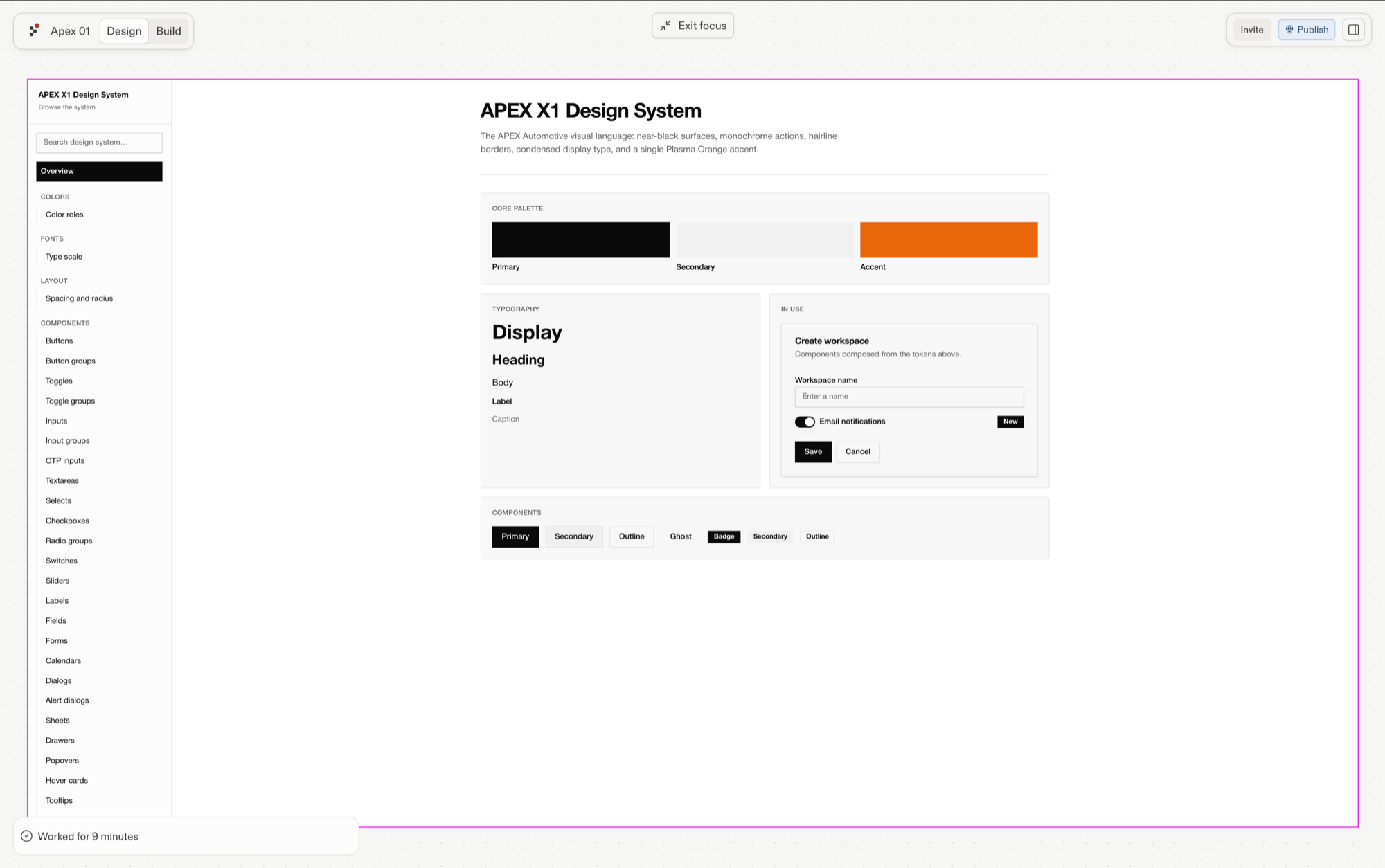
A design system gives Replit reusable visual direction. It can capture color tokens, typography, spacing, example components, logos, and brand assets so new designs stay consistent.

From the prompt box, select the **plus** menu, then **Use a design system** when a saved system should guide what you create.

## When a design system helps

* **Create consistently:** Keep colors, typography, spacing, and components aligned across new work.
* **Give a team shared direction:** Use one saved system as the visual reference for multiple Projects.
* **Restyle existing work:** Apply a system when an artifact needs to follow a different visual language.

Name the saved system and the outcome you need. Add other relevant context, such as a brief, Figma frame, screenshot, or content requirements, when those sources define what the work should accomplish.

For example: “Use the saved Acme design system to create a mobile onboarding screen. Keep the existing type scale and button styles, and show two layout directions.”

A design system shapes visual work. A [Skill](/chat/agent-skills) provides reusable instructions or an approach for a task.

<Frame caption="A saved design system with colors, typography, spacing, and example components.">
  <img src="https://mintcdn.com/replit/9Q_lVrxG2Dh35jz1/images/design/replit-design/ds-review.png?fit=max&auto=format&n=9Q_lVrxG2Dh35jz1&q=85&s=947fb5e6043b6740ed93fd437bd9223d" alt="APEX X1 Design System showing its color palette, type scale, spacing, and example components" width="2000" height="1254" data-path="images/design/replit-design/ds-review.png" />
</Frame>

## Follow design-system workflows in Design

The Design guides explain what a system contains, how to create or extract one, and how to apply one to existing work.

<section className="chat-mkt chat-workflow-grid has-visuals">
  <a className="chat-example has-visual" href="/design/design-systems-explained">
    <div className="chat-use-case-visual palette-stone">
      <div className="chat-use-case-window">
        <i />

        <i />

        <i />

        <b />

        <b />

        <b />
      </div>

      <em>
        <Icon icon="palette" size={24} />
      </em>
    </div>

    <span>
      <Icon icon="palette" size={19} />
    </span>

    <div className="chat-card-title">Design systems, explained</div>
    <p>Learn what a design system contains and when it helps.</p>
    <div className="chat-card-link">Learn more →</div>
  </a>

  <a className="chat-example has-visual" href="/design/create-a-design-system">
    <div className="chat-use-case-visual palette-blush">
      <div className="chat-use-case-window">
        <i />

        <i />

        <i />

        <b />

        <b />

        <b />
      </div>

      <em>
        <Icon icon="paintbrush" size={24} />
      </em>
    </div>

    <span>
      <Icon icon="paintbrush" size={19} />
    </span>

    <div className="chat-card-title">Create a design system</div>
    <p>Create one from a prompt or extract it from an existing design.</p>
    <div className="chat-card-link">Open the Design guide →</div>
  </a>
</section>

For existing work, follow [Apply a design system](/design/apply-design-system).

With project context and visual direction in place, explore how to [create assets](/chat/create-assets) such as images, audio, video, and SVGs.
