> ## Documentation Index
> Fetch the complete documentation index at: https://docs.replit.com/llms.txt
> Use this file to discover all available pages before exploring further.

# Upload and use files

> Add relevant documents, spreadsheets, images, or screenshots to a Conversation and tell Replit how the information should support your request.

export const UploadAndUseFilesCover = () => <div className="chat-mkt" role="img" aria-label="Stacked documents and file rows ready to add to a Replit Conversation" style={{
  margin: "28px 0 42px",
  borderTop: 0,
  paddingTop: 0
}}>
    <div className="chat-use-case-visual" style={{
  aspectRatio: "auto",
  minHeight: "clamp(220px, 34vw, 320px)",
  overflow: "hidden",
  background: "radial-gradient(circle at 18% 0%, rgba(255,255,255,.8), transparent 40%), radial-gradient(circle at 94% 94%, rgba(255,187,150,.46), transparent 38%), linear-gradient(140deg, #ff764d, #ff3c00 60%, #c92d00)"
}}>
      <div aria-hidden="true" style={{
  position: "absolute",
  inset: 0,
  background: "linear-gradient(180deg, rgba(255,255,255,.12), rgba(255,255,255,0) 52%, rgba(111,24,0,.2))"
}} />
      <div aria-hidden="true" style={{
  position: "relative",
  zIndex: 1,
  display: "flex",
  alignItems: "center",
  justifyContent: "center",
  width: "100%",
  minHeight: "inherit",
  padding: "clamp(14px, 3vw, 28px)",
  boxSizing: "border-box"
}}>
        <div style={{
  position: "absolute",
  width: "clamp(150px, 29%, 238px)",
  height: "clamp(148px, 26vw, 208px)",
  transform: "translate(-24%, -3%) rotate(-8deg)",
  border: "1px solid rgba(255,255,255,.34)",
  borderRadius: 18,
  background: "rgba(255,255,255,.12)"
}} />
        <div style={{
  position: "absolute",
  width: "clamp(150px, 29%, 238px)",
  height: "clamp(148px, 26vw, 208px)",
  transform: "translate(-11%, -1%) rotate(5deg)",
  border: "1px solid rgba(255,255,255,.42)",
  borderRadius: 18,
  background: "rgba(255,255,255,.16)",
  boxShadow: "0 16px 36px rgba(78,24,8,.14)"
}} />
        <div style={{
  position: "relative",
  width: "clamp(172px, 34%, 280px)",
  minWidth: "min(52%, 245px)",
  height: "clamp(166px, 28vw, 226px)",
  padding: "clamp(14px, 2.3vw, 21px)",
  border: "1px solid rgba(255,255,255,.62)",
  borderRadius: 19,
  background: "linear-gradient(145deg, rgba(255,255,255,.4), rgba(255,255,255,.14))",
  boxShadow: "0 22px 42px rgba(70,22,7,.24)",
  backdropFilter: "blur(7px)",
  boxSizing: "border-box"
}}>
          <div style={{
  position: "absolute",
  top: 0,
  right: 0,
  width: "24%",
  height: "22%",
  clipPath: "polygon(0 0, 100% 100%, 0 100%)",
  borderTopRightRadius: 18,
  background: "rgba(255,255,255,.28)"
}} />
          <div style={{
  display: "flex",
  alignItems: "center",
  gap: 8
}}>
            <span style={{
  width: 26,
  height: 26,
  display: "grid",
  placeItems: "center",
  border: "1px solid rgba(255,255,255,.62)",
  borderRadius: 8,
  background: "rgba(255,255,255,.16)"
}}>
              <span style={{
  width: 10,
  height: 13,
  border: "1px solid rgba(255,255,255,.9)",
  borderRadius: 2
}} />
            </span>
            <span style={{
  width: "42%",
  height: 8,
  borderRadius: 999,
  background: "rgba(255,255,255,.75)"
}} />
          </div>
          <div style={{
  display: "grid",
  gap: "clamp(8px, 1.5vw, 12px)",
  marginTop: "clamp(18px, 3vw, 27px)"
}}>
            {["76%", "90%", "64%", "82%"].map((width, index) => <span key={width} style={{
  width,
  height: index === 1 ? 7 : 6,
  borderRadius: 999,
  background: index === 1 ? "rgba(255,255,255,.64)" : "rgba(255,255,255,.32)"
}} />)}
          </div>
          <div style={{
  position: "absolute",
  left: "clamp(14px, 2.3vw, 21px)",
  right: "clamp(14px, 2.3vw, 21px)",
  bottom: "clamp(13px, 2vw, 18px)",
  display: "flex",
  gap: 6
}}>
            {[0, 1, 2].map(item => <span key={item} style={{
  width: item === 1 ? 22 : 16,
  height: 4,
  borderRadius: 999,
  background: "rgba(255,255,255,.46)"
}} />)}
          </div>
        </div>
        <div style={{
  position: "absolute",
  right: "clamp(14px, 8%, 82px)",
  bottom: "clamp(18px, 10%, 46px)",
  display: "flex",
  alignItems: "center",
  gap: 8,
  width: "clamp(126px, 23%, 190px)",
  padding: "9px 10px 9px 12px",
  border: "1px solid rgba(255,255,255,.58)",
  borderRadius: 14,
  background: "rgba(255,255,255,.16)",
  boxShadow: "0 14px 28px rgba(70,22,7,.16)",
  backdropFilter: "blur(6px)",
  boxSizing: "border-box"
}}>
          <span style={{
  width: 13,
  height: 13,
  border: "1px solid rgba(255,255,255,.84)",
  borderRadius: 4
}} />
          <span style={{
  flex: 1,
  height: 5,
  borderRadius: 999,
  background: "rgba(255,255,255,.58)"
}} />
          <span style={{
  width: 18,
  height: 18,
  borderRadius: 7,
  background: "rgba(255,255,255,.88)"
}} />
        </div>
      </div>
    </div>
  </div>;

<UploadAndUseFilesCover />

Uploading documents, spreadsheets, images, and screenshots can give Replit evidence, requirements, or visual direction that is easier to provide than describe.

## How to upload a file

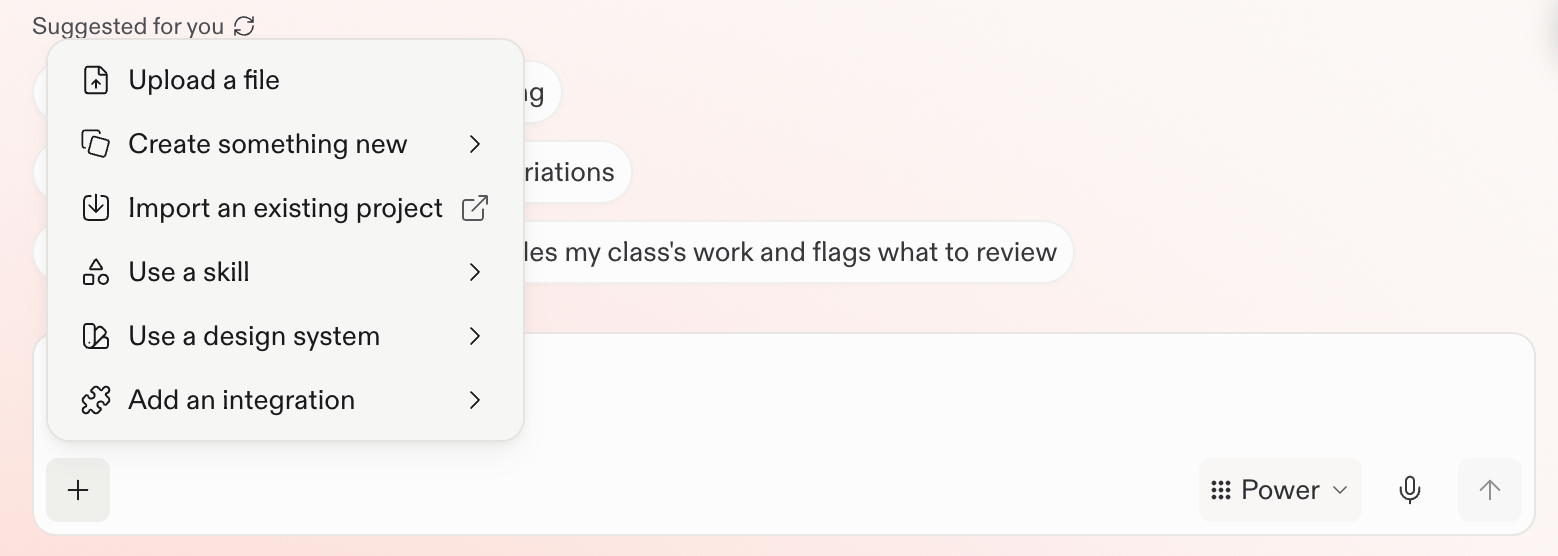
From the prompt box, select the **plus** button, then choose **Upload a file**. You can also drag and drop a file into the prompt box. Add the file before you send the request that depends on it.

<Frame>
  <img src="https://mintcdn.com/replit/teDUL4A-lNO7dv1O/images/chat/prompt-box-plus-menu.png?fit=max&auto=format&n=teDUL4A-lNO7dv1O&q=85&s=7fd877ec8f84f73ec684181b9ec4f7b3" alt="Prompt box plus menu with Upload a file as the first option" width="1558" height="556" data-path="images/chat/prompt-box-plus-menu.png" />
</Frame>

## Use files to

* Analyze a spreadsheet.
* Ask questions about a PDF.
* Ask Replit to create or refine a design from a screenshot.
* Give Replit direction or information about an app you want to build.

## Next steps

<section className="chat-mkt chat-workflow-grid has-visuals">
  <a className="chat-example has-visual" href="/chat/upload-and-use-files">
    <div className="chat-use-case-visual palette-blush">
      <div className="chat-use-case-window">
        <i />

        <i />

        <i />

        <b />

        <b />

        <b />
      </div>

      <em>
        <Icon icon="files" size={24} />
      </em>
    </div>

    <span>
      <Icon icon="files" size={19} />
    </span>

    <div className="chat-card-title">Work with files</div>
    <p>See a complete example for understanding and analyzing a file.</p>
    <div className="chat-card-link">Explore the use case →</div>
  </a>
</section>
