> ## Documentation Index
> Fetch the complete documentation index at: https://docs.replit.com/llms.txt
> Use this file to discover all available pages before exploring further.
# Bring Your Own Cloud
> Compare Full BYOC, BYOC for Published Apps, and Image Exports. Learn where workloads run, who operates them, and how to request access for your enterprise.
Bring Your Own Cloud (BYOC) gives your enterprise options for running the Replit platform or Replit-built apps in your own cloud tenant. Choose an option based on where you need development and production to run, and who will operate the infrastructure.
Full BYOC is in **private preview**. BYOC for Published Apps and Image Exports
are in **early access** for enterprise customers. Availability and onboarding
vary by cloud, configuration, and customer. Contact the Replit enterprise team
to confirm supported capabilities for your organization.
## Compare deployment options
| Option | What runs in your cloud | Who operates the infrastructure | Availability |
| - | - | - | - |
| Full BYOC | The Replit platform and published apps | Replit manages the platform and hosting infrastructure in your tenant | Private preview |
| BYOC for Published Apps | Published apps; development and previews remain Replit-managed | Replit manages publishing and hosting infrastructure in your tenant | Early access |
| Image Exports | Apps your team deploys from exported artifacts | Your team deploys and operates the apps | Early access |
The architecture diagrams below illustrate the deployment options, not a cloud-by-cloud availability matrix. Confirm supported clouds, regions, and services before planning an implementation.
## Full BYOC
Full BYOC brings the Replit platform and published app hosting into your own cloud tenant. The platform includes compute, storage, the file system, integrations, and the Agent harness.
Replit groups infrastructure into isolated units called **cells**. With Full BYOC, these cells run in your cloud. Your security team can govern which internal resources the Agent harness reaches and apply controls to outbound connections.
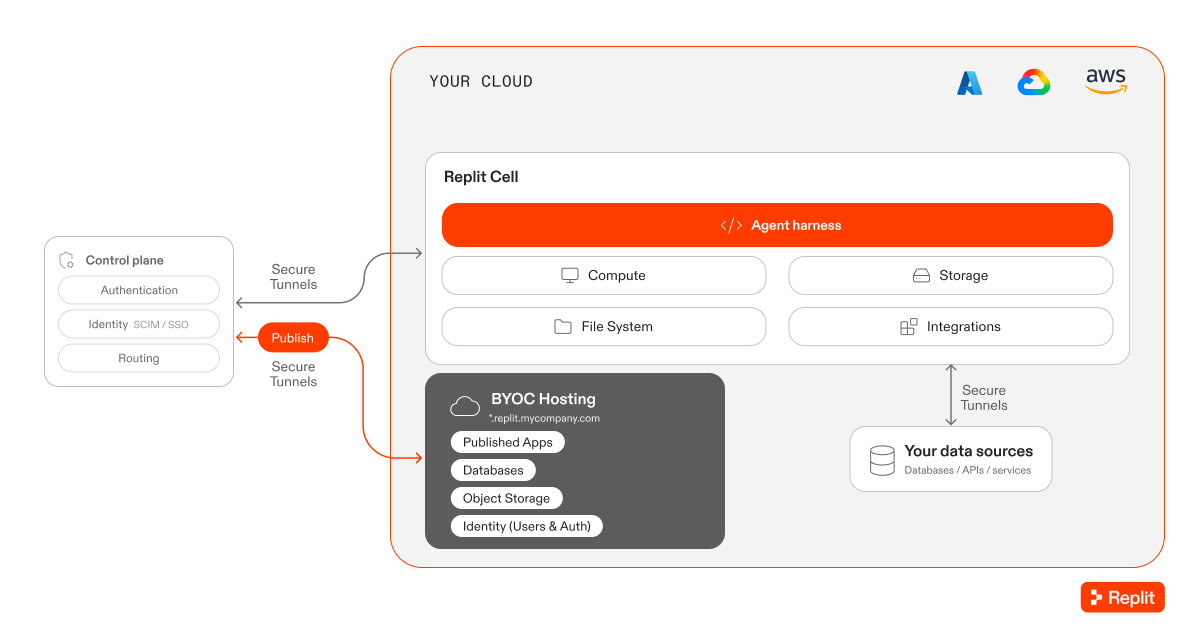 Choose Full BYOC when your requirements extend beyond production hosting to development and Agent execution. It requires more upfront setup than hosting only published apps in your cloud.
Full BYOC does not mean an air-gapped or entirely self-hosted Replit installation.
Running the Agent harness in your tenant does not mean model inference runs there;
inference remains part of Replit's managed Agent offering.
## BYOC for Published Apps
BYOC for Published Apps hosts published Replit projects in your cloud tenant. Development and previews remain on Replit-managed infrastructure.
Admins configure the publishing destination for each Workspace. Builders continue to select **Publish** in Replit. Replit manages the publishing and hosting infrastructure in the configured destination.
Choose Full BYOC when your requirements extend beyond production hosting to development and Agent execution. It requires more upfront setup than hosting only published apps in your cloud.
Full BYOC does not mean an air-gapped or entirely self-hosted Replit installation.
Running the Agent harness in your tenant does not mean model inference runs there;
inference remains part of Replit's managed Agent offering.
## BYOC for Published Apps
BYOC for Published Apps hosts published Replit projects in your cloud tenant. Development and previews remain on Replit-managed infrastructure.
Admins configure the publishing destination for each Workspace. Builders continue to select **Publish** in Replit. Replit manages the publishing and hosting infrastructure in the configured destination.
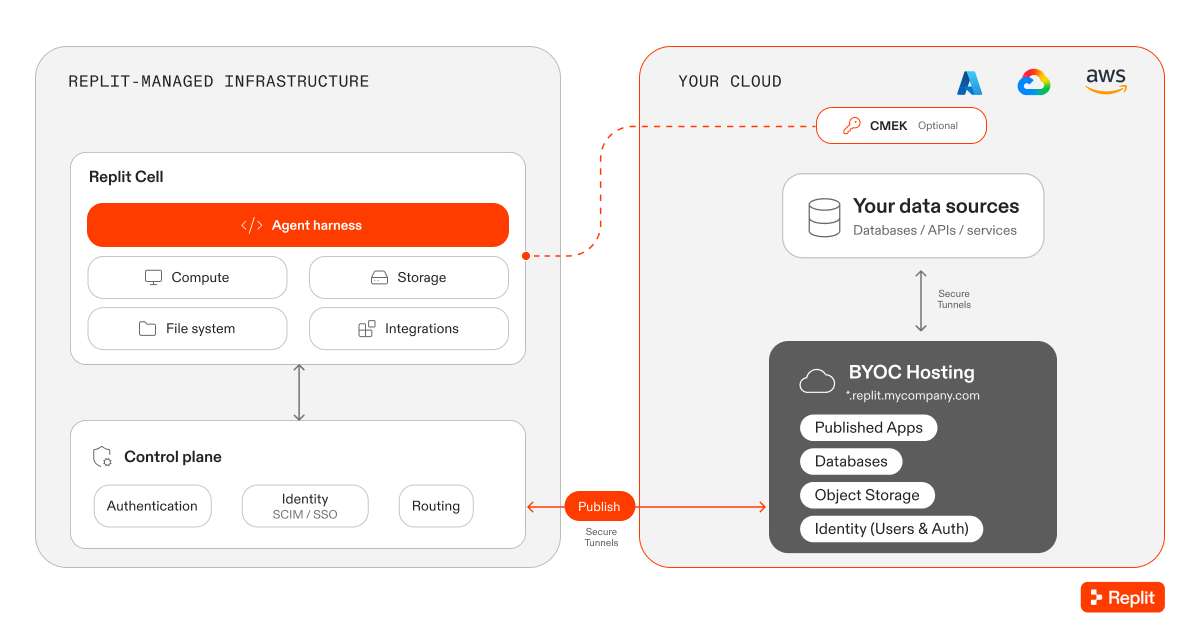 This option lets your team apply cloud security and dependency scanning to deployed workloads. Published apps can connect to private data sources within your environment. Network or VPN access depends on your configured networking.
Replit retains operational permissions to manage publishing infrastructure in your tenant. Your cloud and security teams review setup permissions, ongoing access, and network requirements during onboarding.
Customer-managed encryption keys (CMEK) require an agreement that includes
full physical isolation of the Replit cell. The diagram does not imply CMEK,
every depicted service, or every cloud is included in all early-access configurations.
Choose this option when you need production apps in your cloud without running the full Replit platform there.
## Image Exports
Image Exports lets your infrastructure team deploy and operate Replit-built apps using your own tools and processes.
For projects configured to use Image Exports, selecting **Publish** produces deployment artifacts:
* A Docker image containing the app.
* A Terraform file for infrastructure configuration.
* A software bill of materials (SBOM) for dependency review.
This option lets your team apply cloud security and dependency scanning to deployed workloads. Published apps can connect to private data sources within your environment. Network or VPN access depends on your configured networking.
Replit retains operational permissions to manage publishing infrastructure in your tenant. Your cloud and security teams review setup permissions, ongoing access, and network requirements during onboarding.
Customer-managed encryption keys (CMEK) require an agreement that includes
full physical isolation of the Replit cell. The diagram does not imply CMEK,
every depicted service, or every cloud is included in all early-access configurations.
Choose this option when you need production apps in your cloud without running the full Replit platform there.
## Image Exports
Image Exports lets your infrastructure team deploy and operate Replit-built apps using your own tools and processes.
For projects configured to use Image Exports, selecting **Publish** produces deployment artifacts:
* A Docker image containing the app.
* A Terraform file for infrastructure configuration.
* A software bill of materials (SBOM) for dependency review.
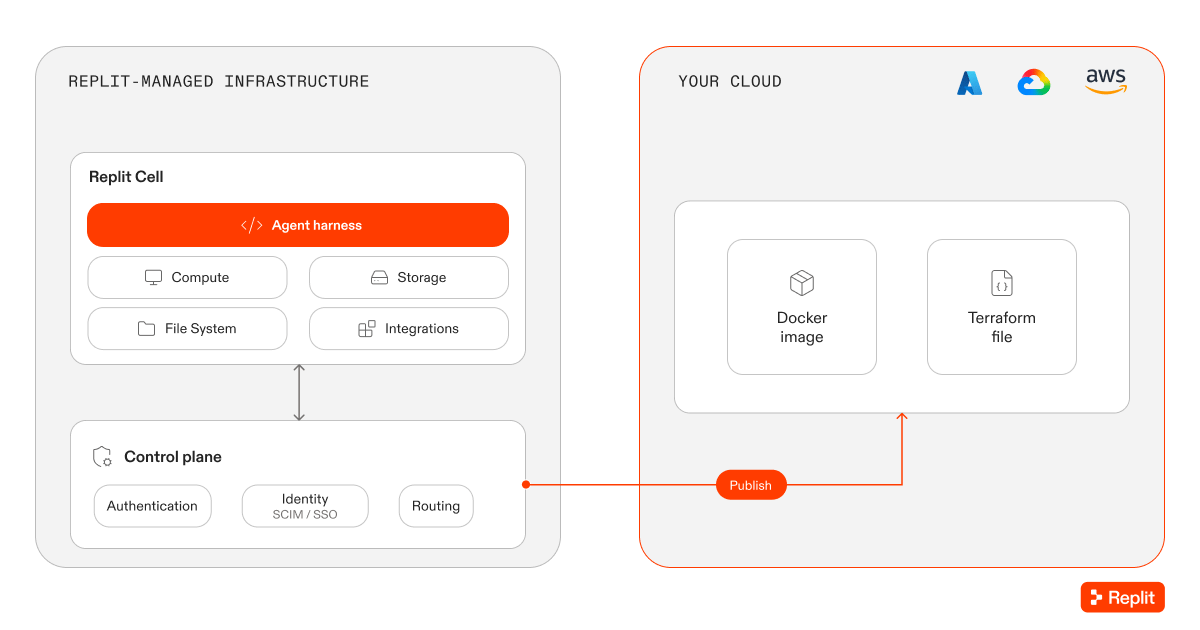 Your team controls security review, deployment, and ongoing operations. You also provide building blocks that Replit would otherwise manage, such as authentication and connectors.
Unlike Replit-managed hosting, the exported app does not require a connection back to the Replit platform for operation. Your team remains responsible for any external services the app uses.
Choose Image Exports when you need a customized production environment and have a team to operate it. You can combine it with BYOC for Published Apps to use different publishing approaches for different projects.
## Request access
[Contact the Replit enterprise team](https://replit.com/enterprise) to discuss the right option and onboarding scope. Prepare the following information:
* Your preferred cloud provider, region, and tenant.
* Whether you need development, published apps, or both in your cloud.
* The private data sources, networking, and access controls your apps require.
* Your cloud, security, and infrastructure owners.
* Whether Replit or your team should operate the published apps.
The enterprise team will confirm eligibility, supported configurations, permissions, and onboarding timing. Do not assume an existing app can migrate automatically; discuss migration requirements before setup.
## Related resources
* [Bring Your Own Cloud to Replit](https://replit.com/blog/bring-your-own-cloud): Read the announcement and architecture overview.
* [Publishing overview](/features/publishing/overview): Learn how publishing works in Replit.
* [Who can access your app](/features/publishing/private-deployments): Control app access separately from where the app runs.
Your team controls security review, deployment, and ongoing operations. You also provide building blocks that Replit would otherwise manage, such as authentication and connectors.
Unlike Replit-managed hosting, the exported app does not require a connection back to the Replit platform for operation. Your team remains responsible for any external services the app uses.
Choose Image Exports when you need a customized production environment and have a team to operate it. You can combine it with BYOC for Published Apps to use different publishing approaches for different projects.
## Request access
[Contact the Replit enterprise team](https://replit.com/enterprise) to discuss the right option and onboarding scope. Prepare the following information:
* Your preferred cloud provider, region, and tenant.
* Whether you need development, published apps, or both in your cloud.
* The private data sources, networking, and access controls your apps require.
* Your cloud, security, and infrastructure owners.
* Whether Replit or your team should operate the published apps.
The enterprise team will confirm eligibility, supported configurations, permissions, and onboarding timing. Do not assume an existing app can migrate automatically; discuss migration requirements before setup.
## Related resources
* [Bring Your Own Cloud to Replit](https://replit.com/blog/bring-your-own-cloud): Read the announcement and architecture overview.
* [Publishing overview](/features/publishing/overview): Learn how publishing works in Replit.
* [Who can access your app](/features/publishing/private-deployments): Control app access separately from where the app runs.