> ## Documentation Index
> Fetch the complete documentation index at: https://docs.replit.com/llms.txt
> Use this file to discover all available pages before exploring further.
# Connect Shopify
> Connect Shopify so Agent can provision a Shopify store, build a custom storefront, and manage your products and inventory from inside Replit.
export const WistiaEmbed = ({videoId, title = "Wistia video", playerColor = "FF0000", controlsVisibleOnLoad = false}) => {
if (!videoId) {
return null;
}
const url = "https://fast.wistia.net/embed/iframe/" + videoId + "?seo=false&playerColor=" + playerColor + "&controlsVisibleOnLoad=" + controlsVisibleOnLoad;
return
;
};
With the Shopify connector, Agent provisions a Shopify store, builds a custom storefront against it, and manages your products and inventory, all in one conversation, with no API keys. Agent recommends Shopify whenever you describe selling a physical good, and you only visit Shopify to go live. From first prompt to real orders is about ten minutes.
For a step-by-step walkthrough, follow [Build a Shopify storefront](/build/ecommerce-store).
## What you can build
* Custom-designed storefronts for physical products
* Branded merch and apparel stores
* Direct-to-consumer shops with carts and checkout
* Catalog and inventory tools backed by your Shopify store
* Product landing pages that sell a single hero item
## Examples

 ## How it works
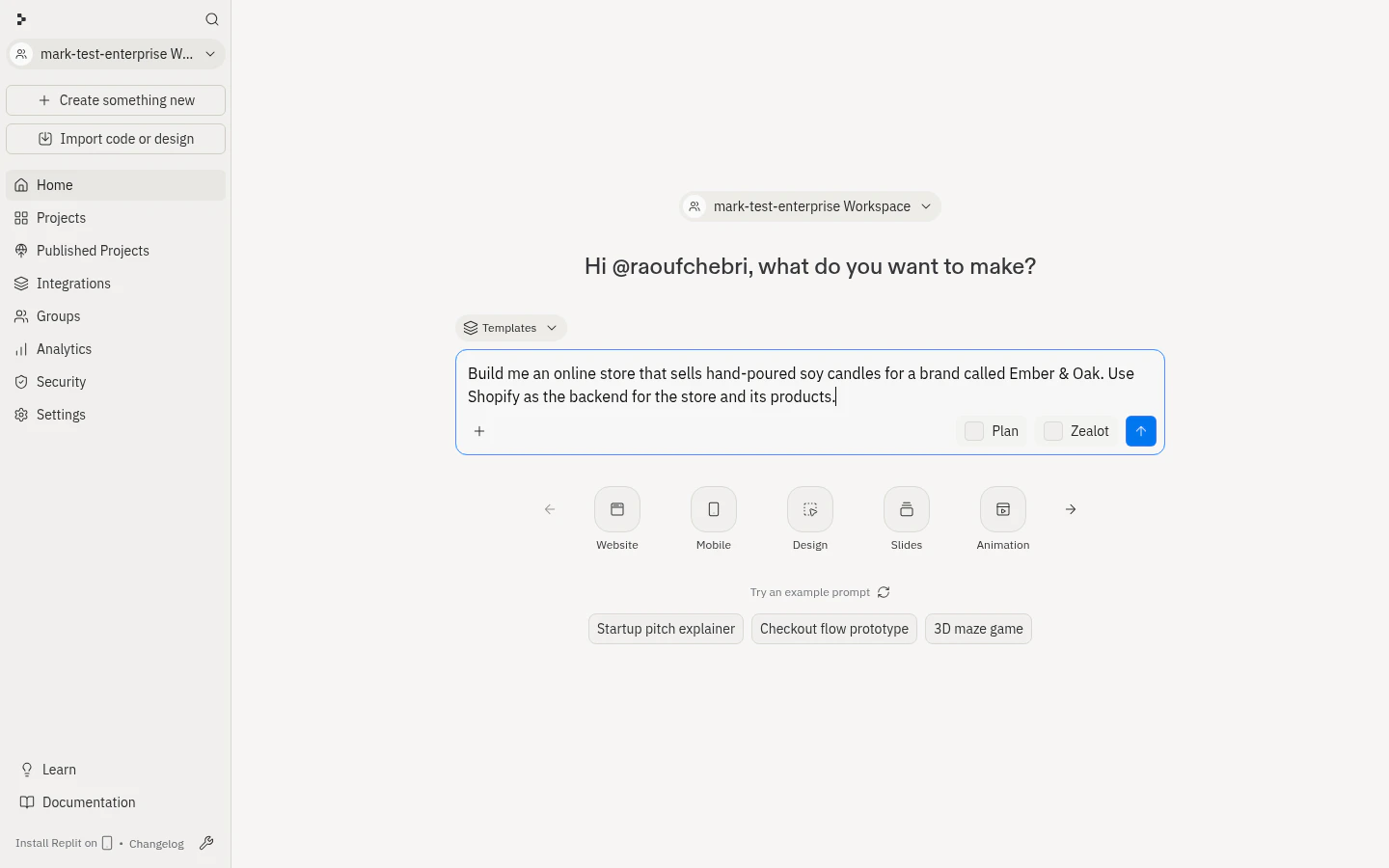
Tell Agent what you want to sell. It recommends Shopify for physical goods, even if you don't name it.
## How it works
Tell Agent what you want to sell. It recommends Shopify for physical goods, even if you don't name it.
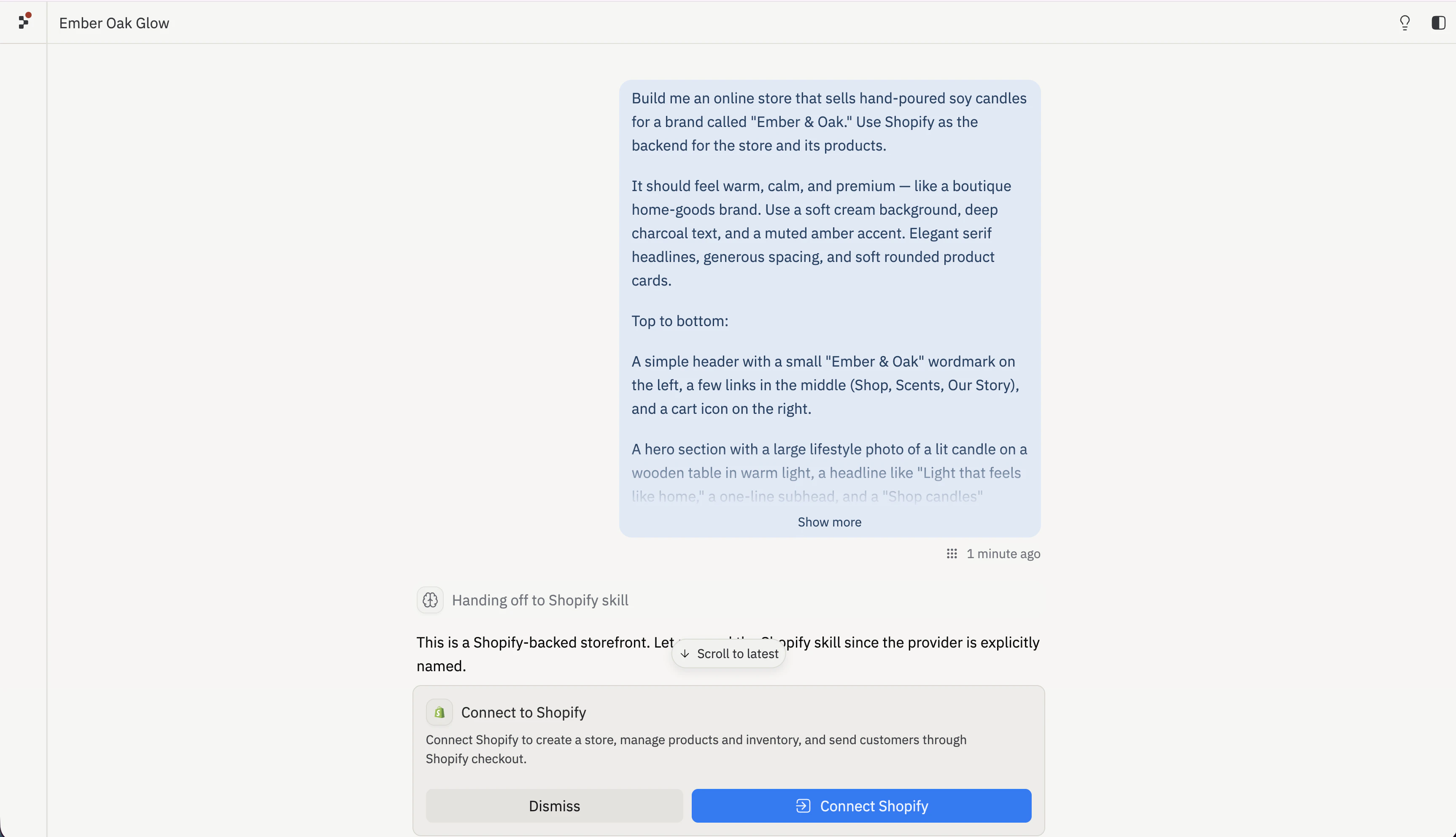
 A development store is created (about ten seconds) under Replit's Shopify Partner account, the Replit Sales Channel app is installed, and the store is connected. No API keys; one store per app; password-protected until you claim it.
 Agent designs the headless storefront and maintains products, variants, inventory, collections, and discounts.
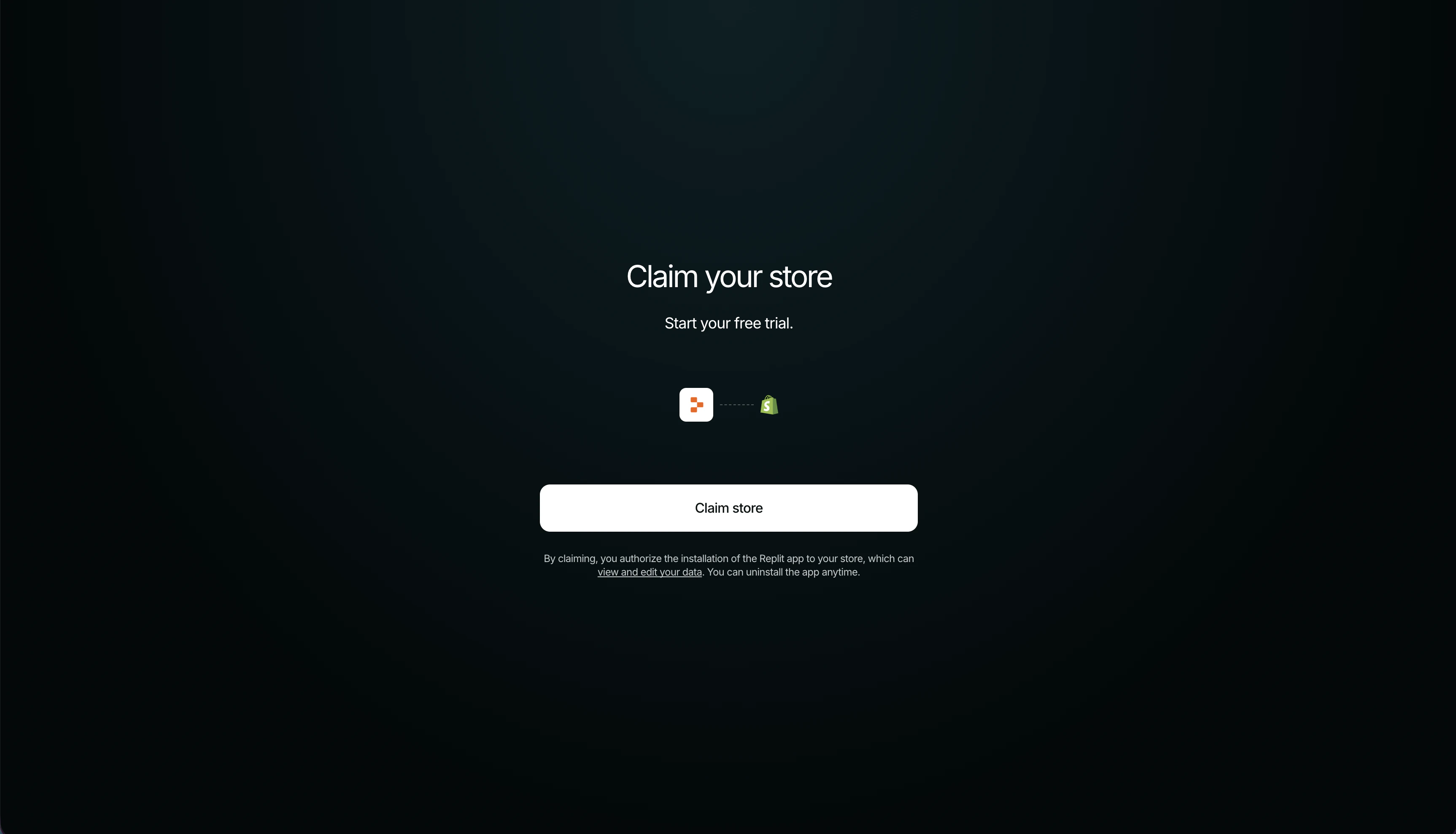
 Claim the store, choose a plan, set up payments, and launch when you're ready to sell.
 ## What Agent manages
Everything in the storefront and catalog is editable by chat.
| Area | What Agent does |
| ----------------- | ----------------------------------------------------------------------------------------------------------------------------------------------------------------------------------------------------------------------------------------------------------------------------------------------------------------------------------------------- |
| Design | Generates a headless front end from your guidance (no Liquid theme, no template library). Copy, layout, navigation, motion, and product pages are editable by chat, and you can explore directions with [Canvas](/references/design/canvas) variants. It's a real Replit project, so you can extend it with a blog, wishlist, or landing pages. |
| Products | Create, update, and delete products and variants. Fields: title, description, type, vendor, tags, SKU, price, weight, options (size, color), images, and availability. |
| Inventory | Set and adjust stock per variant. |
| Collections | Group products into collections. |
| Discounts | Create a price rule plus a redeemable code. |
| Publishing & sync | New products auto-publish to your storefront. Sync runs both ways: edits in your Shopify admin appear in the Replit preview, and Agent's changes appear in your Shopify admin. |
## Replit and Shopify: who does what
| Replit owns | Shopify owns |
| ----------------------------------------------------------- | ----------------------------------------------------------- |
| Storefront design and build | Hosted checkout |
| Catalog management by chat (products, inventory, discounts) | System of record for products, inventory, carts, and orders |
| Storefront hosting and deployment | Payments, identity verification (KYC), and payouts |
| Canvas design variants | Taxes, shipping, and fulfillment |
| Extending the app (blog, landing pages, and more) | Multi-channel selling |
Orders, refunds, payouts, and fulfillment are handled in your Shopify admin, not through Agent.
## Connection scope
* Available to all builders on all apps, connected in the conversation, with no Connectors-panel setup and no credentials.
* Scoped to one app: each app gets its own Shopify store.
* The store is a Replit-owned development store until you claim it; your email is shared with Shopify so you can claim it later.
* You can uninstall the Replit app from your Shopify admin at any time.
## Go live on Shopify
Going live happens on Shopify, not Replit. Ask Agent to start the Go Live flow, then complete these merchant-owned steps in your Shopify admin:
* **Claim the store** from the link in chat or the email Shopify sends. The link expires after 7 days. Claiming starts a free trial.
* **Choose a plan**: a [paid plan](https://www.shopify.com/pricing) is required to process live orders.
* **Set up payments**: activate [Shopify Payments](https://help.shopify.com/en/manual/payments/shopify-payments) or another provider and complete identity verification (KYC). Live capture works once the claiming account finishes KYC.
* **Configure [shipping](https://help.shopify.com/en/manual/shipping) and [taxes](https://help.shopify.com/en/manual/taxes).**
* **Connect a [custom domain](/build/add-custom-domain)** (optional) and remove the storefront password to open the store to buyers.
Checkout always redirects to Shopify-hosted checkout, so buyers pay on Shopify.
Payments, identity verification, taxes, shipping, and fraud checks stay on Shopify. Replit never collects merchant banking details, tax IDs, or other sensitive information.
## Troubleshooting
Provisioning calls several Shopify APIs and can take a little time. Let Agent finish setup before asking it to build the storefront.
Development stores are password-protected until you go live, so checkout previews can land on a password page. This is expected, but the cart still works. Remove the password in Shopify only when you launch.
Live capture requires the claiming Shopify account to finish payments setup and KYC. Until then, checkout redirects to Shopify but can't capture a payment. Complete KYC, or use an account that already has payments set up.
Each store is scoped to one app. If you connected Shopify on a different app, ask Agent to set up a Shopify store for the current one.
A product is only visible once it's active and published. Agent auto-publishes products it creates; if one is missing, ask Agent to publish it, then refresh the preview.
After you claim or transfer the store, Shopify may ask you to reauthorize the connection. Ask Agent to reconnect Shopify, and it restores access without losing your store.
## Related documentation
* [Build a Shopify storefront](/build/ecommerce-store): Step-by-step guide from a prompt to a published storefront
* [Add a custom domain](/build/add-custom-domain): Give your storefront a branded URL
* [Agent integrations](/references/integrations/overview): Replit-managed integrations and Agent services
* [Managing your connectors](/replitai/managing-connectors): Configure and manage connectors
* [Shopify Help Center](https://help.shopify.com/): Store setup, payments, and account management
## What Agent manages
Everything in the storefront and catalog is editable by chat.
| Area | What Agent does |
| ----------------- | ----------------------------------------------------------------------------------------------------------------------------------------------------------------------------------------------------------------------------------------------------------------------------------------------------------------------------------------------- |
| Design | Generates a headless front end from your guidance (no Liquid theme, no template library). Copy, layout, navigation, motion, and product pages are editable by chat, and you can explore directions with [Canvas](/references/design/canvas) variants. It's a real Replit project, so you can extend it with a blog, wishlist, or landing pages. |
| Products | Create, update, and delete products and variants. Fields: title, description, type, vendor, tags, SKU, price, weight, options (size, color), images, and availability. |
| Inventory | Set and adjust stock per variant. |
| Collections | Group products into collections. |
| Discounts | Create a price rule plus a redeemable code. |
| Publishing & sync | New products auto-publish to your storefront. Sync runs both ways: edits in your Shopify admin appear in the Replit preview, and Agent's changes appear in your Shopify admin. |
## Replit and Shopify: who does what
| Replit owns | Shopify owns |
| ----------------------------------------------------------- | ----------------------------------------------------------- |
| Storefront design and build | Hosted checkout |
| Catalog management by chat (products, inventory, discounts) | System of record for products, inventory, carts, and orders |
| Storefront hosting and deployment | Payments, identity verification (KYC), and payouts |
| Canvas design variants | Taxes, shipping, and fulfillment |
| Extending the app (blog, landing pages, and more) | Multi-channel selling |
Orders, refunds, payouts, and fulfillment are handled in your Shopify admin, not through Agent.
## Connection scope
* Available to all builders on all apps, connected in the conversation, with no Connectors-panel setup and no credentials.
* Scoped to one app: each app gets its own Shopify store.
* The store is a Replit-owned development store until you claim it; your email is shared with Shopify so you can claim it later.
* You can uninstall the Replit app from your Shopify admin at any time.
## Go live on Shopify
Going live happens on Shopify, not Replit. Ask Agent to start the Go Live flow, then complete these merchant-owned steps in your Shopify admin:
* **Claim the store** from the link in chat or the email Shopify sends. The link expires after 7 days. Claiming starts a free trial.
* **Choose a plan**: a [paid plan](https://www.shopify.com/pricing) is required to process live orders.
* **Set up payments**: activate [Shopify Payments](https://help.shopify.com/en/manual/payments/shopify-payments) or another provider and complete identity verification (KYC). Live capture works once the claiming account finishes KYC.
* **Configure [shipping](https://help.shopify.com/en/manual/shipping) and [taxes](https://help.shopify.com/en/manual/taxes).**
* **Connect a [custom domain](/build/add-custom-domain)** (optional) and remove the storefront password to open the store to buyers.
Checkout always redirects to Shopify-hosted checkout, so buyers pay on Shopify.
Payments, identity verification, taxes, shipping, and fraud checks stay on Shopify. Replit never collects merchant banking details, tax IDs, or other sensitive information.
## Troubleshooting
Provisioning calls several Shopify APIs and can take a little time. Let Agent finish setup before asking it to build the storefront.
Development stores are password-protected until you go live, so checkout previews can land on a password page. This is expected, but the cart still works. Remove the password in Shopify only when you launch.
Live capture requires the claiming Shopify account to finish payments setup and KYC. Until then, checkout redirects to Shopify but can't capture a payment. Complete KYC, or use an account that already has payments set up.
Each store is scoped to one app. If you connected Shopify on a different app, ask Agent to set up a Shopify store for the current one.
A product is only visible once it's active and published. Agent auto-publishes products it creates; if one is missing, ask Agent to publish it, then refresh the preview.
After you claim or transfer the store, Shopify may ask you to reauthorize the connection. Ask Agent to reconnect Shopify, and it restores access without losing your store.
## Related documentation
* [Build a Shopify storefront](/build/ecommerce-store): Step-by-step guide from a prompt to a published storefront
* [Add a custom domain](/build/add-custom-domain): Give your storefront a branded URL
* [Agent integrations](/references/integrations/overview): Replit-managed integrations and Agent services
* [Managing your connectors](/replitai/managing-connectors): Configure and manage connectors
* [Shopify Help Center](https://help.shopify.com/): Store setup, payments, and account management