> ## Documentation Index
> Fetch the complete documentation index at: https://docs.replit.com/llms.txt
> Use this file to discover all available pages before exploring further.

# Task lifecycle

> Understand task states, queued work, applying changes, archiving, and cancelling Agent tasks.

export const TaskCard = ({title = "Product Manager next steps discussion", description = "", status = "draft", timestamp = "Created 3 minutes ago", width = "364px", showMenu = false}) => {
  if (typeof document !== "undefined" && !document.getElementById("task-card-styles")) {
    const style = document.createElement("style");
    style.id = "task-card-styles";
    style.textContent = `
      .task-card {
        --tc-bg: var(--replit-docs-bg-task, #EDECE8);
        --tc-border: var(--replit-docs-border, #DEDAD5);
        --tc-text: var(--replit-docs-text, #1D1D1D);
        --tc-text-dim: var(--replit-docs-text-muted, #5C5C5C);
        --tc-text-dimmest: var(--replit-docs-text-subtle, #858585);
        --tc-dot-active: #4A7BF7;
        --tc-dot-draft: #A6A6A6;
        --tc-dot-ready: #F59E0B;
        --tc-dot-done: #22C55E;
      }
      .dark .task-card,
      html.dark .task-card,
      [data-theme="dark"] .task-card {
        --tc-bg: var(--replit-docs-bg-task, #252527);
        --tc-border: var(--replit-docs-border, #39393D);
        --tc-text: var(--replit-docs-text, #F5F5F5);
        --tc-text-dim: var(--replit-docs-text-muted, #B8B8BE);
        --tc-text-dimmest: var(--replit-docs-text-subtle, #8E8F97);
        --tc-dot-active: #6B9EFF;
        --tc-dot-draft: #6B7280;
        --tc-dot-ready: #FBBF24;
        --tc-dot-done: #4ADE80;
      }
      @keyframes task-card-fade-in {
        from { transform: translateY(6px); opacity: 0; }
        to { transform: translateY(0); opacity: 1; }
      }
      @keyframes tc-tl {
        0%{opacity:1;fill:var(--tc-light)} 5%{opacity:1;fill:var(--tc-dark)} 10%{opacity:1;fill:var(--tc-dark)} 15%{opacity:1;fill:var(--tc-light)}
        20%{opacity:0} 25%{opacity:1;fill:var(--tc-dark)} 30%{opacity:1;fill:var(--tc-light)} 35%{opacity:0}
        40%{opacity:1;fill:var(--tc-dark)} 45%{opacity:1;fill:var(--tc-light)} 50%{opacity:0} 55%{opacity:1;fill:var(--tc-dark)}
        60%{opacity:0} 65%{opacity:1;fill:var(--tc-light)} 70%{opacity:1;fill:var(--tc-light)} 75%{opacity:1;fill:var(--tc-light)}
        80%{opacity:1;fill:var(--tc-light)} 85%{opacity:0} 90%{opacity:1;fill:var(--tc-light)} 95%{opacity:1;fill:var(--tc-light)}
      }
      @keyframes tc-tr {
        0%{opacity:1;fill:var(--tc-dark)} 5%{opacity:0} 10%{opacity:0} 15%{opacity:0}
        20%{opacity:1;fill:var(--tc-light)} 25%{opacity:1;fill:var(--tc-light)} 30%{opacity:1;fill:var(--tc-light)} 35%{opacity:1;fill:var(--tc-light)}
        40%{opacity:0} 45%{opacity:1;fill:var(--tc-dark)} 50%{opacity:1;fill:var(--tc-dark)} 55%{opacity:0}
        60%{opacity:1;fill:var(--tc-dark)} 65%{opacity:0} 70%{opacity:0} 75%{opacity:1;fill:var(--tc-light)}
        80%{opacity:0} 85%{opacity:1;fill:var(--tc-dark)} 90%{opacity:0} 95%{opacity:0}
      }
      @keyframes tc-bl {
        0%{opacity:1;fill:var(--tc-light)} 5%{opacity:0} 10%{opacity:0} 15%{opacity:0}
        20%{opacity:1;fill:var(--tc-light)} 25%{opacity:1;fill:var(--tc-light)} 30%{opacity:1;fill:var(--tc-light)} 35%{opacity:1;fill:var(--tc-light)}
        40%{opacity:0} 45%{opacity:1;fill:var(--tc-light)} 50%{opacity:1;fill:var(--tc-light)} 55%{opacity:0}
        60%{opacity:1;fill:var(--tc-light)} 65%{opacity:0} 70%{opacity:0} 75%{opacity:1;fill:var(--tc-light)}
        80%{opacity:0} 85%{opacity:1;fill:var(--tc-light)} 90%{opacity:0} 95%{opacity:0}
      }
      @keyframes tc-br {
        0%{opacity:1;fill:var(--tc-light)} 5%{opacity:1;fill:var(--tc-dark)} 10%{opacity:1;fill:var(--tc-light)} 15%{opacity:1;fill:var(--tc-light)}
        20%{opacity:0} 25%{opacity:1;fill:var(--tc-light)} 30%{opacity:1;fill:var(--tc-dark)} 35%{opacity:0}
        40%{opacity:1;fill:var(--tc-light)} 45%{opacity:1;fill:var(--tc-light)} 50%{opacity:0} 55%{opacity:1;fill:var(--tc-light)}
        60%{opacity:0} 65%{opacity:1;fill:var(--tc-dark)} 70%{opacity:1;fill:var(--tc-light)} 75%{opacity:1;fill:var(--tc-light)}
        80%{opacity:1;fill:var(--tc-light)} 85%{opacity:0} 90%{opacity:1;fill:var(--tc-light)} 95%{opacity:1;fill:var(--tc-dark)}
      }
      @keyframes tc-drop {
        0%{opacity:0} 5%{opacity:1;fill:var(--tc-dark)} 10%{opacity:1;fill:var(--tc-dark)} 15%{opacity:1;fill:var(--tc-dark)}
        20%{opacity:0} 25%{opacity:0} 30%{opacity:0} 35%{opacity:0}
        40%{opacity:1;fill:var(--tc-dark)} 45%{opacity:0} 50%{opacity:0} 55%{opacity:1;fill:var(--tc-dark)}
        60%{opacity:0} 65%{opacity:1;fill:var(--tc-dark)} 70%{opacity:1;fill:var(--tc-dark)} 75%{opacity:0}
        80%{opacity:1;fill:var(--tc-dark)} 85%{opacity:0} 90%{opacity:1;fill:var(--tc-dark)} 95%{opacity:1;fill:var(--tc-dark)}
      }
      @keyframes tc-dropalt {
        0%{opacity:0} 5%{opacity:0} 10%{opacity:0} 15%{opacity:0}
        20%{opacity:1;fill:var(--tc-dark)} 25%{opacity:0} 30%{opacity:0} 35%{opacity:1;fill:var(--tc-dark)}
        40%{opacity:0} 45%{opacity:0} 50%{opacity:1;fill:var(--tc-dark)} 55%{opacity:0}
        60%{opacity:1;fill:var(--tc-dark)} 65%{opacity:0} 70%{opacity:0} 75%{opacity:0}
        80%{opacity:0} 85%{opacity:1;fill:var(--tc-dark)} 90%{opacity:0} 95%{opacity:0}
      }
      .task-card .tc-el-tl { animation: tc-tl 4s step-end infinite; }
      .task-card .tc-el-tr { animation: tc-tr 4s step-end infinite; }
      .task-card .tc-el-bl { animation: tc-bl 4s step-end infinite; }
      .task-card .tc-el-br { animation: tc-br 4s step-end infinite; }
      .task-card .tc-el-drop { animation: tc-drop 4s step-end infinite; }
      .task-card .tc-el-dropalt { animation: tc-dropalt 4s step-end infinite; }
      @media (hover: hover) {
        .task-card:hover {
          border-color: var(--tc-text-dimmest) !important;
        }
        .task-card .tc-menu-btn:hover {
          background: var(--tc-border);
        }
      }
    `;
    document.head.appendChild(style);
  }
  const colorPairs = {
    active: {
      dark: "#57ABFF",
      light: "#A8D4FF"
    },
    "active-queued": {
      dark: "#6BB5FF",
      light: "#6BB5FF"
    },
    draft: {
      dark: "#A6A6A6",
      light: "#D4D4D4"
    },
    "draft-static": {
      dark: "#A6A6A6",
      light: "#D4D4D4"
    },
    "draft-done": {
      dark: "#A6A6A6",
      light: "#D4D4D4"
    },
    ready: {
      dark: "#009118",
      light: "#6CD97E"
    },
    "ready-drop": {
      dark: "#009118",
      light: "#6CD97E"
    },
    applying: {
      dark: "#7C3AED",
      light: "#C4B5FD"
    },
    done: {
      dark: "#22C55E",
      light: "#86EFAC"
    }
  };
  const statusLabels = {
    active: "Active",
    "active-queued": "Queued",
    draft: "Draft",
    "draft-static": "Draft",
    "draft-done": "Done",
    ready: "Ready",
    "ready-drop": "Ready",
    applying: "Applying",
    done: "Done"
  };
  const colors = colorPairs[status] || colorPairs.draft;
  const applyingIconHtml = '<svg width="16" height="16" viewBox="0 0 24 24" fill="none" style="flex-shrink:0;--tc-dark:#009118;--tc-light:#6CD97E"><circle class="tc-el-tl" cx="5.332" cy="5.338" r="5.332" fill="#009118"/><circle class="tc-el-tr" cx="18.663" cy="5.338" r="5.332" fill="#009118"/><circle class="tc-el-bl" cx="5.332" cy="18.668" r="5.332" fill="#009118"/><circle class="tc-el-br" cx="18.663" cy="18.668" r="5.332" fill="#009118"/><path class="tc-el-drop" fill="#009118" d="M18.662 0a5.332 5.332 0 0 1 .001 10.664l-.412.01a8 8 0 0 0-7.577 7.59l-.01.398-.008.274A5.331 5.331 0 0 1 0 18.662a5.332 5.332 0 0 1 5.332-5.332l.398-.01a8 8 0 0 0 7.59-7.576l.011-.412A5.331 5.331 0 0 1 18.662 0Z"/><g class="tc-el-dropalt" transform="rotate(90, 12, 12)"><path fill="#009118" d="M18.662 0a5.332 5.332 0 0 1 .001 10.664l-.412.01a8 8 0 0 0-7.577 7.59l-.01.398-.008.274A5.331 5.331 0 0 1 0 18.662a5.332 5.332 0 0 1 5.332-5.332l.398-.01a8 8 0 0 0 7.59-7.576l.011-.412A5.331 5.331 0 0 1 18.662 0Z"/></g></svg>';
  const doneIconHtml = '<svg width="16" height="16" viewBox="0 0 24 24" style="flex-shrink:0;fill:var(--tc-text-dimmest)"><path d="M12 7a5 5 0 1 1 0 10 5 5 0 0 1 0-10Z"/><path fill-rule="evenodd" d="M12 1c6.075 0 11 4.925 11 11s-4.925 11-11 11S1 18.075 1 12 5.925 1 12 1Zm0 2a9 9 0 1 0 0 18 9 9 0 0 0 0-18Z" clip-rule="evenodd"/></svg>';
  const handleApplyChanges = e => {
    const tooltip = e.currentTarget.parentElement;
    tooltip.style.display = "none";
    const menuBtn = tooltip.previousElementSibling;
    if (menuBtn) menuBtn.style.background = "none";
    const card = e.currentTarget.closest(".task-card");
    if (!card) return;
    const headerRow = card.firstElementChild;
    const oldIcon = headerRow.firstElementChild;
    const menuWrapper = headerRow.lastElementChild;
    const meta = card.lastElementChild;
    const temp = document.createElement("div");
    temp.innerHTML = applyingIconHtml;
    headerRow.replaceChild(temp.firstElementChild, oldIcon);
    meta.textContent = "Applying \u2022 just now";
    menuWrapper.style.visibility = "hidden";
    setTimeout(() => {
      const currentIcon = headerRow.firstElementChild;
      const doneTemp = document.createElement("div");
      doneTemp.innerHTML = doneIconHtml;
      headerRow.replaceChild(doneTemp.firstElementChild, currentIcon);
      meta.textContent = "Done \u2022 just now";
      const board = card.closest(".kb-board");
      if (!board) return;
      const doneCol = board.querySelector('[data-kb-column="done"]');
      if (!doneCol) return;
      const cardList = doneCol.querySelector("[data-kb-cards]");
      const readyCol = board.querySelector('[data-kb-column="ready"]');
      card.style.transition = "opacity 300ms, transform 300ms";
      card.style.opacity = "0";
      card.style.transform = "translateY(-10px)";
      setTimeout(() => {
        card.parentElement.removeChild(card);
        if (readyCol) {
          const rc = readyCol.querySelector("[data-kb-count]");
          rc.textContent = parseInt(rc.textContent) - 1;
        }
        const dc = doneCol.querySelector("[data-kb-count]");
        dc.textContent = parseInt(dc.textContent) + 1;
        card.style.opacity = "0";
        card.style.transform = "translateY(6px)";
        cardList.insertBefore(card, cardList.firstChild);
        requestAnimationFrame(() => {
          card.style.transition = "opacity 300ms, transform 300ms";
          card.style.opacity = "1";
          card.style.transform = "translateY(0)";
        });
      }, 300);
    }, 3000);
  };
  return <div className="task-card" style={{
    fontFamily: "'IBM Plex Sans', sans-serif",
    width: width,
    background: "var(--tc-bg)",
    border: "1px solid var(--tc-border)",
    borderRadius: "8px",
    padding: "8px 12px",
    margin: 0,
    display: "flex",
    flexDirection: "column",
    gap: "4px",
    cursor: "pointer",
    opacity: 0,
    animation: "task-card-fade-in 300ms ease-out forwards",
    transition: "border-color 120ms ease-out"
  }}>
      {}
      <div style={{
    display: "flex",
    alignItems: "center",
    gap: "8px"
  }}>
        {status === "done" ? <svg width="16" height="16" viewBox="0 0 24 24" fill="var(--tc-text-dimmest)" style={{
    flexShrink: 0
  }}>
            <path d="M12 7a5 5 0 1 1 0 10 5 5 0 0 1 0-10Z" />
            <path fillRule="evenodd" d="M12 1c6.075 0 11 4.925 11 11s-4.925 11-11 11S1 18.075 1 12 5.925 1 12 1Zm0 2a9 9 0 1 0 0 18 9 9 0 0 0 0-18Z" clipRule="evenodd" />
          </svg> : status === "draft-static" ? <svg width="16" height="16" viewBox="0 0 24 24" fill="none" style={{
    flexShrink: 0
  }}>
            <circle cx="5.332" cy="5.338" r="5.332" fill={colors.dark} />
            <circle cx="18.663" cy="5.338" r="5.332" fill={colors.dark} />
            <circle cx="5.332" cy="18.668" r="5.332" fill={colors.dark} />
            <circle cx="18.663" cy="18.668" r="5.332" fill={colors.dark} />
          </svg> : status === "draft-done" ? <svg width="16" height="16" viewBox="0 0 24 24" fill="none" style={{
    flexShrink: 0
  }}>
            <circle cx="5.332" cy="5.338" r="5.332" fill={colors.light} />
            <circle cx="18.663" cy="5.338" r="5.332" fill={colors.light} />
            <circle cx="5.332" cy="18.668" r="5.332" fill={colors.light} />
            <circle cx="18.663" cy="18.668" r="5.332" fill={colors.light} />
          </svg> : status === "active-queued" ? <svg width="16" height="16" viewBox="0 0 24 24" fill="none" style={{
    flexShrink: 0
  }}>
            <circle cx="5.332" cy="5.338" r="5.332" fill={colors.light} />
            <circle cx="18.663" cy="5.338" r="5.332" fill={colors.light} />
            <circle cx="5.332" cy="18.668" r="5.332" fill={colors.light} />
            <circle cx="18.663" cy="18.668" r="5.332" fill={colors.light} />
          </svg> : status === "ready-drop" ? <svg width="16" height="16" viewBox="0 0 24 24" fill="none" style={{
    flexShrink: 0
  }}>
            <circle cx="5.332" cy="5.338" r="5.332" fill={colors.light} />
            <circle cx="18.663" cy="18.668" r="5.332" fill={colors.light} />
            <path fill={colors.dark} d="M18.662 0a5.332 5.332 0 0 1 .001 10.664l-.412.01a8 8 0 0 0-7.577 7.59l-.01.398-.008.274A5.331 5.331 0 0 1 0 18.662a5.332 5.332 0 0 1 5.332-5.332l.398-.01a8 8 0 0 0 7.59-7.576l.011-.412A5.331 5.331 0 0 1 18.662 0Z" />
          </svg> : <svg width="16" height="16" viewBox="0 0 24 24" fill="none" style={{
    flexShrink: 0,
    "--tc-dark": colors.dark,
    "--tc-light": colors.light
  }}>
            <circle className="tc-el-tl" cx="5.332" cy="5.338" r="5.332" fill={colors.dark} />
            <circle className="tc-el-tr" cx="18.663" cy="5.338" r="5.332" fill={colors.dark} />
            <circle className="tc-el-bl" cx="5.332" cy="18.668" r="5.332" fill={colors.dark} />
            <circle className="tc-el-br" cx="18.663" cy="18.668" r="5.332" fill={colors.dark} />
            <path className="tc-el-drop" fill={colors.dark} d="M18.662 0a5.332 5.332 0 0 1 .001 10.664l-.412.01a8 8 0 0 0-7.577 7.59l-.01.398-.008.274A5.331 5.331 0 0 1 0 18.662a5.332 5.332 0 0 1 5.332-5.332l.398-.01a8 8 0 0 0 7.59-7.576l.011-.412A5.331 5.331 0 0 1 18.662 0Z" />
            <g className="tc-el-dropalt" transform="rotate(90, 12, 12)">
              <path fill={colors.dark} d="M18.662 0a5.332 5.332 0 0 1 .001 10.664l-.412.01a8 8 0 0 0-7.577 7.59l-.01.398-.008.274A5.331 5.331 0 0 1 0 18.662a5.332 5.332 0 0 1 5.332-5.332l.398-.01a8 8 0 0 0 7.59-7.576l.011-.412A5.331 5.331 0 0 1 18.662 0Z" />
            </g>
          </svg>}
        <span style={{
    flex: 1,
    fontSize: "14px",
    lineHeight: "1.4",
    color: "var(--tc-text)",
    minWidth: 0
  }}>
          {title}
        </span>
        <div style={{
    position: "relative",
    flexShrink: 0
  }}>
          <button className="tc-menu-btn" type="button" aria-label="Thread actions" onClick={showMenu ? e => {
    const btn = e.currentTarget;
    const popup = btn.nextElementSibling;
    const card = btn.closest(".task-card");
    const isHidden = popup.style.display === "none";
    popup.style.display = isHidden ? "flex" : "none";
    btn.style.background = isHidden ? "var(--tc-border)" : "none";
    if (card) card.style.zIndex = isHidden ? "9999" : "";
  } : undefined} style={{
    display: "flex",
    alignItems: "center",
    justifyContent: "center",
    width: "24px",
    height: "24px",
    border: "none",
    background: "none",
    borderRadius: "4px",
    cursor: "pointer",
    color: "var(--tc-text-dimmest)",
    padding: 0,
    flexShrink: 0,
    transition: "background 120ms ease-out"
  }}>
            <svg width="16" height="16" viewBox="0 0 24 24" fill="currentColor">
              <path fillRule="evenodd" d="M10.25 5a1.75 1.75 0 1 1 3.5 0 1.75 1.75 0 0 1-3.5 0Zm0 7a1.75 1.75 0 1 1 3.5 0 1.75 1.75 0 0 1-3.5 0Zm0 7a1.75 1.75 0 1 1 3.5 0 1.75 1.75 0 0 1-3.5 0Z" clipRule="evenodd" />
            </svg>
          </button>
          {showMenu && <div style={{
    display: "none",
    position: "absolute",
    top: 0,
    left: "28px",
    background: "var(--tc-bg)",
    border: "1px solid var(--tc-border)",
    borderRadius: "8px",
    padding: "4px",
    boxShadow: "0 8px 24px rgba(0,0,0,0.12), 0 2px 6px rgba(0,0,0,0.06)",
    zIndex: 9999,
    minWidth: "160px",
    flexDirection: "column",
    gap: "0"
  }}>
              <div onClick={handleApplyChanges} style={{
    display: "flex",
    alignItems: "center",
    gap: "8px",
    padding: "6px 8px",
    borderRadius: "4px",
    cursor: "pointer",
    color: "var(--tc-text)",
    fontSize: "14px"
  }}>
                <svg width="16" height="16" viewBox="0 0 24 24" fill="currentColor" style={{
    flexShrink: 0
  }}>
                  <path fillRule="evenodd" d="M6 3.75a2.25 2.25 0 1 0 0 4.5 2.25 2.25 0 0 0 0-4.5ZM2.25 6a3.75 3.75 0 1 1 4.527 3.67 8.25 8.25 0 0 0 7.554 7.553A3.751 3.751 0 0 1 21.75 18a3.75 3.75 0 0 1-7.43.726 9.75 9.75 0 0 1-7.57-4.53V21a.75.75 0 0 1-1.5 0V9.675A3.751 3.751 0 0 1 2.25 6ZM18 15.75a2.25 2.25 0 1 0 0 4.5 2.25 2.25 0 0 0 0-4.5Z" clipRule="evenodd" />
                </svg>
                <span>Apply changes</span>
              </div>
              <div style={{
    display: "flex",
    alignItems: "center",
    gap: "8px",
    padding: "6px 8px",
    borderRadius: "4px",
    cursor: "pointer",
    color: "var(--tc-text)",
    fontSize: "14px"
  }}>
                <svg width="16" height="16" viewBox="0 0 24 24" fill="currentColor" style={{
    flexShrink: 0
  }}>
                  <path fillRule="evenodd" d="M5.47 5.47a.75.75 0 0 1 1.06 0L12 10.94l5.47-5.47a.75.75 0 1 1 1.06 1.06L13.06 12l5.47 5.47a.75.75 0 1 1-1.06 1.06L12 13.06l-5.47 5.47a.75.75 0 0 1-1.06-1.06L10.94 12 5.47 6.53a.75.75 0 0 1 0-1.06Z" clipRule="evenodd" />
                </svg>
                <span>Cancel</span>
              </div>
            </div>}
        </div>
      </div>
      {}
      {description && <div style={{
    fontSize: "12px",
    color: "var(--tc-text-dim)",
    lineHeight: "1.5",
    overflow: "hidden",
    display: "-webkit-box",
    WebkitLineClamp: 3,
    WebkitBoxOrient: "vertical",
    paddingLeft: "0"
  }}>
          {description}
        </div>}
      {}
      <div style={{
    fontSize: "12px",
    color: "var(--tc-text-dimmest)",
    paddingLeft: "0"
  }}>
        {statusLabels[status] || status} • {timestamp}
      </div>
    </div>;
};

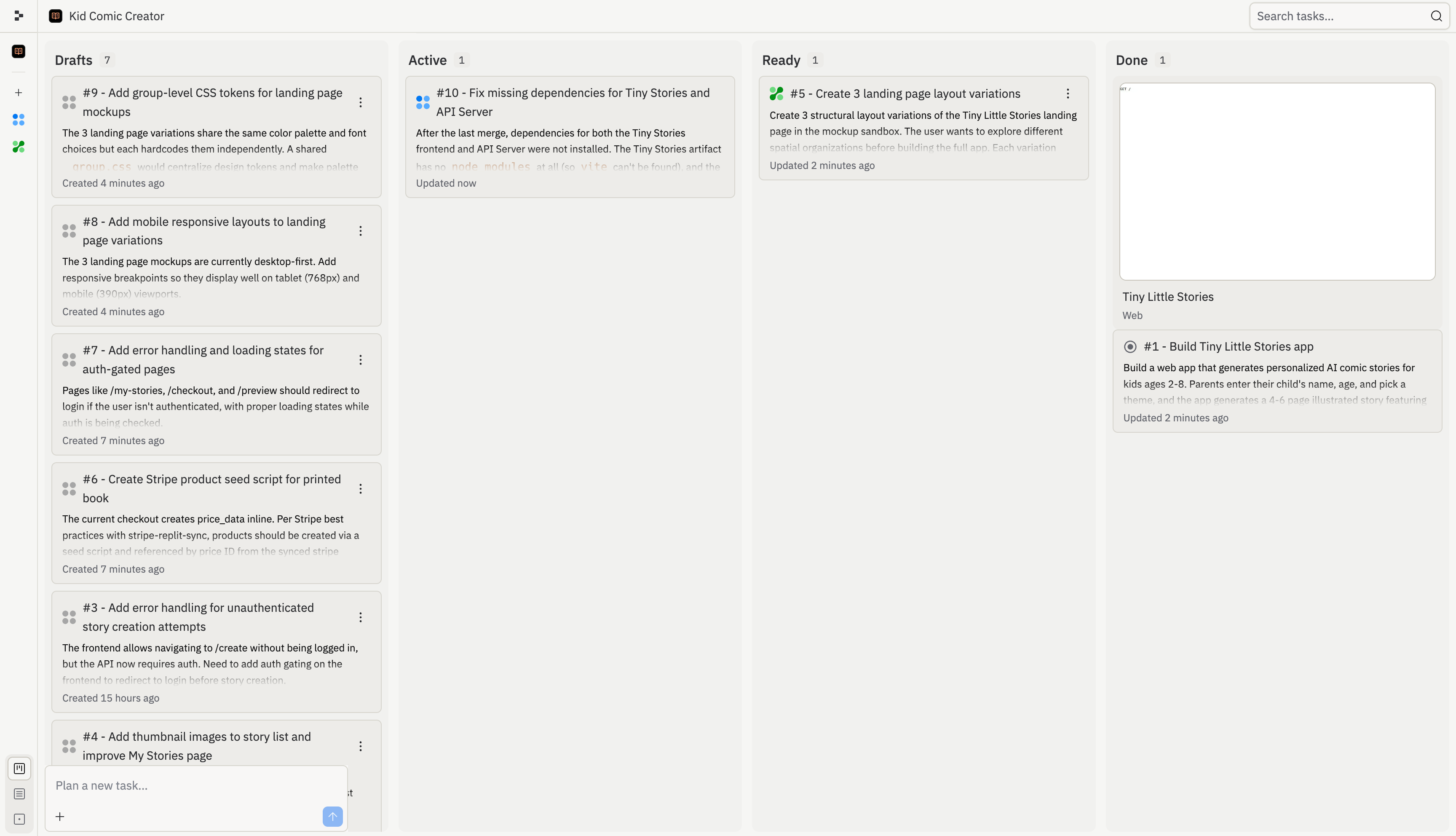
Every Agent task moves through a lifecycle: planned, running, ready for review, and finished. The lifecycle keeps work isolated until you decide what should become part of your main version.

<Frame>
  <img src="https://mintcdn.com/replit/L22mbBMLs80H8_c8/images/replitai/task-board-progress.png?fit=max&auto=format&n=L22mbBMLs80H8_c8&q=85&s=3b4ef2fbede2d057e40c138956ccd74d" alt="Task board showing tasks organized in Drafts, Active, Ready, and Done columns" width="3456" height="1984" data-path="images/replitai/task-board-progress.png" />
</Frame>

## Draft

A **Draft** is a task Agent has planned but has not started building yet. Drafts are safe to review because they only contain the proposed work: the task title, description, and plan.

Use Drafts to decide whether Agent understood the goal. You can start the task, ask Agent to revise the plan, or archive the draft for later.

## Active

An **Active** task is running in the background. Agent works on it in an isolated copy of your project, so your main version stays unchanged while the task runs.

You can keep using the main thread while Active tasks run. If a task needs feedback, open its thread and continue the conversation there.

## Queued

A **Queued** task is approved but waiting to start. A task can queue when it depends on another task, or when you have reached your plan's active background task limit.

Queued tasks start automatically when their prerequisites finish and an active task slot opens.

## Ready

A **Ready** task is finished, but its changes have not been applied to your main version yet. Review the task's work log, test results, and preview before applying changes.

If the work looks right, apply it to main. If it is not what you wanted, dismiss it and start a new task.

## Applying

An **Applying** task is in the middle of moving its changes into your main version. Agent handles conflicts automatically when applying changes from multiple tasks.

Wait for applying to finish before judging the final result. If something looks off afterward, ask Agent to fix it in the main thread.

## Done

A **Done** task is finished and no longer needs action. Done can mean the task was applied to your main version, archived before it started, or cancelled after it moved into building.

Use the **Done** column as a history of completed, archived, and cancelled task work.

## State examples

Every task moves through a series of stages, from an idea to part of your app. Each stage has its own icon so you can tell what's happening at a glance.

<div style={{ display: 'grid', gridTemplateColumns: 'repeat(auto-fill, minmax(300px, 1fr))', gap: '20px', margin: '20px 0' }}>
  <div style={{ display: 'flex', flexDirection: 'column', gap: '6px' }}>
    <TaskCard title="Add gift flow for family and friends" description="Let parents create a story for someone else's child and send it as a gift." status="draft-static" timestamp="2m" width="100%" />

    <span style={{ fontSize: '13px', color: 'var(--kb-text-dimmer, #666)', padding: '0 4px' }}><strong>Draft</strong>: Agent has proposed this task. It has a plan ready for your review.</span>
  </div>

  <div style={{ display: 'flex', flexDirection: 'column', gap: '6px' }}>
    <TaskCard title="Story continuations: sequels" description="Adding a Continue the Adventure button generates a sequel that picks up where the last one left off." status="active" timestamp="12m" width="100%" />

    <span style={{ fontSize: '13px', color: 'var(--kb-text-dimmer, #666)', padding: '0 4px' }}><strong>Active</strong>: Agent is building this task right now. It runs in its own copy of your project so your main version stays safe.</span>
  </div>

  <div style={{ display: 'flex', flexDirection: 'column', gap: '6px' }}>
    <TaskCard title="Add gift flow for family and friends" description="Let parents create a story for someone else's child and send it as a gift." status="active-queued" timestamp="1m" width="100%" />

    <span style={{ fontSize: '13px', color: 'var(--kb-text-dimmer, #666)', padding: '0 4px' }}><strong>Queued</strong>: This task is approved but waiting for a slot to open up before it can start building.</span>
  </div>

  <div style={{ display: 'flex', flexDirection: 'column', gap: '6px' }}>
    <TaskCard title="Bedtime mode with dark theme" description="A dedicated bedtime mode with a warm-toned dark theme and ambient sounds." status="ready-drop" timestamp="35m" width="100%" />

    <span style={{ fontSize: '13px', color: 'var(--kb-text-dimmer, #666)', padding: '0 4px' }}><strong>Ready</strong>: This task is complete. You can review the changes and apply them to your main version whenever you're ready.</span>
  </div>

  <div style={{ display: 'flex', flexDirection: 'column', gap: '6px' }}>
    <TaskCard title="Shareable links with OG previews" description="Adding public shareable links is the single biggest growth lever." status="applying" timestamp="31m" width="100%" />

    <span style={{ fontSize: '13px', color: 'var(--kb-text-dimmer, #666)', padding: '0 4px' }}><strong>Applying</strong>: The changes from this task are being applied to your main version right now.</span>
  </div>

  <div style={{ display: 'flex', flexDirection: 'column', gap: '6px' }}>
    <TaskCard title="Read-aloud with word highlighting" description="Text-to-speech lets kids enjoy stories independently while following along with highlighted words." status="done" timestamp="4h" width="100%" />

    <span style={{ fontSize: '13px', color: 'var(--kb-text-dimmer, #666)', padding: '0 4px' }}><strong>Done</strong>: This task is finished and its changes are part of your main version.</span>
  </div>

  <div style={{ display: 'flex', flexDirection: 'column', gap: '6px' }}>
    <TaskCard title="Onboarding tour for new readers" description="A short guided walkthrough that introduces parents to the core reading flow on first launch." status="draft-static" timestamp="1h" width="100%" />

    <span style={{ fontSize: '13px', color: 'var(--kb-text-dimmer, #666)', padding: '0 4px' }}><strong>Archived</strong>: A planning session you set aside before it started building. Archived planning sessions can be restored later from the <strong>Done</strong> column.</span>
  </div>

  <div style={{ display: 'flex', flexDirection: 'column', gap: '6px' }}>
    <TaskCard title="Experimental sticker pack generator" description="Generate custom illustrated stickers from a story's characters and scenes." status="done" timestamp="2h" width="100%" />

    <span style={{ fontSize: '13px', color: 'var(--kb-text-dimmer, #666)', padding: '0 4px' }}><strong>Cancelled</strong>: A task you stopped after it had moved into building. Cancelled tasks can't be restored. Start a new task if you change your mind.</span>
  </div>
</div>

## Archiving and cancelling tasks

You can stop a task at any point in its lifecycle, but the option you see depends on where the task is on the board. Both **Archive** and **Cancel** move a task to the **Done** column, but they behave differently:

| Action      | When it's available                                                                                 | What happens                                                                                         | Reversible?                                                                              |
| ----------- | --------------------------------------------------------------------------------------------------- | ---------------------------------------------------------------------------------------------------- | ---------------------------------------------------------------------------------------- |
| **Archive** | While the task is still a planning session: a **Draft** that hasn't started building                | The planning session is set aside without running. Its plan is preserved.                            | Yes. Open the archived card in the **Done** column and restore it back to **Drafts**.    |
| **Cancel**  | After the task has moved from planning into building: any **Active**, **Queued**, or **Ready** task | Agent stops the task and discards any in-progress work. No changes are applied to your main version. | No. Cancelled tasks can't be restored. Start a new task if you want to revisit the work. |

Use **Archive** for planning sessions you want to revisit later. Use **Cancel** as the permanent stop button for tasks that are queued, already running, or finished building.

You can find both archived planning sessions and cancelled tasks in the **Done** column on the far right of the task board, alongside completed tasks.