> ## Documentation Index
> Fetch the complete documentation index at: https://docs.replit.com/llms.txt
> Use this file to discover all available pages before exploring further.

# Task board

> Use the task board to review, start, monitor, and apply Agent tasks as they move through each stage.

export const TaskReviewDrawer = ({taskNumber = 23, taskTitle = "Story regeneration: redo pages or whole stories", taskDescription = 'Added story and page-level regeneration capabilities:\n\nBackend (API):\n- POST /api/stories/:storyId/regenerate: regenerates the entire story, deletes existing pages, sets status to "generating", and re-runs the full story text and image generation pipeline in the background\n- POST /api/stories/:storyId/pages/:pageId/regenerate: regenerates a single page with body { target: "text" | "image" | "both" }\n\nFrontend (story-preview.tsx):\n- Per-page regeneration menu: subtle three-dot icon overlay on the image area with options for "Regenerate Text", "Regenerate Image", or "Regenerate Both"\n- "Regenerate Story" button in header with confirmation dialog\n- Loading state: regenerating pages show a spinner and skeleton text while other pages remain readable'}) => {
  if (typeof document !== "undefined" && !document.getElementById("task-review-drawer-styles")) {
    const style = document.createElement("style");
    style.id = "task-review-drawer-styles";
    style.textContent = `
      .trd-wrap {
        --trd-surface: var(--replit-docs-bg, #F6F6F4);
        --trd-surface-higher: var(--replit-docs-bg-elevated, #F1F1EE);
        --trd-border: var(--replit-docs-border, #DEDAD5);
        --trd-border-strong: var(--replit-docs-border-strong, #CAC4BE);
        --trd-text: var(--replit-docs-text, #1D1D1D);
        --trd-text-dim: var(--replit-docs-text-muted, #5C5C5C);
        --trd-text-dimmest: var(--replit-docs-text-subtle, #858585);
        --trd-icon: var(--replit-docs-text-subtle, #858585);
        --trd-btn-bg: var(--replit-docs-bg-muted, #F1F1EE);
        --trd-btn-hover: var(--replit-docs-bg-elevated, #F1F1EE);
        --trd-positive-bg: hsla(140, 50%, 38%, 1);
        --trd-positive-text: #FFFFFF;
        --trd-positive-hover: hsla(140, 50%, 33%, 1);
        --trd-shadow: 0 1px 3px rgba(0,0,0,0.06);
        --trd-icon-surface: var(--replit-docs-bg-elevated, #F1F1EE);
        --trd-icon-border: var(--replit-docs-border, #DEDAD5);
      }
      .dark .trd-wrap,
      html.dark .trd-wrap,
      [data-theme="dark"] .trd-wrap {
        --trd-surface: var(--replit-docs-bg, #1E1E1F);
        --trd-surface-higher: var(--replit-docs-bg-elevated, #222223);
        --trd-border: var(--replit-docs-border, #39393D);
        --trd-border-strong: var(--replit-docs-border-strong, #4A4A50);
        --trd-text: var(--replit-docs-text, #F5F5F5);
        --trd-text-dim: var(--replit-docs-text-muted, #B8B8BE);
        --trd-text-dimmest: var(--replit-docs-text-subtle, #8E8F97);
        --trd-icon: var(--replit-docs-text-subtle, #8E8F97);
        --trd-btn-bg: var(--replit-docs-bg-elevated, #222223);
        --trd-btn-hover: var(--replit-docs-bg-muted, #222223);
        --trd-positive-bg: hsla(140, 50%, 33%, 1);
        --trd-positive-text: #FFFFFF;
        --trd-positive-hover: hsla(140, 50%, 28%, 1);
        --trd-shadow: 0 1px 3px rgba(0,0,0,0.2);
        --trd-icon-surface: var(--replit-docs-bg-elevated, #222223);
        --trd-icon-border: var(--replit-docs-border, #39393D);
      }
      .trd-wrap, .trd-wrap * {
        font-family: 'IBM Plex Sans', sans-serif !important;
      }
      @keyframes trd-fade-in {
        from { transform: translateY(8px); opacity: 0; }
        to { transform: translateY(0); opacity: 1; }
      }
      @media (hover: hover) {
        .trd-wrap .trd-dismiss:hover { background: var(--trd-btn-hover) !important; }
        .trd-wrap .trd-apply:hover { background: var(--trd-positive-hover) !important; }
      }
    `;
    document.head.appendChild(style);
  }
  const PlusIcon = <svg width="16" height="16" viewBox="0 0 24 24" fill="currentColor">
      <path d="M12 4.25a.75.75 0 0 1 .75.75v6.25H19a.75.75 0 0 1 0 1.5h-6.25V19a.75.75 0 0 1-1.5 0v-6.25H5a.75.75 0 0 1 0-1.5h6.25V5a.75.75 0 0 1 .75-.75Z" />
    </svg>;
  const ArrowUpIcon = <svg width="16" height="16" viewBox="0 0 24 24" fill="currentColor">
      <path fillRule="evenodd" d="M11.47 4.47a.75.75 0 0 1 1.06 0l7 7a.75.75 0 1 1-1.06 1.06l-5.72-5.72V19a.75.75 0 0 1-1.5 0V6.81l-5.72 5.72a.75.75 0 0 1-1.06-1.06l7-7Z" clipRule="evenodd" />
    </svg>;
  const ApplyIcon = <svg width="16" height="16" viewBox="0 0 24 24" fill="currentColor">
      <path fillRule="evenodd" d="M6 3.75a2.25 2.25 0 1 0 0 4.5 2.25 2.25 0 0 0 0-4.5ZM2.25 6a3.75 3.75 0 1 1 4.527 3.67 8.25 8.25 0 0 0 7.554 7.553A3.751 3.751 0 0 1 21.75 18a3.75 3.75 0 0 1-7.43.726 9.75 9.75 0 0 1-7.57-4.53V21a.75.75 0 0 1-1.5 0V9.675A3.751 3.751 0 0 1 2.25 6ZM18 15.75a2.25 2.25 0 1 0 0 4.5 2.25 2.25 0 0 0 0-4.5Z" clipRule="evenodd" />
    </svg>;
  const AgentModesIcon = <svg width="16" height="16" viewBox="0 0 24 24" fill="currentColor">
      <path d="M1.25 6V4A2.75 2.75 0 0 1 4 1.25h2a.75.75 0 0 1 0 1.5H4A1.25 1.25 0 0 0 2.75 4v2a.75.75 0 0 1-1.5 0ZM21.25 6V4a1.25 1.25 0 0 0-1.126-1.244L20 2.75h-2a.75.75 0 0 1 0-1.5h2A2.75 2.75 0 0 1 22.75 4v2a.75.75 0 0 1-1.5 0ZM21.25 20v-2a.75.75 0 0 1 1.5 0v2A2.75 2.75 0 0 1 20 22.75h-2a.75.75 0 0 1 0-1.5h2A1.25 1.25 0 0 0 21.25 20ZM1.25 20v-2a.75.75 0 0 1 1.5 0v2l.006.124A1.25 1.25 0 0 0 4 21.25h2a.75.75 0 0 1 0 1.5H4A2.75 2.75 0 0 1 1.25 20ZM16 12a4 4 0 1 0-8 0 4 4 0 0 0 8 0Zm1.5 0a5.5 5.5 0 1 1-11 0 5.5 5.5 0 0 1 11 0Z" />
    </svg>;
  const ChevronDown = <svg width="12" height="12" viewBox="0 0 24 24" fill="var(--trd-text-dimmest)">
      <path fillRule="evenodd" d="M12.53 15.53a.75.75 0 0 1-1.06 0l-6-6a.75.75 0 0 1 1.06-1.06L12 13.94l5.47-5.47a.75.75 0 1 1 1.06 1.06l-6 6Z" clipRule="evenodd" />
    </svg>;
  const SparkleIcon = <svg width="16" height="16" viewBox="0 0 24 24" fill="none">
      <path fill="#009118" d="M18.662 0a5.332 5.332 0 0 1 .001 10.664l-.412.01a8 8 0 0 0-7.577 7.59l-.01.398-.008.274A5.331 5.331 0 0 1 0 18.662a5.332 5.332 0 0 1 5.332-5.332l.398-.01a8 8 0 0 0 7.59-7.576l.011-.412A5.331 5.331 0 0 1 18.662 0Z" />
      <path fill="#6CD97E" d="m18.663 13.33.273.007a5.332 5.332 0 1 1-5.598 5.6l-.007-.275.006-.265a5.38 5.38 0 0 1 .137-.963c.006-.026.01-.052.017-.078.012-.047.026-.095.04-.142a4.84 4.84 0 0 1 .032-.114l.007-.024.065-.193.02-.054.022-.06c.021-.056.044-.112.067-.167l.026-.059c.024-.056.048-.112.074-.167l.058-.118a4.854 4.854 0 0 1 .145-.265l.024-.043a5.29 5.29 0 0 1 .08-.129c.02-.032.04-.065.062-.097a5.34 5.34 0 0 1 .468-.607l.071-.079a5.562 5.562 0 0 1 .265-.267l.11-.1a5.3 5.3 0 0 1 .308-.252l.058-.045c.046-.034.093-.068.14-.1l.049-.034.073-.049.07-.043.112-.07c.043-.026.089-.05.133-.075.026-.014.051-.03.078-.044l.114-.059c.041-.02.083-.042.126-.062l.089-.04.146-.065.086-.033c.048-.019.095-.038.143-.055l.023-.008.202-.068.024-.007c.062-.019.125-.036.189-.053l.043-.012c.062-.016.125-.03.189-.044l.078-.018a5.34 5.34 0 0 1 .485-.074c.011 0 .023-.003.034-.005.09-.009.18-.014.27-.02l.274-.006ZM5.332 0a5.332 5.332 0 0 1 5.332 5.332l-.008.274a5.332 5.332 0 0 1-5.324 5.058l-.274-.007A5.332 5.332 0 0 1 5.332 0Z" />
    </svg>;
  const descriptionLines = taskDescription.split("\n").filter(l => l.trim());
  return <div className="trd-wrap" style={{
    fontFamily: "'IBM Plex Sans', sans-serif",
    width: "100%",
    maxWidth: "427px",
    minWidth: "320px",
    alignSelf: "center",
    margin: "48px auto",
    opacity: 0,
    animation: "trd-fade-in 300ms ease-out forwards"
  }}>
      {}
      <div style={{
    background: "var(--trd-surface)",
    border: "1px solid var(--trd-border-strong)",
    borderRadius: "6px",
    padding: "8px",
    boxShadow: "var(--trd-shadow)",
    display: "flex",
    flexDirection: "column",
    gap: "4px"
  }}>
        {}
        <div>
          <div style={{
    display: "flex",
    flexDirection: "column",
    gap: "8px",
    padding: "4px"
  }}>
            {}
            <div style={{
    display: "flex",
    alignItems: "center",
    gap: "8px"
  }}>
              <div style={{
    display: "flex",
    alignItems: "center",
    justifyContent: "center",
    width: "28px",
    height: "28px",
    borderRadius: "8px",
    background: "var(--trd-icon-surface)",
    border: "1px solid var(--trd-icon-border)",
    flexShrink: 0
  }}>
                {SparkleIcon}
              </div>
              <span style={{
    fontSize: "14px",
    lineHeight: "1.4",
    color: "var(--trd-text)"
  }}>
                Ready for review
              </span>
            </div>

            {}
            <div style={{
    display: "flex",
    flexDirection: "column",
    gap: "4px"
  }}>
              <span style={{
    fontSize: "13px",
    lineHeight: "1.4",
    color: "var(--trd-text-dim)"
  }}>
                Task #{taskNumber}: {taskTitle}
              </span>

              {}
              <div style={{
    fontSize: "12px",
    lineHeight: "1.5",
    color: "var(--trd-text-dimmest)",
    maxHeight: "50px",
    overflow: "hidden",
    position: "relative"
  }}>
                {descriptionLines.map((line, i) => <span key={i}>
                    {line}
                    <br />
                  </span>)}
              </div>
            </div>

            {}
            <div style={{
    display: "flex",
    gap: "8px"
  }}>
              <button className="trd-dismiss" type="button" style={{
    width: "122px",
    flexShrink: 0,
    height: "32px",
    display: "flex",
    alignItems: "center",
    justifyContent: "center",
    border: "none",
    borderRadius: "8px",
    background: "var(--trd-btn-bg)",
    color: "var(--trd-text)",
    fontSize: "14px",
    fontFamily: "inherit",
    cursor: "pointer",
    transition: "background 120ms ease-out"
  }}>
                Dismiss
              </button>
              <button className="trd-apply" type="button" style={{
    flex: 1,
    height: "32px",
    display: "flex",
    alignItems: "center",
    justifyContent: "center",
    gap: "6px",
    border: "none",
    borderRadius: "8px",
    background: "var(--trd-positive-bg)",
    color: "var(--trd-positive-text)",
    fontSize: "14px",
    fontFamily: "inherit",
    cursor: "pointer",
    transition: "background 120ms ease-out"
  }}>
                <span>Apply changes to main version</span>
                {ApplyIcon}
              </button>
            </div>
          </div>
        </div>

        {}
        <div style={{
    padding: 0
  }}>
          <div style={{
    display: "flex",
    flexDirection: "column",
    gap: "4px"
  }}>
            {}
            <div style={{
    padding: "5px 6px",
    minHeight: "21px",
    fontSize: "14px",
    lineHeight: "1.3",
    color: "var(--trd-text-dimmest)"
  }}>
              Message agent…
            </div>

            {}
            <div style={{
    display: "flex",
    justifyContent: "space-between",
    alignItems: "flex-end",
    paddingBottom: "2px"
  }}>
              {}
              <div style={{
    display: "flex",
    alignItems: "center",
    gap: "4px"
  }}>
                <button type="button" style={{
    display: "flex",
    alignItems: "center",
    justifyContent: "center",
    width: "24px",
    height: "24px",
    border: "none",
    borderRadius: "4px",
    background: "transparent",
    cursor: "pointer",
    color: "var(--trd-icon)",
    padding: 0
  }}>
                  {PlusIcon}
                </button>
              </div>

              {}
              <div style={{
    display: "flex",
    alignItems: "center",
    gap: "8px",
    paddingRight: "2px"
  }}>
                <button type="button" style={{
    display: "flex",
    alignItems: "center",
    gap: "4px",
    height: "24px",
    padding: "0 4px",
    border: "none",
    borderRadius: "4px",
    background: "transparent",
    cursor: "pointer",
    color: "var(--trd-icon)"
  }}>
                  {AgentModesIcon}
                  {ChevronDown}
                </button>
                <button type="button" style={{
    display: "flex",
    alignItems: "center",
    justifyContent: "center",
    width: "28px",
    height: "28px",
    border: "none",
    borderRadius: "8px",
    background: "hsla(210, 100%, 74%, 1)",
    color: "#FFFFFF",
    padding: 0,
    cursor: "pointer"
  }}>
                  {ArrowUpIcon}
                </button>
              </div>
            </div>
          </div>
        </div>
      </div>
    </div>;
};

export const KanbanColumns = ({columns = []}) => {
  if (typeof document !== "undefined" && !document.getElementById("kanban-board-styles")) {
    const style = document.createElement("style");
    style.id = "kanban-board-styles";
    style.textContent = `
      .kb-board {
        --kb-bg: var(--replit-docs-bg, #F6F6F4);
        --kb-col-bg: var(--replit-docs-bg-elevated, #F1F1EE);
        --kb-card-bg: var(--replit-docs-bg-task, #EDECE8);
        --kb-border: var(--replit-docs-border, #DEDAD5);
        --kb-text: var(--replit-docs-text, #1D1D1D);
        --kb-text-dim: var(--replit-docs-text-muted, #5C5C5C);
        --kb-text-dimmer: var(--replit-docs-text-muted, #5C5C5C);
        --kb-text-dimmest: var(--replit-docs-text-subtle, #858585);
        --kb-badge-bg: var(--replit-docs-bg-elevated, #F1F1EE);
      }
      .dark .kb-board,
      html.dark .kb-board,
      [data-theme="dark"] .kb-board {
        --kb-bg: var(--replit-docs-bg, #1E1E1F);
        --kb-col-bg: var(--replit-docs-bg-elevated, #222223);
        --kb-card-bg: var(--replit-docs-bg-task, #252527);
        --kb-border: var(--replit-docs-border, #39393D);
        --kb-text: var(--replit-docs-text, #F5F5F5);
        --kb-text-dim: var(--replit-docs-text-muted, #B8B8BE);
        --kb-text-dimmer: var(--replit-docs-text-muted, #B8B8BE);
        --kb-text-dimmest: var(--replit-docs-text-subtle, #8E8F97);
        --kb-badge-bg: var(--replit-docs-bg-elevated, #222223);
      }
      .kb-board { overflow: visible; }
    `;
    document.head.appendChild(style);
  }
  return <div className="kb-board" style={{
    fontFamily: "'IBM Plex Sans', sans-serif",
    display: "flex",
    gap: "12px",
    padding: "8px",
    background: "var(--kb-bg)",
    borderRadius: "12px"
  }}>
      {columns.map((col, ci) => <div key={ci} data-kb-column={col.title.toLowerCase()} style={{
    flex: "1 1 0",
    minWidth: "200px",
    background: "var(--kb-col-bg)",
    borderRadius: "8px",
    display: "flex",
    flexDirection: "column",
    overflow: "visible"
  }}>
          <div style={{
    display: "flex",
    alignItems: "center",
    gap: "8px",
    padding: "12px 12px 8px 12px"
  }}>
            <span style={{
    fontSize: "14px",
    fontWeight: 500,
    color: "var(--kb-text)"
  }}>
              {col.title}
            </span>
            <span data-kb-count style={{
    fontSize: "12px",
    color: "var(--kb-text-dimmer)",
    background: "var(--kb-badge-bg)",
    padding: "0 6px",
    borderRadius: "4px",
    lineHeight: "20px"
  }}>
              {col.count}
            </span>
          </div>
          <div data-kb-cards style={{
    display: "flex",
    flexDirection: "column",
    gap: "8px",
    padding: "8px",
    flex: "1 1 0"
  }}>
            {col.cards.map((card, i) => <TaskCard key={i} title={card.title} description={card.description} status={card.status} timestamp={card.timestamp} showMenu={card.showMenu} width="100%" />)}
          </div>
        </div>)}
    </div>;
};

export const TaskCard = ({title = "Product Manager next steps discussion", description = "", status = "draft", timestamp = "Created 3 minutes ago", width = "364px", showMenu = false}) => {
  if (typeof document !== "undefined" && !document.getElementById("task-card-styles")) {
    const style = document.createElement("style");
    style.id = "task-card-styles";
    style.textContent = `
      .task-card {
        --tc-bg: var(--replit-docs-bg-task, #EDECE8);
        --tc-border: var(--replit-docs-border, #DEDAD5);
        --tc-text: var(--replit-docs-text, #1D1D1D);
        --tc-text-dim: var(--replit-docs-text-muted, #5C5C5C);
        --tc-text-dimmest: var(--replit-docs-text-subtle, #858585);
        --tc-dot-active: #4A7BF7;
        --tc-dot-draft: #A6A6A6;
        --tc-dot-ready: #F59E0B;
        --tc-dot-done: #22C55E;
      }
      .dark .task-card,
      html.dark .task-card,
      [data-theme="dark"] .task-card {
        --tc-bg: var(--replit-docs-bg-task, #252527);
        --tc-border: var(--replit-docs-border, #39393D);
        --tc-text: var(--replit-docs-text, #F5F5F5);
        --tc-text-dim: var(--replit-docs-text-muted, #B8B8BE);
        --tc-text-dimmest: var(--replit-docs-text-subtle, #8E8F97);
        --tc-dot-active: #6B9EFF;
        --tc-dot-draft: #6B7280;
        --tc-dot-ready: #FBBF24;
        --tc-dot-done: #4ADE80;
      }
      @keyframes task-card-fade-in {
        from { transform: translateY(6px); opacity: 0; }
        to { transform: translateY(0); opacity: 1; }
      }
      @keyframes tc-tl {
        0%{opacity:1;fill:var(--tc-light)} 5%{opacity:1;fill:var(--tc-dark)} 10%{opacity:1;fill:var(--tc-dark)} 15%{opacity:1;fill:var(--tc-light)}
        20%{opacity:0} 25%{opacity:1;fill:var(--tc-dark)} 30%{opacity:1;fill:var(--tc-light)} 35%{opacity:0}
        40%{opacity:1;fill:var(--tc-dark)} 45%{opacity:1;fill:var(--tc-light)} 50%{opacity:0} 55%{opacity:1;fill:var(--tc-dark)}
        60%{opacity:0} 65%{opacity:1;fill:var(--tc-light)} 70%{opacity:1;fill:var(--tc-light)} 75%{opacity:1;fill:var(--tc-light)}
        80%{opacity:1;fill:var(--tc-light)} 85%{opacity:0} 90%{opacity:1;fill:var(--tc-light)} 95%{opacity:1;fill:var(--tc-light)}
      }
      @keyframes tc-tr {
        0%{opacity:1;fill:var(--tc-dark)} 5%{opacity:0} 10%{opacity:0} 15%{opacity:0}
        20%{opacity:1;fill:var(--tc-light)} 25%{opacity:1;fill:var(--tc-light)} 30%{opacity:1;fill:var(--tc-light)} 35%{opacity:1;fill:var(--tc-light)}
        40%{opacity:0} 45%{opacity:1;fill:var(--tc-dark)} 50%{opacity:1;fill:var(--tc-dark)} 55%{opacity:0}
        60%{opacity:1;fill:var(--tc-dark)} 65%{opacity:0} 70%{opacity:0} 75%{opacity:1;fill:var(--tc-light)}
        80%{opacity:0} 85%{opacity:1;fill:var(--tc-dark)} 90%{opacity:0} 95%{opacity:0}
      }
      @keyframes tc-bl {
        0%{opacity:1;fill:var(--tc-light)} 5%{opacity:0} 10%{opacity:0} 15%{opacity:0}
        20%{opacity:1;fill:var(--tc-light)} 25%{opacity:1;fill:var(--tc-light)} 30%{opacity:1;fill:var(--tc-light)} 35%{opacity:1;fill:var(--tc-light)}
        40%{opacity:0} 45%{opacity:1;fill:var(--tc-light)} 50%{opacity:1;fill:var(--tc-light)} 55%{opacity:0}
        60%{opacity:1;fill:var(--tc-light)} 65%{opacity:0} 70%{opacity:0} 75%{opacity:1;fill:var(--tc-light)}
        80%{opacity:0} 85%{opacity:1;fill:var(--tc-light)} 90%{opacity:0} 95%{opacity:0}
      }
      @keyframes tc-br {
        0%{opacity:1;fill:var(--tc-light)} 5%{opacity:1;fill:var(--tc-dark)} 10%{opacity:1;fill:var(--tc-light)} 15%{opacity:1;fill:var(--tc-light)}
        20%{opacity:0} 25%{opacity:1;fill:var(--tc-light)} 30%{opacity:1;fill:var(--tc-dark)} 35%{opacity:0}
        40%{opacity:1;fill:var(--tc-light)} 45%{opacity:1;fill:var(--tc-light)} 50%{opacity:0} 55%{opacity:1;fill:var(--tc-light)}
        60%{opacity:0} 65%{opacity:1;fill:var(--tc-dark)} 70%{opacity:1;fill:var(--tc-light)} 75%{opacity:1;fill:var(--tc-light)}
        80%{opacity:1;fill:var(--tc-light)} 85%{opacity:0} 90%{opacity:1;fill:var(--tc-light)} 95%{opacity:1;fill:var(--tc-dark)}
      }
      @keyframes tc-drop {
        0%{opacity:0} 5%{opacity:1;fill:var(--tc-dark)} 10%{opacity:1;fill:var(--tc-dark)} 15%{opacity:1;fill:var(--tc-dark)}
        20%{opacity:0} 25%{opacity:0} 30%{opacity:0} 35%{opacity:0}
        40%{opacity:1;fill:var(--tc-dark)} 45%{opacity:0} 50%{opacity:0} 55%{opacity:1;fill:var(--tc-dark)}
        60%{opacity:0} 65%{opacity:1;fill:var(--tc-dark)} 70%{opacity:1;fill:var(--tc-dark)} 75%{opacity:0}
        80%{opacity:1;fill:var(--tc-dark)} 85%{opacity:0} 90%{opacity:1;fill:var(--tc-dark)} 95%{opacity:1;fill:var(--tc-dark)}
      }
      @keyframes tc-dropalt {
        0%{opacity:0} 5%{opacity:0} 10%{opacity:0} 15%{opacity:0}
        20%{opacity:1;fill:var(--tc-dark)} 25%{opacity:0} 30%{opacity:0} 35%{opacity:1;fill:var(--tc-dark)}
        40%{opacity:0} 45%{opacity:0} 50%{opacity:1;fill:var(--tc-dark)} 55%{opacity:0}
        60%{opacity:1;fill:var(--tc-dark)} 65%{opacity:0} 70%{opacity:0} 75%{opacity:0}
        80%{opacity:0} 85%{opacity:1;fill:var(--tc-dark)} 90%{opacity:0} 95%{opacity:0}
      }
      .task-card .tc-el-tl { animation: tc-tl 4s step-end infinite; }
      .task-card .tc-el-tr { animation: tc-tr 4s step-end infinite; }
      .task-card .tc-el-bl { animation: tc-bl 4s step-end infinite; }
      .task-card .tc-el-br { animation: tc-br 4s step-end infinite; }
      .task-card .tc-el-drop { animation: tc-drop 4s step-end infinite; }
      .task-card .tc-el-dropalt { animation: tc-dropalt 4s step-end infinite; }
      @media (hover: hover) {
        .task-card:hover {
          border-color: var(--tc-text-dimmest) !important;
        }
        .task-card .tc-menu-btn:hover {
          background: var(--tc-border);
        }
      }
    `;
    document.head.appendChild(style);
  }
  const colorPairs = {
    active: {
      dark: "#57ABFF",
      light: "#A8D4FF"
    },
    "active-queued": {
      dark: "#6BB5FF",
      light: "#6BB5FF"
    },
    draft: {
      dark: "#A6A6A6",
      light: "#D4D4D4"
    },
    "draft-static": {
      dark: "#A6A6A6",
      light: "#D4D4D4"
    },
    "draft-done": {
      dark: "#A6A6A6",
      light: "#D4D4D4"
    },
    ready: {
      dark: "#009118",
      light: "#6CD97E"
    },
    "ready-drop": {
      dark: "#009118",
      light: "#6CD97E"
    },
    applying: {
      dark: "#7C3AED",
      light: "#C4B5FD"
    },
    done: {
      dark: "#22C55E",
      light: "#86EFAC"
    }
  };
  const statusLabels = {
    active: "Active",
    "active-queued": "Queued",
    draft: "Draft",
    "draft-static": "Draft",
    "draft-done": "Done",
    ready: "Ready",
    "ready-drop": "Ready",
    applying: "Applying",
    done: "Done"
  };
  const colors = colorPairs[status] || colorPairs.draft;
  const applyingIconHtml = '<svg width="16" height="16" viewBox="0 0 24 24" fill="none" style="flex-shrink:0;--tc-dark:#009118;--tc-light:#6CD97E"><circle class="tc-el-tl" cx="5.332" cy="5.338" r="5.332" fill="#009118"/><circle class="tc-el-tr" cx="18.663" cy="5.338" r="5.332" fill="#009118"/><circle class="tc-el-bl" cx="5.332" cy="18.668" r="5.332" fill="#009118"/><circle class="tc-el-br" cx="18.663" cy="18.668" r="5.332" fill="#009118"/><path class="tc-el-drop" fill="#009118" d="M18.662 0a5.332 5.332 0 0 1 .001 10.664l-.412.01a8 8 0 0 0-7.577 7.59l-.01.398-.008.274A5.331 5.331 0 0 1 0 18.662a5.332 5.332 0 0 1 5.332-5.332l.398-.01a8 8 0 0 0 7.59-7.576l.011-.412A5.331 5.331 0 0 1 18.662 0Z"/><g class="tc-el-dropalt" transform="rotate(90, 12, 12)"><path fill="#009118" d="M18.662 0a5.332 5.332 0 0 1 .001 10.664l-.412.01a8 8 0 0 0-7.577 7.59l-.01.398-.008.274A5.331 5.331 0 0 1 0 18.662a5.332 5.332 0 0 1 5.332-5.332l.398-.01a8 8 0 0 0 7.59-7.576l.011-.412A5.331 5.331 0 0 1 18.662 0Z"/></g></svg>';
  const doneIconHtml = '<svg width="16" height="16" viewBox="0 0 24 24" style="flex-shrink:0;fill:var(--tc-text-dimmest)"><path d="M12 7a5 5 0 1 1 0 10 5 5 0 0 1 0-10Z"/><path fill-rule="evenodd" d="M12 1c6.075 0 11 4.925 11 11s-4.925 11-11 11S1 18.075 1 12 5.925 1 12 1Zm0 2a9 9 0 1 0 0 18 9 9 0 0 0 0-18Z" clip-rule="evenodd"/></svg>';
  const handleApplyChanges = e => {
    const tooltip = e.currentTarget.parentElement;
    tooltip.style.display = "none";
    const menuBtn = tooltip.previousElementSibling;
    if (menuBtn) menuBtn.style.background = "none";
    const card = e.currentTarget.closest(".task-card");
    if (!card) return;
    const headerRow = card.firstElementChild;
    const oldIcon = headerRow.firstElementChild;
    const menuWrapper = headerRow.lastElementChild;
    const meta = card.lastElementChild;
    const temp = document.createElement("div");
    temp.innerHTML = applyingIconHtml;
    headerRow.replaceChild(temp.firstElementChild, oldIcon);
    meta.textContent = "Applying \u2022 just now";
    menuWrapper.style.visibility = "hidden";
    setTimeout(() => {
      const currentIcon = headerRow.firstElementChild;
      const doneTemp = document.createElement("div");
      doneTemp.innerHTML = doneIconHtml;
      headerRow.replaceChild(doneTemp.firstElementChild, currentIcon);
      meta.textContent = "Done \u2022 just now";
      const board = card.closest(".kb-board");
      if (!board) return;
      const doneCol = board.querySelector('[data-kb-column="done"]');
      if (!doneCol) return;
      const cardList = doneCol.querySelector("[data-kb-cards]");
      const readyCol = board.querySelector('[data-kb-column="ready"]');
      card.style.transition = "opacity 300ms, transform 300ms";
      card.style.opacity = "0";
      card.style.transform = "translateY(-10px)";
      setTimeout(() => {
        card.parentElement.removeChild(card);
        if (readyCol) {
          const rc = readyCol.querySelector("[data-kb-count]");
          rc.textContent = parseInt(rc.textContent) - 1;
        }
        const dc = doneCol.querySelector("[data-kb-count]");
        dc.textContent = parseInt(dc.textContent) + 1;
        card.style.opacity = "0";
        card.style.transform = "translateY(6px)";
        cardList.insertBefore(card, cardList.firstChild);
        requestAnimationFrame(() => {
          card.style.transition = "opacity 300ms, transform 300ms";
          card.style.opacity = "1";
          card.style.transform = "translateY(0)";
        });
      }, 300);
    }, 3000);
  };
  return <div className="task-card" style={{
    fontFamily: "'IBM Plex Sans', sans-serif",
    width: width,
    background: "var(--tc-bg)",
    border: "1px solid var(--tc-border)",
    borderRadius: "8px",
    padding: "8px 12px",
    margin: 0,
    display: "flex",
    flexDirection: "column",
    gap: "4px",
    cursor: "pointer",
    opacity: 0,
    animation: "task-card-fade-in 300ms ease-out forwards",
    transition: "border-color 120ms ease-out"
  }}>
      {}
      <div style={{
    display: "flex",
    alignItems: "center",
    gap: "8px"
  }}>
        {status === "done" ? <svg width="16" height="16" viewBox="0 0 24 24" fill="var(--tc-text-dimmest)" style={{
    flexShrink: 0
  }}>
            <path d="M12 7a5 5 0 1 1 0 10 5 5 0 0 1 0-10Z" />
            <path fillRule="evenodd" d="M12 1c6.075 0 11 4.925 11 11s-4.925 11-11 11S1 18.075 1 12 5.925 1 12 1Zm0 2a9 9 0 1 0 0 18 9 9 0 0 0 0-18Z" clipRule="evenodd" />
          </svg> : status === "draft-static" ? <svg width="16" height="16" viewBox="0 0 24 24" fill="none" style={{
    flexShrink: 0
  }}>
            <circle cx="5.332" cy="5.338" r="5.332" fill={colors.dark} />
            <circle cx="18.663" cy="5.338" r="5.332" fill={colors.dark} />
            <circle cx="5.332" cy="18.668" r="5.332" fill={colors.dark} />
            <circle cx="18.663" cy="18.668" r="5.332" fill={colors.dark} />
          </svg> : status === "draft-done" ? <svg width="16" height="16" viewBox="0 0 24 24" fill="none" style={{
    flexShrink: 0
  }}>
            <circle cx="5.332" cy="5.338" r="5.332" fill={colors.light} />
            <circle cx="18.663" cy="5.338" r="5.332" fill={colors.light} />
            <circle cx="5.332" cy="18.668" r="5.332" fill={colors.light} />
            <circle cx="18.663" cy="18.668" r="5.332" fill={colors.light} />
          </svg> : status === "active-queued" ? <svg width="16" height="16" viewBox="0 0 24 24" fill="none" style={{
    flexShrink: 0
  }}>
            <circle cx="5.332" cy="5.338" r="5.332" fill={colors.light} />
            <circle cx="18.663" cy="5.338" r="5.332" fill={colors.light} />
            <circle cx="5.332" cy="18.668" r="5.332" fill={colors.light} />
            <circle cx="18.663" cy="18.668" r="5.332" fill={colors.light} />
          </svg> : status === "ready-drop" ? <svg width="16" height="16" viewBox="0 0 24 24" fill="none" style={{
    flexShrink: 0
  }}>
            <circle cx="5.332" cy="5.338" r="5.332" fill={colors.light} />
            <circle cx="18.663" cy="18.668" r="5.332" fill={colors.light} />
            <path fill={colors.dark} d="M18.662 0a5.332 5.332 0 0 1 .001 10.664l-.412.01a8 8 0 0 0-7.577 7.59l-.01.398-.008.274A5.331 5.331 0 0 1 0 18.662a5.332 5.332 0 0 1 5.332-5.332l.398-.01a8 8 0 0 0 7.59-7.576l.011-.412A5.331 5.331 0 0 1 18.662 0Z" />
          </svg> : <svg width="16" height="16" viewBox="0 0 24 24" fill="none" style={{
    flexShrink: 0,
    "--tc-dark": colors.dark,
    "--tc-light": colors.light
  }}>
            <circle className="tc-el-tl" cx="5.332" cy="5.338" r="5.332" fill={colors.dark} />
            <circle className="tc-el-tr" cx="18.663" cy="5.338" r="5.332" fill={colors.dark} />
            <circle className="tc-el-bl" cx="5.332" cy="18.668" r="5.332" fill={colors.dark} />
            <circle className="tc-el-br" cx="18.663" cy="18.668" r="5.332" fill={colors.dark} />
            <path className="tc-el-drop" fill={colors.dark} d="M18.662 0a5.332 5.332 0 0 1 .001 10.664l-.412.01a8 8 0 0 0-7.577 7.59l-.01.398-.008.274A5.331 5.331 0 0 1 0 18.662a5.332 5.332 0 0 1 5.332-5.332l.398-.01a8 8 0 0 0 7.59-7.576l.011-.412A5.331 5.331 0 0 1 18.662 0Z" />
            <g className="tc-el-dropalt" transform="rotate(90, 12, 12)">
              <path fill={colors.dark} d="M18.662 0a5.332 5.332 0 0 1 .001 10.664l-.412.01a8 8 0 0 0-7.577 7.59l-.01.398-.008.274A5.331 5.331 0 0 1 0 18.662a5.332 5.332 0 0 1 5.332-5.332l.398-.01a8 8 0 0 0 7.59-7.576l.011-.412A5.331 5.331 0 0 1 18.662 0Z" />
            </g>
          </svg>}
        <span style={{
    flex: 1,
    fontSize: "14px",
    lineHeight: "1.4",
    color: "var(--tc-text)",
    minWidth: 0
  }}>
          {title}
        </span>
        <div style={{
    position: "relative",
    flexShrink: 0
  }}>
          <button className="tc-menu-btn" type="button" aria-label="Thread actions" onClick={showMenu ? e => {
    const btn = e.currentTarget;
    const popup = btn.nextElementSibling;
    const card = btn.closest(".task-card");
    const isHidden = popup.style.display === "none";
    popup.style.display = isHidden ? "flex" : "none";
    btn.style.background = isHidden ? "var(--tc-border)" : "none";
    if (card) card.style.zIndex = isHidden ? "9999" : "";
  } : undefined} style={{
    display: "flex",
    alignItems: "center",
    justifyContent: "center",
    width: "24px",
    height: "24px",
    border: "none",
    background: "none",
    borderRadius: "4px",
    cursor: "pointer",
    color: "var(--tc-text-dimmest)",
    padding: 0,
    flexShrink: 0,
    transition: "background 120ms ease-out"
  }}>
            <svg width="16" height="16" viewBox="0 0 24 24" fill="currentColor">
              <path fillRule="evenodd" d="M10.25 5a1.75 1.75 0 1 1 3.5 0 1.75 1.75 0 0 1-3.5 0Zm0 7a1.75 1.75 0 1 1 3.5 0 1.75 1.75 0 0 1-3.5 0Zm0 7a1.75 1.75 0 1 1 3.5 0 1.75 1.75 0 0 1-3.5 0Z" clipRule="evenodd" />
            </svg>
          </button>
          {showMenu && <div style={{
    display: "none",
    position: "absolute",
    top: 0,
    left: "28px",
    background: "var(--tc-bg)",
    border: "1px solid var(--tc-border)",
    borderRadius: "8px",
    padding: "4px",
    boxShadow: "0 8px 24px rgba(0,0,0,0.12), 0 2px 6px rgba(0,0,0,0.06)",
    zIndex: 9999,
    minWidth: "160px",
    flexDirection: "column",
    gap: "0"
  }}>
              <div onClick={handleApplyChanges} style={{
    display: "flex",
    alignItems: "center",
    gap: "8px",
    padding: "6px 8px",
    borderRadius: "4px",
    cursor: "pointer",
    color: "var(--tc-text)",
    fontSize: "14px"
  }}>
                <svg width="16" height="16" viewBox="0 0 24 24" fill="currentColor" style={{
    flexShrink: 0
  }}>
                  <path fillRule="evenodd" d="M6 3.75a2.25 2.25 0 1 0 0 4.5 2.25 2.25 0 0 0 0-4.5ZM2.25 6a3.75 3.75 0 1 1 4.527 3.67 8.25 8.25 0 0 0 7.554 7.553A3.751 3.751 0 0 1 21.75 18a3.75 3.75 0 0 1-7.43.726 9.75 9.75 0 0 1-7.57-4.53V21a.75.75 0 0 1-1.5 0V9.675A3.751 3.751 0 0 1 2.25 6ZM18 15.75a2.25 2.25 0 1 0 0 4.5 2.25 2.25 0 0 0 0-4.5Z" clipRule="evenodd" />
                </svg>
                <span>Apply changes</span>
              </div>
              <div style={{
    display: "flex",
    alignItems: "center",
    gap: "8px",
    padding: "6px 8px",
    borderRadius: "4px",
    cursor: "pointer",
    color: "var(--tc-text)",
    fontSize: "14px"
  }}>
                <svg width="16" height="16" viewBox="0 0 24 24" fill="currentColor" style={{
    flexShrink: 0
  }}>
                  <path fillRule="evenodd" d="M5.47 5.47a.75.75 0 0 1 1.06 0L12 10.94l5.47-5.47a.75.75 0 1 1 1.06 1.06L13.06 12l5.47 5.47a.75.75 0 1 1-1.06 1.06L12 13.06l-5.47 5.47a.75.75 0 0 1-1.06-1.06L10.94 12 5.47 6.53a.75.75 0 0 1 0-1.06Z" clipRule="evenodd" />
                </svg>
                <span>Cancel</span>
              </div>
            </div>}
        </div>
      </div>
      {}
      {description && <div style={{
    fontSize: "12px",
    color: "var(--tc-text-dim)",
    lineHeight: "1.5",
    overflow: "hidden",
    display: "-webkit-box",
    WebkitLineClamp: 3,
    WebkitBoxOrient: "vertical",
    paddingLeft: "0"
  }}>
          {description}
        </div>}
      {}
      <div style={{
    fontSize: "12px",
    color: "var(--tc-text-dimmest)",
    paddingLeft: "0"
  }}>
        {statusLabels[status] || status} • {timestamp}
      </div>
    </div>;
};

## How the task board works

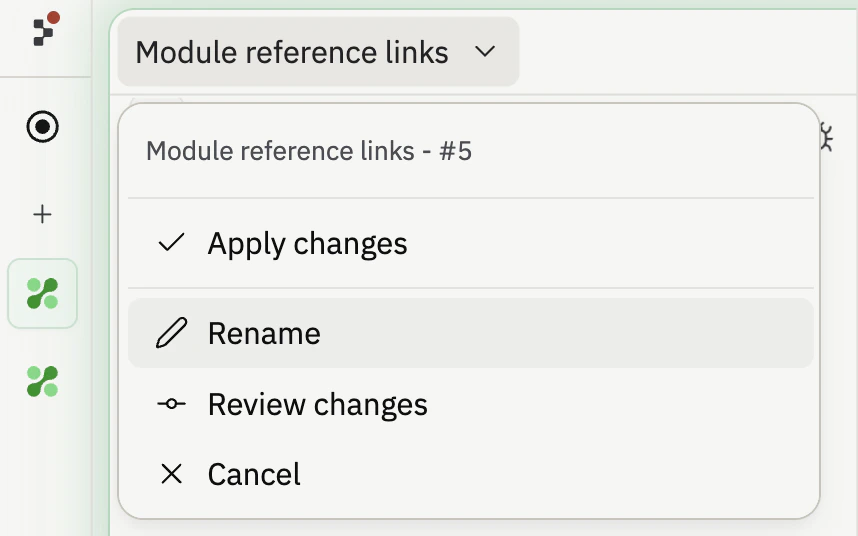
The task board gives you one place to review, start, monitor, and apply Agent tasks. Use it when Agent breaks a large request into multiple pieces, when you want to run work in the background, or when you need to understand what has already changed in your project.

<Frame>
  <img src="https://mintcdn.com/replit/L22mbBMLs80H8_c8/images/replitai/task-board-progress.png?fit=max&auto=format&n=L22mbBMLs80H8_c8&q=85&s=3b4ef2fbede2d057e40c138956ccd74d" alt="Task board showing tasks organized in Drafts, Active, Ready, and Done columns" width="3456" height="1984" data-path="images/replitai/task-board-progress.png" />
</Frame>

Tasks are organized into columns based on status. The board shows what Agent has planned, what is running, what is ready for review, and what has already been applied.

Each task moves from left to right as it progresses:

* **Drafts**: tasks Agent has planned but has not started
* **Active**: tasks Agent is building now, including tasks queued behind your active task limit
* **Ready**: tasks Agent has finished and are ready for your review
* **Done**: tasks that are finished, archived, or cancelled

## Drafts

**Drafts** are planned tasks that Agent has not started building yet. Each draft includes a title, description, and step-by-step plan.

Use Drafts to review Agent's proposed approach before work starts. You can inspect the plan, ask Agent to adjust it, or start the task when you're ready.

Drafts are useful when you want to plan a larger feature before committing background work. For example, Agent might split an onboarding project into separate drafts for authentication, profile setup, dashboard UI, and deployment polish.

## Active

Once you accept a task, it moves to the **Active** column and Agent starts building. Each task runs in its own isolated copy of your project, so nothing changes in your main version until you apply the work.

Some tasks depend on others. For example, a task that builds a dashboard may need the database schema task to finish first. Dependent tasks wait as **Queued** until their prerequisites finish. Tasks also queue if you reach your plan's active background task limit.

<KanbanColumns
  columns={[
{ title: 'Drafts', count: 2, cards: [
{ title: 'Add gift flow for family and friends', description: 'Let parents create a story for someone else\'s child and send it as a gift. Opens a new acquisition channel.', status: 'draft-static', timestamp: '2m' },
{ title: 'Bedtime reading mode with dark theme', description: 'A dedicated bedtime mode with a warm-toned dark theme and ambient sounds turns the app into a full bedtime ritual.', status: 'draft-static', timestamp: '2m' },
] },
{ title: 'Active', count: 3, cards: [
{ title: 'Story continuations: sequels', description: 'Adding a "Continue the Adventure" button generates a sequel that picks up where the last one left off.', status: 'active', timestamp: '12m' },
{ title: 'Story regeneration: redo pages', description: 'Adding the ability to regenerate individual pages gives parents control and reduces frustration.', status: 'active', timestamp: '8m' },
{ title: 'Add gift flow for family and friends', description: 'Let parents create a story for someone else\'s child and send it as a gift.', status: 'active-queued', timestamp: '1m' },
] }
]}
/>

## Ready

When a task finishes building, it moves to **Ready**. This means the work is complete, but nothing has changed in your main version yet.

You can apply changes in two ways:

* **From the thread**: open the task's thread and select **Apply changes to main version** to bring the work into your project, or **Dismiss** to discard it
* **From the board**: select the three-dot menu on any Ready task card, then select **Apply changes**

<TaskReviewDrawer />

Review Ready tasks before applying them. Check the work log, test output, and preview so you understand what Agent changed.

## Done

Once applied, the task card moves to the **Done** column.

The Done column also includes archived planning sessions and cancelled tasks. This gives you a history of what happened without mixing finished work back into Drafts or Active.

<KanbanColumns
  columns={[
{ title: 'Ready', count: 3, cards: [
{ title: 'Bedtime reading mode with dark theme', description: 'A dedicated bedtime mode with a warm-toned dark theme and ambient sounds.', status: 'ready-drop', timestamp: '35m', showMenu: true },
{ title: 'Shareable story links with OG previews', description: 'Adding public shareable links is the single biggest growth lever.', status: 'ready-drop', timestamp: '31m', showMenu: true },
{ title: 'Enhanced character customization', description: 'Adding appearance options makes illustrations feel truly personalized.', status: 'ready-drop', timestamp: '28m', showMenu: true },
] },
{ title: 'Done', count: 4, cards: [
{ title: 'Read-aloud mode with word highlighting', description: 'Text-to-speech lets kids enjoy stories independently.', status: 'done', timestamp: '4h' },
{ title: 'Shareable story links with OG previews', description: 'Public shareable links as the biggest growth lever.', status: 'done', timestamp: '1h' },
{ title: 'Enhanced character customization', description: 'Appearance options for truly personalized illustrations.', status: 'done', timestamp: '4h' },
{ title: 'Mobile responsiveness and production polish', description: 'Better error states, mobile layouts, and loading animations.', status: 'done', timestamp: '4h' },
] }
]}
/>

Agent handles conflicts automatically when you apply changes from multiple tasks. If something doesn't look right, ask Agent to fix it.

## Find and filter tasks

Use the task board when your project has many tasks in flight. You can search by task title or task number, filter drafts, and use edit mode to manage groups of tasks at once.

For example, search by task number when someone references a task from a thread, review, or Slack conversation. Filter drafts when you want to focus on planned work without scanning active or finished tasks.

For suggested follow-ups, see [Follow-up tasks](/references/agent/follow-up-tasks).

## Rename a task

Long-running task lists can get hard to scan as scope shifts. To rename any task, open the three-dot menu on its card (in the task list sidebar or on the task board) and select **Rename**. Type a clearer title and select **Save**.

Renaming a task only changes how it appears to you and your teammates. The work Agent has already done, the task's history, and any pending changes are untouched.

## Settings on each task

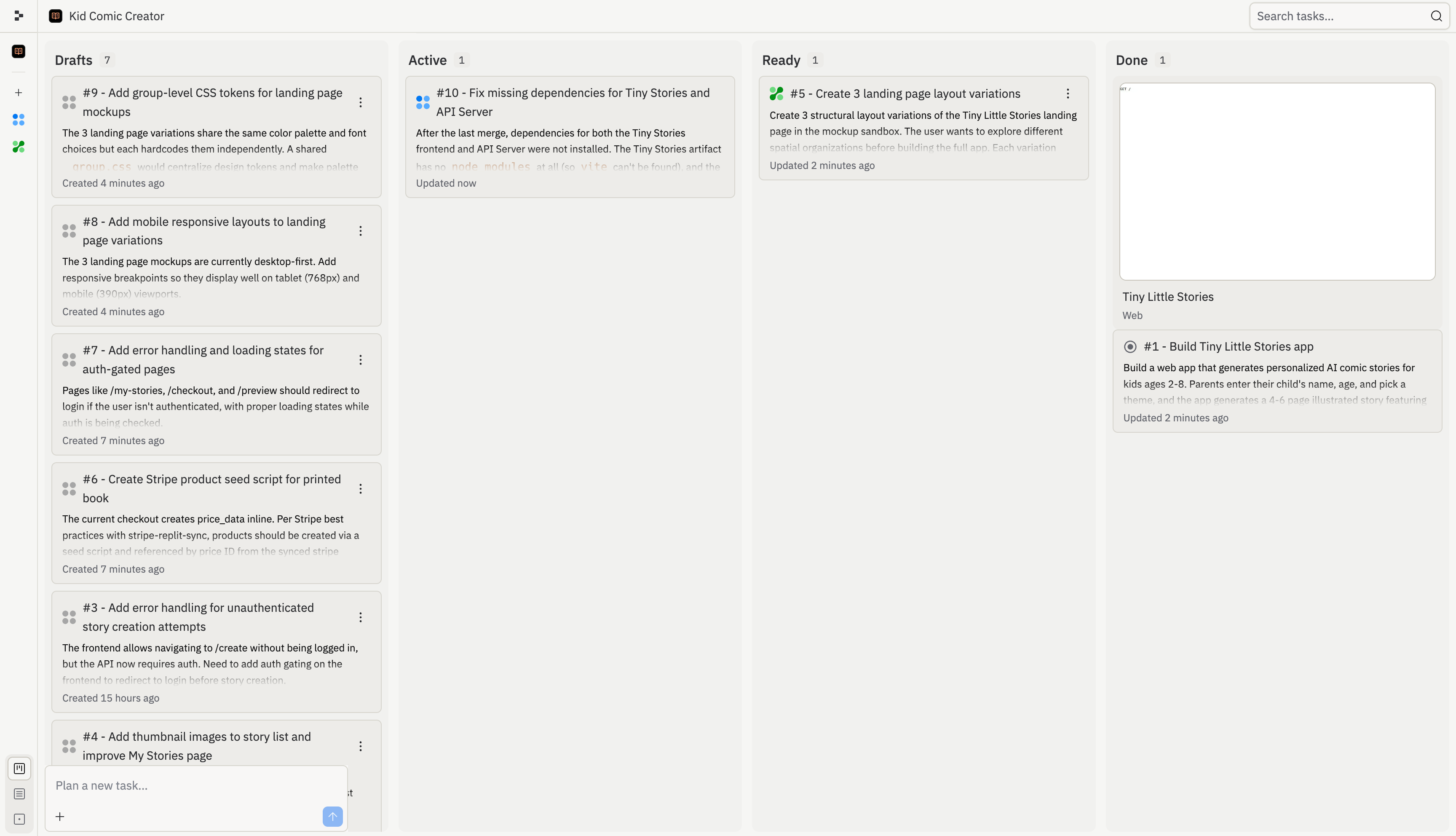
Every task has its own settings dropdown next to its title. Open it to control how Agent finishes the task and how the result lands in your project:

* **Auto-apply changes** (Drafts and Active): when the task is ready, apply it to the main version immediately instead of waiting for review.
* **Auto-approve plan** (Drafts): when Agent suggests a plan for the task, accept it automatically and start building.
* **Apply changes** (Ready): apply the finished work to your main version.
* **Rename**: change the title shown on the card.
* **Review changes** (Ready): jump straight to the diff for a task that's ready.
* **Cancel**: stop the task or remove a draft.

Auto-apply and auto-approve are quick actions you select once, not toggles you leave on. The menu keeps a consistent width so the labels don't shift as you open different tasks.
<Frame>
  <img src="https://mintcdn.com/replit/DIV6tWVNn7BTXh9_/images/replitai/task-settings-dropdown.png?fit=max&auto=format&n=DIV6tWVNn7BTXh9_&q=85&s=1af34e3cc379dc6bfb12b38a22836e84" alt="Task settings dropdown open on a task card showing Apply changes, Rename, Review changes, and Cancel actions in a fixed-width popover" width="858" height="536" data-path="images/replitai/task-settings-dropdown.png" />
</Frame>