> ## Documentation Index
> Fetch the complete documentation index at: https://docs.replit.com/llms.txt
> Use this file to discover all available pages before exploring further.

# Ciclo de vida da tarefa

> Entenda os estados das tarefas, trabalho na fila, aplicação de mudanças, arquivamento e cancelamento de tarefas do Agent.

export const TaskCard = ({title = "Product Manager next steps discussion", description = "", status = "draft", timestamp = "Created 3 minutes ago", width = "364px", showMenu = false}) => {
  if (typeof document !== "undefined" && !document.getElementById("task-card-styles")) {
    const style = document.createElement("style");
    style.id = "task-card-styles";
    style.textContent = `
      .task-card {
        --tc-bg: var(--replit-docs-bg-task, #EDECE8);
        --tc-border: var(--replit-docs-border, #DEDAD5);
        --tc-text: var(--replit-docs-text, #1D1D1D);
        --tc-text-dim: var(--replit-docs-text-muted, #5C5C5C);
        --tc-text-dimmest: var(--replit-docs-text-subtle, #858585);
        --tc-dot-active: #4A7BF7;
        --tc-dot-draft: #A6A6A6;
        --tc-dot-ready: #F59E0B;
        --tc-dot-done: #22C55E;
      }
      .dark .task-card,
      html.dark .task-card,
      [data-theme="dark"] .task-card {
        --tc-bg: var(--replit-docs-bg-task, #252527);
        --tc-border: var(--replit-docs-border, #39393D);
        --tc-text: var(--replit-docs-text, #F5F5F5);
        --tc-text-dim: var(--replit-docs-text-muted, #B8B8BE);
        --tc-text-dimmest: var(--replit-docs-text-subtle, #8E8F97);
        --tc-dot-active: #6B9EFF;
        --tc-dot-draft: #6B7280;
        --tc-dot-ready: #FBBF24;
        --tc-dot-done: #4ADE80;
      }
      @keyframes task-card-fade-in {
        from { transform: translateY(6px); opacity: 0; }
        to { transform: translateY(0); opacity: 1; }
      }
      @keyframes tc-tl {
        0%{opacity:1;fill:var(--tc-light)} 5%{opacity:1;fill:var(--tc-dark)} 10%{opacity:1;fill:var(--tc-dark)} 15%{opacity:1;fill:var(--tc-light)}
        20%{opacity:0} 25%{opacity:1;fill:var(--tc-dark)} 30%{opacity:1;fill:var(--tc-light)} 35%{opacity:0}
        40%{opacity:1;fill:var(--tc-dark)} 45%{opacity:1;fill:var(--tc-light)} 50%{opacity:0} 55%{opacity:1;fill:var(--tc-dark)}
        60%{opacity:0} 65%{opacity:1;fill:var(--tc-light)} 70%{opacity:1;fill:var(--tc-light)} 75%{opacity:1;fill:var(--tc-light)}
        80%{opacity:1;fill:var(--tc-light)} 85%{opacity:0} 90%{opacity:1;fill:var(--tc-light)} 95%{opacity:1;fill:var(--tc-light)}
      }
      @keyframes tc-tr {
        0%{opacity:1;fill:var(--tc-dark)} 5%{opacity:0} 10%{opacity:0} 15%{opacity:0}
        20%{opacity:1;fill:var(--tc-light)} 25%{opacity:1;fill:var(--tc-light)} 30%{opacity:1;fill:var(--tc-light)} 35%{opacity:1;fill:var(--tc-light)}
        40%{opacity:0} 45%{opacity:1;fill:var(--tc-dark)} 50%{opacity:1;fill:var(--tc-dark)} 55%{opacity:0}
        60%{opacity:1;fill:var(--tc-dark)} 65%{opacity:0} 70%{opacity:0} 75%{opacity:1;fill:var(--tc-light)}
        80%{opacity:0} 85%{opacity:1;fill:var(--tc-dark)} 90%{opacity:0} 95%{opacity:0}
      }
      @keyframes tc-bl {
        0%{opacity:1;fill:var(--tc-light)} 5%{opacity:0} 10%{opacity:0} 15%{opacity:0}
        20%{opacity:1;fill:var(--tc-light)} 25%{opacity:1;fill:var(--tc-light)} 30%{opacity:1;fill:var(--tc-light)} 35%{opacity:1;fill:var(--tc-light)}
        40%{opacity:0} 45%{opacity:1;fill:var(--tc-light)} 50%{opacity:1;fill:var(--tc-light)} 55%{opacity:0}
        60%{opacity:1;fill:var(--tc-light)} 65%{opacity:0} 70%{opacity:0} 75%{opacity:1;fill:var(--tc-light)}
        80%{opacity:0} 85%{opacity:1;fill:var(--tc-light)} 90%{opacity:0} 95%{opacity:0}
      }
      @keyframes tc-br {
        0%{opacity:1;fill:var(--tc-light)} 5%{opacity:1;fill:var(--tc-dark)} 10%{opacity:1;fill:var(--tc-light)} 15%{opacity:1;fill:var(--tc-light)}
        20%{opacity:0} 25%{opacity:1;fill:var(--tc-light)} 30%{opacity:1;fill:var(--tc-dark)} 35%{opacity:0}
        40%{opacity:1;fill:var(--tc-light)} 45%{opacity:1;fill:var(--tc-light)} 50%{opacity:0} 55%{opacity:1;fill:var(--tc-light)}
        60%{opacity:0} 65%{opacity:1;fill:var(--tc-dark)} 70%{opacity:1;fill:var(--tc-light)} 75%{opacity:1;fill:var(--tc-light)}
        80%{opacity:1;fill:var(--tc-light)} 85%{opacity:0} 90%{opacity:1;fill:var(--tc-light)} 95%{opacity:1;fill:var(--tc-dark)}
      }
      @keyframes tc-drop {
        0%{opacity:0} 5%{opacity:1;fill:var(--tc-dark)} 10%{opacity:1;fill:var(--tc-dark)} 15%{opacity:1;fill:var(--tc-dark)}
        20%{opacity:0} 25%{opacity:0} 30%{opacity:0} 35%{opacity:0}
        40%{opacity:1;fill:var(--tc-dark)} 45%{opacity:0} 50%{opacity:0} 55%{opacity:1;fill:var(--tc-dark)}
        60%{opacity:0} 65%{opacity:1;fill:var(--tc-dark)} 70%{opacity:1;fill:var(--tc-dark)} 75%{opacity:0}
        80%{opacity:1;fill:var(--tc-dark)} 85%{opacity:0} 90%{opacity:1;fill:var(--tc-dark)} 95%{opacity:1;fill:var(--tc-dark)}
      }
      @keyframes tc-dropalt {
        0%{opacity:0} 5%{opacity:0} 10%{opacity:0} 15%{opacity:0}
        20%{opacity:1;fill:var(--tc-dark)} 25%{opacity:0} 30%{opacity:0} 35%{opacity:1;fill:var(--tc-dark)}
        40%{opacity:0} 45%{opacity:0} 50%{opacity:1;fill:var(--tc-dark)} 55%{opacity:0}
        60%{opacity:1;fill:var(--tc-dark)} 65%{opacity:0} 70%{opacity:0} 75%{opacity:0}
        80%{opacity:0} 85%{opacity:1;fill:var(--tc-dark)} 90%{opacity:0} 95%{opacity:0}
      }
      .task-card .tc-el-tl { animation: tc-tl 4s step-end infinite; }
      .task-card .tc-el-tr { animation: tc-tr 4s step-end infinite; }
      .task-card .tc-el-bl { animation: tc-bl 4s step-end infinite; }
      .task-card .tc-el-br { animation: tc-br 4s step-end infinite; }
      .task-card .tc-el-drop { animation: tc-drop 4s step-end infinite; }
      .task-card .tc-el-dropalt { animation: tc-dropalt 4s step-end infinite; }
      @media (hover: hover) {
        .task-card:hover {
          border-color: var(--tc-text-dimmest) !important;
        }
        .task-card .tc-menu-btn:hover {
          background: var(--tc-border);
        }
      }
    `;
    document.head.appendChild(style);
  }
  const colorPairs = {
    active: {
      dark: "#57ABFF",
      light: "#A8D4FF"
    },
    "active-queued": {
      dark: "#6BB5FF",
      light: "#6BB5FF"
    },
    draft: {
      dark: "#A6A6A6",
      light: "#D4D4D4"
    },
    "draft-static": {
      dark: "#A6A6A6",
      light: "#D4D4D4"
    },
    "draft-done": {
      dark: "#A6A6A6",
      light: "#D4D4D4"
    },
    ready: {
      dark: "#009118",
      light: "#6CD97E"
    },
    "ready-drop": {
      dark: "#009118",
      light: "#6CD97E"
    },
    applying: {
      dark: "#7C3AED",
      light: "#C4B5FD"
    },
    done: {
      dark: "#22C55E",
      light: "#86EFAC"
    }
  };
  const statusLabels = {
    active: "Active",
    "active-queued": "Queued",
    draft: "Draft",
    "draft-static": "Draft",
    "draft-done": "Done",
    ready: "Ready",
    "ready-drop": "Ready",
    applying: "Applying",
    done: "Done"
  };
  const colors = colorPairs[status] || colorPairs.draft;
  const applyingIconHtml = '<svg width="16" height="16" viewBox="0 0 24 24" fill="none" style="flex-shrink:0;--tc-dark:#009118;--tc-light:#6CD97E"><circle class="tc-el-tl" cx="5.332" cy="5.338" r="5.332" fill="#009118"/><circle class="tc-el-tr" cx="18.663" cy="5.338" r="5.332" fill="#009118"/><circle class="tc-el-bl" cx="5.332" cy="18.668" r="5.332" fill="#009118"/><circle class="tc-el-br" cx="18.663" cy="18.668" r="5.332" fill="#009118"/><path class="tc-el-drop" fill="#009118" d="M18.662 0a5.332 5.332 0 0 1 .001 10.664l-.412.01a8 8 0 0 0-7.577 7.59l-.01.398-.008.274A5.331 5.331 0 0 1 0 18.662a5.332 5.332 0 0 1 5.332-5.332l.398-.01a8 8 0 0 0 7.59-7.576l.011-.412A5.331 5.331 0 0 1 18.662 0Z"/><g class="tc-el-dropalt" transform="rotate(90, 12, 12)"><path fill="#009118" d="M18.662 0a5.332 5.332 0 0 1 .001 10.664l-.412.01a8 8 0 0 0-7.577 7.59l-.01.398-.008.274A5.331 5.331 0 0 1 0 18.662a5.332 5.332 0 0 1 5.332-5.332l.398-.01a8 8 0 0 0 7.59-7.576l.011-.412A5.331 5.331 0 0 1 18.662 0Z"/></g></svg>';
  const doneIconHtml = '<svg width="16" height="16" viewBox="0 0 24 24" style="flex-shrink:0;fill:var(--tc-text-dimmest)"><path d="M12 7a5 5 0 1 1 0 10 5 5 0 0 1 0-10Z"/><path fill-rule="evenodd" d="M12 1c6.075 0 11 4.925 11 11s-4.925 11-11 11S1 18.075 1 12 5.925 1 12 1Zm0 2a9 9 0 1 0 0 18 9 9 0 0 0 0-18Z" clip-rule="evenodd"/></svg>';
  const handleApplyChanges = e => {
    const tooltip = e.currentTarget.parentElement;
    tooltip.style.display = "none";
    const menuBtn = tooltip.previousElementSibling;
    if (menuBtn) menuBtn.style.background = "none";
    const card = e.currentTarget.closest(".task-card");
    if (!card) return;
    const headerRow = card.firstElementChild;
    const oldIcon = headerRow.firstElementChild;
    const menuWrapper = headerRow.lastElementChild;
    const meta = card.lastElementChild;
    const temp = document.createElement("div");
    temp.innerHTML = applyingIconHtml;
    headerRow.replaceChild(temp.firstElementChild, oldIcon);
    meta.textContent = "Applying \u2022 just now";
    menuWrapper.style.visibility = "hidden";
    setTimeout(() => {
      const currentIcon = headerRow.firstElementChild;
      const doneTemp = document.createElement("div");
      doneTemp.innerHTML = doneIconHtml;
      headerRow.replaceChild(doneTemp.firstElementChild, currentIcon);
      meta.textContent = "Done \u2022 just now";
      const board = card.closest(".kb-board");
      if (!board) return;
      const doneCol = board.querySelector('[data-kb-column="done"]');
      if (!doneCol) return;
      const cardList = doneCol.querySelector("[data-kb-cards]");
      const readyCol = board.querySelector('[data-kb-column="ready"]');
      card.style.transition = "opacity 300ms, transform 300ms";
      card.style.opacity = "0";
      card.style.transform = "translateY(-10px)";
      setTimeout(() => {
        card.parentElement.removeChild(card);
        if (readyCol) {
          const rc = readyCol.querySelector("[data-kb-count]");
          rc.textContent = parseInt(rc.textContent) - 1;
        }
        const dc = doneCol.querySelector("[data-kb-count]");
        dc.textContent = parseInt(dc.textContent) + 1;
        card.style.opacity = "0";
        card.style.transform = "translateY(6px)";
        cardList.insertBefore(card, cardList.firstChild);
        requestAnimationFrame(() => {
          card.style.transition = "opacity 300ms, transform 300ms";
          card.style.opacity = "1";
          card.style.transform = "translateY(0)";
        });
      }, 300);
    }, 3000);
  };
  return <div className="task-card" style={{
    fontFamily: "'IBM Plex Sans', sans-serif",
    width: width,
    background: "var(--tc-bg)",
    border: "1px solid var(--tc-border)",
    borderRadius: "8px",
    padding: "8px 12px",
    margin: 0,
    display: "flex",
    flexDirection: "column",
    gap: "4px",
    cursor: "pointer",
    opacity: 0,
    animation: "task-card-fade-in 300ms ease-out forwards",
    transition: "border-color 120ms ease-out"
  }}>
      {}
      <div style={{
    display: "flex",
    alignItems: "center",
    gap: "8px"
  }}>
        {status === "done" ? <svg width="16" height="16" viewBox="0 0 24 24" fill="var(--tc-text-dimmest)" style={{
    flexShrink: 0
  }}>
            <path d="M12 7a5 5 0 1 1 0 10 5 5 0 0 1 0-10Z" />
            <path fillRule="evenodd" d="M12 1c6.075 0 11 4.925 11 11s-4.925 11-11 11S1 18.075 1 12 5.925 1 12 1Zm0 2a9 9 0 1 0 0 18 9 9 0 0 0 0-18Z" clipRule="evenodd" />
          </svg> : status === "draft-static" ? <svg width="16" height="16" viewBox="0 0 24 24" fill="none" style={{
    flexShrink: 0
  }}>
            <circle cx="5.332" cy="5.338" r="5.332" fill={colors.dark} />
            <circle cx="18.663" cy="5.338" r="5.332" fill={colors.dark} />
            <circle cx="5.332" cy="18.668" r="5.332" fill={colors.dark} />
            <circle cx="18.663" cy="18.668" r="5.332" fill={colors.dark} />
          </svg> : status === "draft-done" ? <svg width="16" height="16" viewBox="0 0 24 24" fill="none" style={{
    flexShrink: 0
  }}>
            <circle cx="5.332" cy="5.338" r="5.332" fill={colors.light} />
            <circle cx="18.663" cy="5.338" r="5.332" fill={colors.light} />
            <circle cx="5.332" cy="18.668" r="5.332" fill={colors.light} />
            <circle cx="18.663" cy="18.668" r="5.332" fill={colors.light} />
          </svg> : status === "active-queued" ? <svg width="16" height="16" viewBox="0 0 24 24" fill="none" style={{
    flexShrink: 0
  }}>
            <circle cx="5.332" cy="5.338" r="5.332" fill={colors.light} />
            <circle cx="18.663" cy="5.338" r="5.332" fill={colors.light} />
            <circle cx="5.332" cy="18.668" r="5.332" fill={colors.light} />
            <circle cx="18.663" cy="18.668" r="5.332" fill={colors.light} />
          </svg> : status === "ready-drop" ? <svg width="16" height="16" viewBox="0 0 24 24" fill="none" style={{
    flexShrink: 0
  }}>
            <circle cx="5.332" cy="5.338" r="5.332" fill={colors.light} />
            <circle cx="18.663" cy="18.668" r="5.332" fill={colors.light} />
            <path fill={colors.dark} d="M18.662 0a5.332 5.332 0 0 1 .001 10.664l-.412.01a8 8 0 0 0-7.577 7.59l-.01.398-.008.274A5.331 5.331 0 0 1 0 18.662a5.332 5.332 0 0 1 5.332-5.332l.398-.01a8 8 0 0 0 7.59-7.576l.011-.412A5.331 5.331 0 0 1 18.662 0Z" />
          </svg> : <svg width="16" height="16" viewBox="0 0 24 24" fill="none" style={{
    flexShrink: 0,
    "--tc-dark": colors.dark,
    "--tc-light": colors.light
  }}>
            <circle className="tc-el-tl" cx="5.332" cy="5.338" r="5.332" fill={colors.dark} />
            <circle className="tc-el-tr" cx="18.663" cy="5.338" r="5.332" fill={colors.dark} />
            <circle className="tc-el-bl" cx="5.332" cy="18.668" r="5.332" fill={colors.dark} />
            <circle className="tc-el-br" cx="18.663" cy="18.668" r="5.332" fill={colors.dark} />
            <path className="tc-el-drop" fill={colors.dark} d="M18.662 0a5.332 5.332 0 0 1 .001 10.664l-.412.01a8 8 0 0 0-7.577 7.59l-.01.398-.008.274A5.331 5.331 0 0 1 0 18.662a5.332 5.332 0 0 1 5.332-5.332l.398-.01a8 8 0 0 0 7.59-7.576l.011-.412A5.331 5.331 0 0 1 18.662 0Z" />
            <g className="tc-el-dropalt" transform="rotate(90, 12, 12)">
              <path fill={colors.dark} d="M18.662 0a5.332 5.332 0 0 1 .001 10.664l-.412.01a8 8 0 0 0-7.577 7.59l-.01.398-.008.274A5.331 5.331 0 0 1 0 18.662a5.332 5.332 0 0 1 5.332-5.332l.398-.01a8 8 0 0 0 7.59-7.576l.011-.412A5.331 5.331 0 0 1 18.662 0Z" />
            </g>
          </svg>}
        <span style={{
    flex: 1,
    fontSize: "14px",
    lineHeight: "1.4",
    color: "var(--tc-text)",
    minWidth: 0
  }}>
          {title}
        </span>
        <div style={{
    position: "relative",
    flexShrink: 0
  }}>
          <button className="tc-menu-btn" type="button" aria-label="Thread actions" onClick={showMenu ? e => {
    const btn = e.currentTarget;
    const popup = btn.nextElementSibling;
    const card = btn.closest(".task-card");
    const isHidden = popup.style.display === "none";
    popup.style.display = isHidden ? "flex" : "none";
    btn.style.background = isHidden ? "var(--tc-border)" : "none";
    if (card) card.style.zIndex = isHidden ? "9999" : "";
  } : undefined} style={{
    display: "flex",
    alignItems: "center",
    justifyContent: "center",
    width: "24px",
    height: "24px",
    border: "none",
    background: "none",
    borderRadius: "4px",
    cursor: "pointer",
    color: "var(--tc-text-dimmest)",
    padding: 0,
    flexShrink: 0,
    transition: "background 120ms ease-out"
  }}>
            <svg width="16" height="16" viewBox="0 0 24 24" fill="currentColor">
              <path fillRule="evenodd" d="M10.25 5a1.75 1.75 0 1 1 3.5 0 1.75 1.75 0 0 1-3.5 0Zm0 7a1.75 1.75 0 1 1 3.5 0 1.75 1.75 0 0 1-3.5 0Zm0 7a1.75 1.75 0 1 1 3.5 0 1.75 1.75 0 0 1-3.5 0Z" clipRule="evenodd" />
            </svg>
          </button>
          {showMenu && <div style={{
    display: "none",
    position: "absolute",
    top: 0,
    left: "28px",
    background: "var(--tc-bg)",
    border: "1px solid var(--tc-border)",
    borderRadius: "8px",
    padding: "4px",
    boxShadow: "0 8px 24px rgba(0,0,0,0.12), 0 2px 6px rgba(0,0,0,0.06)",
    zIndex: 9999,
    minWidth: "160px",
    flexDirection: "column",
    gap: "0"
  }}>
              <div onClick={handleApplyChanges} style={{
    display: "flex",
    alignItems: "center",
    gap: "8px",
    padding: "6px 8px",
    borderRadius: "4px",
    cursor: "pointer",
    color: "var(--tc-text)",
    fontSize: "14px"
  }}>
                <svg width="16" height="16" viewBox="0 0 24 24" fill="currentColor" style={{
    flexShrink: 0
  }}>
                  <path fillRule="evenodd" d="M6 3.75a2.25 2.25 0 1 0 0 4.5 2.25 2.25 0 0 0 0-4.5ZM2.25 6a3.75 3.75 0 1 1 4.527 3.67 8.25 8.25 0 0 0 7.554 7.553A3.751 3.751 0 0 1 21.75 18a3.75 3.75 0 0 1-7.43.726 9.75 9.75 0 0 1-7.57-4.53V21a.75.75 0 0 1-1.5 0V9.675A3.751 3.751 0 0 1 2.25 6ZM18 15.75a2.25 2.25 0 1 0 0 4.5 2.25 2.25 0 0 0 0-4.5Z" clipRule="evenodd" />
                </svg>
                <span>Apply changes</span>
              </div>
              <div style={{
    display: "flex",
    alignItems: "center",
    gap: "8px",
    padding: "6px 8px",
    borderRadius: "4px",
    cursor: "pointer",
    color: "var(--tc-text)",
    fontSize: "14px"
  }}>
                <svg width="16" height="16" viewBox="0 0 24 24" fill="currentColor" style={{
    flexShrink: 0
  }}>
                  <path fillRule="evenodd" d="M5.47 5.47a.75.75 0 0 1 1.06 0L12 10.94l5.47-5.47a.75.75 0 1 1 1.06 1.06L13.06 12l5.47 5.47a.75.75 0 1 1-1.06 1.06L12 13.06l-5.47 5.47a.75.75 0 0 1-1.06-1.06L10.94 12 5.47 6.53a.75.75 0 0 1 0-1.06Z" clipRule="evenodd" />
                </svg>
                <span>Cancel</span>
              </div>
            </div>}
        </div>
      </div>
      {}
      {description && <div style={{
    fontSize: "12px",
    color: "var(--tc-text-dim)",
    lineHeight: "1.5",
    overflow: "hidden",
    display: "-webkit-box",
    WebkitLineClamp: 3,
    WebkitBoxOrient: "vertical",
    paddingLeft: "0"
  }}>
          {description}
        </div>}
      {}
      <div style={{
    fontSize: "12px",
    color: "var(--tc-text-dimmest)",
    paddingLeft: "0"
  }}>
        {statusLabels[status] || status} • {timestamp}
      </div>
    </div>;
};

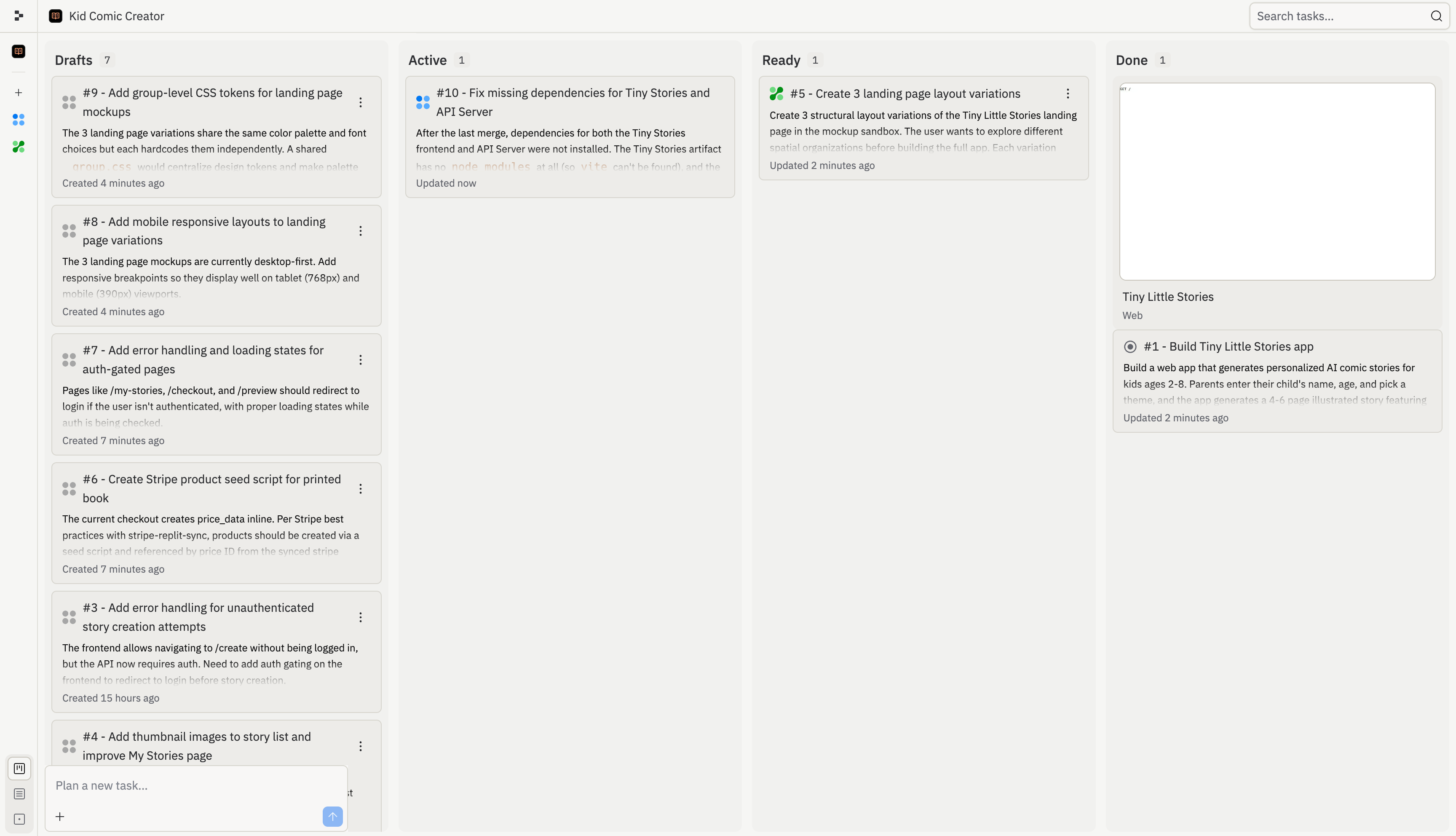
Cada tarefa do Agent passa por um ciclo de vida: planejada, em execução, pronta para revisão e concluída. O ciclo de vida mantém o trabalho isolado até que você decida o que deve fazer parte da sua versão principal.

<Frame>
  <img src="https://mintcdn.com/replit/L22mbBMLs80H8_c8/images/replitai/task-board-progress.png?fit=max&auto=format&n=L22mbBMLs80H8_c8&q=85&s=3b4ef2fbede2d057e40c138956ccd74d" alt="Quadro de tarefas mostrando tarefas organizadas nas colunas Rascunhos, Ativo, Pronto e Concluído" width="3456" height="1984" data-path="images/replitai/task-board-progress.png" />
</Frame>

## Rascunho

Um **Rascunho** é uma tarefa que o Agent planejou, mas ainda não começou a construir. Os Rascunhos são seguros para revisar porque contêm apenas o trabalho proposto: o título da tarefa, descrição e plano.

Use os Rascunhos para decidir se o Agent entendeu o objetivo. Você pode iniciar a tarefa, pedir ao Agent que revise o plano ou arquivar o rascunho para depois.

## Ativo

Uma tarefa **Ativa** está sendo executada em segundo plano. O Agent trabalha nela em uma cópia isolada do seu projeto, então sua versão principal permanece inalterada enquanto a tarefa roda.

Você pode continuar usando a thread principal enquanto as tarefas Ativas rodam. Se uma tarefa precisar de feedback, abra sua thread e continue a conversa lá.

## Na Fila

Uma tarefa **Na Fila** está aprovada, mas aguardando para iniciar. Uma tarefa pode entrar na fila quando depende de outra tarefa, ou quando você atingiu o limite de tarefas em segundo plano ativas do seu plano.

As tarefas na fila iniciam automaticamente quando seus pré-requisitos terminam e um slot de tarefa ativa é aberto.

## Pronto

Uma tarefa **Pronta** está concluída, mas suas mudanças ainda não foram aplicadas à sua versão principal. Revise o log de trabalho da tarefa, resultados de testes e preview antes de aplicar as mudanças.

Se o trabalho parecer correto, aplique-o à versão principal. Se não for o que você queria, descarte e inicie uma nova tarefa.

## Aplicando

Uma tarefa em **Aplicando** está no processo de mover suas mudanças para sua versão principal. O Agent trata conflitos automaticamente ao aplicar mudanças de múltiplas tarefas.

Aguarde o processo de aplicação terminar antes de avaliar o resultado final. Se algo parecer errado depois, peça ao Agent que corrija na thread principal.

## Concluído

Uma tarefa **Concluída** está finalizada e não requer mais ação. Concluído pode significar que a tarefa foi aplicada à sua versão principal, arquivada antes de iniciar ou cancelada após mover para a construção.

Use a coluna **Concluído** como um histórico de trabalho de tarefas completadas, arquivadas e canceladas.

## Exemplos de estados

Cada tarefa passa por uma série de estágios, de uma ideia até fazer parte do seu app. Cada estágio tem seu próprio ícone para que você possa entender o que está acontecendo de relance.

<div style={{ display: 'grid', gridTemplateColumns: 'repeat(auto-fill, minmax(300px, 1fr))', gap: '20px', margin: '20px 0' }}>
  <div style={{ display: 'flex', flexDirection: 'column', gap: '6px' }}>
    <TaskCard title="Add gift flow for family and friends" description="Let parents create a story for someone else's child and send it as a gift." status="draft-static" timestamp="2m" width="100%" />

    <span style={{ fontSize: '13px', color: 'var(--kb-text-dimmer, #666)', padding: '0 4px' }}><strong>Rascunho</strong>: O Agent propôs esta tarefa. Ela tem um plano pronto para sua revisão.</span>
  </div>

  <div style={{ display: 'flex', flexDirection: 'column', gap: '6px' }}>
    <TaskCard title="Story continuations: sequels" description="Adding a Continue the Adventure button generates a sequel that picks up where the last one left off." status="active" timestamp="12m" width="100%" />

    <span style={{ fontSize: '13px', color: 'var(--kb-text-dimmer, #666)', padding: '0 4px' }}><strong>Ativo</strong>: O Agent está construindo esta tarefa agora. Ela roda em sua própria cópia do seu projeto para que sua versão principal permaneça segura.</span>
  </div>

  <div style={{ display: 'flex', flexDirection: 'column', gap: '6px' }}>
    <TaskCard title="Add gift flow for family and friends" description="Let parents create a story for someone else's child and send it as a gift." status="active-queued" timestamp="1m" width="100%" />

    <span style={{ fontSize: '13px', color: 'var(--kb-text-dimmer, #666)', padding: '0 4px' }}><strong>Na Fila</strong>: Esta tarefa está aprovada, mas aguardando um slot abrir antes de começar a construção.</span>
  </div>

  <div style={{ display: 'flex', flexDirection: 'column', gap: '6px' }}>
    <TaskCard title="Bedtime mode with dark theme" description="A dedicated bedtime mode with a warm-toned dark theme and ambient sounds." status="ready-drop" timestamp="35m" width="100%" />

    <span style={{ fontSize: '13px', color: 'var(--kb-text-dimmer, #666)', padding: '0 4px' }}><strong>Pronto</strong>: Esta tarefa está completa. Você pode revisar as mudanças e aplicá-las à sua versão principal quando estiver pronto.</span>
  </div>

  <div style={{ display: 'flex', flexDirection: 'column', gap: '6px' }}>
    <TaskCard title="Shareable links with OG previews" description="Adding public shareable links is the single biggest growth lever." status="applying" timestamp="31m" width="100%" />

    <span style={{ fontSize: '13px', color: 'var(--kb-text-dimmer, #666)', padding: '0 4px' }}><strong>Aplicando</strong>: As mudanças desta tarefa estão sendo aplicadas à sua versão principal agora.</span>
  </div>

  <div style={{ display: 'flex', flexDirection: 'column', gap: '6px' }}>
    <TaskCard title="Read-aloud with word highlighting" description="Text-to-speech lets kids enjoy stories independently while following along with highlighted words." status="done" timestamp="4h" width="100%" />

    <span style={{ fontSize: '13px', color: 'var(--kb-text-dimmer, #666)', padding: '0 4px' }}><strong>Concluído</strong>: Esta tarefa está finalizada e suas mudanças fazem parte da sua versão principal.</span>
  </div>

  <div style={{ display: 'flex', flexDirection: 'column', gap: '6px' }}>
    <TaskCard title="Onboarding tour for new readers" description="A short guided walkthrough that introduces parents to the core reading flow on first launch." status="draft-static" timestamp="1h" width="100%" />

    <span style={{ fontSize: '13px', color: 'var(--kb-text-dimmer, #666)', padding: '0 4px' }}><strong>Arquivado</strong>: Uma sessão de planejamento que você separou antes de iniciar a construção. Sessões de planejamento arquivadas podem ser restauradas depois da coluna <strong>Concluído</strong>.</span>
  </div>

  <div style={{ display: 'flex', flexDirection: 'column', gap: '6px' }}>
    <TaskCard title="Experimental sticker pack generator" description="Generate custom illustrated stickers from a story's characters and scenes." status="done" timestamp="2h" width="100%" />

    <span style={{ fontSize: '13px', color: 'var(--kb-text-dimmer, #666)', padding: '0 4px' }}><strong>Cancelado</strong>: Uma tarefa que você parou depois de ter entrado na construção. Tarefas canceladas não podem ser restauradas. Inicie uma nova tarefa se mudar de ideia.</span>
  </div>
</div>

## Arquivando e cancelando tarefas

Você pode parar uma tarefa em qualquer ponto do seu ciclo de vida, mas a opção disponível depende de onde a tarefa está no quadro. Tanto **Arquivar** quanto **Cancelar** movem uma tarefa para a coluna **Concluído**, mas se comportam de forma diferente:

| Ação         | Quando está disponível                                                                                          | O que acontece                                                                                                      | Reversível?                                                                                             |
| ------------ | --------------------------------------------------------------------------------------------------------------- | ------------------------------------------------------------------------------------------------------------------- | ------------------------------------------------------------------------------------------------------- |
| **Arquivar** | Enquanto a tarefa ainda é uma sessão de planejamento: um **Rascunho** que não começou a construção              | A sessão de planejamento é separada sem executar. Seu plano é preservado.                                           | Sim. Abra o card arquivado na coluna **Concluído** e restaure-o de volta para **Rascunhos**.            |
| **Cancelar** | Após a tarefa ter saído do planejamento para a construção: qualquer tarefa **Ativa**, **Na Fila** ou **Pronta** | O Agent para a tarefa e descarta qualquer trabalho em andamento. Nenhuma mudança é aplicada à sua versão principal. | Não. Tarefas canceladas não podem ser restauradas. Inicie uma nova tarefa se quiser retomar o trabalho. |

Use **Arquivar** para sessões de planejamento que você quer revisar depois. Use **Cancelar** como o botão de parada permanente para tarefas que estão na fila, já em execução ou que terminaram a construção.

Você pode encontrar tanto sessões de planejamento arquivadas quanto tarefas canceladas na coluna **Concluído** no lado direito do quadro de tarefas, ao lado das tarefas concluídas.