> ## Documentation Index
> Fetch the complete documentation index at: https://docs.replit.com/llms.txt
> Use this file to discover all available pages before exploring further.

# Quadro de tarefas

> Use o quadro de tarefas para revisar, iniciar, monitorar e aplicar tarefas do Agent conforme elas avançam por cada estágio.

export const TaskReviewDrawer = ({taskNumber = 23, taskTitle = "Story regeneration: redo pages or whole stories", taskDescription = 'Added story and page-level regeneration capabilities:\n\nBackend (API):\n- POST /api/stories/:storyId/regenerate: regenerates the entire story, deletes existing pages, sets status to "generating", and re-runs the full story text and image generation pipeline in the background\n- POST /api/stories/:storyId/pages/:pageId/regenerate: regenerates a single page with body { target: "text" | "image" | "both" }\n\nFrontend (story-preview.tsx):\n- Per-page regeneration menu: subtle three-dot icon overlay on the image area with options for "Regenerate Text", "Regenerate Image", or "Regenerate Both"\n- "Regenerate Story" button in header with confirmation dialog\n- Loading state: regenerating pages show a spinner and skeleton text while other pages remain readable'}) => {
  if (typeof document !== "undefined" && !document.getElementById("task-review-drawer-styles")) {
    const style = document.createElement("style");
    style.id = "task-review-drawer-styles";
    style.textContent = `
      .trd-wrap {
        --trd-surface: var(--replit-docs-bg, #F6F6F4);
        --trd-surface-higher: var(--replit-docs-bg-elevated, #F1F1EE);
        --trd-border: var(--replit-docs-border, #DEDAD5);
        --trd-border-strong: var(--replit-docs-border-strong, #CAC4BE);
        --trd-text: var(--replit-docs-text, #1D1D1D);
        --trd-text-dim: var(--replit-docs-text-muted, #5C5C5C);
        --trd-text-dimmest: var(--replit-docs-text-subtle, #858585);
        --trd-icon: var(--replit-docs-text-subtle, #858585);
        --trd-btn-bg: var(--replit-docs-bg-muted, #F1F1EE);
        --trd-btn-hover: var(--replit-docs-bg-elevated, #F1F1EE);
        --trd-positive-bg: hsla(140, 50%, 38%, 1);
        --trd-positive-text: #FFFFFF;
        --trd-positive-hover: hsla(140, 50%, 33%, 1);
        --trd-shadow: 0 1px 3px rgba(0,0,0,0.06);
        --trd-icon-surface: var(--replit-docs-bg-elevated, #F1F1EE);
        --trd-icon-border: var(--replit-docs-border, #DEDAD5);
      }
      .dark .trd-wrap,
      html.dark .trd-wrap,
      [data-theme="dark"] .trd-wrap {
        --trd-surface: var(--replit-docs-bg, #1E1E1F);
        --trd-surface-higher: var(--replit-docs-bg-elevated, #222223);
        --trd-border: var(--replit-docs-border, #39393D);
        --trd-border-strong: var(--replit-docs-border-strong, #4A4A50);
        --trd-text: var(--replit-docs-text, #F5F5F5);
        --trd-text-dim: var(--replit-docs-text-muted, #B8B8BE);
        --trd-text-dimmest: var(--replit-docs-text-subtle, #8E8F97);
        --trd-icon: var(--replit-docs-text-subtle, #8E8F97);
        --trd-btn-bg: var(--replit-docs-bg-elevated, #222223);
        --trd-btn-hover: var(--replit-docs-bg-muted, #222223);
        --trd-positive-bg: hsla(140, 50%, 33%, 1);
        --trd-positive-text: #FFFFFF;
        --trd-positive-hover: hsla(140, 50%, 28%, 1);
        --trd-shadow: 0 1px 3px rgba(0,0,0,0.2);
        --trd-icon-surface: var(--replit-docs-bg-elevated, #222223);
        --trd-icon-border: var(--replit-docs-border, #39393D);
      }
      .trd-wrap, .trd-wrap * {
        font-family: 'IBM Plex Sans', sans-serif !important;
      }
      @keyframes trd-fade-in {
        from { transform: translateY(8px); opacity: 0; }
        to { transform: translateY(0); opacity: 1; }
      }
      @media (hover: hover) {
        .trd-wrap .trd-dismiss:hover { background: var(--trd-btn-hover) !important; }
        .trd-wrap .trd-apply:hover { background: var(--trd-positive-hover) !important; }
      }
    `;
    document.head.appendChild(style);
  }
  const PlusIcon = <svg width="16" height="16" viewBox="0 0 24 24" fill="currentColor">
      <path d="M12 4.25a.75.75 0 0 1 .75.75v6.25H19a.75.75 0 0 1 0 1.5h-6.25V19a.75.75 0 0 1-1.5 0v-6.25H5a.75.75 0 0 1 0-1.5h6.25V5a.75.75 0 0 1 .75-.75Z" />
    </svg>;
  const ArrowUpIcon = <svg width="16" height="16" viewBox="0 0 24 24" fill="currentColor">
      <path fillRule="evenodd" d="M11.47 4.47a.75.75 0 0 1 1.06 0l7 7a.75.75 0 1 1-1.06 1.06l-5.72-5.72V19a.75.75 0 0 1-1.5 0V6.81l-5.72 5.72a.75.75 0 0 1-1.06-1.06l7-7Z" clipRule="evenodd" />
    </svg>;
  const ApplyIcon = <svg width="16" height="16" viewBox="0 0 24 24" fill="currentColor">
      <path fillRule="evenodd" d="M6 3.75a2.25 2.25 0 1 0 0 4.5 2.25 2.25 0 0 0 0-4.5ZM2.25 6a3.75 3.75 0 1 1 4.527 3.67 8.25 8.25 0 0 0 7.554 7.553A3.751 3.751 0 0 1 21.75 18a3.75 3.75 0 0 1-7.43.726 9.75 9.75 0 0 1-7.57-4.53V21a.75.75 0 0 1-1.5 0V9.675A3.751 3.751 0 0 1 2.25 6ZM18 15.75a2.25 2.25 0 1 0 0 4.5 2.25 2.25 0 0 0 0-4.5Z" clipRule="evenodd" />
    </svg>;
  const AgentModesIcon = <svg width="16" height="16" viewBox="0 0 24 24" fill="currentColor">
      <path d="M1.25 6V4A2.75 2.75 0 0 1 4 1.25h2a.75.75 0 0 1 0 1.5H4A1.25 1.25 0 0 0 2.75 4v2a.75.75 0 0 1-1.5 0ZM21.25 6V4a1.25 1.25 0 0 0-1.126-1.244L20 2.75h-2a.75.75 0 0 1 0-1.5h2A2.75 2.75 0 0 1 22.75 4v2a.75.75 0 0 1-1.5 0ZM21.25 20v-2a.75.75 0 0 1 1.5 0v2A2.75 2.75 0 0 1 20 22.75h-2a.75.75 0 0 1 0-1.5h2A1.25 1.25 0 0 0 21.25 20ZM1.25 20v-2a.75.75 0 0 1 1.5 0v2l.006.124A1.25 1.25 0 0 0 4 21.25h2a.75.75 0 0 1 0 1.5H4A2.75 2.75 0 0 1 1.25 20ZM16 12a4 4 0 1 0-8 0 4 4 0 0 0 8 0Zm1.5 0a5.5 5.5 0 1 1-11 0 5.5 5.5 0 0 1 11 0Z" />
    </svg>;
  const ChevronDown = <svg width="12" height="12" viewBox="0 0 24 24" fill="var(--trd-text-dimmest)">
      <path fillRule="evenodd" d="M12.53 15.53a.75.75 0 0 1-1.06 0l-6-6a.75.75 0 0 1 1.06-1.06L12 13.94l5.47-5.47a.75.75 0 1 1 1.06 1.06l-6 6Z" clipRule="evenodd" />
    </svg>;
  const SparkleIcon = <svg width="16" height="16" viewBox="0 0 24 24" fill="none">
      <path fill="#009118" d="M18.662 0a5.332 5.332 0 0 1 .001 10.664l-.412.01a8 8 0 0 0-7.577 7.59l-.01.398-.008.274A5.331 5.331 0 0 1 0 18.662a5.332 5.332 0 0 1 5.332-5.332l.398-.01a8 8 0 0 0 7.59-7.576l.011-.412A5.331 5.331 0 0 1 18.662 0Z" />
      <path fill="#6CD97E" d="m18.663 13.33.273.007a5.332 5.332 0 1 1-5.598 5.6l-.007-.275.006-.265a5.38 5.38 0 0 1 .137-.963c.006-.026.01-.052.017-.078.012-.047.026-.095.04-.142a4.84 4.84 0 0 1 .032-.114l.007-.024.065-.193.02-.054.022-.06c.021-.056.044-.112.067-.167l.026-.059c.024-.056.048-.112.074-.167l.058-.118a4.854 4.854 0 0 1 .145-.265l.024-.043a5.29 5.29 0 0 1 .08-.129c.02-.032.04-.065.062-.097a5.34 5.34 0 0 1 .468-.607l.071-.079a5.562 5.562 0 0 1 .265-.267l.11-.1a5.3 5.3 0 0 1 .308-.252l.058-.045c.046-.034.093-.068.14-.1l.049-.034.073-.049.07-.043.112-.07c.043-.026.089-.05.133-.075.026-.014.051-.03.078-.044l.114-.059c.041-.02.083-.042.126-.062l.089-.04.146-.065.086-.033c.048-.019.095-.038.143-.055l.023-.008.202-.068.024-.007c.062-.019.125-.036.189-.053l.043-.012c.062-.016.125-.03.189-.044l.078-.018a5.34 5.34 0 0 1 .485-.074c.011 0 .023-.003.034-.005.09-.009.18-.014.27-.02l.274-.006ZM5.332 0a5.332 5.332 0 0 1 5.332 5.332l-.008.274a5.332 5.332 0 0 1-5.324 5.058l-.274-.007A5.332 5.332 0 0 1 5.332 0Z" />
    </svg>;
  const descriptionLines = taskDescription.split("\n").filter(l => l.trim());
  return <div className="trd-wrap" style={{
    fontFamily: "'IBM Plex Sans', sans-serif",
    width: "100%",
    maxWidth: "427px",
    minWidth: "320px",
    alignSelf: "center",
    margin: "48px auto",
    opacity: 0,
    animation: "trd-fade-in 300ms ease-out forwards"
  }}>
      {}
      <div style={{
    background: "var(--trd-surface)",
    border: "1px solid var(--trd-border-strong)",
    borderRadius: "6px",
    padding: "8px",
    boxShadow: "var(--trd-shadow)",
    display: "flex",
    flexDirection: "column",
    gap: "4px"
  }}>
        {}
        <div>
          <div style={{
    display: "flex",
    flexDirection: "column",
    gap: "8px",
    padding: "4px"
  }}>
            {}
            <div style={{
    display: "flex",
    alignItems: "center",
    gap: "8px"
  }}>
              <div style={{
    display: "flex",
    alignItems: "center",
    justifyContent: "center",
    width: "28px",
    height: "28px",
    borderRadius: "8px",
    background: "var(--trd-icon-surface)",
    border: "1px solid var(--trd-icon-border)",
    flexShrink: 0
  }}>
                {SparkleIcon}
              </div>
              <span style={{
    fontSize: "14px",
    lineHeight: "1.4",
    color: "var(--trd-text)"
  }}>
                Ready for review
              </span>
            </div>

            {}
            <div style={{
    display: "flex",
    flexDirection: "column",
    gap: "4px"
  }}>
              <span style={{
    fontSize: "13px",
    lineHeight: "1.4",
    color: "var(--trd-text-dim)"
  }}>
                Task #{taskNumber}: {taskTitle}
              </span>

              {}
              <div style={{
    fontSize: "12px",
    lineHeight: "1.5",
    color: "var(--trd-text-dimmest)",
    maxHeight: "50px",
    overflow: "hidden",
    position: "relative"
  }}>
                {descriptionLines.map((line, i) => <span key={i}>
                    {line}
                    <br />
                  </span>)}
              </div>
            </div>

            {}
            <div style={{
    display: "flex",
    gap: "8px"
  }}>
              <button className="trd-dismiss" type="button" style={{
    width: "122px",
    flexShrink: 0,
    height: "32px",
    display: "flex",
    alignItems: "center",
    justifyContent: "center",
    border: "none",
    borderRadius: "8px",
    background: "var(--trd-btn-bg)",
    color: "var(--trd-text)",
    fontSize: "14px",
    fontFamily: "inherit",
    cursor: "pointer",
    transition: "background 120ms ease-out"
  }}>
                Dismiss
              </button>
              <button className="trd-apply" type="button" style={{
    flex: 1,
    height: "32px",
    display: "flex",
    alignItems: "center",
    justifyContent: "center",
    gap: "6px",
    border: "none",
    borderRadius: "8px",
    background: "var(--trd-positive-bg)",
    color: "var(--trd-positive-text)",
    fontSize: "14px",
    fontFamily: "inherit",
    cursor: "pointer",
    transition: "background 120ms ease-out"
  }}>
                <span>Apply changes to main version</span>
                {ApplyIcon}
              </button>
            </div>
          </div>
        </div>

        {}
        <div style={{
    padding: 0
  }}>
          <div style={{
    display: "flex",
    flexDirection: "column",
    gap: "4px"
  }}>
            {}
            <div style={{
    padding: "5px 6px",
    minHeight: "21px",
    fontSize: "14px",
    lineHeight: "1.3",
    color: "var(--trd-text-dimmest)"
  }}>
              Message agent…
            </div>

            {}
            <div style={{
    display: "flex",
    justifyContent: "space-between",
    alignItems: "flex-end",
    paddingBottom: "2px"
  }}>
              {}
              <div style={{
    display: "flex",
    alignItems: "center",
    gap: "4px"
  }}>
                <button type="button" style={{
    display: "flex",
    alignItems: "center",
    justifyContent: "center",
    width: "24px",
    height: "24px",
    border: "none",
    borderRadius: "4px",
    background: "transparent",
    cursor: "pointer",
    color: "var(--trd-icon)",
    padding: 0
  }}>
                  {PlusIcon}
                </button>
              </div>

              {}
              <div style={{
    display: "flex",
    alignItems: "center",
    gap: "8px",
    paddingRight: "2px"
  }}>
                <button type="button" style={{
    display: "flex",
    alignItems: "center",
    gap: "4px",
    height: "24px",
    padding: "0 4px",
    border: "none",
    borderRadius: "4px",
    background: "transparent",
    cursor: "pointer",
    color: "var(--trd-icon)"
  }}>
                  {AgentModesIcon}
                  {ChevronDown}
                </button>
                <button type="button" style={{
    display: "flex",
    alignItems: "center",
    justifyContent: "center",
    width: "28px",
    height: "28px",
    border: "none",
    borderRadius: "8px",
    background: "hsla(210, 100%, 74%, 1)",
    color: "#FFFFFF",
    padding: 0,
    cursor: "pointer"
  }}>
                  {ArrowUpIcon}
                </button>
              </div>
            </div>
          </div>
        </div>
      </div>
    </div>;
};

export const KanbanColumns = ({columns = []}) => {
  if (typeof document !== "undefined" && !document.getElementById("kanban-board-styles")) {
    const style = document.createElement("style");
    style.id = "kanban-board-styles";
    style.textContent = `
      .kb-board {
        --kb-bg: var(--replit-docs-bg, #F6F6F4);
        --kb-col-bg: var(--replit-docs-bg-elevated, #F1F1EE);
        --kb-card-bg: var(--replit-docs-bg-task, #EDECE8);
        --kb-border: var(--replit-docs-border, #DEDAD5);
        --kb-text: var(--replit-docs-text, #1D1D1D);
        --kb-text-dim: var(--replit-docs-text-muted, #5C5C5C);
        --kb-text-dimmer: var(--replit-docs-text-muted, #5C5C5C);
        --kb-text-dimmest: var(--replit-docs-text-subtle, #858585);
        --kb-badge-bg: var(--replit-docs-bg-elevated, #F1F1EE);
      }
      .dark .kb-board,
      html.dark .kb-board,
      [data-theme="dark"] .kb-board {
        --kb-bg: var(--replit-docs-bg, #1E1E1F);
        --kb-col-bg: var(--replit-docs-bg-elevated, #222223);
        --kb-card-bg: var(--replit-docs-bg-task, #252527);
        --kb-border: var(--replit-docs-border, #39393D);
        --kb-text: var(--replit-docs-text, #F5F5F5);
        --kb-text-dim: var(--replit-docs-text-muted, #B8B8BE);
        --kb-text-dimmer: var(--replit-docs-text-muted, #B8B8BE);
        --kb-text-dimmest: var(--replit-docs-text-subtle, #8E8F97);
        --kb-badge-bg: var(--replit-docs-bg-elevated, #222223);
      }
      .kb-board { overflow: visible; }
    `;
    document.head.appendChild(style);
  }
  return <div className="kb-board" style={{
    fontFamily: "'IBM Plex Sans', sans-serif",
    display: "flex",
    gap: "12px",
    padding: "8px",
    background: "var(--kb-bg)",
    borderRadius: "12px"
  }}>
      {columns.map((col, ci) => <div key={ci} data-kb-column={col.title.toLowerCase()} style={{
    flex: "1 1 0",
    minWidth: "200px",
    background: "var(--kb-col-bg)",
    borderRadius: "8px",
    display: "flex",
    flexDirection: "column",
    overflow: "visible"
  }}>
          <div style={{
    display: "flex",
    alignItems: "center",
    gap: "8px",
    padding: "12px 12px 8px 12px"
  }}>
            <span style={{
    fontSize: "14px",
    fontWeight: 500,
    color: "var(--kb-text)"
  }}>
              {col.title}
            </span>
            <span data-kb-count style={{
    fontSize: "12px",
    color: "var(--kb-text-dimmer)",
    background: "var(--kb-badge-bg)",
    padding: "0 6px",
    borderRadius: "4px",
    lineHeight: "20px"
  }}>
              {col.count}
            </span>
          </div>
          <div data-kb-cards style={{
    display: "flex",
    flexDirection: "column",
    gap: "8px",
    padding: "8px",
    flex: "1 1 0"
  }}>
            {col.cards.map((card, i) => <TaskCard key={i} title={card.title} description={card.description} status={card.status} timestamp={card.timestamp} showMenu={card.showMenu} width="100%" />)}
          </div>
        </div>)}
    </div>;
};

export const TaskCard = ({title = "Product Manager next steps discussion", description = "", status = "draft", timestamp = "Created 3 minutes ago", width = "364px", showMenu = false}) => {
  if (typeof document !== "undefined" && !document.getElementById("task-card-styles")) {
    const style = document.createElement("style");
    style.id = "task-card-styles";
    style.textContent = `
      .task-card {
        --tc-bg: var(--replit-docs-bg-task, #EDECE8);
        --tc-border: var(--replit-docs-border, #DEDAD5);
        --tc-text: var(--replit-docs-text, #1D1D1D);
        --tc-text-dim: var(--replit-docs-text-muted, #5C5C5C);
        --tc-text-dimmest: var(--replit-docs-text-subtle, #858585);
        --tc-dot-active: #4A7BF7;
        --tc-dot-draft: #A6A6A6;
        --tc-dot-ready: #F59E0B;
        --tc-dot-done: #22C55E;
      }
      .dark .task-card,
      html.dark .task-card,
      [data-theme="dark"] .task-card {
        --tc-bg: var(--replit-docs-bg-task, #252527);
        --tc-border: var(--replit-docs-border, #39393D);
        --tc-text: var(--replit-docs-text, #F5F5F5);
        --tc-text-dim: var(--replit-docs-text-muted, #B8B8BE);
        --tc-text-dimmest: var(--replit-docs-text-subtle, #8E8F97);
        --tc-dot-active: #6B9EFF;
        --tc-dot-draft: #6B7280;
        --tc-dot-ready: #FBBF24;
        --tc-dot-done: #4ADE80;
      }
      @keyframes task-card-fade-in {
        from { transform: translateY(6px); opacity: 0; }
        to { transform: translateY(0); opacity: 1; }
      }
      @keyframes tc-tl {
        0%{opacity:1;fill:var(--tc-light)} 5%{opacity:1;fill:var(--tc-dark)} 10%{opacity:1;fill:var(--tc-dark)} 15%{opacity:1;fill:var(--tc-light)}
        20%{opacity:0} 25%{opacity:1;fill:var(--tc-dark)} 30%{opacity:1;fill:var(--tc-light)} 35%{opacity:0}
        40%{opacity:1;fill:var(--tc-dark)} 45%{opacity:1;fill:var(--tc-light)} 50%{opacity:0} 55%{opacity:1;fill:var(--tc-dark)}
        60%{opacity:0} 65%{opacity:1;fill:var(--tc-light)} 70%{opacity:1;fill:var(--tc-light)} 75%{opacity:1;fill:var(--tc-light)}
        80%{opacity:1;fill:var(--tc-light)} 85%{opacity:0} 90%{opacity:1;fill:var(--tc-light)} 95%{opacity:1;fill:var(--tc-light)}
      }
      @keyframes tc-tr {
        0%{opacity:1;fill:var(--tc-dark)} 5%{opacity:0} 10%{opacity:0} 15%{opacity:0}
        20%{opacity:1;fill:var(--tc-light)} 25%{opacity:1;fill:var(--tc-light)} 30%{opacity:1;fill:var(--tc-light)} 35%{opacity:1;fill:var(--tc-light)}
        40%{opacity:0} 45%{opacity:1;fill:var(--tc-dark)} 50%{opacity:1;fill:var(--tc-dark)} 55%{opacity:0}
        60%{opacity:1;fill:var(--tc-dark)} 65%{opacity:0} 70%{opacity:0} 75%{opacity:1;fill:var(--tc-light)}
        80%{opacity:0} 85%{opacity:1;fill:var(--tc-dark)} 90%{opacity:0} 95%{opacity:0}
      }
      @keyframes tc-bl {
        0%{opacity:1;fill:var(--tc-light)} 5%{opacity:0} 10%{opacity:0} 15%{opacity:0}
        20%{opacity:1;fill:var(--tc-light)} 25%{opacity:1;fill:var(--tc-light)} 30%{opacity:1;fill:var(--tc-light)} 35%{opacity:1;fill:var(--tc-light)}
        40%{opacity:0} 45%{opacity:1;fill:var(--tc-light)} 50%{opacity:1;fill:var(--tc-light)} 55%{opacity:0}
        60%{opacity:1;fill:var(--tc-light)} 65%{opacity:0} 70%{opacity:0} 75%{opacity:1;fill:var(--tc-light)}
        80%{opacity:0} 85%{opacity:1;fill:var(--tc-light)} 90%{opacity:0} 95%{opacity:0}
      }
      @keyframes tc-br {
        0%{opacity:1;fill:var(--tc-light)} 5%{opacity:1;fill:var(--tc-dark)} 10%{opacity:1;fill:var(--tc-light)} 15%{opacity:1;fill:var(--tc-light)}
        20%{opacity:0} 25%{opacity:1;fill:var(--tc-light)} 30%{opacity:1;fill:var(--tc-dark)} 35%{opacity:0}
        40%{opacity:1;fill:var(--tc-light)} 45%{opacity:1;fill:var(--tc-light)} 50%{opacity:0} 55%{opacity:1;fill:var(--tc-light)}
        60%{opacity:0} 65%{opacity:1;fill:var(--tc-dark)} 70%{opacity:1;fill:var(--tc-light)} 75%{opacity:1;fill:var(--tc-light)}
        80%{opacity:1;fill:var(--tc-light)} 85%{opacity:0} 90%{opacity:1;fill:var(--tc-light)} 95%{opacity:1;fill:var(--tc-dark)}
      }
      @keyframes tc-drop {
        0%{opacity:0} 5%{opacity:1;fill:var(--tc-dark)} 10%{opacity:1;fill:var(--tc-dark)} 15%{opacity:1;fill:var(--tc-dark)}
        20%{opacity:0} 25%{opacity:0} 30%{opacity:0} 35%{opacity:0}
        40%{opacity:1;fill:var(--tc-dark)} 45%{opacity:0} 50%{opacity:0} 55%{opacity:1;fill:var(--tc-dark)}
        60%{opacity:0} 65%{opacity:1;fill:var(--tc-dark)} 70%{opacity:1;fill:var(--tc-dark)} 75%{opacity:0}
        80%{opacity:1;fill:var(--tc-dark)} 85%{opacity:0} 90%{opacity:1;fill:var(--tc-dark)} 95%{opacity:1;fill:var(--tc-dark)}
      }
      @keyframes tc-dropalt {
        0%{opacity:0} 5%{opacity:0} 10%{opacity:0} 15%{opacity:0}
        20%{opacity:1;fill:var(--tc-dark)} 25%{opacity:0} 30%{opacity:0} 35%{opacity:1;fill:var(--tc-dark)}
        40%{opacity:0} 45%{opacity:0} 50%{opacity:1;fill:var(--tc-dark)} 55%{opacity:0}
        60%{opacity:1;fill:var(--tc-dark)} 65%{opacity:0} 70%{opacity:0} 75%{opacity:0}
        80%{opacity:0} 85%{opacity:1;fill:var(--tc-dark)} 90%{opacity:0} 95%{opacity:0}
      }
      .task-card .tc-el-tl { animation: tc-tl 4s step-end infinite; }
      .task-card .tc-el-tr { animation: tc-tr 4s step-end infinite; }
      .task-card .tc-el-bl { animation: tc-bl 4s step-end infinite; }
      .task-card .tc-el-br { animation: tc-br 4s step-end infinite; }
      .task-card .tc-el-drop { animation: tc-drop 4s step-end infinite; }
      .task-card .tc-el-dropalt { animation: tc-dropalt 4s step-end infinite; }
      @media (hover: hover) {
        .task-card:hover {
          border-color: var(--tc-text-dimmest) !important;
        }
        .task-card .tc-menu-btn:hover {
          background: var(--tc-border);
        }
      }
    `;
    document.head.appendChild(style);
  }
  const colorPairs = {
    active: {
      dark: "#57ABFF",
      light: "#A8D4FF"
    },
    "active-queued": {
      dark: "#6BB5FF",
      light: "#6BB5FF"
    },
    draft: {
      dark: "#A6A6A6",
      light: "#D4D4D4"
    },
    "draft-static": {
      dark: "#A6A6A6",
      light: "#D4D4D4"
    },
    "draft-done": {
      dark: "#A6A6A6",
      light: "#D4D4D4"
    },
    ready: {
      dark: "#009118",
      light: "#6CD97E"
    },
    "ready-drop": {
      dark: "#009118",
      light: "#6CD97E"
    },
    applying: {
      dark: "#7C3AED",
      light: "#C4B5FD"
    },
    done: {
      dark: "#22C55E",
      light: "#86EFAC"
    }
  };
  const statusLabels = {
    active: "Active",
    "active-queued": "Queued",
    draft: "Draft",
    "draft-static": "Draft",
    "draft-done": "Done",
    ready: "Ready",
    "ready-drop": "Ready",
    applying: "Applying",
    done: "Done"
  };
  const colors = colorPairs[status] || colorPairs.draft;
  const applyingIconHtml = '<svg width="16" height="16" viewBox="0 0 24 24" fill="none" style="flex-shrink:0;--tc-dark:#009118;--tc-light:#6CD97E"><circle class="tc-el-tl" cx="5.332" cy="5.338" r="5.332" fill="#009118"/><circle class="tc-el-tr" cx="18.663" cy="5.338" r="5.332" fill="#009118"/><circle class="tc-el-bl" cx="5.332" cy="18.668" r="5.332" fill="#009118"/><circle class="tc-el-br" cx="18.663" cy="18.668" r="5.332" fill="#009118"/><path class="tc-el-drop" fill="#009118" d="M18.662 0a5.332 5.332 0 0 1 .001 10.664l-.412.01a8 8 0 0 0-7.577 7.59l-.01.398-.008.274A5.331 5.331 0 0 1 0 18.662a5.332 5.332 0 0 1 5.332-5.332l.398-.01a8 8 0 0 0 7.59-7.576l.011-.412A5.331 5.331 0 0 1 18.662 0Z"/><g class="tc-el-dropalt" transform="rotate(90, 12, 12)"><path fill="#009118" d="M18.662 0a5.332 5.332 0 0 1 .001 10.664l-.412.01a8 8 0 0 0-7.577 7.59l-.01.398-.008.274A5.331 5.331 0 0 1 0 18.662a5.332 5.332 0 0 1 5.332-5.332l.398-.01a8 8 0 0 0 7.59-7.576l.011-.412A5.331 5.331 0 0 1 18.662 0Z"/></g></svg>';
  const doneIconHtml = '<svg width="16" height="16" viewBox="0 0 24 24" style="flex-shrink:0;fill:var(--tc-text-dimmest)"><path d="M12 7a5 5 0 1 1 0 10 5 5 0 0 1 0-10Z"/><path fill-rule="evenodd" d="M12 1c6.075 0 11 4.925 11 11s-4.925 11-11 11S1 18.075 1 12 5.925 1 12 1Zm0 2a9 9 0 1 0 0 18 9 9 0 0 0 0-18Z" clip-rule="evenodd"/></svg>';
  const handleApplyChanges = e => {
    const tooltip = e.currentTarget.parentElement;
    tooltip.style.display = "none";
    const menuBtn = tooltip.previousElementSibling;
    if (menuBtn) menuBtn.style.background = "none";
    const card = e.currentTarget.closest(".task-card");
    if (!card) return;
    const headerRow = card.firstElementChild;
    const oldIcon = headerRow.firstElementChild;
    const menuWrapper = headerRow.lastElementChild;
    const meta = card.lastElementChild;
    const temp = document.createElement("div");
    temp.innerHTML = applyingIconHtml;
    headerRow.replaceChild(temp.firstElementChild, oldIcon);
    meta.textContent = "Applying \u2022 just now";
    menuWrapper.style.visibility = "hidden";
    setTimeout(() => {
      const currentIcon = headerRow.firstElementChild;
      const doneTemp = document.createElement("div");
      doneTemp.innerHTML = doneIconHtml;
      headerRow.replaceChild(doneTemp.firstElementChild, currentIcon);
      meta.textContent = "Done \u2022 just now";
      const board = card.closest(".kb-board");
      if (!board) return;
      const doneCol = board.querySelector('[data-kb-column="done"]');
      if (!doneCol) return;
      const cardList = doneCol.querySelector("[data-kb-cards]");
      const readyCol = board.querySelector('[data-kb-column="ready"]');
      card.style.transition = "opacity 300ms, transform 300ms";
      card.style.opacity = "0";
      card.style.transform = "translateY(-10px)";
      setTimeout(() => {
        card.parentElement.removeChild(card);
        if (readyCol) {
          const rc = readyCol.querySelector("[data-kb-count]");
          rc.textContent = parseInt(rc.textContent) - 1;
        }
        const dc = doneCol.querySelector("[data-kb-count]");
        dc.textContent = parseInt(dc.textContent) + 1;
        card.style.opacity = "0";
        card.style.transform = "translateY(6px)";
        cardList.insertBefore(card, cardList.firstChild);
        requestAnimationFrame(() => {
          card.style.transition = "opacity 300ms, transform 300ms";
          card.style.opacity = "1";
          card.style.transform = "translateY(0)";
        });
      }, 300);
    }, 3000);
  };
  return <div className="task-card" style={{
    fontFamily: "'IBM Plex Sans', sans-serif",
    width: width,
    background: "var(--tc-bg)",
    border: "1px solid var(--tc-border)",
    borderRadius: "8px",
    padding: "8px 12px",
    margin: 0,
    display: "flex",
    flexDirection: "column",
    gap: "4px",
    cursor: "pointer",
    opacity: 0,
    animation: "task-card-fade-in 300ms ease-out forwards",
    transition: "border-color 120ms ease-out"
  }}>
      {}
      <div style={{
    display: "flex",
    alignItems: "center",
    gap: "8px"
  }}>
        {status === "done" ? <svg width="16" height="16" viewBox="0 0 24 24" fill="var(--tc-text-dimmest)" style={{
    flexShrink: 0
  }}>
            <path d="M12 7a5 5 0 1 1 0 10 5 5 0 0 1 0-10Z" />
            <path fillRule="evenodd" d="M12 1c6.075 0 11 4.925 11 11s-4.925 11-11 11S1 18.075 1 12 5.925 1 12 1Zm0 2a9 9 0 1 0 0 18 9 9 0 0 0 0-18Z" clipRule="evenodd" />
          </svg> : status === "draft-static" ? <svg width="16" height="16" viewBox="0 0 24 24" fill="none" style={{
    flexShrink: 0
  }}>
            <circle cx="5.332" cy="5.338" r="5.332" fill={colors.dark} />
            <circle cx="18.663" cy="5.338" r="5.332" fill={colors.dark} />
            <circle cx="5.332" cy="18.668" r="5.332" fill={colors.dark} />
            <circle cx="18.663" cy="18.668" r="5.332" fill={colors.dark} />
          </svg> : status === "draft-done" ? <svg width="16" height="16" viewBox="0 0 24 24" fill="none" style={{
    flexShrink: 0
  }}>
            <circle cx="5.332" cy="5.338" r="5.332" fill={colors.light} />
            <circle cx="18.663" cy="5.338" r="5.332" fill={colors.light} />
            <circle cx="5.332" cy="18.668" r="5.332" fill={colors.light} />
            <circle cx="18.663" cy="18.668" r="5.332" fill={colors.light} />
          </svg> : status === "active-queued" ? <svg width="16" height="16" viewBox="0 0 24 24" fill="none" style={{
    flexShrink: 0
  }}>
            <circle cx="5.332" cy="5.338" r="5.332" fill={colors.light} />
            <circle cx="18.663" cy="5.338" r="5.332" fill={colors.light} />
            <circle cx="5.332" cy="18.668" r="5.332" fill={colors.light} />
            <circle cx="18.663" cy="18.668" r="5.332" fill={colors.light} />
          </svg> : status === "ready-drop" ? <svg width="16" height="16" viewBox="0 0 24 24" fill="none" style={{
    flexShrink: 0
  }}>
            <circle cx="5.332" cy="5.338" r="5.332" fill={colors.light} />
            <circle cx="18.663" cy="18.668" r="5.332" fill={colors.light} />
            <path fill={colors.dark} d="M18.662 0a5.332 5.332 0 0 1 .001 10.664l-.412.01a8 8 0 0 0-7.577 7.59l-.01.398-.008.274A5.331 5.331 0 0 1 0 18.662a5.332 5.332 0 0 1 5.332-5.332l.398-.01a8 8 0 0 0 7.59-7.576l.011-.412A5.331 5.331 0 0 1 18.662 0Z" />
          </svg> : <svg width="16" height="16" viewBox="0 0 24 24" fill="none" style={{
    flexShrink: 0,
    "--tc-dark": colors.dark,
    "--tc-light": colors.light
  }}>
            <circle className="tc-el-tl" cx="5.332" cy="5.338" r="5.332" fill={colors.dark} />
            <circle className="tc-el-tr" cx="18.663" cy="5.338" r="5.332" fill={colors.dark} />
            <circle className="tc-el-bl" cx="5.332" cy="18.668" r="5.332" fill={colors.dark} />
            <circle className="tc-el-br" cx="18.663" cy="18.668" r="5.332" fill={colors.dark} />
            <path className="tc-el-drop" fill={colors.dark} d="M18.662 0a5.332 5.332 0 0 1 .001 10.664l-.412.01a8 8 0 0 0-7.577 7.59l-.01.398-.008.274A5.331 5.331 0 0 1 0 18.662a5.332 5.332 0 0 1 5.332-5.332l.398-.01a8 8 0 0 0 7.59-7.576l.011-.412A5.331 5.331 0 0 1 18.662 0Z" />
            <g className="tc-el-dropalt" transform="rotate(90, 12, 12)">
              <path fill={colors.dark} d="M18.662 0a5.332 5.332 0 0 1 .001 10.664l-.412.01a8 8 0 0 0-7.577 7.59l-.01.398-.008.274A5.331 5.331 0 0 1 0 18.662a5.332 5.332 0 0 1 5.332-5.332l.398-.01a8 8 0 0 0 7.59-7.576l.011-.412A5.331 5.331 0 0 1 18.662 0Z" />
            </g>
          </svg>}
        <span style={{
    flex: 1,
    fontSize: "14px",
    lineHeight: "1.4",
    color: "var(--tc-text)",
    minWidth: 0
  }}>
          {title}
        </span>
        <div style={{
    position: "relative",
    flexShrink: 0
  }}>
          <button className="tc-menu-btn" type="button" aria-label="Thread actions" onClick={showMenu ? e => {
    const btn = e.currentTarget;
    const popup = btn.nextElementSibling;
    const card = btn.closest(".task-card");
    const isHidden = popup.style.display === "none";
    popup.style.display = isHidden ? "flex" : "none";
    btn.style.background = isHidden ? "var(--tc-border)" : "none";
    if (card) card.style.zIndex = isHidden ? "9999" : "";
  } : undefined} style={{
    display: "flex",
    alignItems: "center",
    justifyContent: "center",
    width: "24px",
    height: "24px",
    border: "none",
    background: "none",
    borderRadius: "4px",
    cursor: "pointer",
    color: "var(--tc-text-dimmest)",
    padding: 0,
    flexShrink: 0,
    transition: "background 120ms ease-out"
  }}>
            <svg width="16" height="16" viewBox="0 0 24 24" fill="currentColor">
              <path fillRule="evenodd" d="M10.25 5a1.75 1.75 0 1 1 3.5 0 1.75 1.75 0 0 1-3.5 0Zm0 7a1.75 1.75 0 1 1 3.5 0 1.75 1.75 0 0 1-3.5 0Zm0 7a1.75 1.75 0 1 1 3.5 0 1.75 1.75 0 0 1-3.5 0Z" clipRule="evenodd" />
            </svg>
          </button>
          {showMenu && <div style={{
    display: "none",
    position: "absolute",
    top: 0,
    left: "28px",
    background: "var(--tc-bg)",
    border: "1px solid var(--tc-border)",
    borderRadius: "8px",
    padding: "4px",
    boxShadow: "0 8px 24px rgba(0,0,0,0.12), 0 2px 6px rgba(0,0,0,0.06)",
    zIndex: 9999,
    minWidth: "160px",
    flexDirection: "column",
    gap: "0"
  }}>
              <div onClick={handleApplyChanges} style={{
    display: "flex",
    alignItems: "center",
    gap: "8px",
    padding: "6px 8px",
    borderRadius: "4px",
    cursor: "pointer",
    color: "var(--tc-text)",
    fontSize: "14px"
  }}>
                <svg width="16" height="16" viewBox="0 0 24 24" fill="currentColor" style={{
    flexShrink: 0
  }}>
                  <path fillRule="evenodd" d="M6 3.75a2.25 2.25 0 1 0 0 4.5 2.25 2.25 0 0 0 0-4.5ZM2.25 6a3.75 3.75 0 1 1 4.527 3.67 8.25 8.25 0 0 0 7.554 7.553A3.751 3.751 0 0 1 21.75 18a3.75 3.75 0 0 1-7.43.726 9.75 9.75 0 0 1-7.57-4.53V21a.75.75 0 0 1-1.5 0V9.675A3.751 3.751 0 0 1 2.25 6ZM18 15.75a2.25 2.25 0 1 0 0 4.5 2.25 2.25 0 0 0 0-4.5Z" clipRule="evenodd" />
                </svg>
                <span>Apply changes</span>
              </div>
              <div style={{
    display: "flex",
    alignItems: "center",
    gap: "8px",
    padding: "6px 8px",
    borderRadius: "4px",
    cursor: "pointer",
    color: "var(--tc-text)",
    fontSize: "14px"
  }}>
                <svg width="16" height="16" viewBox="0 0 24 24" fill="currentColor" style={{
    flexShrink: 0
  }}>
                  <path fillRule="evenodd" d="M5.47 5.47a.75.75 0 0 1 1.06 0L12 10.94l5.47-5.47a.75.75 0 1 1 1.06 1.06L13.06 12l5.47 5.47a.75.75 0 1 1-1.06 1.06L12 13.06l-5.47 5.47a.75.75 0 0 1-1.06-1.06L10.94 12 5.47 6.53a.75.75 0 0 1 0-1.06Z" clipRule="evenodd" />
                </svg>
                <span>Cancel</span>
              </div>
            </div>}
        </div>
      </div>
      {}
      {description && <div style={{
    fontSize: "12px",
    color: "var(--tc-text-dim)",
    lineHeight: "1.5",
    overflow: "hidden",
    display: "-webkit-box",
    WebkitLineClamp: 3,
    WebkitBoxOrient: "vertical",
    paddingLeft: "0"
  }}>
          {description}
        </div>}
      {}
      <div style={{
    fontSize: "12px",
    color: "var(--tc-text-dimmest)",
    paddingLeft: "0"
  }}>
        {statusLabels[status] || status} • {timestamp}
      </div>
    </div>;
};

## Como o quadro de tarefas funciona

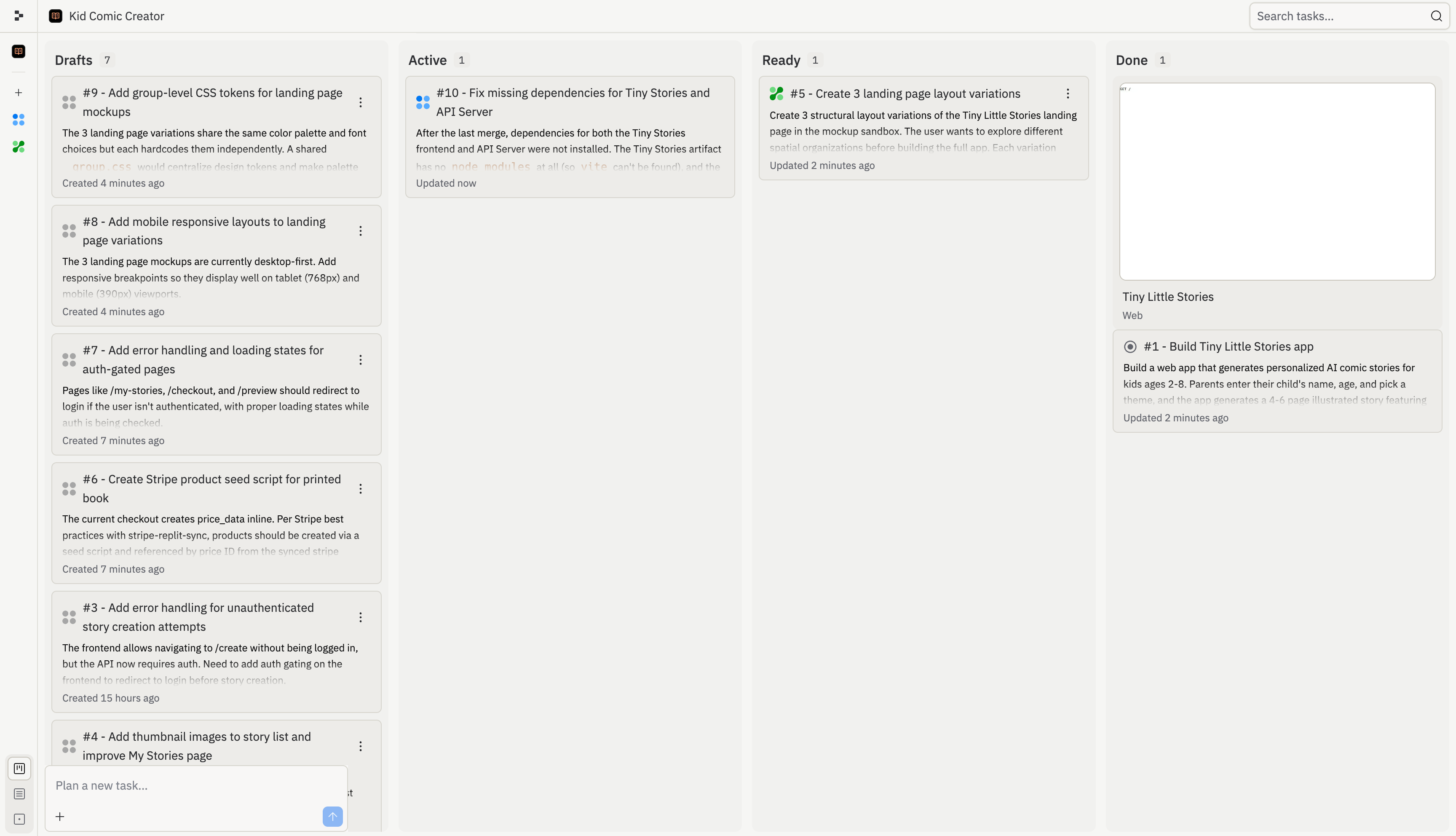
O quadro de tarefas oferece um lugar único para revisar, iniciar, monitorar e aplicar tarefas do Agent. Use-o quando o Agent divide uma solicitação grande em múltiplas partes, quando você quer executar trabalho em segundo plano ou quando precisa entender o que já mudou no seu projeto.

<Frame>
  <img src="https://mintcdn.com/replit/L22mbBMLs80H8_c8/images/replitai/task-board-progress.png?fit=max&auto=format&n=L22mbBMLs80H8_c8&q=85&s=3b4ef2fbede2d057e40c138956ccd74d" alt="Quadro de tarefas mostrando tarefas organizadas nas colunas Rascunhos, Ativo, Pronto e Concluído" width="3456" height="1984" data-path="images/replitai/task-board-progress.png" />
</Frame>

As tarefas são organizadas em colunas com base no status. O quadro mostra o que o Agent planejou, o que está sendo executado, o que está pronto para revisão e o que já foi aplicado.

Cada tarefa se move da esquerda para a direita conforme avança:

* **Rascunhos**: tarefas que o Agent planejou, mas ainda não iniciou
* **Ativo**: tarefas que o Agent está construindo agora, incluindo tarefas na fila atrás do seu limite de tarefas ativas
* **Pronto**: tarefas que o Agent concluiu e estão prontas para sua revisão
* **Concluído**: tarefas que estão finalizadas, arquivadas ou canceladas

## Rascunhos

**Rascunhos** são tarefas planejadas que o Agent ainda não começou a construir. Cada rascunho inclui um título, descrição e plano passo a passo.

Use os Rascunhos para revisar a abordagem proposta pelo Agent antes de o trabalho começar. Você pode inspecionar o plano, pedir ao Agent que o ajuste ou iniciar a tarefa quando estiver pronto.

Os Rascunhos são úteis quando você quer planejar uma funcionalidade maior antes de comprometer trabalho em segundo plano. Por exemplo, o Agent pode dividir um projeto de integração em rascunhos separados para autenticação, configuração de perfil, UI do dashboard e polimento de deploy.

## Ativo

Depois que você aceita uma tarefa, ela passa para a coluna **Ativo** e o Agent começa a construir. Cada tarefa roda em sua própria cópia isolada do seu projeto, então nada muda na sua versão principal até que você aplique o trabalho.

Algumas tarefas dependem de outras. Por exemplo, uma tarefa que constrói um dashboard pode precisar que a tarefa de esquema de banco de dados termine primeiro. Tarefas dependentes aguardam como **Na Fila** até que seus pré-requisitos terminem. As tarefas também entram na fila se você atingir o limite de tarefas em segundo plano ativas do seu plano.
<KanbanColumns
  columns={[
{ title: 'Drafts', count: 2, cards: [
{ title: 'Add gift flow for family and friends', description: 'Let parents create a story for someone else\'s child and send it as a gift. Opens a new acquisition channel.', status: 'draft-static', timestamp: '2m' },
{ title: 'Bedtime reading mode with dark theme', description: 'A dedicated bedtime mode with a warm-toned dark theme and ambient sounds turns the app into a full bedtime ritual.', status: 'draft-static', timestamp: '2m' },
] },
{ title: 'Active', count: 3, cards: [
{ title: 'Story continuations: sequels', description: 'Adding a "Continue the Adventure" button generates a sequel that picks up where the last one left off.', status: 'active', timestamp: '12m' },
{ title: 'Story regeneration: redo pages', description: 'Adding the ability to regenerate individual pages gives parents control and reduces frustration.', status: 'active', timestamp: '8m' },
{ title: 'Add gift flow for family and friends', description: 'Let parents create a story for someone else\'s child and send it as a gift.', status: 'active-queued', timestamp: '1m' },
] }
]}
/>

## Pronto

Quando uma tarefa termina de construir, ela passa para **Pronto**. Isso significa que o trabalho está completo, mas nada mudou na sua versão principal ainda.

Você pode aplicar mudanças de duas formas:

* **Pela thread**: abra a thread da tarefa e selecione **Aplicar mudanças à versão principal** para trazer o trabalho para seu projeto, ou **Descartar** para descartá-lo
* **Pelo quadro**: selecione o menu de três pontos em qualquer card de tarefa Pronta, depois selecione **Aplicar mudanças**

<TaskReviewDrawer />

Revise as tarefas Prontas antes de aplicá-las. Verifique o log de trabalho, saída de testes e preview para entender o que o Agent mudou.

## Concluído

Depois de aplicada, o card da tarefa passa para a coluna **Concluído**.

A coluna Concluído também inclui sessões de planejamento arquivadas e tarefas canceladas. Isso fornece um histórico do que aconteceu sem misturar o trabalho finalizado de volta a Rascunhos ou Ativo.

<KanbanColumns
  columns={[
{ title: 'Ready', count: 3, cards: [
{ title: 'Bedtime reading mode with dark theme', description: 'A dedicated bedtime mode with a warm-toned dark theme and ambient sounds.', status: 'ready-drop', timestamp: '35m', showMenu: true },
{ title: 'Shareable story links with OG previews', description: 'Adding public shareable links is the single biggest growth lever.', status: 'ready-drop', timestamp: '31m', showMenu: true },
{ title: 'Enhanced character customization', description: 'Adding appearance options makes illustrations feel truly personalized.', status: 'ready-drop', timestamp: '28m', showMenu: true },
] },
{ title: 'Done', count: 4, cards: [
{ title: 'Read-aloud mode with word highlighting', description: 'Text-to-speech lets kids enjoy stories independently.', status: 'done', timestamp: '4h' },
{ title: 'Shareable story links with OG previews', description: 'Public shareable links as the biggest growth lever.', status: 'done', timestamp: '1h' },
{ title: 'Enhanced character customization', description: 'Appearance options for truly personalized illustrations.', status: 'done', timestamp: '4h' },
{ title: 'Mobile responsiveness and production polish', description: 'Better error states, mobile layouts, and loading animations.', status: 'done', timestamp: '4h' },
] }
]}
/>

O Agent trata conflitos automaticamente quando você aplica mudanças de múltiplas tarefas. Se algo não parecer correto, peça ao Agent que corrija.

## Encontrar e filtrar tarefas

Use o quadro de tarefas quando seu projeto tiver muitas tarefas em andamento. Você pode pesquisar por título ou número de tarefa, filtrar rascunhos e usar o modo de edição para gerenciar grupos de tarefas de uma vez.

Por exemplo, pesquise pelo número da tarefa quando alguém faz referência a uma tarefa de uma thread, revisão ou conversa no Slack. Filtre rascunhos quando quiser se concentrar no trabalho planejado sem escanear tarefas ativas ou concluídas.

Para sugestões de acompanhamento, veja [Tarefas de acompanhamento](/references/agent/follow-up-tasks).

## Renomear uma tarefa

Listas de tarefas longas podem ficar difíceis de escanear conforme o escopo muda. Para renomear qualquer tarefa, abra o menu de três pontos no seu card (na barra lateral da lista de tarefas ou no quadro de tarefas) e selecione **Renomear**. Digite um título mais claro e selecione **Salvar**.

Renomear uma tarefa só muda como ela aparece para você e seus colegas. O trabalho que o Agent já realizou, o histórico da tarefa e quaisquer mudanças pendentes não são afetados.

## Configurações em cada tarefa

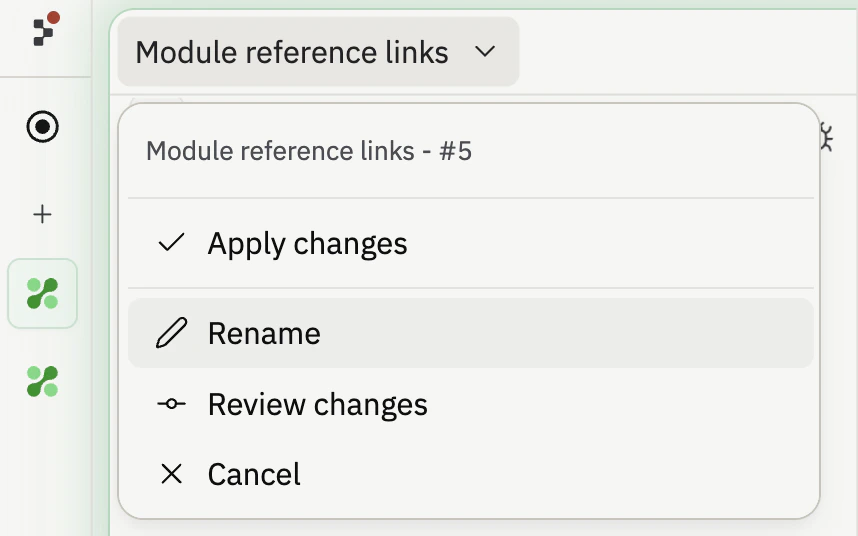
Cada tarefa tem seu próprio menu suspenso de configurações ao lado do título. Abra-o para controlar como o Agent finaliza a tarefa e como o resultado chega ao seu projeto:

* **Aplicar mudanças automaticamente** (Rascunhos e Ativo): quando a tarefa estiver pronta, aplique-a à versão principal imediatamente em vez de esperar pela revisão.
* **Aprovar plano automaticamente** (Rascunhos): quando o Agent sugerir um plano para a tarefa, aceite-o automaticamente e comece a construir.
* **Aplicar mudanças** (Pronto): aplique o trabalho concluído à sua versão principal.
* **Renomear**: altere o título exibido no card.
* **Revisar mudanças** (Pronto): vá direto ao diff de uma tarefa que está pronta.
* **Cancelar**: pare a tarefa ou remova um rascunho.

Aplicar automaticamente e aprovar automaticamente são ações rápidas que você seleciona uma vez, não alternadores que você deixa ligados. O menu mantém uma largura consistente para que os rótulos não se movam conforme você abre tarefas diferentes.

<Frame>
  <img src="https://mintcdn.com/replit/DIV6tWVNn7BTXh9_/images/replitai/task-settings-dropdown.png?fit=max&auto=format&n=DIV6tWVNn7BTXh9_&q=85&s=1af34e3cc379dc6bfb12b38a22836e84" alt="Menu suspenso de configurações de tarefa aberto em um card de tarefa mostrando as ações Aplicar mudanças, Renomear, Revisar mudanças e Cancelar em um popover de largura fixa" width="858" height="536" data-path="images/replitai/task-settings-dropdown.png" />
</Frame>
