> ## Documentation Index
> Fetch the complete documentation index at: https://docs.replit.com/llms.txt
> Use this file to discover all available pages before exploring further.

# Entenda seu workspace

> Entenda como seu Replit Workspace reúne pessoas, Projects, Conversations, Routines, dados, integrações e segurança.

export const WorkspaceCover = () => <div className="chat-mkt" role="img" aria-label="A frosted Replit Workspace canvas bringing together a conversation, files, and a routine" style={{
  margin: "28px 0 42px",
  borderTop: 0,
  paddingTop: 0
}}>
    <div className="chat-use-case-visual" style={{
  aspectRatio: "auto",
  minHeight: "clamp(220px, 34vw, 320px)",
  overflow: "hidden",
  background: "radial-gradient(circle at 50% -18%, rgba(255,255,255,.82), transparent 42%), radial-gradient(circle at 4% 96%, rgba(255,184,146,.48), transparent 38%), linear-gradient(140deg, #ff764d, #ff3c00 60%, #c92d00)"
}}>
      <div aria-hidden="true" style={{
  position: "absolute",
  inset: 0,
  background: "linear-gradient(180deg, rgba(255,255,255,.14), rgba(255,255,255,0) 48%, rgba(111,24,0,.2))"
}} />
      <div aria-hidden="true" style={{
  position: "relative",
  zIndex: 1,
  display: "flex",
  width: "100%",
  minHeight: "inherit",
  boxSizing: "border-box",
  alignItems: "center",
  justifyContent: "center",
  padding: "clamp(12px, 2.6vw, 26px)"
}}>
        <div style={{
  display: "grid",
  gridTemplateColumns: "clamp(38px, 7vw, 66px) minmax(0, 1fr)",
  width: "min(720px, 90%)",
  minHeight: "clamp(168px, 27vw, 220px)",
  overflow: "hidden",
  border: "1px solid rgba(255,255,255,.62)",
  borderRadius: 24,
  background: "linear-gradient(145deg, rgba(255,255,255,.4), rgba(255,255,255,.12))",
  boxShadow: "0 20px 40px rgba(55,27,18,.22)",
  backdropFilter: "blur(7px)"
}}>
          <div style={{
  display: "grid",
  alignContent: "space-between",
  justifyItems: "center",
  padding: "clamp(12px, 2vw, 18px) 0",
  borderRight: "1px solid rgba(255,255,255,.28)"
}}>
            <span style={{
  width: 13,
  height: 13,
  borderRadius: 4,
  background: "rgba(255,255,255,.92)"
}} />
            <div style={{
  display: "grid",
  gap: 10
}}>
              {[0, 1, 2].map(item => <span key={item} style={{
  width: 12,
  height: 12,
  border: item === 0 ? "1px solid rgba(255,255,255,.84)" : "1px solid rgba(255,255,255,.48)",
  borderRadius: item === 2 ? 999 : 4,
  background: item === 0 ? "rgba(255,255,255,.3)" : "transparent"
}} />)}
            </div>
            <span style={{
  width: 13,
  height: 13,
  border: "1px solid rgba(255,255,255,.56)",
  borderRadius: 999
}} />
          </div>
          <div style={{
  minWidth: 0,
  padding: "clamp(13px, 2.4vw, 22px)"
}}>
            <div style={{
  display: "flex",
  alignItems: "center",
  gap: 7
}}>
              {[0, 1, 2].map(dot => <span key={dot} style={{
  width: 7,
  height: 7,
  borderRadius: 999,
  background: dot === 0 ? "rgba(255,255,255,.92)" : "rgba(255,255,255,.38)"
}} />)}
              <span style={{
  width: "30%",
  height: 6,
  marginLeft: 5,
  borderRadius: 999,
  background: "rgba(255,255,255,.62)"
}} />
            </div>
            <div style={{
  display: "grid",
  gridTemplateColumns: "minmax(0, 1.25fr) minmax(0, .75fr)",
  gap: "clamp(9px, 1.8vw, 16px)",
  marginTop: "clamp(13px, 2.4vw, 20px)"
}}>
              <div style={{
  display: "grid",
  alignContent: "space-between",
  minHeight: "clamp(102px, 16vw, 138px)",
  padding: "clamp(10px, 1.7vw, 14px)",
  border: "1px solid rgba(255,255,255,.42)",
  borderRadius: 14,
  background: "rgba(255,255,255,.13)"
}}>
                <div style={{
  display: "grid",
  gap: 8
}}>
                  <span style={{
  width: "56%",
  height: 16,
  border: "1px solid rgba(255,255,255,.46)",
  borderRadius: "10px 10px 10px 3px",
  background: "rgba(255,255,255,.18)"
}} />
                  <span style={{
  justifySelf: "end",
  width: "48%",
  height: 16,
  borderRadius: "10px 10px 3px 10px",
  background: "rgba(255,255,255,.74)"
}} />
                </div>
                <span style={{
  height: 8,
  border: "1px solid rgba(255,255,255,.48)",
  borderRadius: 7,
  background: "rgba(255,255,255,.13)"
}} />
              </div>
              <div style={{
  display: "grid",
  gap: "clamp(9px, 1.5vw, 14px)"
}}>
                {["76%", "54%"].map((width, index) => <div key={width} style={{
  display: "grid",
  alignContent: "center",
  gap: 7,
  padding: "clamp(8px, 1.5vw, 12px)",
  border: "1px solid rgba(255,255,255,.4)",
  borderRadius: 13,
  background: index === 0 ? "rgba(255,255,255,.2)" : "rgba(255,255,255,.11)"
}}>
                    <span style={{
  width,
  height: 6,
  borderRadius: 999,
  background: "rgba(255,255,255,.78)"
}} />
                    <span style={{
  width: "48%",
  height: 4,
  borderRadius: 999,
  background: "rgba(255,255,255,.42)"
}} />
                  </div>)}
              </div>
            </div>
          </div>
        </div>
      </div>
    </div>
  </div>;

export const chatIcon = (name, size = 19) => {
  const paths = {
    MessageCircle: <path d="M7.9 20A9 9 0 1 0 4 16.1L2 22Z" />,
    ChartNoAxesCombined: <>
        <path d="M12 16v5" />
        <path d="M16 14v7" />
        <path d="M20 10v11" />
        <path d="m22 3-8.646 8.646a.5.5 0 0 1-.708 0L9.354 8.354a.5.5 0 0 0-.708 0L2 15" />
        <path d="M4 18v3" />
        <path d="M8 14v7" />
      </>,
    Workflow: <>
        <rect width="8" height="8" x="3" y="3" rx="2" />
        <path d="M7 11v4a2 2 0 0 0 2 2h4" />
        <rect width="8" height="8" x="13" y="13" rx="2" />
      </>,
    Lightbulb: <>
        <path d="M15 14c.2-1 .7-1.7 1.5-2.5 1-.9 1.5-2.2 1.5-3.5A6 6 0 0 0 6 8c0 1 .2 2.2 1.5 3.5.7.7 1.3 1.5 1.5 2.5" />
        <path d="M9 18h6" />
        <path d="M10 22h4" />
      </>,
    Code2: <>
        <path d="m18 16 4-4-4-4" />
        <path d="m6 8-4 4 4 4" />
        <path d="m14.5 4-5 16" />
      </>,
    Presentation: <>
        <path d="M2 3h20" />
        <path d="M21 3v11a2 2 0 0 1-2 2H5a2 2 0 0 1-2-2V3" />
        <path d="m7 21 5-5 5 5" />
      </>,
    PanelsTopLeft: <>
        <rect width="18" height="18" x="3" y="3" rx="2" />
        <path d="M3 9h18" />
        <path d="M9 21V9" />
      </>,
    Keyboard: <>
        <rect width="20" height="14" x="2" y="5" rx="2" />
        <path d="M6 9h.01M10 9h.01M14 9h.01M18 9h.01M6 13h.01M10 13h.01M14 13h.01M18 13h.01M8 17h8" />
      </>,
    Layers3: <>
        <path d="m12 2 9 5-9 5-9-5 9-5Z" />
        <path d="m3 12 9 5 9-5M3 17l9 5 9-5" />
      </>,
    CalendarClock: <>
        <path d="M16 2v4M8 2v4M3 10h18" />
        <rect width="18" height="19" x="3" y="4" rx="2" />
        <path d="M12 14v3l2 1" />
      </>,
    ConversationProject: <>
        <path d="M3 4h8v6H6l-3 2V4Z" />
        <rect width="9" height="9" x="12" y="11" rx="1.5" />
        <path d="M12 14h9M15 11v9" />
      </>,
    CursorDesign: <>
        <path d="m5 3 13 7-6 2-2 6L5 3Z" />
        <path d="M15 16h6M18 13v6" />
      </>,
    AppWindow: <>
        <rect width="20" height="18" x="2" y="3" rx="2" />
        <path d="M2 8h20M6 5.5h.01M9 5.5h.01" />
      </>,
    CloudUpload: <>
        <path d="M12 13v8M8 17l4-4 4 4" />
        <path d="M20 16.5A5 5 0 0 0 18 7h-1.3A7 7 0 0 0 3.3 9.4 4.5 4.5 0 0 0 5 18h2" />
      </>,
    Image: <>
        <rect width="18" height="18" x="3" y="3" rx="2" ry="2" />
        <circle cx="9" cy="9" r="2" />
        <path d="m21 15-3.086-3.086a2 2 0 0 0-2.828 0L6 21" />
      </>,
    FileUp: <>
        <path d="M15 2H6a2 2 0 0 0-2 2v16a2 2 0 0 0 2 2h12a2 2 0 0 0 2-2V7Z" />
        <path d="M14 2v4a2 2 0 0 0 2 2h4" />
        <path d="M12 12v6" />
        <path d="m15 15-3-3-3 3" />
      </>,
    Search: <>
        <circle cx="11" cy="11" r="8" />
        <path d="m21 21-4.3-4.3" />
      </>,
    Sparkles: <path d="M9.937 15.5A2 2 0 0 0 8.5 14.063l-6.135-1.582a.5.5 0 0 1 0-.962L8.5 9.936A2 2 0 0 0 9.937 8.5l1.582-6.135a.5.5 0 0 1 .963 0L14.063 8.5A2 2 0 0 0 15.5 9.937l6.135 1.581a.5.5 0 0 1 0 .964L15.5 14.063a2 2 0 0 0-1.437 1.437l-1.582 6.135a.5.5 0 0 1-.963 0z" />,
    Briefcase: <>
        <path d="M16 20V4a2 2 0 0 0-2-2h-4a2 2 0 0 0-2 2v16" />
        <rect width="20" height="14" x="2" y="6" rx="2" />
      </>,
    WandSparkles: <>
        <path d="m21.64 3.64-1.28-1.28a1.21 1.21 0 0 0-1.72 0L2.36 18.64a1.21 1.21 0 0 0 0 1.72l1.28 1.28a1.2 1.2 0 0 0 1.72 0L21.64 5.36a1.2 1.2 0 0 0 0-1.72" />
        <path d="m14 7 3 3" />
        <path d="M5 6v4" />
        <path d="M19 14v4" />
        <path d="M10 2v2" />
        <path d="M7 8H3" />
        <path d="M21 16h-4" />
        <path d="M11 3H9" />
      </>
  };
  return <svg width={size} height={size} viewBox="0 0 24 24" fill="none" stroke="currentColor" strokeWidth="1.8" strokeLinecap="round" strokeLinejoin="round" aria-hidden="true">
      {paths[name] ?? paths.Sparkles}
    </svg>;
};

<WorkspaceCover />

Seu Replit Workspace é a base de tudo relacionado a uma ideia. Ele reúne
[Projects](/pt/home/projects), [Conversations](/pt/home/conversations),
[Routines](/pt/chat/routines) e integrações, para que você possa avançar de uma
pergunta inicial até um resultado útil.

## Configure o projeto da cafeteria

Antes de começar a moldar a ideia da cafeteria, dê a ela um lar. Este Workspace
vai manter as partes do lançamento juntas conforme elas se desenvolvem:

* Uma conversa para moldar o conceito e pesquisar o mercado local
* Arquivos e ferramentas conectadas que adicionam contexto útil ao plano
* Uma Routine que depois vai monitorar a concorrência e as mudanças do mercado
* O site que você eventualmente vai projetar e publicar

<Frame>
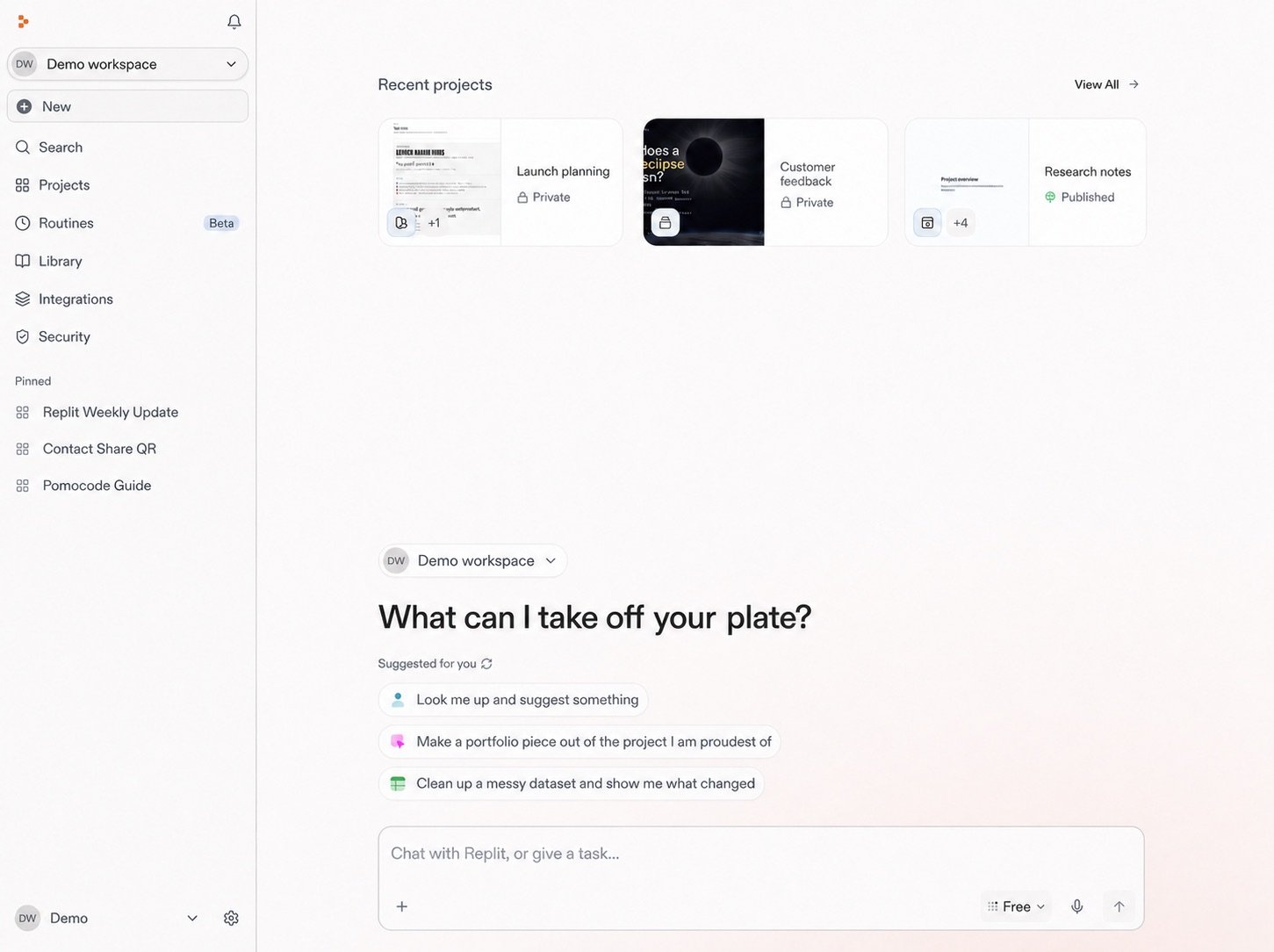
  <img src="https://mintcdn.com/replit/teDUL4A-lNO7dv1O/images/chat/start-new-conversation-home-sanitized-neutral.jpg?fit=max&auto=format&n=teDUL4A-lNO7dv1O&q=85&s=cf93f549696aff0eab748dd953aea0b6" alt="Tela inicial do Replit para o workspace Demo com Projects, Conversations, Routines, prompts sugeridos e a caixa de mensagem" width="1451" height="1084" data-path="images/chat/start-new-conversation-home-sanitized-neutral.jpg" />
</Frame>

A caixa de prompt é onde este projeto começa. A partir daqui, você vai iniciar
uma conversa e dar ao Replit a primeira descrição da cafeteria que você quer
criar.

## Detalhes do workspace

Ele também mantém juntos pessoas relacionadas, configurações, recursos
compartilhados, integrações e cobrança. Seu acesso determina o que você pode
ver e gerenciar.

As configurações do Workspace e os controles de organização são separados dos
controles que você usa para moldar como o Agent responde a um pedido.

Você pode voltar ao Workspace ao longo do lançamento para encontrar tudo o que
o sustenta.

<section className="chat-mkt chat-workflow-grid has-visuals">
  <a className="chat-example has-visual" href="/pt/home/start-a-conversation">
    <div className="chat-use-case-visual">
      <div className="chat-use-case-icon">
        {chatIcon("MessageCircle", 32)}
      </div>
    </div>

    <div className="chat-example-tag">Próximo passo</div>
    <div className="chat-card-title">Inicie uma conversa</div>
    <p>Comece o lançamento da cafeteria descrevendo o resultado que você quer.</p>
    <div className="chat-card-link">Explorar →</div>
  </a>

  <a className="chat-example has-visual" href="/pt/features/collaboration/workspaces">
    <div className="chat-use-case-visual palette-stone">
      <div className="chat-use-case-icon">
        {chatIcon("Briefcase", 32)}
      </div>
    </div>

    <div className="chat-example-tag">Detalhes do workspace</div>
    <div className="chat-card-title">Veja mais sobre workspaces</div>

    <p>
      Saiba mais sobre Workspaces Pessoais e de Equipe, acesso, configurações e
      gerenciamento.
    </p>

    <div className="chat-card-link">Explorar →</div>
  </a>
</section>

Em seguida, [inicie uma conversa](/pt/home/start-a-conversation) para começar a
moldar a ideia da cafeteria.
