> ## Documentation Index
> Fetch the complete documentation index at: https://docs.replit.com/llms.txt
> Use this file to discover all available pages before exploring further.

# Quadro de tarefas

> Use o quadro de tarefas para revisar, iniciar, monitorar e aplicar tarefas do Agent conforme elas avançam por cada estágio.

export const TaskReviewDrawer = ({taskNumber = 23, taskTitle = "Story regeneration: redo pages or whole stories", taskDescription = 'Added story and page-level regeneration capabilities:\n\nBackend (API):\n- POST /api/stories/:storyId/regenerate: regenerates the entire story, deletes existing pages, sets status to "generating", and re-runs the full story text and image generation pipeline in the background\n- POST /api/stories/:storyId/pages/:pageId/regenerate: regenerates a single page with body { target: "text" | "image" | "both" }\n\nFrontend (story-preview.tsx):\n- Per-page regeneration menu: subtle three-dot icon overlay on the image area with options for "Regenerate Text", "Regenerate Image", or "Regenerate Both"\n- "Regenerate Story" button in header with confirmation dialog\n- Loading state: regenerating pages show a spinner and skeleton text while other pages remain readable'}) => {
  if (typeof document !== "undefined" && !document.getElementById("task-review-drawer-styles")) {
    const style = document.createElement("style");
    style.id = "task-review-drawer-styles";
    style.textContent = `
      .trd-wrap {
        --trd-surface: var(--replit-docs-bg, #F6F6F4);
        --trd-surface-higher: var(--replit-docs-bg-elevated, #F1F1EE);
        --trd-border: var(--replit-docs-border, #DEDAD5);
        --trd-border-strong: var(--replit-docs-border-strong, #CAC4BE);
        --trd-text: var(--replit-docs-text, #1D1D1D);
        --trd-text-dim: var(--replit-docs-text-muted, #5C5C5C);
        --trd-text-dimmest: var(--replit-docs-text-subtle, #858585);
        --trd-icon: var(--replit-docs-text-subtle, #858585);
        --trd-btn-bg: var(--replit-docs-bg-muted, #F1F1EE);
        --trd-btn-hover: var(--replit-docs-bg-elevated, #F1F1EE);
        --trd-positive-bg: hsla(140, 50%, 38%, 1);
        --trd-positive-text: #FFFFFF;
        --trd-positive-hover: hsla(140, 50%, 33%, 1);
        --trd-shadow: 0 1px 3px rgba(0,0,0,0.06);
        --trd-icon-surface: var(--replit-docs-bg-elevated, #F1F1EE);
        --trd-icon-border: var(--replit-docs-border, #DEDAD5);
      }
      .dark .trd-wrap,
      html.dark .trd-wrap,
      [data-theme="dark"] .trd-wrap {
        --trd-surface: var(--replit-docs-bg, #1E1E1F);
        --trd-surface-higher: var(--replit-docs-bg-elevated, #222223);
        --trd-border: var(--replit-docs-border, #39393D);
        --trd-border-strong: var(--replit-docs-border-strong, #4A4A50);
        --trd-text: var(--replit-docs-text, #F5F5F5);
        --trd-text-dim: var(--replit-docs-text-muted, #B8B8BE);
        --trd-text-dimmest: var(--replit-docs-text-subtle, #8E8F97);
        --trd-icon: var(--replit-docs-text-subtle, #8E8F97);
        --trd-btn-bg: var(--replit-docs-bg-elevated, #222223);
        --trd-btn-hover: var(--replit-docs-bg-muted, #222223);
        --trd-positive-bg: hsla(140, 50%, 33%, 1);
        --trd-positive-text: #FFFFFF;
        --trd-positive-hover: hsla(140, 50%, 28%, 1);
        --trd-shadow: 0 1px 3px rgba(0,0,0,0.2);
        --trd-icon-surface: var(--replit-docs-bg-elevated, #222223);
        --trd-icon-border: var(--replit-docs-border, #39393D);
      }
      .trd-wrap, .trd-wrap * {
        font-family: 'IBM Plex Sans', sans-serif !important;
      }
      @keyframes trd-fade-in {
        from { transform: translateY(8px); opacity: 0; }
        to { transform: translateY(0); opacity: 1; }
      }
      @media (hover: hover) {
        .trd-wrap .trd-dismiss:hover { background: var(--trd-btn-hover) !important; }
        .trd-wrap .trd-apply:hover { background: var(--trd-positive-hover) !important; }
      }
    `;
    document.head.appendChild(style);
  }
  const PlusIcon = <svg width="16" height="16" viewBox="0 0 24 24" fill="currentColor">
      <path d="M12 4.25a.75.75 0 0 1 .75.75v6.25H19a.75.75 0 0 1 0 1.5h-6.25V19a.75.75 0 0 1-1.5 0v-6.25H5a.75.75 0 0 1 0-1.5h6.25V5a.75.75 0 0 1 .75-.75Z" />
    </svg>;
  const ArrowUpIcon = <svg width="16" height="16" viewBox="0 0 24 24" fill="currentColor">
      <path fillRule="evenodd" d="M11.47 4.47a.75.75 0 0 1 1.06 0l7 7a.75.75 0 1 1-1.06 1.06l-5.72-5.72V19a.75.75 0 0 1-1.5 0V6.81l-5.72 5.72a.75.75 0 0 1-1.06-1.06l7-7Z" clipRule="evenodd" />
    </svg>;
  const ApplyIcon = <svg width="16" height="16" viewBox="0 0 24 24" fill="currentColor">
      <path fillRule="evenodd" d="M6 3.75a2.25 2.25 0 1 0 0 4.5 2.25 2.25 0 0 0 0-4.5ZM2.25 6a3.75 3.75 0 1 1 4.527 3.67 8.25 8.25 0 0 0 7.554 7.553A3.751 3.751 0 0 1 21.75 18a3.75 3.75 0 0 1-7.43.726 9.75 9.75 0 0 1-7.57-4.53V21a.75.75 0 0 1-1.5 0V9.675A3.751 3.751 0 0 1 2.25 6ZM18 15.75a2.25 2.25 0 1 0 0 4.5 2.25 2.25 0 0 0 0-4.5Z" clipRule="evenodd" />
    </svg>;
  const AgentModesIcon = <svg width="16" height="16" viewBox="0 0 24 24" fill="currentColor">
      <path d="M1.25 6V4A2.75 2.75 0 0 1 4 1.25h2a.75.75 0 0 1 0 1.5H4A1.25 1.25 0 0 0 2.75 4v2a.75.75 0 0 1-1.5 0ZM21.25 6V4a1.25 1.25 0 0 0-1.126-1.244L20 2.75h-2a.75.75 0 0 1 0-1.5h2A2.75 2.75 0 0 1 22.75 4v2a.75.75 0 0 1-1.5 0ZM21.25 20v-2a.75.75 0 0 1 1.5 0v2A2.75 2.75 0 0 1 20 22.75h-2a.75.75 0 0 1 0-1.5h2A1.25 1.25 0 0 0 21.25 20ZM1.25 20v-2a.75.75 0 0 1 1.5 0v2l.006.124A1.25 1.25 0 0 0 4 21.25h2a.75.75 0 0 1 0 1.5H4A2.75 2.75 0 0 1 1.25 20ZM16 12a4 4 0 1 0-8 0 4 4 0 0 0 8 0Zm1.5 0a5.5 5.5 0 1 1-11 0 5.5 5.5 0 0 1 11 0Z" />
    </svg>;
  const ChevronDown = <svg width="12" height="12" viewBox="0 0 24 24" fill="var(--trd-text-dimmest)">
      <path fillRule="evenodd" d="M12.53 15.53a.75.75 0 0 1-1.06 0l-6-6a.75.75 0 0 1 1.06-1.06L12 13.94l5.47-5.47a.75.75 0 1 1 1.06 1.06l-6 6Z" clipRule="evenodd" />
    </svg>;
  const SparkleIcon = <svg width="16" height="16" viewBox="0 0 24 24" fill="none">
      <path fill="#009118" d="M18.662 0a5.332 5.332 0 0 1 .001 10.664l-.412.01a8 8 0 0 0-7.577 7.59l-.01.398-.008.274A5.331 5.331 0 0 1 0 18.662a5.332 5.332 0 0 1 5.332-5.332l.398-.01a8 8 0 0 0 7.59-7.576l.011-.412A5.331 5.331 0 0 1 18.662 0Z" />
      <path fill="#6CD97E" d="m18.663 13.33.273.007a5.332 5.332 0 1 1-5.598 5.6l-.007-.275.006-.265a5.38 5.38 0 0 1 .137-.963c.006-.026.01-.052.017-.078.012-.047.026-.095.04-.142a4.84 4.84 0 0 1 .032-.114l.007-.024.065-.193.02-.054.022-.06c.021-.056.044-.112.067-.167l.026-.059c.024-.056.048-.112.074-.167l.058-.118a4.854 4.854 0 0 1 .145-.265l.024-.043a5.29 5.29 0 0 1 .08-.129c.02-.032.04-.065.062-.097a5.34 5.34 0 0 1 .468-.607l.071-.079a5.562 5.562 0 0 1 .265-.267l.11-.1a5.3 5.3 0 0 1 .308-.252l.058-.045c.046-.034.093-.068.14-.1l.049-.034.073-.049.07-.043.112-.07c.043-.026.089-.05.133-.075.026-.014.051-.03.078-.044l.114-.059c.041-.02.083-.042.126-.062l.089-.04.146-.065.086-.033c.048-.019.095-.038.143-.055l.023-.008.202-.068.024-.007c.062-.019.125-.036.189-.053l.043-.012c.062-.016.125-.03.189-.044l.078-.018a5.34 5.34 0 0 1 .485-.074c.011 0 .023-.003.034-.005.09-.009.18-.014.27-.02l.274-.006ZM5.332 0a5.332 5.332 0 0 1 5.332 5.332l-.008.274a5.332 5.332 0 0 1-5.324 5.058l-.274-.007A5.332 5.332 0 0 1 5.332 0Z" />
    </svg>;
  const descriptionLines = taskDescription.split("\n").filter(l => l.trim());
  return <div className="trd-wrap" style={{
    fontFamily: "'IBM Plex Sans', sans-serif",
    width: "100%",
    maxWidth: "427px",
    minWidth: "320px",
    alignSelf: "center",
    margin: "48px auto",
    opacity: 0,
    animation: "trd-fade-in 300ms ease-out forwards"
  }}>
      {}
      <div style={{
    background: "var(--trd-surface)",
    border: "1px solid var(--trd-border-strong)",
    borderRadius: "6px",
    padding: "8px",
    boxShadow: "var(--trd-shadow)",
    display: "flex",
    flexDirection: "column",
    gap: "4px"
  }}>
        {}
        <div>
          <div style={{
    display: "flex",
    flexDirection: "column",
    gap: "8px",
    padding: "4px"
  }}>
            {}
            <div style={{
    display: "flex",
    alignItems: "center",
    gap: "8px"
  }}>
              <div style={{
    display: "flex",
    alignItems: "center",
    justifyContent: "center",
    width: "28px",
    height: "28px",
    borderRadius: "8px",
    background: "var(--trd-icon-surface)",
    border: "1px solid var(--trd-icon-border)",
    flexShrink: 0
  }}>
                {SparkleIcon}
              </div>
              <span style={{
    fontSize: "14px",
    lineHeight: "1.4",
    color: "var(--trd-text)"
  }}>
                Ready for review
              </span>
            </div>

            {}
            <div style={{
    display: "flex",
    flexDirection: "column",
    gap: "4px"
  }}>
              <span style={{
    fontSize: "13px",
    lineHeight: "1.4",
    color: "var(--trd-text-dim)"
  }}>
                Task #{taskNumber}: {taskTitle}
              </span>

              {}
              <div style={{
    fontSize: "12px",
    lineHeight: "1.5",
    color: "var(--trd-text-dimmest)",
    maxHeight: "50px",
    overflow: "hidden",
    position: "relative"
  }}>
                {descriptionLines.map((line, i) => <span key={i}>
                    {line}
                    <br />
                  </span>)}
              </div>
            </div>

            {}
            <div style={{
    display: "flex",
    gap: "8px"
  }}>
              <button className="trd-dismiss" type="button" style={{
    width: "122px",
    flexShrink: 0,
    height: "32px",
    display: "flex",
    alignItems: "center",
    justifyContent: "center",
    border: "none",
    borderRadius: "8px",
    background: "var(--trd-btn-bg)",
    color: "var(--trd-text)",
    fontSize: "14px",
    fontFamily: "inherit",
    cursor: "pointer",
    transition: "background 120ms ease-out"
  }}>
                Dismiss
              </button>
              <button className="trd-apply" type="button" style={{
    flex: 1,
    height: "32px",
    display: "flex",
    alignItems: "center",
    justifyContent: "center",
    gap: "6px",
    border: "none",
    borderRadius: "8px",
    background: "var(--trd-positive-bg)",
    color: "var(--trd-positive-text)",
    fontSize: "14px",
    fontFamily: "inherit",
    cursor: "pointer",
    transition: "background 120ms ease-out"
  }}>
                <span>Apply changes to main version</span>
                {ApplyIcon}
              </button>
            </div>
          </div>
        </div>

        {}
        <div style={{
    padding: 0
  }}>
          <div style={{
    display: "flex",
    flexDirection: "column",
    gap: "4px"
  }}>
            {}
            <div style={{
    padding: "5px 6px",
    minHeight: "21px",
    fontSize: "14px",
    lineHeight: "1.3",
    color: "var(--trd-text-dimmest)"
  }}>
              Message agent…
            </div>

            {}
            <div style={{
    display: "flex",
    justifyContent: "space-between",
    alignItems: "flex-end",
    paddingBottom: "2px"
  }}>
              {}
              <div style={{
    display: "flex",
    alignItems: "center",
    gap: "4px"
  }}>
                <button type="button" style={{
    display: "flex",
    alignItems: "center",
    justifyContent: "center",
    width: "24px",
    height: "24px",
    border: "none",
    borderRadius: "4px",
    background: "transparent",
    cursor: "pointer",
    color: "var(--trd-icon)",
    padding: 0
  }}>
                  {PlusIcon}
                </button>
              </div>

              {}
              <div style={{
    display: "flex",
    alignItems: "center",
    gap: "8px",
    paddingRight: "2px"
  }}>
                <button type="button" style={{
    display: "flex",
    alignItems: "center",
    gap: "4px",
    height: "24px",
    padding: "0 4px",
    border: "none",
    borderRadius: "4px",
    background: "transparent",
    cursor: "pointer",
    color: "var(--trd-icon)"
  }}>
                  {AgentModesIcon}
                  {ChevronDown}
                </button>
                <button type="button" style={{
    display: "flex",
    alignItems: "center",
    justifyContent: "center",
    width: "28px",
    height: "28px",
    border: "none",
    borderRadius: "8px",
    background: "hsla(210, 100%, 74%, 1)",
    color: "#FFFFFF",
    padding: 0,
    cursor: "pointer"
  }}>
                  {ArrowUpIcon}
                </button>
              </div>
            </div>
          </div>
        </div>
      </div>
    </div>;
};

export const KanbanColumns = ({columns = []}) => {
  if (typeof document !== "undefined" && !document.getElementById("kanban-board-styles")) {
    const style = document.createElement("style");
    style.id = "kanban-board-styles";
    style.textContent = `
      .kb-board {
        --kb-bg: var(--replit-docs-bg, #F6F6F4);
        --kb-col-bg: var(--replit-docs-bg-elevated, #F1F1EE);
        --kb-card-bg: var(--replit-docs-bg-task, #EDECE8);
        --kb-border: var(--replit-docs-border, #DEDAD5);
        --kb-text: var(--replit-docs-text, #1D1D1D);
        --kb-text-dim: var(--replit-docs-text-muted, #5C5C5C);
        --kb-text-dimmer: var(--replit-docs-text-muted, #5C5C5C);
        --kb-text-dimmest: var(--replit-docs-text-subtle, #858585);
        --kb-badge-bg: var(--replit-docs-bg-elevated, #F1F1EE);
      }
      .dark .kb-board,
      html.dark .kb-board,
      [data-theme="dark"] .kb-board {
        --kb-bg: var(--replit-docs-bg, #1E1E1F);
        --kb-col-bg: var(--replit-docs-bg-elevated, #222223);
        --kb-card-bg: var(--replit-docs-bg-task, #252527);
        --kb-border: var(--replit-docs-border, #39393D);
        --kb-text: var(--replit-docs-text, #F5F5F5);
        --kb-text-dim: var(--replit-docs-text-muted, #B8B8BE);
        --kb-text-dimmer: var(--replit-docs-text-muted, #B8B8BE);
        --kb-text-dimmest: var(--replit-docs-text-subtle, #8E8F97);
        --kb-badge-bg: var(--replit-docs-bg-elevated, #222223);
      }
      .kb-board { overflow: visible; }
    `;
    document.head.appendChild(style);
  }
  return <div className="kb-board" style={{
    fontFamily: "'IBM Plex Sans', sans-serif",
    display: "flex",
    gap: "12px",
    padding: "8px",
    background: "var(--kb-bg)",
    borderRadius: "12px"
  }}>
      {columns.map((col, ci) => <div key={ci} data-kb-column={col.title.toLowerCase()} style={{
    flex: "1 1 0",
    minWidth: "200px",
    background: "var(--kb-col-bg)",
    borderRadius: "8px",
    display: "flex",
    flexDirection: "column",
    overflow: "visible"
  }}>
          <div style={{
    display: "flex",
    alignItems: "center",
    gap: "8px",
    padding: "12px 12px 8px 12px"
  }}>
            <span style={{
    fontSize: "14px",
    fontWeight: 500,
    color: "var(--kb-text)"
  }}>
              {col.title}
            </span>
            <span data-kb-count style={{
    fontSize: "12px",
    color: "var(--kb-text-dimmer)",
    background: "var(--kb-badge-bg)",
    padding: "0 6px",
    borderRadius: "4px",
    lineHeight: "20px"
  }}>
              {col.count}
            </span>
          </div>
          <div data-kb-cards style={{
    display: "flex",
    flexDirection: "column",
    gap: "8px",
    padding: "8px",
    flex: "1 1 0"
  }}>
            {col.cards.map((card, i) => <TaskCard key={i} title={card.title} description={card.description} status={card.status} timestamp={card.timestamp} showMenu={card.showMenu} width="100%" />)}
          </div>
        </div>)}
    </div>;
};

export const TaskCard = ({title = "Product Manager next steps discussion", description = "", status = "draft", timestamp = "Created 3 minutes ago", width = "364px", showMenu = false}) => {
  if (typeof document !== "undefined" && !document.getElementById("task-card-styles")) {
    const style = document.createElement("style");
    style.id = "task-card-styles";
    style.textContent = `
      .task-card {
        --tc-bg: var(--replit-docs-bg-task, #EDECE8);
        --tc-border: var(--replit-docs-border, #DEDAD5);
        --tc-text: var(--replit-docs-text, #1D1D1D);
        --tc-text-dim: var(--replit-docs-text-muted, #5C5C5C);
        --tc-text-dimmest: var(--replit-docs-text-subtle, #858585);
        --tc-dot-active: #4A7BF7;
        --tc-dot-draft: #A6A6A6;
        --tc-dot-ready: #F59E0B;
        --tc-dot-done: #22C55E;
      }
      .dark .task-card,
      html.dark .task-card,
      [data-theme="dark"] .task-card {
        --tc-bg: var(--replit-docs-bg-task, #252527);
        --tc-border: var(--replit-docs-border, #39393D);
        --tc-text: var(--replit-docs-text, #F5F5F5);
        --tc-text-dim: var(--replit-docs-text-muted, #B8B8BE);
        --tc-text-dimmest: var(--replit-docs-text-subtle, #8E8F97);
        --tc-dot-active: #6B9EFF;
        --tc-dot-draft: #6B7280;
        --tc-dot-ready: #FBBF24;
        --tc-dot-done: #4ADE80;
      }
      @keyframes task-card-fade-in {
        from { transform: translateY(6px); opacity: 0; }
        to { transform: translateY(0); opacity: 1; }
      }
      @keyframes tc-tl {
        0%{opacity:1;fill:var(--tc-light)} 5%{opacity:1;fill:var(--tc-dark)} 10%{opacity:1;fill:var(--tc-dark)} 15%{opacity:1;fill:var(--tc-light)}
        20%{opacity:0} 25%{opacity:1;fill:var(--tc-dark)} 30%{opacity:1;fill:var(--tc-light)} 35%{opacity:0}
        40%{opacity:1;fill:var(--tc-dark)} 45%{opacity:1;fill:var(--tc-light)} 50%{opacity:0} 55%{opacity:1;fill:var(--tc-dark)}
        60%{opacity:0} 65%{opacity:1;fill:var(--tc-light)} 70%{opacity:1;fill:var(--tc-light)} 75%{opacity:1;fill:var(--tc-light)}
        80%{opacity:1;fill:var(--tc-light)} 85%{opacity:0} 90%{opacity:1;fill:var(--tc-light)} 95%{opacity:1;fill:var(--tc-light)}
      }
      @keyframes tc-tr {
        0%{opacity:1;fill:var(--tc-dark)} 5%{opacity:0} 10%{opacity:0} 15%{opacity:0}
        20%{opacity:1;fill:var(--tc-light)} 25%{opacity:1;fill:var(--tc-light)} 30%{opacity:1;fill:var(--tc-light)} 35%{opacity:1;fill:var(--tc-light)}
        40%{opacity:0} 45%{opacity:1;fill:var(--tc-dark)} 50%{opacity:1;fill:var(--tc-dark)} 55%{opacity:0}
        60%{opacity:1;fill:var(--tc-dark)} 65%{opacity:0} 70%{opacity:0} 75%{opacity:1;fill:var(--tc-light)}
        80%{opacity:0} 85%{opacity:1;fill:var(--tc-dark)} 90%{opacity:0} 95%{opacity:0}
      }
      @keyframes tc-bl {
        0%{opacity:1;fill:var(--tc-light)} 5%{opacity:0} 10%{opacity:0} 15%{opacity:0}
        20%{opacity:1;fill:var(--tc-light)} 25%{opacity:1;fill:var(--tc-light)} 30%{opacity:1;fill:var(--tc-light)} 35%{opacity:1;fill:var(--tc-light)}
        40%{opacity:0} 45%{opacity:1;fill:var(--tc-light)} 50%{opacity:1;fill:var(--tc-light)} 55%{opacity:0}
        60%{opacity:1;fill:var(--tc-light)} 65%{opacity:0} 70%{opacity:0} 75%{opacity:1;fill:var(--tc-light)}
        80%{opacity:0} 85%{opacity:1;fill:var(--tc-light)} 90%{opacity:0} 95%{opacity:0}
      }
      @keyframes tc-br {
        0%{opacity:1;fill:var(--tc-light)} 5%{opacity:1;fill:var(--tc-dark)} 10%{opacity:1;fill:var(--tc-light)} 15%{opacity:1;fill:var(--tc-light)}
        20%{opacity:0} 25%{opacity:1;fill:var(--tc-light)} 30%{opacity:1;fill:var(--tc-dark)} 35%{opacity:0}
        40%{opacity:1;fill:var(--tc-light)} 45%{opacity:1;fill:var(--tc-light)} 50%{opacity:0} 55%{opacity:1;fill:var(--tc-light)}
        60%{opacity:0} 65%{opacity:1;fill:var(--tc-dark)} 70%{opacity:1;fill:var(--tc-light)} 75%{opacity:1;fill:var(--tc-light)}
        80%{opacity:1;fill:var(--tc-light)} 85%{opacity:0} 90%{opacity:1;fill:var(--tc-light)} 95%{opacity:1;fill:var(--tc-dark)}
      }
      @keyframes tc-drop {
        0%{opacity:0} 5%{opacity:1;fill:var(--tc-dark)} 10%{opacity:1;fill:var(--tc-dark)} 15%{opacity:1;fill:var(--tc-dark)}
        20%{opacity:0} 25%{opacity:0} 30%{opacity:0} 35%{opacity:0}
        40%{opacity:1;fill:var(--tc-dark)} 45%{opacity:0} 50%{opacity:0} 55%{opacity:1;fill:var(--tc-dark)}
        60%{opacity:0} 65%{opacity:1;fill:var(--tc-dark)} 70%{opacity:1;fill:var(--tc-dark)} 75%{opacity:0}
        80%{opacity:1;fill:var(--tc-dark)} 85%{opacity:0} 90%{opacity:1;fill:var(--tc-dark)} 95%{opacity:1;fill:var(--tc-dark)}
      }
      @keyframes tc-dropalt {
        0%{opacity:0} 5%{opacity:0} 10%{opacity:0} 15%{opacity:0}
        20%{opacity:1;fill:var(--tc-dark)} 25%{opacity:0} 30%{opacity:0} 35%{opacity:1;fill:var(--tc-dark)}
        40%{opacity:0} 45%{opacity:0} 50%{opacity:1;fill:var(--tc-dark)} 55%{opacity:0}
        60%{opacity:1;fill:var(--tc-dark)} 65%{opacity:0} 70%{opacity:0} 75%{opacity:0}
        80%{opacity:0} 85%{opacity:1;fill:var(--tc-dark)} 90%{opacity:0} 95%{opacity:0}
      }
      .task-card .tc-el-tl { animation: tc-tl 4s step-end infinite; }
      .task-card .tc-el-tr { animation: tc-tr 4s step-end infinite; }
      .task-card .tc-el-bl { animation: tc-bl 4s step-end infinite; }
      .task-card .tc-el-br { animation: tc-br 4s step-end infinite; }
      .task-card .tc-el-drop { animation: tc-drop 4s step-end infinite; }
      .task-card .tc-el-dropalt { animation: tc-dropalt 4s step-end infinite; }
      @media (hover: hover) {
        .task-card:hover {
          border-color: var(--tc-text-dimmest) !important;
        }
        .task-card .tc-menu-btn:hover {
          background: var(--tc-border);
        }
      }
    `;
    document.head.appendChild(style);
  }
  const colorPairs = {
    active: {
      dark: "#57ABFF",
      light: "#A8D4FF"
    },
    "active-queued": {
      dark: "#6BB5FF",
      light: "#6BB5FF"
    },
    draft: {
      dark: "#A6A6A6",
      light: "#D4D4D4"
    },
    "draft-static": {
      dark: "#A6A6A6",
      light: "#D4D4D4"
    },
    "draft-done": {
      dark: "#A6A6A6",
      light: "#D4D4D4"
    },
    ready: {
      dark: "#009118",
      light: "#6CD97E"
    },
    "ready-drop": {
      dark: "#009118",
      light: "#6CD97E"
    },
    applying: {
      dark: "#7C3AED",
      light: "#C4B5FD"
    },
    done: {
      dark: "#22C55E",
      light: "#86EFAC"
    }
  };
  const statusLabels = {
    active: "Active",
    "active-queued": "Queued",
    draft: "Draft",
    "draft-static": "Draft",
    "draft-done": "Done",
    ready: "Ready",
    "ready-drop": "Ready",
    applying: "Applying",
    done: "Done"
  };
  const colors = colorPairs[status] || colorPairs.draft;
  const applyingIconHtml = '<svg width="16" height="16" viewBox="0 0 24 24" fill="none" style="flex-shrink:0;--tc-dark:#009118;--tc-light:#6CD97E"><circle class="tc-el-tl" cx="5.332" cy="5.338" r="5.332" fill="#009118"/><circle class="tc-el-tr" cx="18.663" cy="5.338" r="5.332" fill="#009118"/><circle class="tc-el-bl" cx="5.332" cy="18.668" r="5.332" fill="#009118"/><circle class="tc-el-br" cx="18.663" cy="18.668" r="5.332" fill="#009118"/><path class="tc-el-drop" fill="#009118" d="M18.662 0a5.332 5.332 0 0 1 .001 10.664l-.412.01a8 8 0 0 0-7.577 7.59l-.01.398-.008.274A5.331 5.331 0 0 1 0 18.662a5.332 5.332 0 0 1 5.332-5.332l.398-.01a8 8 0 0 0 7.59-7.576l.011-.412A5.331 5.331 0 0 1 18.662 0Z"/><g class="tc-el-dropalt" transform="rotate(90, 12, 12)"><path fill="#009118" d="M18.662 0a5.332 5.332 0 0 1 .001 10.664l-.412.01a8 8 0 0 0-7.577 7.59l-.01.398-.008.274A5.331 5.331 0 0 1 0 18.662a5.332 5.332 0 0 1 5.332-5.332l.398-.01a8 8 0 0 0 7.59-7.576l.011-.412A5.331 5.331 0 0 1 18.662 0Z"/></g></svg>';
  const doneIconHtml = '<svg width="16" height="16" viewBox="0 0 24 24" style="flex-shrink:0;fill:var(--tc-text-dimmest)"><path d="M12 7a5 5 0 1 1 0 10 5 5 0 0 1 0-10Z"/><path fill-rule="evenodd" d="M12 1c6.075 0 11 4.925 11 11s-4.925 11-11 11S1 18.075 1 12 5.925 1 12 1Zm0 2a9 9 0 1 0 0 18 9 9 0 0 0 0-18Z" clip-rule="evenodd"/></svg>';
  const handleApplyChanges = e => {
    const tooltip = e.currentTarget.parentElement;
    tooltip.style.display = "none";
    const menuBtn = tooltip.previousElementSibling;
    if (menuBtn) menuBtn.style.background = "none";
    const card = e.currentTarget.closest(".task-card");
    if (!card) return;
    const headerRow = card.firstElementChild;
    const oldIcon = headerRow.firstElementChild;
    const menuWrapper = headerRow.lastElementChild;
    const meta = card.lastElementChild;
    const temp = document.createElement("div");
    temp.innerHTML = applyingIconHtml;
    headerRow.replaceChild(temp.firstElementChild, oldIcon);
    meta.textContent = "Applying \u2022 just now";
    menuWrapper.style.visibility = "hidden";
    setTimeout(() => {
      const currentIcon = headerRow.firstElementChild;
      const doneTemp = document.createElement("div");
      doneTemp.innerHTML = doneIconHtml;
      headerRow.replaceChild(doneTemp.firstElementChild, currentIcon);
      meta.textContent = "Done \u2022 just now";
      const board = card.closest(".kb-board");
      if (!board) return;
      const doneCol = board.querySelector('[data-kb-column="done"]');
      if (!doneCol) return;
      const cardList = doneCol.querySelector("[data-kb-cards]");
      const readyCol = board.querySelector('[data-kb-column="ready"]');
      card.style.transition = "opacity 300ms, transform 300ms";
      card.style.opacity = "0";
      card.style.transform = "translateY(-10px)";
      setTimeout(() => {
        card.parentElement.removeChild(card);
        if (readyCol) {
          const rc = readyCol.querySelector("[data-kb-count]");
          rc.textContent = parseInt(rc.textContent) - 1;
        }
        const dc = doneCol.querySelector("[data-kb-count]");
        dc.textContent = parseInt(dc.textContent) + 1;
        card.style.opacity = "0";
        card.style.transform = "translateY(6px)";
        cardList.insertBefore(card, cardList.firstChild);
        requestAnimationFrame(() => {
          card.style.transition = "opacity 300ms, transform 300ms";
          card.style.opacity = "1";
          card.style.transform = "translateY(0)";
        });
      }, 300);
    }, 3000);
  };
  return <div className="task-card" style={{
    fontFamily: "'IBM Plex Sans', sans-serif",
    width: width,
    background: "var(--tc-bg)",
    border: "1px solid var(--tc-border)",
    borderRadius: "8px",
    padding: "8px 12px",
    margin: 0,
    display: "flex",
    flexDirection: "column",
    gap: "4px",
    cursor: "pointer",
    opacity: 0,
    animation: "task-card-fade-in 300ms ease-out forwards",
    transition: "border-color 120ms ease-out"
  }}>
      {}
      <div style={{
    display: "flex",
    alignItems: "center",
    gap: "8px"
  }}>
        {status === "done" ? <svg width="16" height="16" viewBox="0 0 24 24" fill="var(--tc-text-dimmest)" style={{
    flexShrink: 0
  }}>
            <path d="M12 7a5 5 0 1 1 0 10 5 5 0 0 1 0-10Z" />
            <path fillRule="evenodd" d="M12 1c6.075 0 11 4.925 11 11s-4.925 11-11 11S1 18.075 1 12 5.925 1 12 1Zm0 2a9 9 0 1 0 0 18 9 9 0 0 0 0-18Z" clipRule="evenodd" />
          </svg> : status === "draft-static" ? <svg width="16" height="16" viewBox="0 0 24 24" fill="none" style={{
    flexShrink: 0
  }}>
            <circle cx="5.332" cy="5.338" r="5.332" fill={colors.dark} />
            <circle cx="18.663" cy="5.338" r="5.332" fill={colors.dark} />
            <circle cx="5.332" cy="18.668" r="5.332" fill={colors.dark} />
            <circle cx="18.663" cy="18.668" r="5.332" fill={colors.dark} />
          </svg> : status === "draft-done" ? <svg width="16" height="16" viewBox="0 0 24 24" fill="none" style={{
    flexShrink: 0
  }}>
            <circle cx="5.332" cy="5.338" r="5.332" fill={colors.light} />
            <circle cx="18.663" cy="5.338" r="5.332" fill={colors.light} />
            <circle cx="5.332" cy="18.668" r="5.332" fill={colors.light} />
            <circle cx="18.663" cy="18.668" r="5.332" fill={colors.light} />
          </svg> : status === "active-queued" ? <svg width="16" height="16" viewBox="0 0 24 24" fill="none" style={{
    flexShrink: 0
  }}>
            <circle cx="5.332" cy="5.338" r="5.332" fill={colors.light} />
            <circle cx="18.663" cy="5.338" r="5.332" fill={colors.light} />
            <circle cx="5.332" cy="18.668" r="5.332" fill={colors.light} />
            <circle cx="18.663" cy="18.668" r="5.332" fill={colors.light} />
          </svg> : status === "ready-drop" ? <svg width="16" height="16" viewBox="0 0 24 24" fill="none" style={{
    flexShrink: 0
  }}>
            <circle cx="5.332" cy="5.338" r="5.332" fill={colors.light} />
            <circle cx="18.663" cy="18.668" r="5.332" fill={colors.light} />
            <path fill={colors.dark} d="M18.662 0a5.332 5.332 0 0 1 .001 10.664l-.412.01a8 8 0 0 0-7.577 7.59l-.01.398-.008.274A5.331 5.331 0 0 1 0 18.662a5.332 5.332 0 0 1 5.332-5.332l.398-.01a8 8 0 0 0 7.59-7.576l.011-.412A5.331 5.331 0 0 1 18.662 0Z" />
          </svg> : <svg width="16" height="16" viewBox="0 0 24 24" fill="none" style={{
    flexShrink: 0,
    "--tc-dark": colors.dark,
    "--tc-light": colors.light
  }}>
            <circle className="tc-el-tl" cx="5.332" cy="5.338" r="5.332" fill={colors.dark} />
            <circle className="tc-el-tr" cx="18.663" cy="5.338" r="5.332" fill={colors.dark} />
            <circle className="tc-el-bl" cx="5.332" cy="18.668" r="5.332" fill={colors.dark} />
            <circle className="tc-el-br" cx="18.663" cy="18.668" r="5.332" fill={colors.dark} />
            <path className="tc-el-drop" fill={colors.dark} d="M18.662 0a5.332 5.332 0 0 1 .001 10.664l-.412.01a8 8 0 0 0-7.577 7.59l-.01.398-.008.274A5.331 5.331 0 0 1 0 18.662a5.332 5.332 0 0 1 5.332-5.332l.398-.01a8 8 0 0 0 7.59-7.576l.011-.412A5.331 5.331 0 0 1 18.662 0Z" />
            <g className="tc-el-dropalt" transform="rotate(90, 12, 12)">
              <path fill={colors.dark} d="M18.662 0a5.332 5.332 0 0 1 .001 10.664l-.412.01a8 8 0 0 0-7.577 7.59l-.01.398-.008.274A5.331 5.331 0 0 1 0 18.662a5.332 5.332 0 0 1 5.332-5.332l.398-.01a8 8 0 0 0 7.59-7.576l.011-.412A5.331 5.331 0 0 1 18.662 0Z" />
            </g>
          </svg>}
        <span style={{
    flex: 1,
    fontSize: "14px",
    lineHeight: "1.4",
    color: "var(--tc-text)",
    minWidth: 0
  }}>
          {title}
        </span>
        <div style={{
    position: "relative",
    flexShrink: 0
  }}>
          <button className="tc-menu-btn" type="button" aria-label="Thread actions" onClick={showMenu ? e => {
    const btn = e.currentTarget;
    const popup = btn.nextElementSibling;
    const card = btn.closest(".task-card");
    const isHidden = popup.style.display === "none";
    popup.style.display = isHidden ? "flex" : "none";
    btn.style.background = isHidden ? "var(--tc-border)" : "none";
    if (card) card.style.zIndex = isHidden ? "9999" : "";
  } : undefined} style={{
    display: "flex",
    alignItems: "center",
    justifyContent: "center",
    width: "24px",
    height: "24px",
    border: "none",
    background: "none",
    borderRadius: "4px",
    cursor: "pointer",
    color: "var(--tc-text-dimmest)",
    padding: 0,
    flexShrink: 0,
    transition: "background 120ms ease-out"
  }}>
            <svg width="16" height="16" viewBox="0 0 24 24" fill="currentColor">
              <path fillRule="evenodd" d="M10.25 5a1.75 1.75 0 1 1 3.5 0 1.75 1.75 0 0 1-3.5 0Zm0 7a1.75 1.75 0 1 1 3.5 0 1.75 1.75 0 0 1-3.5 0Zm0 7a1.75 1.75 0 1 1 3.5 0 1.75 1.75 0 0 1-3.5 0Z" clipRule="evenodd" />
            </svg>
          </button>
          {showMenu && <div style={{
    display: "none",
    position: "absolute",
    top: 0,
    left: "28px",
    background: "var(--tc-bg)",
    border: "1px solid var(--tc-border)",
    borderRadius: "8px",
    padding: "4px",
    boxShadow: "0 8px 24px rgba(0,0,0,0.12), 0 2px 6px rgba(0,0,0,0.06)",
    zIndex: 9999,
    minWidth: "160px",
    flexDirection: "column",
    gap: "0"
  }}>
              <div onClick={handleApplyChanges} style={{
    display: "flex",
    alignItems: "center",
    gap: "8px",
    padding: "6px 8px",
    borderRadius: "4px",
    cursor: "pointer",
    color: "var(--tc-text)",
    fontSize: "14px"
  }}>
                <svg width="16" height="16" viewBox="0 0 24 24" fill="currentColor" style={{
    flexShrink: 0
  }}>
                  <path fillRule="evenodd" d="M6 3.75a2.25 2.25 0 1 0 0 4.5 2.25 2.25 0 0 0 0-4.5ZM2.25 6a3.75 3.75 0 1 1 4.527 3.67 8.25 8.25 0 0 0 7.554 7.553A3.751 3.751 0 0 1 21.75 18a3.75 3.75 0 0 1-7.43.726 9.75 9.75 0 0 1-7.57-4.53V21a.75.75 0 0 1-1.5 0V9.675A3.751 3.751 0 0 1 2.25 6ZM18 15.75a2.25 2.25 0 1 0 0 4.5 2.25 2.25 0 0 0 0-4.5Z" clipRule="evenodd" />
                </svg>
                <span>Apply changes</span>
              </div>
              <div style={{
    display: "flex",
    alignItems: "center",
    gap: "8px",
    padding: "6px 8px",
    borderRadius: "4px",
    cursor: "pointer",
    color: "var(--tc-text)",
    fontSize: "14px"
  }}>
                <svg width="16" height="16" viewBox="0 0 24 24" fill="currentColor" style={{
    flexShrink: 0
  }}>
                  <path fillRule="evenodd" d="M5.47 5.47a.75.75 0 0 1 1.06 0L12 10.94l5.47-5.47a.75.75 0 1 1 1.06 1.06L13.06 12l5.47 5.47a.75.75 0 1 1-1.06 1.06L12 13.06l-5.47 5.47a.75.75 0 0 1-1.06-1.06L10.94 12 5.47 6.53a.75.75 0 0 1 0-1.06Z" clipRule="evenodd" />
                </svg>
                <span>Cancel</span>
              </div>
            </div>}
        </div>
      </div>
      {}
      {description && <div style={{
    fontSize: "12px",
    color: "var(--tc-text-dim)",
    lineHeight: "1.5",
    overflow: "hidden",
    display: "-webkit-box",
    WebkitLineClamp: 3,
    WebkitBoxOrient: "vertical",
    paddingLeft: "0"
  }}>
          {description}
        </div>}
      {}
      <div style={{
    fontSize: "12px",
    color: "var(--tc-text-dimmest)",
    paddingLeft: "0"
  }}>
        {statusLabels[status] || status} • {timestamp}
      </div>
    </div>;
};

## Como funciona o quadro de tarefas

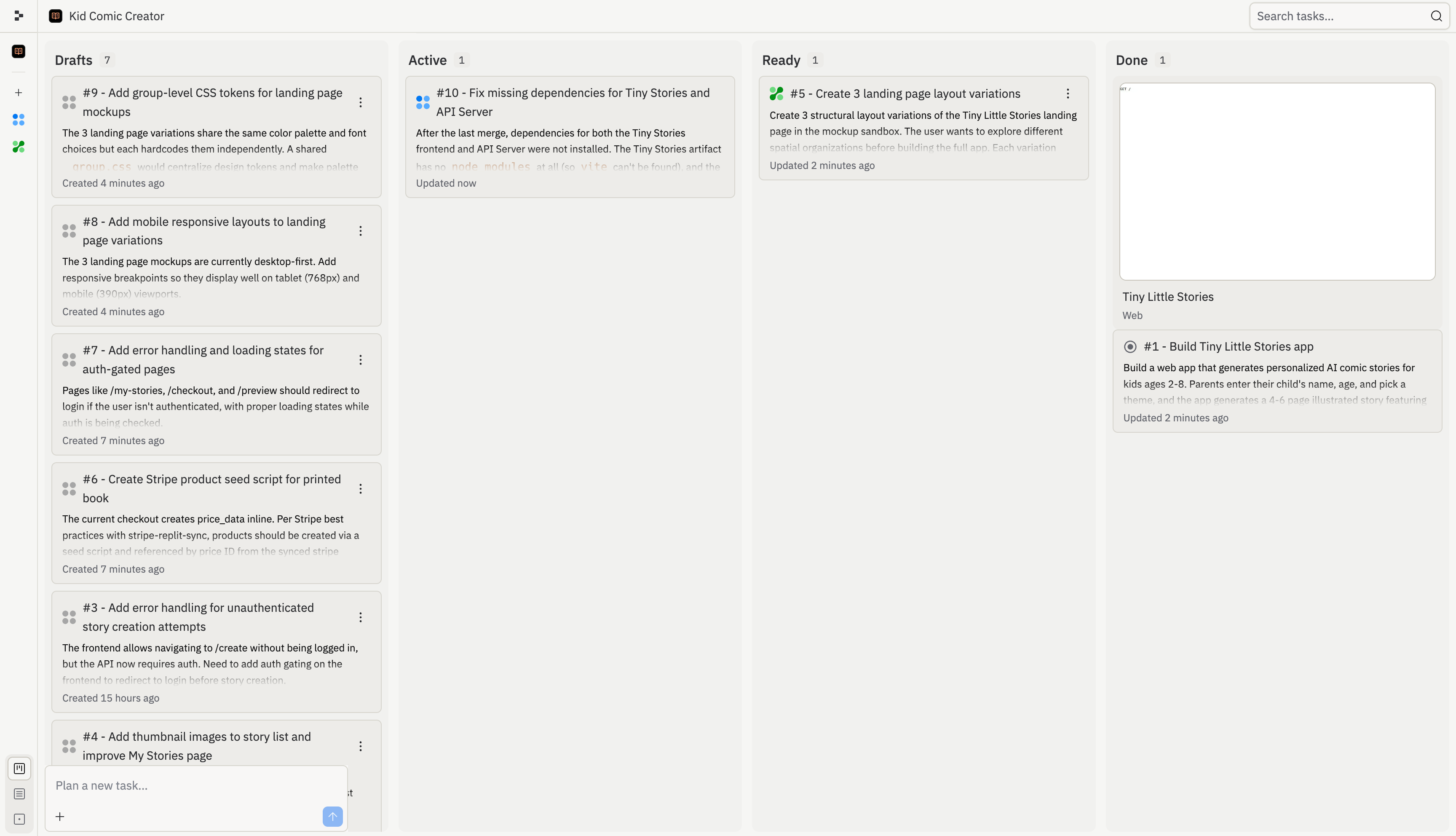
O quadro de tarefas oferece um único lugar para revisar, iniciar, monitorar e aplicar tarefas do Agent. Use-o quando o Agent dividir uma grande solicitação em várias partes, quando você quiser executar trabalho em segundo plano, ou quando precisar entender o que já foi alterado no seu projeto.

<Frame>
  <img src="https://mintcdn.com/replit/L22mbBMLs80H8_c8/images/replitai/task-board-progress.png?fit=max&auto=format&n=L22mbBMLs80H8_c8&q=85&s=3b4ef2fbede2d057e40c138956ccd74d" alt="Quadro de tarefas mostrando tarefas organizadas nas colunas Rascunhos, Ativo, Pronto e Concluído" width="3456" height="1984" data-path="images/replitai/task-board-progress.png" />
</Frame>

As tarefas são organizadas em colunas com base no status. O quadro mostra o que o Agent planejou, o que está em execução, o que está pronto para revisão e o que já foi aplicado.

Cada tarefa avança da esquerda para a direita conforme progride:

* **Rascunhos**: tarefas que o Agent planejou mas ainda não iniciou
* **Ativo**: tarefas que o Agent está construindo agora, incluindo tarefas na fila atrás do limite de tarefas ativas
* **Pronto**: tarefas que o Agent concluiu e estão prontas para sua revisão
* **Concluído**: tarefas finalizadas, arquivadas ou canceladas

## Rascunhos

**Rascunhos** são tarefas planejadas que o Agent ainda não começou a construir. Cada rascunho inclui título, descrição e um plano passo a passo.

Use os Rascunhos para revisar a abordagem proposta pelo Agent antes que o trabalho comece. Você pode inspecionar o plano, pedir ao Agent para ajustá-lo ou iniciar a tarefa quando estiver pronto.

Os Rascunhos são úteis quando você quer planejar uma funcionalidade maior antes de comprometer trabalho em segundo plano. Por exemplo, o Agent pode dividir um projeto de integração em rascunhos separados para autenticação, configuração de perfil, interface do dashboard e polimento de implantação.

## Ativo

Ao aceitar uma tarefa, ela passa para a coluna **Ativo** e o Agent começa a construir. Cada tarefa é executada em sua própria cópia isolada do seu projeto, de modo que nada muda na sua versão principal até que você aplique o trabalho.

Algumas tarefas dependem de outras. Por exemplo, uma tarefa que constrói um dashboard pode precisar que a tarefa do esquema do banco de dados seja concluída primeiro. Tarefas dependentes aguardam como **Na fila** até que seus pré-requisitos terminem. Tarefas também ficam na fila se você atingiu o limite de tarefas em segundo plano ativas do seu plano.

<KanbanColumns
  columns={[
{ title: 'Rascunhos', count: 2, cards: [
{ title: 'Add gift flow for family and friends', description: 'Let parents create a story for someone else\'s child and send it as a gift. Opens a new acquisition channel.', status: 'draft-static', timestamp: '2m' },
{ title: 'Bedtime reading mode with dark theme', description: 'A dedicated bedtime mode with a warm-toned dark theme and ambient sounds turns the app into a full bedtime ritual.', status: 'draft-static', timestamp: '2m' },
] },
{ title: 'Ativo', count: 3, cards: [
{ title: 'Story continuations: sequels', description: 'Adding a "Continue the Adventure" button generates a sequel that picks up where the last one left off.', status: 'active', timestamp: '12m' },
{ title: 'Story regeneration: redo pages', description: 'Adding the ability to regenerate individual pages gives parents control and reduces frustration.', status: 'active', timestamp: '8m' },
{ title: 'Add gift flow for family and friends', description: 'Let parents create a story for someone else\'s child and send it as a gift.', status: 'active-queued', timestamp: '1m' },
] }
]}
/>

## Pronto

Quando uma tarefa termina de construir, ela passa para **Pronto**. Isso significa que o trabalho está completo, mas nada mudou na sua versão principal ainda.

Você pode aplicar alterações de duas formas:

* **Da thread**: abra a thread da tarefa e selecione **Aplicar alterações à versão principal** para trazer o trabalho para o seu projeto, ou **Descartar** para descartá-lo
* **Do quadro**: selecione o menu de três pontos em qualquer cartão de tarefa Pronta e, em seguida, selecione **Aplicar alterações**

<TaskReviewDrawer />

Revise as tarefas Prontas antes de aplicá-las. Verifique o registro de trabalho, a saída dos testes e a prévia para entender o que o Agent alterou.

## Concluído

Após a aplicação, o cartão da tarefa passa para a coluna **Concluído**.

A coluna Concluído também inclui sessões de planejamento arquivadas e tarefas canceladas. Isso fornece um histórico do que aconteceu sem misturar o trabalho concluído de volta nos Rascunhos ou Ativo.

<KanbanColumns
  columns={[
{ title: 'Pronto', count: 3, cards: [
{ title: 'Bedtime reading mode with dark theme', description: 'A dedicated bedtime mode with a warm-toned dark theme and ambient sounds.', status: 'ready-drop', timestamp: '35m', showMenu: true },
{ title: 'Shareable story links with OG previews', description: 'Adding public shareable links is the single biggest growth lever.', status: 'ready-drop', timestamp: '31m', showMenu: true },
{ title: 'Enhanced character customization', description: 'Adding appearance options makes illustrations feel truly personalized.', status: 'ready-drop', timestamp: '28m', showMenu: true },
] },
{ title: 'Concluído', count: 4, cards: [
{ title: 'Read-aloud mode with word highlighting', description: 'Text-to-speech lets kids enjoy stories independently.', status: 'done', timestamp: '4h' },
{ title: 'Shareable story links with OG previews', description: 'Public shareable links as the biggest growth lever.', status: 'done', timestamp: '1h' },
{ title: 'Enhanced character customization', description: 'Appearance options for truly personalized illustrations.', status: 'done', timestamp: '4h' },
{ title: 'Mobile responsiveness and production polish', description: 'Better error states, mobile layouts, and loading animations.', status: 'done', timestamp: '4h' },
] }
]}
/>

O Agent resolve conflitos automaticamente ao aplicar alterações de múltiplas tarefas. Se algo não parecer certo, peça ao Agent para corrigir.

## Encontrar e filtrar tarefas

Use o quadro de tarefas quando seu projeto tiver muitas tarefas em andamento. Você pode pesquisar por título ou número de tarefa, filtrar rascunhos e usar o modo de edição para gerenciar grupos de tarefas de uma vez.

Por exemplo, pesquise por número de tarefa quando alguém referenciar uma tarefa de uma thread, revisão ou conversa no Slack. Filtre rascunhos quando quiser se concentrar no trabalho planejado sem escanear tarefas ativas ou concluídas.

Para acompanhamentos sugeridos, consulte [Tarefas de acompanhamento](/pt/core-concepts/agent/task-system/follow-up-tasks).
