> ## Documentation Index
> Fetch the complete documentation index at: https://docs.replit.com/llms.txt
> Use this file to discover all available pages before exploring further.

# Convidar colegas de equipe

> Convide colegas de equipe para o seu projeto e construa juntos — cada pessoa pode iniciar novos threads com o Agent enquanto trabalha no mesmo projeto.

export const KanbanColumns = ({columns = []}) => {
  if (typeof document !== "undefined" && !document.getElementById("kanban-board-styles")) {
    const style = document.createElement("style");
    style.id = "kanban-board-styles";
    style.textContent = `
      .kb-board {
        --kb-bg: var(--replit-docs-bg, #F6F6F4);
        --kb-col-bg: var(--replit-docs-bg-elevated, #F1F1EE);
        --kb-card-bg: var(--replit-docs-bg-task, #EDECE8);
        --kb-border: var(--replit-docs-border, #DEDAD5);
        --kb-text: var(--replit-docs-text, #1D1D1D);
        --kb-text-dim: var(--replit-docs-text-muted, #5C5C5C);
        --kb-text-dimmer: var(--replit-docs-text-muted, #5C5C5C);
        --kb-text-dimmest: var(--replit-docs-text-subtle, #858585);
        --kb-badge-bg: var(--replit-docs-bg-elevated, #F1F1EE);
      }
      .dark .kb-board,
      html.dark .kb-board,
      [data-theme="dark"] .kb-board {
        --kb-bg: var(--replit-docs-bg, #1E1E1F);
        --kb-col-bg: var(--replit-docs-bg-elevated, #222223);
        --kb-card-bg: var(--replit-docs-bg-task, #252527);
        --kb-border: var(--replit-docs-border, #39393D);
        --kb-text: var(--replit-docs-text, #F5F5F5);
        --kb-text-dim: var(--replit-docs-text-muted, #B8B8BE);
        --kb-text-dimmer: var(--replit-docs-text-muted, #B8B8BE);
        --kb-text-dimmest: var(--replit-docs-text-subtle, #8E8F97);
        --kb-badge-bg: var(--replit-docs-bg-elevated, #222223);
      }
      .kb-board { overflow: visible; }
    `;
    document.head.appendChild(style);
  }
  return <div className="kb-board" style={{
    fontFamily: "'IBM Plex Sans', sans-serif",
    display: "flex",
    gap: "12px",
    padding: "8px",
    background: "var(--kb-bg)",
    borderRadius: "12px"
  }}>
      {columns.map((col, ci) => <div key={ci} data-kb-column={col.title.toLowerCase()} style={{
    flex: "1 1 0",
    minWidth: "200px",
    background: "var(--kb-col-bg)",
    borderRadius: "8px",
    display: "flex",
    flexDirection: "column",
    overflow: "visible"
  }}>
          <div style={{
    display: "flex",
    alignItems: "center",
    gap: "8px",
    padding: "12px 12px 8px 12px"
  }}>
            <span style={{
    fontSize: "14px",
    fontWeight: 500,
    color: "var(--kb-text)"
  }}>
              {col.title}
            </span>
            <span data-kb-count style={{
    fontSize: "12px",
    color: "var(--kb-text-dimmer)",
    background: "var(--kb-badge-bg)",
    padding: "0 6px",
    borderRadius: "4px",
    lineHeight: "20px"
  }}>
              {col.count}
            </span>
          </div>
          <div data-kb-cards style={{
    display: "flex",
    flexDirection: "column",
    gap: "8px",
    padding: "8px",
    flex: "1 1 0"
  }}>
            {col.cards.map((card, i) => <TaskCard key={i} title={card.title} description={card.description} status={card.status} timestamp={card.timestamp} showMenu={card.showMenu} width="100%" />)}
          </div>
        </div>)}
    </div>;
};

export const TaskCard = ({title = "Product Manager next steps discussion", description = "", status = "draft", timestamp = "Created 3 minutes ago", width = "364px", showMenu = false}) => {
  if (typeof document !== "undefined" && !document.getElementById("task-card-styles")) {
    const style = document.createElement("style");
    style.id = "task-card-styles";
    style.textContent = `
      .task-card {
        --tc-bg: var(--replit-docs-bg-task, #EDECE8);
        --tc-border: var(--replit-docs-border, #DEDAD5);
        --tc-text: var(--replit-docs-text, #1D1D1D);
        --tc-text-dim: var(--replit-docs-text-muted, #5C5C5C);
        --tc-text-dimmest: var(--replit-docs-text-subtle, #858585);
        --tc-dot-active: #4A7BF7;
        --tc-dot-draft: #A6A6A6;
        --tc-dot-ready: #F59E0B;
        --tc-dot-done: #22C55E;
      }
      .dark .task-card,
      html.dark .task-card,
      [data-theme="dark"] .task-card {
        --tc-bg: var(--replit-docs-bg-task, #252527);
        --tc-border: var(--replit-docs-border, #39393D);
        --tc-text: var(--replit-docs-text, #F5F5F5);
        --tc-text-dim: var(--replit-docs-text-muted, #B8B8BE);
        --tc-text-dimmest: var(--replit-docs-text-subtle, #8E8F97);
        --tc-dot-active: #6B9EFF;
        --tc-dot-draft: #6B7280;
        --tc-dot-ready: #FBBF24;
        --tc-dot-done: #4ADE80;
      }
      @keyframes task-card-fade-in {
        from { transform: translateY(6px); opacity: 0; }
        to { transform: translateY(0); opacity: 1; }
      }
      @keyframes tc-tl {
        0%{opacity:1;fill:var(--tc-light)} 5%{opacity:1;fill:var(--tc-dark)} 10%{opacity:1;fill:var(--tc-dark)} 15%{opacity:1;fill:var(--tc-light)}
        20%{opacity:0} 25%{opacity:1;fill:var(--tc-dark)} 30%{opacity:1;fill:var(--tc-light)} 35%{opacity:0}
        40%{opacity:1;fill:var(--tc-dark)} 45%{opacity:1;fill:var(--tc-light)} 50%{opacity:0} 55%{opacity:1;fill:var(--tc-dark)}
        60%{opacity:0} 65%{opacity:1;fill:var(--tc-light)} 70%{opacity:1;fill:var(--tc-light)} 75%{opacity:1;fill:var(--tc-light)}
        80%{opacity:1;fill:var(--tc-light)} 85%{opacity:0} 90%{opacity:1;fill:var(--tc-light)} 95%{opacity:1;fill:var(--tc-light)}
      }
      @keyframes tc-tr {
        0%{opacity:1;fill:var(--tc-dark)} 5%{opacity:0} 10%{opacity:0} 15%{opacity:0}
        20%{opacity:1;fill:var(--tc-light)} 25%{opacity:1;fill:var(--tc-light)} 30%{opacity:1;fill:var(--tc-light)} 35%{opacity:1;fill:var(--tc-light)}
        40%{opacity:0} 45%{opacity:1;fill:var(--tc-dark)} 50%{opacity:1;fill:var(--tc-dark)} 55%{opacity:0}
        60%{opacity:1;fill:var(--tc-dark)} 65%{opacity:0} 70%{opacity:0} 75%{opacity:1;fill:var(--tc-light)}
        80%{opacity:0} 85%{opacity:1;fill:var(--tc-dark)} 90%{opacity:0} 95%{opacity:0}
      }
      @keyframes tc-bl {
        0%{opacity:1;fill:var(--tc-light)} 5%{opacity:0} 10%{opacity:0} 15%{opacity:0}
        20%{opacity:1;fill:var(--tc-light)} 25%{opacity:1;fill:var(--tc-light)} 30%{opacity:1;fill:var(--tc-light)} 35%{opacity:1;fill:var(--tc-light)}
        40%{opacity:0} 45%{opacity:1;fill:var(--tc-light)} 50%{opacity:1;fill:var(--tc-light)} 55%{opacity:0}
        60%{opacity:1;fill:var(--tc-light)} 65%{opacity:0} 70%{opacity:0} 75%{opacity:1;fill:var(--tc-light)}
        80%{opacity:0} 85%{opacity:1;fill:var(--tc-light)} 90%{opacity:0} 95%{opacity:0}
      }
      @keyframes tc-br {
        0%{opacity:1;fill:var(--tc-light)} 5%{opacity:1;fill:var(--tc-dark)} 10%{opacity:1;fill:var(--tc-light)} 15%{opacity:1;fill:var(--tc-light)}
        20%{opacity:0} 25%{opacity:1;fill:var(--tc-light)} 30%{opacity:1;fill:var(--tc-dark)} 35%{opacity:0}
        40%{opacity:1;fill:var(--tc-light)} 45%{opacity:1;fill:var(--tc-light)} 50%{opacity:0} 55%{opacity:1;fill:var(--tc-light)}
        60%{opacity:0} 65%{opacity:1;fill:var(--tc-dark)} 70%{opacity:1;fill:var(--tc-light)} 75%{opacity:1;fill:var(--tc-light)}
        80%{opacity:1;fill:var(--tc-light)} 85%{opacity:0} 90%{opacity:1;fill:var(--tc-light)} 95%{opacity:1;fill:var(--tc-dark)}
      }
      @keyframes tc-drop {
        0%{opacity:0} 5%{opacity:1;fill:var(--tc-dark)} 10%{opacity:1;fill:var(--tc-dark)} 15%{opacity:1;fill:var(--tc-dark)}
        20%{opacity:0} 25%{opacity:0} 30%{opacity:0} 35%{opacity:0}
        40%{opacity:1;fill:var(--tc-dark)} 45%{opacity:0} 50%{opacity:0} 55%{opacity:1;fill:var(--tc-dark)}
        60%{opacity:0} 65%{opacity:1;fill:var(--tc-dark)} 70%{opacity:1;fill:var(--tc-dark)} 75%{opacity:0}
        80%{opacity:1;fill:var(--tc-dark)} 85%{opacity:0} 90%{opacity:1;fill:var(--tc-dark)} 95%{opacity:1;fill:var(--tc-dark)}
      }
      @keyframes tc-dropalt {
        0%{opacity:0} 5%{opacity:0} 10%{opacity:0} 15%{opacity:0}
        20%{opacity:1;fill:var(--tc-dark)} 25%{opacity:0} 30%{opacity:0} 35%{opacity:1;fill:var(--tc-dark)}
        40%{opacity:0} 45%{opacity:0} 50%{opacity:1;fill:var(--tc-dark)} 55%{opacity:0}
        60%{opacity:1;fill:var(--tc-dark)} 65%{opacity:0} 70%{opacity:0} 75%{opacity:0}
        80%{opacity:0} 85%{opacity:1;fill:var(--tc-dark)} 90%{opacity:0} 95%{opacity:0}
      }
      .task-card .tc-el-tl { animation: tc-tl 4s step-end infinite; }
      .task-card .tc-el-tr { animation: tc-tr 4s step-end infinite; }
      .task-card .tc-el-bl { animation: tc-bl 4s step-end infinite; }
      .task-card .tc-el-br { animation: tc-br 4s step-end infinite; }
      .task-card .tc-el-drop { animation: tc-drop 4s step-end infinite; }
      .task-card .tc-el-dropalt { animation: tc-dropalt 4s step-end infinite; }
      @media (hover: hover) {
        .task-card:hover {
          border-color: var(--tc-text-dimmest) !important;
        }
        .task-card .tc-menu-btn:hover {
          background: var(--tc-border);
        }
      }
    `;
    document.head.appendChild(style);
  }
  const colorPairs = {
    active: {
      dark: "#57ABFF",
      light: "#A8D4FF"
    },
    "active-queued": {
      dark: "#6BB5FF",
      light: "#6BB5FF"
    },
    draft: {
      dark: "#A6A6A6",
      light: "#D4D4D4"
    },
    "draft-static": {
      dark: "#A6A6A6",
      light: "#D4D4D4"
    },
    "draft-done": {
      dark: "#A6A6A6",
      light: "#D4D4D4"
    },
    ready: {
      dark: "#009118",
      light: "#6CD97E"
    },
    "ready-drop": {
      dark: "#009118",
      light: "#6CD97E"
    },
    applying: {
      dark: "#7C3AED",
      light: "#C4B5FD"
    },
    done: {
      dark: "#22C55E",
      light: "#86EFAC"
    }
  };
  const statusLabels = {
    active: "Active",
    "active-queued": "Queued",
    draft: "Draft",
    "draft-static": "Draft",
    "draft-done": "Done",
    ready: "Ready",
    "ready-drop": "Ready",
    applying: "Applying",
    done: "Done"
  };
  const colors = colorPairs[status] || colorPairs.draft;
  const applyingIconHtml = '<svg width="16" height="16" viewBox="0 0 24 24" fill="none" style="flex-shrink:0;--tc-dark:#009118;--tc-light:#6CD97E"><circle class="tc-el-tl" cx="5.332" cy="5.338" r="5.332" fill="#009118"/><circle class="tc-el-tr" cx="18.663" cy="5.338" r="5.332" fill="#009118"/><circle class="tc-el-bl" cx="5.332" cy="18.668" r="5.332" fill="#009118"/><circle class="tc-el-br" cx="18.663" cy="18.668" r="5.332" fill="#009118"/><path class="tc-el-drop" fill="#009118" d="M18.662 0a5.332 5.332 0 0 1 .001 10.664l-.412.01a8 8 0 0 0-7.577 7.59l-.01.398-.008.274A5.331 5.331 0 0 1 0 18.662a5.332 5.332 0 0 1 5.332-5.332l.398-.01a8 8 0 0 0 7.59-7.576l.011-.412A5.331 5.331 0 0 1 18.662 0Z"/><g class="tc-el-dropalt" transform="rotate(90, 12, 12)"><path fill="#009118" d="M18.662 0a5.332 5.332 0 0 1 .001 10.664l-.412.01a8 8 0 0 0-7.577 7.59l-.01.398-.008.274A5.331 5.331 0 0 1 0 18.662a5.332 5.332 0 0 1 5.332-5.332l.398-.01a8 8 0 0 0 7.59-7.576l.011-.412A5.331 5.331 0 0 1 18.662 0Z"/></g></svg>';
  const doneIconHtml = '<svg width="16" height="16" viewBox="0 0 24 24" style="flex-shrink:0;fill:var(--tc-text-dimmest)"><path d="M12 7a5 5 0 1 1 0 10 5 5 0 0 1 0-10Z"/><path fill-rule="evenodd" d="M12 1c6.075 0 11 4.925 11 11s-4.925 11-11 11S1 18.075 1 12 5.925 1 12 1Zm0 2a9 9 0 1 0 0 18 9 9 0 0 0 0-18Z" clip-rule="evenodd"/></svg>';
  const handleApplyChanges = e => {
    const tooltip = e.currentTarget.parentElement;
    tooltip.style.display = "none";
    const menuBtn = tooltip.previousElementSibling;
    if (menuBtn) menuBtn.style.background = "none";
    const card = e.currentTarget.closest(".task-card");
    if (!card) return;
    const headerRow = card.firstElementChild;
    const oldIcon = headerRow.firstElementChild;
    const menuWrapper = headerRow.lastElementChild;
    const meta = card.lastElementChild;
    const temp = document.createElement("div");
    temp.innerHTML = applyingIconHtml;
    headerRow.replaceChild(temp.firstElementChild, oldIcon);
    meta.textContent = "Applying \u2022 just now";
    menuWrapper.style.visibility = "hidden";
    setTimeout(() => {
      const currentIcon = headerRow.firstElementChild;
      const doneTemp = document.createElement("div");
      doneTemp.innerHTML = doneIconHtml;
      headerRow.replaceChild(doneTemp.firstElementChild, currentIcon);
      meta.textContent = "Done \u2022 just now";
      const board = card.closest(".kb-board");
      if (!board) return;
      const doneCol = board.querySelector('[data-kb-column="done"]');
      if (!doneCol) return;
      const cardList = doneCol.querySelector("[data-kb-cards]");
      const readyCol = board.querySelector('[data-kb-column="ready"]');
      card.style.transition = "opacity 300ms, transform 300ms";
      card.style.opacity = "0";
      card.style.transform = "translateY(-10px)";
      setTimeout(() => {
        card.parentElement.removeChild(card);
        if (readyCol) {
          const rc = readyCol.querySelector("[data-kb-count]");
          rc.textContent = parseInt(rc.textContent) - 1;
        }
        const dc = doneCol.querySelector("[data-kb-count]");
        dc.textContent = parseInt(dc.textContent) + 1;
        card.style.opacity = "0";
        card.style.transform = "translateY(6px)";
        cardList.insertBefore(card, cardList.firstChild);
        requestAnimationFrame(() => {
          card.style.transition = "opacity 300ms, transform 300ms";
          card.style.opacity = "1";
          card.style.transform = "translateY(0)";
        });
      }, 300);
    }, 3000);
  };
  return <div className="task-card" style={{
    fontFamily: "'IBM Plex Sans', sans-serif",
    width: width,
    background: "var(--tc-bg)",
    border: "1px solid var(--tc-border)",
    borderRadius: "8px",
    padding: "8px 12px",
    margin: 0,
    display: "flex",
    flexDirection: "column",
    gap: "4px",
    cursor: "pointer",
    opacity: 0,
    animation: "task-card-fade-in 300ms ease-out forwards",
    transition: "border-color 120ms ease-out"
  }}>
      {}
      <div style={{
    display: "flex",
    alignItems: "center",
    gap: "8px"
  }}>
        {status === "done" ? <svg width="16" height="16" viewBox="0 0 24 24" fill="var(--tc-text-dimmest)" style={{
    flexShrink: 0
  }}>
            <path d="M12 7a5 5 0 1 1 0 10 5 5 0 0 1 0-10Z" />
            <path fillRule="evenodd" d="M12 1c6.075 0 11 4.925 11 11s-4.925 11-11 11S1 18.075 1 12 5.925 1 12 1Zm0 2a9 9 0 1 0 0 18 9 9 0 0 0 0-18Z" clipRule="evenodd" />
          </svg> : status === "draft-static" ? <svg width="16" height="16" viewBox="0 0 24 24" fill="none" style={{
    flexShrink: 0
  }}>
            <circle cx="5.332" cy="5.338" r="5.332" fill={colors.dark} />
            <circle cx="18.663" cy="5.338" r="5.332" fill={colors.dark} />
            <circle cx="5.332" cy="18.668" r="5.332" fill={colors.dark} />
            <circle cx="18.663" cy="18.668" r="5.332" fill={colors.dark} />
          </svg> : status === "draft-done" ? <svg width="16" height="16" viewBox="0 0 24 24" fill="none" style={{
    flexShrink: 0
  }}>
            <circle cx="5.332" cy="5.338" r="5.332" fill={colors.light} />
            <circle cx="18.663" cy="5.338" r="5.332" fill={colors.light} />
            <circle cx="5.332" cy="18.668" r="5.332" fill={colors.light} />
            <circle cx="18.663" cy="18.668" r="5.332" fill={colors.light} />
          </svg> : status === "active-queued" ? <svg width="16" height="16" viewBox="0 0 24 24" fill="none" style={{
    flexShrink: 0
  }}>
            <circle cx="5.332" cy="5.338" r="5.332" fill={colors.light} />
            <circle cx="18.663" cy="5.338" r="5.332" fill={colors.light} />
            <circle cx="5.332" cy="18.668" r="5.332" fill={colors.light} />
            <circle cx="18.663" cy="18.668" r="5.332" fill={colors.light} />
          </svg> : status === "ready-drop" ? <svg width="16" height="16" viewBox="0 0 24 24" fill="none" style={{
    flexShrink: 0
  }}>
            <circle cx="5.332" cy="5.338" r="5.332" fill={colors.light} />
            <circle cx="18.663" cy="18.668" r="5.332" fill={colors.light} />
            <path fill={colors.dark} d="M18.662 0a5.332 5.332 0 0 1 .001 10.664l-.412.01a8 8 0 0 0-7.577 7.59l-.01.398-.008.274A5.331 5.331 0 0 1 0 18.662a5.332 5.332 0 0 1 5.332-5.332l.398-.01a8 8 0 0 0 7.59-7.576l.011-.412A5.331 5.331 0 0 1 18.662 0Z" />
          </svg> : <svg width="16" height="16" viewBox="0 0 24 24" fill="none" style={{
    flexShrink: 0,
    "--tc-dark": colors.dark,
    "--tc-light": colors.light
  }}>
            <circle className="tc-el-tl" cx="5.332" cy="5.338" r="5.332" fill={colors.dark} />
            <circle className="tc-el-tr" cx="18.663" cy="5.338" r="5.332" fill={colors.dark} />
            <circle className="tc-el-bl" cx="5.332" cy="18.668" r="5.332" fill={colors.dark} />
            <circle className="tc-el-br" cx="18.663" cy="18.668" r="5.332" fill={colors.dark} />
            <path className="tc-el-drop" fill={colors.dark} d="M18.662 0a5.332 5.332 0 0 1 .001 10.664l-.412.01a8 8 0 0 0-7.577 7.59l-.01.398-.008.274A5.331 5.331 0 0 1 0 18.662a5.332 5.332 0 0 1 5.332-5.332l.398-.01a8 8 0 0 0 7.59-7.576l.011-.412A5.331 5.331 0 0 1 18.662 0Z" />
            <g className="tc-el-dropalt" transform="rotate(90, 12, 12)">
              <path fill={colors.dark} d="M18.662 0a5.332 5.332 0 0 1 .001 10.664l-.412.01a8 8 0 0 0-7.577 7.59l-.01.398-.008.274A5.331 5.331 0 0 1 0 18.662a5.332 5.332 0 0 1 5.332-5.332l.398-.01a8 8 0 0 0 7.59-7.576l.011-.412A5.331 5.331 0 0 1 18.662 0Z" />
            </g>
          </svg>}
        <span style={{
    flex: 1,
    fontSize: "14px",
    lineHeight: "1.4",
    color: "var(--tc-text)",
    minWidth: 0
  }}>
          {title}
        </span>
        <div style={{
    position: "relative",
    flexShrink: 0
  }}>
          <button className="tc-menu-btn" type="button" aria-label="Thread actions" onClick={showMenu ? e => {
    const btn = e.currentTarget;
    const popup = btn.nextElementSibling;
    const card = btn.closest(".task-card");
    const isHidden = popup.style.display === "none";
    popup.style.display = isHidden ? "flex" : "none";
    btn.style.background = isHidden ? "var(--tc-border)" : "none";
    if (card) card.style.zIndex = isHidden ? "9999" : "";
  } : undefined} style={{
    display: "flex",
    alignItems: "center",
    justifyContent: "center",
    width: "24px",
    height: "24px",
    border: "none",
    background: "none",
    borderRadius: "4px",
    cursor: "pointer",
    color: "var(--tc-text-dimmest)",
    padding: 0,
    flexShrink: 0,
    transition: "background 120ms ease-out"
  }}>
            <svg width="16" height="16" viewBox="0 0 24 24" fill="currentColor">
              <path fillRule="evenodd" d="M10.25 5a1.75 1.75 0 1 1 3.5 0 1.75 1.75 0 0 1-3.5 0Zm0 7a1.75 1.75 0 1 1 3.5 0 1.75 1.75 0 0 1-3.5 0Zm0 7a1.75 1.75 0 1 1 3.5 0 1.75 1.75 0 0 1-3.5 0Z" clipRule="evenodd" />
            </svg>
          </button>
          {showMenu && <div style={{
    display: "none",
    position: "absolute",
    top: 0,
    left: "28px",
    background: "var(--tc-bg)",
    border: "1px solid var(--tc-border)",
    borderRadius: "8px",
    padding: "4px",
    boxShadow: "0 8px 24px rgba(0,0,0,0.12), 0 2px 6px rgba(0,0,0,0.06)",
    zIndex: 9999,
    minWidth: "160px",
    flexDirection: "column",
    gap: "0"
  }}>
              <div onClick={handleApplyChanges} style={{
    display: "flex",
    alignItems: "center",
    gap: "8px",
    padding: "6px 8px",
    borderRadius: "4px",
    cursor: "pointer",
    color: "var(--tc-text)",
    fontSize: "14px"
  }}>
                <svg width="16" height="16" viewBox="0 0 24 24" fill="currentColor" style={{
    flexShrink: 0
  }}>
                  <path fillRule="evenodd" d="M6 3.75a2.25 2.25 0 1 0 0 4.5 2.25 2.25 0 0 0 0-4.5ZM2.25 6a3.75 3.75 0 1 1 4.527 3.67 8.25 8.25 0 0 0 7.554 7.553A3.751 3.751 0 0 1 21.75 18a3.75 3.75 0 0 1-7.43.726 9.75 9.75 0 0 1-7.57-4.53V21a.75.75 0 0 1-1.5 0V9.675A3.751 3.751 0 0 1 2.25 6ZM18 15.75a2.25 2.25 0 1 0 0 4.5 2.25 2.25 0 0 0 0-4.5Z" clipRule="evenodd" />
                </svg>
                <span>Apply changes</span>
              </div>
              <div style={{
    display: "flex",
    alignItems: "center",
    gap: "8px",
    padding: "6px 8px",
    borderRadius: "4px",
    cursor: "pointer",
    color: "var(--tc-text)",
    fontSize: "14px"
  }}>
                <svg width="16" height="16" viewBox="0 0 24 24" fill="currentColor" style={{
    flexShrink: 0
  }}>
                  <path fillRule="evenodd" d="M5.47 5.47a.75.75 0 0 1 1.06 0L12 10.94l5.47-5.47a.75.75 0 1 1 1.06 1.06L13.06 12l5.47 5.47a.75.75 0 1 1-1.06 1.06L12 13.06l-5.47 5.47a.75.75 0 0 1-1.06-1.06L10.94 12 5.47 6.53a.75.75 0 0 1 0-1.06Z" clipRule="evenodd" />
                </svg>
                <span>Cancel</span>
              </div>
            </div>}
        </div>
      </div>
      {}
      {description && <div style={{
    fontSize: "12px",
    color: "var(--tc-text-dim)",
    lineHeight: "1.5",
    overflow: "hidden",
    display: "-webkit-box",
    WebkitLineClamp: 3,
    WebkitBoxOrient: "vertical",
    paddingLeft: "0"
  }}>
          {description}
        </div>}
      {}
      <div style={{
    fontSize: "12px",
    color: "var(--tc-text-dimmest)",
    paddingLeft: "0"
  }}>
        {statusLabels[status] || status} • {timestamp}
      </div>
    </div>;
};

## Construa com colegas de equipe

O Replit permite que várias pessoas trabalhem no mesmo projeto ao mesmo tempo. Cada pessoa pode iniciar novos threads de planejamento com o Agent, e as tarefas de todos aparecem no quadro compartilhado — para que a equipe construa juntos em vez de se revezar.

## Comece a construir com colegas de equipe

### Convidando colegas de equipe

1. Abra seu projeto
2. Clique em **Invite** ou compartilhe o link do projeto
3. Os colegas entram e iniciam novos threads com o Agent

<Frame>
  <video autoPlay muted loop playsInline style={{ width: '100%', borderRadius: '8px' }}>
    <source src="https://mintcdn.com/replit/L22mbBMLs80H8_c8/images/replitai/teamwork-invite.mp4?fit=max&auto=format&n=L22mbBMLs80H8_c8&q=85&s=8e86729d83e092ac9cfe88a0a9a48616" type="video/mp4" data-path="images/replitai/teamwork-invite.mp4" />
  </video>
</Frame>

### Trabalhando em paralelo

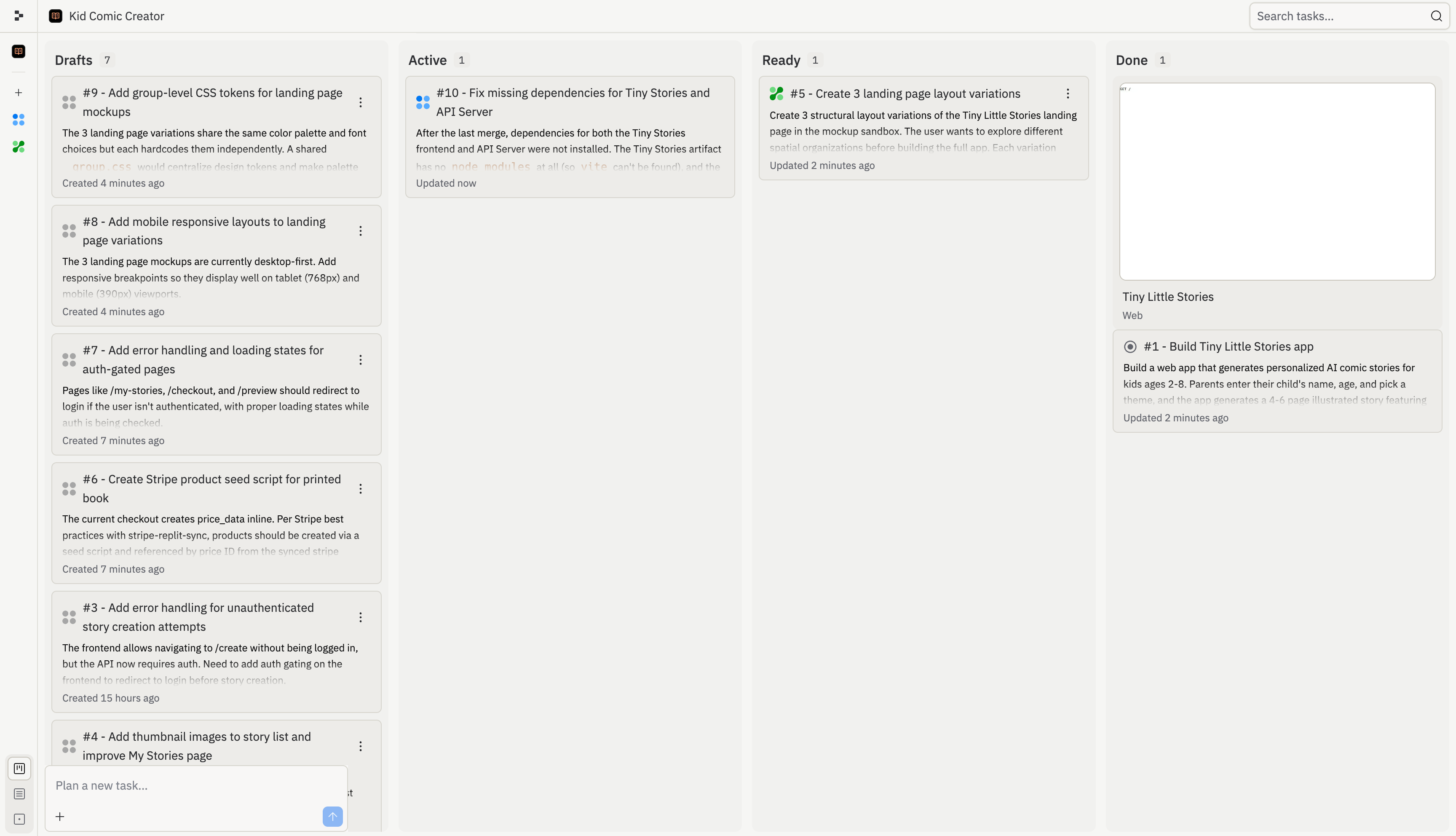
Cada pessoa pode criar novos threads, para que você possa trabalhar de forma independente sem interromper uns aos outros. As tarefas de todos aparecem no quadro Kanban compartilhado, facilitando ver quem está trabalhando em quê e evitar conflitos no trabalho.

<Note>
  No Core, apenas 1 tarefa em segundo plano pode ser executada por vez em todo o projeto. No Pro, até 10 tarefas podem ser executadas em paralelo — para que várias pessoas possam ter o Agent construindo diferentes partes do projeto simultaneamente.
</Note>

## O quadro de tarefas compartilhado

Quando a equipe trabalha em conjunto, as tarefas de todos aparecem no mesmo quadro. Você pode ver rapidamente quem está trabalhando em quê, o que está em andamento e o que está pronto para ser aplicado.

<Frame>
  <img src="https://mintcdn.com/replit/L22mbBMLs80H8_c8/images/replitai/task-board-progress.png?fit=max&auto=format&n=L22mbBMLs80H8_c8&q=85&s=3b4ef2fbede2d057e40c138956ccd74d" alt="Quadro de tarefas mostrando tarefas organizadas nas colunas Rascunhos, Ativo, Pronto e Concluído" width="3456" height="1984" data-path="images/replitai/task-board-progress.png" />
</Frame>

Cada tarefa passa por quatro etapas:

<div style={{ display: 'grid', gridTemplateColumns: 'repeat(auto-fill, minmax(300px, 1fr))', gap: '20px', margin: '20px 0' }}>
  <div style={{ display: 'flex', flexDirection: 'column', gap: '6px' }}>
    <TaskCard title="Add gift flow for family and friends" description="Let parents create a story for someone else's child and send it as a gift." status="draft-static" timestamp="2m" width="100%" />

    <span style={{ fontSize: '13px', color: 'var(--kb-text-dimmer, #666)', padding: '0 4px' }}><strong>Rascunho</strong> — O Agent propôs esta tarefa. Ela tem um plano pronto para revisão.</span>
  </div>

  <div style={{ display: 'flex', flexDirection: 'column', gap: '6px' }}>
    <TaskCard title="Story continuations — sequels" description="Adding a 'Continue the Adventure' button generates a sequel that picks up where the last one left off." status="active" timestamp="12m" width="100%" />

    <span style={{ fontSize: '13px', color: 'var(--kb-text-dimmer, #666)', padding: '0 4px' }}><strong>Ativo</strong> — O Agent está construindo esta tarefa agora em sua própria cópia isolada do projeto.</span>
  </div>

  <div style={{ display: 'flex', flexDirection: 'column', gap: '6px' }}>
    <TaskCard title="Bedtime mode with dark theme" description="A dedicated bedtime mode with a warm-toned dark theme and ambient sounds." status="ready-drop" timestamp="35m" width="100%" />

    <span style={{ fontSize: '13px', color: 'var(--kb-text-dimmer, #666)', padding: '0 4px' }}><strong>Pronto</strong> — A tarefa está concluída. Revise as alterações e aplique-as à versão principal.</span>
  </div>

  <div style={{ display: 'flex', flexDirection: 'column', gap: '6px' }}>
    <TaskCard title="Read-aloud with word highlighting" description="Text-to-speech lets kids enjoy stories independently while following along with highlighted words." status="done" timestamp="4h" width="100%" />

    <span style={{ fontSize: '13px', color: 'var(--kb-text-dimmer, #666)', padding: '0 4px' }}><strong>Concluído</strong> — Esta tarefa está finalizada e suas alterações fazem parte da versão principal.</span>
  </div>
</div>

### Como as equipes usam o quadro

Quando várias pessoas estão construindo ao mesmo tempo, as tarefas de cada pessoa aparecem no quadro compartilhado. Veja como fica — um colega está trabalhando em continuações e regeneração de histórias enquanto outro cuida do fluxo de presente, e o trabalho concluído do restante da equipe fica em Pronto e Concluído.

<KanbanColumns
  columns={[
{ title: 'Active', count: 3, cards: [
{ title: 'Story continuations — sequels', description: 'Adding a "Continue the Adventure" button generates a sequel that picks up where the last one left off.', status: 'active', timestamp: '12m' },
{ title: 'Story regeneration — redo pages', description: 'Adding the ability to regenerate individual pages gives parents control and reduces frustration.', status: 'active', timestamp: '8m' },
{ title: 'Add gift flow for family and friends', description: 'Let parents create a story for someone else\'s child and send it as a gift.', status: 'active-queued', timestamp: '1m' },
] },
{ title: 'Ready', count: 2, cards: [
{ title: 'Bedtime reading mode with dark theme', description: 'A dedicated bedtime mode with a warm-toned dark theme and ambient sounds.', status: 'ready-drop', timestamp: '35m', showMenu: true },
{ title: 'Shareable story links with OG previews', description: 'Adding public shareable links is the single biggest growth lever.', status: 'ready-drop', timestamp: '31m', showMenu: true },
] },
{ title: 'Done', count: 3, cards: [
{ title: 'Read-aloud mode with word highlighting', description: 'Text-to-speech lets kids enjoy stories independently.', status: 'done', timestamp: '4h' },
{ title: 'Enhanced character customization', description: 'Appearance options for truly personalized illustrations.', status: 'done', timestamp: '4h' },
{ title: 'Mobile responsiveness & production polish', description: 'Better error states, mobile layouts, and loading animations.', status: 'done', timestamp: '4h' },
] }
]}
/>

Quando uma tarefa é movida para Pronto, qualquer pessoa da equipe pode revisar e aplicar as alterações. O Agent lida com conflitos automaticamente quando várias tarefas são aplicadas.

## O que você pode construir juntos

* **Dividir um recurso entre a equipe**: Uma pessoa constrói o frontend enquanto outra cuida do backend, cada uma pelo seu próprio chat com o Agent. O quadro Kanban mantém todos alinhados.
* **Integrar um novo colega**: Ele pode explorar o projeto pelo próprio chat com o Agent, fazer perguntas sobre como as coisas funcionam e começar a contribuir — tudo sem bloquear ninguém.
* **Entregar mais rápido no Pro**: Com execução paralela, duas ou três pessoas podem cada uma despachar tarefas que são executadas ao mesmo tempo. Um projeto que levaria uma sessão inteira para uma pessoa pode ser concluído em uma fração do tempo.

## Perguntas frequentes

<Accordion title="Posso enviar mensagens para meu colega pelo Agent?">
  Não. O Agent não é uma ferramenta de mensagens — ele está sempre ouvindo e tentará agir em tudo que você digitar. Use Slack, Discord ou outra ferramenta para comunicação da equipe.
</Accordion>

<Accordion title="Vamos sobrescrever o trabalho um do outro?">
  O sistema de tarefas ajuda a evitar isso dando a cada tarefa sua própria cópia isolada, mas está ciente de quais outras tarefas existem. Quando as tarefas são concluídas, você as aplica de volta à versão principal e resolve quaisquer conflitos nessa etapa.
</Accordion>

<Accordion title="Como posso ver o que meus colegas estão fazendo?">
  Verifique o quadro Kanban para ver as tarefas ativas. Você também pode ver a presença do cursor e quais arquivos os colegas estão visualizando.
</Accordion>

<Accordion title="Posso remover alguém do meu projeto?">
  Sim. Os proprietários do projeto podem gerenciar membros da equipe e revogar o acesso a qualquer momento.
</Accordion>

## Disponibilidade

| Recurso                         | Core | Pro |
| ------------------------------- | ---- | --- |
| Assentos de colaboração         | 5    | 15  |
| Chats simultâneos               | ✅    | ✅   |
| Kanban compartilhado            | ✅    | ✅   |
| Tarefas ativas em segundo plano | 1    | 10  |