> ## Documentation Index
> Fetch the complete documentation index at: https://docs.replit.com/llms.txt
> Use this file to discover all available pages before exploring further.
# March 21, 2025
> 2분 읽기
## 새로운 기능
* [JS 스택을 위한 비주얼 에디터](#visual-editor)
* [Agent 타임라인 메시지](#agent-timeline-messages)
## 플랫폼 업데이트
### 비주얼 에디터
Agent가 이제 눈을 갖게 되었습니다 - 클릭하고, 설명하고, 완료.
 흥미로운 새 기능이 출시되었습니다. 이제 JavaScript 앱의 프로젝트에서 요소를 직접 클릭하고 선택할 수 있습니다!
이를 통해 UI를 구축하고 편집하는 것이 그 어느 때보다 직관적입니다. 더 자세히 알고 싶으신가요? [https://blog.replit.com/cartographer](https://blog.replit.com/cartographer) 블로그에서 자세한 안내를 확인하세요.
### Agent 타임라인 메시지
이제 Agent가 프로젝트의 블루프린트를 설정할 때마다 시각적 표시기가 나타납니다. 이로 인해 Agent가 무엇을 하는지 따라가고 개발 과정을 이해하기가 더 쉬워집니다.
흥미로운 새 기능이 출시되었습니다. 이제 JavaScript 앱의 프로젝트에서 요소를 직접 클릭하고 선택할 수 있습니다!
이를 통해 UI를 구축하고 편집하는 것이 그 어느 때보다 직관적입니다. 더 자세히 알고 싶으신가요? [https://blog.replit.com/cartographer](https://blog.replit.com/cartographer) 블로그에서 자세한 안내를 확인하세요.
### Agent 타임라인 메시지
이제 Agent가 프로젝트의 블루프린트를 설정할 때마다 시각적 표시기가 나타납니다. 이로 인해 Agent가 무엇을 하는지 따라가고 개발 과정을 이해하기가 더 쉬워집니다.
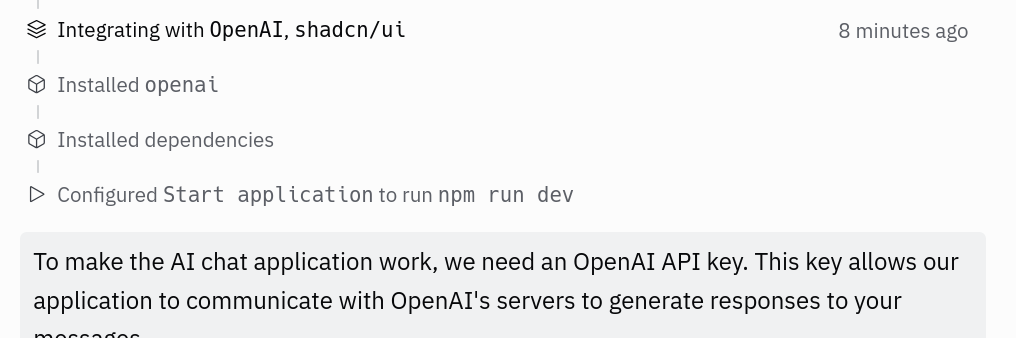 또한 블루프린트 사용 방식을 더 잘 추적하기 위해 분석을 강화하여 향후 더 스마트한 개선을 이룰 수 있도록 했습니다.