> ## Documentation Index
> Fetch the complete documentation index at: https://docs.replit.com/llms.txt
> Use this file to discover all available pages before exploring further.

# 작업 라이프사이클

> 작업 상태, 큐에 추가된 작업, 변경 사항 적용, 보관, Agent 작업 취소를 이해하세요.

export const TaskCard = ({title = "Product Manager next steps discussion", description = "", status = "draft", timestamp = "Created 3 minutes ago", width = "364px", showMenu = false}) => {
  if (typeof document !== "undefined" && !document.getElementById("task-card-styles")) {
    const style = document.createElement("style");
    style.id = "task-card-styles";
    style.textContent = `
      .task-card {
        --tc-bg: var(--replit-docs-bg-task, #EDECE8);
        --tc-border: var(--replit-docs-border, #DEDAD5);
        --tc-text: var(--replit-docs-text, #1D1D1D);
        --tc-text-dim: var(--replit-docs-text-muted, #5C5C5C);
        --tc-text-dimmest: var(--replit-docs-text-subtle, #858585);
        --tc-dot-active: #4A7BF7;
        --tc-dot-draft: #A6A6A6;
        --tc-dot-ready: #F59E0B;
        --tc-dot-done: #22C55E;
      }
      .dark .task-card,
      html.dark .task-card,
      [data-theme="dark"] .task-card {
        --tc-bg: var(--replit-docs-bg-task, #252527);
        --tc-border: var(--replit-docs-border, #39393D);
        --tc-text: var(--replit-docs-text, #F5F5F5);
        --tc-text-dim: var(--replit-docs-text-muted, #B8B8BE);
        --tc-text-dimmest: var(--replit-docs-text-subtle, #8E8F97);
        --tc-dot-active: #6B9EFF;
        --tc-dot-draft: #6B7280;
        --tc-dot-ready: #FBBF24;
        --tc-dot-done: #4ADE80;
      }
      @keyframes task-card-fade-in {
        from { transform: translateY(6px); opacity: 0; }
        to { transform: translateY(0); opacity: 1; }
      }
      @keyframes tc-tl {
        0%{opacity:1;fill:var(--tc-light)} 5%{opacity:1;fill:var(--tc-dark)} 10%{opacity:1;fill:var(--tc-dark)} 15%{opacity:1;fill:var(--tc-light)}
        20%{opacity:0} 25%{opacity:1;fill:var(--tc-dark)} 30%{opacity:1;fill:var(--tc-light)} 35%{opacity:0}
        40%{opacity:1;fill:var(--tc-dark)} 45%{opacity:1;fill:var(--tc-light)} 50%{opacity:0} 55%{opacity:1;fill:var(--tc-dark)}
        60%{opacity:0} 65%{opacity:1;fill:var(--tc-light)} 70%{opacity:1;fill:var(--tc-light)} 75%{opacity:1;fill:var(--tc-light)}
        80%{opacity:1;fill:var(--tc-light)} 85%{opacity:0} 90%{opacity:1;fill:var(--tc-light)} 95%{opacity:1;fill:var(--tc-light)}
      }
      @keyframes tc-tr {
        0%{opacity:1;fill:var(--tc-dark)} 5%{opacity:0} 10%{opacity:0} 15%{opacity:0}
        20%{opacity:1;fill:var(--tc-light)} 25%{opacity:1;fill:var(--tc-light)} 30%{opacity:1;fill:var(--tc-light)} 35%{opacity:1;fill:var(--tc-light)}
        40%{opacity:0} 45%{opacity:1;fill:var(--tc-dark)} 50%{opacity:1;fill:var(--tc-dark)} 55%{opacity:0}
        60%{opacity:1;fill:var(--tc-dark)} 65%{opacity:0} 70%{opacity:0} 75%{opacity:1;fill:var(--tc-light)}
        80%{opacity:0} 85%{opacity:1;fill:var(--tc-dark)} 90%{opacity:0} 95%{opacity:0}
      }
      @keyframes tc-bl {
        0%{opacity:1;fill:var(--tc-light)} 5%{opacity:0} 10%{opacity:0} 15%{opacity:0}
        20%{opacity:1;fill:var(--tc-light)} 25%{opacity:1;fill:var(--tc-light)} 30%{opacity:1;fill:var(--tc-light)} 35%{opacity:1;fill:var(--tc-light)}
        40%{opacity:0} 45%{opacity:1;fill:var(--tc-light)} 50%{opacity:1;fill:var(--tc-light)} 55%{opacity:0}
        60%{opacity:1;fill:var(--tc-light)} 65%{opacity:0} 70%{opacity:0} 75%{opacity:1;fill:var(--tc-light)}
        80%{opacity:0} 85%{opacity:1;fill:var(--tc-light)} 90%{opacity:0} 95%{opacity:0}
      }
      @keyframes tc-br {
        0%{opacity:1;fill:var(--tc-light)} 5%{opacity:1;fill:var(--tc-dark)} 10%{opacity:1;fill:var(--tc-light)} 15%{opacity:1;fill:var(--tc-light)}
        20%{opacity:0} 25%{opacity:1;fill:var(--tc-light)} 30%{opacity:1;fill:var(--tc-dark)} 35%{opacity:0}
        40%{opacity:1;fill:var(--tc-light)} 45%{opacity:1;fill:var(--tc-light)} 50%{opacity:0} 55%{opacity:1;fill:var(--tc-light)}
        60%{opacity:0} 65%{opacity:1;fill:var(--tc-dark)} 70%{opacity:1;fill:var(--tc-light)} 75%{opacity:1;fill:var(--tc-light)}
        80%{opacity:1;fill:var(--tc-light)} 85%{opacity:0} 90%{opacity:1;fill:var(--tc-light)} 95%{opacity:1;fill:var(--tc-dark)}
      }
      @keyframes tc-drop {
        0%{opacity:0} 5%{opacity:1;fill:var(--tc-dark)} 10%{opacity:1;fill:var(--tc-dark)} 15%{opacity:1;fill:var(--tc-dark)}
        20%{opacity:0} 25%{opacity:0} 30%{opacity:0} 35%{opacity:0}
        40%{opacity:1;fill:var(--tc-dark)} 45%{opacity:0} 50%{opacity:0} 55%{opacity:1;fill:var(--tc-dark)}
        60%{opacity:0} 65%{opacity:1;fill:var(--tc-dark)} 70%{opacity:1;fill:var(--tc-dark)} 75%{opacity:0}
        80%{opacity:1;fill:var(--tc-dark)} 85%{opacity:0} 90%{opacity:1;fill:var(--tc-dark)} 95%{opacity:1;fill:var(--tc-dark)}
      }
      @keyframes tc-dropalt {
        0%{opacity:0} 5%{opacity:0} 10%{opacity:0} 15%{opacity:0}
        20%{opacity:1;fill:var(--tc-dark)} 25%{opacity:0} 30%{opacity:0} 35%{opacity:1;fill:var(--tc-dark)}
        40%{opacity:0} 45%{opacity:0} 50%{opacity:1;fill:var(--tc-dark)} 55%{opacity:0}
        60%{opacity:1;fill:var(--tc-dark)} 65%{opacity:0} 70%{opacity:0} 75%{opacity:0}
        80%{opacity:0} 85%{opacity:1;fill:var(--tc-dark)} 90%{opacity:0} 95%{opacity:0}
      }
      .task-card .tc-el-tl { animation: tc-tl 4s step-end infinite; }
      .task-card .tc-el-tr { animation: tc-tr 4s step-end infinite; }
      .task-card .tc-el-bl { animation: tc-bl 4s step-end infinite; }
      .task-card .tc-el-br { animation: tc-br 4s step-end infinite; }
      .task-card .tc-el-drop { animation: tc-drop 4s step-end infinite; }
      .task-card .tc-el-dropalt { animation: tc-dropalt 4s step-end infinite; }
      @media (hover: hover) {
        .task-card:hover {
          border-color: var(--tc-text-dimmest) !important;
        }
        .task-card .tc-menu-btn:hover {
          background: var(--tc-border);
        }
      }
    `;
    document.head.appendChild(style);
  }
  const colorPairs = {
    active: {
      dark: "#57ABFF",
      light: "#A8D4FF"
    },
    "active-queued": {
      dark: "#6BB5FF",
      light: "#6BB5FF"
    },
    draft: {
      dark: "#A6A6A6",
      light: "#D4D4D4"
    },
    "draft-static": {
      dark: "#A6A6A6",
      light: "#D4D4D4"
    },
    "draft-done": {
      dark: "#A6A6A6",
      light: "#D4D4D4"
    },
    ready: {
      dark: "#009118",
      light: "#6CD97E"
    },
    "ready-drop": {
      dark: "#009118",
      light: "#6CD97E"
    },
    applying: {
      dark: "#7C3AED",
      light: "#C4B5FD"
    },
    done: {
      dark: "#22C55E",
      light: "#86EFAC"
    }
  };
  const statusLabels = {
    active: "Active",
    "active-queued": "Queued",
    draft: "Draft",
    "draft-static": "Draft",
    "draft-done": "Done",
    ready: "Ready",
    "ready-drop": "Ready",
    applying: "Applying",
    done: "Done"
  };
  const colors = colorPairs[status] || colorPairs.draft;
  const applyingIconHtml = '<svg width="16" height="16" viewBox="0 0 24 24" fill="none" style="flex-shrink:0;--tc-dark:#009118;--tc-light:#6CD97E"><circle class="tc-el-tl" cx="5.332" cy="5.338" r="5.332" fill="#009118"/><circle class="tc-el-tr" cx="18.663" cy="5.338" r="5.332" fill="#009118"/><circle class="tc-el-bl" cx="5.332" cy="18.668" r="5.332" fill="#009118"/><circle class="tc-el-br" cx="18.663" cy="18.668" r="5.332" fill="#009118"/><path class="tc-el-drop" fill="#009118" d="M18.662 0a5.332 5.332 0 0 1 .001 10.664l-.412.01a8 8 0 0 0-7.577 7.59l-.01.398-.008.274A5.331 5.331 0 0 1 0 18.662a5.332 5.332 0 0 1 5.332-5.332l.398-.01a8 8 0 0 0 7.59-7.576l.011-.412A5.331 5.331 0 0 1 18.662 0Z"/><g class="tc-el-dropalt" transform="rotate(90, 12, 12)"><path fill="#009118" d="M18.662 0a5.332 5.332 0 0 1 .001 10.664l-.412.01a8 8 0 0 0-7.577 7.59l-.01.398-.008.274A5.331 5.331 0 0 1 0 18.662a5.332 5.332 0 0 1 5.332-5.332l.398-.01a8 8 0 0 0 7.59-7.576l.011-.412A5.331 5.331 0 0 1 18.662 0Z"/></g></svg>';
  const doneIconHtml = '<svg width="16" height="16" viewBox="0 0 24 24" style="flex-shrink:0;fill:var(--tc-text-dimmest)"><path d="M12 7a5 5 0 1 1 0 10 5 5 0 0 1 0-10Z"/><path fill-rule="evenodd" d="M12 1c6.075 0 11 4.925 11 11s-4.925 11-11 11S1 18.075 1 12 5.925 1 12 1Zm0 2a9 9 0 1 0 0 18 9 9 0 0 0 0-18Z" clip-rule="evenodd"/></svg>';
  const handleApplyChanges = e => {
    const tooltip = e.currentTarget.parentElement;
    tooltip.style.display = "none";
    const menuBtn = tooltip.previousElementSibling;
    if (menuBtn) menuBtn.style.background = "none";
    const card = e.currentTarget.closest(".task-card");
    if (!card) return;
    const headerRow = card.firstElementChild;
    const oldIcon = headerRow.firstElementChild;
    const menuWrapper = headerRow.lastElementChild;
    const meta = card.lastElementChild;
    const temp = document.createElement("div");
    temp.innerHTML = applyingIconHtml;
    headerRow.replaceChild(temp.firstElementChild, oldIcon);
    meta.textContent = "Applying \u2022 just now";
    menuWrapper.style.visibility = "hidden";
    setTimeout(() => {
      const currentIcon = headerRow.firstElementChild;
      const doneTemp = document.createElement("div");
      doneTemp.innerHTML = doneIconHtml;
      headerRow.replaceChild(doneTemp.firstElementChild, currentIcon);
      meta.textContent = "Done \u2022 just now";
      const board = card.closest(".kb-board");
      if (!board) return;
      const doneCol = board.querySelector('[data-kb-column="done"]');
      if (!doneCol) return;
      const cardList = doneCol.querySelector("[data-kb-cards]");
      const readyCol = board.querySelector('[data-kb-column="ready"]');
      card.style.transition = "opacity 300ms, transform 300ms";
      card.style.opacity = "0";
      card.style.transform = "translateY(-10px)";
      setTimeout(() => {
        card.parentElement.removeChild(card);
        if (readyCol) {
          const rc = readyCol.querySelector("[data-kb-count]");
          rc.textContent = parseInt(rc.textContent) - 1;
        }
        const dc = doneCol.querySelector("[data-kb-count]");
        dc.textContent = parseInt(dc.textContent) + 1;
        card.style.opacity = "0";
        card.style.transform = "translateY(6px)";
        cardList.insertBefore(card, cardList.firstChild);
        requestAnimationFrame(() => {
          card.style.transition = "opacity 300ms, transform 300ms";
          card.style.opacity = "1";
          card.style.transform = "translateY(0)";
        });
      }, 300);
    }, 3000);
  };
  return <div className="task-card" style={{
    fontFamily: "'IBM Plex Sans', sans-serif",
    width: width,
    background: "var(--tc-bg)",
    border: "1px solid var(--tc-border)",
    borderRadius: "8px",
    padding: "8px 12px",
    margin: 0,
    display: "flex",
    flexDirection: "column",
    gap: "4px",
    cursor: "pointer",
    opacity: 0,
    animation: "task-card-fade-in 300ms ease-out forwards",
    transition: "border-color 120ms ease-out"
  }}>
      {}
      <div style={{
    display: "flex",
    alignItems: "center",
    gap: "8px"
  }}>
        {status === "done" ? <svg width="16" height="16" viewBox="0 0 24 24" fill="var(--tc-text-dimmest)" style={{
    flexShrink: 0
  }}>
            <path d="M12 7a5 5 0 1 1 0 10 5 5 0 0 1 0-10Z" />
            <path fillRule="evenodd" d="M12 1c6.075 0 11 4.925 11 11s-4.925 11-11 11S1 18.075 1 12 5.925 1 12 1Zm0 2a9 9 0 1 0 0 18 9 9 0 0 0 0-18Z" clipRule="evenodd" />
          </svg> : status === "draft-static" ? <svg width="16" height="16" viewBox="0 0 24 24" fill="none" style={{
    flexShrink: 0
  }}>
            <circle cx="5.332" cy="5.338" r="5.332" fill={colors.dark} />
            <circle cx="18.663" cy="5.338" r="5.332" fill={colors.dark} />
            <circle cx="5.332" cy="18.668" r="5.332" fill={colors.dark} />
            <circle cx="18.663" cy="18.668" r="5.332" fill={colors.dark} />
          </svg> : status === "draft-done" ? <svg width="16" height="16" viewBox="0 0 24 24" fill="none" style={{
    flexShrink: 0
  }}>
            <circle cx="5.332" cy="5.338" r="5.332" fill={colors.light} />
            <circle cx="18.663" cy="5.338" r="5.332" fill={colors.light} />
            <circle cx="5.332" cy="18.668" r="5.332" fill={colors.light} />
            <circle cx="18.663" cy="18.668" r="5.332" fill={colors.light} />
          </svg> : status === "active-queued" ? <svg width="16" height="16" viewBox="0 0 24 24" fill="none" style={{
    flexShrink: 0
  }}>
            <circle cx="5.332" cy="5.338" r="5.332" fill={colors.light} />
            <circle cx="18.663" cy="5.338" r="5.332" fill={colors.light} />
            <circle cx="5.332" cy="18.668" r="5.332" fill={colors.light} />
            <circle cx="18.663" cy="18.668" r="5.332" fill={colors.light} />
          </svg> : status === "ready-drop" ? <svg width="16" height="16" viewBox="0 0 24 24" fill="none" style={{
    flexShrink: 0
  }}>
            <circle cx="5.332" cy="5.338" r="5.332" fill={colors.light} />
            <circle cx="18.663" cy="18.668" r="5.332" fill={colors.light} />
            <path fill={colors.dark} d="M18.662 0a5.332 5.332 0 0 1 .001 10.664l-.412.01a8 8 0 0 0-7.577 7.59l-.01.398-.008.274A5.331 5.331 0 0 1 0 18.662a5.332 5.332 0 0 1 5.332-5.332l.398-.01a8 8 0 0 0 7.59-7.576l.011-.412A5.331 5.331 0 0 1 18.662 0Z" />
          </svg> : <svg width="16" height="16" viewBox="0 0 24 24" fill="none" style={{
    flexShrink: 0,
    "--tc-dark": colors.dark,
    "--tc-light": colors.light
  }}>
            <circle className="tc-el-tl" cx="5.332" cy="5.338" r="5.332" fill={colors.dark} />
            <circle className="tc-el-tr" cx="18.663" cy="5.338" r="5.332" fill={colors.dark} />
            <circle className="tc-el-bl" cx="5.332" cy="18.668" r="5.332" fill={colors.dark} />
            <circle className="tc-el-br" cx="18.663" cy="18.668" r="5.332" fill={colors.dark} />
            <path className="tc-el-drop" fill={colors.dark} d="M18.662 0a5.332 5.332 0 0 1 .001 10.664l-.412.01a8 8 0 0 0-7.577 7.59l-.01.398-.008.274A5.331 5.331 0 0 1 0 18.662a5.332 5.332 0 0 1 5.332-5.332l.398-.01a8 8 0 0 0 7.59-7.576l.011-.412A5.331 5.331 0 0 1 18.662 0Z" />
            <g className="tc-el-dropalt" transform="rotate(90, 12, 12)">
              <path fill={colors.dark} d="M18.662 0a5.332 5.332 0 0 1 .001 10.664l-.412.01a8 8 0 0 0-7.577 7.59l-.01.398-.008.274A5.331 5.331 0 0 1 0 18.662a5.332 5.332 0 0 1 5.332-5.332l.398-.01a8 8 0 0 0 7.59-7.576l.011-.412A5.331 5.331 0 0 1 18.662 0Z" />
            </g>
          </svg>}
        <span style={{
    flex: 1,
    fontSize: "14px",
    lineHeight: "1.4",
    color: "var(--tc-text)",
    minWidth: 0
  }}>
          {title}
        </span>
        <div style={{
    position: "relative",
    flexShrink: 0
  }}>
          <button className="tc-menu-btn" type="button" aria-label="Thread actions" onClick={showMenu ? e => {
    const btn = e.currentTarget;
    const popup = btn.nextElementSibling;
    const card = btn.closest(".task-card");
    const isHidden = popup.style.display === "none";
    popup.style.display = isHidden ? "flex" : "none";
    btn.style.background = isHidden ? "var(--tc-border)" : "none";
    if (card) card.style.zIndex = isHidden ? "9999" : "";
  } : undefined} style={{
    display: "flex",
    alignItems: "center",
    justifyContent: "center",
    width: "24px",
    height: "24px",
    border: "none",
    background: "none",
    borderRadius: "4px",
    cursor: "pointer",
    color: "var(--tc-text-dimmest)",
    padding: 0,
    flexShrink: 0,
    transition: "background 120ms ease-out"
  }}>
            <svg width="16" height="16" viewBox="0 0 24 24" fill="currentColor">
              <path fillRule="evenodd" d="M10.25 5a1.75 1.75 0 1 1 3.5 0 1.75 1.75 0 0 1-3.5 0Zm0 7a1.75 1.75 0 1 1 3.5 0 1.75 1.75 0 0 1-3.5 0Zm0 7a1.75 1.75 0 1 1 3.5 0 1.75 1.75 0 0 1-3.5 0Z" clipRule="evenodd" />
            </svg>
          </button>
          {showMenu && <div style={{
    display: "none",
    position: "absolute",
    top: 0,
    left: "28px",
    background: "var(--tc-bg)",
    border: "1px solid var(--tc-border)",
    borderRadius: "8px",
    padding: "4px",
    boxShadow: "0 8px 24px rgba(0,0,0,0.12), 0 2px 6px rgba(0,0,0,0.06)",
    zIndex: 9999,
    minWidth: "160px",
    flexDirection: "column",
    gap: "0"
  }}>
              <div onClick={handleApplyChanges} style={{
    display: "flex",
    alignItems: "center",
    gap: "8px",
    padding: "6px 8px",
    borderRadius: "4px",
    cursor: "pointer",
    color: "var(--tc-text)",
    fontSize: "14px"
  }}>
                <svg width="16" height="16" viewBox="0 0 24 24" fill="currentColor" style={{
    flexShrink: 0
  }}>
                  <path fillRule="evenodd" d="M6 3.75a2.25 2.25 0 1 0 0 4.5 2.25 2.25 0 0 0 0-4.5ZM2.25 6a3.75 3.75 0 1 1 4.527 3.67 8.25 8.25 0 0 0 7.554 7.553A3.751 3.751 0 0 1 21.75 18a3.75 3.75 0 0 1-7.43.726 9.75 9.75 0 0 1-7.57-4.53V21a.75.75 0 0 1-1.5 0V9.675A3.751 3.751 0 0 1 2.25 6ZM18 15.75a2.25 2.25 0 1 0 0 4.5 2.25 2.25 0 0 0 0-4.5Z" clipRule="evenodd" />
                </svg>
                <span>Apply changes</span>
              </div>
              <div style={{
    display: "flex",
    alignItems: "center",
    gap: "8px",
    padding: "6px 8px",
    borderRadius: "4px",
    cursor: "pointer",
    color: "var(--tc-text)",
    fontSize: "14px"
  }}>
                <svg width="16" height="16" viewBox="0 0 24 24" fill="currentColor" style={{
    flexShrink: 0
  }}>
                  <path fillRule="evenodd" d="M5.47 5.47a.75.75 0 0 1 1.06 0L12 10.94l5.47-5.47a.75.75 0 1 1 1.06 1.06L13.06 12l5.47 5.47a.75.75 0 1 1-1.06 1.06L12 13.06l-5.47 5.47a.75.75 0 0 1-1.06-1.06L10.94 12 5.47 6.53a.75.75 0 0 1 0-1.06Z" clipRule="evenodd" />
                </svg>
                <span>Cancel</span>
              </div>
            </div>}
        </div>
      </div>
      {}
      {description && <div style={{
    fontSize: "12px",
    color: "var(--tc-text-dim)",
    lineHeight: "1.5",
    overflow: "hidden",
    display: "-webkit-box",
    WebkitLineClamp: 3,
    WebkitBoxOrient: "vertical",
    paddingLeft: "0"
  }}>
          {description}
        </div>}
      {}
      <div style={{
    fontSize: "12px",
    color: "var(--tc-text-dimmest)",
    paddingLeft: "0"
  }}>
        {statusLabels[status] || status} • {timestamp}
      </div>
    </div>;
};

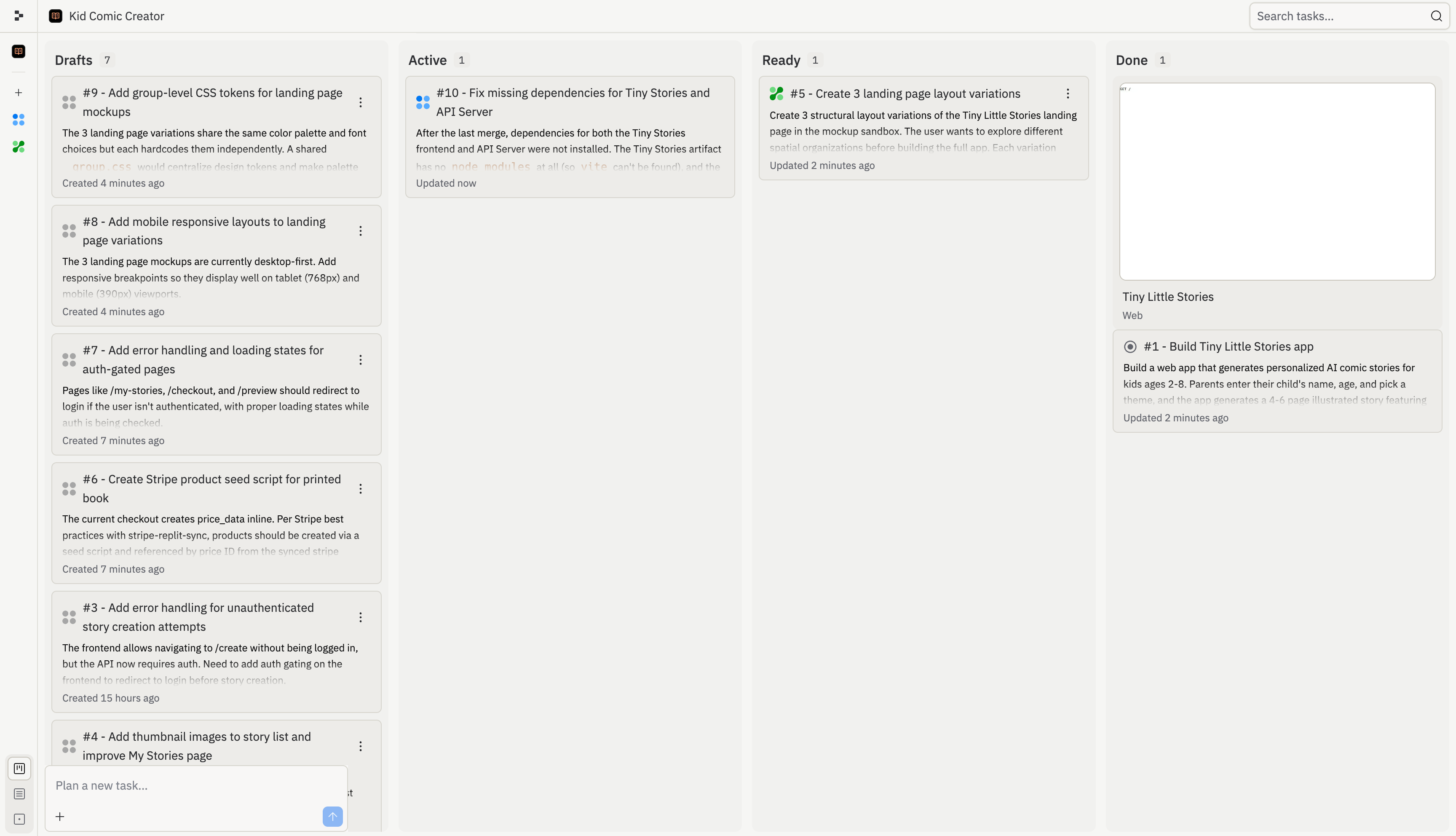
모든 Agent 작업은 라이프사이클을 거칩니다: 계획됨, 실행 중, 검토 준비 완료, 완료. 라이프사이클은 여러분이 메인 버전의 일부가 되어야 한다고 결정할 때까지 작업을 격리 상태로 유지합니다.

<Frame>
  <img src="https://mintcdn.com/replit/L22mbBMLs80H8_c8/images/replitai/task-board-progress.png?fit=max&auto=format&n=L22mbBMLs80H8_c8&q=85&s=3b4ef2fbede2d057e40c138956ccd74d" alt="초안, 활성, 준비, 완료 열로 구성된 작업들을 보여주는 작업 보드" width="3456" height="1984" data-path="images/replitai/task-board-progress.png" />
</Frame>

## 초안

**초안**은 Agent가 계획했지만 아직 빌드를 시작하지 않은 작업입니다. 초안은 제안된 작업만 포함하기 때문에 안전하게 검토할 수 있습니다: 작업 제목, 설명, 계획.

초안을 사용하여 Agent가 목표를 이해했는지 결정하세요. 작업을 시작하거나, Agent에게 계획을 수정하도록 요청하거나, 나중을 위해 초안을 보관할 수 있습니다.

## 활성

**활성** 작업은 백그라운드에서 실행 중입니다. Agent는 프로젝트의 격리된 복사본에서 작업하므로, 작업이 실행되는 동안 메인 버전은 변경되지 않습니다.

활성 작업이 실행되는 동안 메인 스레드를 계속 사용할 수 있습니다. 작업에 피드백이 필요한 경우, 해당 스레드를 열고 대화를 계속하세요.

## 큐에 추가됨

**큐에 추가된** 작업은 승인되었지만 시작을 기다리고 있습니다. 작업이 다른 작업에 의존하거나, 플랜의 활성 백그라운드 작업 한도에 도달했을 때 큐에 추가될 수 있습니다.

큐에 추가된 작업은 전제 조건이 완료되고 활성 작업 슬롯이 열리면 자동으로 시작됩니다.

## 준비

**준비** 작업은 완료되었지만, 변경 사항이 아직 메인 버전에 적용되지 않았습니다. 변경 사항을 적용하기 전에 작업의 작업 로그, 테스트 결과, 미리보기를 검토하세요.

작업이 올바르게 보이면 메인에 적용하세요. 원하는 것이 아니라면 해제하고 새 작업을 시작하세요.

## 적용 중

**적용 중** 작업은 변경 사항을 메인 버전으로 이동하는 과정에 있습니다. Agent는 여러 작업의 변경 사항을 적용할 때 충돌을 자동으로 처리합니다.

최종 결과를 판단하기 전에 적용이 완료될 때까지 기다리세요. 이후에 뭔가 이상해 보이면 메인 스레드에서 Agent에게 수정을 요청하세요.

## 완료

**완료** 작업은 끝났으며 더 이상 조치가 필요하지 않습니다. 완료는 작업이 메인 버전에 적용되었거나, 시작 전에 보관되었거나, 빌드로 이동한 후 취소되었음을 의미할 수 있습니다.

완료된 작업, 보관된 작업, 취소된 작업의 기록으로 **완료** 열을 사용하세요.

## 상태 예시

모든 작업은 아이디어에서 앱의 일부가 되기까지 일련의 단계를 거칩니다. 각 단계에는 한눈에 무슨 일이 일어나고 있는지 알 수 있는 고유한 아이콘이 있습니다.

<div style={{ display: 'grid', gridTemplateColumns: 'repeat(auto-fill, minmax(300px, 1fr))', gap: '20px', margin: '20px 0' }}>
  <div style={{ display: 'flex', flexDirection: 'column', gap: '6px' }}>
    <TaskCard title="가족과 친구를 위한 선물 흐름 추가" description="부모가 다른 아이를 위한 이야기를 만들어 선물로 보낼 수 있게 해줍니다." status="draft-static" timestamp="2m" width="100%" />

    <span style={{ fontSize: '13px', color: 'var(--kb-text-dimmer, #666)', padding: '0 4px' }}><strong>초안</strong>: Agent가 이 작업을 제안했습니다. 검토를 위한 계획이 준비되었습니다.</span>
  </div>

  <div style={{ display: 'flex', flexDirection: 'column', gap: '6px' }}>
    <TaskCard title="이야기 연속: 속편" description="모험 계속하기 버튼을 추가하면 이전 이야기가 끝난 곳에서 시작되는 속편이 생성됩니다." status="active" timestamp="12m" width="100%" />

    <span style={{ fontSize: '13px', color: 'var(--kb-text-dimmer, #666)', padding: '0 4px' }}><strong>활성</strong>: Agent가 지금 이 작업을 빌드하고 있습니다. 메인 버전이 안전하게 유지되도록 프로젝트의 자체 복사본에서 실행됩니다.</span>
  </div>

  <div style={{ display: 'flex', flexDirection: 'column', gap: '6px' }}>
    <TaskCard title="가족과 친구를 위한 선물 흐름 추가" description="부모가 다른 아이를 위한 이야기를 만들어 선물로 보낼 수 있게 해줍니다." status="active-queued" timestamp="1m" width="100%" />

    <span style={{ fontSize: '13px', color: 'var(--kb-text-dimmer, #666)', padding: '0 4px' }}><strong>큐에 추가됨</strong>: 이 작업은 승인되었지만 빌드를 시작하기 전에 슬롯이 열리기를 기다리고 있습니다.</span>
  </div>

  <div style={{ display: 'flex', flexDirection: 'column', gap: '6px' }}>
    <TaskCard title="따뜻한 테마가 있는 취침 모드" description="따뜻한 톤의 어두운 테마와 주변 소리가 있는 전용 취침 모드." status="ready-drop" timestamp="35m" width="100%" />

    <span style={{ fontSize: '13px', color: 'var(--kb-text-dimmer, #666)', padding: '0 4px' }}><strong>준비</strong>: 이 작업이 완료되었습니다. 준비가 되면 변경 사항을 검토하고 메인 버전에 적용할 수 있습니다.</span>
  </div>

  <div style={{ display: 'flex', flexDirection: 'column', gap: '6px' }}>
    <TaskCard title="OG 미리보기가 있는 공유 가능한 링크" description="공개 공유 가능한 링크 추가가 가장 큰 성장 레버입니다." status="applying" timestamp="31m" width="100%" />

    <span style={{ fontSize: '13px', color: 'var(--kb-text-dimmer, #666)', padding: '0 4px' }}><strong>적용 중</strong>: 이 작업의 변경 사항이 지금 메인 버전에 적용되고 있습니다.</span>
  </div>

  <div style={{ display: 'flex', flexDirection: 'column', gap: '6px' }}>
    <TaskCard title="단어 강조 표시가 있는 소리 내어 읽기" description="텍스트 음성 변환을 통해 아이들이 강조된 단어를 따라가며 독립적으로 이야기를 즐길 수 있습니다." status="done" timestamp="4h" width="100%" />

    <span style={{ fontSize: '13px', color: 'var(--kb-text-dimmer, #666)', padding: '0 4px' }}><strong>완료</strong>: 이 작업이 완료되었으며 변경 사항이 메인 버전의 일부입니다.</span>
  </div>

  <div style={{ display: 'flex', flexDirection: 'column', gap: '6px' }}>
    <TaskCard title="새 독자를 위한 온보딩 투어" description="첫 실행 시 부모에게 핵심 읽기 흐름을 소개하는 짧은 가이드 안내." status="draft-static" timestamp="1h" width="100%" />

    <span style={{ fontSize: '13px', color: 'var(--kb-text-dimmer, #666)', padding: '0 4px' }}><strong>보관됨</strong>: 빌드를 시작하기 전에 보류된 계획 세션입니다. 보관된 계획 세션은 나중에 <strong>완료</strong> 열에서 복원할 수 있습니다.</span>
  </div>

  <div style={{ display: 'flex', flexDirection: 'column', gap: '6px' }}>
    <TaskCard title="실험적 스티커 팩 생성기" description="이야기의 캐릭터와 장면에서 커스텀 일러스트레이션 스티커를 생성합니다." status="done" timestamp="2h" width="100%" />

    <span style={{ fontSize: '13px', color: 'var(--kb-text-dimmer, #666)', padding: '0 4px' }}><strong>취소됨</strong>: 빌드로 이동한 후 중지한 작업입니다. 취소된 작업은 복원할 수 없습니다. 마음이 바뀌면 새 작업을 시작하세요.</span>
  </div>
</div>

## 작업 보관 및 취소

라이프사이클의 어느 시점에서든 작업을 중지할 수 있지만, 표시되는 옵션은 작업이 보드의 어디에 있는지에 따라 달라집니다. **보관**과 **취소** 모두 작업을 **완료** 열로 이동시키지만, 작동 방식이 다릅니다:

| 액션     | 사용 가능한 시점                                               | 어떤 일이 일어나는지                                                  | 되돌릴 수 있나요?                                          |
| ------ | ------------------------------------------------------- | ------------------------------------------------------------ | --------------------------------------------------- |
| **보관** | 작업이 아직 계획 세션 상태일 때: 빌드를 시작하지 않은 **초안**                  | 계획 세션이 실행되지 않고 보류됩니다. 계획이 보존됩니다.                             | 예. **완료** 열에서 보관된 카드를 열고 **초안**으로 복원하세요.            |
| **취소** | 작업이 계획에서 빌드로 이동한 후: 모든 **활성**, **큐에 추가됨**, 또는 **준비** 작업 | Agent가 작업을 중지하고 진행 중인 모든 작업을 삭제합니다. 메인 버전에 변경 사항이 적용되지 않습니다. | 아니요. 취소된 작업은 복원할 수 없습니다. 작업을 다시 하고 싶다면 새 작업을 시작하세요. |

나중에 다시 검토하려는 계획 세션에는 **보관**을 사용하세요. 큐에 추가되었거나, 이미 실행 중이거나, 빌드가 완료된 작업의 영구적인 중지 버튼으로는 **취소**를 사용하세요.

보관된 계획 세션과 취소된 작업 모두 완료된 작업과 함께 작업 보드 맨 오른쪽의 **완료** 열에서 찾을 수 있습니다.