> ## Documentation Index
> Fetch the complete documentation index at: https://docs.replit.com/llms.txt
> Use this file to discover all available pages before exploring further.

# 시작하기

> 초기 아이디어부터 게시된 오프닝 사이트까지 Replit으로 커피숍 런칭 과정을 따라가 보세요.

export const GetStartedCover = () => <div className="chat-mkt" role="img" aria-label="A Replit journey from research and ideas to a plan and a finished result" style={{
  margin: "28px 0 42px",
  borderTop: 0,
  paddingTop: 0
}}>
    <div className="chat-use-case-visual" style={{
  aspectRatio: "auto",
  minHeight: "clamp(220px, 34vw, 320px)",
  overflow: "hidden",
  background: "radial-gradient(circle at 50% -18%, rgba(255,255,255,.82), transparent 42%), radial-gradient(circle at 4% 96%, rgba(255,184,146,.48), transparent 38%), linear-gradient(140deg, #ff764d, #ff3c00 60%, #c92d00)"
}}>
      <div aria-hidden="true" style={{
  position: "absolute",
  inset: 0,
  background: "linear-gradient(180deg, rgba(255,255,255,.14), rgba(255,255,255,0) 48%, rgba(111,24,0,.2))"
}} />
      <div aria-hidden="true" style={{
  position: "relative",
  zIndex: 1,
  display: "flex",
  width: "100%",
  minHeight: "inherit",
  boxSizing: "border-box",
  alignItems: "center",
  justifyContent: "center",
  padding: "clamp(10px, 2vw, 20px)"
}}>
        <div style={{
  width: "clamp(270px, 72%, 760px)",
  maxWidth: "calc(100% - 20px)",
  boxSizing: "border-box",
  padding: "clamp(14px, 2.4vw, 24px)",
  border: "1px solid rgba(255,255,255,.54)",
  borderRadius: 24,
  background: "linear-gradient(180deg, rgba(255,255,255,.27), rgba(255,255,255,.1))",
  boxShadow: "0 18px 36px rgba(55,27,18,.2)",
  backdropFilter: "blur(5px)"
}}>
          <div style={{
  display: "flex",
  gap: 7
}}>
            {[".92", ".52", ".32"].map(opacity => <span key={opacity} style={{
  width: 8,
  height: 8,
  borderRadius: 999,
  background: `rgba(255,255,255,${opacity})`
}} />)}
          </div>
          <div style={{
  display: "grid",
  gridTemplateColumns: "repeat(3, minmax(0, 1fr))",
  gap: "clamp(8px, 1.8vw, 16px)",
  marginTop: "clamp(16px, 3vw, 24px)"
}}>
            {["48%", "68%", "88%"].map((height, index) => <div key={height} style={{
  display: "grid",
  alignContent: "end",
  minHeight: "clamp(88px, 14vw, 128px)",
  padding: "clamp(8px, 1.4vw, 13px)",
  border: "1px solid rgba(255,255,255,.38)",
  borderRadius: 14,
  background: "rgba(255,255,255,.1)"
}}>
                <span style={{
  display: "block",
  width: index === 2 ? "100%" : "78%",
  height,
  borderRadius: 9,
  background: index === 2 ? "rgba(255,255,255,.82)" : "rgba(255,255,255,.34)"
}} />
              </div>)}
          </div>
          <div style={{
  display: "flex",
  alignItems: "center",
  justifyContent: "space-between",
  gap: 8,
  marginTop: "clamp(12px, 2vw, 18px)",
  padding: "9px 10px",
  border: "1px solid rgba(255,255,255,.52)",
  borderRadius: 11,
  background: "rgba(255,255,255,.14)"
}}>
            <span style={{
  width: "62%",
  height: 6,
  borderRadius: 99,
  background: "rgba(255,255,255,.72)"
}} />
            <span style={{
  width: 16,
  height: 16,
  borderRadius: 6,
  background: "rgba(255,255,255,.9)"
}} />
          </div>
        </div>
      </div>
    </div>
  </div>;

<GetStartedCover />

Replit에 오신 것을 환영합니다. 아이디어를 현실로 만들 수 있는 최고의 공간입니다.

시작하고 플랫폼에 익숙해지는 가장 좋은 방법은 함께
무언가를 만들어보는 것입니다.

## 프로젝트: 커피숍 열기

동네에 커피숍을 열고 싶다고 상상해보세요. 지역 시장을 조사하고,
위치를 선정하고, 런칭 계획을 세우고, 사이트를 만들고, 동네
사람들과 공유해야 합니다.

시작하기 전에 모든 답을 갖고 있을 필요는 없습니다. 목표, 마음속에
그린 동네, 그리고 방문해주었으면 하는 사람들부터 시작하세요.

## 배우게 될 내용

* 지역 시장을 조사하고 발견한 내용을 명확한 계획으로 바꾸는 방법
* Replit을 이미 사용 중인 도구와 연결하여 더 관련성 높은
  컨텍스트를 활용하는 방법
* 지역 경쟁사와 시장 변화를 꾸준히 살펴보는 방법
* 커피숍을 전 세계에 알리는 사이트를 구축하고
  게시하는 방법

## 만들게 될 것

* 초점이 명확한 카페 콘셉트와 런칭 계획
* 선택을 뒷받침하는 조사 자료와 원자료
* 계획을 최신 상태로 유지하는 주간 Routine
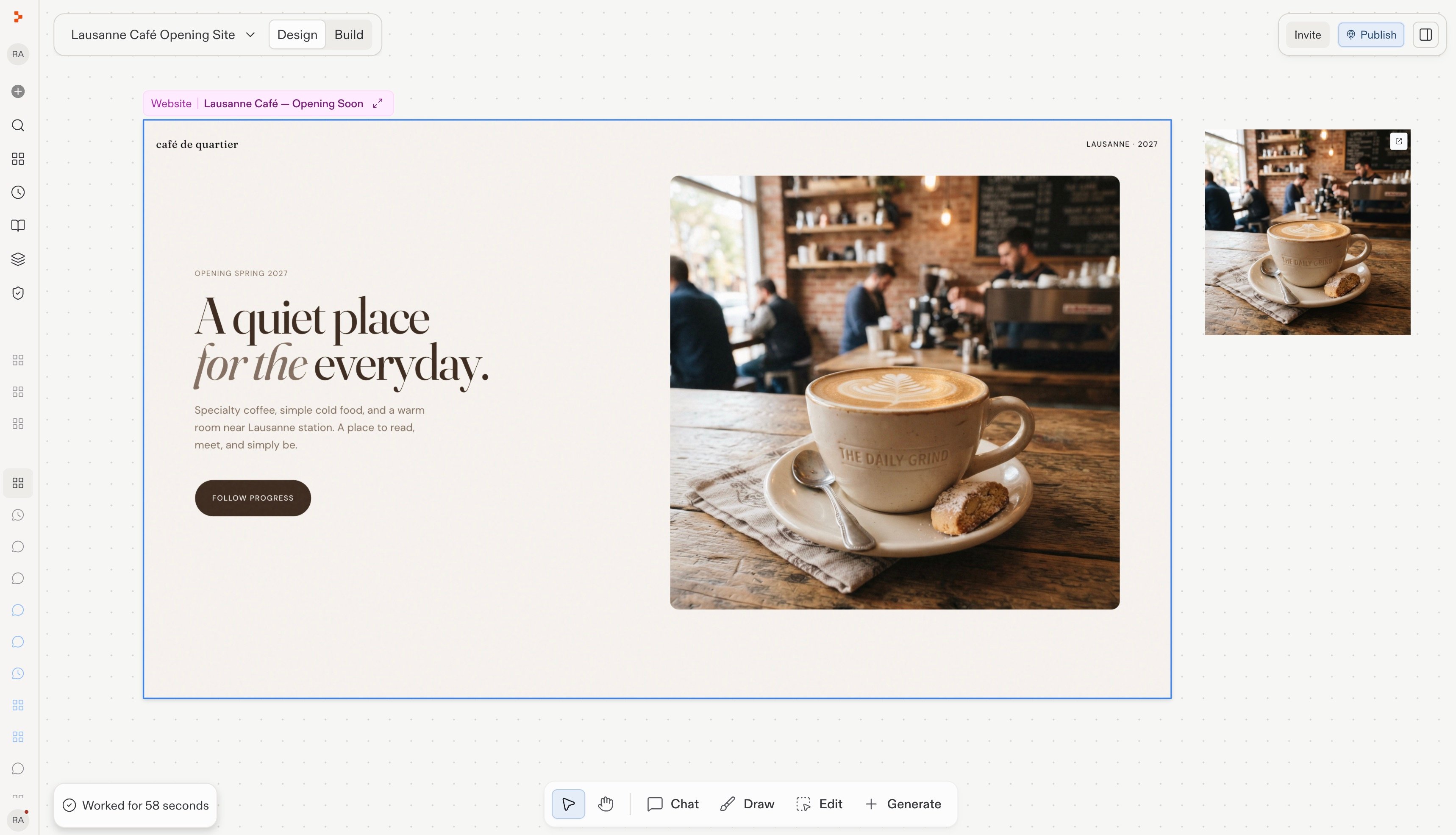
* 사람들이 발견할 수 있는 게시된 오프닝 사이트

<Frame caption="여러분이 만들고 게시할 커피숍 오프닝 사이트.">
  <img src="https://mintcdn.com/replit/teDUL4A-lNO7dv1O/images/coffee-shop-launch/review-updated-site-design.jpg?fit=max&auto=format&n=teDUL4A-lNO7dv1O&q=85&s=c8fe50bb80c330b66c108027baaf9db8" alt="Replit Design에 표시된 커피숍 오프닝 사이트" width="3436" height="1970" data-path="images/coffee-shop-launch/review-updated-site-design.jpg" />
</Frame>

먼저 [Workspace 이해하기](/home/understand-your-workspace)부터 시작하세요. 이곳에서
대화, 원자료, Routine, 사이트가 하나로 모입니다.