> ## Documentation Index
> Fetch the complete documentation index at: https://docs.replit.com/llms.txt
> Use this file to discover all available pages before exploring further.
# Project Security Center
> 자동 스캔과 Agent 기반 보안 검토로 프로젝트에서 종속성, 코드, 개인정보 관련 취약점을 찾아보세요.
 종속성 보안이 처음이신가요? CVE, SBOM, 노출도, Fix with Agent, Republish, Auto-Protect의 정의는 [보안 개념](/ko/features/security/concepts)을 참고하세요.
## 결과가 분류되는 방식
두 스캔 유형의 결과는 모두 Security 패널에 표시되며, 심각도 수준별로 분류됩니다.
* **Critical(심각)**: 즉각적인 위험을 초래하며 게시 전에 반드시 해결해야 하는 취약점입니다. 원격 코드 실행, 노출된 엔드포인트의 SQL 인젝션, 유출된 자격 증명 등이 있습니다.
* **High(높음)**: 특정 조건에서 악용될 수 있는 심각한 문제로, 크로스 사이트 스크립팅(XSS), 안전하지 않은 인증 흐름, 알려진 익스플로잇이 있는 패치되지 않은 종속성 등이 있습니다.
* **Medium(중간)**: 잠재적 위험을 나타내지만 악용 가능성이 낮은 문제로, 보안 헤더 누락이나 지나치게 허용적인 CORS 구성 등이 있습니다.
* **Low / Informational(낮음/정보성)**: 사소한 문제나 모범 사례 권장 사항으로, 지원 종료된 API 사용이나 프로덕션 환경의 지나치게 상세한 오류 메시지 등이 있습니다.
## Project Security Center란 무엇인가요?
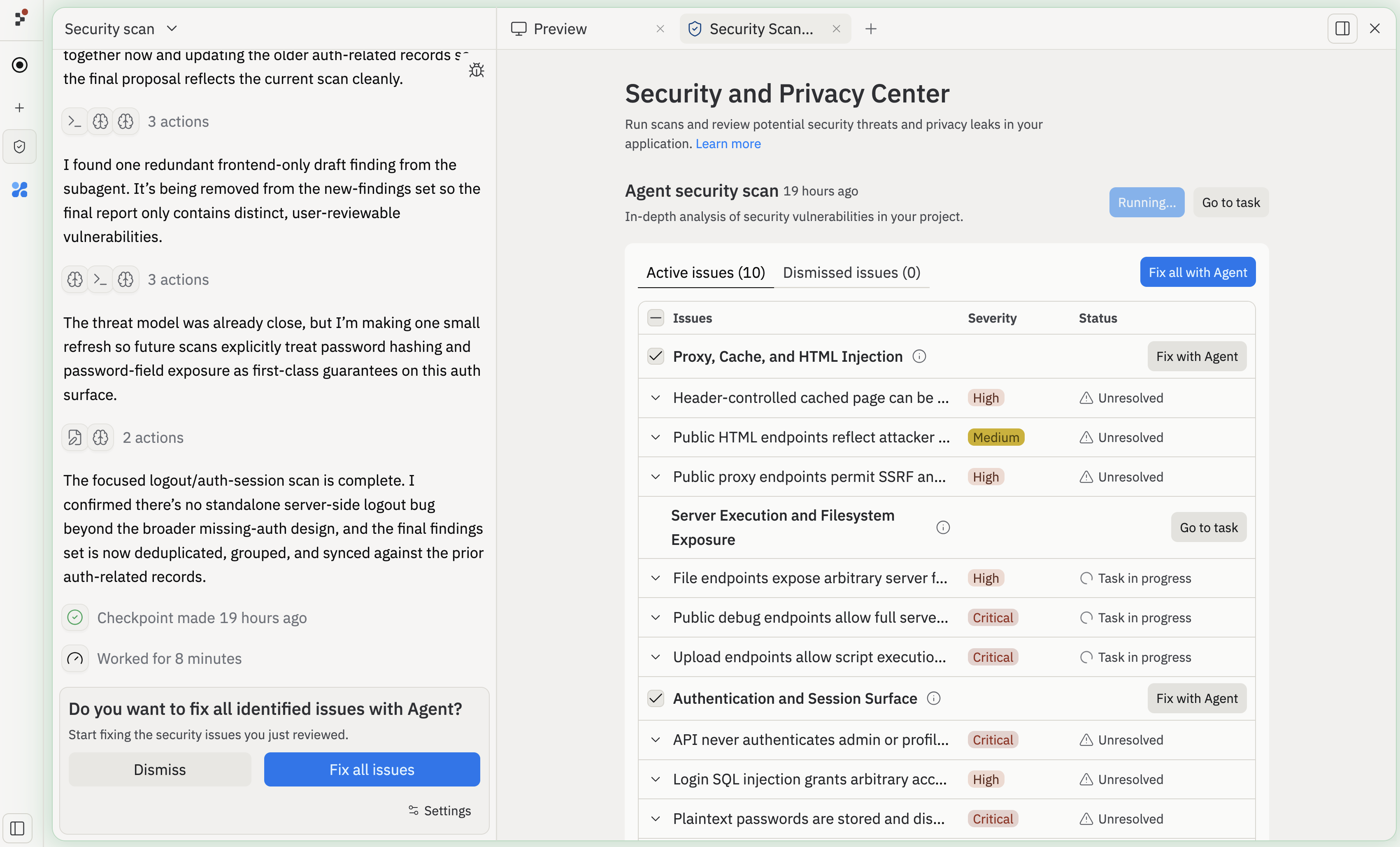
Project Security Center는 게시 전에 보안 및 개인정보 관련 취약점을 찾아 수정하는 프로젝트의 중심 허브입니다. 프로젝트의 **Security** 패널을 열어 스캔을 실행하고, 발견 사항을 검토하고, 승인된 문제를 Agent에게 보내 해결하세요.
Project Security Center는 두 가지 유형의 스캔을 지원합니다.
1. **자동 종속성 스캔**: 프로젝트 패키지를 공개 취약점 데이터베이스와 비교해 확인하는 무료의 경량 스캔
2. **Agent 보안 스캔**: 모델 기반 분석과 정적 코드 분석 도구를 결합해 전체 코드베이스를 감사하는 AI 지원 검토
두 스캔 유형의 결과는 모두 동일한 Security 패널에서 심각도별로 정리되어 가장 영향이 큰 문제부터 확인할 수 있습니다.
## 자동 종속성 스캔
자동 종속성 스캔은 프로젝트가 의존하는 패키지를 공개 취약점 데이터베이스와 비교해 감사합니다. 이 스캔은 **무료**이며 자동으로 실행됩니다. 새로운 Common Vulnerabilities and Exposures(CVE) 항목이 공개되면 Replit이 프로젝트의 종속성과 비교해 확인하고, 일치하는 항목을 **Security** 패널에 표시합니다 — 수동으로 다시 스캔할 필요가 없습니다.
종속성 스캔은 Node.js/npm, Python, Go, Rust, PHP, Ruby를 지원합니다. 예를 들어, 스캔은 `express@4.18.2`와 같이 오래된 패키지의 알려진 취약점을 표시할 수 있습니다.
종속성 보안이 처음이신가요? CVE, SBOM, 노출도, Fix with Agent, Republish, Auto-Protect의 정의는 [보안 개념](/ko/features/security/concepts)을 참고하세요.
## 결과가 분류되는 방식
두 스캔 유형의 결과는 모두 Security 패널에 표시되며, 심각도 수준별로 분류됩니다.
* **Critical(심각)**: 즉각적인 위험을 초래하며 게시 전에 반드시 해결해야 하는 취약점입니다. 원격 코드 실행, 노출된 엔드포인트의 SQL 인젝션, 유출된 자격 증명 등이 있습니다.
* **High(높음)**: 특정 조건에서 악용될 수 있는 심각한 문제로, 크로스 사이트 스크립팅(XSS), 안전하지 않은 인증 흐름, 알려진 익스플로잇이 있는 패치되지 않은 종속성 등이 있습니다.
* **Medium(중간)**: 잠재적 위험을 나타내지만 악용 가능성이 낮은 문제로, 보안 헤더 누락이나 지나치게 허용적인 CORS 구성 등이 있습니다.
* **Low / Informational(낮음/정보성)**: 사소한 문제나 모범 사례 권장 사항으로, 지원 종료된 API 사용이나 프로덕션 환경의 지나치게 상세한 오류 메시지 등이 있습니다.
## Project Security Center란 무엇인가요?
Project Security Center는 게시 전에 보안 및 개인정보 관련 취약점을 찾아 수정하는 프로젝트의 중심 허브입니다. 프로젝트의 **Security** 패널을 열어 스캔을 실행하고, 발견 사항을 검토하고, 승인된 문제를 Agent에게 보내 해결하세요.
Project Security Center는 두 가지 유형의 스캔을 지원합니다.
1. **자동 종속성 스캔**: 프로젝트 패키지를 공개 취약점 데이터베이스와 비교해 확인하는 무료의 경량 스캔
2. **Agent 보안 스캔**: 모델 기반 분석과 정적 코드 분석 도구를 결합해 전체 코드베이스를 감사하는 AI 지원 검토
두 스캔 유형의 결과는 모두 동일한 Security 패널에서 심각도별로 정리되어 가장 영향이 큰 문제부터 확인할 수 있습니다.
## 자동 종속성 스캔
자동 종속성 스캔은 프로젝트가 의존하는 패키지를 공개 취약점 데이터베이스와 비교해 감사합니다. 이 스캔은 **무료**이며 자동으로 실행됩니다. 새로운 Common Vulnerabilities and Exposures(CVE) 항목이 공개되면 Replit이 프로젝트의 종속성과 비교해 확인하고, 일치하는 항목을 **Security** 패널에 표시합니다 — 수동으로 다시 스캔할 필요가 없습니다.
종속성 스캔은 Node.js/npm, Python, Go, Rust, PHP, Ruby를 지원합니다. 예를 들어, 스캔은 `express@4.18.2`와 같이 오래된 패키지의 알려진 취약점을 표시할 수 있습니다.
 ### Auto-Protect
Auto-Protect는 자동 종속성 스캔을 확장한 기능입니다. 일치하는 취약점이 발견되면 Replit Agent가 패치를 준비하고 테스트한 뒤 직접 링크가 포함된 이메일을 보냅니다. Auto-Protect는 종속성 CVE만 다루며, 애플리케이션 코드의 취약점에는 [Agent 보안 스캔](#agent-security-scans)을 사용하세요.
프로젝트의 종속성과 일치하는 새 취약점이 발견될 때마다 Replit은 다음을 수행합니다.
1. 영향을 받는 프로젝트의 **Security** 패널로 바로 이동하는 링크가 포함된 요약 이메일을 보냅니다.
2. Replit Agent에게 취약점을 해결하는 패치를 준비하고 테스트하도록 요청합니다.
3. 검토를 기다리는 상태로 패치를 **Security** 패널에 남겨둡니다.
**Go to Task**를 선택해 적용하기 전에 생성된 변경 사항을 확인하세요. 패치를 적용한 후에는 새 버전을 게시하기 전까지 취약점이 **pending republish(재게시 대기)** 상태로 표시됩니다.
프로덕션 앱의 보안을 유지하려면 패치를 적용한 후 항상 다시 게시하세요.
Replit은 새로운 취약점마다 워크스페이스당 최대 한 건의 이메일을 보냅니다. 이 이메일은 해당 워크스페이스에서 영향을 받은 모든 프로젝트를 요약합니다. 관리자는 Auto-Protect를 트리거하는 최소 심각도를 설정할 수 있습니다 — 예를 들어 critical만 해당하도록 설정할 수 있습니다.
#### Auto-Protect 활성화하기
두 Auto-Protect 설정은 모두 **기본적으로 꺼져** 있습니다. Auto-Protect를 활성화하려면 두 가지 설정이 필요합니다: Replit이 패치를 준비하도록 승인하는 관리자 전용 설정과, 새 취약점에 대한 이메일 수신 여부를 제어하는 개인 설정입니다.
**Settings** > **Account** > **Advanced**로 이동해 Replit이 자동으로 완화 조치를 준비할 최소 심각도(low, medium, high, critical)를 선택하세요. 임계값을 높게 설정하면 Replit은 가장 심각한 취약점에 대해서만 패치를 준비합니다.
**Settings** > **Personalization** > **Email Notifications**로 이동해 새 보안 문제에 대한 알림을 받고 싶은 최소 심각도를 선택하세요. 보통 high 또는 critical을 선택합니다.
Agent가 준비한 완화 조치는 Auto-Protect가 선제적으로 준비한 경우에도
다른 Agent 작업과 동일하게 요금이 청구됩니다.
## Agent 보안 스캔
Agent 보안 스캔은 종속성 검사를 넘어 전체 코드베이스에 대한 종합적인 감사를 수행합니다. Security Agent는 모델 기반 검토와 [Semgrep](https://semgrep.dev/), [HoundDog.ai](https://hounddog.ai)와 같은 정적 분석 도구를 결합해 패턴 매칭만으로는 놓칠 수 있는 취약점을 찾아냅니다.
Agent 보안 스캔은 모든 유료 Replit 빌더가 사용할 수 있습니다. 대규모 프로젝트의 경우 철저한 평가를 위해 심층 감사에 최대 15분이 걸릴 수 있습니다.
### Security Agent가 하는 일
Agent 보안 스캔을 시작하면 Security Agent가 코드베이스에 대한 전체 검토를 수행합니다.
1. **아키텍처 매핑** -- 경로, API, 데이터 흐름, 진입점을 식별합니다.
2. **위협 모델 구축** -- 애플리케이션에 맞춘 커스터마이즈 가능한 위협 모델링 계획을 생성합니다.
3. **정적 분석 실행** -- Semgrep과 HoundDog.ai를 사용해 코드 수준의 취약점과 개인정보 문제를 스캔합니다.
4. **AI로 발견 사항 분석** -- 표시된 문제가 애플리케이션 맥락에서 실제로 악용 가능한지 평가해 오탐(false positive)을 크게 줄입니다.
5. **발견 사항 보고서 생성** -- 검토를 위해 식별된 위험을 제시합니다.
Agent 보안 스캔은 광범위한 취약점 카테고리를 다룹니다.
* **정적 분석(SAST) 문제**: SQL 인젝션, 크로스 사이트 스크립팅(XSS), 크로스 사이트 요청 위조(CSRF)와 같은 안전하지 않은 코드 패턴
* **개인정보 문제**: 로그, 파일, 서드파티 API와 같은 위험한 목적지로 흘러가는 민감한 데이터
* **아키텍처 취약점**: 경로, API, 데이터 흐름이 구성된 방식의 보안 공백
예를 들어, 검토 과정에서 매개변수화되지 않은 데이터베이스 쿼리를 표시할 수 있습니다.
```javascript theme={null}
const query = `SELECT * FROM users WHERE username = '${userInput}'`;
```
또는 민감한 사용자 데이터를 로깅하는 코드도 있습니다.
```javascript theme={null}
logger.info("New signup", {
email: user.email,
phoneNumber: user.phoneNumber,
address: user.address,
});
```
### Agent 보안 스캔 시작하기
프로젝트의 **Security** 패널을 열어 Project Security Center를 실행합니다.
### Auto-Protect
Auto-Protect는 자동 종속성 스캔을 확장한 기능입니다. 일치하는 취약점이 발견되면 Replit Agent가 패치를 준비하고 테스트한 뒤 직접 링크가 포함된 이메일을 보냅니다. Auto-Protect는 종속성 CVE만 다루며, 애플리케이션 코드의 취약점에는 [Agent 보안 스캔](#agent-security-scans)을 사용하세요.
프로젝트의 종속성과 일치하는 새 취약점이 발견될 때마다 Replit은 다음을 수행합니다.
1. 영향을 받는 프로젝트의 **Security** 패널로 바로 이동하는 링크가 포함된 요약 이메일을 보냅니다.
2. Replit Agent에게 취약점을 해결하는 패치를 준비하고 테스트하도록 요청합니다.
3. 검토를 기다리는 상태로 패치를 **Security** 패널에 남겨둡니다.
**Go to Task**를 선택해 적용하기 전에 생성된 변경 사항을 확인하세요. 패치를 적용한 후에는 새 버전을 게시하기 전까지 취약점이 **pending republish(재게시 대기)** 상태로 표시됩니다.
프로덕션 앱의 보안을 유지하려면 패치를 적용한 후 항상 다시 게시하세요.
Replit은 새로운 취약점마다 워크스페이스당 최대 한 건의 이메일을 보냅니다. 이 이메일은 해당 워크스페이스에서 영향을 받은 모든 프로젝트를 요약합니다. 관리자는 Auto-Protect를 트리거하는 최소 심각도를 설정할 수 있습니다 — 예를 들어 critical만 해당하도록 설정할 수 있습니다.
#### Auto-Protect 활성화하기
두 Auto-Protect 설정은 모두 **기본적으로 꺼져** 있습니다. Auto-Protect를 활성화하려면 두 가지 설정이 필요합니다: Replit이 패치를 준비하도록 승인하는 관리자 전용 설정과, 새 취약점에 대한 이메일 수신 여부를 제어하는 개인 설정입니다.
**Settings** > **Account** > **Advanced**로 이동해 Replit이 자동으로 완화 조치를 준비할 최소 심각도(low, medium, high, critical)를 선택하세요. 임계값을 높게 설정하면 Replit은 가장 심각한 취약점에 대해서만 패치를 준비합니다.
**Settings** > **Personalization** > **Email Notifications**로 이동해 새 보안 문제에 대한 알림을 받고 싶은 최소 심각도를 선택하세요. 보통 high 또는 critical을 선택합니다.
Agent가 준비한 완화 조치는 Auto-Protect가 선제적으로 준비한 경우에도
다른 Agent 작업과 동일하게 요금이 청구됩니다.
## Agent 보안 스캔
Agent 보안 스캔은 종속성 검사를 넘어 전체 코드베이스에 대한 종합적인 감사를 수행합니다. Security Agent는 모델 기반 검토와 [Semgrep](https://semgrep.dev/), [HoundDog.ai](https://hounddog.ai)와 같은 정적 분석 도구를 결합해 패턴 매칭만으로는 놓칠 수 있는 취약점을 찾아냅니다.
Agent 보안 스캔은 모든 유료 Replit 빌더가 사용할 수 있습니다. 대규모 프로젝트의 경우 철저한 평가를 위해 심층 감사에 최대 15분이 걸릴 수 있습니다.
### Security Agent가 하는 일
Agent 보안 스캔을 시작하면 Security Agent가 코드베이스에 대한 전체 검토를 수행합니다.
1. **아키텍처 매핑** -- 경로, API, 데이터 흐름, 진입점을 식별합니다.
2. **위협 모델 구축** -- 애플리케이션에 맞춘 커스터마이즈 가능한 위협 모델링 계획을 생성합니다.
3. **정적 분석 실행** -- Semgrep과 HoundDog.ai를 사용해 코드 수준의 취약점과 개인정보 문제를 스캔합니다.
4. **AI로 발견 사항 분석** -- 표시된 문제가 애플리케이션 맥락에서 실제로 악용 가능한지 평가해 오탐(false positive)을 크게 줄입니다.
5. **발견 사항 보고서 생성** -- 검토를 위해 식별된 위험을 제시합니다.
Agent 보안 스캔은 광범위한 취약점 카테고리를 다룹니다.
* **정적 분석(SAST) 문제**: SQL 인젝션, 크로스 사이트 스크립팅(XSS), 크로스 사이트 요청 위조(CSRF)와 같은 안전하지 않은 코드 패턴
* **개인정보 문제**: 로그, 파일, 서드파티 API와 같은 위험한 목적지로 흘러가는 민감한 데이터
* **아키텍처 취약점**: 경로, API, 데이터 흐름이 구성된 방식의 보안 공백
예를 들어, 검토 과정에서 매개변수화되지 않은 데이터베이스 쿼리를 표시할 수 있습니다.
```javascript theme={null}
const query = `SELECT * FROM users WHERE username = '${userInput}'`;
```
또는 민감한 사용자 데이터를 로깅하는 코드도 있습니다.
```javascript theme={null}
logger.info("New signup", {
email: user.email,
phoneNumber: user.phoneNumber,
address: user.address,
});
```
### Agent 보안 스캔 시작하기
프로젝트의 **Security** 패널을 열어 Project Security Center를 실행합니다.
 **Run scan with Agent**를 선택합니다.
 필요하다면 위협 모델링 프롬프트를 커스터마이즈해 애플리케이션의 특정
영역에 초점을 맞출 수 있습니다.
필요하다면 위협 모델링 프롬프트를 커스터마이즈해 애플리케이션의 특정
영역에 초점을 맞출 수 있습니다.
 검토가 완료될 때까지 기다립니다. 일반적으로 몇 분 정도 걸리지만, 대규모
프로젝트의 경우 최대 15분까지 걸릴 수 있습니다.
검토가 완료되면 Security Agent가 식별된 위험에 대한 보고서를 생성합니다. 취약점 세부 정보를 검토하고, 이해했고 받아들일 수 있는 발견 사항은 무시하거나, 수정 요청을 보내기 전에 발견 사항을 수정할 수 있습니다.
발견 사항을 검토한 후, 승인된 문제를 Replit Agent에게 보내 해결하세요. Security Agent는 취약점을 별도의 작업으로 정리하므로 Agent가 여러 수정 작업을 동시에 진행할 수 있습니다. 수정이 적용된 후에는 다시 스캔을 실행해 문제가 해결되었는지 확인하세요.
첫 번째 발견 사항들을 수정한 후에는 다시 스캔을 실행하세요. 더 큰 규모의 프로젝트에서는 심각도가 높은 발견 사항이 해결된 후 추가적인 문제가 드러날 수 있습니다.
## 제한 사항 및 모범 사례
* **개인정보 및 데이터 처리**: 모든 스캔은 Replit 인프라에서 실행됩니다. 여러분의 코드와 데이터는 Semgrep, HoundDog.ai, 또는 다른 서드파티로 전송되지 않습니다. 스캔 구성과 결과는 여러분의 Replit App에 계속 연결되어 있습니다.
* **언어 지원**:
* 종속성 스캔은 **Node.js/npm**, **Python**, **Go**, **Rust**, **PHP**, **Ruby**를 포함한 다양한 인기 생태계를 지원합니다.
* 자동 종속성 수정은 현재 **Node.js/npm**에 초점을 맞추고 있습니다.
* **완전한 보안 검토는 아닙니다**: 스캔은 코드 리뷰, 테스트, 종속성 검토, 실제 앱 점검과 함께 사용하세요.
* **변경 후 다시 실행하세요**: 다음의 경우 스캔을 다시 실행하세요.
* 종속성을 추가하거나 업데이트한 후
* 주요 코드를 변경한 후
* 새 버전을 게시하기 전
## 게시 검사
**Block publishing of critical vulnerabilities** 설정은 Deploy 탭의 Advanced 설정(및 Redeploy 흐름)에 있습니다. Replit은 게시 전에 항상 보안 스캔을 실행합니다. 이 토글은 스캔에서 심각도가 critical인 문제가 발견되었을 때 어떤 일이 일어날지를 결정합니다.
* **On** — 문제가 해결되거나 무시되기 전까지 게시가 차단됩니다.
* **Off** — 게시가 진행되며 발견 사항이 검토용으로 표시됩니다.
이 설정을 켜서 검토 없이 심각한 문제가 배포되지 않도록 하세요. 엔터프라이즈 플랜의 조직은 모든 앱에 이 설정을 의무화할 수 있습니다.
이 설정은 이전에 "Security scan before publishing"이라는 이름으로 **Beta** 태그가 붙어 있었습니다. 이제 Beta에서 벗어났고 동작을 더 명확히 하기 위해 이름이 바뀌었습니다 — 스캔 자체는 어느 경우든 항상 실행됩니다.
## 다음 단계
* [게시](/ko/learn/projects-and-artifacts/replit-deployments)에 대해 자세히 알아보고 스캔이 정상이면 Replit App을 게시하세요.
* [Replit Agent](/ko/features/agent/overview)를 살펴보고 Project Editor에서 직접 보안 및 개인정보 문제를 수정하세요.
* Replit의 보안 접근 방식에 대해 더 알아보려면 [Replit이 AI 생성 코드를 보호하는 방법](https://blog.replit.com/securing-ai-generated-code)을 읽어보세요.
* 코드 품질, 성능, 신뢰성을 개선하는 더 많은 도구는 [에디터 기능](/ko/features/editor/editor-and-tools)을 확인하세요.
검토가 완료될 때까지 기다립니다. 일반적으로 몇 분 정도 걸리지만, 대규모
프로젝트의 경우 최대 15분까지 걸릴 수 있습니다.
검토가 완료되면 Security Agent가 식별된 위험에 대한 보고서를 생성합니다. 취약점 세부 정보를 검토하고, 이해했고 받아들일 수 있는 발견 사항은 무시하거나, 수정 요청을 보내기 전에 발견 사항을 수정할 수 있습니다.
발견 사항을 검토한 후, 승인된 문제를 Replit Agent에게 보내 해결하세요. Security Agent는 취약점을 별도의 작업으로 정리하므로 Agent가 여러 수정 작업을 동시에 진행할 수 있습니다. 수정이 적용된 후에는 다시 스캔을 실행해 문제가 해결되었는지 확인하세요.
첫 번째 발견 사항들을 수정한 후에는 다시 스캔을 실행하세요. 더 큰 규모의 프로젝트에서는 심각도가 높은 발견 사항이 해결된 후 추가적인 문제가 드러날 수 있습니다.
## 제한 사항 및 모범 사례
* **개인정보 및 데이터 처리**: 모든 스캔은 Replit 인프라에서 실행됩니다. 여러분의 코드와 데이터는 Semgrep, HoundDog.ai, 또는 다른 서드파티로 전송되지 않습니다. 스캔 구성과 결과는 여러분의 Replit App에 계속 연결되어 있습니다.
* **언어 지원**:
* 종속성 스캔은 **Node.js/npm**, **Python**, **Go**, **Rust**, **PHP**, **Ruby**를 포함한 다양한 인기 생태계를 지원합니다.
* 자동 종속성 수정은 현재 **Node.js/npm**에 초점을 맞추고 있습니다.
* **완전한 보안 검토는 아닙니다**: 스캔은 코드 리뷰, 테스트, 종속성 검토, 실제 앱 점검과 함께 사용하세요.
* **변경 후 다시 실행하세요**: 다음의 경우 스캔을 다시 실행하세요.
* 종속성을 추가하거나 업데이트한 후
* 주요 코드를 변경한 후
* 새 버전을 게시하기 전
## 게시 검사
**Block publishing of critical vulnerabilities** 설정은 Deploy 탭의 Advanced 설정(및 Redeploy 흐름)에 있습니다. Replit은 게시 전에 항상 보안 스캔을 실행합니다. 이 토글은 스캔에서 심각도가 critical인 문제가 발견되었을 때 어떤 일이 일어날지를 결정합니다.
* **On** — 문제가 해결되거나 무시되기 전까지 게시가 차단됩니다.
* **Off** — 게시가 진행되며 발견 사항이 검토용으로 표시됩니다.
이 설정을 켜서 검토 없이 심각한 문제가 배포되지 않도록 하세요. 엔터프라이즈 플랜의 조직은 모든 앱에 이 설정을 의무화할 수 있습니다.
이 설정은 이전에 "Security scan before publishing"이라는 이름으로 **Beta** 태그가 붙어 있었습니다. 이제 Beta에서 벗어났고 동작을 더 명확히 하기 위해 이름이 바뀌었습니다 — 스캔 자체는 어느 경우든 항상 실행됩니다.
## 다음 단계
* [게시](/ko/learn/projects-and-artifacts/replit-deployments)에 대해 자세히 알아보고 스캔이 정상이면 Replit App을 게시하세요.
* [Replit Agent](/ko/features/agent/overview)를 살펴보고 Project Editor에서 직접 보안 및 개인정보 문제를 수정하세요.
* Replit의 보안 접근 방식에 대해 더 알아보려면 [Replit이 AI 생성 코드를 보호하는 방법](https://blog.replit.com/securing-ai-generated-code)을 읽어보세요.
* 코드 품질, 성능, 신뢰성을 개선하는 더 많은 도구는 [에디터 기능](/ko/features/editor/editor-and-tools)을 확인하세요.