> ## Documentation Index
> Fetch the complete documentation index at: https://docs.replit.com/llms.txt
> Use this file to discover all available pages before exploring further.

# 앱 리믹스하기

> 공개된 Replit 앱이나 템플릿의 나만의 복사본을 만들어 워크스페이스에서 탐색하고, 커스터마이즈하고, 그 위에 빌드해보세요.

export const RemixButton = ({replUrl = "https://replit.com/@sarahxli/Digital-Piano-Keys?v=1", label = "Remix this app", count = null}) => {
  if (typeof document !== 'undefined' && !document.getElementById('remix-button-styles')) {
    const style = document.createElement('style');
    style.id = 'remix-button-styles';
    style.textContent = `
      /* Button container */
      .remix-btn-container {
        --btn-bg: var(--replit-docs-bg-muted, #F1F1EE);
        --btn-bg-hover: var(--replit-docs-bg-elevated, #F1F1EE);
        --btn-text: var(--replit-docs-text, #1D1D1D);
        --btn-border: var(--replit-docs-border, #DEDAD5);
        --transition-duration: 120ms;
        display: flex;
        justify-content: center;
      }

      .dark .remix-btn-container,
      html.dark .remix-btn-container,
      [data-theme="dark"] .remix-btn-container {
        --btn-bg: var(--replit-docs-bg-elevated, #222223);
        --btn-bg-hover: var(--replit-docs-bg-muted, #222223);
        --btn-text: var(--replit-docs-text, #F5F5F5);
        --btn-border: var(--replit-docs-border, #39393D);
      }

      /* Button base styles - matching template page exactly */
      .remix-btn {
        /* Layout */
        display: inline-flex;
        align-items: center;
        justify-content: center;
        width: 50%;
        max-width: 400px;
        min-width: 200px;
        height: 36px;
        padding: 0 16px;
        gap: 8px;

        /* Typography */
        font-family: 'IBM Plex Sans', -apple-system, BlinkMacSystemFont, 'Segoe UI', Roboto, sans-serif;
        font-size: 14px;
        font-weight: 500;
        line-height: 1.5;
        text-decoration: none;
        white-space: nowrap;

        /* Visual */
        border-radius: 8px;
        border: none;
        background: var(--btn-bg);
        color: var(--btn-text);
        box-shadow: inset 0 0 0 1px var(--btn-border);

        /* Interaction */
        cursor: pointer;
        user-select: none;
        transition-property: background-color;
        transition-duration: var(--transition-duration);
        transition-timing-function: ease-out;
        -webkit-tap-highlight-color: transparent;
        -webkit-touch-callout: none;
      }

      /* Content (icon + label) - centered */
      .remix-btn-content {
        display: flex;
        align-items: center;
        justify-content: center;
        gap: 8px;
      }

      /* Hover state */
      @media (hover: hover) {
        .remix-btn:hover {
          background: var(--btn-bg-hover);
        }
      }

      /* Active/pressed state */
      .remix-btn:active {
        background: var(--btn-bg-hover);
        transform: scale(0.99);
      }

      /* Focus visible state */
      .remix-btn:focus-visible {
        outline: 2px solid #0079F2;
        outline-offset: 2px;
      }

      /* Icon styles */
      .remix-btn svg {
        flex-shrink: 0;
        width: 20px;
        height: 20px;
      }

      /* Label styles */
      .remix-btn span {
        font-weight: 600;
      }

      /* Animation */
      @keyframes remix-btn-fade-in {
        from { opacity: 0; transform: translateY(4px); }
        to { opacity: 1; transform: translateY(0); }
      }

      .remix-btn-container {
        animation: remix-btn-fade-in 300ms ease-out;
      }
    `;
    document.head.appendChild(style);
  }
  const handleClick = e => {
    e.preventDefault();
    const url = replUrl.includes('replit.com') ? replUrl : `https://replit.com${replUrl}`;
    window.open(url, '_blank');
  };
  const RemixIcon = () => <svg width="20" height="20" viewBox="0 0 24 24" fill="currentColor" preserveAspectRatio="xMidYMin">
      <path d="M17.47 13.47a.75.75 0 0 1 1.06 0l4 4a.745.745 0 0 1 .118.16c.016.027.032.054.044.083.007.016.01.032.016.049a.744.744 0 0 1 .042.238.743.743 0 0 1-.037.223c-.007.02-.012.042-.02.062a.748.748 0 0 1-.163.245l-4 4a.75.75 0 0 1-1.06-1.06l2.72-2.72H15.95a4.753 4.753 0 0 1-3.886-2.09l-.351-.442a.75.75 0 0 1 1.172-.936l.36.45.04.055a3.251 3.251 0 0 0 2.68 1.463h4.224l-2.72-2.72a.75.75 0 0 1 0-1.06ZM17.47 1.47a.75.75 0 0 1 1.06 0l4 4a.756.756 0 0 1 .162.816.749.749 0 0 1-.162.244l-4 4a.75.75 0 0 1-1.06-1.06l2.72-2.72H16.02a3.25 3.25 0 0 0-2.674 1.372l-5.44 8.58a4.75 4.75 0 0 1-3.934 2.047L2 18.75a.75.75 0 0 1 0-1.5h1.979a3.25 3.25 0 0 0 2.673-1.373l5.442-8.578.02-.03a4.751 4.751 0 0 1 3.913-2.018l4.162-.001-2.72-2.72a.75.75 0 0 1 0-1.06ZM3.972 5.25a4.75 4.75 0 0 1 4.27 2.612.751.751 0 0 1-1.34.675 3.252 3.252 0 0 0-2.698-1.781l-.226-.006H2a.75.75 0 0 1 0-1.5h1.972Z" />
    </svg>;
  return <div className="remix-btn-container" style={{
    margin: '16px 0'
  }}>
      <button onClick={handleClick} className="remix-btn" type="button" tabIndex={0}>
        <RemixIcon />
        <span>{label}</span>
      </button>
    </div>;
};

리믹스를 사용하면 커뮤니티가 만든 기존 앱에서 시작할 수 있습니다. 처음부터 빌드하는 것보다 빠르고, 동작하는 코드에서 배우기에도 좋은 방법입니다.

<Tip>
  Replit이 처음이신가요? [첫 번째 앱 빌드하기](/ko/build/your-first-app)를 통해 Agent가 처음부터 어떻게 작동하는지 배워보세요.
</Tip>

## 리믹스란

**리믹스**는 현재 접근 권한이 있는 앱으로부터 만드는 새로운 Replit 앱입니다. 공개된 앱이나 템플릿을 리믹스하면, 직접 다루고 반복적으로 개선할 수 있는 나만의 복사본을 갖게 됩니다. 리믹스에서 변경한 내용은 원본 앱에 영향을 주지 않습니다.

리믹스는 출처를 표시합니다. 원본으로 돌아가는 **Remixed from** 링크가 표시되며, 원본의 빌드 프롬프트가 커버 페이지에 나타납니다.

## 리믹스에 포함되는 것

리믹스는 원본과 명확히 분리된, 완전하고 동작하는 복사본입니다:

* **모든 파일과 구성**이 그대로 복사되어, 앱이 원본과 정확히 동일하게 동작합니다.
* **원본의 체크포인트 기록**도 함께 가져오며, 원본 앱의 기록으로 표시됩니다. 이 체크포인트들로 롤백할 수 있지만, 그것을 만들어낸 대화는 원본에 남아 있습니다.
* **완전히 새로운 Agent.** 리믹스는 이전 채팅 기록을 물려받지 않은 새로운 Agent로 시작합니다.
* **값이 아닌 시크릿 이름.** 앱이 시크릿(예: API 키)을 사용하는 경우, 리믹스에는 어떤 값을 채워야 하는지 알 수 있도록 이름만 나열되며 값은 비어 있습니다. 값은 본인 소유의 앱을 리믹스할 때만 복사됩니다.
* **새로운 데이터베이스.** 리믹스는 원본의 데이터베이스에 연결되지 않습니다. 원본에서 제공하는 경우 **Copy data from original App** 옵션으로 데이터 자체를 복사할 수 있지만, 이 경우에도 변경 사항이 원본에 영향을 주지는 않습니다.
* Replit Auth를 사용하는 앱의 경우 **새로운 로그인 설정**.

복사되지 않는 것: 배포, 도메인, 커넥터 구성으로, 이는 각자의 복사본에서 직접 설정해야 합니다. 또한 리믹스는 처음에 비공개로 시작되므로, 게시하기 전까지는 아무것도 공유되지 않습니다.

## 앱 리믹스하는 방법

<Steps>
  <Step title="앱의 커버 페이지 열기">
    리믹스하고 싶은 앱을 찾으세요. [커뮤니티](https://replit.com/community/all)에 있는 앱도 좋습니다. 커버 페이지에는 실시간 미리보기와 공유 옵션이 표시됩니다.
  </Step>

  <Step title="앱 리믹스하기">
    **Remix this App**을 선택해 나만의 버전 만들기를 시작하세요.
  </Step>

  <Step title="앱 세부 정보 작성하기">
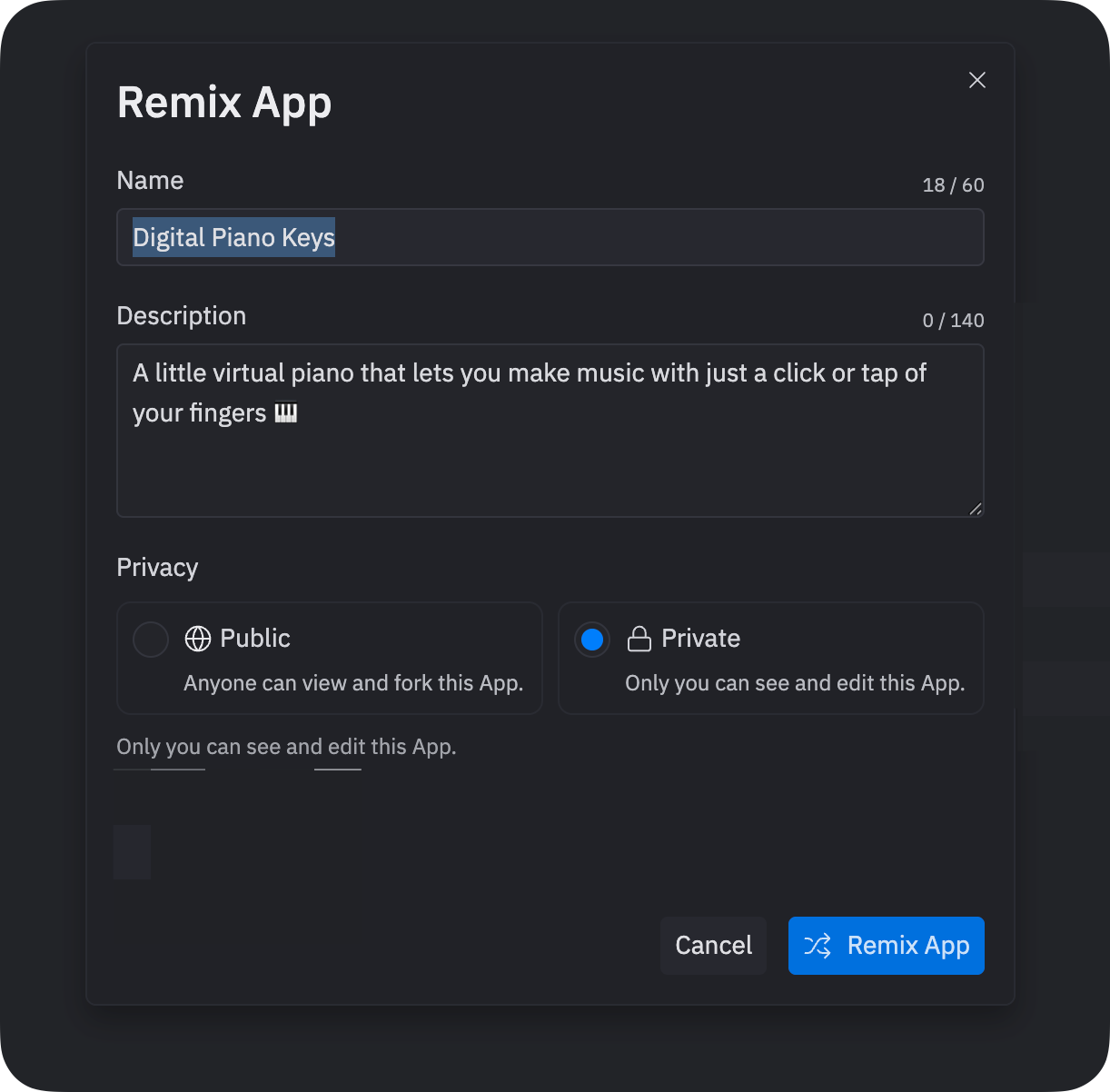
    **Remix App** 대화 상자에서 복사본의 이름과 선택적으로 설명을 입력한 다음 **Remix App**을 선택하세요. 이 세부 정보는 나중에 수정할 수 있습니다.

    <Frame>
      <img src="https://mintcdn.com/replit/u7DyWVbaIRze6Cmd/images/getting-started/quickstart_remix_dialog.png?fit=max&auto=format&n=u7DyWVbaIRze6Cmd&q=85&s=d1d41a640ac0fc55679aa4081d5c5ff2" alt="앱 이름, 설명, 개인 정보 설정을 보여주는 Remix App 대화 상자" width="1222" height="1202" data-path="images/getting-started/quickstart_remix_dialog.png" />
    </Frame>
  </Step>

  <Step title="복사본 살펴보기">
    복사본이 워크스페이스에서 열리고 자동으로 시작됩니다. **Preview** 탭으로 이동해 실행되는 모습을 확인하세요.
  </Step>
</Steps>

## 직접 해보기

[템플릿으로 시작하기](/ko/design/start-from-a-template)에 소개된 주요 템플릿 중 하나인 **Supercar showcase** 템플릿의 리믹스를 만들어보세요:

<Frame>
  <img src="https://mintcdn.com/replit/9Q_lVrxG2Dh35jz1/images/design/replit-design/templates/supercar-showcase.webp?fit=max&auto=format&n=9Q_lVrxG2Dh35jz1&q=85&s=3807a96319b4d974f30bda957f6bd92e" alt="Supercar showcase 템플릿 커버 — 은색 슈퍼카 히어로가 있는 다크 랜딩 페이지" width="1920" height="1080" data-path="images/design/replit-design/templates/supercar-showcase.webp" />
</Frame>

<RemixButton replUrl="https://replit.com/t/replit-gallery/repls/Apex-01/view" label="Remix this app" />

## 리믹스 위에 빌드하기

리믹스가 워크스페이스에서 열리면 Agent를 사용해 수정하고 확장하세요. **Agent** 탭에 추가하고 싶은 기능을 설명하는 프롬프트를 입력하세요.

Agent의 변경 사항을 취소하려면, 변경 후 생성된 Checkpoint에서 **Rollback to here**를 선택하세요. 자세한 내용은 [Checkpoints 및 Rollbacks](/ko/features/version-control/checkpoints-and-rollbacks)를 참조하세요.

## 리믹스할까요, 프롬프트로 빌드할까요?

두 경로 모두 결국 같은 곳에 도달합니다. Agent의 도움으로 발전시켜 나가는 나만의 앱이죠. 다만 시작하는 방식이 다릅니다:

|             | 리믹스             | 프롬프트로 빌드하기            |
| ----------- | --------------- | --------------------- |
| 시작점         | 그대로 복사된 동작하는 앱  | 설명을 바탕으로 Agent가 만드는 앱 |
| 첫 결과        | 즉시 나오며 원본과 동일함  | 시간이 더 걸리고 결과가 달라짐     |
| Agent의 첫 동작 | 사용자의 방향 지시를 기다림 | 프롬프트를 바탕으로 계획하고 빌드함   |

원하는 것과 비슷한 앱이 이미 있다면 리믹스하세요. Agent의 첫 작업이 빈 상태가 아니라 실제로 동작하는 앱을 대상으로 이루어집니다. 아이디어가 어디에서도 찾아볼 수 없는 것이라면 프롬프트로 빌드하세요.

## 다음 단계

* **더 많은 리믹스 살펴보기**: [커뮤니티](https://replit.com/community/all)를 둘러보며 리믹스하고 배울 앱을 찾아보세요
* **처음부터 빌드하기**: Agent로 [나만의 앱 만들기](/ko/build/your-first-app)를 시도하여 경험을 비교해보세요
* **리믹스 가능하도록 게시하기**: 개선한 버전을 공유해 다른 사람들이 여러분의 작업 위에서 계속 빌드할 수 있게 하세요