> ## Documentation Index
> Fetch the complete documentation index at: https://docs.replit.com/llms.txt
> Use this file to discover all available pages before exploring further.
# replit.md
> replit.md를 사용해 Agent의 동작, 코딩 스타일, 프로젝트 컨텍스트를 사용자 지정하는 방법을 알아보세요.
export const YouTubeEmbed = ({videoId, title = "YouTube video", startAt}) => {
if (!videoId) {
return null;
}
let url = "https://www.youtube.com/embed/" + videoId;
if (startAt) {
url = url + "?start=" + startAt;
}
return
;
};
Agent는 검증된 모범 사례를 사용해 프로젝트의 루트 디렉터리에 이 파일을 자동으로 생성합니다. Agent는 사용자의 선호도, 프로젝트 구조, 코딩 스타일을 이해하는 데 도움이 되도록 이 파일의 내용을 컨텍스트에 포함합니다.
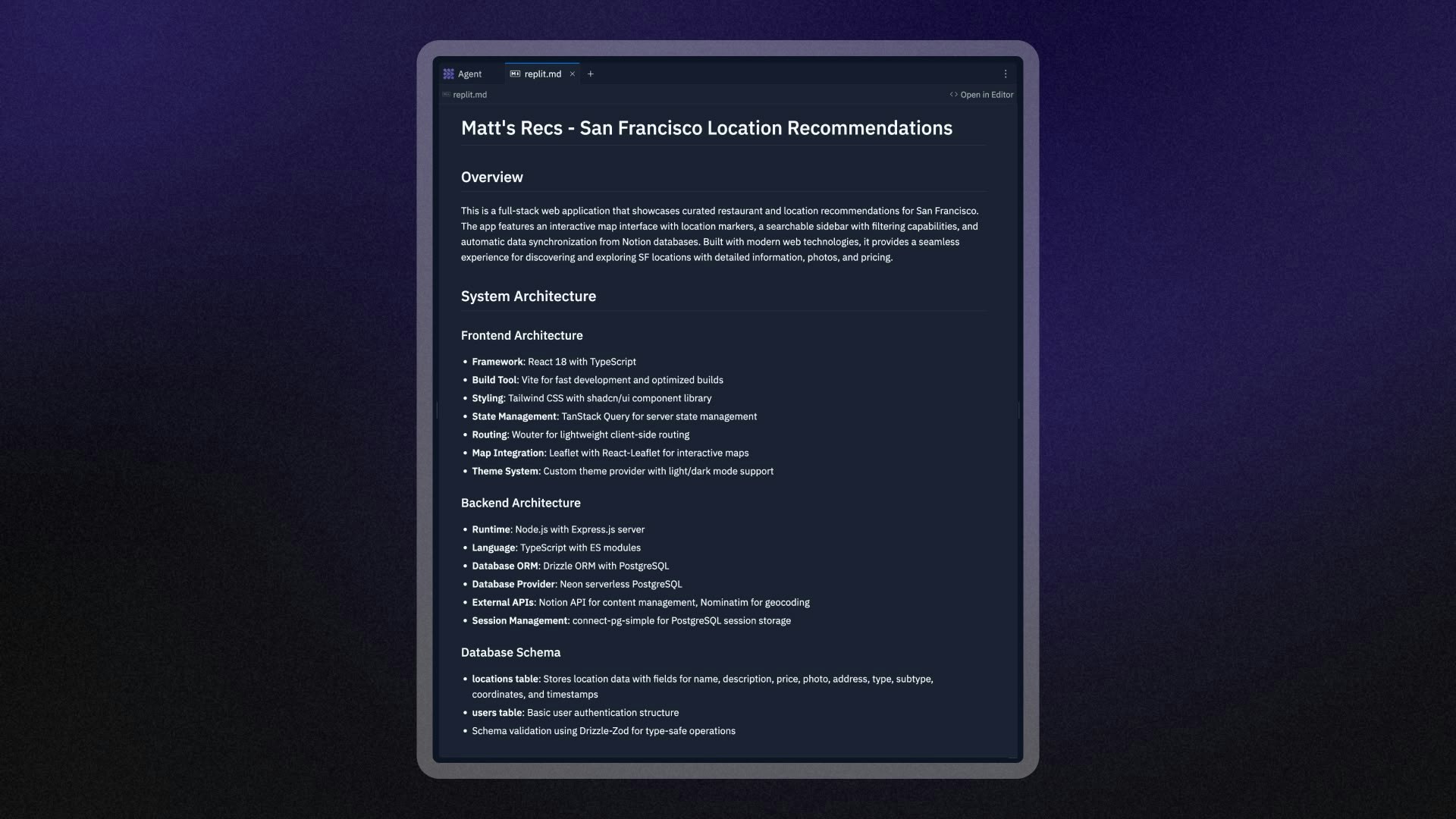 ## `replit.md`의 동작 방식
Agent는 먼저 검증된 모범 사례를 사용해 프로젝트의 루트 디렉터리에 `replit.md` 파일을 만듭니다. 이 파일에는 다음이 포함됩니다.
* 기본 프로젝트 정보
* 권장 코딩 패턴
* 프로젝트 유형에 흔히 적용되는 선호 사항
Agent가 요청을 처리할 때는 자동으로 `replit.md` 파일을 읽고 그 내용을 다음과 같은 용도로 사용합니다.
* 프로젝트의 아키텍처와 관례를 이해하기 위해
* 선호하는 코딩 패턴과 스타일을 따르기 위해
* 지정한 패키지 관리자와 종속성을 사용하기 위해
Agent는 프로젝트에 대해 더 많이 알게 되고 애플리케이션을 변경하면서 `replit.md` 파일을 업데이트할 수도 있습니다.
`replit.md` 파일을 편집해 Agent의 동작을 사용자 지정할 수 있습니다.
## `replit.md` 설정하기
### 자동 생성
Agent로 새 프로젝트를 만들면 검증된 모범 사례를 사용해 `replit.md` 파일을 자동으로 생성합니다. 이 파일은 프로젝트의 루트 디렉터리에 표시되며 다음을 포함합니다.
* 기본 프로젝트 정보
* 권장 코딩 패턴
* 프로젝트 유형에 흔히 적용되는 선호 사항
### 수동 생성
프로젝트의 루트 디렉터리에 `replit.md`라는 이름의 새 파일을 추가하여 직접 만들 수도 있습니다. Agent는 이후 대화에서 이 파일을 자동으로 감지하고 사용합니다.
`replit.md`가 올바르게 동작하려면 프로젝트의 루트 디렉터리에 있어야 합니다.
### `replit.md` 재생성하기
`replit.md` 파일이 손상되었거나 새로 시작하고 싶다면:
1. 프로젝트 루트에서 기존 `replit.md` 파일을 삭제합니다
2. Agent와 새 대화를 시작합니다
3. Agent가 현재 프로젝트를 기반으로 새로운 `replit.md` 파일을 자동으로 생성합니다
## 모범 사례
### 구체적이고 명확하게 작성하기
Agent가 원하는 바를 정확히 이해할 수 있도록 명확하고 구체적인 지침을 작성하세요.
```markdown theme={null}
## Coding Style
- Use TypeScript for all new JavaScript files
- Prefer functional components with hooks over class components
- Use Tailwind CSS for styling, avoid inline styles
- Always include TypeScript types for function parameters and return values
```
프롬프트 형식에 대한 더 자세한 가이드는 [Anthropic 프롬프트 엔지니어링 가이드](https://docs.anthropic.com/en/docs/build-with-claude/prompt-engineering/use-xml-tags)를 확인해 보세요.
### 예시 사용하기
예시는 추상적인 설명보다 Agent가 사용자의 선호도를 더 잘 이해하는 데 도움이 됩니다.
````markdown theme={null}
## API Error Handling
When creating API endpoints, always use this error handling pattern:
```javascript
app.get('/api/users', async (req, res) => {
try {
const users = await getUsersFromDatabase();
res.json({ success: true, data: users });
} catch (error) {
console.error('Error fetching users:', error);
res.status(500).json({
success: false,
error: 'Failed to fetch users'
});
}
});
````
### 커뮤니케이션 선호 사항 정의하기
정보와 업데이트를 어떤 방식으로 받고 싶은지 Agent에게 알려주세요.
```markdown theme={null}
## Communication Style
- Before implementing changes, explain what you're going to do and why
- Break down complex tasks into clear steps
- Ask for clarification if requirements are unclear
- Provide brief explanations for technical decisions
```
### 프로젝트 컨텍스트 명시하기
프로젝트의 목적과 제약 조건을 Agent가 이해할 수 있도록 도와주세요.
```markdown theme={null}
## Project Context
This is a social media app for book lovers where users can:
- Create reading lists and share book recommendations
- Follow other readers and see their updates
- Rate and review books they've read
Target audience: Casual readers aged 25-45
Tech stack: React frontend, Node.js backend, PostgreSQL database
```
## `replit.md` 구성 예시
### 웹 애플리케이션 프로젝트
```markdown theme={null}
# MyApp Project Guidelines
## Project Overview
A task management web application built with React and Express.js.
## Technology Preferences
- Frontend: React with TypeScript, Tailwind CSS
- Backend: Express.js with TypeScript
- Database: Neon PostgreSQL with Drizzle ORM
- Package Manager: npm (not yarn or pnpm)
## Coding Standards
- Use functional components with hooks
- Implement proper error boundaries
- Follow REST API conventions for endpoints
- Use descriptive variable and function names
## Communication Style
- Explain your approach before making changes
- Provide code comments for complex logic
- Ask questions if requirements are ambiguous
```
### 데이터 분석 프로젝트
```markdown theme={null}
# Data Analysis Project Guidelines
## Project Context
Analyzing customer behavior data to identify trends and insights.
## Technology Preferences
- Python with Streamlit for interactive web applications
- pandas, numpy, and matplotlib for data analysis
## Analysis Standards
- Include clear documentation for all analysis steps
- Create interactive visualizations with Streamlit components
- Validate data quality before analysis
- Export results to CSV format and display in Streamlit tables
## Communication Style
- Explain statistical methods and assumptions
- Provide context for findings and recommendations
- Use clear, non-technical language for business insights
- Create interactive dashboards for stakeholder presentations
```
### API 개발 프로젝트
```markdown theme={null}
# API Development Guidelines
## Project Overview
Building a RESTful API for a mobile app backend.
## Technology Stack
- Node.js with Express.js
- MongoDB with Mongoose
- JWT for authentication
- Package manager: npm
## API Standards
- Use semantic HTTP status codes
- Implement proper input validation
- Include rate limiting on public endpoints
- Follow OpenAPI specification for documentation
## Security Requirements
- Validate all user inputs
- Use environment variables for sensitive data
- Implement proper CORS policies
- Include request logging for debugging
## Testing Approach
- Write unit tests for all endpoints
- Include integration tests for critical flows
- Use Jest as the testing framework
```
## 고급 활용
### 동적 프로젝트 안내
프로젝트가 발전함에 따라 최신 컨텍스트를 제공하도록 `replit.md` 파일을 업데이트하세요.
```markdown theme={null}
## Current Development Phase
The team is currently focused on implementing user authentication.
Priority features:
1. User registration and login
2. Password reset functionality
3. Email verification
## Recent Decisions
- Switched from local authentication to OAuth with Google
- Added Redux for state management
- Decided to use Material-UI for consistent styling
```
### 외부 도구와의 연동
`replit.md`에서 외부 문서와 도구를 참조하세요.
```markdown theme={null}
## External Resources
- Design system: Follow the Figma design system at [link]
- API documentation: Reference our internal API docs
- Coding standards: Follow the team style guide in our wiki
## Deployment Process
- Test changes in development environment first
- Use the CI/CD pipeline for staging published apps
- Require code review before production releases
```
## 웹 검색과 `replit.md` 결합하기
Agent는 웹 검색을 수행해 최신 정보, 라이브러리, 솔루션을 찾을 수 있습니다. 이를 `replit.md` 파일과 결합하면 최신 지식과 프로젝트별 지침을 동시에 얻을 수 있습니다.
### 웹 검색 연동을 위한 모범 사례
**Agent가 조사해야 할 내용을 구체적으로 명시하세요.**
```markdown theme={null}
## Research Preferences
- Always check for the latest versions of dependencies before suggesting updates
- Research current best practices for security implementations
- Look up recent performance optimization techniques for our tech stack
```
**외부 지식을 어떻게 적용해야 하는지 Agent에게 안내하세요.**
```markdown theme={null}
## External Research Guidelines
- When suggesting new libraries, ensure compatibility with our existing stack
- Adapt external examples to match our coding standards and project structure
- Verify that suggested solutions work with our publishing environment
```
**두 가지를 함께 활용하는 요청 예시입니다.**
"React 18의 최신 성능 최적화 기법을 조사하고, `replit.md`에 정의된 컴포넌트 패턴에 따라 이를 구현해줘"
이런 방식으로 접근하면 최신 정보이면서도 여러분의 프로젝트에 맞게 조정된 솔루션을 얻을 수 있습니다.
## 제한 사항
### 파일 크기 및 콘텐츠 제한
`replit.md`에 엄격한 글자 수 제한은 없지만, 매우 큰 파일은 완전히 처리되지 않을 수 있습니다. 최상의 결과를 위해 `replit.md`를 간결하고 핵심적으로 유지하세요.
### 루트 디렉터리 요구 사항
`replit.md`는 프로젝트의 루트 디렉터리에 있어야 합니다. Agent는 하위 디렉터리에 있는 파일을 자동으로 감지하지 않습니다.
### 컨텍스트 범위
`replit.md`는 Agent 대화에 컨텍스트를 제공하지만 다른 AI 도구에는 자동으로 적용되지 않습니다.
## 다음 단계
프로젝트에 맞게 Agent를 사용자 지정할 준비가 되셨나요?
1. **간단하게 시작하기**: 핵심 선호 사항을 담은 기본 `replit.md`를 만드세요
2. **반복하며 개선하기**: Agent와 작업하면서 `replit.md`를 업데이트하세요
3. **패턴 공유하기**: 성공적인 `replit.md` 구성을 비슷한 프로젝트 전반에 활용하세요
4. **효과 모니터링하기**: Agent가 지침을 얼마나 잘 따르는지 확인하고 그에 맞게 조정하세요
[Agent와 함께 작업하기](/ko/features/agent/overview)에 대해 더 알아보거나 다른 [AI 도구](/ko/build/welcome)를 살펴보세요.
**엔터프라이즈**: [맞춤 템플릿](/ko/teams/custom-templates)에 `replit.md`를 사전 구성하면 조직의 모든 빌더에게 일관된 시작 컨텍스트를 제공할 수 있습니다. 디자인 관련 지침은 [디자인 시스템 설정하기](/ko/teams/custom-design-system)를 참조하세요.
## `replit.md`의 동작 방식
Agent는 먼저 검증된 모범 사례를 사용해 프로젝트의 루트 디렉터리에 `replit.md` 파일을 만듭니다. 이 파일에는 다음이 포함됩니다.
* 기본 프로젝트 정보
* 권장 코딩 패턴
* 프로젝트 유형에 흔히 적용되는 선호 사항
Agent가 요청을 처리할 때는 자동으로 `replit.md` 파일을 읽고 그 내용을 다음과 같은 용도로 사용합니다.
* 프로젝트의 아키텍처와 관례를 이해하기 위해
* 선호하는 코딩 패턴과 스타일을 따르기 위해
* 지정한 패키지 관리자와 종속성을 사용하기 위해
Agent는 프로젝트에 대해 더 많이 알게 되고 애플리케이션을 변경하면서 `replit.md` 파일을 업데이트할 수도 있습니다.
`replit.md` 파일을 편집해 Agent의 동작을 사용자 지정할 수 있습니다.
## `replit.md` 설정하기
### 자동 생성
Agent로 새 프로젝트를 만들면 검증된 모범 사례를 사용해 `replit.md` 파일을 자동으로 생성합니다. 이 파일은 프로젝트의 루트 디렉터리에 표시되며 다음을 포함합니다.
* 기본 프로젝트 정보
* 권장 코딩 패턴
* 프로젝트 유형에 흔히 적용되는 선호 사항
### 수동 생성
프로젝트의 루트 디렉터리에 `replit.md`라는 이름의 새 파일을 추가하여 직접 만들 수도 있습니다. Agent는 이후 대화에서 이 파일을 자동으로 감지하고 사용합니다.
`replit.md`가 올바르게 동작하려면 프로젝트의 루트 디렉터리에 있어야 합니다.
### `replit.md` 재생성하기
`replit.md` 파일이 손상되었거나 새로 시작하고 싶다면:
1. 프로젝트 루트에서 기존 `replit.md` 파일을 삭제합니다
2. Agent와 새 대화를 시작합니다
3. Agent가 현재 프로젝트를 기반으로 새로운 `replit.md` 파일을 자동으로 생성합니다
## 모범 사례
### 구체적이고 명확하게 작성하기
Agent가 원하는 바를 정확히 이해할 수 있도록 명확하고 구체적인 지침을 작성하세요.
```markdown theme={null}
## Coding Style
- Use TypeScript for all new JavaScript files
- Prefer functional components with hooks over class components
- Use Tailwind CSS for styling, avoid inline styles
- Always include TypeScript types for function parameters and return values
```
프롬프트 형식에 대한 더 자세한 가이드는 [Anthropic 프롬프트 엔지니어링 가이드](https://docs.anthropic.com/en/docs/build-with-claude/prompt-engineering/use-xml-tags)를 확인해 보세요.
### 예시 사용하기
예시는 추상적인 설명보다 Agent가 사용자의 선호도를 더 잘 이해하는 데 도움이 됩니다.
````markdown theme={null}
## API Error Handling
When creating API endpoints, always use this error handling pattern:
```javascript
app.get('/api/users', async (req, res) => {
try {
const users = await getUsersFromDatabase();
res.json({ success: true, data: users });
} catch (error) {
console.error('Error fetching users:', error);
res.status(500).json({
success: false,
error: 'Failed to fetch users'
});
}
});
````
### 커뮤니케이션 선호 사항 정의하기
정보와 업데이트를 어떤 방식으로 받고 싶은지 Agent에게 알려주세요.
```markdown theme={null}
## Communication Style
- Before implementing changes, explain what you're going to do and why
- Break down complex tasks into clear steps
- Ask for clarification if requirements are unclear
- Provide brief explanations for technical decisions
```
### 프로젝트 컨텍스트 명시하기
프로젝트의 목적과 제약 조건을 Agent가 이해할 수 있도록 도와주세요.
```markdown theme={null}
## Project Context
This is a social media app for book lovers where users can:
- Create reading lists and share book recommendations
- Follow other readers and see their updates
- Rate and review books they've read
Target audience: Casual readers aged 25-45
Tech stack: React frontend, Node.js backend, PostgreSQL database
```
## `replit.md` 구성 예시
### 웹 애플리케이션 프로젝트
```markdown theme={null}
# MyApp Project Guidelines
## Project Overview
A task management web application built with React and Express.js.
## Technology Preferences
- Frontend: React with TypeScript, Tailwind CSS
- Backend: Express.js with TypeScript
- Database: Neon PostgreSQL with Drizzle ORM
- Package Manager: npm (not yarn or pnpm)
## Coding Standards
- Use functional components with hooks
- Implement proper error boundaries
- Follow REST API conventions for endpoints
- Use descriptive variable and function names
## Communication Style
- Explain your approach before making changes
- Provide code comments for complex logic
- Ask questions if requirements are ambiguous
```
### 데이터 분석 프로젝트
```markdown theme={null}
# Data Analysis Project Guidelines
## Project Context
Analyzing customer behavior data to identify trends and insights.
## Technology Preferences
- Python with Streamlit for interactive web applications
- pandas, numpy, and matplotlib for data analysis
## Analysis Standards
- Include clear documentation for all analysis steps
- Create interactive visualizations with Streamlit components
- Validate data quality before analysis
- Export results to CSV format and display in Streamlit tables
## Communication Style
- Explain statistical methods and assumptions
- Provide context for findings and recommendations
- Use clear, non-technical language for business insights
- Create interactive dashboards for stakeholder presentations
```
### API 개발 프로젝트
```markdown theme={null}
# API Development Guidelines
## Project Overview
Building a RESTful API for a mobile app backend.
## Technology Stack
- Node.js with Express.js
- MongoDB with Mongoose
- JWT for authentication
- Package manager: npm
## API Standards
- Use semantic HTTP status codes
- Implement proper input validation
- Include rate limiting on public endpoints
- Follow OpenAPI specification for documentation
## Security Requirements
- Validate all user inputs
- Use environment variables for sensitive data
- Implement proper CORS policies
- Include request logging for debugging
## Testing Approach
- Write unit tests for all endpoints
- Include integration tests for critical flows
- Use Jest as the testing framework
```
## 고급 활용
### 동적 프로젝트 안내
프로젝트가 발전함에 따라 최신 컨텍스트를 제공하도록 `replit.md` 파일을 업데이트하세요.
```markdown theme={null}
## Current Development Phase
The team is currently focused on implementing user authentication.
Priority features:
1. User registration and login
2. Password reset functionality
3. Email verification
## Recent Decisions
- Switched from local authentication to OAuth with Google
- Added Redux for state management
- Decided to use Material-UI for consistent styling
```
### 외부 도구와의 연동
`replit.md`에서 외부 문서와 도구를 참조하세요.
```markdown theme={null}
## External Resources
- Design system: Follow the Figma design system at [link]
- API documentation: Reference our internal API docs
- Coding standards: Follow the team style guide in our wiki
## Deployment Process
- Test changes in development environment first
- Use the CI/CD pipeline for staging published apps
- Require code review before production releases
```
## 웹 검색과 `replit.md` 결합하기
Agent는 웹 검색을 수행해 최신 정보, 라이브러리, 솔루션을 찾을 수 있습니다. 이를 `replit.md` 파일과 결합하면 최신 지식과 프로젝트별 지침을 동시에 얻을 수 있습니다.
### 웹 검색 연동을 위한 모범 사례
**Agent가 조사해야 할 내용을 구체적으로 명시하세요.**
```markdown theme={null}
## Research Preferences
- Always check for the latest versions of dependencies before suggesting updates
- Research current best practices for security implementations
- Look up recent performance optimization techniques for our tech stack
```
**외부 지식을 어떻게 적용해야 하는지 Agent에게 안내하세요.**
```markdown theme={null}
## External Research Guidelines
- When suggesting new libraries, ensure compatibility with our existing stack
- Adapt external examples to match our coding standards and project structure
- Verify that suggested solutions work with our publishing environment
```
**두 가지를 함께 활용하는 요청 예시입니다.**
"React 18의 최신 성능 최적화 기법을 조사하고, `replit.md`에 정의된 컴포넌트 패턴에 따라 이를 구현해줘"
이런 방식으로 접근하면 최신 정보이면서도 여러분의 프로젝트에 맞게 조정된 솔루션을 얻을 수 있습니다.
## 제한 사항
### 파일 크기 및 콘텐츠 제한
`replit.md`에 엄격한 글자 수 제한은 없지만, 매우 큰 파일은 완전히 처리되지 않을 수 있습니다. 최상의 결과를 위해 `replit.md`를 간결하고 핵심적으로 유지하세요.
### 루트 디렉터리 요구 사항
`replit.md`는 프로젝트의 루트 디렉터리에 있어야 합니다. Agent는 하위 디렉터리에 있는 파일을 자동으로 감지하지 않습니다.
### 컨텍스트 범위
`replit.md`는 Agent 대화에 컨텍스트를 제공하지만 다른 AI 도구에는 자동으로 적용되지 않습니다.
## 다음 단계
프로젝트에 맞게 Agent를 사용자 지정할 준비가 되셨나요?
1. **간단하게 시작하기**: 핵심 선호 사항을 담은 기본 `replit.md`를 만드세요
2. **반복하며 개선하기**: Agent와 작업하면서 `replit.md`를 업데이트하세요
3. **패턴 공유하기**: 성공적인 `replit.md` 구성을 비슷한 프로젝트 전반에 활용하세요
4. **효과 모니터링하기**: Agent가 지침을 얼마나 잘 따르는지 확인하고 그에 맞게 조정하세요
[Agent와 함께 작업하기](/ko/features/agent/overview)에 대해 더 알아보거나 다른 [AI 도구](/ko/build/welcome)를 살펴보세요.
**엔터프라이즈**: [맞춤 템플릿](/ko/teams/custom-templates)에 `replit.md`를 사전 구성하면 조직의 모든 빌더에게 일관된 시작 컨텍스트를 제공할 수 있습니다. 디자인 관련 지침은 [디자인 시스템 설정하기](/ko/teams/custom-design-system)를 참조하세요.