> ## Documentation Index
> Fetch the complete documentation index at: https://docs.replit.com/llms.txt
> Use this file to discover all available pages before exploring further.

# Chats와 Projects 비교

> 언제 chat에서 작업하고, 언제 새 Project를 만들고, 언제 기존 Project의 변경을 요청해야 하는지 알아보세요. 변경은 따라가며 검토할 수 있는 백그라운드 작업으로 진행됩니다.

export const ConversationsProjectsCover = ({handoff = false}) => <div className="chat-mkt" role="img" aria-label={handoff ? "A Replit chat flowing into a structured Project window" : "A frosted Replit Chat window linked to a structured Project window"} style={{
  margin: "28px 0 42px",
  borderTop: 0,
  paddingTop: 0
}}>
    <div className="chat-use-case-visual" style={{
  aspectRatio: "auto",
  minHeight: "clamp(220px, 34vw, 320px)",
  overflow: "hidden",
  background: "radial-gradient(circle at 50% -18%, rgba(255,255,255,.82), transparent 42%), radial-gradient(circle at 4% 96%, rgba(255,184,146,.48), transparent 38%), linear-gradient(140deg, #ff764d, #ff3c00 60%, #c92d00)"
}}>
      <div aria-hidden="true" style={{
  position: "absolute",
  inset: 0,
  background: "linear-gradient(180deg, rgba(255,255,255,.14), rgba(255,255,255,0) 48%, rgba(111,24,0,.2))"
}} />
      <div aria-hidden="true" style={{
  position: "relative",
  zIndex: 1,
  display: "flex",
  width: "100%",
  boxSizing: "border-box",
  minHeight: "inherit",
  alignItems: "center",
  justifyContent: "center",
  gap: handoff ? "clamp(5px, 1vw, 13px)" : "clamp(3px, .8vw, 10px)",
  padding: "clamp(10px, 1.6vw, 18px)"
}}>
        <div style={{
  position: "relative",
  flex: handoff ? "0 1 38%" : "0 1 45%",
  width: handoff ? "38%" : "45%",
  minWidth: 0,
  maxWidth: "none"
}}>
          <div aria-hidden="true" style={{
  position: "absolute",
  width: "84%",
  height: "82%",
  left: "10%",
  top: "9%",
  transform: "rotate(3deg)",
  border: "1px solid rgba(255,255,255,.28)",
  borderRadius: 20,
  opacity: 0.52
}} />
          <div aria-hidden="true" style={{
  position: "relative",
  display: "flex",
  width: "100%",
  boxSizing: "border-box",
  minHeight: "clamp(138px, 20vw, 190px)",
  gap: "clamp(7px, 1.5vw, 14px)",
  padding: "clamp(10px, 2vw, 18px)",
  border: "1px solid rgba(255,255,255,.54)",
  borderRadius: 20,
  background: "linear-gradient(180deg, rgba(255,255,255,.27), rgba(255,255,255,.1))",
  boxShadow: "0 18px 36px rgba(55,27,18,.2)",
  backdropFilter: "blur(5px)"
}}>
            <div style={{
  display: "grid",
  width: "clamp(20px, 4vw, 36px)",
  minWidth: "clamp(20px, 4vw, 36px)",
  alignContent: "start",
  gap: 8,
  paddingRight: "clamp(6px, 1vw, 11px)",
  borderRight: "1px solid rgba(255,255,255,.3)"
}}>
              <span style={{
  width: 10,
  height: 10,
  borderRadius: 4,
  background: "rgba(255,255,255,.9)"
}} />
              <span style={{
  width: 10,
  height: 10,
  borderRadius: 4,
  border: "1px solid rgba(255,255,255,.66)",
  background: "rgba(255,255,255,.12)"
}} />
              <span style={{
  width: 10,
  height: 10,
  borderRadius: 999,
  border: "1px solid rgba(255,255,255,.48)"
}} />
            </div>
            <div style={{
  display: "grid",
  minWidth: 0,
  flex: "1 1 auto",
  alignContent: "space-between",
  gap: 8
}}>
              <div style={{
  display: "grid",
  gap: 7
}}>
                <span style={{
  width: "66%",
  height: 17,
  border: "1px solid rgba(255,255,255,.44)",
  borderRadius: "10px 10px 10px 3px",
  background: "rgba(255,255,255,.17)"
}} />
                <span style={{
  justifySelf: "end",
  width: "56%",
  height: 17,
  borderRadius: "10px 10px 3px 10px",
  background: "rgba(255,255,255,.76)"
}} />
                <span style={{
  width: "76%",
  height: 21,
  border: "1px solid rgba(255,255,255,.4)",
  borderRadius: "10px 10px 10px 3px",
  background: "rgba(255,255,255,.14)"
}} />
              </div>
              <div style={{
  display: "flex",
  alignItems: "center",
  justifyContent: "space-between",
  gap: 6,
  padding: "7px 8px",
  border: "1px solid rgba(255,255,255,.52)",
  borderRadius: 10,
  background: "rgba(255,255,255,.14)"
}}>
                <span style={{
  width: "65%",
  height: 5,
  borderRadius: 999,
  background: "rgba(255,255,255,.7)"
}} />
                <span style={{
  width: 14,
  height: 14,
  borderRadius: 5,
  background: "rgba(255,255,255,.88)"
}} />
              </div>
            </div>
          </div>
        </div>

        <div aria-hidden="true" style={{
  position: "relative",
  width: handoff ? "clamp(30px, 9vw, 92px)" : "clamp(24px, 7vw, 76px)",
  minWidth: handoff ? "clamp(30px, 9vw, 92px)" : "clamp(24px, 7vw, 76px)",
  height: "clamp(38px, 6vw, 56px)"
}}>
          <span style={{
  position: "absolute",
  left: 0,
  right: 0,
  top: "50%",
  width: "100%",
  height: 2,
  borderRadius: 999,
  background: "linear-gradient(90deg, rgba(255,255,255,.18), rgba(255,255,255,.86), rgba(255,255,255,.18))",
  boxShadow: "0 0 12px rgba(255,255,255,.36)"
}} />
          <span style={{
  position: "absolute",
  left: handoff ? "7%" : "13%",
  top: "calc(50% - 5px)",
  width: handoff ? 7 : 10,
  height: handoff ? 7 : 10,
  border: "1px solid rgba(255,255,255,.72)",
  borderRadius: 999,
  background: "rgba(255,255,255,.18)",
  boxShadow: "0 0 10px rgba(255,255,255,.24)"
}} />
          <span style={{
  position: "absolute",
  left: handoff ? "39%" : "46%",
  top: handoff ? "calc(50% - 6px)" : "calc(50% - 8px)",
  width: handoff ? 12 : 16,
  height: handoff ? 12 : 16,
  border: "1px solid rgba(255,255,255,.86)",
  borderRadius: 999,
  background: "rgba(255,255,255,.28)",
  boxShadow: "0 0 14px rgba(255,255,255,.34)"
}} />
          <span style={{
  position: "absolute",
  right: handoff ? "3%" : "8%",
  top: handoff ? "calc(50% - 9px)" : "calc(50% - 5px)",
  width: handoff ? 18 : 10,
  height: handoff ? 18 : 10,
  border: "1px solid rgba(255,255,255,.72)",
  borderRadius: 999,
  background: handoff ? "rgba(255,255,255,.42)" : "rgba(255,255,255,.18)",
  boxShadow: handoff ? "0 0 18px rgba(255,255,255,.46)" : "0 0 10px rgba(255,255,255,.24)"
}} />
        </div>

        <div style={{
  position: "relative",
  flex: handoff ? "0 1 52%" : "0 1 45%",
  width: handoff ? "52%" : "45%",
  minWidth: 0,
  maxWidth: "none",
  transform: handoff ? "translateX(1%)" : undefined
}}>
          <div aria-hidden="true" style={{
  position: "absolute",
  width: "84%",
  height: "82%",
  right: "10%",
  top: "9%",
  transform: "rotate(-3deg)",
  border: "1px solid rgba(255,255,255,.28)",
  borderRadius: 20,
  opacity: 0.52
}} />
          <div aria-hidden="true" style={{
  position: "relative",
  display: "grid",
  width: "100%",
  boxSizing: "border-box",
  minHeight: "clamp(138px, 20vw, 190px)",
  gridTemplateRows: "auto 1fr",
  gap: "clamp(9px, 1.8vw, 15px)",
  padding: "clamp(10px, 2vw, 18px)",
  border: "1px solid rgba(255,255,255,.54)",
  borderRadius: 20,
  background: "linear-gradient(180deg, rgba(255,255,255,.27), rgba(255,255,255,.1))",
  boxShadow: "0 18px 36px rgba(55,27,18,.2)",
  backdropFilter: "blur(5px)"
}}>
            <div style={{
  display: "flex",
  alignItems: "center",
  gap: 6
}}>
              <span style={{
  width: 8,
  height: 8,
  borderRadius: 999,
  background: "rgba(255,255,255,.92)"
}} />
              <span style={{
  width: 8,
  height: 8,
  borderRadius: 999,
  background: "rgba(255,255,255,.52)"
}} />
              <span style={{
  width: 8,
  height: 8,
  borderRadius: 999,
  background: "rgba(255,255,255,.32)"
}} />
              <span style={{
  width: "34%",
  height: 6,
  marginLeft: 6,
  borderRadius: 999,
  background: "rgba(255,255,255,.62)"
}} />
            </div>
            <div style={{
  display: "grid",
  gridTemplateColumns: "minmax(18px, .45fr) minmax(0, 1fr)",
  gap: "clamp(7px, 1.5vw, 14px)",
  minWidth: 0
}}>
              <div style={{
  display: "grid",
  alignContent: "start",
  gap: 7,
  paddingRight: "clamp(5px, 1vw, 10px)",
  borderRight: "1px solid rgba(255,255,255,.3)"
}}>
                <span style={{
  width: "80%",
  height: 7,
  borderRadius: 999,
  background: "rgba(255,255,255,.8)"
}} />
                <span style={{
  width: "64%",
  height: 7,
  borderRadius: 999,
  background: "rgba(255,255,255,.42)"
}} />
                <span style={{
  width: "74%",
  height: 7,
  borderRadius: 999,
  background: "rgba(255,255,255,.26)"
}} />
              </div>
              <div style={{
  display: "grid",
  gridTemplateColumns: "repeat(2, minmax(0, 1fr))",
  gridTemplateRows: "repeat(2, minmax(0, 1fr))",
  gap: 7,
  minWidth: 0
}}>
                <span style={{
  border: "1px solid rgba(255,255,255,.48)",
  borderRadius: 9,
  background: "rgba(255,255,255,.2)"
}} />
                <span style={{
  border: "1px solid rgba(255,255,255,.32)",
  borderRadius: 9,
  background: "rgba(255,255,255,.1)"
}} />
                <span style={{
  gridColumn: "span 2",
  border: "1px solid rgba(255,255,255,.4)",
  borderRadius: 9,
  background: "rgba(255,255,255,.16)"
}} />
              </div>
            </div>
          </div>
        </div>
      </div>
    </div>
  </div>;

<ConversationsProjectsCover />

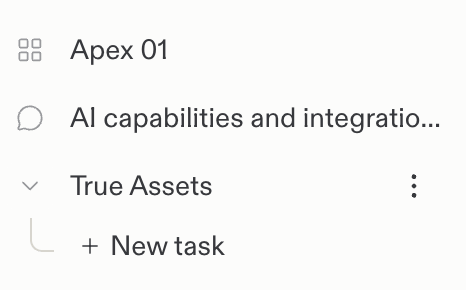
Chats는 질문, 탐색, 후속 작업, Routines를 위한 것입니다. Projects는 애플리케이션을 빌드하고 슬라이드와 디자인을 만들기 위한 것입니다. chat에서 기존 Project의 변경을 요청할 수도 있습니다. 요청은 chat에서 시작되고, 작업은 Project에서 실행됩니다.

[chat에서 Project를 다루는 방법을 알아보세요.](/ko/chat/continue-or-create-a-project)

## 차이점

서로 연결되어 있지만 chats와 Projects는 서로 다른 목적을 수행합니다. 다음은 그 차이점입니다:

| 영역 | Chats | Projects |
| - | - | - |
| 적합한 용도 | 질문, 탐색, Routines | 앱, 슬라이드, 대시보드, 여러 아티팩트 등 더 심층적인 빌드 및 디자인 작업 |
| 구조 | 단일 스레드 | 여러 아티팩트가 있는 Project 워크스페이스 |
| 백그라운드 작업 | 기존 Project에 작업을 위임할 수 있음 | 작업이 Project에서 실행되며 병렬로 실행 가능 |
| Routines | 사용 가능 | 사용 불가 |
| 통합 | 사용 가능 | 사용 가능 |
| 생성 가능 항목 | 문서, 이미지, 시트 등의 Assets | 문서, 이미지, 시트 등의 Assets, 그리고 슬라이드, 앱, 웹사이트 등의 [Artifacts](/ko/features/projects-and-artifacts/artifacts) |
| Publishing | 게시할 수 없음 | 게시하여 공개할 수 있음 |
## 기존 Project 업데이트하기

변경을 요청하기 위해 새 Project를 만들거나 기존 Project를 열 필요는 없습니다. Replit에 Project를 찾도록 요청하고 업데이트 내용을 설명하세요:

> 내 가계부 앱을 찾아서 CSV 내보내기를 추가하는 작업을 만들어줘. 작업 링크도 알려줘.

Replit은 해당 Project에 백그라운드 작업으로 작업을 위임합니다. 연결된 작업을 열어 진행 상황을 확인하고, 변경 사항을 검토하고, 그곳에서 작업을 이어가세요. chat은 그대로 chat으로 유지됩니다.

집중적인 빌드, 협업, 시각적 반복 작업에는 Project 환경을 사용하세요. 수정을 요청한다고 해서 앱이 자동으로 게시되지는 않습니다.

[기존 Project 업데이트 안내](/ko/chat/continue-or-create-a-project#update-an-existing-project)를 따라가 보세요.

<Frame>
  <img src="https://mintcdn.com/replit/teDUL4A-lNO7dv1O/images/chat/conversation-and-project-icons.png?fit=max&auto=format&n=teDUL4A-lNO7dv1O&q=85&s=dd0308cf6783c2345507028dbcf27533" alt="chat의 채팅 아이콘과 Project의 그리드 아이콘이 표시된 Replit 사이드바" width="466" height="290" data-path="images/chat/conversation-and-project-icons.png" />
</Frame>
