> ## Documentation Index
> Fetch the complete documentation index at: https://docs.replit.com/llms.txt
> Use this file to discover all available pages before exploring further.

# 컨텍스트 추가

> Conversation을 이해하는 데 필요한 관련 파일, 소스, 연결된 도구, 기존 작업을 Replit에 제공하세요.

export const IntegrationsCardVisual = () => <CardScene>
    <div style={{
  position: "relative",
  width: 132,
  height: 100
}}>
      <Panel style={{
  position: "absolute",
  left: 41,
  top: 26,
  width: 50,
  height: 50,
  display: "grid",
  placeItems: "center"
}}>
        <DotGrid />
      </Panel>
      {[[0, 4], [86, 4], [43, 75]].map(([left, top]) => <span key={`${left}-${top}`} style={{
  position: "absolute",
  left,
  top,
  width: 30,
  height: 30,
  border: "1px solid rgba(255,255,255,.58)",
  borderRadius: 9,
  background: "rgba(255,255,255,.22)"
}} />)}
    </div>
  </CardScene>;

export const ImportProjectCardVisual = () => <CardScene>
    <div style={{
  display: "flex",
  alignItems: "center",
  gap: 10
}}>
      <Panel style={{
  width: 58,
  height: 70,
  padding: 10
}}>
        {["100%", "73%", "86%"].map(width => <i key={width} style={{
  display: "block",
  width,
  height: 5,
  marginBottom: 8,
  borderRadius: 99,
  background: "rgba(255,255,255,.66)"
}} />)}
      </Panel>
      <span style={{
  width: 20,
  height: 2,
  background: "rgba(255,255,255,.72)"
}} />
      <Panel style={{
  width: 70,
  height: 70,
  padding: 11
}}>
        <div style={{
  display: "grid",
  gridTemplateColumns: "repeat(2, 1fr)",
  gap: 6
}}>
          {Array.from({
  length: 4
}, (_, index) => <i key={index} style={{
  height: 18,
  borderRadius: 4,
  background: "rgba(255,255,255,.55)"
}} />)}
        </div>
      </Panel>
    </div>
  </CardScene>;

export const FigmaCardVisual = () => <CardScene>
    <Panel style={{
  width: 104,
  height: 92,
  display: "grid",
  placeItems: "center"
}}>
      <svg width="45" height="60" viewBox="0 0 24 24" fill="rgba(255,255,255,.88)">
        <path d="M12 12a4 4 0 1 1 8 0 4 4 0 0 1-8 0zM4 20a4 4 0 0 1 4-4h4v4a4 4 0 1 1-8 0zM12 0v8h4a4 4 0 1 0 0-8h-4zM4 4a4 4 0 0 0 4 4h4V0H8a4 4 0 0 0-4 4zM4 12a4 4 0 0 0 4 4h4V8H8a4 4 0 0 0-4 4z" />
      </svg>
    </Panel>
  </CardScene>;

export const FilesCardVisual = () => <CardScene>
    <Panel style={{
  width: 86,
  height: 104,
  padding: 14
}}>
      <div style={{
  display: "grid",
  gap: 9
}}>
        {["76%", "100%", "62%", "86%"].map(width => <i key={width} style={{
  width,
  height: 5,
  borderRadius: 99,
  background: "rgba(255,255,255,.7)"
}} />)}
      </div>
    </Panel>
  </CardScene>;

export const AddContextCover = () => <div className="chat-mkt" role="img" aria-label="File, image, Figma, and Slack context cues around a Replit Conversation prompt" style={{
  margin: "28px 0 42px",
  borderTop: 0,
  paddingTop: 0
}}>
    <div className="chat-use-case-visual" style={{
  aspectRatio: "auto",
  minHeight: "clamp(220px, 34vw, 320px)",
  overflow: "hidden",
  background: "radial-gradient(circle at 50% -18%, rgba(255,255,255,.82), transparent 42%), radial-gradient(circle at 4% 96%, rgba(255,184,146,.48), transparent 38%), linear-gradient(140deg, #ff764d, #ff3c00 60%, #c92d00)"
}}>
      <div aria-hidden="true" style={{
  position: "absolute",
  inset: 0,
  background: "linear-gradient(180deg, rgba(255,255,255,.14), rgba(255,255,255,0) 48%, rgba(111,24,0,.2))"
}} />
      <div aria-hidden="true" style={{
  position: "relative",
  zIndex: 1,
  display: "grid",
  width: "100%",
  minHeight: "inherit",
  placeItems: "center",
  padding: "clamp(12px, 2.5vw, 24px)",
  boxSizing: "border-box"
}}>
        <div style={{
  position: "absolute",
  left: "clamp(12px, 6%, 62px)",
  top: "29%",
  display: "grid",
  width: "clamp(34px, 7vw, 58px)",
  height: "clamp(42px, 9vw, 72px)",
  placeItems: "center",
  border: "1px solid rgba(255,255,255,.58)",
  borderRadius: 13,
  background: "linear-gradient(180deg, rgba(255,255,255,.31), rgba(255,255,255,.12))",
  boxShadow: "0 12px 24px rgba(55,27,18,.16)",
  backdropFilter: "blur(5px)"
}}>
          <div style={{
  position: "relative",
  width: "48%",
  height: "58%",
  border: "1px solid rgba(255,255,255,.86)",
  borderRadius: 4
}}>
            <span style={{
  position: "absolute",
  top: 5,
  left: 4,
  right: 4,
  height: 2,
  borderRadius: 999,
  background: "rgba(255,255,255,.76)"
}} />
            <span style={{
  position: "absolute",
  top: 11,
  left: 4,
  right: 7,
  height: 2,
  borderRadius: 999,
  background: "rgba(255,255,255,.48)"
}} />
          </div>
        </div>

        <div style={{
  position: "absolute",
  left: "clamp(18px, 10%, 88px)",
  bottom: "clamp(18px, 9%, 44px)",
  display: "grid",
  width: "clamp(34px, 7vw, 56px)",
  height: "clamp(34px, 7vw, 56px)",
  placeItems: "center",
  border: "1px solid rgba(255,255,255,.58)",
  borderRadius: 15,
  background: "linear-gradient(180deg, rgba(255,255,255,.31), rgba(255,255,255,.12))",
  boxShadow: "0 12px 24px rgba(55,27,18,.16)",
  backdropFilter: "blur(5px)"
}}>
          <svg aria-hidden="true" viewBox="0 0 24 24" width="55%" fill="rgba(255,255,255,.88)">
            <path d="M12 12a4 4 0 1 1 8 0 4 4 0 0 1-8 0zM4 20a4 4 0 0 1 4-4h4v4a4 4 0 1 1-8 0zM12 0v8h4a4 4 0 1 0 0-8h-4zM4 4a4 4 0 0 0 4 4h4V0H8a4 4 0 0 0-4 4zM4 12a4 4 0 0 0 4 4h4V8H8a4 4 0 0 0-4 4z" />
          </svg>
        </div>

        <div style={{
  position: "absolute",
  right: "clamp(12px, 6%, 62px)",
  top: "20%",
  display: "grid",
  width: "clamp(38px, 8vw, 66px)",
  height: "clamp(34px, 7vw, 58px)",
  placeItems: "center",
  border: "1px solid rgba(255,255,255,.58)",
  borderRadius: 13,
  background: "linear-gradient(180deg, rgba(255,255,255,.31), rgba(255,255,255,.12))",
  boxShadow: "0 12px 24px rgba(55,27,18,.16)",
  backdropFilter: "blur(5px)"
}}>
          <div style={{
  position: "relative",
  width: "58%",
  height: "54%",
  overflow: "hidden",
  border: "1px solid rgba(255,255,255,.82)",
  borderRadius: 5
}}>
            <span style={{
  position: "absolute",
  top: "22%",
  right: "18%",
  width: 5,
  height: 5,
  borderRadius: 999,
  background: "rgba(255,255,255,.88)"
}} />
            <span style={{
  position: "absolute",
  left: "-7%",
  right: "-7%",
  bottom: "-18%",
  height: "72%",
  transform: "rotate(28deg)",
  borderTop: "1px solid rgba(255,255,255,.68)",
  background: "rgba(255,255,255,.18)"
}} />
          </div>
        </div>

        <div style={{
  position: "absolute",
  right: "clamp(16px, 9%, 84px)",
  bottom: "clamp(18px, 8%, 42px)",
  display: "grid",
  width: "clamp(34px, 7vw, 56px)",
  height: "clamp(34px, 7vw, 56px)",
  placeItems: "center",
  border: "1px solid rgba(255,255,255,.58)",
  borderRadius: 999,
  background: "linear-gradient(180deg, rgba(255,255,255,.31), rgba(255,255,255,.12))",
  boxShadow: "0 12px 24px rgba(55,27,18,.16)",
  backdropFilter: "blur(5px)"
}}>
          <svg aria-hidden="true" viewBox="0 0 24 24" width="58%" fill="rgba(255,255,255,.88)">
            <path d="M5.042 15.165a2.528 2.528 0 0 1-2.52 2.523A2.528 2.528 0 0 1 0 15.165a2.527 2.527 0 0 1 2.522-2.52h2.52v2.52zM6.313 15.165a2.527 2.527 0 0 1 2.521-2.52 2.527 2.527 0 0 1 2.521 2.52v6.313A2.528 2.528 0 0 1 8.834 24a2.528 2.528 0 0 1-2.521-2.522v-6.313zM8.834 5.042a2.528 2.528 0 0 1-2.521-2.52A2.528 2.528 0 0 1 8.834 0a2.528 2.528 0 0 1 2.521 2.522v2.52H8.834zM8.834 6.313a2.528 2.528 0 0 1 2.521 2.521 2.528 2.528 0 0 1-2.521 2.521H2.522A2.528 2.528 0 0 1 0 8.834a2.527 2.527 0 0 1 2.522-2.521h6.312zM18.956 8.834a2.528 2.528 0 0 1 2.522-2.521A2.528 2.528 0 0 1 24 8.834a2.528 2.528 0 0 1-2.522 2.521h-2.522V8.834zM17.688 8.834a2.528 2.528 0 0 1-2.523 2.521 2.527 2.527 0 0 1-2.52-2.521V2.522A2.527 2.527 0 0 1 15.165 0a2.528 2.528 0 0 1 2.523 2.522v6.312zM15.165 18.956a2.528 2.528 0 0 1 2.523 2.522A2.528 2.528 0 0 1 15.165 24a2.527 2.527 0 0 1-2.52-2.522v-2.522h2.52zM15.165 17.688a2.527 2.527 0 0 1-2.52-2.523 2.526 2.526 0 0 1 2.52-2.52h6.313A2.527 2.527 0 0 1 24 15.165a2.528 2.528 0 0 1-2.522 2.523h-6.313z" />
          </svg>
        </div>

        <div style={{
  position: "relative",
  width: "min(56%, 520px)",
  minWidth: "clamp(230px, 46%, 360px)",
  minHeight: "clamp(142px, 22vw, 196px)",
  padding: "clamp(13px, 2.4vw, 22px)",
  border: "1px solid rgba(255,255,255,.58)",
  borderRadius: 22,
  background: "linear-gradient(180deg, rgba(255,255,255,.3), rgba(255,255,255,.11))",
  boxShadow: "0 20px 38px rgba(55,27,18,.22)",
  backdropFilter: "blur(6px)",
  boxSizing: "border-box"
}}>
          <div style={{
  display: "flex",
  alignItems: "center",
  gap: 7
}}>
            <span style={{
  width: 8,
  height: 8,
  borderRadius: 999,
  background: "rgba(255,255,255,.92)"
}} />
            <span style={{
  width: 8,
  height: 8,
  borderRadius: 999,
  background: "rgba(255,255,255,.52)"
}} />
            <span style={{
  width: 8,
  height: 8,
  borderRadius: 999,
  background: "rgba(255,255,255,.32)"
}} />
          </div>
          <div style={{
  display: "grid",
  gap: 8,
  marginTop: "clamp(16px, 3vw, 24px)"
}}>
            <span style={{
  width: "52%",
  height: 9,
  borderRadius: 999,
  background: "rgba(255,255,255,.55)"
}} />
            <span style={{
  width: "72%",
  height: 9,
  borderRadius: 999,
  background: "rgba(255,255,255,.28)"
}} />
          </div>
          <div style={{
  position: "absolute",
  left: "clamp(13px, 2.4vw, 22px)",
  right: "clamp(13px, 2.4vw, 22px)",
  bottom: "clamp(13px, 2.4vw, 22px)",
  display: "flex",
  alignItems: "center",
  justifyContent: "space-between",
  gap: 8,
  padding: "9px 10px 9px 12px",
  border: "1px solid rgba(255,255,255,.6)",
  borderRadius: 14,
  background: "rgba(255,255,255,.15)"
}}>
            <span style={{
  width: "62%",
  height: 6,
  borderRadius: 999,
  background: "rgba(255,255,255,.72)"
}} />
            <span style={{
  width: 22,
  height: 22,
  borderRadius: 8,
  background: "rgba(255,255,255,.9)"
}} />
          </div>
        </div>
      </div>
    </div>
  </div>;

<AddContextCover />

요청을 Replit이 이해하는 데 도움이 될 때 관련 컨텍스트와 도구를 추가하세요. 유용한 컨텍스트는 Replit에 더 명확한 의도를 전달하고 결과물의 품질을 높입니다.

## 컨텍스트는 어떻게 추가하나요?

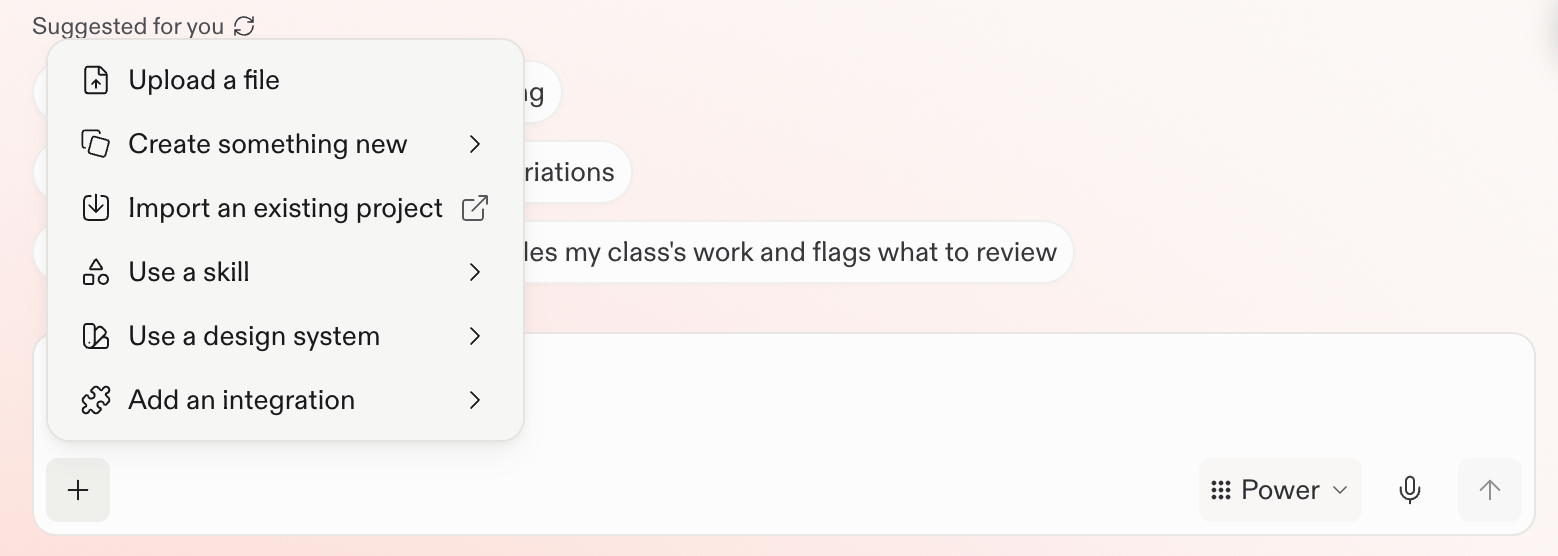
프롬프트 상자의 **plus** 메뉴를 선택하여 파일을 업로드하거나, 기존 작업을 가져오거나, Skill이나 디자인 시스템을 사용하거나, 통합을 추가하세요.

<Frame>
  <img src="https://mintcdn.com/replit/teDUL4A-lNO7dv1O/images/chat/prompt-box-plus-menu.png?fit=max&auto=format&n=teDUL4A-lNO7dv1O&q=85&s=7fd877ec8f84f73ec684181b9ec4f7b3" alt="Upload a file, Create something new, Import an existing project, Use a skill, Use a design system, Add an integration이 있는 프롬프트 상자의 plus 메뉴" width="1558" height="556" data-path="images/chat/prompt-box-plus-menu.png" />
</Frame>

## 작업에 맞는 컨텍스트 선택

파일, 스크린샷과 이미지, 웹 소스와 리서치, 연결된 도구를 추가할 수 있습니다. 현재 작업에 도움이 되는 소스를 선택하세요:

* **[파일, 스크린샷, 이미지](/ko/chat/upload-and-use-files):** 유용한 증거나 요구 사항이 담긴 문서, 스프레드시트, 내보내기 파일, 스크린샷, 시각적 참고 자료를 추가하세요.
* **[웹 소스와 리서치](/ko/features/agent/web-search):** 최신 정보나 외부 관점이 결과를 향상시킬 수 있는 경우 Replit에 웹 검색을 요청하세요.
* **[통합](/ko/chat/integrate-your-tools):** 필요한 도구를 연결한 다음, Replit이 고려해야 할 서비스, 채널, 레코드, 기타 정보를 지정하세요.
* **[디자인 컨텍스트](/ko/chat/work-with-figma):** 레이아웃, 계층 구조, 비주얼 방향이 중요한 경우 Figma 프레임을 첨부하세요.
* **[기존 작업](/ko/chat/import-a-project):** 코드, 디자인, 또는 다른 곳에서 만든 작업을 이어서 빌드하고 싶을 때 Project를 가져오세요. Project를 가져오는 것은 파일을 증거로 첨부하는 것과 다릅니다.

요청에 관련 링크를 붙여넣거나 Replit에 웹 검색을 요청할 수도 있습니다.

## 컨텍스트 소스 선택

<section className="chat-mkt chat-workflow-grid has-visuals">
  <a className="chat-example has-visual" href="/ko/chat/upload-and-use-files">
    <FilesCardVisual />

    <span>
      <Icon icon="file-arrow-up" size={19} />
    </span>

    <div className="chat-card-title">파일 업로드 및 사용</div>
    <p>업로드한 파일에 대해 질문하거나 증거로 사용하세요.</p>
    <div className="chat-card-link">살펴보기 →</div>
  </a>

  <a className="chat-example has-visual" href="/ko/chat/work-with-figma">
    <FigmaCardVisual />

    <span>
      <Icon icon="figma" size={19} />
    </span>

    <div className="chat-card-title">Figma로 작업하기</div>
    <p>비주얼 방향이 중요한 경우 특정 프레임을 사용하세요.</p>
    <div className="chat-card-link">살펴보기 →</div>
  </a>

  <a className="chat-example has-visual" href="/ko/chat/integrate-your-tools">
    <IntegrationsCardVisual />

    <span>
      <Icon icon="plug" size={19} />
    </span>

    <div className="chat-card-title">도구 통합하기</div>
    <p>관련 정보를 담고 있거나 작업을 지원하는 서비스를 연결하세요.</p>
    <div className="chat-card-link">살펴보기 →</div>
  </a>

  <a className="chat-example has-visual" href="/ko/chat/import-a-project">
    <ImportProjectCardVisual />

    <span>
      <Icon icon="file-import" size={19} />
    </span>

    <div className="chat-card-title">기존 Project 가져오기</div>

    <p>
      기존 코드, 디자인, 또는 다른 프로젝트 작업을 이어서 빌드하세요.
    </p>

    <div className="chat-card-link">살펴보기 →</div>
  </a>
</section>

최신 공개 정보가 필요하다면 [Web Search 가이드](/ko/features/agent/web-search)를 따르세요. [MCP](/ko/chat/connect-through-mcp)는 호환되는 도구와 클라이언트를 위한 별도의 확장 경로입니다.
