> ## Documentation Index
> Fetch the complete documentation index at: https://docs.replit.com/llms.txt
> Use this file to discover all available pages before exploring further.
# iOS 네이티브 컴포넌트 사용하기
> PixelGames에서 알림, 액션 시트, SF Symbols 등 네이티브 iOS 컴포넌트를 사용해보세요.
export const AiPrompt = ({children}) => {
return
{children}
;
};
export const nativeAlertPrompt = `When a player tries to quit mid-game, show a native alert asking "Quit game? Your progress will be lost." with Cancel and Quit options.`;
export const nativeActionSheetPrompt = "When a player taps to change their profile photo, show the native action sheet with Camera and Photo Library options, not a custom modal.";
export const nativeSwitchesPrompt = "Add a Settings screen with native switches for sound effects and haptics.";
export const sfSymbolsPrompt = "Use SF Symbols for the settings and leaderboard icons on iOS.";
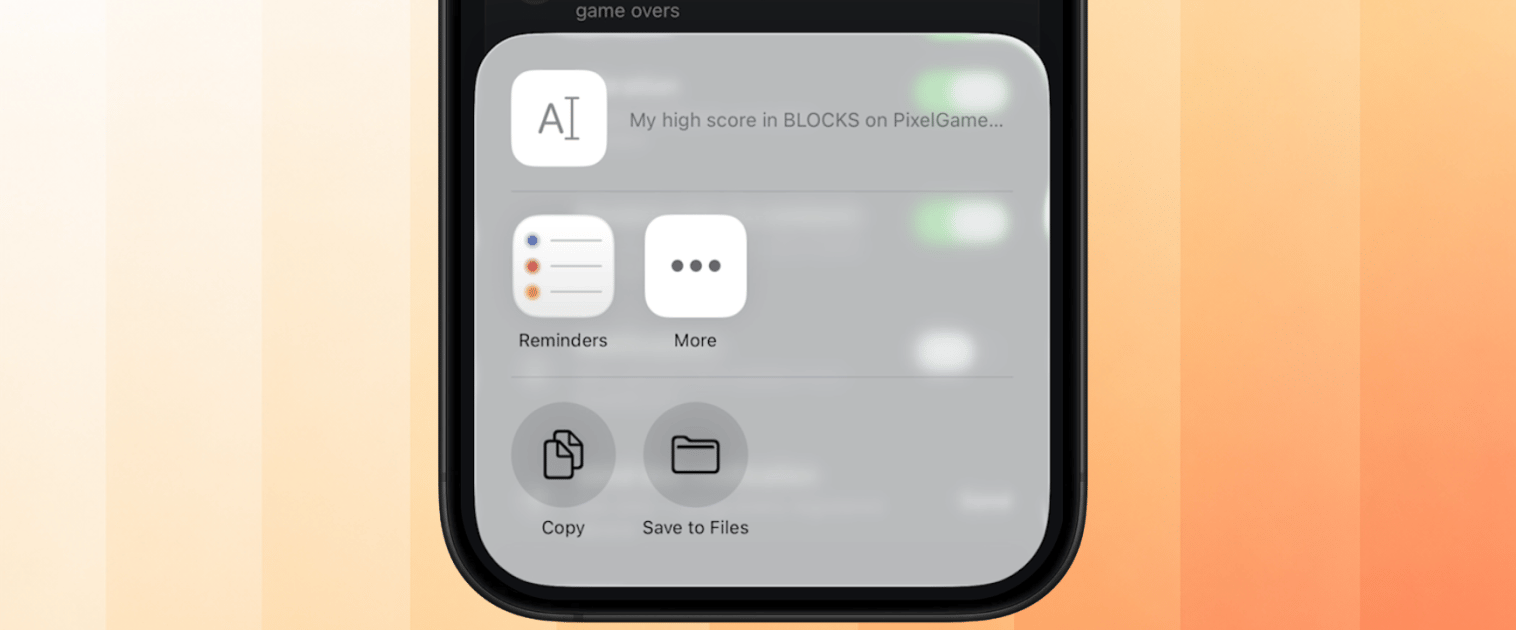
export const nativeShareSheetPrompt = "Let players share their high score using the native share sheet.";
## 이것이 중요한 이유
모든 iPhone에는 이미 알림, 공유 시트, 스위치, 메뉴가 내장되어 있으며, 플레이어는 자신이 가진
다른 모든 앱에서 이를 사용합니다. 앱이 동일한 네이티브 컴포넌트를 사용하면 플레이어는 탭하기
전부터 그 동작 방식을 이미 알고 있습니다. 그것이 실제 iPhone 앱처럼 느껴지게 만드는 이유입니다.
아래는 앱에 추가할 수 있는 네이티브 컴포넌트의 예시 프롬프트입니다: 알림, 액션 시트, 스위치
등입니다.
## 네이티브 알림
{nativeAlertPrompt}
이는 실제 `UIAlertController` 알림을 렌더링합니다. iOS 자체가 사용하는 팝업과 동일한 스타일입니다.
확인해야 할 명확한 결정이 하나 있을 때 알림을 사용하세요.
 ## 네이티브 액션 시트
{nativeActionSheetPrompt}
액션 시트는 알림의 형제 격으로, 단일 예/아니오 결정이 아니라 선택할 수 있는 몇 가지 명확한
옵션이 있을 때 사용합니다. Android에는 자체 네이티브 대응 요소가 있으며, Agent가
플랫폼별로 알맞은 것을 자동으로 선택합니다.
## 네이티브 액션 시트
{nativeActionSheetPrompt}
액션 시트는 알림의 형제 격으로, 단일 예/아니오 결정이 아니라 선택할 수 있는 몇 가지 명확한
옵션이 있을 때 사용합니다. Android에는 자체 네이티브 대응 요소가 있으며, Agent가
플랫폼별로 알맞은 것을 자동으로 선택합니다.
 ## 네이티브 스위치
{nativeSwitchesPrompt}
iOS Settings 앱 전체에서 사용되는 것과 동일한 켜기/끄기 스위치로, 즉시 알아볼 수 있어
플레이어가 커스텀 토글 디자인을 파악할 필요가 없습니다.
## 네이티브 스위치
{nativeSwitchesPrompt}
iOS Settings 앱 전체에서 사용되는 것과 동일한 켜기/끄기 스위치로, 즉시 알아볼 수 있어
플레이어가 커스텀 토글 디자인을 파악할 필요가 없습니다.
 ## SF Symbols
{sfSymbolsPrompt}
SF Symbols는 Apple의 내장 아이콘 세트입니다. 심볼은 주변 텍스트의 크기, 굵기, 다크 모드에
자동으로 맞춰집니다. 커스텀 아이콘 세트라면 수동으로 구현해야 하는 부분입니다.
## SF Symbols
{sfSymbolsPrompt}
SF Symbols는 Apple의 내장 아이콘 세트입니다. 심볼은 주변 텍스트의 크기, 굵기, 다크 모드에
자동으로 맞춰집니다. 커스텀 아이콘 세트라면 수동으로 구현해야 하는 부분입니다.
 SF Symbols는 iOS 전용입니다. Android용으로는 Agent에게 어울리는 아이콘 세트를 선택하도록
요청하세요. 플랫폼 간에 아이콘이 픽셀 단위로 동일하지는 않으며, 이는 예상된 동작입니다.
## 네이티브 공유 시트
{nativeShareSheetPrompt}
Photos나 Safari와 동일한 시스템 공유 시트를 열어, 플레이어가 이미 설치한 앱들을 나열합니다.
SF Symbols는 iOS 전용입니다. Android용으로는 Agent에게 어울리는 아이콘 세트를 선택하도록
요청하세요. 플랫폼 간에 아이콘이 픽셀 단위로 동일하지는 않으며, 이는 예상된 동작입니다.
## 네이티브 공유 시트
{nativeShareSheetPrompt}
Photos나 Safari와 동일한 시스템 공유 시트를 열어, 플레이어가 이미 설치한 앱들을 나열합니다.
 ## 문제 해결
* **알림이나 액션 시트 대신 커스텀 모달이 표시됨:** Agent가 JS로 렌더링된 유사한 모습이 아니라
네이티브 API를 사용했는지 확인하세요. 겉모습은 비슷해도 동작은 다를 수 있습니다.
* **Android에서 아이콘이 이상하게 보임:** SF Symbols에 한해서는 예상된 동작입니다. iOS
전용이기 때문입니다. Agent에게 어떤 대체 아이콘 세트를 사용했는지 확인하세요.
* **공유 시트에 예상한 앱이 포함되지 않음:** 이는 OS와 테스트 기기에 설치된 앱에 의해
제어되며, PixelGames가 직접 추가할 수 있는 것이 아닙니다.
## 다음 단계
공유 시트를 초대 링크와 결합해보세요.
네이티브 컴포넌트가 기기에서 올바르게 렌더링되는지 확인해보세요.
## 관련 항목
* [햅틱 추가하기](/ko/build/mobile-haptics)
## 문제 해결
* **알림이나 액션 시트 대신 커스텀 모달이 표시됨:** Agent가 JS로 렌더링된 유사한 모습이 아니라
네이티브 API를 사용했는지 확인하세요. 겉모습은 비슷해도 동작은 다를 수 있습니다.
* **Android에서 아이콘이 이상하게 보임:** SF Symbols에 한해서는 예상된 동작입니다. iOS
전용이기 때문입니다. Agent에게 어떤 대체 아이콘 세트를 사용했는지 확인하세요.
* **공유 시트에 예상한 앱이 포함되지 않음:** 이는 OS와 테스트 기기에 설치된 앱에 의해
제어되며, PixelGames가 직접 추가할 수 있는 것이 아닙니다.
## 다음 단계
공유 시트를 초대 링크와 결합해보세요.
네이티브 컴포넌트가 기기에서 올바르게 렌더링되는지 확인해보세요.
## 관련 항목
* [햅틱 추가하기](/ko/build/mobile-haptics)