> ## Documentation Index
> Fetch the complete documentation index at: https://docs.replit.com/llms.txt
> Use this file to discover all available pages before exploring further.
# 팀과 함께 PixelGames 만들기
> 팀원을 초대해 각자의 Agent 작업으로 PixelGames를 동시에 만드세요.
PixelGames는 혼자 만들 필요가 없습니다. 팀원을 초대하면 각자 자신의 Agent 작업을 동시에
실행할 수 있고, 모든 작업이 공유 보드에서 추적되어 중복 작업이 생기지 않습니다.
## 팀원 초대하기
PixelGames 앱에서 **Invite**를 열고 링크를 공유하거나 이메일로 사람을 추가하세요.
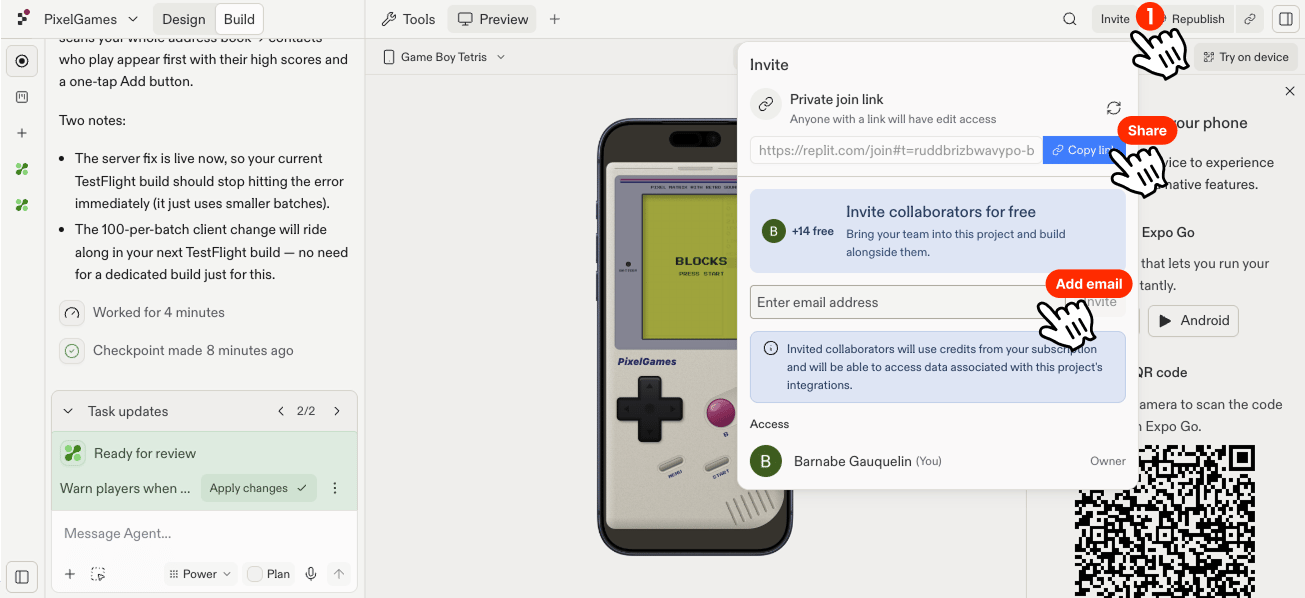 참여하고 나면 다른 사람이 끝나기를 기다릴 필요 없이 바로 자신의 Agent 대화를 열 수
있습니다.
## 보드에서 작업 추적하기
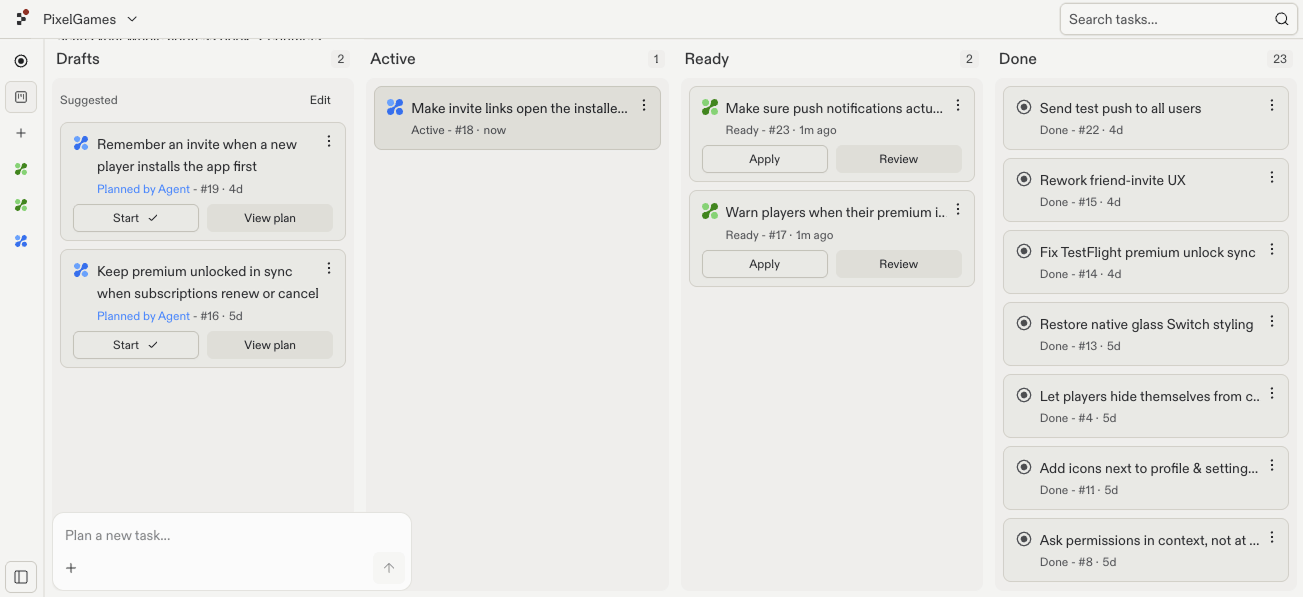
각 Agent 작업은 네 단계를 거칩니다. **Draft**(검토할 계획이 준비됨), **Active**(Agent가
만드는 중), **Ready**(완료되어 적용을 기다림), **Done**(PixelGames에 병합됨)입니다.
예를 들어 한 팀원이 Snake를 만드는 동안 다른 팀원이 결제를 추가할 수 있습니다. 두 작업은
보드에서 각각 독립적으로 이동하므로 누가 무엇을 하고 있는지 분명히 알 수 있습니다.
참여하고 나면 다른 사람이 끝나기를 기다릴 필요 없이 바로 자신의 Agent 대화를 열 수
있습니다.
## 보드에서 작업 추적하기
각 Agent 작업은 네 단계를 거칩니다. **Draft**(검토할 계획이 준비됨), **Active**(Agent가
만드는 중), **Ready**(완료되어 적용을 기다림), **Done**(PixelGames에 병합됨)입니다.
예를 들어 한 팀원이 Snake를 만드는 동안 다른 팀원이 결제를 추가할 수 있습니다. 두 작업은
보드에서 각각 독립적으로 이동하므로 누가 무엇을 하고 있는지 분명히 알 수 있습니다.
 Agent는 각 작업을 PixelGames의 독립된 복사본에서 만들기 때문에, 두 사람이 동시에 작업해도
서로의 변경 사항을 덮어쓰지 않습니다. 충돌은 작업을 실제로 되돌려 적용할 때만 발생하며,
이미 적용된 다른 작업과 같은 코드를 건드린 경우에만 생깁니다.
## 다음 단계
PixelGames의 모습을 화면별로 다듬어 보세요.
팀이 만든 빌드를 실제 기기에서 사용해 보세요.
## 관련 문서
* [첫 모바일 앱 시작하기](/ko/build/mobile-first-app)
Agent는 각 작업을 PixelGames의 독립된 복사본에서 만들기 때문에, 두 사람이 동시에 작업해도
서로의 변경 사항을 덮어쓰지 않습니다. 충돌은 작업을 실제로 되돌려 적용할 때만 발생하며,
이미 적용된 다른 작업과 같은 코드를 건드린 경우에만 생깁니다.
## 다음 단계
PixelGames의 모습을 화면별로 다듬어 보세요.
팀이 만든 빌드를 실제 기기에서 사용해 보세요.
## 관련 문서
* [첫 모바일 앱 시작하기](/ko/build/mobile-first-app)