> ## Documentation Index
> Fetch the complete documentation index at: https://docs.replit.com/llms.txt
> Use this file to discover all available pages before exploring further.
# replit.md
> replit.mdを使用してAgentの動作、コーディングスタイル、プロジェクトコンテキストをカスタマイズする方法を学びましょう。
export const YouTubeEmbed = ({videoId, title = "YouTube video", startAt}) => {
if (!videoId) {
return null;
}
let url = "https://www.youtube.com/embed/" + videoId;
if (startAt) {
url = url + "?start=" + startAt;
}
return
;
};
Agentはベストプラクティスに基づいて、プロジェクトのルートディレクトリにこのファイルを自動的に作成します。Agentはその内容をコンテキストに含め、ユーザーの好み、プロジェクト構造、コーディングスタイルを理解するのに役立てます。
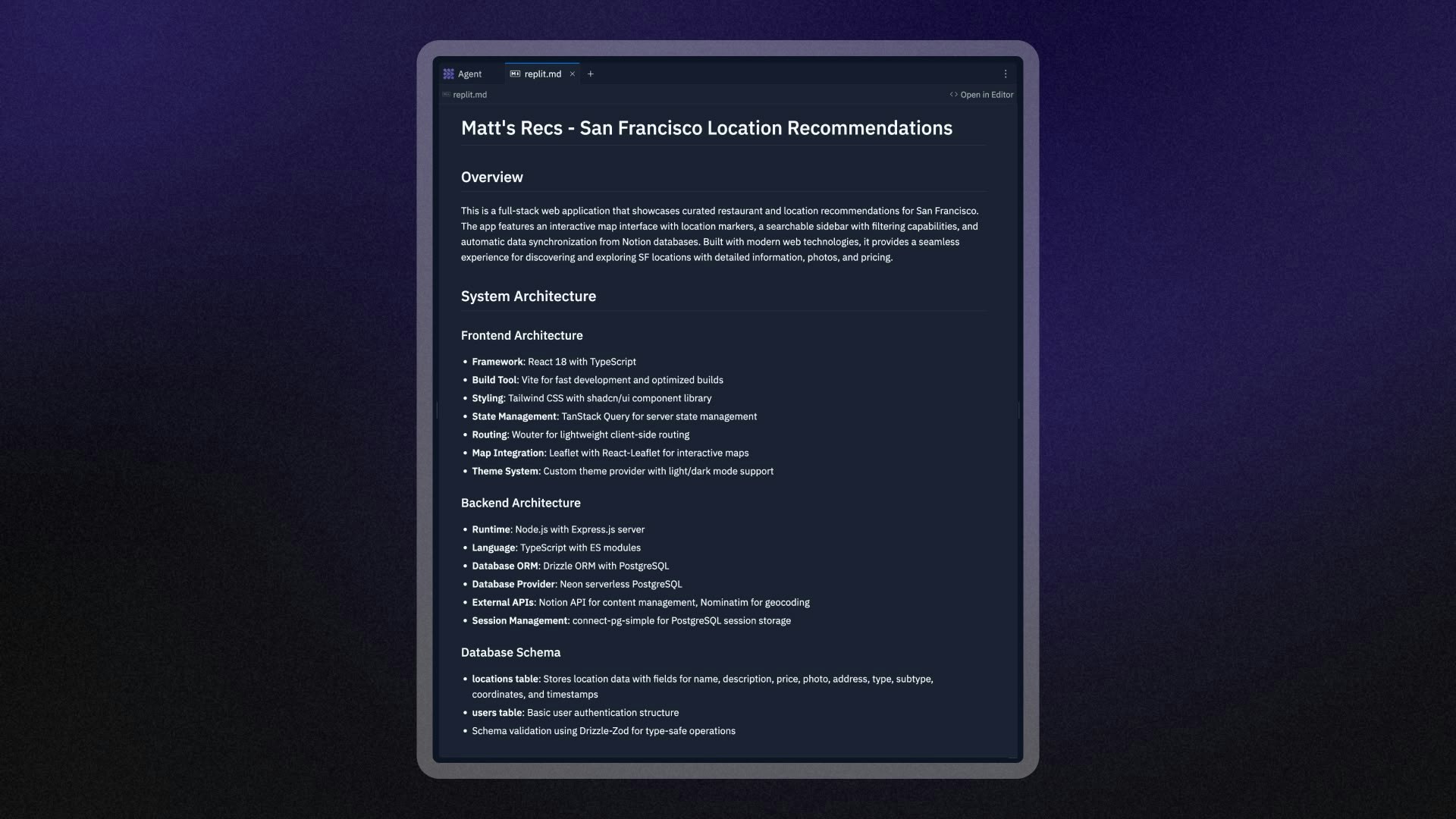 ## `replit.md`の仕組み
Agentはまず、ベストプラクティスに基づいてプロジェクトのルートディレクトリに`replit.md`ファイルを作成します。このファイルには以下が含まれます:
* 基本的なプロジェクト情報
* 推奨するコーディングパターン
* プロジェクトタイプに合わせた一般的な設定
Agentはリクエストを処理する際に`replit.md`ファイルを自動的に読み取り、その内容を以下の目的で使用します:
* プロジェクトのアーキテクチャと規約の理解
* 好みのコーディングパターンとスタイルに従う
* 指定したパッケージマネージャーと依存関係の使用
Agentはプロジェクトについてより多くを学び、アプリケーションに変更を加えると、`replit.md`ファイルを更新することもあります。
`replit.md`ファイルを編集してAgentの動作をカスタマイズできます。
## `replit.md`のセットアップ
### 自動生成
Agentで新しいプロジェクトを作成すると、ベストプラクティスに基づいて`replit.md`ファイルが自動的に生成されます。このファイルはプロジェクトのルートディレクトリに表示され、以下が含まれます:
* 基本的なプロジェクト情報
* 推奨するコーディングパターン
* プロジェクトタイプに合わせた一般的な設定
### 手動作成
プロジェクトのルートディレクトリに`replit.md`という名前の新しいファイルを追加することで、独自の`replit.md`ファイルを作成できます。Agentは将来の会話でこのファイルを自動的に検出して使用します。
`replit.md`は正しく機能するために、プロジェクトのルートディレクトリに配置する必要があります。
### `replit.md`の再生成
`replit.md`ファイルが壊れた場合や最初からやり直したい場合:
1. プロジェクトのルートから既存の`replit.md`ファイルを削除します
2. Agentとの新しい会話を開始します
3. Agentが現在のプロジェクトに基づいて新しい`replit.md`ファイルを自動的に生成します
## ベストプラクティス
### 具体的かつ明確に記述する
Agentが何を望んでいるかを正確に理解できるよう、明確で具体的な指示を記述してください:
```markdown theme={null}
## Coding Style
- Use TypeScript for all new JavaScript files
- Prefer functional components with hooks over class components
- Use Tailwind CSS for styling, avoid inline styles
- Always include TypeScript types for function parameters and return values
```
プロンプトの形式についての詳細なガイドは、[Anthropicプロンプトエンジニアリングガイド](https://docs.anthropic.com/en/docs/build-with-claude/prompt-engineering/use-xml-tags)をご覧ください。
### 例を使用する
例を使うと、抽象的な説明よりもAgentが好みをより理解できます:
````markdown theme={null}
## API Error Handling
When creating API endpoints, always use this error handling pattern:
```javascript
app.get('/api/users', async (req, res) => {
try {
const users = await getUsersFromDatabase();
res.json({ success: true, data: users });
} catch (error) {
console.error('Error fetching users:', error);
res.status(500).json({
success: false,
error: 'Failed to fetch users'
});
}
});
````
### コミュニケーションの好みを定義する
Agentに情報やアップデートをどのように受け取りたいかを伝えてください:
```markdown theme={null}
## Communication Style
- Before implementing changes, explain what you're going to do and why
- Break down complex tasks into clear steps
- Ask for clarification if requirements are unclear
- Provide brief explanations for technical decisions
```
### プロジェクトのコンテキストを指定する
Agentがプロジェクトの目的と制約を理解できるよう助けてください:
```markdown theme={null}
## Project Context
This is a social media app for book lovers where users can:
- Create reading lists and share book recommendations
- Follow other readers and see their updates
- Rate and review books they've read
Target audience: Casual readers aged 25-45
Tech stack: React frontend, Node.js backend, PostgreSQL database
```
## `replit.md`設定の例
### ウェブアプリケーションプロジェクト
```markdown theme={null}
# MyApp Project Guidelines
## Project Overview
A task management web application built with React and Express.js.
## Technology Preferences
- Frontend: React with TypeScript, Tailwind CSS
- Backend: Express.js with TypeScript
- Database: Neon PostgreSQL with Drizzle ORM
- Package Manager: npm (not yarn or pnpm)
## Coding Standards
- Use functional components with hooks
- Implement proper error boundaries
- Follow REST API conventions for endpoints
- Use descriptive variable and function names
## Communication Style
- Explain your approach before making changes
- Provide code comments for complex logic
- Ask questions if requirements are ambiguous
```
### データ分析プロジェクト
```markdown theme={null}
# Data Analysis Project Guidelines
## Project Context
Analyzing customer behavior data to identify trends and insights.
## Technology Preferences
- Python with Streamlit for interactive web applications
- pandas, numpy, and matplotlib for data analysis
## Analysis Standards
- Include clear documentation for all analysis steps
- Create interactive visualizations with Streamlit components
- Validate data quality before analysis
- Export results to CSV format and display in Streamlit tables
## Communication Style
- Explain statistical methods and assumptions
- Provide context for findings and recommendations
- Use clear, non-technical language for business insights
- Create interactive dashboards for stakeholder presentations
```
### API開発プロジェクト
```markdown theme={null}
# API Development Guidelines
## Project Overview
Building a RESTful API for a mobile app backend.
## Technology Stack
- Node.js with Express.js
- MongoDB with Mongoose
- JWT for authentication
- Package manager: npm
## API Standards
- Use semantic HTTP status codes
- Implement proper input validation
- Include rate limiting on public endpoints
- Follow OpenAPI specification for documentation
## Security Requirements
- Validate all user inputs
- Use environment variables for sensitive data
- Implement proper CORS policies
- Include request logging for debugging
## Testing Approach
- Write unit tests for all endpoints
- Include integration tests for critical flows
- Use Jest as the testing framework
```
## 高度な使用法
### 動的なプロジェクトガイダンス
プロジェクトの進化に合わせて`replit.md`ファイルを更新し、最新のコンテキストを提供してください:
```markdown theme={null}
## Current Development Phase
The team is currently focused on implementing user authentication.
Priority features:
1. User registration and login
2. Password reset functionality
3. Email verification
## Recent Decisions
- Switched from local authentication to OAuth with Google
- Added Redux for state management
- Decided to use Material-UI for consistent styling
```
### 外部ツールとの統合
`replit.md`で外部ドキュメントやツールを参照してください:
```markdown theme={null}
## External Resources
- Design system: Follow the Figma design system at [link]
- API documentation: Reference our internal API docs
- Coding standards: Follow the team style guide in our wiki
## Deployment Process
- Test changes in development environment first
- Use the CI/CD pipeline for staging published apps
- Require code review before production releases
```
## ウェブ検索と`replit.md`の組み合わせ
Agentは現在の情報、ライブラリ、解決策を見つけるためにウェブ検索を実行できます。`replit.md`ファイルと組み合わせることで、最新の知識とプロジェクト固有のガイダンスの両方を得られます。
### ウェブ検索統合のベストプラクティス
**Agentに調査してほしい内容を具体的に指定してください:**
```markdown theme={null}
## Research Preferences
- Always check for the latest versions of dependencies before suggesting updates
- Research current best practices for security implementations
- Look up recent performance optimization techniques for our tech stack
```
**外部の知識をどのように適用するかAgentを導いてください:**
```markdown theme={null}
## External Research Guidelines
- When suggesting new libraries, ensure compatibility with our existing stack
- Adapt external examples to match our coding standards and project structure
- Verify that suggested solutions work with our publishing environment
```
**両方を活用するリクエストの例:**
「最新のReact 18パフォーマンス最適化テクニックを調査し、`replit.md`で定義されたコンポーネントパターンに従って実装してください」
このアプローチにより、最新かつ特定のプロジェクトニーズに合わせたソリューションが得られます。
## 制限事項
### ファイルサイズとコンテンツの制限
`replit.md`に厳格な文字数制限はありませんが、非常に大きなファイルは完全に処理されない場合があります。最良の結果を得るために`replit.md`は焦点を絞り、簡潔に保ってください。
### ルートディレクトリの要件
`replit.md`はプロジェクトのルートディレクトリに存在する必要があります。Agentはサブディレクトリにあるファイルを自動的に検出しません。
### コンテキストのスコープ
`replit.md`はAgent会話のコンテキストを提供しますが、他のAIツールには自動的に適用されません。
## 次のステップ
Agentをプロジェクトにカスタマイズする準備ができましたか?
1. **シンプルに始める**:主要な好みを含む基本的な`replit.md`を作成します
2. **反復して改善する**:Agentと作業しながら`replit.md`を更新します
3. **パターンを共有する**:成功した`replit.md`設定を同様のプロジェクトで活用します
4. **効果を監視する**:Agentがガイドラインにどれだけうまくしたがっているか注意して、必要に応じて調整します
[Agentの使い方](/references/agent/overview)について詳しく学ぶか、他の[AIツール](/build/welcome)を探索してください。
**Enterprise**:[カスタムテンプレート](/teams/custom-templates)に`replit.md`を事前設定して、組織のすべてのビルダーに一貫した開始コンテキストを提供します。デザイン固有のガイダンスについては、[デザインシステムの設定](/teams/custom-design-system)をご覧ください。
## `replit.md`の仕組み
Agentはまず、ベストプラクティスに基づいてプロジェクトのルートディレクトリに`replit.md`ファイルを作成します。このファイルには以下が含まれます:
* 基本的なプロジェクト情報
* 推奨するコーディングパターン
* プロジェクトタイプに合わせた一般的な設定
Agentはリクエストを処理する際に`replit.md`ファイルを自動的に読み取り、その内容を以下の目的で使用します:
* プロジェクトのアーキテクチャと規約の理解
* 好みのコーディングパターンとスタイルに従う
* 指定したパッケージマネージャーと依存関係の使用
Agentはプロジェクトについてより多くを学び、アプリケーションに変更を加えると、`replit.md`ファイルを更新することもあります。
`replit.md`ファイルを編集してAgentの動作をカスタマイズできます。
## `replit.md`のセットアップ
### 自動生成
Agentで新しいプロジェクトを作成すると、ベストプラクティスに基づいて`replit.md`ファイルが自動的に生成されます。このファイルはプロジェクトのルートディレクトリに表示され、以下が含まれます:
* 基本的なプロジェクト情報
* 推奨するコーディングパターン
* プロジェクトタイプに合わせた一般的な設定
### 手動作成
プロジェクトのルートディレクトリに`replit.md`という名前の新しいファイルを追加することで、独自の`replit.md`ファイルを作成できます。Agentは将来の会話でこのファイルを自動的に検出して使用します。
`replit.md`は正しく機能するために、プロジェクトのルートディレクトリに配置する必要があります。
### `replit.md`の再生成
`replit.md`ファイルが壊れた場合や最初からやり直したい場合:
1. プロジェクトのルートから既存の`replit.md`ファイルを削除します
2. Agentとの新しい会話を開始します
3. Agentが現在のプロジェクトに基づいて新しい`replit.md`ファイルを自動的に生成します
## ベストプラクティス
### 具体的かつ明確に記述する
Agentが何を望んでいるかを正確に理解できるよう、明確で具体的な指示を記述してください:
```markdown theme={null}
## Coding Style
- Use TypeScript for all new JavaScript files
- Prefer functional components with hooks over class components
- Use Tailwind CSS for styling, avoid inline styles
- Always include TypeScript types for function parameters and return values
```
プロンプトの形式についての詳細なガイドは、[Anthropicプロンプトエンジニアリングガイド](https://docs.anthropic.com/en/docs/build-with-claude/prompt-engineering/use-xml-tags)をご覧ください。
### 例を使用する
例を使うと、抽象的な説明よりもAgentが好みをより理解できます:
````markdown theme={null}
## API Error Handling
When creating API endpoints, always use this error handling pattern:
```javascript
app.get('/api/users', async (req, res) => {
try {
const users = await getUsersFromDatabase();
res.json({ success: true, data: users });
} catch (error) {
console.error('Error fetching users:', error);
res.status(500).json({
success: false,
error: 'Failed to fetch users'
});
}
});
````
### コミュニケーションの好みを定義する
Agentに情報やアップデートをどのように受け取りたいかを伝えてください:
```markdown theme={null}
## Communication Style
- Before implementing changes, explain what you're going to do and why
- Break down complex tasks into clear steps
- Ask for clarification if requirements are unclear
- Provide brief explanations for technical decisions
```
### プロジェクトのコンテキストを指定する
Agentがプロジェクトの目的と制約を理解できるよう助けてください:
```markdown theme={null}
## Project Context
This is a social media app for book lovers where users can:
- Create reading lists and share book recommendations
- Follow other readers and see their updates
- Rate and review books they've read
Target audience: Casual readers aged 25-45
Tech stack: React frontend, Node.js backend, PostgreSQL database
```
## `replit.md`設定の例
### ウェブアプリケーションプロジェクト
```markdown theme={null}
# MyApp Project Guidelines
## Project Overview
A task management web application built with React and Express.js.
## Technology Preferences
- Frontend: React with TypeScript, Tailwind CSS
- Backend: Express.js with TypeScript
- Database: Neon PostgreSQL with Drizzle ORM
- Package Manager: npm (not yarn or pnpm)
## Coding Standards
- Use functional components with hooks
- Implement proper error boundaries
- Follow REST API conventions for endpoints
- Use descriptive variable and function names
## Communication Style
- Explain your approach before making changes
- Provide code comments for complex logic
- Ask questions if requirements are ambiguous
```
### データ分析プロジェクト
```markdown theme={null}
# Data Analysis Project Guidelines
## Project Context
Analyzing customer behavior data to identify trends and insights.
## Technology Preferences
- Python with Streamlit for interactive web applications
- pandas, numpy, and matplotlib for data analysis
## Analysis Standards
- Include clear documentation for all analysis steps
- Create interactive visualizations with Streamlit components
- Validate data quality before analysis
- Export results to CSV format and display in Streamlit tables
## Communication Style
- Explain statistical methods and assumptions
- Provide context for findings and recommendations
- Use clear, non-technical language for business insights
- Create interactive dashboards for stakeholder presentations
```
### API開発プロジェクト
```markdown theme={null}
# API Development Guidelines
## Project Overview
Building a RESTful API for a mobile app backend.
## Technology Stack
- Node.js with Express.js
- MongoDB with Mongoose
- JWT for authentication
- Package manager: npm
## API Standards
- Use semantic HTTP status codes
- Implement proper input validation
- Include rate limiting on public endpoints
- Follow OpenAPI specification for documentation
## Security Requirements
- Validate all user inputs
- Use environment variables for sensitive data
- Implement proper CORS policies
- Include request logging for debugging
## Testing Approach
- Write unit tests for all endpoints
- Include integration tests for critical flows
- Use Jest as the testing framework
```
## 高度な使用法
### 動的なプロジェクトガイダンス
プロジェクトの進化に合わせて`replit.md`ファイルを更新し、最新のコンテキストを提供してください:
```markdown theme={null}
## Current Development Phase
The team is currently focused on implementing user authentication.
Priority features:
1. User registration and login
2. Password reset functionality
3. Email verification
## Recent Decisions
- Switched from local authentication to OAuth with Google
- Added Redux for state management
- Decided to use Material-UI for consistent styling
```
### 外部ツールとの統合
`replit.md`で外部ドキュメントやツールを参照してください:
```markdown theme={null}
## External Resources
- Design system: Follow the Figma design system at [link]
- API documentation: Reference our internal API docs
- Coding standards: Follow the team style guide in our wiki
## Deployment Process
- Test changes in development environment first
- Use the CI/CD pipeline for staging published apps
- Require code review before production releases
```
## ウェブ検索と`replit.md`の組み合わせ
Agentは現在の情報、ライブラリ、解決策を見つけるためにウェブ検索を実行できます。`replit.md`ファイルと組み合わせることで、最新の知識とプロジェクト固有のガイダンスの両方を得られます。
### ウェブ検索統合のベストプラクティス
**Agentに調査してほしい内容を具体的に指定してください:**
```markdown theme={null}
## Research Preferences
- Always check for the latest versions of dependencies before suggesting updates
- Research current best practices for security implementations
- Look up recent performance optimization techniques for our tech stack
```
**外部の知識をどのように適用するかAgentを導いてください:**
```markdown theme={null}
## External Research Guidelines
- When suggesting new libraries, ensure compatibility with our existing stack
- Adapt external examples to match our coding standards and project structure
- Verify that suggested solutions work with our publishing environment
```
**両方を活用するリクエストの例:**
「最新のReact 18パフォーマンス最適化テクニックを調査し、`replit.md`で定義されたコンポーネントパターンに従って実装してください」
このアプローチにより、最新かつ特定のプロジェクトニーズに合わせたソリューションが得られます。
## 制限事項
### ファイルサイズとコンテンツの制限
`replit.md`に厳格な文字数制限はありませんが、非常に大きなファイルは完全に処理されない場合があります。最良の結果を得るために`replit.md`は焦点を絞り、簡潔に保ってください。
### ルートディレクトリの要件
`replit.md`はプロジェクトのルートディレクトリに存在する必要があります。Agentはサブディレクトリにあるファイルを自動的に検出しません。
### コンテキストのスコープ
`replit.md`はAgent会話のコンテキストを提供しますが、他のAIツールには自動的に適用されません。
## 次のステップ
Agentをプロジェクトにカスタマイズする準備ができましたか?
1. **シンプルに始める**:主要な好みを含む基本的な`replit.md`を作成します
2. **反復して改善する**:Agentと作業しながら`replit.md`を更新します
3. **パターンを共有する**:成功した`replit.md`設定を同様のプロジェクトで活用します
4. **効果を監視する**:Agentがガイドラインにどれだけうまくしたがっているか注意して、必要に応じて調整します
[Agentの使い方](/references/agent/overview)について詳しく学ぶか、他の[AIツール](/build/welcome)を探索してください。
**Enterprise**:[カスタムテンプレート](/teams/custom-templates)に`replit.md`を事前設定して、組織のすべてのビルダーに一貫した開始コンテキストを提供します。デザイン固有のガイダンスについては、[デザインシステムの設定](/teams/custom-design-system)をご覧ください。