> ## Documentation Index
> Fetch the complete documentation index at: https://docs.replit.com/llms.txt
> Use this file to discover all available pages before exploring further.

# はじめる

> 初期のアイデアから公開されたオープニングサイトまで、Replitでコーヒーショップの立ち上げを追っていきます。

export const GetStartedCover = () => <div className="chat-mkt" role="img" aria-label="A Replit journey from research and ideas to a plan and a finished result" style={{
  margin: "28px 0 42px",
  borderTop: 0,
  paddingTop: 0
}}>
    <div className="chat-use-case-visual" style={{
  aspectRatio: "auto",
  minHeight: "clamp(220px, 34vw, 320px)",
  overflow: "hidden",
  background: "radial-gradient(circle at 50% -18%, rgba(255,255,255,.82), transparent 42%), radial-gradient(circle at 4% 96%, rgba(255,184,146,.48), transparent 38%), linear-gradient(140deg, #ff764d, #ff3c00 60%, #c92d00)"
}}>
      <div aria-hidden="true" style={{
  position: "absolute",
  inset: 0,
  background: "linear-gradient(180deg, rgba(255,255,255,.14), rgba(255,255,255,0) 48%, rgba(111,24,0,.2))"
}} />
      <div aria-hidden="true" style={{
  position: "relative",
  zIndex: 1,
  display: "flex",
  width: "100%",
  minHeight: "inherit",
  boxSizing: "border-box",
  alignItems: "center",
  justifyContent: "center",
  padding: "clamp(10px, 2vw, 20px)"
}}>
        <div style={{
  width: "clamp(270px, 72%, 760px)",
  maxWidth: "calc(100% - 20px)",
  boxSizing: "border-box",
  padding: "clamp(14px, 2.4vw, 24px)",
  border: "1px solid rgba(255,255,255,.54)",
  borderRadius: 24,
  background: "linear-gradient(180deg, rgba(255,255,255,.27), rgba(255,255,255,.1))",
  boxShadow: "0 18px 36px rgba(55,27,18,.2)",
  backdropFilter: "blur(5px)"
}}>
          <div style={{
  display: "flex",
  gap: 7
}}>
            {[".92", ".52", ".32"].map(opacity => <span key={opacity} style={{
  width: 8,
  height: 8,
  borderRadius: 999,
  background: `rgba(255,255,255,${opacity})`
}} />)}
          </div>
          <div style={{
  display: "grid",
  gridTemplateColumns: "repeat(3, minmax(0, 1fr))",
  gap: "clamp(8px, 1.8vw, 16px)",
  marginTop: "clamp(16px, 3vw, 24px)"
}}>
            {["48%", "68%", "88%"].map((height, index) => <div key={height} style={{
  display: "grid",
  alignContent: "end",
  minHeight: "clamp(88px, 14vw, 128px)",
  padding: "clamp(8px, 1.4vw, 13px)",
  border: "1px solid rgba(255,255,255,.38)",
  borderRadius: 14,
  background: "rgba(255,255,255,.1)"
}}>
                <span style={{
  display: "block",
  width: index === 2 ? "100%" : "78%",
  height,
  borderRadius: 9,
  background: index === 2 ? "rgba(255,255,255,.82)" : "rgba(255,255,255,.34)"
}} />
              </div>)}
          </div>
          <div style={{
  display: "flex",
  alignItems: "center",
  justifyContent: "space-between",
  gap: 8,
  marginTop: "clamp(12px, 2vw, 18px)",
  padding: "9px 10px",
  border: "1px solid rgba(255,255,255,.52)",
  borderRadius: 11,
  background: "rgba(255,255,255,.14)"
}}>
            <span style={{
  width: "62%",
  height: 6,
  borderRadius: 99,
  background: "rgba(255,255,255,.72)"
}} />
            <span style={{
  width: 16,
  height: 16,
  borderRadius: 6,
  background: "rgba(255,255,255,.9)"
}} />
          </div>
        </div>
      </div>
    </div>
  </div>;

<GetStartedCover />

Replitへようこそ。アイデアを本物にするための最適な場所です。

始めてプラットフォームに慣れる最良の方法は、一緒に
何かを作ることです。

## プロジェクト: コーヒーショップを開く

近所にコーヒーショップを開きたいと想像してみてください。地元の市場を調査し、
場所を選び、立ち上げ計画を組み立て、サイトを作り、それを近隣の人々と
共有する必要があります。

始める前にすべての答えを持っている必要はありません。目指すこと、思い描いている
地域、そして訪れてほしい人々から始めましょう。

## 学べること

* 地元の市場を調査し、その発見を明確な計画に変える方法
* Replitをすでに使っているツールと連携させ、より関連性の高い
  コンテキストを使えるようにする方法
* 地元の競合や市場の変化を継続的に見守る方法
* コーヒーショップを世界に見えるようにするサイトを構築して
  公開する方法

## 作れるもの

* 焦点を絞ったカフェのコンセプトと立ち上げ計画
* 選択を裏付ける調査と元資料
* 計画を最新に保つ週次のRoutine
* 人々が見つけられる公開されたオープニングサイト

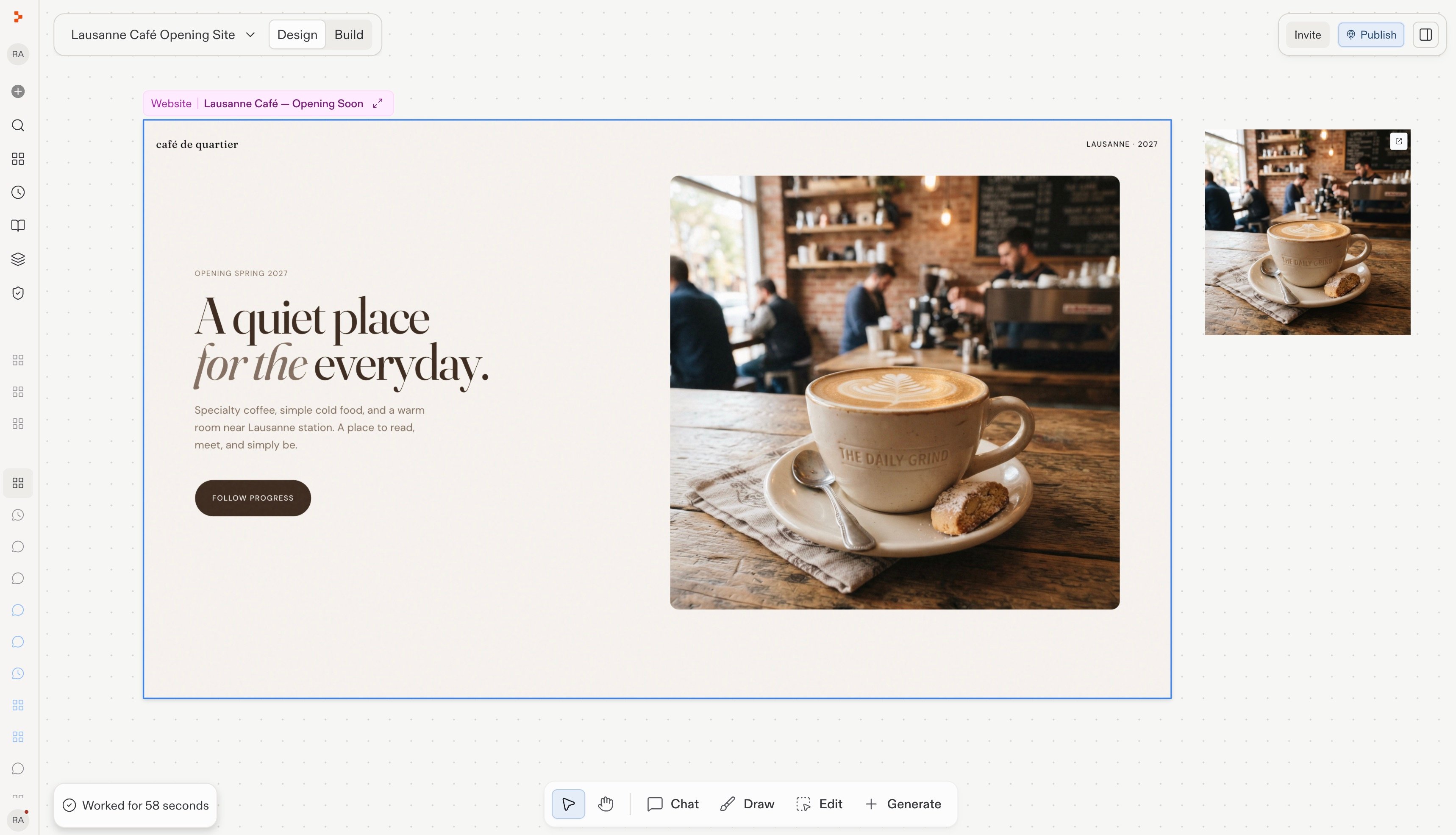
<Frame caption="あなたが作成して公開するコーヒーショップのオープニングサイト。">
  <img src="https://mintcdn.com/replit/teDUL4A-lNO7dv1O/images/coffee-shop-launch/review-updated-site-design.jpg?fit=max&auto=format&n=teDUL4A-lNO7dv1O&q=85&s=c8fe50bb80c330b66c108027baaf9db8" alt="Replit Designで表示されたコーヒーショップのオープニングサイト" width="3436" height="1970" data-path="images/coffee-shop-launch/review-updated-site-design.jpg" />
</Frame>

まず、[あなたのWorkspaceを理解する](/home/understand-your-workspace)ことから始めましょう。ここで
会話、元資料、Routine、サイトが一つにまとまります。
