> ## Documentation Index
> Fetch the complete documentation index at: https://docs.replit.com/llms.txt
> Use this file to discover all available pages before exploring further.

# チームメイトを招待する

> チームメイトをプロジェクトに招待して一緒に作る — 全員がAgentで新しいスレッドを開始しながら同じプロジェクトで作業できます。

export const KanbanColumns = ({columns = []}) => {
  if (typeof document !== "undefined" && !document.getElementById("kanban-board-styles")) {
    const style = document.createElement("style");
    style.id = "kanban-board-styles";
    style.textContent = `
      .kb-board {
        --kb-bg: var(--replit-docs-bg, #F6F6F4);
        --kb-col-bg: var(--replit-docs-bg-elevated, #F1F1EE);
        --kb-card-bg: var(--replit-docs-bg-task, #EDECE8);
        --kb-border: var(--replit-docs-border, #DEDAD5);
        --kb-text: var(--replit-docs-text, #1D1D1D);
        --kb-text-dim: var(--replit-docs-text-muted, #5C5C5C);
        --kb-text-dimmer: var(--replit-docs-text-muted, #5C5C5C);
        --kb-text-dimmest: var(--replit-docs-text-subtle, #858585);
        --kb-badge-bg: var(--replit-docs-bg-elevated, #F1F1EE);
      }
      .dark .kb-board,
      html.dark .kb-board,
      [data-theme="dark"] .kb-board {
        --kb-bg: var(--replit-docs-bg, #1E1E1F);
        --kb-col-bg: var(--replit-docs-bg-elevated, #222223);
        --kb-card-bg: var(--replit-docs-bg-task, #252527);
        --kb-border: var(--replit-docs-border, #39393D);
        --kb-text: var(--replit-docs-text, #F5F5F5);
        --kb-text-dim: var(--replit-docs-text-muted, #B8B8BE);
        --kb-text-dimmer: var(--replit-docs-text-muted, #B8B8BE);
        --kb-text-dimmest: var(--replit-docs-text-subtle, #8E8F97);
        --kb-badge-bg: var(--replit-docs-bg-elevated, #222223);
      }
      .kb-board { overflow: visible; }
    `;
    document.head.appendChild(style);
  }
  return <div className="kb-board" style={{
    fontFamily: "'IBM Plex Sans', sans-serif",
    display: "flex",
    gap: "12px",
    padding: "8px",
    background: "var(--kb-bg)",
    borderRadius: "12px"
  }}>
      {columns.map((col, ci) => <div key={ci} data-kb-column={col.title.toLowerCase()} style={{
    flex: "1 1 0",
    minWidth: "200px",
    background: "var(--kb-col-bg)",
    borderRadius: "8px",
    display: "flex",
    flexDirection: "column",
    overflow: "visible"
  }}>
          <div style={{
    display: "flex",
    alignItems: "center",
    gap: "8px",
    padding: "12px 12px 8px 12px"
  }}>
            <span style={{
    fontSize: "14px",
    fontWeight: 500,
    color: "var(--kb-text)"
  }}>
              {col.title}
            </span>
            <span data-kb-count style={{
    fontSize: "12px",
    color: "var(--kb-text-dimmer)",
    background: "var(--kb-badge-bg)",
    padding: "0 6px",
    borderRadius: "4px",
    lineHeight: "20px"
  }}>
              {col.count}
            </span>
          </div>
          <div data-kb-cards style={{
    display: "flex",
    flexDirection: "column",
    gap: "8px",
    padding: "8px",
    flex: "1 1 0"
  }}>
            {col.cards.map((card, i) => <TaskCard key={i} title={card.title} description={card.description} status={card.status} timestamp={card.timestamp} showMenu={card.showMenu} width="100%" />)}
          </div>
        </div>)}
    </div>;
};

export const TaskCard = ({title = "Product Manager next steps discussion", description = "", status = "draft", timestamp = "Created 3 minutes ago", width = "364px", showMenu = false}) => {
  if (typeof document !== "undefined" && !document.getElementById("task-card-styles")) {
    const style = document.createElement("style");
    style.id = "task-card-styles";
    style.textContent = `
      .task-card {
        --tc-bg: var(--replit-docs-bg-task, #EDECE8);
        --tc-border: var(--replit-docs-border, #DEDAD5);
        --tc-text: var(--replit-docs-text, #1D1D1D);
        --tc-text-dim: var(--replit-docs-text-muted, #5C5C5C);
        --tc-text-dimmest: var(--replit-docs-text-subtle, #858585);
        --tc-dot-active: #4A7BF7;
        --tc-dot-draft: #A6A6A6;
        --tc-dot-ready: #F59E0B;
        --tc-dot-done: #22C55E;
      }
      .dark .task-card,
      html.dark .task-card,
      [data-theme="dark"] .task-card {
        --tc-bg: var(--replit-docs-bg-task, #252527);
        --tc-border: var(--replit-docs-border, #39393D);
        --tc-text: var(--replit-docs-text, #F5F5F5);
        --tc-text-dim: var(--replit-docs-text-muted, #B8B8BE);
        --tc-text-dimmest: var(--replit-docs-text-subtle, #8E8F97);
        --tc-dot-active: #6B9EFF;
        --tc-dot-draft: #6B7280;
        --tc-dot-ready: #FBBF24;
        --tc-dot-done: #4ADE80;
      }
      @keyframes task-card-fade-in {
        from { transform: translateY(6px); opacity: 0; }
        to { transform: translateY(0); opacity: 1; }
      }
      @keyframes tc-tl {
        0%{opacity:1;fill:var(--tc-light)} 5%{opacity:1;fill:var(--tc-dark)} 10%{opacity:1;fill:var(--tc-dark)} 15%{opacity:1;fill:var(--tc-light)}
        20%{opacity:0} 25%{opacity:1;fill:var(--tc-dark)} 30%{opacity:1;fill:var(--tc-light)} 35%{opacity:0}
        40%{opacity:1;fill:var(--tc-dark)} 45%{opacity:1;fill:var(--tc-light)} 50%{opacity:0} 55%{opacity:1;fill:var(--tc-dark)}
        60%{opacity:0} 65%{opacity:1;fill:var(--tc-light)} 70%{opacity:1;fill:var(--tc-light)} 75%{opacity:1;fill:var(--tc-light)}
        80%{opacity:1;fill:var(--tc-light)} 85%{opacity:0} 90%{opacity:1;fill:var(--tc-light)} 95%{opacity:1;fill:var(--tc-light)}
      }
      @keyframes tc-tr {
        0%{opacity:1;fill:var(--tc-dark)} 5%{opacity:0} 10%{opacity:0} 15%{opacity:0}
        20%{opacity:1;fill:var(--tc-light)} 25%{opacity:1;fill:var(--tc-light)} 30%{opacity:1;fill:var(--tc-light)} 35%{opacity:1;fill:var(--tc-light)}
        40%{opacity:0} 45%{opacity:1;fill:var(--tc-dark)} 50%{opacity:1;fill:var(--tc-dark)} 55%{opacity:0}
        60%{opacity:1;fill:var(--tc-dark)} 65%{opacity:0} 70%{opacity:0} 75%{opacity:1;fill:var(--tc-light)}
        80%{opacity:0} 85%{opacity:1;fill:var(--tc-dark)} 90%{opacity:0} 95%{opacity:0}
      }
      @keyframes tc-bl {
        0%{opacity:1;fill:var(--tc-light)} 5%{opacity:0} 10%{opacity:0} 15%{opacity:0}
        20%{opacity:1;fill:var(--tc-light)} 25%{opacity:1;fill:var(--tc-light)} 30%{opacity:1;fill:var(--tc-light)} 35%{opacity:1;fill:var(--tc-light)}
        40%{opacity:0} 45%{opacity:1;fill:var(--tc-light)} 50%{opacity:1;fill:var(--tc-light)} 55%{opacity:0}
        60%{opacity:1;fill:var(--tc-light)} 65%{opacity:0} 70%{opacity:0} 75%{opacity:1;fill:var(--tc-light)}
        80%{opacity:0} 85%{opacity:1;fill:var(--tc-light)} 90%{opacity:0} 95%{opacity:0}
      }
      @keyframes tc-br {
        0%{opacity:1;fill:var(--tc-light)} 5%{opacity:1;fill:var(--tc-dark)} 10%{opacity:1;fill:var(--tc-light)} 15%{opacity:1;fill:var(--tc-light)}
        20%{opacity:0} 25%{opacity:1;fill:var(--tc-light)} 30%{opacity:1;fill:var(--tc-dark)} 35%{opacity:0}
        40%{opacity:1;fill:var(--tc-light)} 45%{opacity:1;fill:var(--tc-light)} 50%{opacity:0} 55%{opacity:1;fill:var(--tc-light)}
        60%{opacity:0} 65%{opacity:1;fill:var(--tc-dark)} 70%{opacity:1;fill:var(--tc-light)} 75%{opacity:1;fill:var(--tc-light)}
        80%{opacity:1;fill:var(--tc-light)} 85%{opacity:0} 90%{opacity:1;fill:var(--tc-light)} 95%{opacity:1;fill:var(--tc-dark)}
      }
      @keyframes tc-drop {
        0%{opacity:0} 5%{opacity:1;fill:var(--tc-dark)} 10%{opacity:1;fill:var(--tc-dark)} 15%{opacity:1;fill:var(--tc-dark)}
        20%{opacity:0} 25%{opacity:0} 30%{opacity:0} 35%{opacity:0}
        40%{opacity:1;fill:var(--tc-dark)} 45%{opacity:0} 50%{opacity:0} 55%{opacity:1;fill:var(--tc-dark)}
        60%{opacity:0} 65%{opacity:1;fill:var(--tc-dark)} 70%{opacity:1;fill:var(--tc-dark)} 75%{opacity:0}
        80%{opacity:1;fill:var(--tc-dark)} 85%{opacity:0} 90%{opacity:1;fill:var(--tc-dark)} 95%{opacity:1;fill:var(--tc-dark)}
      }
      @keyframes tc-dropalt {
        0%{opacity:0} 5%{opacity:0} 10%{opacity:0} 15%{opacity:0}
        20%{opacity:1;fill:var(--tc-dark)} 25%{opacity:0} 30%{opacity:0} 35%{opacity:1;fill:var(--tc-dark)}
        40%{opacity:0} 45%{opacity:0} 50%{opacity:1;fill:var(--tc-dark)} 55%{opacity:0}
        60%{opacity:1;fill:var(--tc-dark)} 65%{opacity:0} 70%{opacity:0} 75%{opacity:0}
        80%{opacity:0} 85%{opacity:1;fill:var(--tc-dark)} 90%{opacity:0} 95%{opacity:0}
      }
      .task-card .tc-el-tl { animation: tc-tl 4s step-end infinite; }
      .task-card .tc-el-tr { animation: tc-tr 4s step-end infinite; }
      .task-card .tc-el-bl { animation: tc-bl 4s step-end infinite; }
      .task-card .tc-el-br { animation: tc-br 4s step-end infinite; }
      .task-card .tc-el-drop { animation: tc-drop 4s step-end infinite; }
      .task-card .tc-el-dropalt { animation: tc-dropalt 4s step-end infinite; }
      @media (hover: hover) {
        .task-card:hover {
          border-color: var(--tc-text-dimmest) !important;
        }
        .task-card .tc-menu-btn:hover {
          background: var(--tc-border);
        }
      }
    `;
    document.head.appendChild(style);
  }
  const colorPairs = {
    active: {
      dark: "#57ABFF",
      light: "#A8D4FF"
    },
    "active-queued": {
      dark: "#6BB5FF",
      light: "#6BB5FF"
    },
    draft: {
      dark: "#A6A6A6",
      light: "#D4D4D4"
    },
    "draft-static": {
      dark: "#A6A6A6",
      light: "#D4D4D4"
    },
    "draft-done": {
      dark: "#A6A6A6",
      light: "#D4D4D4"
    },
    ready: {
      dark: "#009118",
      light: "#6CD97E"
    },
    "ready-drop": {
      dark: "#009118",
      light: "#6CD97E"
    },
    applying: {
      dark: "#7C3AED",
      light: "#C4B5FD"
    },
    done: {
      dark: "#22C55E",
      light: "#86EFAC"
    }
  };
  const statusLabels = {
    active: "Active",
    "active-queued": "Queued",
    draft: "Draft",
    "draft-static": "Draft",
    "draft-done": "Done",
    ready: "Ready",
    "ready-drop": "Ready",
    applying: "Applying",
    done: "Done"
  };
  const colors = colorPairs[status] || colorPairs.draft;
  const applyingIconHtml = '<svg width="16" height="16" viewBox="0 0 24 24" fill="none" style="flex-shrink:0;--tc-dark:#009118;--tc-light:#6CD97E"><circle class="tc-el-tl" cx="5.332" cy="5.338" r="5.332" fill="#009118"/><circle class="tc-el-tr" cx="18.663" cy="5.338" r="5.332" fill="#009118"/><circle class="tc-el-bl" cx="5.332" cy="18.668" r="5.332" fill="#009118"/><circle class="tc-el-br" cx="18.663" cy="18.668" r="5.332" fill="#009118"/><path class="tc-el-drop" fill="#009118" d="M18.662 0a5.332 5.332 0 0 1 .001 10.664l-.412.01a8 8 0 0 0-7.577 7.59l-.01.398-.008.274A5.331 5.331 0 0 1 0 18.662a5.332 5.332 0 0 1 5.332-5.332l.398-.01a8 8 0 0 0 7.59-7.576l.011-.412A5.331 5.331 0 0 1 18.662 0Z"/><g class="tc-el-dropalt" transform="rotate(90, 12, 12)"><path fill="#009118" d="M18.662 0a5.332 5.332 0 0 1 .001 10.664l-.412.01a8 8 0 0 0-7.577 7.59l-.01.398-.008.274A5.331 5.331 0 0 1 0 18.662a5.332 5.332 0 0 1 5.332-5.332l.398-.01a8 8 0 0 0 7.59-7.576l.011-.412A5.331 5.331 0 0 1 18.662 0Z"/></g></svg>';
  const doneIconHtml = '<svg width="16" height="16" viewBox="0 0 24 24" style="flex-shrink:0;fill:var(--tc-text-dimmest)"><path d="M12 7a5 5 0 1 1 0 10 5 5 0 0 1 0-10Z"/><path fill-rule="evenodd" d="M12 1c6.075 0 11 4.925 11 11s-4.925 11-11 11S1 18.075 1 12 5.925 1 12 1Zm0 2a9 9 0 1 0 0 18 9 9 0 0 0 0-18Z" clip-rule="evenodd"/></svg>';
  const handleApplyChanges = e => {
    const tooltip = e.currentTarget.parentElement;
    tooltip.style.display = "none";
    const menuBtn = tooltip.previousElementSibling;
    if (menuBtn) menuBtn.style.background = "none";
    const card = e.currentTarget.closest(".task-card");
    if (!card) return;
    const headerRow = card.firstElementChild;
    const oldIcon = headerRow.firstElementChild;
    const menuWrapper = headerRow.lastElementChild;
    const meta = card.lastElementChild;
    const temp = document.createElement("div");
    temp.innerHTML = applyingIconHtml;
    headerRow.replaceChild(temp.firstElementChild, oldIcon);
    meta.textContent = "Applying \u2022 just now";
    menuWrapper.style.visibility = "hidden";
    setTimeout(() => {
      const currentIcon = headerRow.firstElementChild;
      const doneTemp = document.createElement("div");
      doneTemp.innerHTML = doneIconHtml;
      headerRow.replaceChild(doneTemp.firstElementChild, currentIcon);
      meta.textContent = "Done \u2022 just now";
      const board = card.closest(".kb-board");
      if (!board) return;
      const doneCol = board.querySelector('[data-kb-column="done"]');
      if (!doneCol) return;
      const cardList = doneCol.querySelector("[data-kb-cards]");
      const readyCol = board.querySelector('[data-kb-column="ready"]');
      card.style.transition = "opacity 300ms, transform 300ms";
      card.style.opacity = "0";
      card.style.transform = "translateY(-10px)";
      setTimeout(() => {
        card.parentElement.removeChild(card);
        if (readyCol) {
          const rc = readyCol.querySelector("[data-kb-count]");
          rc.textContent = parseInt(rc.textContent) - 1;
        }
        const dc = doneCol.querySelector("[data-kb-count]");
        dc.textContent = parseInt(dc.textContent) + 1;
        card.style.opacity = "0";
        card.style.transform = "translateY(6px)";
        cardList.insertBefore(card, cardList.firstChild);
        requestAnimationFrame(() => {
          card.style.transition = "opacity 300ms, transform 300ms";
          card.style.opacity = "1";
          card.style.transform = "translateY(0)";
        });
      }, 300);
    }, 3000);
  };
  return <div className="task-card" style={{
    fontFamily: "'IBM Plex Sans', sans-serif",
    width: width,
    background: "var(--tc-bg)",
    border: "1px solid var(--tc-border)",
    borderRadius: "8px",
    padding: "8px 12px",
    margin: 0,
    display: "flex",
    flexDirection: "column",
    gap: "4px",
    cursor: "pointer",
    opacity: 0,
    animation: "task-card-fade-in 300ms ease-out forwards",
    transition: "border-color 120ms ease-out"
  }}>
      {}
      <div style={{
    display: "flex",
    alignItems: "center",
    gap: "8px"
  }}>
        {status === "done" ? <svg width="16" height="16" viewBox="0 0 24 24" fill="var(--tc-text-dimmest)" style={{
    flexShrink: 0
  }}>
            <path d="M12 7a5 5 0 1 1 0 10 5 5 0 0 1 0-10Z" />
            <path fillRule="evenodd" d="M12 1c6.075 0 11 4.925 11 11s-4.925 11-11 11S1 18.075 1 12 5.925 1 12 1Zm0 2a9 9 0 1 0 0 18 9 9 0 0 0 0-18Z" clipRule="evenodd" />
          </svg> : status === "draft-static" ? <svg width="16" height="16" viewBox="0 0 24 24" fill="none" style={{
    flexShrink: 0
  }}>
            <circle cx="5.332" cy="5.338" r="5.332" fill={colors.dark} />
            <circle cx="18.663" cy="5.338" r="5.332" fill={colors.dark} />
            <circle cx="5.332" cy="18.668" r="5.332" fill={colors.dark} />
            <circle cx="18.663" cy="18.668" r="5.332" fill={colors.dark} />
          </svg> : status === "draft-done" ? <svg width="16" height="16" viewBox="0 0 24 24" fill="none" style={{
    flexShrink: 0
  }}>
            <circle cx="5.332" cy="5.338" r="5.332" fill={colors.light} />
            <circle cx="18.663" cy="5.338" r="5.332" fill={colors.light} />
            <circle cx="5.332" cy="18.668" r="5.332" fill={colors.light} />
            <circle cx="18.663" cy="18.668" r="5.332" fill={colors.light} />
          </svg> : status === "active-queued" ? <svg width="16" height="16" viewBox="0 0 24 24" fill="none" style={{
    flexShrink: 0
  }}>
            <circle cx="5.332" cy="5.338" r="5.332" fill={colors.light} />
            <circle cx="18.663" cy="5.338" r="5.332" fill={colors.light} />
            <circle cx="5.332" cy="18.668" r="5.332" fill={colors.light} />
            <circle cx="18.663" cy="18.668" r="5.332" fill={colors.light} />
          </svg> : status === "ready-drop" ? <svg width="16" height="16" viewBox="0 0 24 24" fill="none" style={{
    flexShrink: 0
  }}>
            <circle cx="5.332" cy="5.338" r="5.332" fill={colors.light} />
            <circle cx="18.663" cy="18.668" r="5.332" fill={colors.light} />
            <path fill={colors.dark} d="M18.662 0a5.332 5.332 0 0 1 .001 10.664l-.412.01a8 8 0 0 0-7.577 7.59l-.01.398-.008.274A5.331 5.331 0 0 1 0 18.662a5.332 5.332 0 0 1 5.332-5.332l.398-.01a8 8 0 0 0 7.59-7.576l.011-.412A5.331 5.331 0 0 1 18.662 0Z" />
          </svg> : <svg width="16" height="16" viewBox="0 0 24 24" fill="none" style={{
    flexShrink: 0,
    "--tc-dark": colors.dark,
    "--tc-light": colors.light
  }}>
            <circle className="tc-el-tl" cx="5.332" cy="5.338" r="5.332" fill={colors.dark} />
            <circle className="tc-el-tr" cx="18.663" cy="5.338" r="5.332" fill={colors.dark} />
            <circle className="tc-el-bl" cx="5.332" cy="18.668" r="5.332" fill={colors.dark} />
            <circle className="tc-el-br" cx="18.663" cy="18.668" r="5.332" fill={colors.dark} />
            <path className="tc-el-drop" fill={colors.dark} d="M18.662 0a5.332 5.332 0 0 1 .001 10.664l-.412.01a8 8 0 0 0-7.577 7.59l-.01.398-.008.274A5.331 5.331 0 0 1 0 18.662a5.332 5.332 0 0 1 5.332-5.332l.398-.01a8 8 0 0 0 7.59-7.576l.011-.412A5.331 5.331 0 0 1 18.662 0Z" />
            <g className="tc-el-dropalt" transform="rotate(90, 12, 12)">
              <path fill={colors.dark} d="M18.662 0a5.332 5.332 0 0 1 .001 10.664l-.412.01a8 8 0 0 0-7.577 7.59l-.01.398-.008.274A5.331 5.331 0 0 1 0 18.662a5.332 5.332 0 0 1 5.332-5.332l.398-.01a8 8 0 0 0 7.59-7.576l.011-.412A5.331 5.331 0 0 1 18.662 0Z" />
            </g>
          </svg>}
        <span style={{
    flex: 1,
    fontSize: "14px",
    lineHeight: "1.4",
    color: "var(--tc-text)",
    minWidth: 0
  }}>
          {title}
        </span>
        <div style={{
    position: "relative",
    flexShrink: 0
  }}>
          <button className="tc-menu-btn" type="button" aria-label="Thread actions" onClick={showMenu ? e => {
    const btn = e.currentTarget;
    const popup = btn.nextElementSibling;
    const card = btn.closest(".task-card");
    const isHidden = popup.style.display === "none";
    popup.style.display = isHidden ? "flex" : "none";
    btn.style.background = isHidden ? "var(--tc-border)" : "none";
    if (card) card.style.zIndex = isHidden ? "9999" : "";
  } : undefined} style={{
    display: "flex",
    alignItems: "center",
    justifyContent: "center",
    width: "24px",
    height: "24px",
    border: "none",
    background: "none",
    borderRadius: "4px",
    cursor: "pointer",
    color: "var(--tc-text-dimmest)",
    padding: 0,
    flexShrink: 0,
    transition: "background 120ms ease-out"
  }}>
            <svg width="16" height="16" viewBox="0 0 24 24" fill="currentColor">
              <path fillRule="evenodd" d="M10.25 5a1.75 1.75 0 1 1 3.5 0 1.75 1.75 0 0 1-3.5 0Zm0 7a1.75 1.75 0 1 1 3.5 0 1.75 1.75 0 0 1-3.5 0Zm0 7a1.75 1.75 0 1 1 3.5 0 1.75 1.75 0 0 1-3.5 0Z" clipRule="evenodd" />
            </svg>
          </button>
          {showMenu && <div style={{
    display: "none",
    position: "absolute",
    top: 0,
    left: "28px",
    background: "var(--tc-bg)",
    border: "1px solid var(--tc-border)",
    borderRadius: "8px",
    padding: "4px",
    boxShadow: "0 8px 24px rgba(0,0,0,0.12), 0 2px 6px rgba(0,0,0,0.06)",
    zIndex: 9999,
    minWidth: "160px",
    flexDirection: "column",
    gap: "0"
  }}>
              <div onClick={handleApplyChanges} style={{
    display: "flex",
    alignItems: "center",
    gap: "8px",
    padding: "6px 8px",
    borderRadius: "4px",
    cursor: "pointer",
    color: "var(--tc-text)",
    fontSize: "14px"
  }}>
                <svg width="16" height="16" viewBox="0 0 24 24" fill="currentColor" style={{
    flexShrink: 0
  }}>
                  <path fillRule="evenodd" d="M6 3.75a2.25 2.25 0 1 0 0 4.5 2.25 2.25 0 0 0 0-4.5ZM2.25 6a3.75 3.75 0 1 1 4.527 3.67 8.25 8.25 0 0 0 7.554 7.553A3.751 3.751 0 0 1 21.75 18a3.75 3.75 0 0 1-7.43.726 9.75 9.75 0 0 1-7.57-4.53V21a.75.75 0 0 1-1.5 0V9.675A3.751 3.751 0 0 1 2.25 6ZM18 15.75a2.25 2.25 0 1 0 0 4.5 2.25 2.25 0 0 0 0-4.5Z" clipRule="evenodd" />
                </svg>
                <span>Apply changes</span>
              </div>
              <div style={{
    display: "flex",
    alignItems: "center",
    gap: "8px",
    padding: "6px 8px",
    borderRadius: "4px",
    cursor: "pointer",
    color: "var(--tc-text)",
    fontSize: "14px"
  }}>
                <svg width="16" height="16" viewBox="0 0 24 24" fill="currentColor" style={{
    flexShrink: 0
  }}>
                  <path fillRule="evenodd" d="M5.47 5.47a.75.75 0 0 1 1.06 0L12 10.94l5.47-5.47a.75.75 0 1 1 1.06 1.06L13.06 12l5.47 5.47a.75.75 0 1 1-1.06 1.06L12 13.06l-5.47 5.47a.75.75 0 0 1-1.06-1.06L10.94 12 5.47 6.53a.75.75 0 0 1 0-1.06Z" clipRule="evenodd" />
                </svg>
                <span>Cancel</span>
              </div>
            </div>}
        </div>
      </div>
      {}
      {description && <div style={{
    fontSize: "12px",
    color: "var(--tc-text-dim)",
    lineHeight: "1.5",
    overflow: "hidden",
    display: "-webkit-box",
    WebkitLineClamp: 3,
    WebkitBoxOrient: "vertical",
    paddingLeft: "0"
  }}>
          {description}
        </div>}
      {}
      <div style={{
    fontSize: "12px",
    color: "var(--tc-text-dimmest)",
    paddingLeft: "0"
  }}>
        {statusLabels[status] || status} • {timestamp}
      </div>
    </div>;
};

## チームメイトと一緒に作る

Replitでは複数人が同時に同じプロジェクトで作業できます。それぞれがAgentで新しいプランニングスレッドを開始でき、全員のタスクが共有ボードに表示されます — チームが交代制でなく一緒に構築できます。

## チームメイトと構築を始める

### チームメイトを招待する

1. プロジェクトを開く
2. **招待**をクリックするかプロジェクトリンクを共有する
3. チームメイトが参加してAgentで新しいスレッドを開始する

<Frame>
  <video autoPlay muted loop playsInline style={{ width: '100%', borderRadius: '8px' }}>
    <source src="https://mintcdn.com/replit/L22mbBMLs80H8_c8/images/replitai/teamwork-invite.mp4?fit=max&auto=format&n=L22mbBMLs80H8_c8&q=85&s=8e86729d83e092ac9cfe88a0a9a48616" type="video/mp4" data-path="images/replitai/teamwork-invite.mp4" />
  </video>
</Frame>

### 並行して作業する

それぞれが新しいスレッドを作成できるため、互いに邪魔することなく独立して作業できます。全員のタスクが共有カンバンボードに表示されるため、誰が何をやっているか把握し、作業の重複を避けることが簡単にできます。

<Note>
  Coreでは、プロジェクト全体で同時に実行できるバックグラウンドタスクは1つです。Proでは最大10個のタスクを並行して実行できます — 複数人が同時にAgentでプロジェクトのさまざまな部分を構築できます。
</Note>

## 共有タスクボード

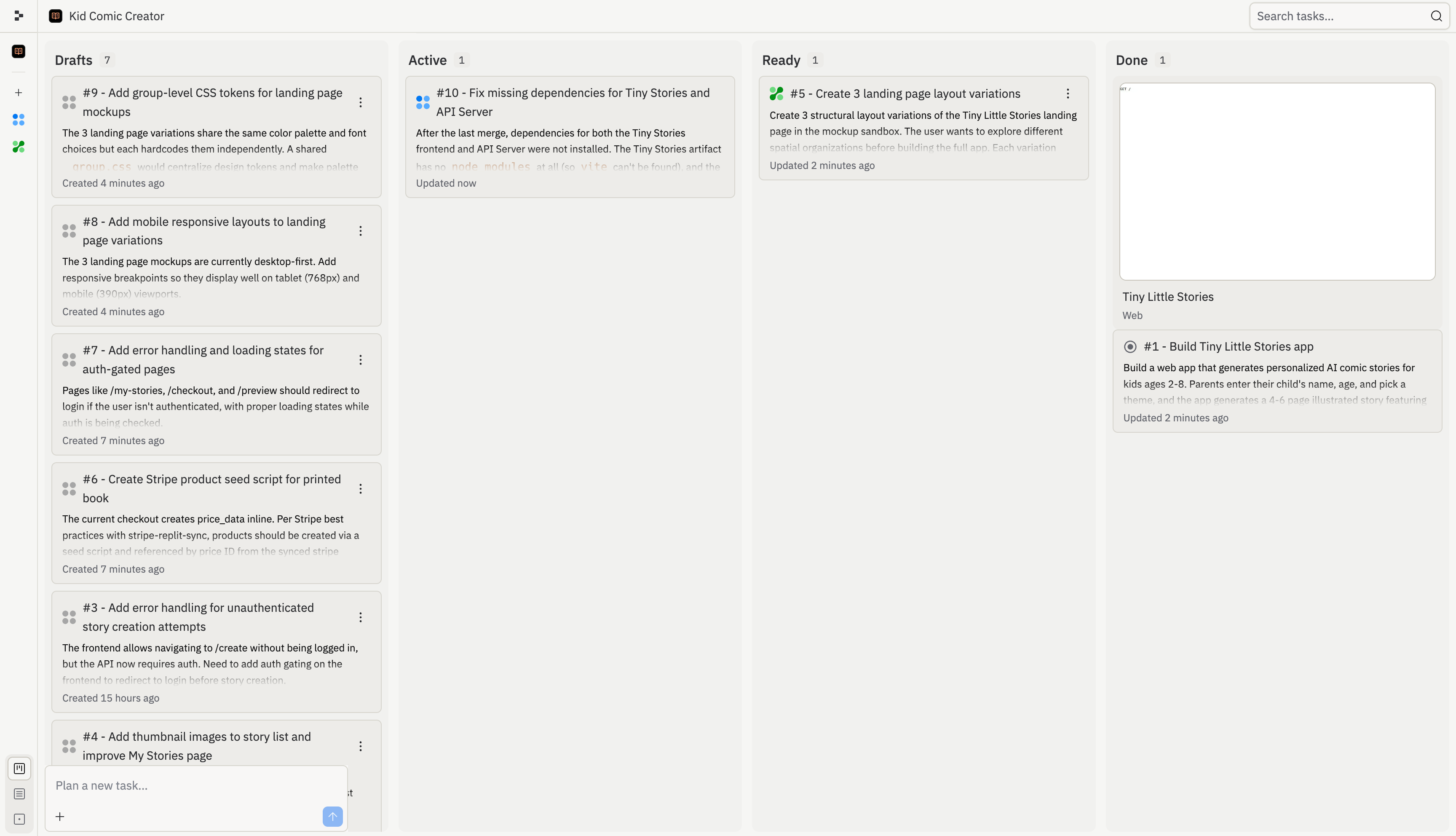
チームが一緒に作業すると、全員のタスクが同じボードに表示されます。誰が何をやっているか、何が進行中か、何が適用可能かをひと目で確認できます。

<Frame>
  <img src="https://mintcdn.com/replit/L22mbBMLs80H8_c8/images/replitai/task-board-progress.png?fit=max&auto=format&n=L22mbBMLs80H8_c8&q=85&s=3b4ef2fbede2d057e40c138956ccd74d" alt="下書き、アクティブ、準備完了、完了の列にタスクが整理されたタスクボード" width="3456" height="1984" data-path="images/replitai/task-board-progress.png" />
</Frame>

各タスクは4つの段階を経て進みます：

<div style={{ display: 'grid', gridTemplateColumns: 'repeat(auto-fill, minmax(300px, 1fr))', gap: '20px', margin: '20px 0' }}>
  <div style={{ display: 'flex', flexDirection: 'column', gap: '6px' }}>
    <TaskCard title="家族や友人のためのギフトフローを追加する" description="親が他の子供のためにストーリーを作成し、ギフトとして送れるようにします。" status="draft-static" timestamp="2m" width="100%" />

    <span style={{ fontSize: '13px', color: 'var(--kb-text-dimmer, #666)', padding: '0 4px' }}><strong>下書き</strong> — Agentがこのタスクを提案しました。レビュー待ちのプランがあります。</span>
  </div>

  <div style={{ display: 'flex', flexDirection: 'column', gap: '6px' }}>
    <TaskCard title="ストーリーの続き — 続編" description="「冒険を続ける」ボタンを追加すると、前回の続きから始まる続編が生成されます。" status="active" timestamp="12m" width="100%" />

    <span style={{ fontSize: '13px', color: 'var(--kb-text-dimmer, #666)', padding: '0 4px' }}><strong>アクティブ</strong> — Agentがプロジェクトの独立したコピーでこのタスクを構築中です。</span>
  </div>

  <div style={{ display: 'flex', flexDirection: 'column', gap: '6px' }}>
    <TaskCard title="ダークテーマの就寝モード" description="温かみのあるダークテーマとアンビエントサウンドを備えた専用の就寝モード。" status="ready-drop" timestamp="35m" width="100%" />

    <span style={{ fontSize: '13px', color: 'var(--kb-text-dimmer, #666)', padding: '0 4px' }}><strong>準備完了</strong> — タスクが完了しました。変更を確認してメインバージョンに適用します。</span>
  </div>

  <div style={{ display: 'flex', flexDirection: 'column', gap: '6px' }}>
    <TaskCard title="単語ハイライト付きの読み上げ" description="テキスト読み上げ機能で、子供たちがハイライトされた単語を追いながら独立してストーリーを楽しめます。" status="done" timestamp="4h" width="100%" />

    <span style={{ fontSize: '13px', color: 'var(--kb-text-dimmer, #666)', padding: '0 4px' }}><strong>完了</strong> — このタスクが終わり、変更がメインバージョンに含まれています。</span>
  </div>
</div>

### チームでのボードの使い方

複数人が同時に構築している場合、それぞれのタスクが共有ボードに表示されます。これがその様子です — あるチームメイトが続編とストーリー再生成に取り組み、別の人がギフトフローに取り組み、チームの残りのメンバーの完成した作業が準備完了と完了に並んでいます。
<KanbanColumns
  columns={[
{ title: 'アクティブ', count: 3, cards: [
{ title: 'ストーリーの続き — 続編', description: '「冒険を続ける」ボタンを追加すると、前回の続きから始まる続編が生成されます。', status: 'active', timestamp: '12m' },
{ title: 'ストーリー再生成 — ページのやり直し', description: '個別のページを再生成する機能を追加すると、親がコントロールでき不満が減ります。', status: 'active', timestamp: '8m' },
{ title: '家族や友人のためのギフトフローを追加する', description: '親が他の子供のためにストーリーを作成し、ギフトとして送れるようにします。', status: 'active-queued', timestamp: '1m' },
] },
{ title: '準備完了', count: 2, cards: [
{ title: 'ダークテーマの就寝読書モード', description: '温かみのあるダークテーマとアンビエントサウンドを備えた専用の就寝モード。', status: 'ready-drop', timestamp: '35m', showMenu: true },
{ title: 'OGプレビュー付き共有可能なストーリーリンク', description: '公開共有リンクを追加することが単一最大の成長レバーです。', status: 'ready-drop', timestamp: '31m', showMenu: true },
] },
{ title: '完了', count: 3, cards: [
{ title: '単語ハイライト付きの読み上げモード', description: 'テキスト読み上げ機能で、子供たちがストーリーを独立して楽しめます。', status: 'done', timestamp: '4h' },
{ title: 'キャラクターカスタマイズの強化', description: '本当にパーソナライズされたイラストのための外観オプション。', status: 'done', timestamp: '4h' },
{ title: 'モバイル対応と本番環境の整備', description: 'より良いエラー状態、モバイルレイアウト、ローディングアニメーション。', status: 'done', timestamp: '4h' },
] }
]}
/>

タスクが準備完了に移動したら、チームの誰でも変更を確認して適用できます。Agentは複数のタスクが適用される際の競合を自動的に処理します。

## 一緒に構築できること

* **機能をチームで分担する**: 1人がフロントエンドを構築し、別の人がバックエンドを担当します。それぞれがAgentとのチャットを通じて、カンバンボードで全員の調整を保ちながら作業します。
* **新しいチームメイトをオンボードする**: 自分のAgentチャットでプロジェクトを探索し、仕組みについて質問し、貢献を始めることができます — 他の人をブロックすることなく。
* **Proでより速く出荷する**: 並行実行により、2〜3人がそれぞれ同時に実行されるタスクをディスパッチできます。1人が完全なセッションを費やすプロジェクトを、一部の時間で完了できます。

## よくある質問

<Accordion title="Agentを通じてチームメイトにメッセージを送れますか？">
  いいえ。Agentはメッセージングツールではありません — 入力したものに対して常に行動しようとします。チームのコミュニケーションにはSlack、Discordや他のツールを使用してください。
</Accordion>

<Accordion title="互いの作業を上書きしてしまいますか？">
  タスクシステムはそれぞれのタスクに独立したコピーを与えることでこれを防ぎますが、他のタスクの存在を認識しています。タスクが完了したら、メインバージョンに適用してそのステップで競合を解決します。
</Accordion>

<Accordion title="チームメイトが何をしているか確認できますか？">
  カンバンボードでアクティブなタスクを確認できます。カーソルのプレゼンスやチームメイトが表示しているファイルも確認できます。
</Accordion>

<Accordion title="プロジェクトから誰かを削除できますか？">
  はい。プロジェクトオーナーはいつでもチームメンバーを管理してアクセスを取り消すことができます。
</Accordion>

## 利用可能な機能

| 機能               | Core | Pro |
| ---------------- | ---- | --- |
| コラボレーションシート      | 5    | 15  |
| 同時チャット           | ✅    | ✅   |
| 共有カンバン           | ✅    | ✅   |
| アクティブバックグラウンドタスク | 1    | 10  |
