> ## Documentation Index
> Fetch the complete documentation index at: https://docs.replit.com/llms.txt
> Use this file to discover all available pages before exploring further.
# 公開コスト
> アプリのニーズに合わせてスケールする柔軟な公開コスト。透明なクレジットベースの請求で使用した分だけ支払います。
export const AiPrompt = ({children}) => {
return
{children}
;
};
export const StaticDeploymentOutboundPerGiB = '$0.10';
export const DedicatedLargeVm = '$160.00';
export const DedicatedMediumVm = '$80.00';
export const DedicatedSmallVm = '$40.00';
export const SharedMediumVm = '$20.00';
export const ScheduledDeployment = '$1.00';
export const SchedulerPrice = '$0.00';
export const ScheduledComputeUnit = '$3.20';
export const AutoscaleDeployment = '$1.00';
export const AutoscaleRequests = '$1.20';
export const AutoscaleComputeUnit = '$3.20';
export const AutoscaleBaseFee = '$1';
Replitの公開コストはアプリのニーズに合わせてスケールするよう設計されています。アプリがリクエストを処理する時だけ課金される使用量ベース請求か、一定のワークロードのための予測可能な定額オプションから選択できます。
## 請求の仕組み
すべての公開コストは月次クレジットから差し引かれます。月次クレジットが完全に使用された後にのみ、使用量ベースの料金が発生します。
* **Starterプラン**: 1つの無料公開済みアプリを含む。デプロイメントは30日後に期限切れになりますが、再公開できます。詳細は[Starterプラン](/billing/plans/starter-plan)をご覧ください。
* **[Coreプラン](/billing/plans/replit-core)**: 月次クレジット込み;[料金](https://replit.com/pricing)をご覧ください
* **[Proプラン](/billing/plans/replit-pro)**: 段階的月次クレジット;詳細は[Replit Pro](/billing/plans/replit-pro)と[料金ページ](https://replit.com/pricing)をご覧ください
クレジットはすべての公開コストに自動的に適用されます。未使用のクレジットは翌月に繰り越されません。[使用量ベース請求](/billing/about-usage-based-billing)について詳しく学ぶ。
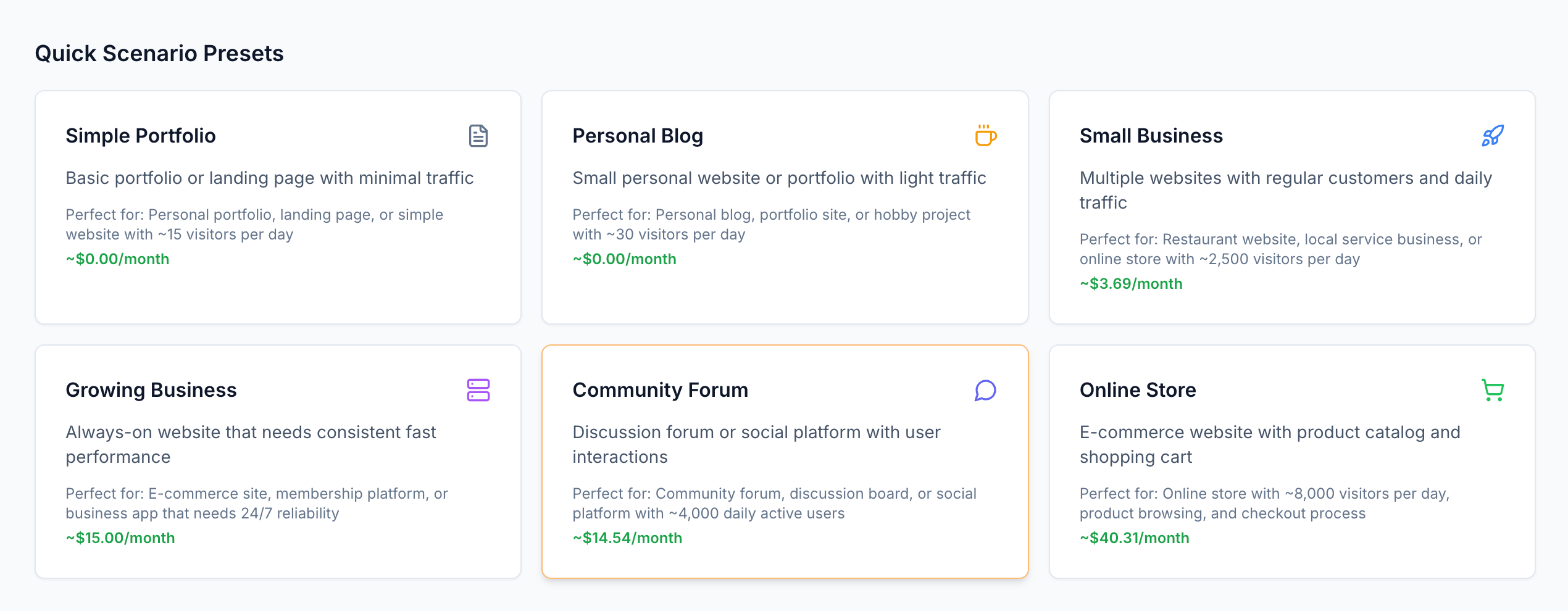
公開コストを実際に理解するには、[インタラクティブ料金計算機](https://deployment-pricing.replit.app/)をご利用ください。
 ## デプロイメントタイプ
アプリのトラフィックパターンとリソースニーズに最適なデプロイメントタイプを選択してください。
変動するトラフィックのあるアプリに最適。アプリがリクエストを処理する時だけ支払い—アイドル時は無料。
**最適な用途:** 予測不可能なトラフィックパターンを持つウェブアプリ、API、サービス
[オートスケールデプロイメントについて詳しく学ぶ](/references/publishing/autoscale-deployments)
**専用リソースによる予測可能な月次コスト**
継続的に稼働する保証されたコンピュートリソース。パフォーマンスニーズに基づいて共有または専用VMを選択。
**最適な用途:** 安定したトラフィックや保証されたリソース要件を持つ本番アプリ
[予約VMデプロイメントについて詳しく学ぶ](/references/publishing/reserved-vm-deployments)
**バックグラウンドタスクと自動化のためのコスト効率的なソリューション**
永続的なインフラを維持せずにスケジュールに従ってコードを実行。
**最適な用途:** バックグラウンドジョブ、データ処理、自動化タスク
[スケジュール済みデプロイメントについて詳しく学ぶ](/references/publishing/scheduled-deployments)
**グローバル配信による静的コンテンツの最小コスト**
CDN配信で静的サイトを公開し、データ転送のみ支払い。
**最適な用途:** ドキュメントサイト、ポートフォリオ、シングルページアプリケーション
[スタティックデプロイメントについて詳しく学ぶ](/references/publishing/static-deployments)
## リクエストベース請求の理解
オートスケールデプロイメントでは、アプリがアクティブに動作している時だけ支払います。
誰もアプリを訪問しない場合は、支払いは0円です。
オートスケールデプロイメントはリクエストベース請求を使用します—アプリがトラフィックを処理する時だけ課金されます。仕組みは以下の通りです:
1. 最初のリクエストが到着すると(アイドル状態の場合)**アプリが起動**
2. コンピュートリソースを使用して**リクエストを処理**
3. 15分間の非アクティブ状態の後**アイドル状態に移行**
**請求時間:** 複雑なアプリでも、多くの場合リクエストごとわずか1〜2秒。
### リクエストベース請求のタイムライン
誰もアプリを訪問しない場合は、支払いは0円です。アプリがビジーな場合は、使用したコンピュートリソースに対して支払います。
誰かがアプリを訪問したときの動作のタイムラインを以下に示します:
## デプロイメントタイプ
アプリのトラフィックパターンとリソースニーズに最適なデプロイメントタイプを選択してください。
変動するトラフィックのあるアプリに最適。アプリがリクエストを処理する時だけ支払い—アイドル時は無料。
**最適な用途:** 予測不可能なトラフィックパターンを持つウェブアプリ、API、サービス
[オートスケールデプロイメントについて詳しく学ぶ](/references/publishing/autoscale-deployments)
**専用リソースによる予測可能な月次コスト**
継続的に稼働する保証されたコンピュートリソース。パフォーマンスニーズに基づいて共有または専用VMを選択。
**最適な用途:** 安定したトラフィックや保証されたリソース要件を持つ本番アプリ
[予約VMデプロイメントについて詳しく学ぶ](/references/publishing/reserved-vm-deployments)
**バックグラウンドタスクと自動化のためのコスト効率的なソリューション**
永続的なインフラを維持せずにスケジュールに従ってコードを実行。
**最適な用途:** バックグラウンドジョブ、データ処理、自動化タスク
[スケジュール済みデプロイメントについて詳しく学ぶ](/references/publishing/scheduled-deployments)
**グローバル配信による静的コンテンツの最小コスト**
CDN配信で静的サイトを公開し、データ転送のみ支払い。
**最適な用途:** ドキュメントサイト、ポートフォリオ、シングルページアプリケーション
[スタティックデプロイメントについて詳しく学ぶ](/references/publishing/static-deployments)
## リクエストベース請求の理解
オートスケールデプロイメントでは、アプリがアクティブに動作している時だけ支払います。
誰もアプリを訪問しない場合は、支払いは0円です。
オートスケールデプロイメントはリクエストベース請求を使用します—アプリがトラフィックを処理する時だけ課金されます。仕組みは以下の通りです:
1. 最初のリクエストが到着すると(アイドル状態の場合)**アプリが起動**
2. コンピュートリソースを使用して**リクエストを処理**
3. 15分間の非アクティブ状態の後**アイドル状態に移行**
**請求時間:** 複雑なアプリでも、多くの場合リクエストごとわずか1〜2秒。
### リクエストベース請求のタイムライン
誰もアプリを訪問しない場合は、支払いは0円です。アプリがビジーな場合は、使用したコンピュートリソースに対して支払います。
誰かがアプリを訪問したときの動作のタイムラインを以下に示します:
リクエストベース請求のタイムライン
まずサーバーが起動します。次にリクエストを処理します。最後にアイドル状態になります。リクエスト処理中のCPUとメモリにのみ料金が発生します。
複数のリクエストが同時に到着した場合(スタックされた青いバーのように)、同じコンピュートリソースを共有します。
請求時間はすべての同時リクエストをカバーするように延長されますが、各リクエストに別々に支払うのではなく、サーバーが動作している合計時間のみ支払います。
緑のバーの間のギャップは、アイドル時間中のコスト削減を表しています。セッションの終わりにサーバーがシャットダウンします。
### コンピュートユニットの説明
コンピュートユニットはアプリが実行する計算作業を測定します:
* **CPU時間**: 使用された処理能力(1 CPU秒 = 18コンピュートユニット)
* **メモリ時間**: 消費されたRAM(1 GB秒 = 2コンピュートユニット)
* **期間**: 各リクエストに対してアプリが作業する時間
## 料金の内訳
アプリがリクエストを処理する時だけ支払い。需要に応じて自動的にスケール。
| コンポーネント | 価格 |
| :-------------------------- | ---------------------: |
| **基本料金**(月額) | {AutoscaleBaseFee} |
| **コンピュートユニット**(100万ユニットあたり) | {AutoscaleComputeUnit} |
| **リクエスト**(100万リクエストあたり) | {AutoscaleRequests} |
バックグラウンドタスクとスケジュール済みジョブを実行。
| コンポーネント | 価格 |
| :-------------------------- | ---------------------: |
| **基本料金**(月額) | {ScheduledDeployment} |
| **コンピュートユニット**(100万ユニットあたり) | {ScheduledComputeUnit} |
| **スケジューラー** | {SchedulerPrice} |
予測可能な月次コストによる専用コンピュートリソース。
#### 共有VM
| 構成 | 価格(月額) |
| :- | -----: |
\| **0.5 vCPU / 2GB RAM** | {SharedMediumVm} |
#### 専用VM
| 構成 | 価格(月額) |
| :-------------------- | ------------------: |
| **1 vCPU / 4GB RAM** | {DedicatedSmallVm} |
| **2 vCPU / 8GB RAM** | {DedicatedMediumVm} |
| **4 vCPU / 16GB RAM** | {DedicatedLargeVm} |
グローバルCDN配信で静的サイトをホスト。
| コンポーネント | 価格 |
| :--------------- | -------------------------------: |
| **ホスティング** | 無料 |
| **データ転送**(GBあたり) | {StaticDeploymentOutboundPerGiB} |
## アプリタイプ別のコスト例
以下の例は、さまざまなタイプのアプリケーションの現実的なコストを示しています。
**トラフィック:** 1日50人の訪問者、各3ページビュー = 月4,500リクエスト
| コンポーネント | 使用量 | コスト |
| :------------- | :--------- | -----------------: |
| **基本料金** | 月額 | {AutoscaleBaseFee} |
| **コンピュートユニット** | 13,500ユニット | \~\$0.04 |
| **リクエスト** | 4,500 | \~\$0.01 |
| **合計** | | **\~\$1.05** |
**トラフィック:** 1日500人の訪問者、各5ページビュー = 月75,000リクエスト
| コンポーネント | 使用量 | コスト |
| :------------- | :---------- | -----------------: |
| **基本料金** | 月額 | {AutoscaleBaseFee} |
| **コンピュートユニット** | 600,000ユニット | \~\$1.92 |
| **リクエスト** | 75,000 | \~\$0.15 |
| **合計** | | **\~\$3.07** |
**トラフィック:** 1日10,000 API呼び出し = 月300,000リクエスト
| コンポーネント | 使用量 | コスト |
| :------------- | :-------- | -----------------: |
| **基本料金** | 月額 | {AutoscaleBaseFee} |
| **コンピュートユニット** | 3.96Mユニット | \~\$12.67 |
| **リクエスト** | 300,000 | \~\$0.60 |
| **合計** | | **\~\$14.27** |
**使用量:** スケジュール済みデプロイメントによる日次データ処理
| コンポーネント | 使用量 | コスト |
| :------------------ | :--------- | --------------------: |
| **スケジュール済みデプロイメント** | 基本料金 | {ScheduledDeployment} |
| **コンピュートユニット** | 50,000ユニット | \~\$0.16 |
| **合計** | | **\~\$1.16** |
## コストの監視と管理
予期しない料金を防ぐために支出制限と予算を設定する。
使用量ダッシュボードでリアルタイムの消費量とコストを追跡する。
[Agent](/references/agent/overview)が請求にどう影響するかを理解する。
ログを表示し、パフォーマンスを追跡し、公開済みアプリの状態を監視する。