> ## Documentation Index
> Fetch the complete documentation index at: https://docs.replit.com/llms.txt
> Use this file to discover all available pages before exploring further.

# Understand your workspace

> Understand how your Replit Workspace brings together people, Projects, Conversations, Routines, data, integrations, and security.

export const WorkspaceCover = () => <div className="chat-mkt" role="img" aria-label="A frosted Replit Workspace canvas bringing together a conversation, files, and a routine" style={{
  margin: "28px 0 42px",
  borderTop: 0,
  paddingTop: 0
}}>
    <div className="chat-use-case-visual" style={{
  aspectRatio: "auto",
  minHeight: "clamp(220px, 34vw, 320px)",
  overflow: "hidden",
  background: "radial-gradient(circle at 50% -18%, rgba(255,255,255,.82), transparent 42%), radial-gradient(circle at 4% 96%, rgba(255,184,146,.48), transparent 38%), linear-gradient(140deg, #ff764d, #ff3c00 60%, #c92d00)"
}}>
      <div aria-hidden="true" style={{
  position: "absolute",
  inset: 0,
  background: "linear-gradient(180deg, rgba(255,255,255,.14), rgba(255,255,255,0) 48%, rgba(111,24,0,.2))"
}} />
      <div aria-hidden="true" style={{
  position: "relative",
  zIndex: 1,
  display: "flex",
  width: "100%",
  minHeight: "inherit",
  boxSizing: "border-box",
  alignItems: "center",
  justifyContent: "center",
  padding: "clamp(12px, 2.6vw, 26px)"
}}>
        <div style={{
  display: "grid",
  gridTemplateColumns: "clamp(38px, 7vw, 66px) minmax(0, 1fr)",
  width: "min(720px, 90%)",
  minHeight: "clamp(168px, 27vw, 220px)",
  overflow: "hidden",
  border: "1px solid rgba(255,255,255,.62)",
  borderRadius: 24,
  background: "linear-gradient(145deg, rgba(255,255,255,.4), rgba(255,255,255,.12))",
  boxShadow: "0 20px 40px rgba(55,27,18,.22)",
  backdropFilter: "blur(7px)"
}}>
          <div style={{
  display: "grid",
  alignContent: "space-between",
  justifyItems: "center",
  padding: "clamp(12px, 2vw, 18px) 0",
  borderRight: "1px solid rgba(255,255,255,.28)"
}}>
            <span style={{
  width: 13,
  height: 13,
  borderRadius: 4,
  background: "rgba(255,255,255,.92)"
}} />
            <div style={{
  display: "grid",
  gap: 10
}}>
              {[0, 1, 2].map(item => <span key={item} style={{
  width: 12,
  height: 12,
  border: item === 0 ? "1px solid rgba(255,255,255,.84)" : "1px solid rgba(255,255,255,.48)",
  borderRadius: item === 2 ? 999 : 4,
  background: item === 0 ? "rgba(255,255,255,.3)" : "transparent"
}} />)}
            </div>
            <span style={{
  width: 13,
  height: 13,
  border: "1px solid rgba(255,255,255,.56)",
  borderRadius: 999
}} />
          </div>
          <div style={{
  minWidth: 0,
  padding: "clamp(13px, 2.4vw, 22px)"
}}>
            <div style={{
  display: "flex",
  alignItems: "center",
  gap: 7
}}>
              {[0, 1, 2].map(dot => <span key={dot} style={{
  width: 7,
  height: 7,
  borderRadius: 999,
  background: dot === 0 ? "rgba(255,255,255,.92)" : "rgba(255,255,255,.38)"
}} />)}
              <span style={{
  width: "30%",
  height: 6,
  marginLeft: 5,
  borderRadius: 999,
  background: "rgba(255,255,255,.62)"
}} />
            </div>
            <div style={{
  display: "grid",
  gridTemplateColumns: "minmax(0, 1.25fr) minmax(0, .75fr)",
  gap: "clamp(9px, 1.8vw, 16px)",
  marginTop: "clamp(13px, 2.4vw, 20px)"
}}>
              <div style={{
  display: "grid",
  alignContent: "space-between",
  minHeight: "clamp(102px, 16vw, 138px)",
  padding: "clamp(10px, 1.7vw, 14px)",
  border: "1px solid rgba(255,255,255,.42)",
  borderRadius: 14,
  background: "rgba(255,255,255,.13)"
}}>
                <div style={{
  display: "grid",
  gap: 8
}}>
                  <span style={{
  width: "56%",
  height: 16,
  border: "1px solid rgba(255,255,255,.46)",
  borderRadius: "10px 10px 10px 3px",
  background: "rgba(255,255,255,.18)"
}} />
                  <span style={{
  justifySelf: "end",
  width: "48%",
  height: 16,
  borderRadius: "10px 10px 3px 10px",
  background: "rgba(255,255,255,.74)"
}} />
                </div>
                <span style={{
  height: 8,
  border: "1px solid rgba(255,255,255,.48)",
  borderRadius: 7,
  background: "rgba(255,255,255,.13)"
}} />
              </div>
              <div style={{
  display: "grid",
  gap: "clamp(9px, 1.5vw, 14px)"
}}>
                {["76%", "54%"].map((width, index) => <div key={width} style={{
  display: "grid",
  alignContent: "center",
  gap: 7,
  padding: "clamp(8px, 1.5vw, 12px)",
  border: "1px solid rgba(255,255,255,.4)",
  borderRadius: 13,
  background: index === 0 ? "rgba(255,255,255,.2)" : "rgba(255,255,255,.11)"
}}>
                    <span style={{
  width,
  height: 6,
  borderRadius: 999,
  background: "rgba(255,255,255,.78)"
}} />
                    <span style={{
  width: "48%",
  height: 4,
  borderRadius: 999,
  background: "rgba(255,255,255,.42)"
}} />
                  </div>)}
              </div>
            </div>
          </div>
        </div>
      </div>
    </div>
  </div>;

export const chatIcon = (name, size = 19) => {
  const paths = {
    MessageCircle: <path d="M7.9 20A9 9 0 1 0 4 16.1L2 22Z" />,
    ChartNoAxesCombined: <>
        <path d="M12 16v5" />
        <path d="M16 14v7" />
        <path d="M20 10v11" />
        <path d="m22 3-8.646 8.646a.5.5 0 0 1-.708 0L9.354 8.354a.5.5 0 0 0-.708 0L2 15" />
        <path d="M4 18v3" />
        <path d="M8 14v7" />
      </>,
    Workflow: <>
        <rect width="8" height="8" x="3" y="3" rx="2" />
        <path d="M7 11v4a2 2 0 0 0 2 2h4" />
        <rect width="8" height="8" x="13" y="13" rx="2" />
      </>,
    Lightbulb: <>
        <path d="M15 14c.2-1 .7-1.7 1.5-2.5 1-.9 1.5-2.2 1.5-3.5A6 6 0 0 0 6 8c0 1 .2 2.2 1.5 3.5.7.7 1.3 1.5 1.5 2.5" />
        <path d="M9 18h6" />
        <path d="M10 22h4" />
      </>,
    Code2: <>
        <path d="m18 16 4-4-4-4" />
        <path d="m6 8-4 4 4 4" />
        <path d="m14.5 4-5 16" />
      </>,
    Presentation: <>
        <path d="M2 3h20" />
        <path d="M21 3v11a2 2 0 0 1-2 2H5a2 2 0 0 1-2-2V3" />
        <path d="m7 21 5-5 5 5" />
      </>,
    PanelsTopLeft: <>
        <rect width="18" height="18" x="3" y="3" rx="2" />
        <path d="M3 9h18" />
        <path d="M9 21V9" />
      </>,
    Keyboard: <>
        <rect width="20" height="14" x="2" y="5" rx="2" />
        <path d="M6 9h.01M10 9h.01M14 9h.01M18 9h.01M6 13h.01M10 13h.01M14 13h.01M18 13h.01M8 17h8" />
      </>,
    Layers3: <>
        <path d="m12 2 9 5-9 5-9-5 9-5Z" />
        <path d="m3 12 9 5 9-5M3 17l9 5 9-5" />
      </>,
    CalendarClock: <>
        <path d="M16 2v4M8 2v4M3 10h18" />
        <rect width="18" height="19" x="3" y="4" rx="2" />
        <path d="M12 14v3l2 1" />
      </>,
    ConversationProject: <>
        <path d="M3 4h8v6H6l-3 2V4Z" />
        <rect width="9" height="9" x="12" y="11" rx="1.5" />
        <path d="M12 14h9M15 11v9" />
      </>,
    CursorDesign: <>
        <path d="m5 3 13 7-6 2-2 6L5 3Z" />
        <path d="M15 16h6M18 13v6" />
      </>,
    AppWindow: <>
        <rect width="20" height="18" x="2" y="3" rx="2" />
        <path d="M2 8h20M6 5.5h.01M9 5.5h.01" />
      </>,
    CloudUpload: <>
        <path d="M12 13v8M8 17l4-4 4 4" />
        <path d="M20 16.5A5 5 0 0 0 18 7h-1.3A7 7 0 0 0 3.3 9.4 4.5 4.5 0 0 0 5 18h2" />
      </>,
    Image: <>
        <rect width="18" height="18" x="3" y="3" rx="2" ry="2" />
        <circle cx="9" cy="9" r="2" />
        <path d="m21 15-3.086-3.086a2 2 0 0 0-2.828 0L6 21" />
      </>,
    FileUp: <>
        <path d="M15 2H6a2 2 0 0 0-2 2v16a2 2 0 0 0 2 2h12a2 2 0 0 0 2-2V7Z" />
        <path d="M14 2v4a2 2 0 0 0 2 2h4" />
        <path d="M12 12v6" />
        <path d="m15 15-3-3-3 3" />
      </>,
    Search: <>
        <circle cx="11" cy="11" r="8" />
        <path d="m21 21-4.3-4.3" />
      </>,
    Sparkles: <path d="M9.937 15.5A2 2 0 0 0 8.5 14.063l-6.135-1.582a.5.5 0 0 1 0-.962L8.5 9.936A2 2 0 0 0 9.937 8.5l1.582-6.135a.5.5 0 0 1 .963 0L14.063 8.5A2 2 0 0 0 15.5 9.937l6.135 1.581a.5.5 0 0 1 0 .964L15.5 14.063a2 2 0 0 0-1.437 1.437l-1.582 6.135a.5.5 0 0 1-.963 0z" />,
    Briefcase: <>
        <path d="M16 20V4a2 2 0 0 0-2-2h-4a2 2 0 0 0-2 2v16" />
        <rect width="20" height="14" x="2" y="6" rx="2" />
      </>,
    WandSparkles: <>
        <path d="m21.64 3.64-1.28-1.28a1.21 1.21 0 0 0-1.72 0L2.36 18.64a1.21 1.21 0 0 0 0 1.72l1.28 1.28a1.2 1.2 0 0 0 1.72 0L21.64 5.36a1.2 1.2 0 0 0 0-1.72" />
        <path d="m14 7 3 3" />
        <path d="M5 6v4" />
        <path d="M19 14v4" />
        <path d="M10 2v2" />
        <path d="M7 8H3" />
        <path d="M21 16h-4" />
        <path d="M11 3H9" />
      </>
  };
  return <svg width={size} height={size} viewBox="0 0 24 24" fill="none" stroke="currentColor" strokeWidth="1.8" strokeLinecap="round" strokeLinejoin="round" aria-hidden="true">
      {paths[name] ?? paths.Sparkles}
    </svg>;
};

<WorkspaceCover />

Your Replit Workspace is the home for everything related to an idea. It brings
together [Projects](/home/projects), [Conversations](/home/conversations),
[Routines](/chat/routines), and integrations, so you can move from an early
question to a useful outcome.

## Set up the coffee-shop project

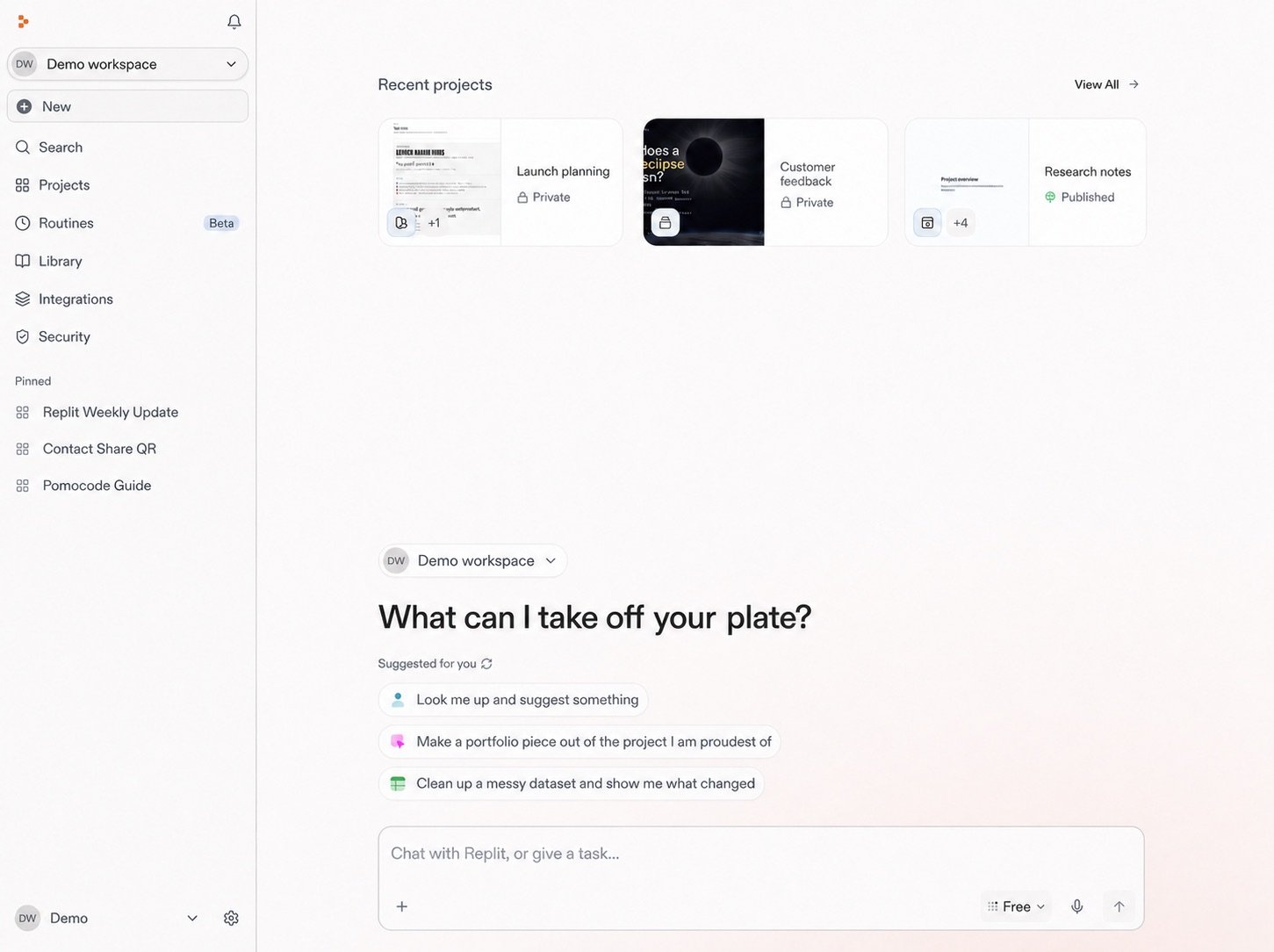
Before you start shaping the coffee-shop idea, give it a home. This Workspace
will keep the parts of the launch together as they develop:

* A conversation for shaping the concept and researching the local market
* Files and connected tools that add useful context to the plan
* A Routine that later watches for competition and market changes
* The site you will eventually design and publish

<Frame>
  <img src="https://mintcdn.com/replit/teDUL4A-lNO7dv1O/images/chat/start-new-conversation-home-sanitized-neutral.jpg?fit=max&auto=format&n=teDUL4A-lNO7dv1O&q=85&s=cf93f549696aff0eab748dd953aea0b6" alt="Replit home screen for Demo workspace with Projects, Conversations, Routines, suggested prompts, and the message box" width="1451" height="1084" data-path="images/chat/start-new-conversation-home-sanitized-neutral.jpg" />
</Frame>

The prompt box is where this project begins. From here, you will start a
conversation and give Replit the first description of the coffee shop you want
to create.

## Workspace details

It also keeps related people, settings, shared resources, integrations, and
billing together. Your access determines what you can see and manage.

Workspace settings and organization controls are separate from the controls you use to shape how Agent responds to a request.

You can return to the Workspace throughout the launch to find everything that
supports it.

<section className="chat-mkt chat-workflow-grid has-visuals">
  <a className="chat-example has-visual" href="/home/start-a-conversation">
    <div className="chat-use-case-visual">
      <div className="chat-use-case-icon">
        {chatIcon("MessageCircle", 32)}
      </div>
    </div>

    <div className="chat-example-tag">Next step</div>
    <div className="chat-card-title">Start a conversation</div>
    <p>Start the coffee-shop launch by describing the outcome you want.</p>
    <div className="chat-card-link">Explore →</div>
  </a>

  <a className="chat-example has-visual" href="/features/collaboration/workspaces">
    <div className="chat-use-case-visual palette-stone">
      <div className="chat-use-case-icon">
        {chatIcon("Briefcase", 32)}
      </div>
    </div>

    <div className="chat-example-tag">Workspace details</div>
    <div className="chat-card-title">See more about workspaces</div>

    <p>
      Learn about Personal and Team Workspaces, access, settings, and
      management.
    </p>

    <div className="chat-card-link">Explore →</div>
  </a>
</section>

Next, [start a conversation](/home/start-a-conversation) to begin shaping the
coffee-shop idea.
