> ## Documentation Index
> Fetch the complete documentation index at: https://docs.replit.com/llms.txt
> Use this file to discover all available pages before exploring further.

# Tableau des tâches

> Utilisez le tableau des tâches pour examiner, démarrer, surveiller et appliquer les tâches Agent à mesure qu'elles progressent à travers chaque étape.

export const TaskReviewDrawer = ({taskNumber = 23, taskTitle = "Story regeneration: redo pages or whole stories", taskDescription = 'Added story and page-level regeneration capabilities:\n\nBackend (API):\n- POST /api/stories/:storyId/regenerate: regenerates the entire story, deletes existing pages, sets status to "generating", and re-runs the full story text and image generation pipeline in the background\n- POST /api/stories/:storyId/pages/:pageId/regenerate: regenerates a single page with body { target: "text" | "image" | "both" }\n\nFrontend (story-preview.tsx):\n- Per-page regeneration menu: subtle three-dot icon overlay on the image area with options for "Regenerate Text", "Regenerate Image", or "Regenerate Both"\n- "Regenerate Story" button in header with confirmation dialog\n- Loading state: regenerating pages show a spinner and skeleton text while other pages remain readable'}) => {
  if (typeof document !== "undefined" && !document.getElementById("task-review-drawer-styles")) {
    const style = document.createElement("style");
    style.id = "task-review-drawer-styles";
    style.textContent = `
      .trd-wrap {
        --trd-surface: var(--replit-docs-bg, #F6F6F4);
        --trd-surface-higher: var(--replit-docs-bg-elevated, #F1F1EE);
        --trd-border: var(--replit-docs-border, #DEDAD5);
        --trd-border-strong: var(--replit-docs-border-strong, #CAC4BE);
        --trd-text: var(--replit-docs-text, #1D1D1D);
        --trd-text-dim: var(--replit-docs-text-muted, #5C5C5C);
        --trd-text-dimmest: var(--replit-docs-text-subtle, #858585);
        --trd-icon: var(--replit-docs-text-subtle, #858585);
        --trd-btn-bg: var(--replit-docs-bg-muted, #F1F1EE);
        --trd-btn-hover: var(--replit-docs-bg-elevated, #F1F1EE);
        --trd-positive-bg: hsla(140, 50%, 38%, 1);
        --trd-positive-text: #FFFFFF;
        --trd-positive-hover: hsla(140, 50%, 33%, 1);
        --trd-shadow: 0 1px 3px rgba(0,0,0,0.06);
        --trd-icon-surface: var(--replit-docs-bg-elevated, #F1F1EE);
        --trd-icon-border: var(--replit-docs-border, #DEDAD5);
      }
      .dark .trd-wrap,
      html.dark .trd-wrap,
      [data-theme="dark"] .trd-wrap {
        --trd-surface: var(--replit-docs-bg, #1E1E1F);
        --trd-surface-higher: var(--replit-docs-bg-elevated, #222223);
        --trd-border: var(--replit-docs-border, #39393D);
        --trd-border-strong: var(--replit-docs-border-strong, #4A4A50);
        --trd-text: var(--replit-docs-text, #F5F5F5);
        --trd-text-dim: var(--replit-docs-text-muted, #B8B8BE);
        --trd-text-dimmest: var(--replit-docs-text-subtle, #8E8F97);
        --trd-icon: var(--replit-docs-text-subtle, #8E8F97);
        --trd-btn-bg: var(--replit-docs-bg-elevated, #222223);
        --trd-btn-hover: var(--replit-docs-bg-muted, #222223);
        --trd-positive-bg: hsla(140, 50%, 33%, 1);
        --trd-positive-text: #FFFFFF;
        --trd-positive-hover: hsla(140, 50%, 28%, 1);
        --trd-shadow: 0 1px 3px rgba(0,0,0,0.2);
        --trd-icon-surface: var(--replit-docs-bg-elevated, #222223);
        --trd-icon-border: var(--replit-docs-border, #39393D);
      }
      .trd-wrap, .trd-wrap * {
        font-family: 'IBM Plex Sans', sans-serif !important;
      }
      @keyframes trd-fade-in {
        from { transform: translateY(8px); opacity: 0; }
        to { transform: translateY(0); opacity: 1; }
      }
      @media (hover: hover) {
        .trd-wrap .trd-dismiss:hover { background: var(--trd-btn-hover) !important; }
        .trd-wrap .trd-apply:hover { background: var(--trd-positive-hover) !important; }
      }
    `;
    document.head.appendChild(style);
  }
  const PlusIcon = <svg width="16" height="16" viewBox="0 0 24 24" fill="currentColor">
      <path d="M12 4.25a.75.75 0 0 1 .75.75v6.25H19a.75.75 0 0 1 0 1.5h-6.25V19a.75.75 0 0 1-1.5 0v-6.25H5a.75.75 0 0 1 0-1.5h6.25V5a.75.75 0 0 1 .75-.75Z" />
    </svg>;
  const ArrowUpIcon = <svg width="16" height="16" viewBox="0 0 24 24" fill="currentColor">
      <path fillRule="evenodd" d="M11.47 4.47a.75.75 0 0 1 1.06 0l7 7a.75.75 0 1 1-1.06 1.06l-5.72-5.72V19a.75.75 0 0 1-1.5 0V6.81l-5.72 5.72a.75.75 0 0 1-1.06-1.06l7-7Z" clipRule="evenodd" />
    </svg>;
  const ApplyIcon = <svg width="16" height="16" viewBox="0 0 24 24" fill="currentColor">
      <path fillRule="evenodd" d="M6 3.75a2.25 2.25 0 1 0 0 4.5 2.25 2.25 0 0 0 0-4.5ZM2.25 6a3.75 3.75 0 1 1 4.527 3.67 8.25 8.25 0 0 0 7.554 7.553A3.751 3.751 0 0 1 21.75 18a3.75 3.75 0 0 1-7.43.726 9.75 9.75 0 0 1-7.57-4.53V21a.75.75 0 0 1-1.5 0V9.675A3.751 3.751 0 0 1 2.25 6ZM18 15.75a2.25 2.25 0 1 0 0 4.5 2.25 2.25 0 0 0 0-4.5Z" clipRule="evenodd" />
    </svg>;
  const AgentModesIcon = <svg width="16" height="16" viewBox="0 0 24 24" fill="currentColor">
      <path d="M1.25 6V4A2.75 2.75 0 0 1 4 1.25h2a.75.75 0 0 1 0 1.5H4A1.25 1.25 0 0 0 2.75 4v2a.75.75 0 0 1-1.5 0ZM21.25 6V4a1.25 1.25 0 0 0-1.126-1.244L20 2.75h-2a.75.75 0 0 1 0-1.5h2A2.75 2.75 0 0 1 22.75 4v2a.75.75 0 0 1-1.5 0ZM21.25 20v-2a.75.75 0 0 1 1.5 0v2A2.75 2.75 0 0 1 20 22.75h-2a.75.75 0 0 1 0-1.5h2A1.25 1.25 0 0 0 21.25 20ZM1.25 20v-2a.75.75 0 0 1 1.5 0v2l.006.124A1.25 1.25 0 0 0 4 21.25h2a.75.75 0 0 1 0 1.5H4A2.75 2.75 0 0 1 1.25 20ZM16 12a4 4 0 1 0-8 0 4 4 0 0 0 8 0Zm1.5 0a5.5 5.5 0 1 1-11 0 5.5 5.5 0 0 1 11 0Z" />
    </svg>;
  const ChevronDown = <svg width="12" height="12" viewBox="0 0 24 24" fill="var(--trd-text-dimmest)">
      <path fillRule="evenodd" d="M12.53 15.53a.75.75 0 0 1-1.06 0l-6-6a.75.75 0 0 1 1.06-1.06L12 13.94l5.47-5.47a.75.75 0 1 1 1.06 1.06l-6 6Z" clipRule="evenodd" />
    </svg>;
  const SparkleIcon = <svg width="16" height="16" viewBox="0 0 24 24" fill="none">
      <path fill="#009118" d="M18.662 0a5.332 5.332 0 0 1 .001 10.664l-.412.01a8 8 0 0 0-7.577 7.59l-.01.398-.008.274A5.331 5.331 0 0 1 0 18.662a5.332 5.332 0 0 1 5.332-5.332l.398-.01a8 8 0 0 0 7.59-7.576l.011-.412A5.331 5.331 0 0 1 18.662 0Z" />
      <path fill="#6CD97E" d="m18.663 13.33.273.007a5.332 5.332 0 1 1-5.598 5.6l-.007-.275.006-.265a5.38 5.38 0 0 1 .137-.963c.006-.026.01-.052.017-.078.012-.047.026-.095.04-.142a4.84 4.84 0 0 1 .032-.114l.007-.024.065-.193.02-.054.022-.06c.021-.056.044-.112.067-.167l.026-.059c.024-.056.048-.112.074-.167l.058-.118a4.854 4.854 0 0 1 .145-.265l.024-.043a5.29 5.29 0 0 1 .08-.129c.02-.032.04-.065.062-.097a5.34 5.34 0 0 1 .468-.607l.071-.079a5.562 5.562 0 0 1 .265-.267l.11-.1a5.3 5.3 0 0 1 .308-.252l.058-.045c.046-.034.093-.068.14-.1l.049-.034.073-.049.07-.043.112-.07c.043-.026.089-.05.133-.075.026-.014.051-.03.078-.044l.114-.059c.041-.02.083-.042.126-.062l.089-.04.146-.065.086-.033c.048-.019.095-.038.143-.055l.023-.008.202-.068.024-.007c.062-.019.125-.036.189-.053l.043-.012c.062-.016.125-.03.189-.044l.078-.018a5.34 5.34 0 0 1 .485-.074c.011 0 .023-.003.034-.005.09-.009.18-.014.27-.02l.274-.006ZM5.332 0a5.332 5.332 0 0 1 5.332 5.332l-.008.274a5.332 5.332 0 0 1-5.324 5.058l-.274-.007A5.332 5.332 0 0 1 5.332 0Z" />
    </svg>;
  const descriptionLines = taskDescription.split("\n").filter(l => l.trim());
  return <div className="trd-wrap" style={{
    fontFamily: "'IBM Plex Sans', sans-serif",
    width: "100%",
    maxWidth: "427px",
    minWidth: "320px",
    alignSelf: "center",
    margin: "48px auto",
    opacity: 0,
    animation: "trd-fade-in 300ms ease-out forwards"
  }}>
      {}
      <div style={{
    background: "var(--trd-surface)",
    border: "1px solid var(--trd-border-strong)",
    borderRadius: "6px",
    padding: "8px",
    boxShadow: "var(--trd-shadow)",
    display: "flex",
    flexDirection: "column",
    gap: "4px"
  }}>
        {}
        <div>
          <div style={{
    display: "flex",
    flexDirection: "column",
    gap: "8px",
    padding: "4px"
  }}>
            {}
            <div style={{
    display: "flex",
    alignItems: "center",
    gap: "8px"
  }}>
              <div style={{
    display: "flex",
    alignItems: "center",
    justifyContent: "center",
    width: "28px",
    height: "28px",
    borderRadius: "8px",
    background: "var(--trd-icon-surface)",
    border: "1px solid var(--trd-icon-border)",
    flexShrink: 0
  }}>
                {SparkleIcon}
              </div>
              <span style={{
    fontSize: "14px",
    lineHeight: "1.4",
    color: "var(--trd-text)"
  }}>
                Ready for review
              </span>
            </div>

            {}
            <div style={{
    display: "flex",
    flexDirection: "column",
    gap: "4px"
  }}>
              <span style={{
    fontSize: "13px",
    lineHeight: "1.4",
    color: "var(--trd-text-dim)"
  }}>
                Task #{taskNumber}: {taskTitle}
              </span>

              {}
              <div style={{
    fontSize: "12px",
    lineHeight: "1.5",
    color: "var(--trd-text-dimmest)",
    maxHeight: "50px",
    overflow: "hidden",
    position: "relative"
  }}>
                {descriptionLines.map((line, i) => <span key={i}>
                    {line}
                    <br />
                  </span>)}
              </div>
            </div>

            {}
            <div style={{
    display: "flex",
    gap: "8px"
  }}>
              <button className="trd-dismiss" type="button" style={{
    width: "122px",
    flexShrink: 0,
    height: "32px",
    display: "flex",
    alignItems: "center",
    justifyContent: "center",
    border: "none",
    borderRadius: "8px",
    background: "var(--trd-btn-bg)",
    color: "var(--trd-text)",
    fontSize: "14px",
    fontFamily: "inherit",
    cursor: "pointer",
    transition: "background 120ms ease-out"
  }}>
                Dismiss
              </button>
              <button className="trd-apply" type="button" style={{
    flex: 1,
    height: "32px",
    display: "flex",
    alignItems: "center",
    justifyContent: "center",
    gap: "6px",
    border: "none",
    borderRadius: "8px",
    background: "var(--trd-positive-bg)",
    color: "var(--trd-positive-text)",
    fontSize: "14px",
    fontFamily: "inherit",
    cursor: "pointer",
    transition: "background 120ms ease-out"
  }}>
                <span>Apply changes to main version</span>
                {ApplyIcon}
              </button>
            </div>
          </div>
        </div>

        {}
        <div style={{
    padding: 0
  }}>
          <div style={{
    display: "flex",
    flexDirection: "column",
    gap: "4px"
  }}>
            {}
            <div style={{
    padding: "5px 6px",
    minHeight: "21px",
    fontSize: "14px",
    lineHeight: "1.3",
    color: "var(--trd-text-dimmest)"
  }}>
              Message agent…
            </div>

            {}
            <div style={{
    display: "flex",
    justifyContent: "space-between",
    alignItems: "flex-end",
    paddingBottom: "2px"
  }}>
              {}
              <div style={{
    display: "flex",
    alignItems: "center",
    gap: "4px"
  }}>
                <button type="button" style={{
    display: "flex",
    alignItems: "center",
    justifyContent: "center",
    width: "24px",
    height: "24px",
    border: "none",
    borderRadius: "4px",
    background: "transparent",
    cursor: "pointer",
    color: "var(--trd-icon)",
    padding: 0
  }}>
                  {PlusIcon}
                </button>
              </div>

              {}
              <div style={{
    display: "flex",
    alignItems: "center",
    gap: "8px",
    paddingRight: "2px"
  }}>
                <button type="button" style={{
    display: "flex",
    alignItems: "center",
    gap: "4px",
    height: "24px",
    padding: "0 4px",
    border: "none",
    borderRadius: "4px",
    background: "transparent",
    cursor: "pointer",
    color: "var(--trd-icon)"
  }}>
                  {AgentModesIcon}
                  {ChevronDown}
                </button>
                <button type="button" style={{
    display: "flex",
    alignItems: "center",
    justifyContent: "center",
    width: "28px",
    height: "28px",
    border: "none",
    borderRadius: "8px",
    background: "hsla(210, 100%, 74%, 1)",
    color: "#FFFFFF",
    padding: 0,
    cursor: "pointer"
  }}>
                  {ArrowUpIcon}
                </button>
              </div>
            </div>
          </div>
        </div>
      </div>
    </div>;
};

export const KanbanColumns = ({columns = []}) => {
  if (typeof document !== "undefined" && !document.getElementById("kanban-board-styles")) {
    const style = document.createElement("style");
    style.id = "kanban-board-styles";
    style.textContent = `
      .kb-board {
        --kb-bg: var(--replit-docs-bg, #F6F6F4);
        --kb-col-bg: var(--replit-docs-bg-elevated, #F1F1EE);
        --kb-card-bg: var(--replit-docs-bg-task, #EDECE8);
        --kb-border: var(--replit-docs-border, #DEDAD5);
        --kb-text: var(--replit-docs-text, #1D1D1D);
        --kb-text-dim: var(--replit-docs-text-muted, #5C5C5C);
        --kb-text-dimmer: var(--replit-docs-text-muted, #5C5C5C);
        --kb-text-dimmest: var(--replit-docs-text-subtle, #858585);
        --kb-badge-bg: var(--replit-docs-bg-elevated, #F1F1EE);
      }
      .dark .kb-board,
      html.dark .kb-board,
      [data-theme="dark"] .kb-board {
        --kb-bg: var(--replit-docs-bg, #1E1E1F);
        --kb-col-bg: var(--replit-docs-bg-elevated, #222223);
        --kb-card-bg: var(--replit-docs-bg-task, #252527);
        --kb-border: var(--replit-docs-border, #39393D);
        --kb-text: var(--replit-docs-text, #F5F5F5);
        --kb-text-dim: var(--replit-docs-text-muted, #B8B8BE);
        --kb-text-dimmer: var(--replit-docs-text-muted, #B8B8BE);
        --kb-text-dimmest: var(--replit-docs-text-subtle, #8E8F97);
        --kb-badge-bg: var(--replit-docs-bg-elevated, #222223);
      }
      .kb-board { overflow: visible; }
    `;
    document.head.appendChild(style);
  }
  return <div className="kb-board" style={{
    fontFamily: "'IBM Plex Sans', sans-serif",
    display: "flex",
    gap: "12px",
    padding: "8px",
    background: "var(--kb-bg)",
    borderRadius: "12px"
  }}>
      {columns.map((col, ci) => <div key={ci} data-kb-column={col.title.toLowerCase()} style={{
    flex: "1 1 0",
    minWidth: "200px",
    background: "var(--kb-col-bg)",
    borderRadius: "8px",
    display: "flex",
    flexDirection: "column",
    overflow: "visible"
  }}>
          <div style={{
    display: "flex",
    alignItems: "center",
    gap: "8px",
    padding: "12px 12px 8px 12px"
  }}>
            <span style={{
    fontSize: "14px",
    fontWeight: 500,
    color: "var(--kb-text)"
  }}>
              {col.title}
            </span>
            <span data-kb-count style={{
    fontSize: "12px",
    color: "var(--kb-text-dimmer)",
    background: "var(--kb-badge-bg)",
    padding: "0 6px",
    borderRadius: "4px",
    lineHeight: "20px"
  }}>
              {col.count}
            </span>
          </div>
          <div data-kb-cards style={{
    display: "flex",
    flexDirection: "column",
    gap: "8px",
    padding: "8px",
    flex: "1 1 0"
  }}>
            {col.cards.map((card, i) => <TaskCard key={i} title={card.title} description={card.description} status={card.status} timestamp={card.timestamp} showMenu={card.showMenu} width="100%" />)}
          </div>
        </div>)}
    </div>;
};

export const TaskCard = ({title = "Product Manager next steps discussion", description = "", status = "draft", timestamp = "Created 3 minutes ago", width = "364px", showMenu = false}) => {
  if (typeof document !== "undefined" && !document.getElementById("task-card-styles")) {
    const style = document.createElement("style");
    style.id = "task-card-styles";
    style.textContent = `
      .task-card {
        --tc-bg: var(--replit-docs-bg-task, #EDECE8);
        --tc-border: var(--replit-docs-border, #DEDAD5);
        --tc-text: var(--replit-docs-text, #1D1D1D);
        --tc-text-dim: var(--replit-docs-text-muted, #5C5C5C);
        --tc-text-dimmest: var(--replit-docs-text-subtle, #858585);
        --tc-dot-active: #4A7BF7;
        --tc-dot-draft: #A6A6A6;
        --tc-dot-ready: #F59E0B;
        --tc-dot-done: #22C55E;
      }
      .dark .task-card,
      html.dark .task-card,
      [data-theme="dark"] .task-card {
        --tc-bg: var(--replit-docs-bg-task, #252527);
        --tc-border: var(--replit-docs-border, #39393D);
        --tc-text: var(--replit-docs-text, #F5F5F5);
        --tc-text-dim: var(--replit-docs-text-muted, #B8B8BE);
        --tc-text-dimmest: var(--replit-docs-text-subtle, #8E8F97);
        --tc-dot-active: #6B9EFF;
        --tc-dot-draft: #6B7280;
        --tc-dot-ready: #FBBF24;
        --tc-dot-done: #4ADE80;
      }
      @keyframes task-card-fade-in {
        from { transform: translateY(6px); opacity: 0; }
        to { transform: translateY(0); opacity: 1; }
      }
      @keyframes tc-tl {
        0%{opacity:1;fill:var(--tc-light)} 5%{opacity:1;fill:var(--tc-dark)} 10%{opacity:1;fill:var(--tc-dark)} 15%{opacity:1;fill:var(--tc-light)}
        20%{opacity:0} 25%{opacity:1;fill:var(--tc-dark)} 30%{opacity:1;fill:var(--tc-light)} 35%{opacity:0}
        40%{opacity:1;fill:var(--tc-dark)} 45%{opacity:1;fill:var(--tc-light)} 50%{opacity:0} 55%{opacity:1;fill:var(--tc-dark)}
        60%{opacity:0} 65%{opacity:1;fill:var(--tc-light)} 70%{opacity:1;fill:var(--tc-light)} 75%{opacity:1;fill:var(--tc-light)}
        80%{opacity:1;fill:var(--tc-light)} 85%{opacity:0} 90%{opacity:1;fill:var(--tc-light)} 95%{opacity:1;fill:var(--tc-light)}
      }
      @keyframes tc-tr {
        0%{opacity:1;fill:var(--tc-dark)} 5%{opacity:0} 10%{opacity:0} 15%{opacity:0}
        20%{opacity:1;fill:var(--tc-light)} 25%{opacity:1;fill:var(--tc-light)} 30%{opacity:1;fill:var(--tc-light)} 35%{opacity:1;fill:var(--tc-light)}
        40%{opacity:0} 45%{opacity:1;fill:var(--tc-dark)} 50%{opacity:1;fill:var(--tc-dark)} 55%{opacity:0}
        60%{opacity:1;fill:var(--tc-dark)} 65%{opacity:0} 70%{opacity:0} 75%{opacity:1;fill:var(--tc-light)}
        80%{opacity:0} 85%{opacity:1;fill:var(--tc-dark)} 90%{opacity:0} 95%{opacity:0}
      }
      @keyframes tc-bl {
        0%{opacity:1;fill:var(--tc-light)} 5%{opacity:0} 10%{opacity:0} 15%{opacity:0}
        20%{opacity:1;fill:var(--tc-light)} 25%{opacity:1;fill:var(--tc-light)} 30%{opacity:1;fill:var(--tc-light)} 35%{opacity:1;fill:var(--tc-light)}
        40%{opacity:0} 45%{opacity:1;fill:var(--tc-light)} 50%{opacity:1;fill:var(--tc-light)} 55%{opacity:0}
        60%{opacity:1;fill:var(--tc-light)} 65%{opacity:0} 70%{opacity:0} 75%{opacity:1;fill:var(--tc-light)}
        80%{opacity:0} 85%{opacity:1;fill:var(--tc-light)} 90%{opacity:0} 95%{opacity:0}
      }
      @keyframes tc-br {
        0%{opacity:1;fill:var(--tc-light)} 5%{opacity:1;fill:var(--tc-dark)} 10%{opacity:1;fill:var(--tc-light)} 15%{opacity:1;fill:var(--tc-light)}
        20%{opacity:0} 25%{opacity:1;fill:var(--tc-light)} 30%{opacity:1;fill:var(--tc-dark)} 35%{opacity:0}
        40%{opacity:1;fill:var(--tc-light)} 45%{opacity:1;fill:var(--tc-light)} 50%{opacity:0} 55%{opacity:1;fill:var(--tc-light)}
        60%{opacity:0} 65%{opacity:1;fill:var(--tc-dark)} 70%{opacity:1;fill:var(--tc-light)} 75%{opacity:1;fill:var(--tc-light)}
        80%{opacity:1;fill:var(--tc-light)} 85%{opacity:0} 90%{opacity:1;fill:var(--tc-light)} 95%{opacity:1;fill:var(--tc-dark)}
      }
      @keyframes tc-drop {
        0%{opacity:0} 5%{opacity:1;fill:var(--tc-dark)} 10%{opacity:1;fill:var(--tc-dark)} 15%{opacity:1;fill:var(--tc-dark)}
        20%{opacity:0} 25%{opacity:0} 30%{opacity:0} 35%{opacity:0}
        40%{opacity:1;fill:var(--tc-dark)} 45%{opacity:0} 50%{opacity:0} 55%{opacity:1;fill:var(--tc-dark)}
        60%{opacity:0} 65%{opacity:1;fill:var(--tc-dark)} 70%{opacity:1;fill:var(--tc-dark)} 75%{opacity:0}
        80%{opacity:1;fill:var(--tc-dark)} 85%{opacity:0} 90%{opacity:1;fill:var(--tc-dark)} 95%{opacity:1;fill:var(--tc-dark)}
      }
      @keyframes tc-dropalt {
        0%{opacity:0} 5%{opacity:0} 10%{opacity:0} 15%{opacity:0}
        20%{opacity:1;fill:var(--tc-dark)} 25%{opacity:0} 30%{opacity:0} 35%{opacity:1;fill:var(--tc-dark)}
        40%{opacity:0} 45%{opacity:0} 50%{opacity:1;fill:var(--tc-dark)} 55%{opacity:0}
        60%{opacity:1;fill:var(--tc-dark)} 65%{opacity:0} 70%{opacity:0} 75%{opacity:0}
        80%{opacity:0} 85%{opacity:1;fill:var(--tc-dark)} 90%{opacity:0} 95%{opacity:0}
      }
      .task-card .tc-el-tl { animation: tc-tl 4s step-end infinite; }
      .task-card .tc-el-tr { animation: tc-tr 4s step-end infinite; }
      .task-card .tc-el-bl { animation: tc-bl 4s step-end infinite; }
      .task-card .tc-el-br { animation: tc-br 4s step-end infinite; }
      .task-card .tc-el-drop { animation: tc-drop 4s step-end infinite; }
      .task-card .tc-el-dropalt { animation: tc-dropalt 4s step-end infinite; }
      @media (hover: hover) {
        .task-card:hover {
          border-color: var(--tc-text-dimmest) !important;
        }
        .task-card .tc-menu-btn:hover {
          background: var(--tc-border);
        }
      }
    `;
    document.head.appendChild(style);
  }
  const colorPairs = {
    active: {
      dark: "#57ABFF",
      light: "#A8D4FF"
    },
    "active-queued": {
      dark: "#6BB5FF",
      light: "#6BB5FF"
    },
    draft: {
      dark: "#A6A6A6",
      light: "#D4D4D4"
    },
    "draft-static": {
      dark: "#A6A6A6",
      light: "#D4D4D4"
    },
    "draft-done": {
      dark: "#A6A6A6",
      light: "#D4D4D4"
    },
    ready: {
      dark: "#009118",
      light: "#6CD97E"
    },
    "ready-drop": {
      dark: "#009118",
      light: "#6CD97E"
    },
    applying: {
      dark: "#7C3AED",
      light: "#C4B5FD"
    },
    done: {
      dark: "#22C55E",
      light: "#86EFAC"
    }
  };
  const statusLabels = {
    active: "Active",
    "active-queued": "Queued",
    draft: "Draft",
    "draft-static": "Draft",
    "draft-done": "Done",
    ready: "Ready",
    "ready-drop": "Ready",
    applying: "Applying",
    done: "Done"
  };
  const colors = colorPairs[status] || colorPairs.draft;
  const applyingIconHtml = '<svg width="16" height="16" viewBox="0 0 24 24" fill="none" style="flex-shrink:0;--tc-dark:#009118;--tc-light:#6CD97E"><circle class="tc-el-tl" cx="5.332" cy="5.338" r="5.332" fill="#009118"/><circle class="tc-el-tr" cx="18.663" cy="5.338" r="5.332" fill="#009118"/><circle class="tc-el-bl" cx="5.332" cy="18.668" r="5.332" fill="#009118"/><circle class="tc-el-br" cx="18.663" cy="18.668" r="5.332" fill="#009118"/><path class="tc-el-drop" fill="#009118" d="M18.662 0a5.332 5.332 0 0 1 .001 10.664l-.412.01a8 8 0 0 0-7.577 7.59l-.01.398-.008.274A5.331 5.331 0 0 1 0 18.662a5.332 5.332 0 0 1 5.332-5.332l.398-.01a8 8 0 0 0 7.59-7.576l.011-.412A5.331 5.331 0 0 1 18.662 0Z"/><g class="tc-el-dropalt" transform="rotate(90, 12, 12)"><path fill="#009118" d="M18.662 0a5.332 5.332 0 0 1 .001 10.664l-.412.01a8 8 0 0 0-7.577 7.59l-.01.398-.008.274A5.331 5.331 0 0 1 0 18.662a5.332 5.332 0 0 1 5.332-5.332l.398-.01a8 8 0 0 0 7.59-7.576l.011-.412A5.331 5.331 0 0 1 18.662 0Z"/></g></svg>';
  const doneIconHtml = '<svg width="16" height="16" viewBox="0 0 24 24" style="flex-shrink:0;fill:var(--tc-text-dimmest)"><path d="M12 7a5 5 0 1 1 0 10 5 5 0 0 1 0-10Z"/><path fill-rule="evenodd" d="M12 1c6.075 0 11 4.925 11 11s-4.925 11-11 11S1 18.075 1 12 5.925 1 12 1Zm0 2a9 9 0 1 0 0 18 9 9 0 0 0 0-18Z" clip-rule="evenodd"/></svg>';
  const handleApplyChanges = e => {
    const tooltip = e.currentTarget.parentElement;
    tooltip.style.display = "none";
    const menuBtn = tooltip.previousElementSibling;
    if (menuBtn) menuBtn.style.background = "none";
    const card = e.currentTarget.closest(".task-card");
    if (!card) return;
    const headerRow = card.firstElementChild;
    const oldIcon = headerRow.firstElementChild;
    const menuWrapper = headerRow.lastElementChild;
    const meta = card.lastElementChild;
    const temp = document.createElement("div");
    temp.innerHTML = applyingIconHtml;
    headerRow.replaceChild(temp.firstElementChild, oldIcon);
    meta.textContent = "Applying \u2022 just now";
    menuWrapper.style.visibility = "hidden";
    setTimeout(() => {
      const currentIcon = headerRow.firstElementChild;
      const doneTemp = document.createElement("div");
      doneTemp.innerHTML = doneIconHtml;
      headerRow.replaceChild(doneTemp.firstElementChild, currentIcon);
      meta.textContent = "Done \u2022 just now";
      const board = card.closest(".kb-board");
      if (!board) return;
      const doneCol = board.querySelector('[data-kb-column="done"]');
      if (!doneCol) return;
      const cardList = doneCol.querySelector("[data-kb-cards]");
      const readyCol = board.querySelector('[data-kb-column="ready"]');
      card.style.transition = "opacity 300ms, transform 300ms";
      card.style.opacity = "0";
      card.style.transform = "translateY(-10px)";
      setTimeout(() => {
        card.parentElement.removeChild(card);
        if (readyCol) {
          const rc = readyCol.querySelector("[data-kb-count]");
          rc.textContent = parseInt(rc.textContent) - 1;
        }
        const dc = doneCol.querySelector("[data-kb-count]");
        dc.textContent = parseInt(dc.textContent) + 1;
        card.style.opacity = "0";
        card.style.transform = "translateY(6px)";
        cardList.insertBefore(card, cardList.firstChild);
        requestAnimationFrame(() => {
          card.style.transition = "opacity 300ms, transform 300ms";
          card.style.opacity = "1";
          card.style.transform = "translateY(0)";
        });
      }, 300);
    }, 3000);
  };
  return <div className="task-card" style={{
    fontFamily: "'IBM Plex Sans', sans-serif",
    width: width,
    background: "var(--tc-bg)",
    border: "1px solid var(--tc-border)",
    borderRadius: "8px",
    padding: "8px 12px",
    margin: 0,
    display: "flex",
    flexDirection: "column",
    gap: "4px",
    cursor: "pointer",
    opacity: 0,
    animation: "task-card-fade-in 300ms ease-out forwards",
    transition: "border-color 120ms ease-out"
  }}>
      {}
      <div style={{
    display: "flex",
    alignItems: "center",
    gap: "8px"
  }}>
        {status === "done" ? <svg width="16" height="16" viewBox="0 0 24 24" fill="var(--tc-text-dimmest)" style={{
    flexShrink: 0
  }}>
            <path d="M12 7a5 5 0 1 1 0 10 5 5 0 0 1 0-10Z" />
            <path fillRule="evenodd" d="M12 1c6.075 0 11 4.925 11 11s-4.925 11-11 11S1 18.075 1 12 5.925 1 12 1Zm0 2a9 9 0 1 0 0 18 9 9 0 0 0 0-18Z" clipRule="evenodd" />
          </svg> : status === "draft-static" ? <svg width="16" height="16" viewBox="0 0 24 24" fill="none" style={{
    flexShrink: 0
  }}>
            <circle cx="5.332" cy="5.338" r="5.332" fill={colors.dark} />
            <circle cx="18.663" cy="5.338" r="5.332" fill={colors.dark} />
            <circle cx="5.332" cy="18.668" r="5.332" fill={colors.dark} />
            <circle cx="18.663" cy="18.668" r="5.332" fill={colors.dark} />
          </svg> : status === "draft-done" ? <svg width="16" height="16" viewBox="0 0 24 24" fill="none" style={{
    flexShrink: 0
  }}>
            <circle cx="5.332" cy="5.338" r="5.332" fill={colors.light} />
            <circle cx="18.663" cy="5.338" r="5.332" fill={colors.light} />
            <circle cx="5.332" cy="18.668" r="5.332" fill={colors.light} />
            <circle cx="18.663" cy="18.668" r="5.332" fill={colors.light} />
          </svg> : status === "active-queued" ? <svg width="16" height="16" viewBox="0 0 24 24" fill="none" style={{
    flexShrink: 0
  }}>
            <circle cx="5.332" cy="5.338" r="5.332" fill={colors.light} />
            <circle cx="18.663" cy="5.338" r="5.332" fill={colors.light} />
            <circle cx="5.332" cy="18.668" r="5.332" fill={colors.light} />
            <circle cx="18.663" cy="18.668" r="5.332" fill={colors.light} />
          </svg> : status === "ready-drop" ? <svg width="16" height="16" viewBox="0 0 24 24" fill="none" style={{
    flexShrink: 0
  }}>
            <circle cx="5.332" cy="5.338" r="5.332" fill={colors.light} />
            <circle cx="18.663" cy="18.668" r="5.332" fill={colors.light} />
            <path fill={colors.dark} d="M18.662 0a5.332 5.332 0 0 1 .001 10.664l-.412.01a8 8 0 0 0-7.577 7.59l-.01.398-.008.274A5.331 5.331 0 0 1 0 18.662a5.332 5.332 0 0 1 5.332-5.332l.398-.01a8 8 0 0 0 7.59-7.576l.011-.412A5.331 5.331 0 0 1 18.662 0Z" />
          </svg> : <svg width="16" height="16" viewBox="0 0 24 24" fill="none" style={{
    flexShrink: 0,
    "--tc-dark": colors.dark,
    "--tc-light": colors.light
  }}>
            <circle className="tc-el-tl" cx="5.332" cy="5.338" r="5.332" fill={colors.dark} />
            <circle className="tc-el-tr" cx="18.663" cy="5.338" r="5.332" fill={colors.dark} />
            <circle className="tc-el-bl" cx="5.332" cy="18.668" r="5.332" fill={colors.dark} />
            <circle className="tc-el-br" cx="18.663" cy="18.668" r="5.332" fill={colors.dark} />
            <path className="tc-el-drop" fill={colors.dark} d="M18.662 0a5.332 5.332 0 0 1 .001 10.664l-.412.01a8 8 0 0 0-7.577 7.59l-.01.398-.008.274A5.331 5.331 0 0 1 0 18.662a5.332 5.332 0 0 1 5.332-5.332l.398-.01a8 8 0 0 0 7.59-7.576l.011-.412A5.331 5.331 0 0 1 18.662 0Z" />
            <g className="tc-el-dropalt" transform="rotate(90, 12, 12)">
              <path fill={colors.dark} d="M18.662 0a5.332 5.332 0 0 1 .001 10.664l-.412.01a8 8 0 0 0-7.577 7.59l-.01.398-.008.274A5.331 5.331 0 0 1 0 18.662a5.332 5.332 0 0 1 5.332-5.332l.398-.01a8 8 0 0 0 7.59-7.576l.011-.412A5.331 5.331 0 0 1 18.662 0Z" />
            </g>
          </svg>}
        <span style={{
    flex: 1,
    fontSize: "14px",
    lineHeight: "1.4",
    color: "var(--tc-text)",
    minWidth: 0
  }}>
          {title}
        </span>
        <div style={{
    position: "relative",
    flexShrink: 0
  }}>
          <button className="tc-menu-btn" type="button" aria-label="Thread actions" onClick={showMenu ? e => {
    const btn = e.currentTarget;
    const popup = btn.nextElementSibling;
    const card = btn.closest(".task-card");
    const isHidden = popup.style.display === "none";
    popup.style.display = isHidden ? "flex" : "none";
    btn.style.background = isHidden ? "var(--tc-border)" : "none";
    if (card) card.style.zIndex = isHidden ? "9999" : "";
  } : undefined} style={{
    display: "flex",
    alignItems: "center",
    justifyContent: "center",
    width: "24px",
    height: "24px",
    border: "none",
    background: "none",
    borderRadius: "4px",
    cursor: "pointer",
    color: "var(--tc-text-dimmest)",
    padding: 0,
    flexShrink: 0,
    transition: "background 120ms ease-out"
  }}>
            <svg width="16" height="16" viewBox="0 0 24 24" fill="currentColor">
              <path fillRule="evenodd" d="M10.25 5a1.75 1.75 0 1 1 3.5 0 1.75 1.75 0 0 1-3.5 0Zm0 7a1.75 1.75 0 1 1 3.5 0 1.75 1.75 0 0 1-3.5 0Zm0 7a1.75 1.75 0 1 1 3.5 0 1.75 1.75 0 0 1-3.5 0Z" clipRule="evenodd" />
            </svg>
          </button>
          {showMenu && <div style={{
    display: "none",
    position: "absolute",
    top: 0,
    left: "28px",
    background: "var(--tc-bg)",
    border: "1px solid var(--tc-border)",
    borderRadius: "8px",
    padding: "4px",
    boxShadow: "0 8px 24px rgba(0,0,0,0.12), 0 2px 6px rgba(0,0,0,0.06)",
    zIndex: 9999,
    minWidth: "160px",
    flexDirection: "column",
    gap: "0"
  }}>
              <div onClick={handleApplyChanges} style={{
    display: "flex",
    alignItems: "center",
    gap: "8px",
    padding: "6px 8px",
    borderRadius: "4px",
    cursor: "pointer",
    color: "var(--tc-text)",
    fontSize: "14px"
  }}>
                <svg width="16" height="16" viewBox="0 0 24 24" fill="currentColor" style={{
    flexShrink: 0
  }}>
                  <path fillRule="evenodd" d="M6 3.75a2.25 2.25 0 1 0 0 4.5 2.25 2.25 0 0 0 0-4.5ZM2.25 6a3.75 3.75 0 1 1 4.527 3.67 8.25 8.25 0 0 0 7.554 7.553A3.751 3.751 0 0 1 21.75 18a3.75 3.75 0 0 1-7.43.726 9.75 9.75 0 0 1-7.57-4.53V21a.75.75 0 0 1-1.5 0V9.675A3.751 3.751 0 0 1 2.25 6ZM18 15.75a2.25 2.25 0 1 0 0 4.5 2.25 2.25 0 0 0 0-4.5Z" clipRule="evenodd" />
                </svg>
                <span>Apply changes</span>
              </div>
              <div style={{
    display: "flex",
    alignItems: "center",
    gap: "8px",
    padding: "6px 8px",
    borderRadius: "4px",
    cursor: "pointer",
    color: "var(--tc-text)",
    fontSize: "14px"
  }}>
                <svg width="16" height="16" viewBox="0 0 24 24" fill="currentColor" style={{
    flexShrink: 0
  }}>
                  <path fillRule="evenodd" d="M5.47 5.47a.75.75 0 0 1 1.06 0L12 10.94l5.47-5.47a.75.75 0 1 1 1.06 1.06L13.06 12l5.47 5.47a.75.75 0 1 1-1.06 1.06L12 13.06l-5.47 5.47a.75.75 0 0 1-1.06-1.06L10.94 12 5.47 6.53a.75.75 0 0 1 0-1.06Z" clipRule="evenodd" />
                </svg>
                <span>Cancel</span>
              </div>
            </div>}
        </div>
      </div>
      {}
      {description && <div style={{
    fontSize: "12px",
    color: "var(--tc-text-dim)",
    lineHeight: "1.5",
    overflow: "hidden",
    display: "-webkit-box",
    WebkitLineClamp: 3,
    WebkitBoxOrient: "vertical",
    paddingLeft: "0"
  }}>
          {description}
        </div>}
      {}
      <div style={{
    fontSize: "12px",
    color: "var(--tc-text-dimmest)",
    paddingLeft: "0"
  }}>
        {statusLabels[status] || status} • {timestamp}
      </div>
    </div>;
};

## Fonctionnement du tableau des tâches

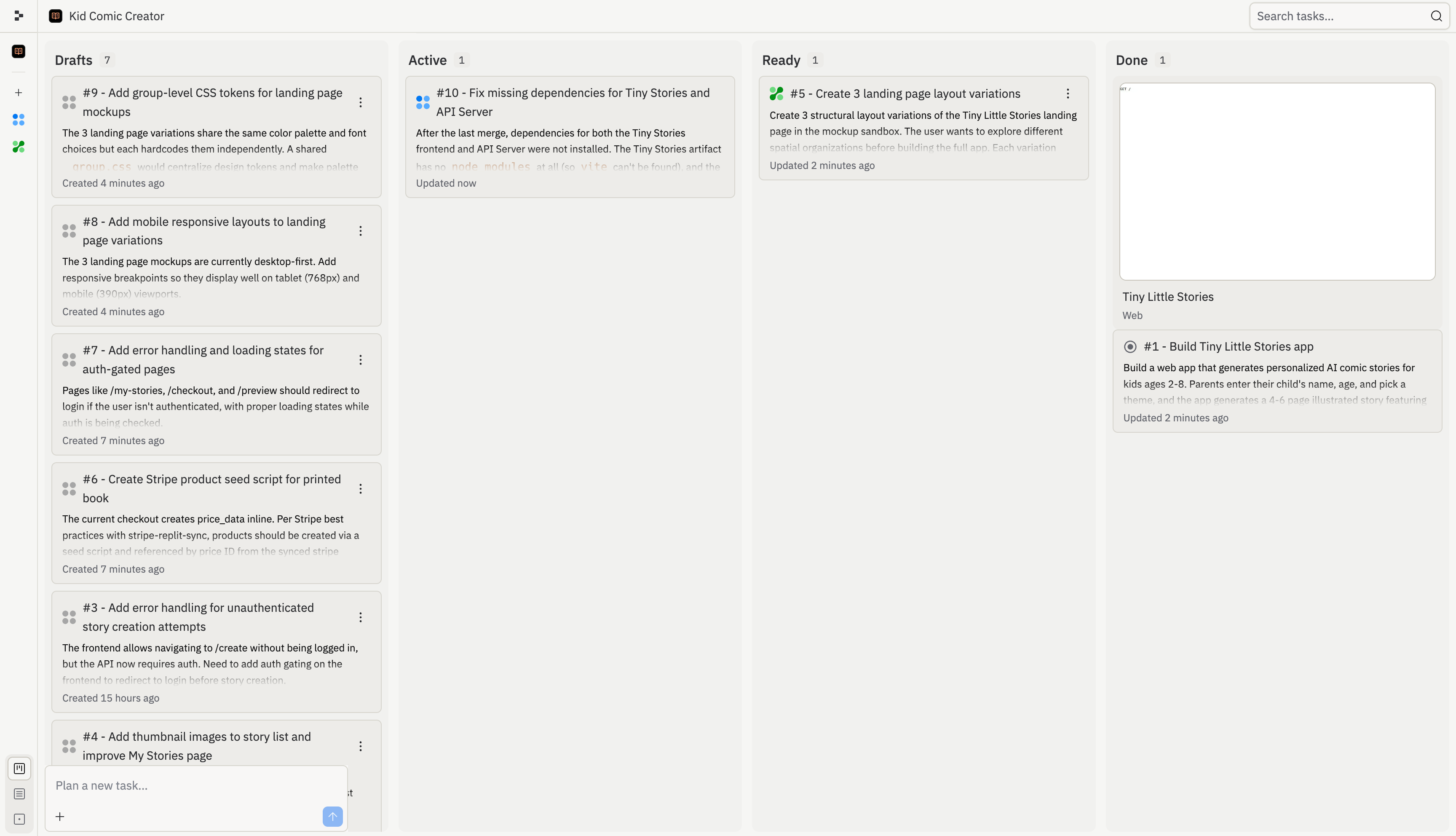
Le tableau des tâches vous offre un espace unique pour examiner, démarrer, surveiller et appliquer les tâches Agent. Utilisez-le lorsqu'Agent décompose une grande demande en plusieurs parties, lorsque vous souhaitez exécuter du travail en arrière-plan, ou lorsque vous devez comprendre ce qui a déjà été modifié dans votre projet.

<Frame>
  <img src="https://mintcdn.com/replit/L22mbBMLs80H8_c8/images/replitai/task-board-progress.png?fit=max&auto=format&n=L22mbBMLs80H8_c8&q=85&s=3b4ef2fbede2d057e40c138956ccd74d" alt="Task board showing tasks organized in Drafts, Active, Ready, and Done columns" width="3456" height="1984" data-path="images/replitai/task-board-progress.png" />
</Frame>

Les tâches sont organisées en colonnes selon leur statut. Le tableau indique ce qu'Agent a planifié, ce qui est en cours d'exécution, ce qui est prêt pour révision, et ce qui a déjà été appliqué.

Chaque tâche progresse de gauche à droite :

* **Brouillons** : tâches qu'Agent a planifiées mais n'a pas encore démarrées
* **Active** : tâches qu'Agent est en train de construire, y compris les tâches en file d'attente derrière votre limite de tâches actives
* **Prête** : tâches qu'Agent a terminées et qui sont prêtes pour votre révision
* **Terminée** : tâches achevées, archivées ou annulées

## Brouillons

Les **Brouillons** sont des tâches planifiées qu'Agent n'a pas encore commencé à construire. Chaque brouillon comprend un titre, une description et un plan étape par étape.

Utilisez les brouillons pour examiner l'approche proposée par Agent avant le démarrage des travaux. Vous pouvez inspecter le plan, demander à Agent de l'ajuster, ou démarrer la tâche quand vous êtes prêt.

Les brouillons sont utiles lorsque vous souhaitez planifier une fonctionnalité plus importante avant de lancer des travaux en arrière-plan. Par exemple, Agent pourrait diviser un projet d'intégration en brouillons distincts pour l'authentification, la configuration du profil, l'interface du tableau de bord et les finitions du déploiement.

## Active

Une fois que vous acceptez une tâche, elle passe dans la colonne **Active** et Agent commence la construction. Chaque tâche s'exécute dans sa propre copie isolée de votre projet, de sorte que rien ne change dans votre version principale tant que vous n'appliquez pas le travail.

Certaines tâches dépendent d'autres. Par exemple, une tâche qui construit un tableau de bord peut nécessiter que la tâche du schéma de base de données soit terminée en premier. Les tâches dépendantes attendent en tant qu'**En file d'attente** jusqu'à ce que leurs prérequis soient achevés. Les tâches se mettent également en file d'attente si vous atteignez la limite de tâches actives en arrière-plan de votre plan.
<KanbanColumns
  columns={[
{ title: 'Drafts', count: 2, cards: [
{ title: 'Add gift flow for family and friends', description: 'Let parents create a story for someone else\'s child and send it as a gift. Opens a new acquisition channel.', status: 'draft-static', timestamp: '2m' },
{ title: 'Bedtime reading mode with dark theme', description: 'A dedicated bedtime mode with a warm-toned dark theme and ambient sounds turns the app into a full bedtime ritual.', status: 'draft-static', timestamp: '2m' },
] },
{ title: 'Active', count: 3, cards: [
{ title: 'Story continuations: sequels', description: 'Adding a "Continue the Adventure" button generates a sequel that picks up where the last one left off.', status: 'active', timestamp: '12m' },
{ title: 'Story regeneration: redo pages', description: 'Adding the ability to regenerate individual pages gives parents control and reduces frustration.', status: 'active', timestamp: '8m' },
{ title: 'Add gift flow for family and friends', description: 'Let parents create a story for someone else\'s child and send it as a gift.', status: 'active-queued', timestamp: '1m' },
] }
]}
/>

## Prête

Lorsqu'une tâche termine sa construction, elle passe à l'état **Prête**. Cela signifie que le travail est terminé, mais rien n'a encore changé dans votre version principale.

Vous pouvez appliquer les modifications de deux façons :

* **Depuis le fil** : ouvrez le fil de la tâche et sélectionnez **Appliquer les modifications à la version principale** pour intégrer le travail à votre projet, ou **Ignorer** pour le supprimer
* **Depuis le tableau** : sélectionnez le menu à trois points sur une carte de tâche Prête, puis sélectionnez **Appliquer les modifications**

<TaskReviewDrawer />

Examinez les tâches Prêtes avant de les appliquer. Vérifiez le journal de travail, les résultats des tests et l'aperçu afin de comprendre ce qu'Agent a modifié.

## Terminée

Une fois appliquée, la carte de tâche passe dans la colonne **Terminée**.

La colonne Terminée comprend également les sessions de planification archivées et les tâches annulées. Cela vous donne un historique de ce qui s'est passé sans mélanger les travaux terminés dans les Brouillons ou les tâches Actives.

<KanbanColumns
  columns={[
{ title: 'Ready', count: 3, cards: [
{ title: 'Bedtime reading mode with dark theme', description: 'A dedicated bedtime mode with a warm-toned dark theme and ambient sounds.', status: 'ready-drop', timestamp: '35m', showMenu: true },
{ title: 'Shareable story links with OG previews', description: 'Adding public shareable links is the single biggest growth lever.', status: 'ready-drop', timestamp: '31m', showMenu: true },
{ title: 'Enhanced character customization', description: 'Adding appearance options makes illustrations feel truly personalized.', status: 'ready-drop', timestamp: '28m', showMenu: true },
] },
{ title: 'Done', count: 4, cards: [
{ title: 'Read-aloud mode with word highlighting', description: 'Text-to-speech lets kids enjoy stories independently.', status: 'done', timestamp: '4h' },
{ title: 'Shareable story links with OG previews', description: 'Public shareable links as the biggest growth lever.', status: 'done', timestamp: '1h' },
{ title: 'Enhanced character customization', description: 'Appearance options for truly personalized illustrations.', status: 'done', timestamp: '4h' },
{ title: 'Mobile responsiveness and production polish', description: 'Better error states, mobile layouts, and loading animations.', status: 'done', timestamp: '4h' },
] }
]}
/>

Agent gère automatiquement les conflits lorsque vous appliquez des modifications provenant de plusieurs tâches. Si quelque chose ne semble pas correct, demandez à Agent de le corriger.

## Rechercher et filtrer les tâches

Utilisez le tableau des tâches lorsque votre projet comporte de nombreuses tâches en cours. Vous pouvez rechercher par titre de tâche ou numéro de tâche, filtrer les brouillons, et utiliser le mode édition pour gérer des groupes de tâches en même temps.

Par exemple, recherchez par numéro de tâche lorsque quelqu'un fait référence à une tâche depuis un fil, une révision ou une conversation Slack. Filtrez les brouillons lorsque vous souhaitez vous concentrer sur le travail planifié sans parcourir les tâches actives ou terminées.

Pour les suggestions de suivi, voir [Tâches de suivi](/references/agent/follow-up-tasks).

## Renommer une tâche

Les listes de tâches de longue durée peuvent devenir difficiles à parcourir à mesure que la portée évolue. Pour renommer une tâche, ouvrez le menu à trois points sur sa carte (dans la barre latérale de la liste des tâches ou sur le tableau des tâches) et sélectionnez **Renommer**. Saisissez un titre plus clair et sélectionnez **Enregistrer**.

Renommer une tâche ne modifie que la façon dont elle apparaît pour vous et vos coéquipiers. Le travail qu'Agent a déjà effectué, l'historique de la tâche et toutes les modifications en attente restent intacts.

## Paramètres de chaque tâche

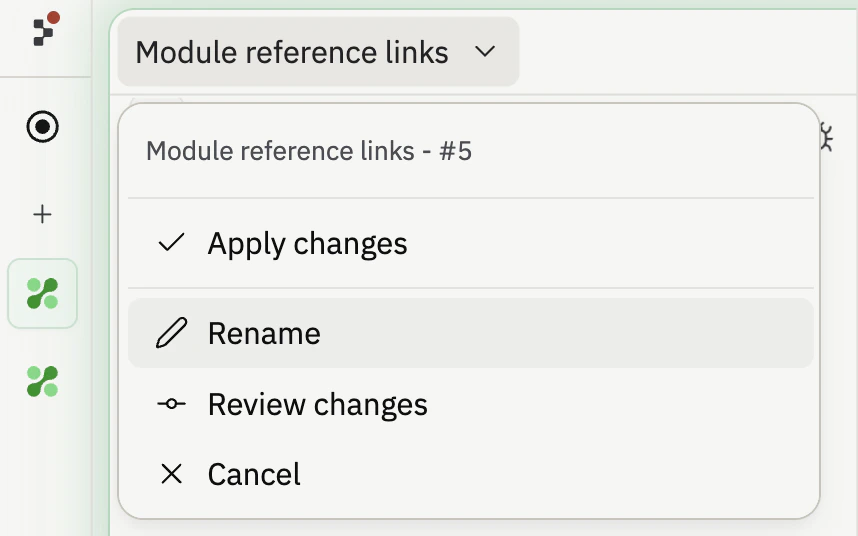
Chaque tâche possède son propre menu déroulant de paramètres à côté de son titre. Ouvrez-le pour contrôler la façon dont Agent termine la tâche et comment le résultat arrive dans votre projet :

* **Appliquer automatiquement les modifications** (Brouillons et Active) : lorsque la tâche est prête, l'appliquer immédiatement à la version principale au lieu d'attendre la révision.
* **Approuver automatiquement le plan** (Brouillons) : lorsqu'Agent suggère un plan pour la tâche, l'accepter automatiquement et commencer la construction.
* **Appliquer les modifications** (Prête) : appliquer le travail terminé à votre version principale.
* **Renommer** : modifier le titre affiché sur la carte.
* **Réviser les modifications** (Prête) : accéder directement au diff pour une tâche prête.
* **Annuler** : arrêter la tâche ou supprimer un brouillon.

L'application automatique et l'approbation automatique sont des actions rapides que vous sélectionnez une seule fois, et non des bascules que vous laissez activées. Le menu conserve une largeur constante pour que les étiquettes ne bougent pas lorsque vous ouvrez différentes tâches.

<Frame>
  <img src="https://mintcdn.com/replit/DIV6tWVNn7BTXh9_/images/replitai/task-settings-dropdown.png?fit=max&auto=format&n=DIV6tWVNn7BTXh9_&q=85&s=1af34e3cc379dc6bfb12b38a22836e84" alt="Menu déroulant des paramètres de tâche ouvert sur une carte de tâche affichant les actions Appliquer les modifications, Renommer, Réviser les modifications et Annuler dans une fenêtre contextuelle de largeur fixe" width="858" height="536" data-path="images/replitai/task-settings-dropdown.png" />
</Frame>
