> ## Documentation Index
> Fetch the complete documentation index at: https://docs.replit.com/llms.txt
> Use this file to discover all available pages before exploring further.

# Comprendre votre espace de travail

> Comprenez comment votre espace de travail Replit réunit les personnes, les Projets, les Conversations, les Routines, les données, les intégrations et la sécurité.

export const WorkspaceCover = () => <div className="chat-mkt" role="img" aria-label="A frosted Replit Workspace canvas bringing together a conversation, files, and a routine" style={{
  margin: "28px 0 42px",
  borderTop: 0,
  paddingTop: 0
}}>
    <div className="chat-use-case-visual" style={{
  aspectRatio: "auto",
  minHeight: "clamp(220px, 34vw, 320px)",
  overflow: "hidden",
  background: "radial-gradient(circle at 50% -18%, rgba(255,255,255,.82), transparent 42%), radial-gradient(circle at 4% 96%, rgba(255,184,146,.48), transparent 38%), linear-gradient(140deg, #ff764d, #ff3c00 60%, #c92d00)"
}}>
      <div aria-hidden="true" style={{
  position: "absolute",
  inset: 0,
  background: "linear-gradient(180deg, rgba(255,255,255,.14), rgba(255,255,255,0) 48%, rgba(111,24,0,.2))"
}} />
      <div aria-hidden="true" style={{
  position: "relative",
  zIndex: 1,
  display: "flex",
  width: "100%",
  minHeight: "inherit",
  boxSizing: "border-box",
  alignItems: "center",
  justifyContent: "center",
  padding: "clamp(12px, 2.6vw, 26px)"
}}>
        <div style={{
  display: "grid",
  gridTemplateColumns: "clamp(38px, 7vw, 66px) minmax(0, 1fr)",
  width: "min(720px, 90%)",
  minHeight: "clamp(168px, 27vw, 220px)",
  overflow: "hidden",
  border: "1px solid rgba(255,255,255,.62)",
  borderRadius: 24,
  background: "linear-gradient(145deg, rgba(255,255,255,.4), rgba(255,255,255,.12))",
  boxShadow: "0 20px 40px rgba(55,27,18,.22)",
  backdropFilter: "blur(7px)"
}}>
          <div style={{
  display: "grid",
  alignContent: "space-between",
  justifyItems: "center",
  padding: "clamp(12px, 2vw, 18px) 0",
  borderRight: "1px solid rgba(255,255,255,.28)"
}}>
            <span style={{
  width: 13,
  height: 13,
  borderRadius: 4,
  background: "rgba(255,255,255,.92)"
}} />
            <div style={{
  display: "grid",
  gap: 10
}}>
              {[0, 1, 2].map(item => <span key={item} style={{
  width: 12,
  height: 12,
  border: item === 0 ? "1px solid rgba(255,255,255,.84)" : "1px solid rgba(255,255,255,.48)",
  borderRadius: item === 2 ? 999 : 4,
  background: item === 0 ? "rgba(255,255,255,.3)" : "transparent"
}} />)}
            </div>
            <span style={{
  width: 13,
  height: 13,
  border: "1px solid rgba(255,255,255,.56)",
  borderRadius: 999
}} />
          </div>
          <div style={{
  minWidth: 0,
  padding: "clamp(13px, 2.4vw, 22px)"
}}>
            <div style={{
  display: "flex",
  alignItems: "center",
  gap: 7
}}>
              {[0, 1, 2].map(dot => <span key={dot} style={{
  width: 7,
  height: 7,
  borderRadius: 999,
  background: dot === 0 ? "rgba(255,255,255,.92)" : "rgba(255,255,255,.38)"
}} />)}
              <span style={{
  width: "30%",
  height: 6,
  marginLeft: 5,
  borderRadius: 999,
  background: "rgba(255,255,255,.62)"
}} />
            </div>
            <div style={{
  display: "grid",
  gridTemplateColumns: "minmax(0, 1.25fr) minmax(0, .75fr)",
  gap: "clamp(9px, 1.8vw, 16px)",
  marginTop: "clamp(13px, 2.4vw, 20px)"
}}>
              <div style={{
  display: "grid",
  alignContent: "space-between",
  minHeight: "clamp(102px, 16vw, 138px)",
  padding: "clamp(10px, 1.7vw, 14px)",
  border: "1px solid rgba(255,255,255,.42)",
  borderRadius: 14,
  background: "rgba(255,255,255,.13)"
}}>
                <div style={{
  display: "grid",
  gap: 8
}}>
                  <span style={{
  width: "56%",
  height: 16,
  border: "1px solid rgba(255,255,255,.46)",
  borderRadius: "10px 10px 10px 3px",
  background: "rgba(255,255,255,.18)"
}} />
                  <span style={{
  justifySelf: "end",
  width: "48%",
  height: 16,
  borderRadius: "10px 10px 3px 10px",
  background: "rgba(255,255,255,.74)"
}} />
                </div>
                <span style={{
  height: 8,
  border: "1px solid rgba(255,255,255,.48)",
  borderRadius: 7,
  background: "rgba(255,255,255,.13)"
}} />
              </div>
              <div style={{
  display: "grid",
  gap: "clamp(9px, 1.5vw, 14px)"
}}>
                {["76%", "54%"].map((width, index) => <div key={width} style={{
  display: "grid",
  alignContent: "center",
  gap: 7,
  padding: "clamp(8px, 1.5vw, 12px)",
  border: "1px solid rgba(255,255,255,.4)",
  borderRadius: 13,
  background: index === 0 ? "rgba(255,255,255,.2)" : "rgba(255,255,255,.11)"
}}>
                    <span style={{
  width,
  height: 6,
  borderRadius: 999,
  background: "rgba(255,255,255,.78)"
}} />
                    <span style={{
  width: "48%",
  height: 4,
  borderRadius: 999,
  background: "rgba(255,255,255,.42)"
}} />
                  </div>)}
              </div>
            </div>
          </div>
        </div>
      </div>
    </div>
  </div>;

export const chatIcon = (name, size = 19) => {
  const paths = {
    MessageCircle: <path d="M7.9 20A9 9 0 1 0 4 16.1L2 22Z" />,
    ChartNoAxesCombined: <>
        <path d="M12 16v5" />
        <path d="M16 14v7" />
        <path d="M20 10v11" />
        <path d="m22 3-8.646 8.646a.5.5 0 0 1-.708 0L9.354 8.354a.5.5 0 0 0-.708 0L2 15" />
        <path d="M4 18v3" />
        <path d="M8 14v7" />
      </>,
    Workflow: <>
        <rect width="8" height="8" x="3" y="3" rx="2" />
        <path d="M7 11v4a2 2 0 0 0 2 2h4" />
        <rect width="8" height="8" x="13" y="13" rx="2" />
      </>,
    Lightbulb: <>
        <path d="M15 14c.2-1 .7-1.7 1.5-2.5 1-.9 1.5-2.2 1.5-3.5A6 6 0 0 0 6 8c0 1 .2 2.2 1.5 3.5.7.7 1.3 1.5 1.5 2.5" />
        <path d="M9 18h6" />
        <path d="M10 22h4" />
      </>,
    Code2: <>
        <path d="m18 16 4-4-4-4" />
        <path d="m6 8-4 4 4 4" />
        <path d="m14.5 4-5 16" />
      </>,
    Presentation: <>
        <path d="M2 3h20" />
        <path d="M21 3v11a2 2 0 0 1-2 2H5a2 2 0 0 1-2-2V3" />
        <path d="m7 21 5-5 5 5" />
      </>,
    PanelsTopLeft: <>
        <rect width="18" height="18" x="3" y="3" rx="2" />
        <path d="M3 9h18" />
        <path d="M9 21V9" />
      </>,
    Keyboard: <>
        <rect width="20" height="14" x="2" y="5" rx="2" />
        <path d="M6 9h.01M10 9h.01M14 9h.01M18 9h.01M6 13h.01M10 13h.01M14 13h.01M18 13h.01M8 17h8" />
      </>,
    Layers3: <>
        <path d="m12 2 9 5-9 5-9-5 9-5Z" />
        <path d="m3 12 9 5 9-5M3 17l9 5 9-5" />
      </>,
    CalendarClock: <>
        <path d="M16 2v4M8 2v4M3 10h18" />
        <rect width="18" height="19" x="3" y="4" rx="2" />
        <path d="M12 14v3l2 1" />
      </>,
    ConversationProject: <>
        <path d="M3 4h8v6H6l-3 2V4Z" />
        <rect width="9" height="9" x="12" y="11" rx="1.5" />
        <path d="M12 14h9M15 11v9" />
      </>,
    CursorDesign: <>
        <path d="m5 3 13 7-6 2-2 6L5 3Z" />
        <path d="M15 16h6M18 13v6" />
      </>,
    AppWindow: <>
        <rect width="20" height="18" x="2" y="3" rx="2" />
        <path d="M2 8h20M6 5.5h.01M9 5.5h.01" />
      </>,
    CloudUpload: <>
        <path d="M12 13v8M8 17l4-4 4 4" />
        <path d="M20 16.5A5 5 0 0 0 18 7h-1.3A7 7 0 0 0 3.3 9.4 4.5 4.5 0 0 0 5 18h2" />
      </>,
    Image: <>
        <rect width="18" height="18" x="3" y="3" rx="2" ry="2" />
        <circle cx="9" cy="9" r="2" />
        <path d="m21 15-3.086-3.086a2 2 0 0 0-2.828 0L6 21" />
      </>,
    FileUp: <>
        <path d="M15 2H6a2 2 0 0 0-2 2v16a2 2 0 0 0 2 2h12a2 2 0 0 0 2-2V7Z" />
        <path d="M14 2v4a2 2 0 0 0 2 2h4" />
        <path d="M12 12v6" />
        <path d="m15 15-3-3-3 3" />
      </>,
    Search: <>
        <circle cx="11" cy="11" r="8" />
        <path d="m21 21-4.3-4.3" />
      </>,
    Sparkles: <path d="M9.937 15.5A2 2 0 0 0 8.5 14.063l-6.135-1.582a.5.5 0 0 1 0-.962L8.5 9.936A2 2 0 0 0 9.937 8.5l1.582-6.135a.5.5 0 0 1 .963 0L14.063 8.5A2 2 0 0 0 15.5 9.937l6.135 1.581a.5.5 0 0 1 0 .964L15.5 14.063a2 2 0 0 0-1.437 1.437l-1.582 6.135a.5.5 0 0 1-.963 0z" />,
    Briefcase: <>
        <path d="M16 20V4a2 2 0 0 0-2-2h-4a2 2 0 0 0-2 2v16" />
        <rect width="20" height="14" x="2" y="6" rx="2" />
      </>,
    WandSparkles: <>
        <path d="m21.64 3.64-1.28-1.28a1.21 1.21 0 0 0-1.72 0L2.36 18.64a1.21 1.21 0 0 0 0 1.72l1.28 1.28a1.2 1.2 0 0 0 1.72 0L21.64 5.36a1.2 1.2 0 0 0 0-1.72" />
        <path d="m14 7 3 3" />
        <path d="M5 6v4" />
        <path d="M19 14v4" />
        <path d="M10 2v2" />
        <path d="M7 8H3" />
        <path d="M21 16h-4" />
        <path d="M11 3H9" />
      </>
  };
  return <svg width={size} height={size} viewBox="0 0 24 24" fill="none" stroke="currentColor" strokeWidth="1.8" strokeLinecap="round" strokeLinejoin="round" aria-hidden="true">
      {paths[name] ?? paths.Sparkles}
    </svg>;
};

<WorkspaceCover />

Votre espace de travail Replit est le point central de tout ce qui concerne une
idée. Il réunit les [Projets](/fr/home/projects), les
[Conversations](/fr/home/conversations), les [Routines](/fr/chat/routines) et
les intégrations, afin que vous puissiez passer d'une première question à un
résultat utile.

## Configurer le projet du café

Avant de commencer à façonner l'idée du café, donnez-lui un espace. Cet espace
de travail regroupera les éléments du lancement à mesure qu'ils se
développent :

* Une conversation pour façonner le concept et étudier le marché local
* Des fichiers et des outils connectés qui apportent un contexte utile au plan
* Une Routine qui surveille ensuite la concurrence et les évolutions du marché
* Le site que vous finirez par concevoir et publier

<Frame>
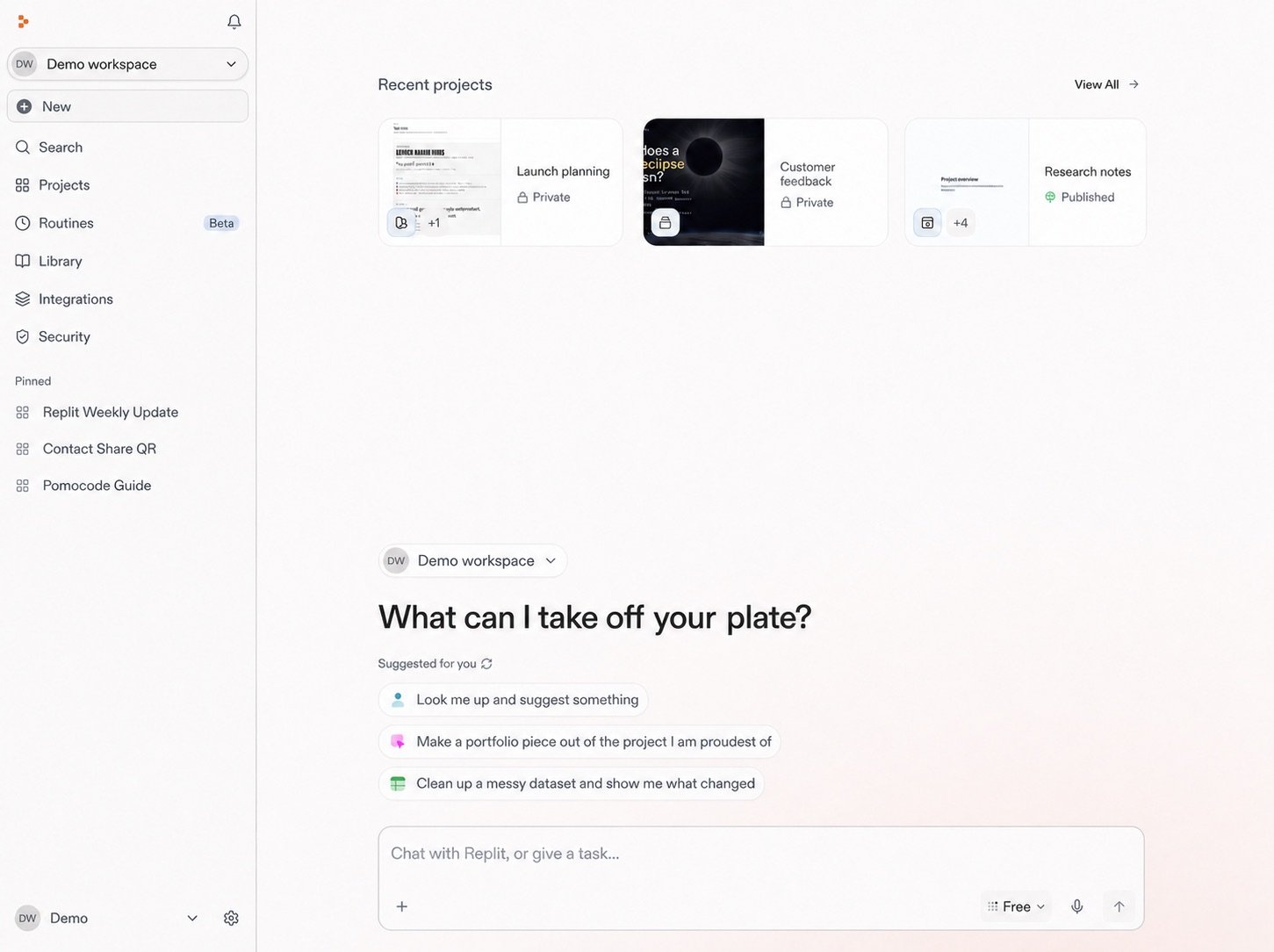
  <img src="https://mintcdn.com/replit/teDUL4A-lNO7dv1O/images/chat/start-new-conversation-home-sanitized-neutral.jpg?fit=max&auto=format&n=teDUL4A-lNO7dv1O&q=85&s=cf93f549696aff0eab748dd953aea0b6" alt="Écran d'accueil Replit pour l'espace de travail Demo avec Projets, Conversations, Routines, invites suggérées et la zone de message" width="1451" height="1084" data-path="images/chat/start-new-conversation-home-sanitized-neutral.jpg" />
</Frame>

La zone d'invite est le point de départ de ce projet. C'est ici que vous
démarrerez une conversation et donnerez à Replit la première description du
café que vous souhaitez créer.

## Détails de l'espace de travail

Il regroupe également les personnes associées, les paramètres, les ressources
partagées, les intégrations et la facturation. Votre niveau d'accès détermine
ce que vous pouvez voir et gérer.

Les paramètres de l'espace de travail et les contrôles d'organisation sont distincts des contrôles que vous utilisez pour définir la façon dont l'Agent répond à une demande.

Vous pouvez revenir à l'espace de travail à tout moment du lancement pour
retrouver tout ce qui le soutient.

<section className="chat-mkt chat-workflow-grid has-visuals">
  <a className="chat-example has-visual" href="/fr/home/start-a-conversation">
    <div className="chat-use-case-visual">
      <div className="chat-use-case-icon">
        {chatIcon("MessageCircle", 32)}
      </div>
    </div>

    <div className="chat-example-tag">Étape suivante</div>
    <div className="chat-card-title">Démarrer une conversation</div>
    <p>Démarrez le lancement du café en décrivant le résultat que vous souhaitez obtenir.</p>
    <div className="chat-card-link">Explorer →</div>
  </a>

  <a className="chat-example has-visual" href="/fr/features/collaboration/workspaces">
    <div className="chat-use-case-visual palette-stone">
      <div className="chat-use-case-icon">
        {chatIcon("Briefcase", 32)}
      </div>
    </div>

    <div className="chat-example-tag">Détails de l'espace de travail</div>
    <div className="chat-card-title">En savoir plus sur les espaces de travail</div>

    <p>
      Découvrez les espaces de travail personnels et d'équipe, l'accès, les
      paramètres et la gestion.
    </p>

    <div className="chat-card-link">Explorer →</div>
  </a>
</section>

Ensuite, [démarrez une conversation](/fr/home/start-a-conversation) pour
commencer à façonner l'idée du café.
