> ## Documentation Index
> Fetch the complete documentation index at: https://docs.replit.com/llms.txt
> Use this file to discover all available pages before exploring further.

# Démarrez une conversation

> Démarrez une Conversation avec une simple question, une recherche web, ou un contexte connecté, puis choisissez la prochaine étape.

export const ChatConversationsCover = () => <div className="chat-mkt" role="img" aria-label="Replit Conversation window with a message thread and prompt box" style={{
  margin: "28px 0 42px",
  borderTop: 0,
  paddingTop: 0
}}>
    <div className="chat-use-case-visual" style={{
  aspectRatio: "auto",
  minHeight: "clamp(220px, 34vw, 320px)",
  overflow: "hidden",
  background: "radial-gradient(circle at 50% -18%, rgba(255,255,255,.82), transparent 42%), radial-gradient(circle at 4% 96%, rgba(255,184,146,.48), transparent 38%), linear-gradient(140deg, #ff764d, #ff3c00 60%, #c92d00)"
}}>
      <div aria-hidden="true" style={{
  position: "absolute",
  inset: 0,
  background: "linear-gradient(180deg, rgba(255,255,255,.14), rgba(255,255,255,0) 48%, rgba(111,24,0,.2))"
}} />
      <div aria-hidden="true" style={{
  position: "absolute",
  width: "clamp(280px, 72%, 780px)",
  maxWidth: "calc(100% - 12px)",
  height: "68%",
  left: "50%",
  top: "15%",
  transform: "translateX(-50%) rotate(3deg)",
  opacity: 0.46,
  border: "1px solid rgba(255,255,255,.34)",
  borderRadius: 28,
  background: "transparent"
}} />
      <div aria-hidden="true" style={{
  position: "relative",
  zIndex: 1,
  display: "flex",
  width: "100%",
  minHeight: "inherit",
  alignItems: "center",
  justifyContent: "center",
  padding: "clamp(10px, 2vw, 20px)"
}}>
        <div style={{
  width: "clamp(260px, 70%, 760px)",
  maxWidth: "calc(100% - 20px)",
  minWidth: 0,
  boxSizing: "border-box",
  padding: "clamp(16px, 3vw, 26px)",
  border: "1px solid rgba(255,255,255,.54)",
  borderRadius: 24,
  background: "linear-gradient(180deg, rgba(255,255,255,.27), rgba(255,255,255,.1))",
  boxShadow: "0 18px 36px rgba(55,27,18,.2)",
  backdropFilter: "blur(5px)"
}}>
          <div style={{
  display: "flex",
  alignItems: "center",
  gap: 7
}}>
            <span style={{
  width: 8,
  height: 8,
  borderRadius: 999,
  background: "rgba(255,255,255,.92)"
}} />
            <span style={{
  width: 8,
  height: 8,
  borderRadius: 999,
  background: "rgba(255,255,255,.52)"
}} />
            <span style={{
  width: 8,
  height: 8,
  borderRadius: 999,
  background: "rgba(255,255,255,.32)"
}} />
          </div>
          <div style={{
  display: "flex",
  gap: "clamp(12px, 3vw, 20px)",
  marginTop: "clamp(14px, 3vw, 22px)"
}}>
            <div style={{
  display: "grid",
  width: "clamp(34px, 7vw, 52px)",
  minWidth: "clamp(34px, 7vw, 52px)",
  alignContent: "start",
  gap: 10,
  padding: "8px 8px 8px 0",
  borderRight: "1px solid rgba(255,255,255,.32)"
}}>
              <span style={{
  width: 12,
  height: 12,
  borderRadius: 4,
  background: "rgba(255,255,255,.9)"
}} />
              <span style={{
  width: 12,
  height: 12,
  border: "1px solid rgba(255,255,255,.66)",
  borderRadius: 4,
  background: "rgba(255,255,255,.12)"
}} />
              <span style={{
  width: 12,
  height: 12,
  border: "1px solid rgba(255,255,255,.48)",
  borderRadius: 999
}} />
            </div>
            <div style={{
  display: "grid",
  minWidth: 0,
  flex: "1 1 auto",
  gap: 9,
  alignContent: "start"
}}>
              <span style={{
  width: "68%",
  height: 24,
  border: "1px solid rgba(255,255,255,.46)",
  borderRadius: "14px 14px 14px 4px",
  background: "rgba(255,255,255,.18)"
}} />
              <span style={{
  justifySelf: "end",
  width: "58%",
  height: 24,
  borderRadius: "14px 14px 4px 14px",
  background: "rgba(255,255,255,.78)"
}} />
              <span style={{
  width: "76%",
  height: 32,
  border: "1px solid rgba(255,255,255,.4)",
  borderRadius: "14px 14px 14px 4px",
  background: "rgba(255,255,255,.14)"
}} />
            </div>
          </div>
          <div style={{
  display: "flex",
  alignItems: "center",
  justifyContent: "space-between",
  gap: 10,
  marginTop: "clamp(14px, 3vw, 20px)",
  padding: "10px 11px 10px 13px",
  border: "1px solid rgba(255,255,255,.58)",
  borderRadius: 15,
  background: "rgba(255,255,255,.16)"
}}>
            <span style={{
  width: "64%",
  height: 7,
  borderRadius: 999,
  background: "rgba(255,255,255,.7)"
}} />
            <span style={{
  display: "grid",
  width: 24,
  height: 24,
  placeItems: "center",
  flex: "0 0 auto",
  borderRadius: 8,
  background: "rgba(255,255,255,.9)",
  color: "#4b5563",
  fontSize: 15,
  fontWeight: 700
}}>
              ↑
            </span>
          </div>
        </div>
      </div>
    </div>
  </div>;

export const chatIcon = (name, size = 19) => {
  const paths = {
    MessageCircle: <path d="M7.9 20A9 9 0 1 0 4 16.1L2 22Z" />,
    ChartNoAxesCombined: <>
        <path d="M12 16v5" />
        <path d="M16 14v7" />
        <path d="M20 10v11" />
        <path d="m22 3-8.646 8.646a.5.5 0 0 1-.708 0L9.354 8.354a.5.5 0 0 0-.708 0L2 15" />
        <path d="M4 18v3" />
        <path d="M8 14v7" />
      </>,
    Workflow: <>
        <rect width="8" height="8" x="3" y="3" rx="2" />
        <path d="M7 11v4a2 2 0 0 0 2 2h4" />
        <rect width="8" height="8" x="13" y="13" rx="2" />
      </>,
    Lightbulb: <>
        <path d="M15 14c.2-1 .7-1.7 1.5-2.5 1-.9 1.5-2.2 1.5-3.5A6 6 0 0 0 6 8c0 1 .2 2.2 1.5 3.5.7.7 1.3 1.5 1.5 2.5" />
        <path d="M9 18h6" />
        <path d="M10 22h4" />
      </>,
    Code2: <>
        <path d="m18 16 4-4-4-4" />
        <path d="m6 8-4 4 4 4" />
        <path d="m14.5 4-5 16" />
      </>,
    Presentation: <>
        <path d="M2 3h20" />
        <path d="M21 3v11a2 2 0 0 1-2 2H5a2 2 0 0 1-2-2V3" />
        <path d="m7 21 5-5 5 5" />
      </>,
    PanelsTopLeft: <>
        <rect width="18" height="18" x="3" y="3" rx="2" />
        <path d="M3 9h18" />
        <path d="M9 21V9" />
      </>,
    Keyboard: <>
        <rect width="20" height="14" x="2" y="5" rx="2" />
        <path d="M6 9h.01M10 9h.01M14 9h.01M18 9h.01M6 13h.01M10 13h.01M14 13h.01M18 13h.01M8 17h8" />
      </>,
    Layers3: <>
        <path d="m12 2 9 5-9 5-9-5 9-5Z" />
        <path d="m3 12 9 5 9-5M3 17l9 5 9-5" />
      </>,
    CalendarClock: <>
        <path d="M16 2v4M8 2v4M3 10h18" />
        <rect width="18" height="19" x="3" y="4" rx="2" />
        <path d="M12 14v3l2 1" />
      </>,
    ConversationProject: <>
        <path d="M3 4h8v6H6l-3 2V4Z" />
        <rect width="9" height="9" x="12" y="11" rx="1.5" />
        <path d="M12 14h9M15 11v9" />
      </>,
    CursorDesign: <>
        <path d="m5 3 13 7-6 2-2 6L5 3Z" />
        <path d="M15 16h6M18 13v6" />
      </>,
    AppWindow: <>
        <rect width="20" height="18" x="2" y="3" rx="2" />
        <path d="M2 8h20M6 5.5h.01M9 5.5h.01" />
      </>,
    CloudUpload: <>
        <path d="M12 13v8M8 17l4-4 4 4" />
        <path d="M20 16.5A5 5 0 0 0 18 7h-1.3A7 7 0 0 0 3.3 9.4 4.5 4.5 0 0 0 5 18h2" />
      </>,
    Image: <>
        <rect width="18" height="18" x="3" y="3" rx="2" ry="2" />
        <circle cx="9" cy="9" r="2" />
        <path d="m21 15-3.086-3.086a2 2 0 0 0-2.828 0L6 21" />
      </>,
    FileUp: <>
        <path d="M15 2H6a2 2 0 0 0-2 2v16a2 2 0 0 0 2 2h12a2 2 0 0 0 2-2V7Z" />
        <path d="M14 2v4a2 2 0 0 0 2 2h4" />
        <path d="M12 12v6" />
        <path d="m15 15-3-3-3 3" />
      </>,
    Search: <>
        <circle cx="11" cy="11" r="8" />
        <path d="m21 21-4.3-4.3" />
      </>,
    Sparkles: <path d="M9.937 15.5A2 2 0 0 0 8.5 14.063l-6.135-1.582a.5.5 0 0 1 0-.962L8.5 9.936A2 2 0 0 0 9.937 8.5l1.582-6.135a.5.5 0 0 1 .963 0L14.063 8.5A2 2 0 0 0 15.5 9.937l6.135 1.581a.5.5 0 0 1 0 .964L15.5 14.063a2 2 0 0 0-1.437 1.437l-1.582 6.135a.5.5 0 0 1-.963 0z" />,
    Briefcase: <>
        <path d="M16 20V4a2 2 0 0 0-2-2h-4a2 2 0 0 0-2 2v16" />
        <rect width="20" height="14" x="2" y="6" rx="2" />
      </>,
    WandSparkles: <>
        <path d="m21.64 3.64-1.28-1.28a1.21 1.21 0 0 0-1.72 0L2.36 18.64a1.21 1.21 0 0 0 0 1.72l1.28 1.28a1.2 1.2 0 0 0 1.72 0L21.64 5.36a1.2 1.2 0 0 0 0-1.72" />
        <path d="m14 7 3 3" />
        <path d="M5 6v4" />
        <path d="M19 14v4" />
        <path d="M10 2v2" />
        <path d="M7 8H3" />
        <path d="M21 16h-4" />
        <path d="M11 3H9" />
      </>
  };
  return <svg width={size} height={size} viewBox="0 0 24 24" fill="none" stroke="currentColor" strokeWidth="1.8" strokeLinecap="round" strokeLinejoin="round" aria-hidden="true">
      {paths[name] ?? paths.Sparkles}
    </svg>;
};

<ChatConversationsCover />

Votre Espace de travail est prêt. Il est maintenant temps de faire avancer
l'idée du café. Démarrez une [conversation](/fr/chat/conversations), dites à
Replit ce que vous voulez créer, et commencez à transformer la première idée
en un véritable plan de lancement.

## Démarrez une nouvelle conversation

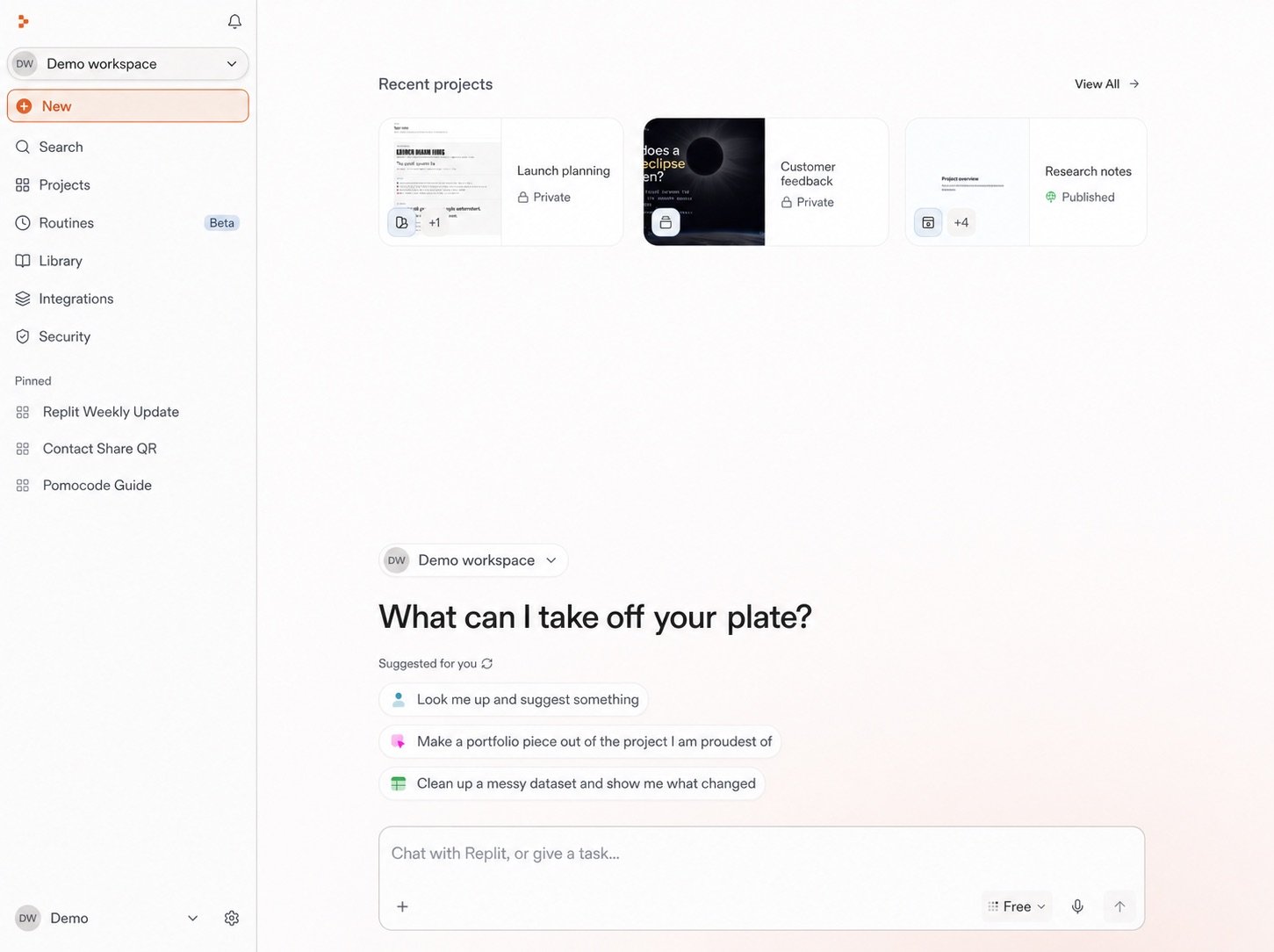
Sélectionnez **Nouveau** dans la barre latérale de Replit. Cela ouvre la
conversation où vous allez façonner le concept, étudier le marché, et
planifier le lancement.

<Frame>
  <img src="https://mintcdn.com/replit/teDUL4A-lNO7dv1O/images/chat/start-new-conversation-home-sanitized.jpg?fit=max&auto=format&n=teDUL4A-lNO7dv1O&q=85&s=279defc825ebebd9d0f7ac8187b6181b" alt="Écran d'accueil de Replit pour l'espace de travail Demo avec le bouton Nouveau mis en évidence, des invites suggérées, et la zone de message" width="1451" height="1084" data-path="images/chat/start-new-conversation-home-sanitized.jpg" />
</Frame>

## Explorez la zone d'invite

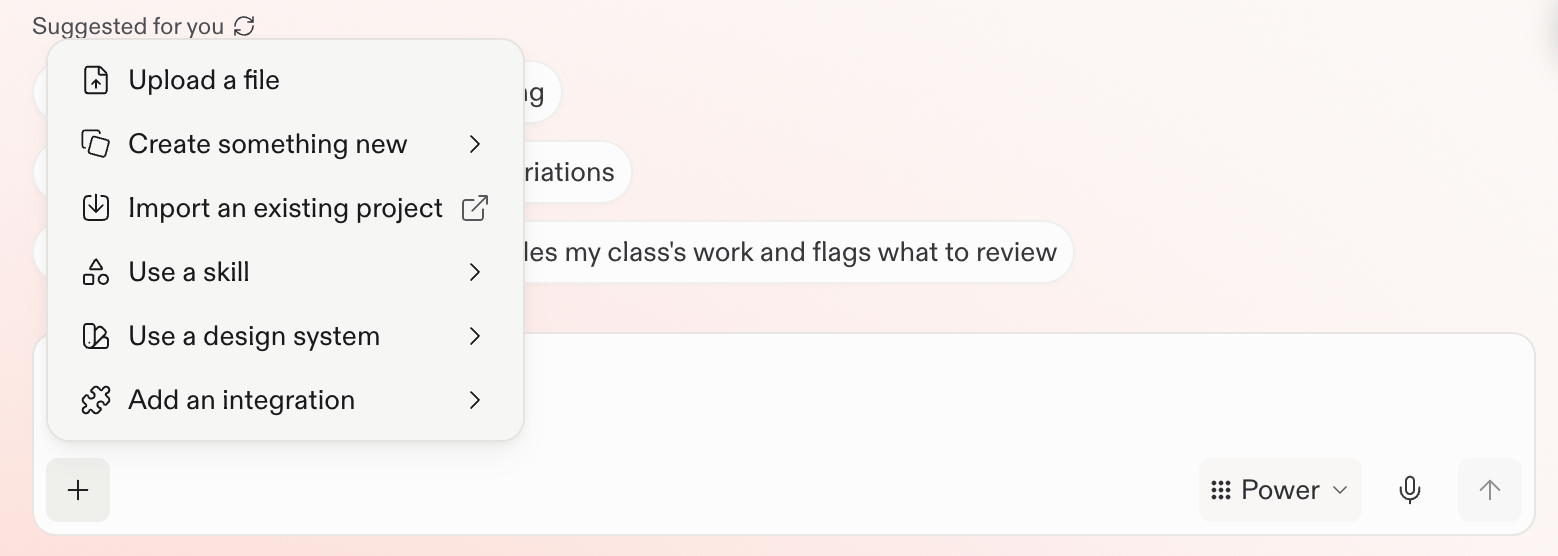
Après avoir sélectionné **Nouveau**, jetez un œil à la zone d'invite. C'est
ici que vous allez donner une direction à Replit, ajouter du contexte utile,
et poursuivre le lancement du café. La prochaine étape consiste à rédiger le
premier prompt.
<Frame>
  <img src="https://mintcdn.com/replit/teDUL4A-lNO7dv1O/images/chat/prompt-box-plus-menu.png?fit=max&auto=format&n=teDUL4A-lNO7dv1O&q=85&s=7fd877ec8f84f73ec684181b9ec4f7b3" alt="Menu plus de la zone d'invite avec des options pour téléverser un fichier, créer quelque chose de nouveau, importer un projet, utiliser une compétence ou un système de design, et ajouter une intégration" width="1558" height="556" data-path="images/chat/prompt-box-plus-menu.png" />
</Frame>

## Suivant

<section className="chat-mkt chat-workflow-grid has-visuals">
  <a className="chat-example has-visual" href="/fr/home/describe-your-idea">
    <div className="chat-use-case-visual">
      <div className="chat-use-case-icon">
        {chatIcon("Lightbulb", 32)}
      </div>
    </div>

    <div className="chat-example-tag">Premier prompt</div>
    <div className="chat-card-title">Façonnez le concept</div>
    <p>Rédigez une première demande ciblée pour le lancement du café.</p>
    <div className="chat-card-link">Continuer →</div>
  </a>
</section>
