> ## Documentation Index
> Fetch the complete documentation index at: https://docs.replit.com/llms.txt
> Use this file to discover all available pages before exploring further.

# Tableau des tâches

> Utilisez le tableau des tâches pour réviser, démarrer, surveiller et appliquer les tâches Agent au fur et à mesure de leur progression dans chaque étape.

export const TaskReviewDrawer = ({taskNumber = 23, taskTitle = "Story regeneration: redo pages or whole stories", taskDescription = 'Added story and page-level regeneration capabilities:\n\nBackend (API):\n- POST /api/stories/:storyId/regenerate: regenerates the entire story, deletes existing pages, sets status to "generating", and re-runs the full story text and image generation pipeline in the background\n- POST /api/stories/:storyId/pages/:pageId/regenerate: regenerates a single page with body { target: "text" | "image" | "both" }\n\nFrontend (story-preview.tsx):\n- Per-page regeneration menu: subtle three-dot icon overlay on the image area with options for "Regenerate Text", "Regenerate Image", or "Regenerate Both"\n- "Regenerate Story" button in header with confirmation dialog\n- Loading state: regenerating pages show a spinner and skeleton text while other pages remain readable'}) => {
  if (typeof document !== "undefined" && !document.getElementById("task-review-drawer-styles")) {
    const style = document.createElement("style");
    style.id = "task-review-drawer-styles";
    style.textContent = `
      .trd-wrap {
        --trd-surface: var(--replit-docs-bg, #F6F6F4);
        --trd-surface-higher: var(--replit-docs-bg-elevated, #F1F1EE);
        --trd-border: var(--replit-docs-border, #DEDAD5);
        --trd-border-strong: var(--replit-docs-border-strong, #CAC4BE);
        --trd-text: var(--replit-docs-text, #1D1D1D);
        --trd-text-dim: var(--replit-docs-text-muted, #5C5C5C);
        --trd-text-dimmest: var(--replit-docs-text-subtle, #858585);
        --trd-icon: var(--replit-docs-text-subtle, #858585);
        --trd-btn-bg: var(--replit-docs-bg-muted, #F1F1EE);
        --trd-btn-hover: var(--replit-docs-bg-elevated, #F1F1EE);
        --trd-positive-bg: hsla(140, 50%, 38%, 1);
        --trd-positive-text: #FFFFFF;
        --trd-positive-hover: hsla(140, 50%, 33%, 1);
        --trd-shadow: 0 1px 3px rgba(0,0,0,0.06);
        --trd-icon-surface: var(--replit-docs-bg-elevated, #F1F1EE);
        --trd-icon-border: var(--replit-docs-border, #DEDAD5);
      }
      .dark .trd-wrap,
      html.dark .trd-wrap,
      [data-theme="dark"] .trd-wrap {
        --trd-surface: var(--replit-docs-bg, #1E1E1F);
        --trd-surface-higher: var(--replit-docs-bg-elevated, #222223);
        --trd-border: var(--replit-docs-border, #39393D);
        --trd-border-strong: var(--replit-docs-border-strong, #4A4A50);
        --trd-text: var(--replit-docs-text, #F5F5F5);
        --trd-text-dim: var(--replit-docs-text-muted, #B8B8BE);
        --trd-text-dimmest: var(--replit-docs-text-subtle, #8E8F97);
        --trd-icon: var(--replit-docs-text-subtle, #8E8F97);
        --trd-btn-bg: var(--replit-docs-bg-elevated, #222223);
        --trd-btn-hover: var(--replit-docs-bg-muted, #222223);
        --trd-positive-bg: hsla(140, 50%, 33%, 1);
        --trd-positive-text: #FFFFFF;
        --trd-positive-hover: hsla(140, 50%, 28%, 1);
        --trd-shadow: 0 1px 3px rgba(0,0,0,0.2);
        --trd-icon-surface: var(--replit-docs-bg-elevated, #222223);
        --trd-icon-border: var(--replit-docs-border, #39393D);
      }
      .trd-wrap, .trd-wrap * {
        font-family: 'IBM Plex Sans', sans-serif !important;
      }
      @keyframes trd-fade-in {
        from { transform: translateY(8px); opacity: 0; }
        to { transform: translateY(0); opacity: 1; }
      }
      @media (hover: hover) {
        .trd-wrap .trd-dismiss:hover { background: var(--trd-btn-hover) !important; }
        .trd-wrap .trd-apply:hover { background: var(--trd-positive-hover) !important; }
      }
    `;
    document.head.appendChild(style);
  }
  const PlusIcon = <svg width="16" height="16" viewBox="0 0 24 24" fill="currentColor">
      <path d="M12 4.25a.75.75 0 0 1 .75.75v6.25H19a.75.75 0 0 1 0 1.5h-6.25V19a.75.75 0 0 1-1.5 0v-6.25H5a.75.75 0 0 1 0-1.5h6.25V5a.75.75 0 0 1 .75-.75Z" />
    </svg>;
  const ArrowUpIcon = <svg width="16" height="16" viewBox="0 0 24 24" fill="currentColor">
      <path fillRule="evenodd" d="M11.47 4.47a.75.75 0 0 1 1.06 0l7 7a.75.75 0 1 1-1.06 1.06l-5.72-5.72V19a.75.75 0 0 1-1.5 0V6.81l-5.72 5.72a.75.75 0 0 1-1.06-1.06l7-7Z" clipRule="evenodd" />
    </svg>;
  const ApplyIcon = <svg width="16" height="16" viewBox="0 0 24 24" fill="currentColor">
      <path fillRule="evenodd" d="M6 3.75a2.25 2.25 0 1 0 0 4.5 2.25 2.25 0 0 0 0-4.5ZM2.25 6a3.75 3.75 0 1 1 4.527 3.67 8.25 8.25 0 0 0 7.554 7.553A3.751 3.751 0 0 1 21.75 18a3.75 3.75 0 0 1-7.43.726 9.75 9.75 0 0 1-7.57-4.53V21a.75.75 0 0 1-1.5 0V9.675A3.751 3.751 0 0 1 2.25 6ZM18 15.75a2.25 2.25 0 1 0 0 4.5 2.25 2.25 0 0 0 0-4.5Z" clipRule="evenodd" />
    </svg>;
  const AgentModesIcon = <svg width="16" height="16" viewBox="0 0 24 24" fill="currentColor">
      <path d="M1.25 6V4A2.75 2.75 0 0 1 4 1.25h2a.75.75 0 0 1 0 1.5H4A1.25 1.25 0 0 0 2.75 4v2a.75.75 0 0 1-1.5 0ZM21.25 6V4a1.25 1.25 0 0 0-1.126-1.244L20 2.75h-2a.75.75 0 0 1 0-1.5h2A2.75 2.75 0 0 1 22.75 4v2a.75.75 0 0 1-1.5 0ZM21.25 20v-2a.75.75 0 0 1 1.5 0v2A2.75 2.75 0 0 1 20 22.75h-2a.75.75 0 0 1 0-1.5h2A1.25 1.25 0 0 0 21.25 20ZM1.25 20v-2a.75.75 0 0 1 1.5 0v2l.006.124A1.25 1.25 0 0 0 4 21.25h2a.75.75 0 0 1 0 1.5H4A2.75 2.75 0 0 1 1.25 20ZM16 12a4 4 0 1 0-8 0 4 4 0 0 0 8 0Zm1.5 0a5.5 5.5 0 1 1-11 0 5.5 5.5 0 0 1 11 0Z" />
    </svg>;
  const ChevronDown = <svg width="12" height="12" viewBox="0 0 24 24" fill="var(--trd-text-dimmest)">
      <path fillRule="evenodd" d="M12.53 15.53a.75.75 0 0 1-1.06 0l-6-6a.75.75 0 0 1 1.06-1.06L12 13.94l5.47-5.47a.75.75 0 1 1 1.06 1.06l-6 6Z" clipRule="evenodd" />
    </svg>;
  const SparkleIcon = <svg width="16" height="16" viewBox="0 0 24 24" fill="none">
      <path fill="#009118" d="M18.662 0a5.332 5.332 0 0 1 .001 10.664l-.412.01a8 8 0 0 0-7.577 7.59l-.01.398-.008.274A5.331 5.331 0 0 1 0 18.662a5.332 5.332 0 0 1 5.332-5.332l.398-.01a8 8 0 0 0 7.59-7.576l.011-.412A5.331 5.331 0 0 1 18.662 0Z" />
      <path fill="#6CD97E" d="m18.663 13.33.273.007a5.332 5.332 0 1 1-5.598 5.6l-.007-.275.006-.265a5.38 5.38 0 0 1 .137-.963c.006-.026.01-.052.017-.078.012-.047.026-.095.04-.142a4.84 4.84 0 0 1 .032-.114l.007-.024.065-.193.02-.054.022-.06c.021-.056.044-.112.067-.167l.026-.059c.024-.056.048-.112.074-.167l.058-.118a4.854 4.854 0 0 1 .145-.265l.024-.043a5.29 5.29 0 0 1 .08-.129c.02-.032.04-.065.062-.097a5.34 5.34 0 0 1 .468-.607l.071-.079a5.562 5.562 0 0 1 .265-.267l.11-.1a5.3 5.3 0 0 1 .308-.252l.058-.045c.046-.034.093-.068.14-.1l.049-.034.073-.049.07-.043.112-.07c.043-.026.089-.05.133-.075.026-.014.051-.03.078-.044l.114-.059c.041-.02.083-.042.126-.062l.089-.04.146-.065.086-.033c.048-.019.095-.038.143-.055l.023-.008.202-.068.024-.007c.062-.019.125-.036.189-.053l.043-.012c.062-.016.125-.03.189-.044l.078-.018a5.34 5.34 0 0 1 .485-.074c.011 0 .023-.003.034-.005.09-.009.18-.014.27-.02l.274-.006ZM5.332 0a5.332 5.332 0 0 1 5.332 5.332l-.008.274a5.332 5.332 0 0 1-5.324 5.058l-.274-.007A5.332 5.332 0 0 1 5.332 0Z" />
    </svg>;
  const descriptionLines = taskDescription.split("\n").filter(l => l.trim());
  return <div className="trd-wrap" style={{
    fontFamily: "'IBM Plex Sans', sans-serif",
    width: "100%",
    maxWidth: "427px",
    minWidth: "320px",
    alignSelf: "center",
    margin: "48px auto",
    opacity: 0,
    animation: "trd-fade-in 300ms ease-out forwards"
  }}>
      {}
      <div style={{
    background: "var(--trd-surface)",
    border: "1px solid var(--trd-border-strong)",
    borderRadius: "6px",
    padding: "8px",
    boxShadow: "var(--trd-shadow)",
    display: "flex",
    flexDirection: "column",
    gap: "4px"
  }}>
        {}
        <div>
          <div style={{
    display: "flex",
    flexDirection: "column",
    gap: "8px",
    padding: "4px"
  }}>
            {}
            <div style={{
    display: "flex",
    alignItems: "center",
    gap: "8px"
  }}>
              <div style={{
    display: "flex",
    alignItems: "center",
    justifyContent: "center",
    width: "28px",
    height: "28px",
    borderRadius: "8px",
    background: "var(--trd-icon-surface)",
    border: "1px solid var(--trd-icon-border)",
    flexShrink: 0
  }}>
                {SparkleIcon}
              </div>
              <span style={{
    fontSize: "14px",
    lineHeight: "1.4",
    color: "var(--trd-text)"
  }}>
                Ready for review
              </span>
            </div>

            {}
            <div style={{
    display: "flex",
    flexDirection: "column",
    gap: "4px"
  }}>
              <span style={{
    fontSize: "13px",
    lineHeight: "1.4",
    color: "var(--trd-text-dim)"
  }}>
                Task #{taskNumber}: {taskTitle}
              </span>

              {}
              <div style={{
    fontSize: "12px",
    lineHeight: "1.5",
    color: "var(--trd-text-dimmest)",
    maxHeight: "50px",
    overflow: "hidden",
    position: "relative"
  }}>
                {descriptionLines.map((line, i) => <span key={i}>
                    {line}
                    <br />
                  </span>)}
              </div>
            </div>

            {}
            <div style={{
    display: "flex",
    gap: "8px"
  }}>
              <button className="trd-dismiss" type="button" style={{
    width: "122px",
    flexShrink: 0,
    height: "32px",
    display: "flex",
    alignItems: "center",
    justifyContent: "center",
    border: "none",
    borderRadius: "8px",
    background: "var(--trd-btn-bg)",
    color: "var(--trd-text)",
    fontSize: "14px",
    fontFamily: "inherit",
    cursor: "pointer",
    transition: "background 120ms ease-out"
  }}>
                Dismiss
              </button>
              <button className="trd-apply" type="button" style={{
    flex: 1,
    height: "32px",
    display: "flex",
    alignItems: "center",
    justifyContent: "center",
    gap: "6px",
    border: "none",
    borderRadius: "8px",
    background: "var(--trd-positive-bg)",
    color: "var(--trd-positive-text)",
    fontSize: "14px",
    fontFamily: "inherit",
    cursor: "pointer",
    transition: "background 120ms ease-out"
  }}>
                <span>Apply changes to main version</span>
                {ApplyIcon}
              </button>
            </div>
          </div>
        </div>

        {}
        <div style={{
    padding: 0
  }}>
          <div style={{
    display: "flex",
    flexDirection: "column",
    gap: "4px"
  }}>
            {}
            <div style={{
    padding: "5px 6px",
    minHeight: "21px",
    fontSize: "14px",
    lineHeight: "1.3",
    color: "var(--trd-text-dimmest)"
  }}>
              Message agent…
            </div>

            {}
            <div style={{
    display: "flex",
    justifyContent: "space-between",
    alignItems: "flex-end",
    paddingBottom: "2px"
  }}>
              {}
              <div style={{
    display: "flex",
    alignItems: "center",
    gap: "4px"
  }}>
                <button type="button" style={{
    display: "flex",
    alignItems: "center",
    justifyContent: "center",
    width: "24px",
    height: "24px",
    border: "none",
    borderRadius: "4px",
    background: "transparent",
    cursor: "pointer",
    color: "var(--trd-icon)",
    padding: 0
  }}>
                  {PlusIcon}
                </button>
              </div>

              {}
              <div style={{
    display: "flex",
    alignItems: "center",
    gap: "8px",
    paddingRight: "2px"
  }}>
                <button type="button" style={{
    display: "flex",
    alignItems: "center",
    gap: "4px",
    height: "24px",
    padding: "0 4px",
    border: "none",
    borderRadius: "4px",
    background: "transparent",
    cursor: "pointer",
    color: "var(--trd-icon)"
  }}>
                  {AgentModesIcon}
                  {ChevronDown}
                </button>
                <button type="button" style={{
    display: "flex",
    alignItems: "center",
    justifyContent: "center",
    width: "28px",
    height: "28px",
    border: "none",
    borderRadius: "8px",
    background: "hsla(210, 100%, 74%, 1)",
    color: "#FFFFFF",
    padding: 0,
    cursor: "pointer"
  }}>
                  {ArrowUpIcon}
                </button>
              </div>
            </div>
          </div>
        </div>
      </div>
    </div>;
};

export const KanbanColumns = ({columns = []}) => {
  if (typeof document !== "undefined" && !document.getElementById("kanban-board-styles")) {
    const style = document.createElement("style");
    style.id = "kanban-board-styles";
    style.textContent = `
      .kb-board {
        --kb-bg: var(--replit-docs-bg, #F6F6F4);
        --kb-col-bg: var(--replit-docs-bg-elevated, #F1F1EE);
        --kb-card-bg: var(--replit-docs-bg-task, #EDECE8);
        --kb-border: var(--replit-docs-border, #DEDAD5);
        --kb-text: var(--replit-docs-text, #1D1D1D);
        --kb-text-dim: var(--replit-docs-text-muted, #5C5C5C);
        --kb-text-dimmer: var(--replit-docs-text-muted, #5C5C5C);
        --kb-text-dimmest: var(--replit-docs-text-subtle, #858585);
        --kb-badge-bg: var(--replit-docs-bg-elevated, #F1F1EE);
      }
      .dark .kb-board,
      html.dark .kb-board,
      [data-theme="dark"] .kb-board {
        --kb-bg: var(--replit-docs-bg, #1E1E1F);
        --kb-col-bg: var(--replit-docs-bg-elevated, #222223);
        --kb-card-bg: var(--replit-docs-bg-task, #252527);
        --kb-border: var(--replit-docs-border, #39393D);
        --kb-text: var(--replit-docs-text, #F5F5F5);
        --kb-text-dim: var(--replit-docs-text-muted, #B8B8BE);
        --kb-text-dimmer: var(--replit-docs-text-muted, #B8B8BE);
        --kb-text-dimmest: var(--replit-docs-text-subtle, #8E8F97);
        --kb-badge-bg: var(--replit-docs-bg-elevated, #222223);
      }
      .kb-board { overflow: visible; }
    `;
    document.head.appendChild(style);
  }
  return <div className="kb-board" style={{
    fontFamily: "'IBM Plex Sans', sans-serif",
    display: "flex",
    gap: "12px",
    padding: "8px",
    background: "var(--kb-bg)",
    borderRadius: "12px"
  }}>
      {columns.map((col, ci) => <div key={ci} data-kb-column={col.title.toLowerCase()} style={{
    flex: "1 1 0",
    minWidth: "200px",
    background: "var(--kb-col-bg)",
    borderRadius: "8px",
    display: "flex",
    flexDirection: "column",
    overflow: "visible"
  }}>
          <div style={{
    display: "flex",
    alignItems: "center",
    gap: "8px",
    padding: "12px 12px 8px 12px"
  }}>
            <span style={{
    fontSize: "14px",
    fontWeight: 500,
    color: "var(--kb-text)"
  }}>
              {col.title}
            </span>
            <span data-kb-count style={{
    fontSize: "12px",
    color: "var(--kb-text-dimmer)",
    background: "var(--kb-badge-bg)",
    padding: "0 6px",
    borderRadius: "4px",
    lineHeight: "20px"
  }}>
              {col.count}
            </span>
          </div>
          <div data-kb-cards style={{
    display: "flex",
    flexDirection: "column",
    gap: "8px",
    padding: "8px",
    flex: "1 1 0"
  }}>
            {col.cards.map((card, i) => <TaskCard key={i} title={card.title} description={card.description} status={card.status} timestamp={card.timestamp} showMenu={card.showMenu} width="100%" />)}
          </div>
        </div>)}
    </div>;
};

export const TaskCard = ({title = "Product Manager next steps discussion", description = "", status = "draft", timestamp = "Created 3 minutes ago", width = "364px", showMenu = false}) => {
  if (typeof document !== "undefined" && !document.getElementById("task-card-styles")) {
    const style = document.createElement("style");
    style.id = "task-card-styles";
    style.textContent = `
      .task-card {
        --tc-bg: var(--replit-docs-bg-task, #EDECE8);
        --tc-border: var(--replit-docs-border, #DEDAD5);
        --tc-text: var(--replit-docs-text, #1D1D1D);
        --tc-text-dim: var(--replit-docs-text-muted, #5C5C5C);
        --tc-text-dimmest: var(--replit-docs-text-subtle, #858585);
        --tc-dot-active: #4A7BF7;
        --tc-dot-draft: #A6A6A6;
        --tc-dot-ready: #F59E0B;
        --tc-dot-done: #22C55E;
      }
      .dark .task-card,
      html.dark .task-card,
      [data-theme="dark"] .task-card {
        --tc-bg: var(--replit-docs-bg-task, #252527);
        --tc-border: var(--replit-docs-border, #39393D);
        --tc-text: var(--replit-docs-text, #F5F5F5);
        --tc-text-dim: var(--replit-docs-text-muted, #B8B8BE);
        --tc-text-dimmest: var(--replit-docs-text-subtle, #8E8F97);
        --tc-dot-active: #6B9EFF;
        --tc-dot-draft: #6B7280;
        --tc-dot-ready: #FBBF24;
        --tc-dot-done: #4ADE80;
      }
      @keyframes task-card-fade-in {
        from { transform: translateY(6px); opacity: 0; }
        to { transform: translateY(0); opacity: 1; }
      }
      @keyframes tc-tl {
        0%{opacity:1;fill:var(--tc-light)} 5%{opacity:1;fill:var(--tc-dark)} 10%{opacity:1;fill:var(--tc-dark)} 15%{opacity:1;fill:var(--tc-light)}
        20%{opacity:0} 25%{opacity:1;fill:var(--tc-dark)} 30%{opacity:1;fill:var(--tc-light)} 35%{opacity:0}
        40%{opacity:1;fill:var(--tc-dark)} 45%{opacity:1;fill:var(--tc-light)} 50%{opacity:0} 55%{opacity:1;fill:var(--tc-dark)}
        60%{opacity:0} 65%{opacity:1;fill:var(--tc-light)} 70%{opacity:1;fill:var(--tc-light)} 75%{opacity:1;fill:var(--tc-light)}
        80%{opacity:1;fill:var(--tc-light)} 85%{opacity:0} 90%{opacity:1;fill:var(--tc-light)} 95%{opacity:1;fill:var(--tc-light)}
      }
      @keyframes tc-tr {
        0%{opacity:1;fill:var(--tc-dark)} 5%{opacity:0} 10%{opacity:0} 15%{opacity:0}
        20%{opacity:1;fill:var(--tc-light)} 25%{opacity:1;fill:var(--tc-light)} 30%{opacity:1;fill:var(--tc-light)} 35%{opacity:1;fill:var(--tc-light)}
        40%{opacity:0} 45%{opacity:1;fill:var(--tc-dark)} 50%{opacity:1;fill:var(--tc-dark)} 55%{opacity:0}
        60%{opacity:1;fill:var(--tc-dark)} 65%{opacity:0} 70%{opacity:0} 75%{opacity:1;fill:var(--tc-light)}
        80%{opacity:0} 85%{opacity:1;fill:var(--tc-dark)} 90%{opacity:0} 95%{opacity:0}
      }
      @keyframes tc-bl {
        0%{opacity:1;fill:var(--tc-light)} 5%{opacity:0} 10%{opacity:0} 15%{opacity:0}
        20%{opacity:1;fill:var(--tc-light)} 25%{opacity:1;fill:var(--tc-light)} 30%{opacity:1;fill:var(--tc-light)} 35%{opacity:1;fill:var(--tc-light)}
        40%{opacity:0} 45%{opacity:1;fill:var(--tc-light)} 50%{opacity:1;fill:var(--tc-light)} 55%{opacity:0}
        60%{opacity:1;fill:var(--tc-light)} 65%{opacity:0} 70%{opacity:0} 75%{opacity:1;fill:var(--tc-light)}
        80%{opacity:0} 85%{opacity:1;fill:var(--tc-light)} 90%{opacity:0} 95%{opacity:0}
      }
      @keyframes tc-br {
        0%{opacity:1;fill:var(--tc-light)} 5%{opacity:1;fill:var(--tc-dark)} 10%{opacity:1;fill:var(--tc-light)} 15%{opacity:1;fill:var(--tc-light)}
        20%{opacity:0} 25%{opacity:1;fill:var(--tc-light)} 30%{opacity:1;fill:var(--tc-dark)} 35%{opacity:0}
        40%{opacity:1;fill:var(--tc-light)} 45%{opacity:1;fill:var(--tc-light)} 50%{opacity:0} 55%{opacity:1;fill:var(--tc-light)}
        60%{opacity:0} 65%{opacity:1;fill:var(--tc-dark)} 70%{opacity:1;fill:var(--tc-light)} 75%{opacity:1;fill:var(--tc-light)}
        80%{opacity:1;fill:var(--tc-light)} 85%{opacity:0} 90%{opacity:1;fill:var(--tc-light)} 95%{opacity:1;fill:var(--tc-dark)}
      }
      @keyframes tc-drop {
        0%{opacity:0} 5%{opacity:1;fill:var(--tc-dark)} 10%{opacity:1;fill:var(--tc-dark)} 15%{opacity:1;fill:var(--tc-dark)}
        20%{opacity:0} 25%{opacity:0} 30%{opacity:0} 35%{opacity:0}
        40%{opacity:1;fill:var(--tc-dark)} 45%{opacity:0} 50%{opacity:0} 55%{opacity:1;fill:var(--tc-dark)}
        60%{opacity:0} 65%{opacity:1;fill:var(--tc-dark)} 70%{opacity:1;fill:var(--tc-dark)} 75%{opacity:0}
        80%{opacity:1;fill:var(--tc-dark)} 85%{opacity:0} 90%{opacity:1;fill:var(--tc-dark)} 95%{opacity:1;fill:var(--tc-dark)}
      }
      @keyframes tc-dropalt {
        0%{opacity:0} 5%{opacity:0} 10%{opacity:0} 15%{opacity:0}
        20%{opacity:1;fill:var(--tc-dark)} 25%{opacity:0} 30%{opacity:0} 35%{opacity:1;fill:var(--tc-dark)}
        40%{opacity:0} 45%{opacity:0} 50%{opacity:1;fill:var(--tc-dark)} 55%{opacity:0}
        60%{opacity:1;fill:var(--tc-dark)} 65%{opacity:0} 70%{opacity:0} 75%{opacity:0}
        80%{opacity:0} 85%{opacity:1;fill:var(--tc-dark)} 90%{opacity:0} 95%{opacity:0}
      }
      .task-card .tc-el-tl { animation: tc-tl 4s step-end infinite; }
      .task-card .tc-el-tr { animation: tc-tr 4s step-end infinite; }
      .task-card .tc-el-bl { animation: tc-bl 4s step-end infinite; }
      .task-card .tc-el-br { animation: tc-br 4s step-end infinite; }
      .task-card .tc-el-drop { animation: tc-drop 4s step-end infinite; }
      .task-card .tc-el-dropalt { animation: tc-dropalt 4s step-end infinite; }
      @media (hover: hover) {
        .task-card:hover {
          border-color: var(--tc-text-dimmest) !important;
        }
        .task-card .tc-menu-btn:hover {
          background: var(--tc-border);
        }
      }
    `;
    document.head.appendChild(style);
  }
  const colorPairs = {
    active: {
      dark: "#57ABFF",
      light: "#A8D4FF"
    },
    "active-queued": {
      dark: "#6BB5FF",
      light: "#6BB5FF"
    },
    draft: {
      dark: "#A6A6A6",
      light: "#D4D4D4"
    },
    "draft-static": {
      dark: "#A6A6A6",
      light: "#D4D4D4"
    },
    "draft-done": {
      dark: "#A6A6A6",
      light: "#D4D4D4"
    },
    ready: {
      dark: "#009118",
      light: "#6CD97E"
    },
    "ready-drop": {
      dark: "#009118",
      light: "#6CD97E"
    },
    applying: {
      dark: "#7C3AED",
      light: "#C4B5FD"
    },
    done: {
      dark: "#22C55E",
      light: "#86EFAC"
    }
  };
  const statusLabels = {
    active: "Active",
    "active-queued": "Queued",
    draft: "Draft",
    "draft-static": "Draft",
    "draft-done": "Done",
    ready: "Ready",
    "ready-drop": "Ready",
    applying: "Applying",
    done: "Done"
  };
  const colors = colorPairs[status] || colorPairs.draft;
  const applyingIconHtml = '<svg width="16" height="16" viewBox="0 0 24 24" fill="none" style="flex-shrink:0;--tc-dark:#009118;--tc-light:#6CD97E"><circle class="tc-el-tl" cx="5.332" cy="5.338" r="5.332" fill="#009118"/><circle class="tc-el-tr" cx="18.663" cy="5.338" r="5.332" fill="#009118"/><circle class="tc-el-bl" cx="5.332" cy="18.668" r="5.332" fill="#009118"/><circle class="tc-el-br" cx="18.663" cy="18.668" r="5.332" fill="#009118"/><path class="tc-el-drop" fill="#009118" d="M18.662 0a5.332 5.332 0 0 1 .001 10.664l-.412.01a8 8 0 0 0-7.577 7.59l-.01.398-.008.274A5.331 5.331 0 0 1 0 18.662a5.332 5.332 0 0 1 5.332-5.332l.398-.01a8 8 0 0 0 7.59-7.576l.011-.412A5.331 5.331 0 0 1 18.662 0Z"/><g class="tc-el-dropalt" transform="rotate(90, 12, 12)"><path fill="#009118" d="M18.662 0a5.332 5.332 0 0 1 .001 10.664l-.412.01a8 8 0 0 0-7.577 7.59l-.01.398-.008.274A5.331 5.331 0 0 1 0 18.662a5.332 5.332 0 0 1 5.332-5.332l.398-.01a8 8 0 0 0 7.59-7.576l.011-.412A5.331 5.331 0 0 1 18.662 0Z"/></g></svg>';
  const doneIconHtml = '<svg width="16" height="16" viewBox="0 0 24 24" style="flex-shrink:0;fill:var(--tc-text-dimmest)"><path d="M12 7a5 5 0 1 1 0 10 5 5 0 0 1 0-10Z"/><path fill-rule="evenodd" d="M12 1c6.075 0 11 4.925 11 11s-4.925 11-11 11S1 18.075 1 12 5.925 1 12 1Zm0 2a9 9 0 1 0 0 18 9 9 0 0 0 0-18Z" clip-rule="evenodd"/></svg>';
  const handleApplyChanges = e => {
    const tooltip = e.currentTarget.parentElement;
    tooltip.style.display = "none";
    const menuBtn = tooltip.previousElementSibling;
    if (menuBtn) menuBtn.style.background = "none";
    const card = e.currentTarget.closest(".task-card");
    if (!card) return;
    const headerRow = card.firstElementChild;
    const oldIcon = headerRow.firstElementChild;
    const menuWrapper = headerRow.lastElementChild;
    const meta = card.lastElementChild;
    const temp = document.createElement("div");
    temp.innerHTML = applyingIconHtml;
    headerRow.replaceChild(temp.firstElementChild, oldIcon);
    meta.textContent = "Applying \u2022 just now";
    menuWrapper.style.visibility = "hidden";
    setTimeout(() => {
      const currentIcon = headerRow.firstElementChild;
      const doneTemp = document.createElement("div");
      doneTemp.innerHTML = doneIconHtml;
      headerRow.replaceChild(doneTemp.firstElementChild, currentIcon);
      meta.textContent = "Done \u2022 just now";
      const board = card.closest(".kb-board");
      if (!board) return;
      const doneCol = board.querySelector('[data-kb-column="done"]');
      if (!doneCol) return;
      const cardList = doneCol.querySelector("[data-kb-cards]");
      const readyCol = board.querySelector('[data-kb-column="ready"]');
      card.style.transition = "opacity 300ms, transform 300ms";
      card.style.opacity = "0";
      card.style.transform = "translateY(-10px)";
      setTimeout(() => {
        card.parentElement.removeChild(card);
        if (readyCol) {
          const rc = readyCol.querySelector("[data-kb-count]");
          rc.textContent = parseInt(rc.textContent) - 1;
        }
        const dc = doneCol.querySelector("[data-kb-count]");
        dc.textContent = parseInt(dc.textContent) + 1;
        card.style.opacity = "0";
        card.style.transform = "translateY(6px)";
        cardList.insertBefore(card, cardList.firstChild);
        requestAnimationFrame(() => {
          card.style.transition = "opacity 300ms, transform 300ms";
          card.style.opacity = "1";
          card.style.transform = "translateY(0)";
        });
      }, 300);
    }, 3000);
  };
  return <div className="task-card" style={{
    fontFamily: "'IBM Plex Sans', sans-serif",
    width: width,
    background: "var(--tc-bg)",
    border: "1px solid var(--tc-border)",
    borderRadius: "8px",
    padding: "8px 12px",
    margin: 0,
    display: "flex",
    flexDirection: "column",
    gap: "4px",
    cursor: "pointer",
    opacity: 0,
    animation: "task-card-fade-in 300ms ease-out forwards",
    transition: "border-color 120ms ease-out"
  }}>
      {}
      <div style={{
    display: "flex",
    alignItems: "center",
    gap: "8px"
  }}>
        {status === "done" ? <svg width="16" height="16" viewBox="0 0 24 24" fill="var(--tc-text-dimmest)" style={{
    flexShrink: 0
  }}>
            <path d="M12 7a5 5 0 1 1 0 10 5 5 0 0 1 0-10Z" />
            <path fillRule="evenodd" d="M12 1c6.075 0 11 4.925 11 11s-4.925 11-11 11S1 18.075 1 12 5.925 1 12 1Zm0 2a9 9 0 1 0 0 18 9 9 0 0 0 0-18Z" clipRule="evenodd" />
          </svg> : status === "draft-static" ? <svg width="16" height="16" viewBox="0 0 24 24" fill="none" style={{
    flexShrink: 0
  }}>
            <circle cx="5.332" cy="5.338" r="5.332" fill={colors.dark} />
            <circle cx="18.663" cy="5.338" r="5.332" fill={colors.dark} />
            <circle cx="5.332" cy="18.668" r="5.332" fill={colors.dark} />
            <circle cx="18.663" cy="18.668" r="5.332" fill={colors.dark} />
          </svg> : status === "draft-done" ? <svg width="16" height="16" viewBox="0 0 24 24" fill="none" style={{
    flexShrink: 0
  }}>
            <circle cx="5.332" cy="5.338" r="5.332" fill={colors.light} />
            <circle cx="18.663" cy="5.338" r="5.332" fill={colors.light} />
            <circle cx="5.332" cy="18.668" r="5.332" fill={colors.light} />
            <circle cx="18.663" cy="18.668" r="5.332" fill={colors.light} />
          </svg> : status === "active-queued" ? <svg width="16" height="16" viewBox="0 0 24 24" fill="none" style={{
    flexShrink: 0
  }}>
            <circle cx="5.332" cy="5.338" r="5.332" fill={colors.light} />
            <circle cx="18.663" cy="5.338" r="5.332" fill={colors.light} />
            <circle cx="5.332" cy="18.668" r="5.332" fill={colors.light} />
            <circle cx="18.663" cy="18.668" r="5.332" fill={colors.light} />
          </svg> : status === "ready-drop" ? <svg width="16" height="16" viewBox="0 0 24 24" fill="none" style={{
    flexShrink: 0
  }}>
            <circle cx="5.332" cy="5.338" r="5.332" fill={colors.light} />
            <circle cx="18.663" cy="18.668" r="5.332" fill={colors.light} />
            <path fill={colors.dark} d="M18.662 0a5.332 5.332 0 0 1 .001 10.664l-.412.01a8 8 0 0 0-7.577 7.59l-.01.398-.008.274A5.331 5.331 0 0 1 0 18.662a5.332 5.332 0 0 1 5.332-5.332l.398-.01a8 8 0 0 0 7.59-7.576l.011-.412A5.331 5.331 0 0 1 18.662 0Z" />
          </svg> : <svg width="16" height="16" viewBox="0 0 24 24" fill="none" style={{
    flexShrink: 0,
    "--tc-dark": colors.dark,
    "--tc-light": colors.light
  }}>
            <circle className="tc-el-tl" cx="5.332" cy="5.338" r="5.332" fill={colors.dark} />
            <circle className="tc-el-tr" cx="18.663" cy="5.338" r="5.332" fill={colors.dark} />
            <circle className="tc-el-bl" cx="5.332" cy="18.668" r="5.332" fill={colors.dark} />
            <circle className="tc-el-br" cx="18.663" cy="18.668" r="5.332" fill={colors.dark} />
            <path className="tc-el-drop" fill={colors.dark} d="M18.662 0a5.332 5.332 0 0 1 .001 10.664l-.412.01a8 8 0 0 0-7.577 7.59l-.01.398-.008.274A5.331 5.331 0 0 1 0 18.662a5.332 5.332 0 0 1 5.332-5.332l.398-.01a8 8 0 0 0 7.59-7.576l.011-.412A5.331 5.331 0 0 1 18.662 0Z" />
            <g className="tc-el-dropalt" transform="rotate(90, 12, 12)">
              <path fill={colors.dark} d="M18.662 0a5.332 5.332 0 0 1 .001 10.664l-.412.01a8 8 0 0 0-7.577 7.59l-.01.398-.008.274A5.331 5.331 0 0 1 0 18.662a5.332 5.332 0 0 1 5.332-5.332l.398-.01a8 8 0 0 0 7.59-7.576l.011-.412A5.331 5.331 0 0 1 18.662 0Z" />
            </g>
          </svg>}
        <span style={{
    flex: 1,
    fontSize: "14px",
    lineHeight: "1.4",
    color: "var(--tc-text)",
    minWidth: 0
  }}>
          {title}
        </span>
        <div style={{
    position: "relative",
    flexShrink: 0
  }}>
          <button className="tc-menu-btn" type="button" aria-label="Thread actions" onClick={showMenu ? e => {
    const btn = e.currentTarget;
    const popup = btn.nextElementSibling;
    const card = btn.closest(".task-card");
    const isHidden = popup.style.display === "none";
    popup.style.display = isHidden ? "flex" : "none";
    btn.style.background = isHidden ? "var(--tc-border)" : "none";
    if (card) card.style.zIndex = isHidden ? "9999" : "";
  } : undefined} style={{
    display: "flex",
    alignItems: "center",
    justifyContent: "center",
    width: "24px",
    height: "24px",
    border: "none",
    background: "none",
    borderRadius: "4px",
    cursor: "pointer",
    color: "var(--tc-text-dimmest)",
    padding: 0,
    flexShrink: 0,
    transition: "background 120ms ease-out"
  }}>
            <svg width="16" height="16" viewBox="0 0 24 24" fill="currentColor">
              <path fillRule="evenodd" d="M10.25 5a1.75 1.75 0 1 1 3.5 0 1.75 1.75 0 0 1-3.5 0Zm0 7a1.75 1.75 0 1 1 3.5 0 1.75 1.75 0 0 1-3.5 0Zm0 7a1.75 1.75 0 1 1 3.5 0 1.75 1.75 0 0 1-3.5 0Z" clipRule="evenodd" />
            </svg>
          </button>
          {showMenu && <div style={{
    display: "none",
    position: "absolute",
    top: 0,
    left: "28px",
    background: "var(--tc-bg)",
    border: "1px solid var(--tc-border)",
    borderRadius: "8px",
    padding: "4px",
    boxShadow: "0 8px 24px rgba(0,0,0,0.12), 0 2px 6px rgba(0,0,0,0.06)",
    zIndex: 9999,
    minWidth: "160px",
    flexDirection: "column",
    gap: "0"
  }}>
              <div onClick={handleApplyChanges} style={{
    display: "flex",
    alignItems: "center",
    gap: "8px",
    padding: "6px 8px",
    borderRadius: "4px",
    cursor: "pointer",
    color: "var(--tc-text)",
    fontSize: "14px"
  }}>
                <svg width="16" height="16" viewBox="0 0 24 24" fill="currentColor" style={{
    flexShrink: 0
  }}>
                  <path fillRule="evenodd" d="M6 3.75a2.25 2.25 0 1 0 0 4.5 2.25 2.25 0 0 0 0-4.5ZM2.25 6a3.75 3.75 0 1 1 4.527 3.67 8.25 8.25 0 0 0 7.554 7.553A3.751 3.751 0 0 1 21.75 18a3.75 3.75 0 0 1-7.43.726 9.75 9.75 0 0 1-7.57-4.53V21a.75.75 0 0 1-1.5 0V9.675A3.751 3.751 0 0 1 2.25 6ZM18 15.75a2.25 2.25 0 1 0 0 4.5 2.25 2.25 0 0 0 0-4.5Z" clipRule="evenodd" />
                </svg>
                <span>Apply changes</span>
              </div>
              <div style={{
    display: "flex",
    alignItems: "center",
    gap: "8px",
    padding: "6px 8px",
    borderRadius: "4px",
    cursor: "pointer",
    color: "var(--tc-text)",
    fontSize: "14px"
  }}>
                <svg width="16" height="16" viewBox="0 0 24 24" fill="currentColor" style={{
    flexShrink: 0
  }}>
                  <path fillRule="evenodd" d="M5.47 5.47a.75.75 0 0 1 1.06 0L12 10.94l5.47-5.47a.75.75 0 1 1 1.06 1.06L13.06 12l5.47 5.47a.75.75 0 1 1-1.06 1.06L12 13.06l-5.47 5.47a.75.75 0 0 1-1.06-1.06L10.94 12 5.47 6.53a.75.75 0 0 1 0-1.06Z" clipRule="evenodd" />
                </svg>
                <span>Cancel</span>
              </div>
            </div>}
        </div>
      </div>
      {}
      {description && <div style={{
    fontSize: "12px",
    color: "var(--tc-text-dim)",
    lineHeight: "1.5",
    overflow: "hidden",
    display: "-webkit-box",
    WebkitLineClamp: 3,
    WebkitBoxOrient: "vertical",
    paddingLeft: "0"
  }}>
          {description}
        </div>}
      {}
      <div style={{
    fontSize: "12px",
    color: "var(--tc-text-dimmest)",
    paddingLeft: "0"
  }}>
        {statusLabels[status] || status} • {timestamp}
      </div>
    </div>;
};

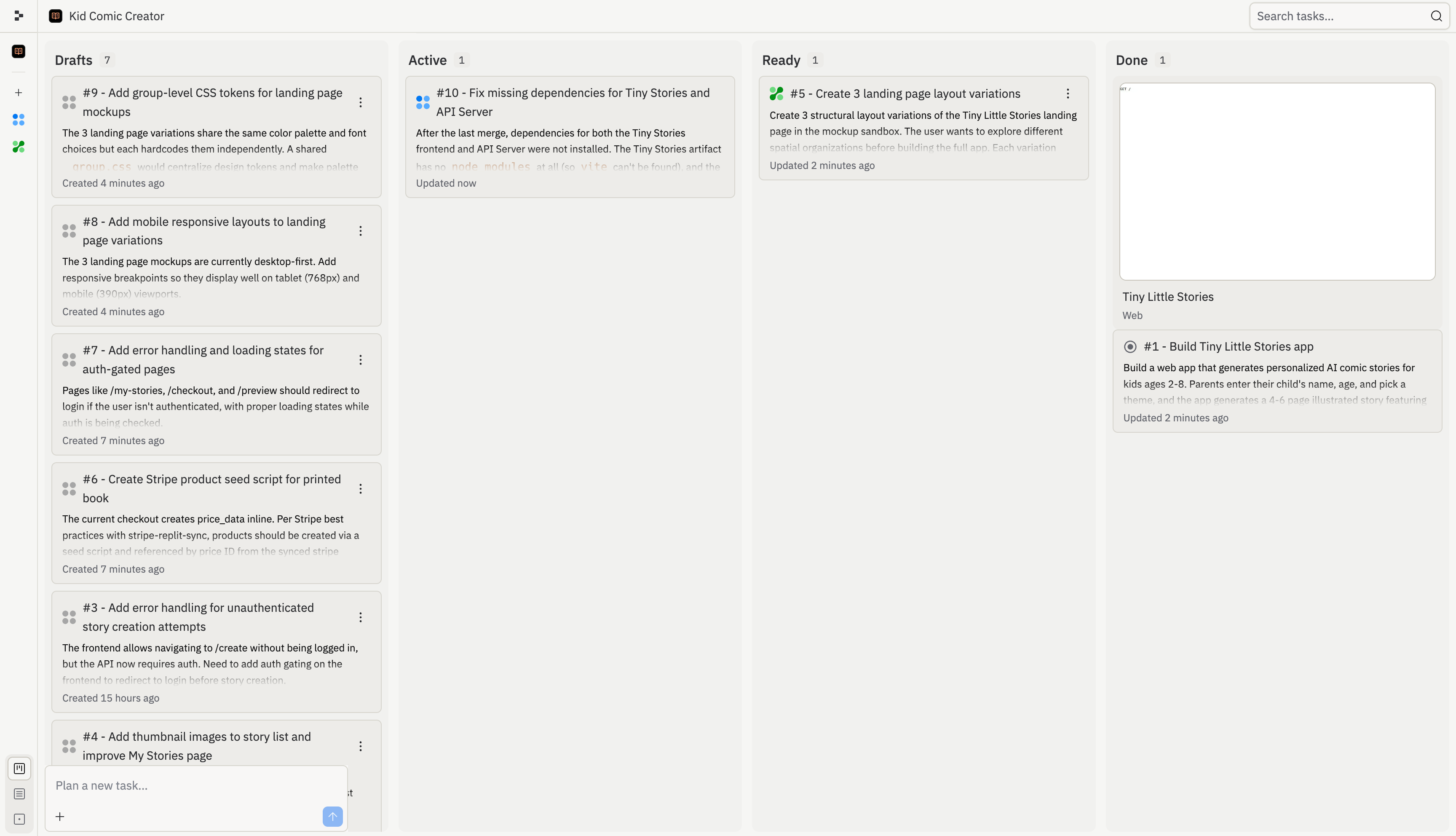
## Fonctionnement du tableau des tâches

Le tableau des tâches vous offre un seul endroit pour réviser, démarrer, surveiller et appliquer les tâches Agent. Utilisez-le lorsqu'Agent divise une grande demande en plusieurs parties, lorsque vous souhaitez exécuter du travail en arrière-plan, ou lorsque vous devez comprendre ce qui a déjà changé dans votre projet.

<Frame>
  <img src="https://mintcdn.com/replit/L22mbBMLs80H8_c8/images/replitai/task-board-progress.png?fit=max&auto=format&n=L22mbBMLs80H8_c8&q=85&s=3b4ef2fbede2d057e40c138956ccd74d" alt="Tableau des tâches affichant les tâches organisées dans les colonnes Brouillons, En cours, Prêt et Terminé" width="3456" height="1984" data-path="images/replitai/task-board-progress.png" />
</Frame>

Les tâches sont organisées en colonnes selon leur statut. Le tableau montre ce qu'Agent a planifié, ce qui est en cours d'exécution, ce qui est prêt pour révision et ce qui a déjà été appliqué.

Chaque tâche avance de gauche à droite au fil de sa progression :

* **Brouillons** : tâches qu'Agent a planifiées mais n'a pas encore démarrées
* **En cours** : tâches qu'Agent construit maintenant, y compris les tâches en file d'attente derrière votre limite de tâches actives
* **Prêt** : tâches qu'Agent a terminées et qui sont prêtes pour votre révision
* **Terminé** : tâches finies, archivées ou annulées

## Brouillons

Les **Brouillons** sont des tâches planifiées qu'Agent n'a pas encore commencé à construire. Chaque brouillon comprend un titre, une description et un plan étape par étape.

Utilisez les Brouillons pour réviser l'approche proposée d'Agent avant que le travail ne commence. Vous pouvez inspecter le plan, demander à Agent de l'ajuster, ou démarrer la tâche lorsque vous êtes prêt.

Les Brouillons sont utiles lorsque vous souhaitez planifier une fonctionnalité plus importante avant de vous engager dans un travail en arrière-plan. Par exemple, Agent pourrait diviser un projet d'intégration en brouillons séparés pour l'authentification, la configuration du profil, l'interface du tableau de bord et la finition du déploiement.

## En cours

Une fois que vous acceptez une tâche, elle passe dans la colonne **En cours** et Agent commence à construire. Chaque tâche s'exécute dans sa propre copie isolée de votre projet, de sorte que rien ne change dans votre version principale tant que vous n'avez pas appliqué le travail.

Certaines tâches dépendent d'autres. Par exemple, une tâche qui construit un tableau de bord peut nécessiter que la tâche du schéma de base de données soit terminée en premier. Les tâches dépendantes attendent **en file d'attente** jusqu'à ce que leurs prérequis soient terminés. Les tâches se mettent également en file d'attente si vous atteignez la limite de votre plan pour les tâches actives en arrière-plan.

<KanbanColumns
  columns={[
{ title: 'Brouillons', count: 2, cards: [
{ title: 'Ajouter un flux cadeau pour la famille et les amis', description: 'Permettre aux parents de créer une histoire pour l\'enfant de quelqu\'un d\'autre et de l\'envoyer en cadeau. Ouvre un nouveau canal d\'acquisition.', status: 'draft-static', timestamp: '2m' },
{ title: 'Mode lecture au coucher avec thème sombre', description: 'Un mode coucher dédié avec un thème sombre aux tons chauds et des sons ambiants transforme l\'application en un véritable rituel du coucher.', status: 'draft-static', timestamp: '2m' },
] },
{ title: 'En cours', count: 3, cards: [
{ title: 'Suites d\'histoires — séquelles', description: 'Ajouter un bouton « Continuer l\'aventure » génère une suite qui reprend là où la dernière s\'est arrêtée.', status: 'active', timestamp: '12m' },
{ title: 'Régénération d\'histoires — refaire des pages', description: 'Ajouter la possibilité de régénérer des pages individuelles donne aux parents le contrôle et réduit la frustration.', status: 'active', timestamp: '8m' },
{ title: 'Ajouter un flux cadeau pour la famille et les amis', description: 'Permettre aux parents de créer une histoire pour l\'enfant de quelqu\'un d\'autre et de l\'envoyer en cadeau.', status: 'active-queued', timestamp: '1m' },
] }
]}
/>

## Prêt

Quand une tâche finit de se construire, elle passe à **Prêt**. Cela signifie que le travail est terminé, mais rien n'a encore changé dans votre version principale.

Vous pouvez appliquer les modifications de deux façons :

* **Depuis le fil** : ouvrez le fil de la tâche et sélectionnez **Appliquer les modifications à la version principale** pour intégrer le travail dans votre projet, ou **Ignorer** pour le rejeter
* **Depuis le tableau** : sélectionnez le menu à trois points sur n'importe quelle carte de tâche Prête, puis sélectionnez **Appliquer les modifications**

<TaskReviewDrawer />

Révisez les tâches Prêtes avant de les appliquer. Vérifiez le journal de travail, les résultats des tests et l'aperçu pour comprendre ce qu'Agent a modifié.

## Terminé

Une fois appliquée, la carte de tâche passe dans la colonne **Terminé**.

La colonne Terminé comprend également les sessions de planification archivées et les tâches annulées. Cela vous donne un historique de ce qui s'est passé sans mélanger le travail terminé dans les Brouillons ou En cours.

<KanbanColumns
  columns={[
{ title: 'Prêt', count: 3, cards: [
{ title: 'Mode lecture au coucher avec thème sombre', description: 'Un mode coucher dédié avec un thème sombre aux tons chauds et des sons ambiants.', status: 'ready-drop', timestamp: '35m', showMenu: true },
{ title: 'Liens d\'histoires partageables avec aperçus OG', description: 'Ajouter des liens publics partageables est le levier de croissance le plus important.', status: 'ready-drop', timestamp: '31m', showMenu: true },
{ title: 'Personnalisation améliorée des personnages', description: 'Ajouter des options d\'apparence rend les illustrations vraiment personnalisées.', status: 'ready-drop', timestamp: '28m', showMenu: true },
] },
{ title: 'Terminé', count: 4, cards: [
{ title: 'Mode lecture à voix haute avec surlignage des mots', description: 'La synthèse vocale permet aux enfants de profiter des histoires de manière autonome.', status: 'done', timestamp: '4h' },
{ title: 'Liens d\'histoires partageables avec aperçus OG', description: 'Liens publics partageables comme levier de croissance le plus important.', status: 'done', timestamp: '1h' },
{ title: 'Personnalisation améliorée des personnages', description: 'Options d\'apparence pour des illustrations vraiment personnalisées.', status: 'done', timestamp: '4h' },
{ title: 'Réactivité mobile et finition production', description: 'Meilleurs états d\'erreur, mises en page mobiles et animations de chargement.', status: 'done', timestamp: '4h' },
] }
]}
/>

Agent gère automatiquement les conflits lorsque vous appliquez des modifications de plusieurs tâches. Si quelque chose ne semble pas correct, demandez à Agent de le corriger.

## Rechercher et filtrer les tâches

Utilisez le tableau des tâches lorsque votre projet a de nombreuses tâches en cours. Vous pouvez rechercher par titre de tâche ou numéro de tâche, filtrer les brouillons et utiliser le mode modification pour gérer des groupes de tâches à la fois.

Par exemple, recherchez par numéro de tâche lorsque quelqu'un fait référence à une tâche depuis un fil, une révision ou une conversation Slack. Filtrez les brouillons lorsque vous souhaitez vous concentrer sur le travail planifié sans analyser les tâches actives ou terminées.

Pour les suivis suggérés, consultez [Tâches de suivi](/fr/core-concepts/agent/task-system/follow-up-tasks).
